length Seat Alhambra 2017 Owner's Manual
[x] Cancel search | Manufacturer: SEAT, Model Year: 2017, Model line: Alhambra, Model: Seat Alhambra 2017Pages: 320, PDF Size: 6.88 MB
Page 49 of 320
The essentials
Loosening anti-theft wheel bolts
F or wheel
s
with full trim, the anti-theft wheel
lock must be threaded into position ››› Fig. 68
2 or
3 . Otherwise it will not be possible to
mou nt
the entir
e hubcap.
● Take the adapter for anti-theft wheel bolts
out of the
vehicle tool kit.
● Insert the adapter onto the anti-theft wheel
bolt.
● Fit
the wheel brace onto the adapter as far
as po
ssible.
● Hold the wheel brace at the end and rotate
the bolt ap
proximately one turn anticlockwise
››› .
Impor t
ant
information about wheel bolts
The wheel rims and bolts have been de-
signed to be fitted to factory options. If differ-
ent rims are fitted, the correct wheel bolts
with the right length and correctly shaped
bolt heads must be used. This ensures that
wheels are fitted securely and that the brake
system functions correctly.
In some circumstances, wheel bolts from the
same model vehicle should not be used.
Wheel bolt tightening torque
The prescribed tightening torque for wheel
bolts for steel and alloy wheels is 140 Nm.
Have the tightening torque of the wheel bolts checked as soon as possible with a reliable
torque wr
ench.
If wheel bolts are rusty and it is difficult to
tighten them, the threads should be replaced
and cleaned before checking the tightening
torque.
Never grease or lubricate wheel bolts or the
wheel hub threads. Although they have been
tightened to the prescribed torque, they
could come loose while driving. WARNING
If the wheel bolts are not fitted correctly they
cou l
d be released while driving leading to
loss of vehicle control and serious damage.
● Only use wheel bolts which correspond to
the wheel rims in que
stion.
● Never use different wheel bolts.
● The bolts and threads should be clean, free
of oil
and grease and easy to thread.
● To loosen and tighten the wheel bolts, al-
way
s use the wheel brace supplied with the
vehicle.
● Loosen the wheel bolts only about one turn
before r
aising the vehicle with the jack.
● Never grease or lubricate wheel bolts or the
wheel hub thre
ads. Although they have been
tightened to the prescribed torque, they
could come loose while driving.
● Never loosen the bolted joints of wheel
rims with bo
lted ring trims. ●
If the wheel bo
lts are not tightened to the
correct torque, they may come loose while
driving, and the bolts and rims may come
out. If the tightening torque is too high, the
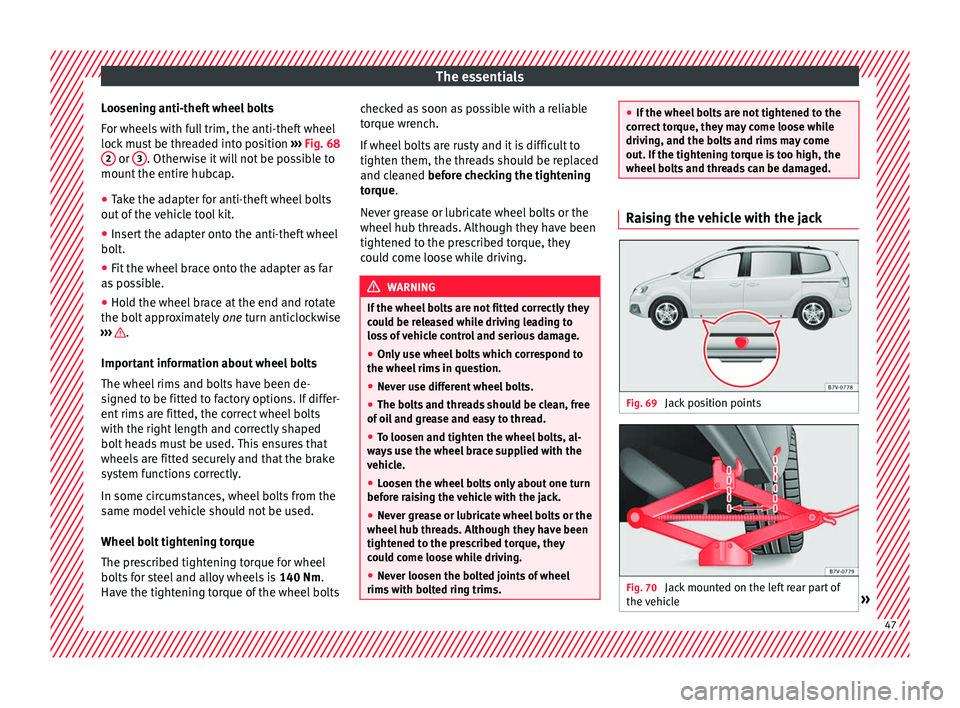
wheel bolts and threads can be damaged. Raising the vehicle with the jack
Fig. 69
Jack position points Fig. 70
Jack mounted on the left rear part of
the v
ehic
le » 47
Page 57 of 320
The essentials
Cleaning windscreen wiper blades
● Lifting and unfolding the wiper arms.
● Use a soft cloth to remove dust and dirt
fr om the w
iper b
lades.
● If the blades are very dirty, a sponge or
damp cloth m
ay be used ››› in Changing
the w ind
s
creen and rear window wiper
blades on page 87.
Change the windscreen wiper blades
● Lifting and unfolding the wiper arms.
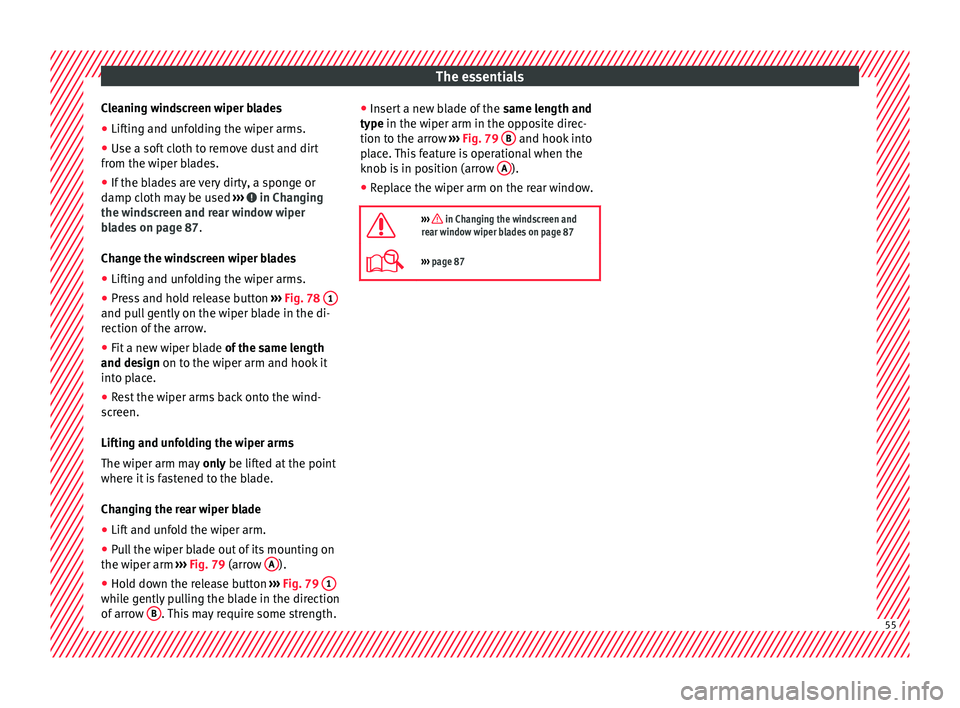
● Press and hold release button ›››
Fig. 78 1 and pull gently on the wiper blade in the di-
r
ection of
the arr
ow.
● Fit a new wiper blade of the same l
ength
and design on to the wiper arm and hook it
into place.
● Rest the wiper arms back onto the wind-
scr
een.
Lifting and unfolding the wiper arms
The wiper arm may only be lifted at the point
where it is fastened to the blade.
Changing the rear wiper blade
● Lift and unfold the wiper arm.
● Pull the wiper blade out of its mounting on
the wiper arm ››
› Fig. 79 (arrow A ).
● Hold down the release button ›
››
Fig. 79 1 while gently pulling the blade in the direction
of
arr
o
w B . This may require some strength. ●
Inser
t
a new blade of the same length and
type in the wiper arm in the opposite direc-
tion to the arrow ››› Fig. 79 B and hook into
p l
ac
e. This feature is operational when the
knob is in position (arrow A ).
● Replace the wiper arm on the rear window.
››› in Changing the windscreen and
rear window wiper blades on page 87
››› page 87 55
Page 139 of 320

Lights and visibility
Move the lever to the required position
› ›
›
Fig. 144:
Rain sensor off.
Rain sensor on; automatic wipe if neces-
sary.
Setting sensitivity level of rain sensor
– Set control to the right: highly sensi-
tive.
– Set control to the left: less sensitive.
When the ignition is switched off and then
back on, the rain sensor stays on and starts
operating again when the windscreen wipers
are in position 1 and the vehicle is travel-
lin g at
mor
e than 4 km/h (2 mph).
Rain sensor modified behaviour
Possible causes of faults and mistaken read-
ings on the sensitive surface ››› Fig. 145 of
the rain sensor include:
● Damaged blades: a film of water on the
damag
ed blades may lengthen the activation
time, reduce the washing intervals or result
in a fast and continuous wipe.
● Insects: insects on the sensor may trigger
the winds
creen wiper.
● Salt on roads: in winter, salt spread in the
roa
ds may cause an extra long wipe when the
windscreen is almost dry.
● Dirt: dry dust, wax, coating on glass (Lotus
effect) or trac
es of detergent (car wash) may
0 1
A reduce the effectiveness of the rain sensor or
m
ak
e it
react more slowly, later or not at all.
● Cracked windscreen: the impact of a stone
wil
l trigger a single wipe cycle with the rain
sensor on. Next the rain sensor detects the
reduction in the sensitive surface area and
adapts accordingly. The behaviour of the sen-
sor will vary with the size of the damage
caused by the stone. WARNING
The rain sensor may not detect enough rain
to sw it
ch on the wipers.
● If necessary, switch on the wipers manually
when water on the w
indscreen obstructs visi-
bility. Note
● Cle
an the sensitive surface of the rain sen-
sor regularly and check the blades for dam-
age ››› Fig. 145 (arrow).
● To remove wax and coatings, we recom-
mend a window c
leaner containing alcohol. Rear vision mirror
Intr oduction WARNING
The automatic anti-dazzle rear vision mirror
cont ain
s an electrolytic fluid which may leak
if the mirror is broken. This could cause irrita-
tion to the skin, eyes and respiratory organs.
● The electrolytic fluid may cause irritation to
the skin, eye
s and respiratory organs, partic-
ularly in individuals suffering from asthma or
other illnesses. Make sure that adequate
quantities of fresh air enter and leave the ve-
hicle if it is not possible to open all the doors
and windows.
● If the electrolytic fluid comes into contact
with eye
s or skin, wash the area for at least
15 minutes with plenty of water, and seek
medical advice.
● If the electrolytic fluid comes into contact
with shoes
or clothing, wash the area for at
least 15 minutes with plenty of water. Wash
shoes and clothing before wearing them
again.
● If the electrolytic fluid is swallowed, wash
your mouth with p
lenty of water for at least
15 minutes. Do not try to provoke vomiting
unless recommended by a Doctor. Seek medi-
cal advice immediately. » 137
Technical data
Advice
Operation
Emergencies
Safety
Page 144 of 320

Operation
Adjustment of the head restraints Fig. 150
A: Adjust the head restraints with no
po s
s
ibility of lengthways direction adjust-
ment; B: Adjust the head restraints with
lengthways direction adjustment Fig. 151
Adjust the head restraints in the sec-
ond or third r o
w of seats Read the additional information carefully
› ›
›
page 15
All seats are equipped with a head restraint.
Adjusting height
● Raise the head restraint in the direction of
the arrow or lo
wer it ››› Fig. 150 or ››› Fig. 151
1 with the button pressed
››
›
in Removing
and in s
t
alling the head restraints on
page 144.
● The head restraint must engage securely in
position.
There are three possible positions
on the second row of seats and two possible
positions on the third row of seats.
Adjusting the front head restraints
● Push the head restraint forward in the di-
rection of the arr
ow or backward ››› Fig. 150
1 B w
ith the button pressed. ●
The hea d r
estraint must engage securely in
position.
Correct adjustment of head restraints
Adjust the head restraint so that its upper
edge is at the same level as the top of your
head, or as close as possible to the same lev-
el as the top of your head and under no cir-
cumstances below eye level. Keep the back
of your neck as close as possible to the head
restraint.
Adjusting the head restraint for short people
Lower the head restraint completely, even if
your head is below its upper edge. When the
head restraint is at its lowest, it is possible
that a small gap remains between it and the
seat backrest.
Adjusting the head restraint for tall people
Raise the head restraint completely.
142
Page 145 of 320

Seats and head restraints
Removing and installing the head re-
s tr
aint
s Fig. 152
A: Fitting the head restraints with no
po ss
ibility of lengthways direction adjust-
ment; B: Fitting the head restraints with
lengthways direction adjustment Fig. 153
Fitting the head restraints in the sec-
ond or third r o
w of seats All seats are equipped with a head restraint.
R
emo
v
ing the front head restraints in vehi-
cles without the lengthways direction ad-
justment of the head restraints
● If necessary, adjust the seat backrest so
that the he
ad restraint can be fitted.
● Push the head restraint up as far as it will
go ››
› .
● Pull out the head restraint pressing the but-
t on c
omp
letely ››› Fig. 152 1 A.
Fittin g the fr
ont
head restraints in vehicles
without the lengthways direction adjustment
of the head restraints
● Correctly place the head restraint into the
guides on the se
at backrest and insert it.
● Completely press the button 1 A and p
ush
the he a
d restraint downwards. ●
Adjust
the head restraint according to the
correct seat position and secure it
››› page 142.
Removing the front head restraints in vehi-
cles with the lengthways direction adjust-
ment of the head restraints
● If necessary, adjust the seat backrest so
that the he
ad restraint can be fitted.
● Push the head restraint up and backward
as f
ar as it will go ››› .
● Place a flat object, e.g. a plastic card 2 B,
on both s ide
s
between the seat backrest cov-
er and the end protector of the seat backrest
retaining bar and unlock the retaining bars
with a little pressure.
● Completely pull out the head restraint.
Fitting the front
head restraints in vehicles
with the lengthways direction adjustment of
the head restraints
● Pull out the two retaining bars from the
head r
estraint as far as possible.
● Correctly place the head restraint into the
guides on the se
at backrest and insert it.
● Push the head restraint down as far as pos-
sibl
e until the two retaining bars are secured.
● Adjust the head restraint according to the
correct
seat position and secure it
››› page 142. »
143
Technical data
Advice
Operation
Emergencies
Safety
Page 153 of 320
Transport and practical equipment
Transporting a load Secure all objects in the vehicle
● Distribute the load throughout the vehicle,
on the roof and in a tr
ailer as uniformly as
possible.
● Transport heavy objects as far forward as
poss
ible in the luggage compartment and
lock the seat backs in the vertical position.
● Secure luggage in the luggage compart-
ment with s
uitable straps on the fastening
rings ››› page 152.
● Check the headlight adjustment
›› ›
page 128.
● Use the suitable tyre pressure according to
the load bein
g transported. Read the tyre in-
flation information label ›››
page 284.
● For vehicles with a tyre pressure indicator,
chan
ge the vehicle load status ›››
page 231. CAUTION
Objects on the shelf could chafe against the
wir e
s of the heating element in the heated
rear window and cause damage. Note
Please note the information about loading a
trai l
er ››› page 234 and the roof carrier sys-
tem ››› page 161. Driving with the rear lid open
Driving with the rear lid open creates an addi-
tional
ri
sk. Secure all objects and secure the
rear lid correctly and take all measures possi-
ble to reduce toxic gases from entering the
vehicle. WARNING
Driving with the rear lid unlocked or open
cou l
d cause serious injuries.
● Always drive with the rear lid closed.
● Secure all objects in the vehicle. Loose
items c
ould fall out of the vehicle and injure
other road users or damage other vehicles.
● Drive particularly carefully and think
ahead.
● A
void sudden manoeuvres and braking giv-
en that thi
s could cause an uncontrolled
movement of the open rear lid.
● When transporting objects that protrude
out of the lug
gage compartment, indicate
them suitably. Observe legal requirements.
● If objects must project out of the luggage
compar
tment, the rear lid must never be used
to “secure” or “attach” objects.
● If a baggage rack is fitted on the rear lid, it
should be r
emoved before travelling with the
rear lid open. WARNING
Toxic gases may enter the vehicle interior
when the re ar lid i
s open. This could cause
loss of consciousness, carbon monoxide poi-
soning, serious injury and accidents.
● To avoid toxic gases entering the vehicle al-
way
s drive with the rear lid closed.
● In exceptional circumstances, if you must
drive with the r
ear lid open, observe the fol-
lowing to reduce the entry of toxic gases in-
side the vehicle:
– Close all windows and the sliding sun-
roof.
– Turn off the air recirculation for the heat-
ing and air conditioner.
– Open all of the air outlets in the dash
panel.
– Turn the heating fan and heater to the
highest level. CAUTION
An open boot hatch changes the length and
height of the
vehicle. Driving with the vehicle loaded
For the best handling when driving a loaded
v
ehic
l
e, note the following:
● Secure all objects ›››
page 151.
● Accelerate gently and carefully. »
151
Technical data
Advice
Operation
Emergencies
Safety
Page 193 of 320
Driving
emergency braking distance is larger then
when the br ak
e p
ads have been run in. While
running in, avoid full power braking or situa-
tions requiring braking performance. For ex-
ample, in heavy traffic.
The rate of wear of the brake pads depends
to a great extent on the conditions in which
the vehicle is used and the way the vehicle is
driven. If the vehicle is used frequently in city
traffic or for short trips or driven sport style,
visit a specialised workshop regularly, more
frequently than advised in the Maintenance
Programme, to have the brake pads checked.
If you drive with wet brakes, for example, af-
ter crossing areas of water, in heavy rainfall
or even after washing the car, the effect of
the brakes is lessened as the brake discs are
wet or even frozen (in winter). At higher
speed, “dry” the brakes as quickly as possi-
ble by braking gently several times. Only do
this without endangering vehicles behind
you or any other road users ››› .
A l a
y
er of salt on the discs and brake pads
will reduce the effectiveness of the brakes
and increase braking distance. If you drive for
a prolonged period on salted roads without
braking then brake carefully several times to
eliminate the layer of salt on the brakes ››› .
If the
v
ehicle remains parked for considera-
ble lengths of time, is used little, or if the
brakes are not used, there may be corrosion
on the brake discs and a build up of dirt onthe brake pads. If the brakes are not used fre-
quently, or if ru
st has formed on the discs,
SEAT recommends cleaning the pads and
discs by braking firmly a few times at a mod-
erately high speed. Only do this without en-
dangering vehicles behind you or any other
road users ››› .
F au
lt
s in the brake system
During braking, if you notice that the vehicle
does not react as usual (that the braking dis-
tance has increased suddenly) it may be pos-
sible that there is a fault in the braking sys-
tem. The warning lamp lights up and a
text message displayed. Take the vehicle to a
specialised workshop immediately and have
the fault repaired. Drive at a moderate speed
and be prepared to use more pressure on the
brake pedal, and allow for longer stopping
distances.
Brake servo
The brake servo only operates when the en-
gine is running and the pressure applied by
the driver on the brake pedal increases.
If the brake servo does not operate or the ve-
hicle must be towed, then the brake pedal
will have to be pressed with more force given
that the braking distance will be increased
when the brake servo does not operate ››› . WARNING
New brake pads do not brake to full efficien-
cy.
● For the fir
st 320 km (200 miles), new brake
pad
s have not yet reached their maximum
braking capacity, and need to be “run in”
first. For this, to compensate for reduced
braking efficiency the brake pedal will have
to be pressed with more force.
● To avoid losing control of the vehicle and
caus
ing serious accidents, always take great
care when driving with new brake pads.
● When running in new brake pads, always
res
pect the safety distances between you and
other vehicles and do not cause situations re-
quiring extreme braking performance. WARNING
When brakes overheat, braking is less effi-
cient and br
aking distances increase.
● When driving on slopes, brakes can be
overlo
aded and overheat quickly.
● Reduce speed or change down a gear when
faced w
ith steep and long slopes. This allows
you to use the engine braking effect and to
reduce the strain on the brake system.
● Non-standard or damaged front spoilers
coul
d restrict the airflow to the brakes and
cause them to overheat. » 191
Technical data
Advice
Operation
Emergencies
Safety
Page 206 of 320
Operation
front wheels are turned, the normal ABS is
activ at
ed.
Br
ake assist system (BAS)
The brake assist system may reduce the re-
quired braking distance. The brake assist
system boosts the braking force if you press
the brake pedal quickly in an emergency. As
a result, the braking pressure increases rap-
idly, the braking force is multiplied and the
braking distance is reduced. This enables the
ABS to be activated more quickly and effec-
tively.
¡Do not lift your foot off the brake pedal!
When the brake pedal is released or when
the brake force is reduced, braking assist au-
tomatically turns off the brake servo.
Traction control when accelerating (ASR)
In the event of wheelspin, the traction control
system reduces the engine torque to match
the amount of grip available. The ASR makes
some situations easier, for example, when
starting, accelerating or going uphill, even in
unfavourable road conditions.
The ASR can be switched on or off manually
››› page 205.
Electronic differential lock system (EDS)
EDL is available when driving in straight lines
under normal conditions. When the EDL de-
tects wheelspin, it brakes the spinning wheel and directs the power to the other drive
wheels. T
o prevent the disc brake of the
braked wheel from overheating, the EDL cuts
out automatically if subjected to excessive
loads. The EDL will switch on again automati-
cally when the brake has cooled down.
Electronic drive torque management (XDS)
When taking a curve, the driveshaft differen-
tial mechanism allows the outer wheel to turn
at a higher speed than the inner wheel. In
this way, the wheel that is turning faster (out-
er wheel) receives less drive torque than the
inner wheel. This may mean that in certain
situations the torque delivered to the inner
wheel is too high, causing the wheels to
spin. On the other hand, the outer wheel is
receiving a lower drive torque than it could
transmit. This causes an overall loss of lateral
grip on the front axle, resulting in understeer
or “lengthening” of the trajectory.
The XDS system can detect and correct this
effect via the sensors and signals of the ESC.
Via the ESC, the XDS will brake the inside
wheel and counter the excess driving torque
of that wheel. This means that the driver's
desired trajectory is much more precise.
The XDS system works in combination with
the ESC and is always active, even when ASR
traction control is disconnected. WARNING
Driving at high speed on icy, slippery wet
grou nd c
an result in loss of vehicle control
and serious injury to the driver and passen-
gers.
● Adjust your speed and driving style to visi-
bility
, road, traffic and weather conditions.
Even though the brake assist systems, ABS,
BAS, EDL, ASR and ESC, provide more securi-
ty, do not take unnecessary risks while driv-
ing.
● Brake assist systems can not overcome the
law
s of physics. Even with ESC and other sys-
tems, slippery and wet roads will always be
dangerous.
● Driving to quickly on wet ground can result
in the wheels lo
sing contact with the ground
in an effect known as “aquaplaning”. Without
adherence, it is impossible to brake, steer or
control the vehicle.
● Brake assist systems cannot avoid acci-
dents if
, for example, the driver does not re-
spect safety distances or drives to quickly in
difficult conditions.
● Even though brake assist systems are ex-
tremely eff
ective and help control the vehicle
in difficult situations, remember that the ve-
hicle stability depends on tyre grip.
● When accelerating on a slippery surface,
for ex
ample on ice or snow, press the acceler-
ator carefully. The wheels can still slip even
with brake assist systems resulting in loss of
vehicle control. 204
Page 216 of 320
Operation
● Ther e i
s
a system malfunction (system tem-
porarily unavailable).
● The ASR system is switched off or the ASR
or ESC i
s working. WARNING
The steering wheel turns quickly by itself
when park in
g using the park assist system.
Placing your hand between the steering
wheel spokes could lead to injuries. Note
● The park a
ssist system has its limitations.
For example, it is not possible to park on
tight bends using the park assist system.
● Even if the park assist system recognises
that ther
e is not enough space for parking
the vehicle, the instrument panel display will
still show this place. In this case, the parking
manoeuvre should not be requested.
● Changing gears between forward and re-
verse g
ears before indicated (that is, before
the signal from the parking sensor system)
the parking results may not be ideal.
● For parallel parking (parallel to the road), a
sound wi
ll tell the driver when they must
change from forward gears to reverse; the
signal from the parking sensor system does
not indicate changes of direction.
● The park assist can also be activated after-
ward
s, if you pass close to a parallel parking
space at a maximum of 40 km an hour
(25 mph) or close to be perpendicular parking space at about 20 km an hour (12 mph) then
pre
s
s the button .
● The progress bar on the screen of the in-
strument p
anel shows a display of the rela-
tive distance to be covered.
● When the Park Assist system is turning the
steerin
g wheel of the stopped vehicle the
symbol is also displayed. Press on the
brake pedal so that the steering can turn with
the vehicle at a standstill and thus reduce the
number of manoeuvres.
● A “suitable” parking space length is at
lea
st 1.1 m greater than the length of the ve-
hicle.
● If the results of the park assist system are
not as
good after changing the wheels, the
system must memorise the perimeter of the
new wheels. This process is performed auto-
matically while the vehicle is in motion. To
help this process, turn slowly (at less than
20 km/h [12 mph]), e.g. in an empty car park. Leaving a parking space using the
P
ark
As
sist system Driving off
● Switch on the engine.
● Press button . When the function is ena-
b l
ed, the b
utton ››› Fig. 212 will light up.
● Apply the turn signal for the side on which
you w ant
to leave the parking space.
● Select reverse gear. ●
Fo l
low the instructions given by the park
assist system.
● When the next indication appears, release
the steerin
g wheel ››› in Parking using the
p ark
a
ssist system on page 214: The sys-
tem will move the steering wheel!
Observe the surrounding area.
● Observe the surrounding area and acceler-
ate car
efully at a maximum of 7 km/h
(4 mph).
● The park assist system is only r
esponsible
for moving the steering wheel during the ma-
noeuvre. The driver applies the accelerator,
the clutch, the gears and the brake.
● When it is possible to leave the parking
spac
e, the Park Assist system will stop. Take
control of the steering and when traffic condi-
tions permit, leave the parking space.
Automatic stoppage of the manoeuvre
The park assist system stops the manoeuvre
in the event of one of the following:
● Driving faster than 7 km/h (4 mph).
● The driver moves the steering wheel.
● A sliding door is opened. To restart the ma-
noeuvre, c
lose the sliding door and press the
button again.
● There is a system malfunction (system tem-
por ari
ly
unavailable).
● The ASR system is switched off or the ASR
or ESC i
s working.
214
Page 220 of 320
Operation
Parking perpendicular to the road
(mode 1) Fig. 216
Display: orientation lines for the
p ark
in
g space behind the vehicle Summary of the orientation points
M
e
anin
g of orientation lines displayed on the
screen ››› Fig. 216. All of the lengths of the
orientation lines use a vehicle located on a
horizontal surface as reference.
Red: safety distance, i.e. road area loca-
ted up to 40 cm behind the vehicle.
Green: prolongation of the rear of the ve-
hicle (somewhat enlarged). The area dis-
played green ends around 2 metres be-
hind the vehicle, on the road.
Yellow: prolongation of the rear of the ve-
hicle as the steering wheel turns. The
area displayed yellow ends around 3 me-
tres behind the vehicle, on the road.
1 2
3 Parking
●
Stop the vehicle in front of a space and se-
l ect
r
everse gear.
● Reverse slowly and turn the steering wheel
so that the
yellow orientation lines guide you
towards the space ››› Fig. 216 3 .
● Align the vehicle straight in the parking
p l
ac
e using the help of the green orientation
lines.
Parking parallel to the road (mode 2) Fig. 217
Display: orientation lines and surfa-
c e
s
for the space behind the vehicle After applying the turn signal, the lines and
s
ur
f
aces not required are deleted.
Summary of the orientation points
Meaning of orientation lines and surfaces
displayed on the screen ››› Fig. 217. All of the lengths of the orientation lines use a vehicle
located on a horiz
ontal surface as reference.
Safety distance: road area located up to
around 40 cm behind the vehicle.
Vehicle side limit.
Turning point when parking. When the
yellow line touches the curb or another
limit of the parking space, the point for
changing direction (magnifying glass)
will have been reached.
Free space required to parallel park the
vehicle. The surface displayed must com-
pletely fit in the space.
Possible vehicle parked next to the curb.
Parking ● Stop the vehicle 1 m away parallel to the
parkin
g space and select reverse gear.
● Switch on mode 2 on the navigation system
scr
een for parallel parking.
● Slowly reverse and turn the steering wheel
so that the s
urface displayed yellow on the
screen stops in front of any obstacles 5 (e.g. another vehicle).
●
Turn the steering wheel fully towards the
s p
ac
e and reverse slowly.
● When the yellow line 3 touches the side
limit of
the s
pace, e.g. the border or curb
(magnifying glass), turn the steering wheel
fully in the opposite direction. 1 2
3
4
5
218