engine Seat Altea 2015 Owner's Guide
[x] Cancel search | Manufacturer: SEAT, Model Year: 2015, Model line: Altea, Model: Seat Altea 2015Pages: 236, PDF Size: 4.23 MB
Page 65 of 236
Opening and closing
Opening and closing Central locking Basic functions The central locking system enables you to
lock and unlock all doors and the rear lid by
just pushing the button.
Description
Central locking can be activated by using any
of the following options:
● the key , by inserting it into the driver door
cylinder and r ot
ating it manually,
● the central lock button in the vehicle interi-
or ›››
page 65
.
● the radio frequency remote control , using
the buttons on the key ›››
page 67.
Various functions are available to improve
the vehicle safety: “Safe” locking system
Selective unlocking system*
Automatic speed-dependent locking and
unlocking system*
Self-locking system to prevent involunta-
ry unlocking
Emergency unlocking system
–
–
–
–
– Unlocking the vehicle*
Press button
››› Fig. 50 on remote
c ontr
ol to unlock all the doors and rear
lid.
Locking the vehicle* Press button
››› Fig. 50 on the remote
c ontr
ol to lock all doors and the rear lid
or turn the key in the door to lock all
doors and the rear lid. WARNING
● Never leave children or disabled persons in
the vehicle. In case of emergency, they may
not be able to leave the vehicle or manage on
their own.
● Never allow children to play in or around
the vehicle. A locked vehicle can be subjected
to extremely high and low temperatures, de-
pending on the time of year, thus causing se-
rious injuries/illness. It could even have fatal
consequences. Close and lock both the rear
lid and all the other doors when you are not
using the vehicle.
● Always take you car keys with you when
you leave the vehicle. Misuse of the keys, for
example, by children, may result in serious
damage and accident.
– The engine may accidentally be started
and be out of control.
– If the ignition is switched on, the electric
equipment could be activated with risk of –
– injury, for example, in the electric win-
dows.
– The doors can be locked using the remote
control key. This could become an obsta-
cle for assistance in an emergency situa-
tion.
– Always take the key with you when you
leave the vehicle.
● Never remove the key from the ignition if
the vehicle is in motion. The steering lock
could suddenly engage, and you would not be
able to steer the vehicle. Note
● While the driver door is open, the vehicle
cannot be locked with the remote control.
This avoids the user from forgetting his key
inside the vehicle.
● If the driver door is unlocked with the key
shaft, only the driver door is unlocked, the
rest of the doors remain locked. When the ig-
nition is switched on, the door “deadlock”
function is deactivated (although the doors
remain locked) and the central lock button is
activated. See ››› page 68.
● If the c
entral locking or anti-theft alarm are
faulty, the driver door control lamp remains
lit for approx. 30 seconds after the vehicle
locks.
● For anti-theft security, only the driver door
is fitted with a lock cylinder. 63
Technical specifications
Advice
Operation
Safety
Page 69 of 236
Opening and closing
The set of keys belonging to your vehicle con-
sists of the following items:
● one remote control key ››› Fig. 49 A with
folding key bit,
● one key without remote control B ,
● a plastic key tab* C .
Duplicate keys
If you need a replacement key, go to a Techni-
cal Service with your vehicle identification
number. WARNING
● An incorrect use of the keys can cause seri-
ous injuries.
● Never leave children or disabled persons in
the vehicle. In case of emergency, they may
not be able to leave the vehicle or manage on
their own.
● An uncontrolled use of the key could start
the engine or activate any electric equipment
(e.g. electric windows), causing risk of acci-
dent. The doors can be locked using the re-
mote control key. This could become an ob-
stacle for assistance in an emergency situa-
tion.
● Never forget the keys inside the vehicle. An
unauthorised use of your vehicle could result
in injury, damage or theft. Always take the
key with you when you leave the vehicle.
● Never remove the key from the ignition if
the vehicle is in motion. Otherwise, the steer- ing could suddenly block and it would be im-
possible to steer the vehicle.
CAUTION
There are electronic components in the re-
mote control key. Avoid wetting and hitting
the keys. Radio frequency remote control
Locking and unlocking the vehicle Fig. 50
Assignment of buttons on the remote
control key. Fig. 51
Range of the radio frequency remote
control. The radio frequency remote control key is
used to lock and unlock the vehicle from a
distance.
By using button
4
››› Fig. 50 on the control,
the k ey
shaft is released.
Unlocking the vehicle
››› Fig. 50 1 .
Locking the vehicle
››› Fig. 50 2 .
Unlocking the rear lid. Press button ›››
Fig. 50 3 until all the turn signals on the
vehicle flash briefly. When the unlocking but-
ton
3 is pressed, you have 2 minutes to
open the door. Once this time has passed, it
will lock again.
Moreover, the battery indicator on the key
››› Fig. 50 (arrow), will flash.
The r emot
e control transmitter and the bat-
teries are integrated in the key. The receiver »
67
Technical specifications
Advice
Operation
Safety
Page 74 of 236
Operation
Electric windows Opening or closing the electric
windows Fig. 55
Detail of the driver door: controls for
the front and rear windows. The front and rear electric windows can be
operated by using the controls on the driver
door.
Opening and closing the windows
– Press the button to open the window.
– Pull the button to close the window
››› .
Always close the windows fully if you park
the vehicle or leave it unattended ››› .
You can use the electric windows for approx.
10 minutes after switching off the ignition if
neither the driver door nor the front passen- ger door has been opened and the key has
not been removed from the ignition.
Buttons on the driver door
Button for window in front left door
Button for window in front right door
Buttons for rear windows* Safety switch for deactivating the electric
window buttons in the rear doors
Button for window in rear left door
Button for window in rear right door
Safety switch *
Safety switch 3 on the driver door can be
used to disable the electric window buttons
in the rear doors.
Safety switch not pressed: buttons on rear
doors are activated.
Safety switch pressed: buttons on rear doors
are deactivated. WARNING
● Incorrect use of the electric windows can
result in injury.
● Never close the rear lid without observing
and ensuring it is clear, to do otherwise could
cause serious injury to you and third parties.
Make sure that no one is in the path of a win-
dow. 1
2
3
4
5 ●
Always take the vehicle key with you when
you leave the vehicle.
● Never leave children or disabled persons in
the vehicle, particularly if they have access to
the keys. An uncontrolled use of the key
could start the engine or activate any electric
equipment (e.g. electric windows), causing
risk of accident. The doors can be locked us-
ing the remote control key. This could be-
come an obstacle for assistance in an emer-
gency situation.
● The electric windows will work until the key
has been removed from the ignition and one
of the front doors has been opened.
● If necessary, use the safety switch to disa-
ble the rear electric windows. Make sure that
they have been disabled. Note
If the window is not able to close because it
is stiff or because of an obstruction, the win-
dow will automatically open again
››› page 73. If this happens, check why the
w indo
w could not be closed before attempt-
ing to close it again. One-touch opening and closing
One-touch opening and closing means you
do not have to hold down the button.
72
Page 76 of 236
Operation
Using the remote control
– Push the lock or unlock button on the re-
mote control for approximately 3 seconds.
All windows which function electrically will
be either opened or closed.
– Release the unlock button to interrupt the
function.
– Once the windows are completely closed,
the turn signals will flash.
Sliding/tilting sunroof* Opening and closing the
sliding/tilting roof Fig. 56
Roof lining description: sliding/tilting
sunroof rotary knob. The sliding/tilting sunroof is opened and
closed using the rotary knob when the igni-
tion is switched on. Closing the sliding/tilting sunroof
– Turn the rotary button to position A ›››
Fig. 56
›
›› .
Opening the sliding/tilting sunroof
– Turn the rotary button to position B . The
sunroof opens to the convenience position
where wind noise is reduced.
– To open the roof further, turn the switch to
position C and hold the switch in this po-
sition until the roof opens to the desired
position.
Tilting the sliding/tilting sunroof
– Turn the rotary button to position D .
Always close the sliding/tilting sunroof fully
if you park the vehicle or leave it unattended
››› .
The sliding/tilting sunroof can be operated
for up to about 10 minutes after the ignition
has been switched off, provided the driver
door and the front passenger door are not
opened.
Sun visor
The sun visor is opened together with the
sliding/tilting sunroof. If required, it can be
closed by hand when the sunroof is closed. WARNING
● Incorrect use of the sliding/tilting sunroof
can result in injury.
● Never close the sliding/tilting sunroof with-
out checking there are no obstructions, to do
otherwise could cause serious injury to you
and others. Make sure that no one is in the
path of the sliding/tilting sunroof.
● Always take the vehicle key with you when
you leave the vehicle.
● Never leave children or disabled persons in
the vehicle, particularly if they have access to
the keys. Unsupervised use of a key could
mean that the engine is started or that elec-
trical equipment is used (e.g. electric slid-
ing/tilting sunroof). Risk of accident! The
doors can be locked using the remote control
key. This could become an obstacle for assis-
tance in an emergency situation.
● The sliding/tilting sunroof continues to
function until one of the front doors is
opened and the key removed from the igni-
tion. Convenience closing*
Using the door lock
– Hold the key in the door lock of the driver
door in the locking position until the slid-
ing/tilting sunroof is closed.
– Release the key to interrupt this function.
74
Page 100 of 236
Operation
– Fold the larger seat down and remove the
mobile storage compartment mounting
plate.
Ashtray*, cigarette lighter* and
power sockets Front ashtray* Fig. 95
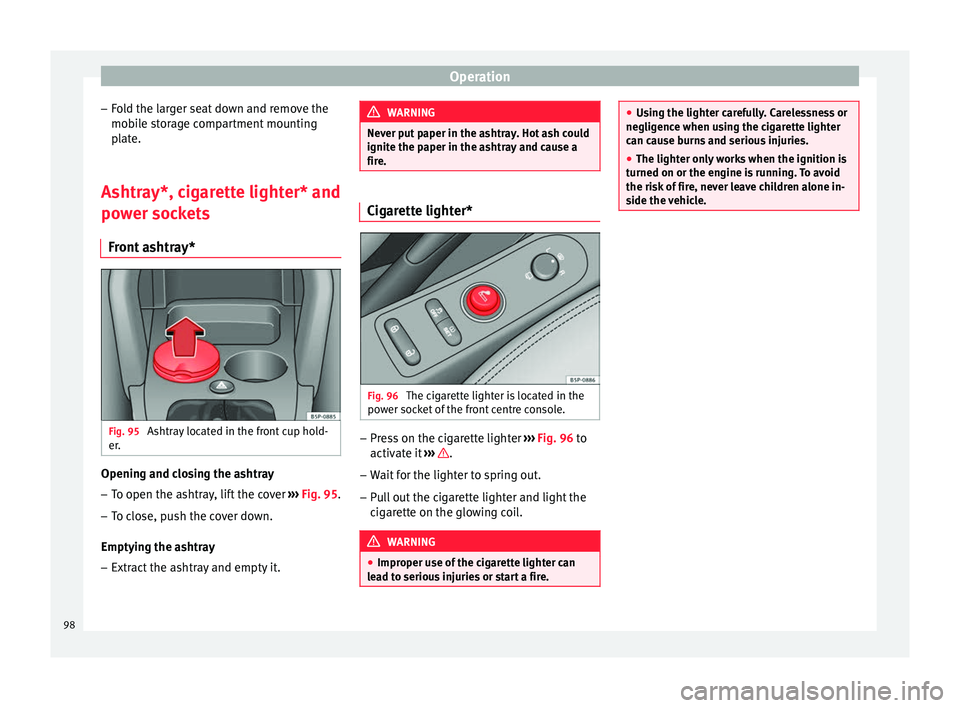
Ashtray located in the front cup hold-
er. Opening and closing the ashtray
– To open the ashtray, lift the cover ››› Fig. 95 .
– To c
lose, push the cover down.
Emptying the ashtray – Extract the ashtray and empty it. WARNING
Never put paper in the ashtray. Hot ash could
ignite the paper in the ashtray and cause a
fire. Cigarette lighter*
Fig. 96
The cigarette lighter is located in the
power socket of the front centre console. –
Press on the cigarette lighter ››› Fig. 96 to
activ at
e it ››› .
– Wait for the lighter to spring out.
– Pull out the cigarette lighter and light the
cigarette on the glowing coil. WARNING
● Improper use of the cigarette lighter can
lead to serious injuries or start a fire. ●
Using the lighter carefully. Carelessness or
negligence when using the cigarette lighter
can cause burns and serious injuries.
● The lighter only works when the ignition is
turned on or the engine is running. To avoid
the risk of fire, never leave children alone in-
side the vehicle. 98
Page 101 of 236
Transport and practical equipment
Power sockets Fig. 97
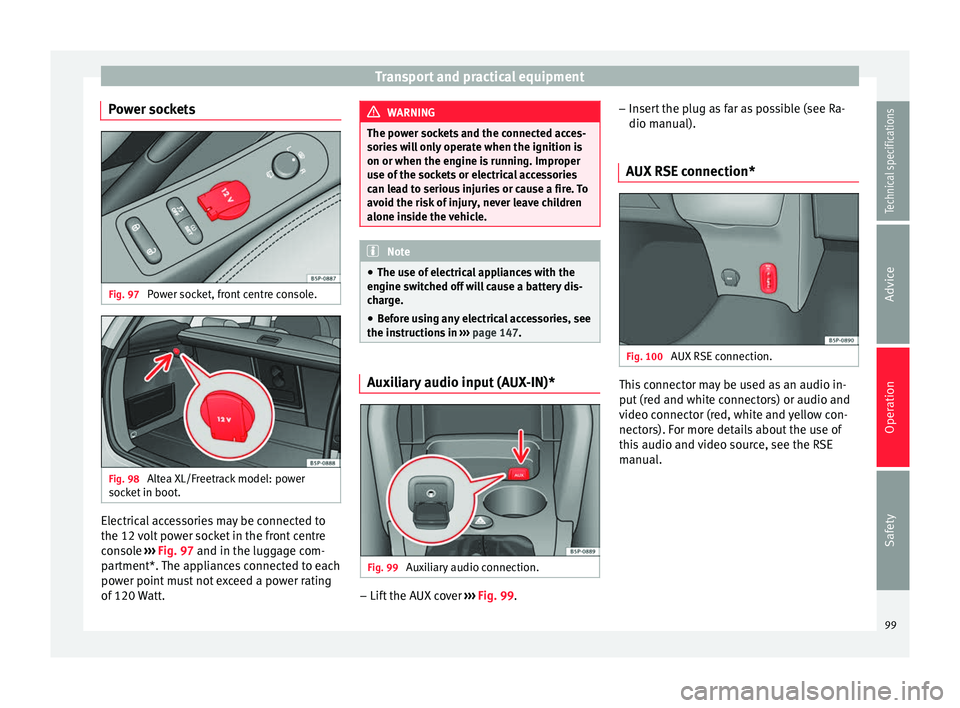
Power socket, front centre console. Fig. 98
Altea XL/Freetrack model: power
socket in boot. Electrical accessories may be connected to
the 12 volt power socket in the front centre
console
››› Fig. 97 and in the luggage com-
p ar
tment*. The appliances connected to each
power point must not exceed a power rating
of 120 Watt. WARNING
The power sockets and the connected acces-
sories will only operate when the ignition is
on or when the engine is running. Improper
use of the sockets or electrical accessories
can lead to serious injuries or cause a fire. To
avoid the risk of injury, never leave children
alone inside the vehicle. Note
● The use of electrical appliances with the
engine switched off will cause a battery dis-
charge.
● Before using any electrical accessories, see
the instructions in ››› page 147. Auxiliary audio input (AUX-IN)*
Fig. 99
Auxiliary audio connection. –
Lift the AUX cover ››› Fig. 99 . –
Inser
t the plug as far as possible (see Ra-
dio manual).
AUX RSE connection* Fig. 100
AUX RSE connection. This connector may be used as an audio in-
put (red and white connectors) or audio and
video connector (red, white and yellow con-
nectors). For more details about the use of
this audio and video source, see the RSE
manual.
99
Technical specifications
Advice
Operation
Safety
Page 109 of 236
Air conditioning
Air conditioning
Heating Operating instructions Fig. 114
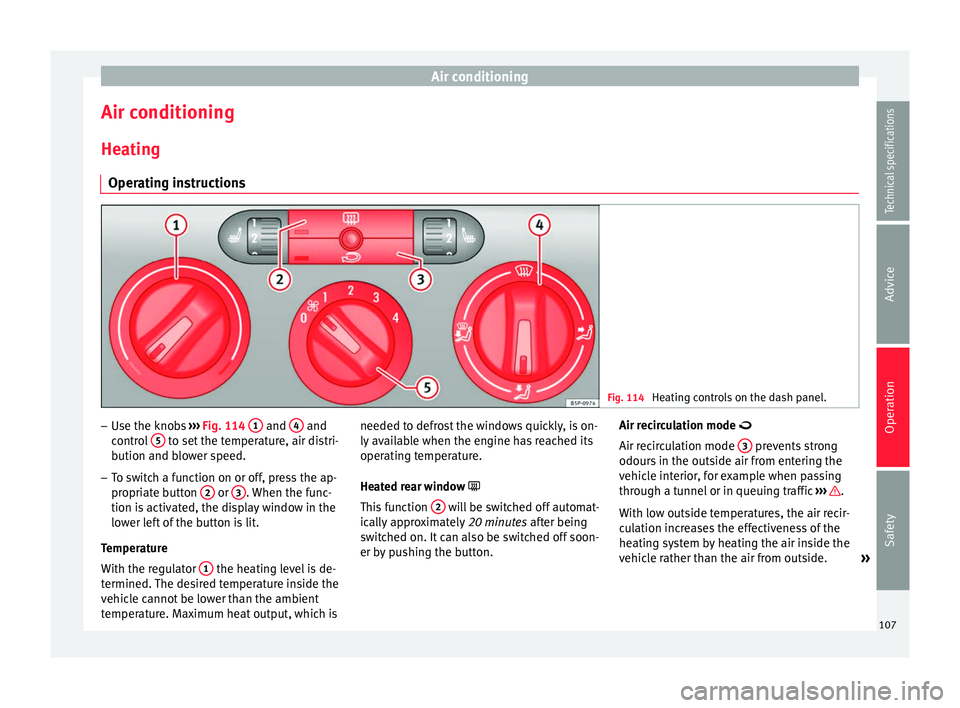
Heating controls on the dash panel. –
Use the knobs ››› Fig. 114 1 and
4 and
control 5 to set the temperature, air distri-
bution and blower speed.
– To switch a function on or off, press the ap-
propriate button 2 or
3 . When the func-
tion is activated, the display window in the
lower left of the button is lit.
Temperature
With the regulator 1 the heating level is de-
termined. The desired temperature inside the
vehicle cannot be lower than the ambient
temperature. Maximum heat output, which is needed to defrost the windows quickly, is on-
ly available when the engine has reached its
operating temperature.
Heated rear window
Thi s
function 2 will be switched off automat-
ically approximately 20 minutes after being
switched on. It can also be switched off soon-
er by pushing the button. Air recirculation mode
Air recirculation mode
3 prevents strong
odours in the outside air from entering the
vehicle interior, for example when passing
through a tunnel or in queuing traffic ››› .
With low outside temperatures, the air recir-
culation increases the effectiveness of the
heating system by heating the air inside the
vehicle rather than the air from outside. »
107
Technical specifications
Advice
Operation
Safety
Page 111 of 236
Air conditioning
Climatic* Controls Fig. 115
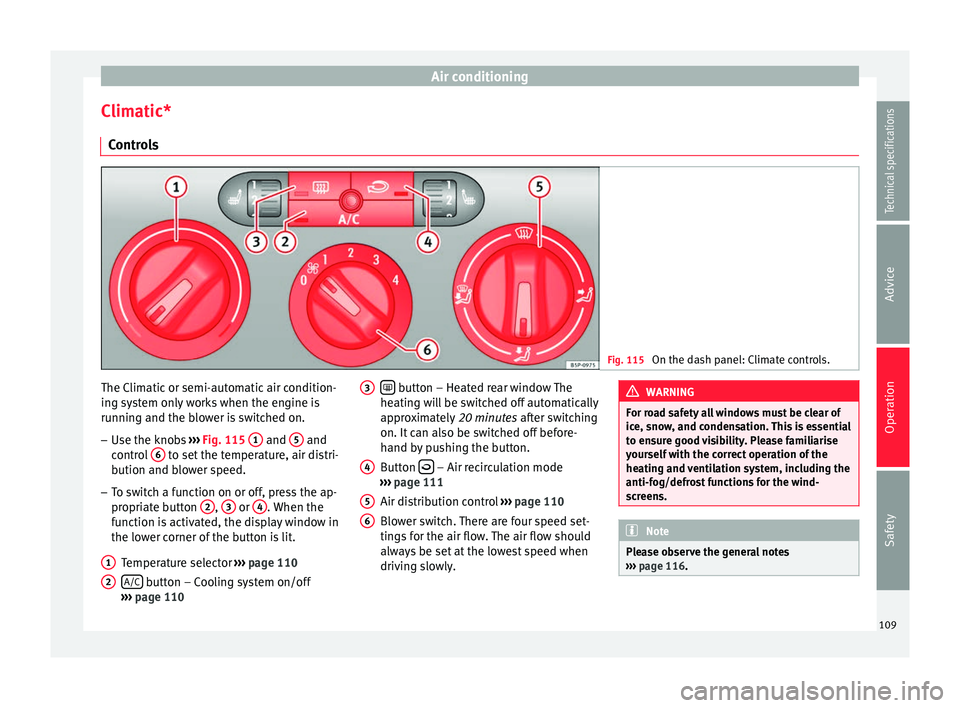
On the dash panel: Climate controls. The Climatic or semi-automatic air condition-
ing system only works when the engine is
running and the blower is switched on.
– Use the knobs ››› Fig. 115 1 and
5 and
control 6 to set the temperature, air distri-
bution and blower speed.
– To switch a function on or off, press the ap-
propriate button 2 ,
3 or
4 . When the
function is activated, the display window in
the lower corner of the button is lit.
Temperature selector ››› page 110
A/C button – Cooling system on/off
››› page 110
1 2
button – Heated rear window The
heating will be switched off automatically
approximately 20 minutes after switching
on. It can also be switched off before-
hand by pushing the button.
Button – Air recirculation mode
››› page 111
Air distribution control ››› page 110
Blower switch. There are four speed set-
tings for the air flow. The air flow should
always be set at the lowest speed when
driving slowly.
3 4
5
6 WARNING
For road safety all windows must be clear of
ice, snow, and condensation. This is essential
to ensure good visibility. Please familiarise
yourself with the correct operation of the
heating and ventilation system, including the
anti-fog/defrost functions for the wind-
screens. Note
Please observe the general notes
››› page 116. 109Technical specifications
Advice
Operation
Safety
Page 112 of 236
Operation
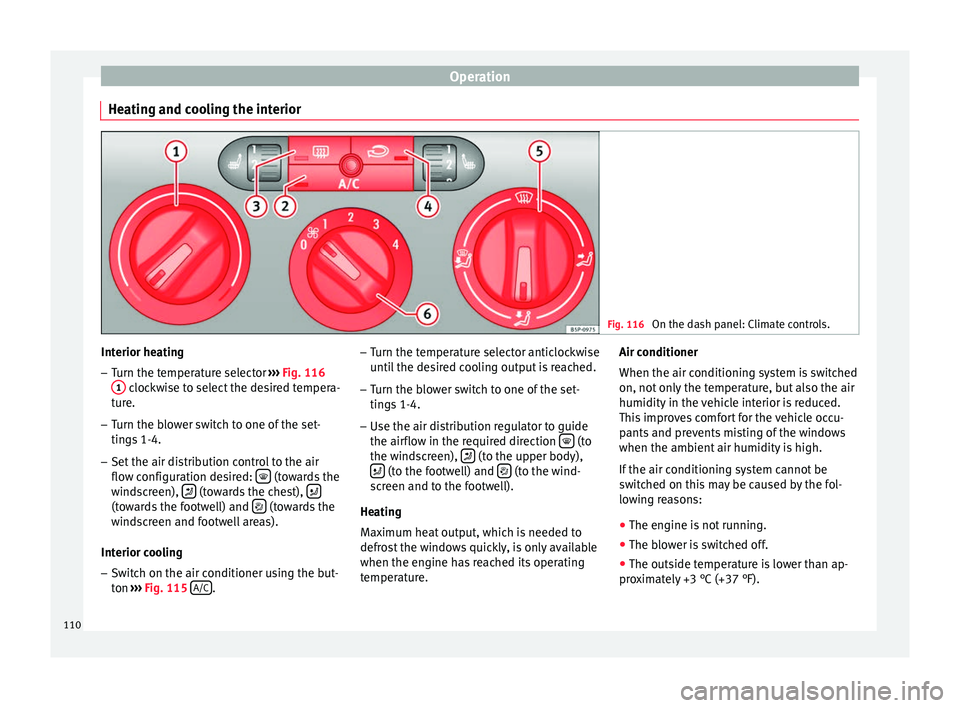
Heating and cooling the interior Fig. 116
On the dash panel: Climate controls. Interior heating
– Turn the temperature selector ››› Fig. 116
1 clockwise to select the desired tempera-
ture.
– Turn the blower switch to one of the set-
tings 1-4.
– Set the air distribution control to the air
flow configuration desired: (towards the
windscreen), (towards the chest),
(towards the footwell) and
(towards the
windscreen and footwell areas).
Interior cooling
– Switch on the air conditioner using the but-
ton ››› Fig. 115
A/C .–
Turn the temperature selector anticlockwise
until the desired cooling output is reached.
– Turn the blower switch to one of the set-
tings 1-4.
– Use the air distribution regulator to guide
the airflow in the required direction (to
the windscreen), (to the upper body),
(to the footwell) and
(to the wind-
screen and to the footwell).
Heating
Maximum heat output, which is needed to
defrost the windows quickly, is only available
when the engine has reached its operating
temperature. Air conditioner
When the air conditioning system is switched
on, not only the temperature, but also the air
humidity in the vehicle interior is reduced.
This improves comfort for the vehicle occu-
pants and prevents misting of the windows
when the ambient air humidity is high.
If the air conditioning system cannot be
switched on this may be caused by the fol-
lowing reasons:
● The engine is not running.
● The blower is switched off.
● The outside temperature is lower than ap-
proximately +3 °C (+37 °F).
110
Page 113 of 236
Air conditioning
● The air conditioning system compressor
has been temporarily switched off because
the engine coolant temperature is too high.
● The air conditioner fuse is faulty.
● Another fault in the vehicle. Have the air
conditioner checked by a specialised work-
shop.
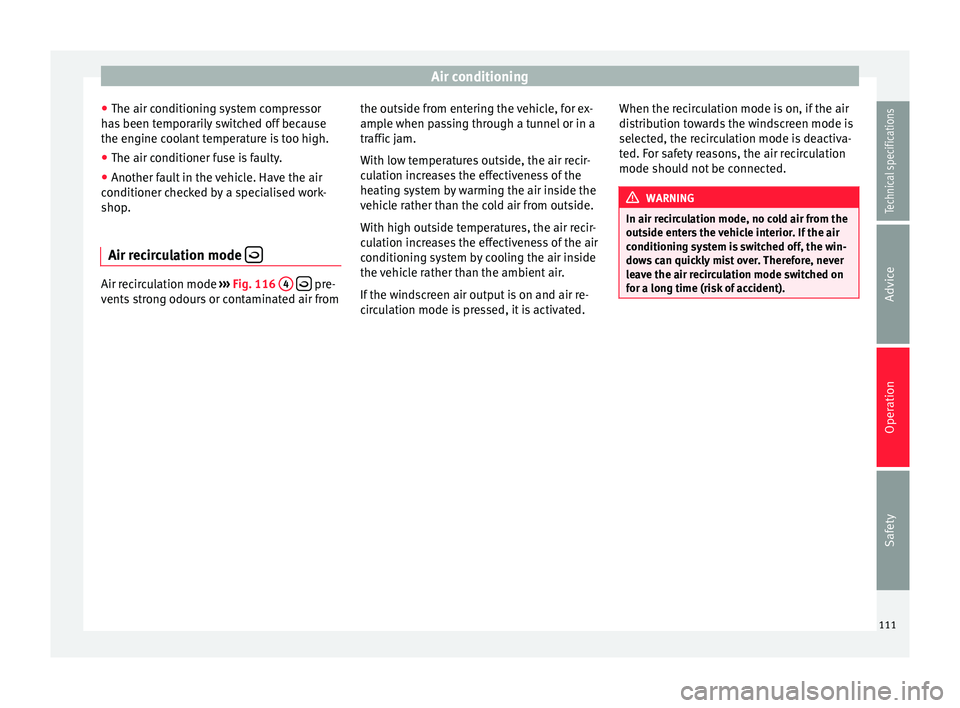
Air recirculation mode Air recirculation mode
››› Fig. 116 4
pre-
vents strong odours or contaminated air from the outside from entering the vehicle, for ex-
ample when passing through a tunnel or in a
traffic jam.
With low temperatures outside, the air recir-
culation increases the effectiveness of the
heating system by warming the air inside the
vehicle rather than the cold air from outside.
With high outside temperatures, the air recir-
culation increases the effectiveness of the air
conditioning system by cooling the air inside
the vehicle rather than the ambient air.
If the windscreen air output is on and air re-
circulation mode is pressed, it is activated.When the recirculation mode is on, if the air
distribution towards the windscreen mode is
selected, the recirculation mode is deactiva-
ted. For safety reasons, the air recirculation
mode should not be connected. WARNING
In air recirculation mode, no cold air from the
outside enters the vehicle interior. If the air
conditioning system is switched off, the win-
dows can quickly mist over. Therefore, never
leave the air recirculation mode switched on
for a long time (risk of accident). 111Technical specifications
Advice
Operation
Safety