light Seat Altea 2015 Workshop Manual
[x] Cancel search | Manufacturer: SEAT, Model Year: 2015, Model line: Altea, Model: Seat Altea 2015Pages: 236, PDF Size: 4.23 MB
Page 99 of 236
Transport and practical equipment
The tables have two positions for use and
cannot be interchanged. WARNING
● The mobile stowage compartment supports
a maximum load of 5 kg. Do not overload.
● Do not drive when the cover of the mobile
storage compartment is open.
● Do not drive when the tables are set up for
use.
● When the vehicle is moving and when the
tables are not in use, keep them stored inside
the mobile storage compartment with the
cover closed.
● Never place hot drinks in the cup holders.
The drink may spill and cause burns when the
vehicle is moving.
● Do not leave cans in the cup holders when
the vehicle is in motion, there is a danger
that the can may be flung around the vehicle
and cause injury.
● Make sure that the mounting plate is prop-
erly fixed onto the cushion frame.
● When the plate is not in use, store inside
the storage compartment.
● When the mobile storage compartment is
not in use, it should always be properly fas-
tened using the storage net in the boot. Note
● Check that the mobile storage compart-
ment is fitted correctly, pulling it forward by the front storage compartment and checking
that both safety clips are securely fastened to
both rings.
Mounting and removal
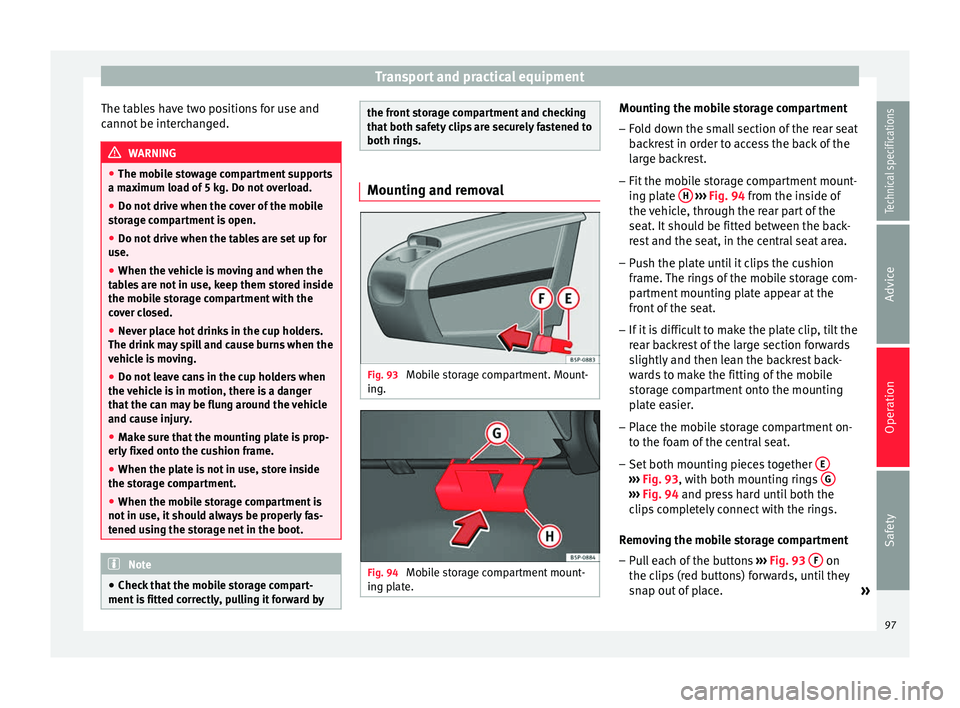
Fig. 93
Mobile storage compartment. Mount-
ing. Fig. 94
Mobile storage compartment mount-
ing plate. Mounting the mobile storage compartment
– Fold down the small section of the rear seat
backrest in order to access the back of the
large backrest.
– Fit the mobile storage compartment mount-
ing plate H
››› Fig. 94 from the inside of
the v
ehicle, through the rear part of the
seat. It should be fitted between the back-
rest and the seat, in the central seat area.
– Push the plate until it clips the cushion
frame. The rings of the mobile storage com-
partment mounting plate appear at the
front of the seat.
– If it is difficult to make the plate clip, tilt the
rear backrest of the large section forwards
slightly and then lean the backrest back-
wards to make the fitting of the mobile
storage compartment onto the mounting
plate easier.
– Place the mobile storage compartment on-
to the foam of the central seat.
– Set both mounting pieces together E ›››
Fig. 93 , with both mounting rings G ›››
Fig. 94 and press hard until both the
c lip
s completely connect with the rings.
Removing the mobile storage compartment – Pull each of the buttons ›››
Fig. 93 F on
the clips (red buttons) forwards, until they
snap out of place. »
97
Technical specifications
Advice
Operation
Safety
Page 100 of 236
Operation
– Fold the larger seat down and remove the
mobile storage compartment mounting
plate.
Ashtray*, cigarette lighter* and
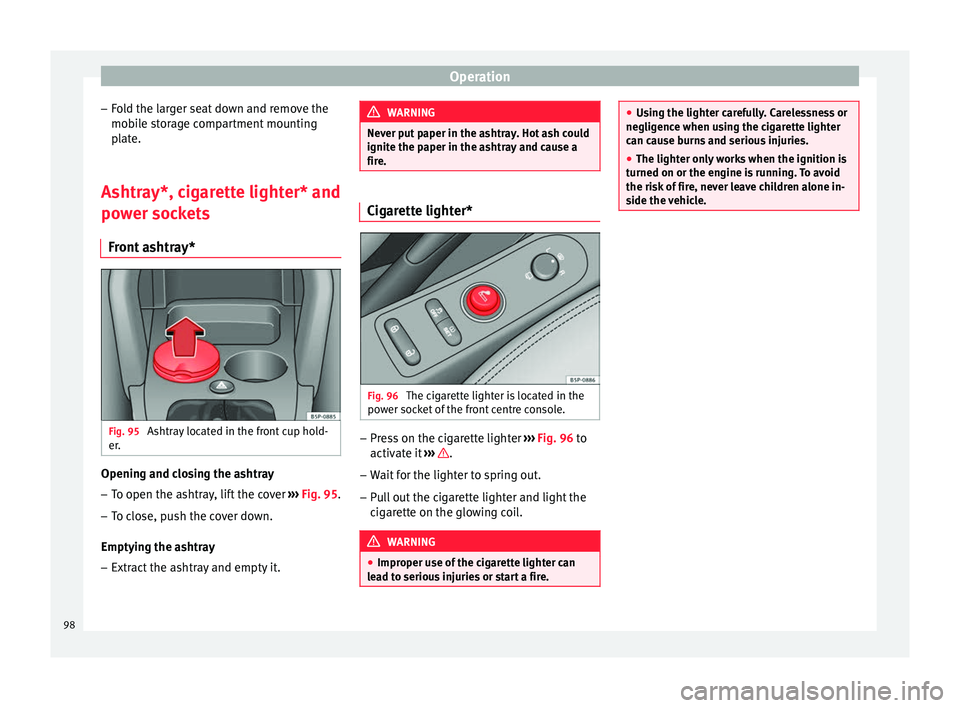
power sockets Front ashtray* Fig. 95
Ashtray located in the front cup hold-
er. Opening and closing the ashtray
– To open the ashtray, lift the cover ››› Fig. 95 .
– To c
lose, push the cover down.
Emptying the ashtray – Extract the ashtray and empty it. WARNING
Never put paper in the ashtray. Hot ash could
ignite the paper in the ashtray and cause a
fire. Cigarette lighter*
Fig. 96
The cigarette lighter is located in the
power socket of the front centre console. –
Press on the cigarette lighter ››› Fig. 96 to
activ at
e it ››› .
– Wait for the lighter to spring out.
– Pull out the cigarette lighter and light the
cigarette on the glowing coil. WARNING
● Improper use of the cigarette lighter can
lead to serious injuries or start a fire. ●
Using the lighter carefully. Carelessness or
negligence when using the cigarette lighter
can cause burns and serious injuries.
● The lighter only works when the ignition is
turned on or the engine is running. To avoid
the risk of fire, never leave children alone in-
side the vehicle. 98
Page 104 of 236
Operation
Removing the shelf
– Unhook the loops ››› Fig. 103 B from
housings A .
– Extract the shelf from its slot, in its rest po-
sition and pull outwards. The storage com-
partment should remain closed.
To remove the storage compartment
– Pull outwards until the compartment is
freed from the pivot point ››› Fig. 104 . WARNING
Do not place heavy or hard objects on the
rear shelf, because they will endanger the ve-
hicle occupants in case of sudden braking. CAUTION
● Before closing the rear lid, ensure that the
rear shelf is correctly fitted.
● An overloaded luggage compartment could
mean that the rear shelf is not correctly seat-
ed and it may be bent or damaged.
● If the luggage compartment is overloaded,
remove the tray. Note
● Ensure that, when placing items of clothing
on the luggage compartment cover, rear visi-
bility is not reduced. ●
If the vehicle is fitted with a storage com-
partment*, it should only be used to store the
emergency triangles* and light objects. Retractable rear shelf
3 Applies to the model: ALTEA XL/ALTEA FREETRACK
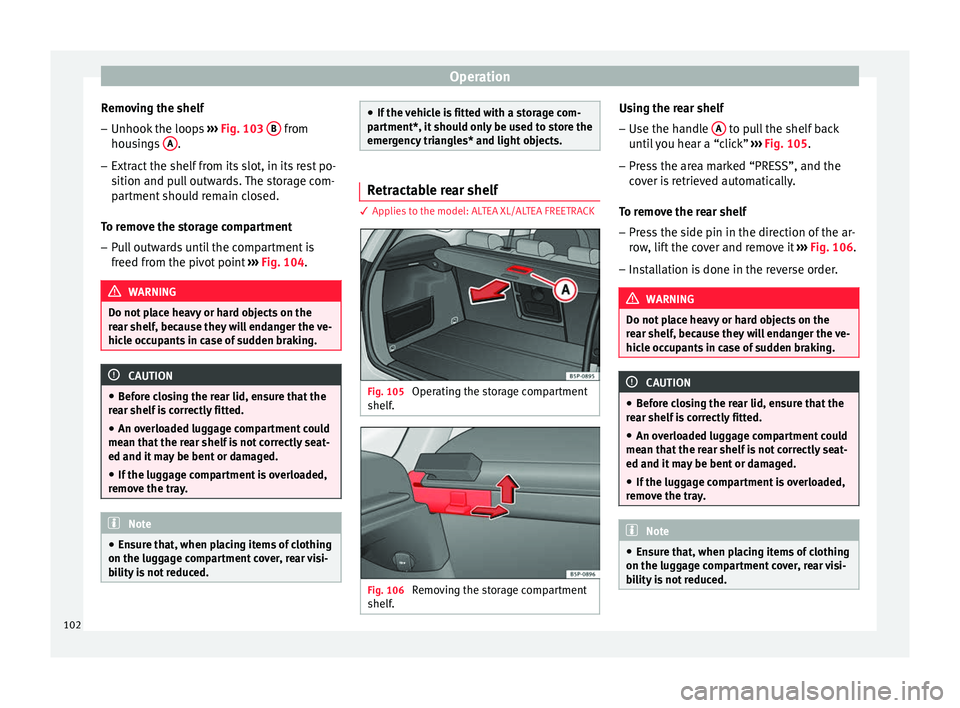
Fig. 105
Operating the storage compartment
shelf. Fig. 106
Removing the storage compartment
shelf. Using the rear shelf
– Use the handle A to pull the shelf back
until you hear a “click” ››› Fig. 105 .
– Pr e
ss the area marked “PRESS”, and the
cover is retrieved automatically.
To remove the rear shelf
– Press the side pin in the direction of the ar-
row, lift the cover and remove it ››› Fig. 106.
– Installation is done in the reverse order. WARNING
Do not place heavy or hard objects on the
rear shelf, because they will endanger the ve-
hicle occupants in case of sudden braking. CAUTION
● Before closing the rear lid, ensure that the
rear shelf is correctly fitted.
● An overloaded luggage compartment could
mean that the rear shelf is not correctly seat-
ed and it may be bent or damaged.
● If the luggage compartment is overloaded,
remove the tray. Note
● Ensure that, when placing items of clothing
on the luggage compartment cover, rear visi-
bility is not reduced. 102
Page 105 of 236
Transport and practical equipment
Fastening rings* There can be four fastening rings in the lug-
gage compartment for fastening luggage and
other objects.
–
Always use suitable and undamaged straps
to secure luggage and other objects to the fastening rings ››› in Loading the lug-
gage compartment on page 101.
– Pull up the fastening rings to attach the
straps.
During a collision or an accident, even small
and light objects can build up so much ener-
gy that they can cause very severe injuries.
The amount of “energy” depends on the
speed of the vehicle and the weight of the
object. The most significant factor, however,
is the speed of the vehicle.
Example: An object weighing 4.5 kg is lying
unsecured in the vehicle. During a frontal col-
lision at a speed of 50 km/h (30 mph), this
object generates a force corresponding to 20
times its weight. This means that the effec-
tive weight of the object increases to about
90 kg. Imagine the injuries that may result
from said “object” if it hits any passenger
when flying through the passenger compart-
ment. This increased risk of injury will be fur-
ther increased if a loose object is struck by
an inflating airbag. WARNING
● If pieces of baggage or other objects are se-
cured to the fastening rings with inappropri-
ate or damaged retaining cords, injuries
could result in the event of braking manoeu-
vres or accidents.
● Never secure a child seat on the fastening
rings. Cargo separation net*
3 Applies to the model: ALTEA XL/ALTEA FREETRACK
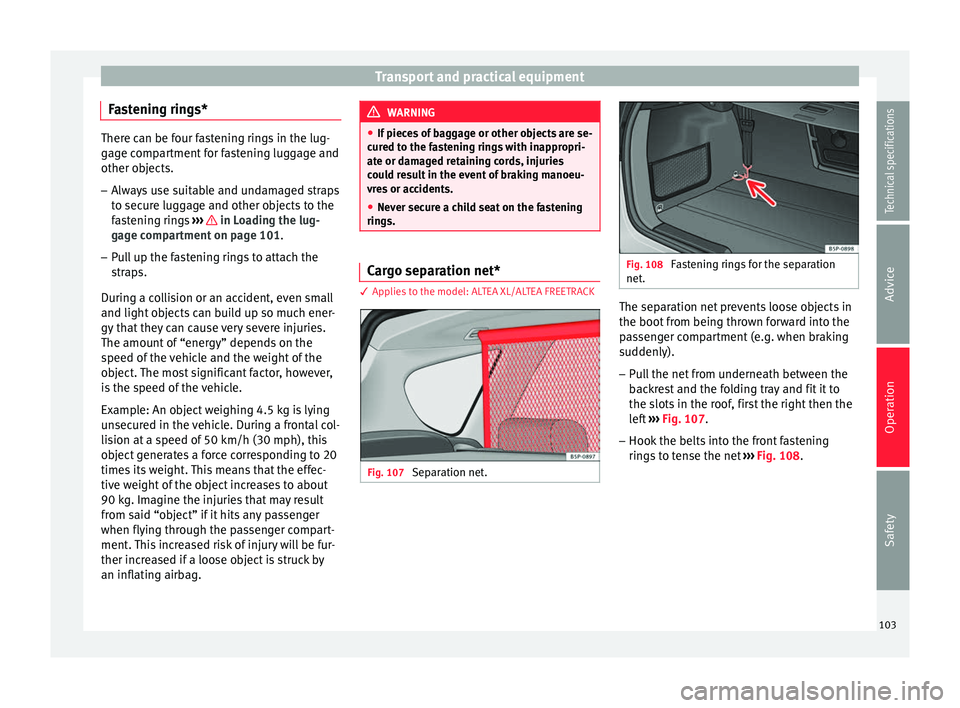
Fig. 107
Separation net. Fig. 108
Fastening rings for the separation
net. The separation net prevents loose objects in
the boot from being thrown forward into the
passenger compartment (e.g. when braking
suddenly).
– Pull the net from underneath between the
backrest and the folding tray and fit it to
the slots in the roof, first the right then the
left ››› Fig. 107 .
– Hook the belts
into the front fastening
rings to tense the net ››› Fig. 108
.
103
Technical specifications
Advice
Operation
Safety
Page 114 of 236
Operation
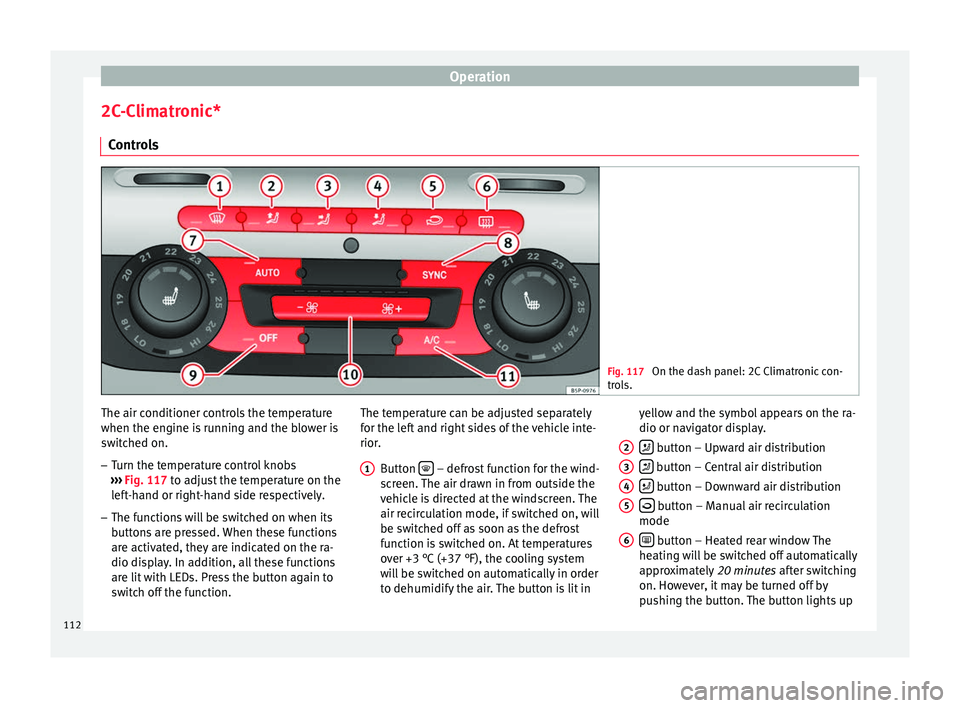
2C-Climatronic* Controls Fig. 117
On the dash panel: 2C Climatronic con-
trols. The air conditioner controls the temperature
when the engine is running and the blower is
switched on.
– Turn the temperature control knobs
››› Fig. 117 to adjust the temperature on the
l ef
t-hand or right-hand side respectively.
– The functions will be switched on when its
buttons are pressed. When these functions
are activated, they are indicated on the ra-
dio display. In addition, all these functions
are lit with LEDs. Press the button again to
switch off the function. The temperature can be adjusted separately
for the left and right sides of the vehicle inte-
rior.
Button – defrost function for the wind-
screen. The air drawn in from outside the
vehicle is directed at the windscreen. The
air recirculation mode, if switched on, will
be switched off as soon as the defrost
function is switched on. At temperatures
over +3 °C (+37 °F), the cooling system
will be switched on automatically in order
to dehumidify the air. The button is lit in
1 yellow and the symbol appears on the ra-
dio or navigator display.
button – Upward air distribution
button – Central air distribution
button – Downward air distribution
button – Manual air recirculation
mode
button – Heated rear window The
heating will be switched off automatically
approximately 20 minutes after switching
on. However, it may be turned off by
pushing the button. The button lights up
2 3
4
5
6
112
Page 116 of 236
Operation
A pleasant temperature is quickly reached in
automatic mode at a temperature of +22 °C
(+72 °F). Therefore, we recommend you not
to change this adjustment, except as neces-
sary to suit individual preferences or particu-
lar circumstances. It is possible to select inte-
rior temperatures from +18 °C (+64 °F) to
+26 °C (+80 °F). These are approximate tem-
peratures and the actual temperature may be
slightly higher or lower depending on out-
side ambient conditions.
Climatronic maintains a constant tempera-
ture. The temperature of the air supplied to the interior, the blower speed and the air dis-
tribution are regulated automatically. The
system also considers the sunlight radiation,
so there is no need for manual readjustment.
Therefore,
automatic mode
almo
s t always
provides the best comfort for the vehicle oc-
cupants throughout the year.
Automatic mode is switched off whenever an
adjustment is made using the buttons for the
air distribution, fan or or the air recircula-
tion button . The temperature will continue
to be regulated within the parameters man-
ually selected by the user. Note
There are two automatic modes:
● Automatic mode LO: this calculates the air
flow for two people.
● Automatic mode HI: this calculates the air
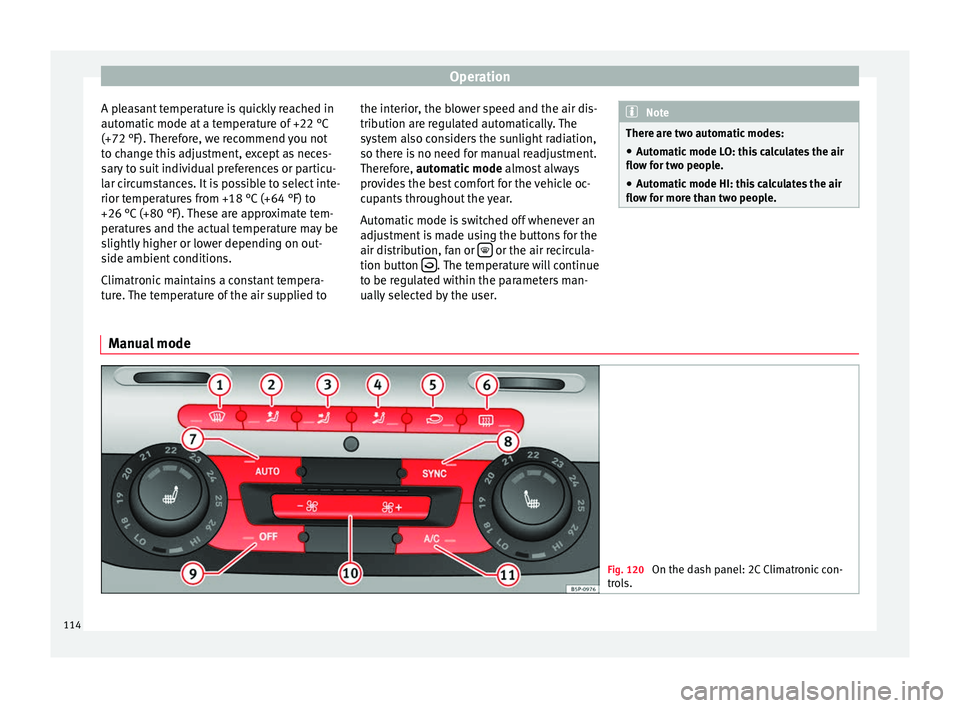
flow for more than two people. Manual mode
Fig. 120
On the dash panel: 2C Climatronic con-
trols. 114
Page 117 of 236
Air conditioning
In manual mode you can adjust the air tem-
perature, air flow and distribution as re-
quired.
Switching on manual mode – To enter manual mode, press one of the
buttons ››› Fig. 120 1 to
5 or press the
air flow control 10 . The selected function is
shown on the radio or navigator display.
Temperature
There are separate temperature selectors for
the left and right sides of the vehicle interior.
The selected temperature is displayed above
the selector. It is possible to select interior
temperatures from +18 °C (+64 °F) to +26 °C
(+80 °F). These are approximate tempera-
tures and the actual temperature may be
slightly higher or lower depending on the
outside ambient conditions.
If you select temperatures below +18 °C
(+64 °F), the indication: LO will appear on the
screen. In this setting the system runs at
maximum cooling output and the tempera-
ture is not regulated.
If a temperature above +26 °C (+80 °F) is se-
lected, the screen will show HI. In this setting
the system runs at maximum heating output
and the temperature is not regulated. Blower
The fan may be adjusted freely using the con-
trols
10 . Always have the blower running at a
low setting to ensure a constant flow of fresh
air into the vehicle. Pushing the button to
the minimum -1, t urn
s the Climatronic off.
Air distribution
The air distribution is adjusted using the but-
tons ,
and
. It is also possible to
open and close some of the air vents sepa-
rately.
Switching the air conditioning on and off
When the A/C button is on (LED lit), the air
conditioning system is on.
When the A/C button is off (LED off), the air
conditioning system is off.
When the A/C button is off, the air condition-
ing system is switched off to save fuel. The
temperature continues to self-regulate. The
set temperature can only be reached if it is
higher than the outside temperature.
Driver and passenger temperature control
The SYNC button controls the synchronisa-
tion of the 2 Climatronic climate zones.
When the SYNC button is off (LED off), the Cli-
matronic climate zone is personalised. For
example: driver side temperature +22 °C (+72 °F) and passenger side temperature +24
℃
(+23.89 ℃
).
When the S
YNC button is on (LED lit), the Cli-
matronic climate zone is synchronised. For
example: driver side temperature +22 °C
(+72 °F) and passenger side temperature +22
℃ (+22.22 ℃
).
If
the SYNC button is on and the passenger
side temperature is changed, the function is
automatically deactivated.
Air recirculation mode –
Press the button
››› Fig. 120 5 to
switch air recirculation mode on or off. It is
switched on if the following symbol ap-
pears in the display .
Air recirculation mode prevents strong
odours or contaminated air from the outside
from entering in the vehicle, for example
when passing through a tunnel or in a traffic
jam.
With low outside temperatures, the air recir-
culation increases the effectiveness of the
heating system by heating the air inside the
vehicle rather than the air from outside.
With high outside temperatures, the air recir-
culation increases the effectiveness of the air
conditioning system by cooling the air inside
the vehicle rather than the ambient air. »
115Technical specifications
Advice
Operation
Safety
Page 120 of 236
Operation
tempt you into taking any risks when driving.
Failure to follow this instruction could result
in an accident.
●
The braking capability of your vehicle is
limited by the tyres' grip. Vehicle behaviour
is no different from a vehicle without four-
wheel drive. So do not be tempted to drive
too fast on icy or slippery roads just because
the vehicle still has good acceleration in
these conditions. Failure to do so could result
in an accident.
● On wet roads bear in mind that the front
wheels may lose contact with the road and
start to float (aquaplaning) if the vehicle is
driven too fast. If this should happen, there
will be no sudden increase in engine speed
when aquaplaning begins to warn the driver,
as with a front-wheel drive vehicle. For this
reason and for that mentioned above, always
choose a driving speed suitable for the road
conditions. Failure to follow this instruction
could result in an accident. Driving with LPG*
3 Applies to the model: ALTEA / ALTEA XL
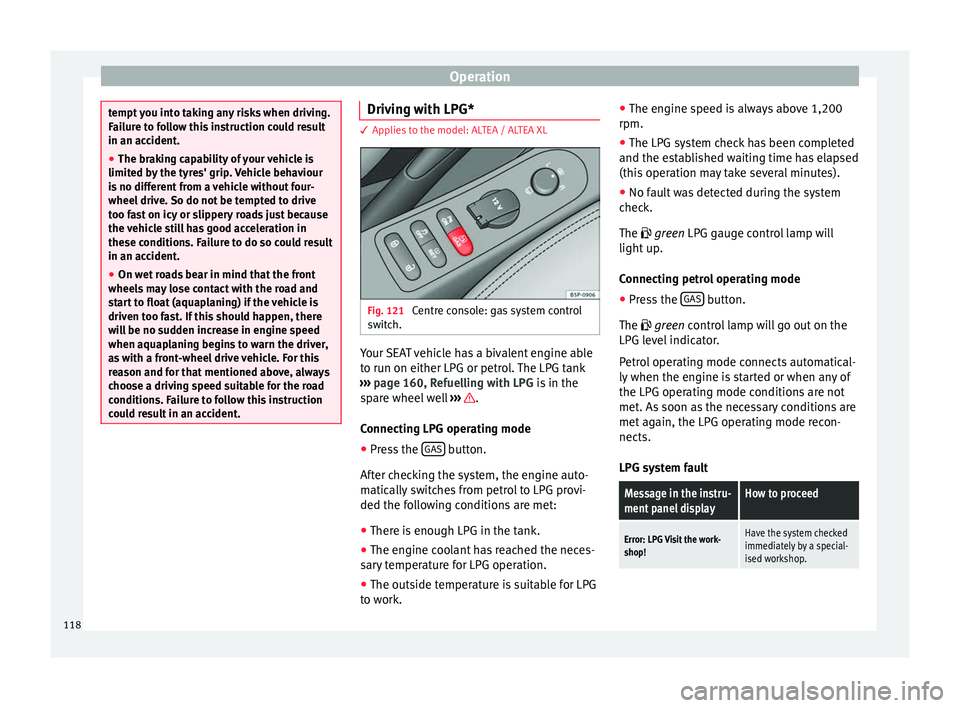
Fig. 121
Centre console: gas system control
switch. Your SEAT vehicle has a bivalent engine able
to run on either LPG or petrol. The LPG tank
››› page 160, Refuelling with LPG is in the
spare wheel well ››› .
Connecting LPG operating mode
● Press the GAS button.
After checking the system, the engine auto-
matically switches from petrol to LPG provi-
ded the following conditions are met:
● There is enough LPG in the tank.
● The engine coolant has reached the neces-
sary temperature for LPG operation.
● The outside temperature is suitable for LPG
to work. ●
The engine speed is always above 1,200
rpm.
● The LPG system check has been completed
and the established waiting time has elapsed
(this operation may take several minutes).
● No fault was detected during the system
check.
The
green LPG gauge control lamp will
light up.
Connecting petrol operating mode
● Press the GAS button.
The green
control lamp will go out on the
LPG l
evel indicator.
Petrol operating mode connects automatical-
ly when the engine is started or when any of
the LPG operating mode conditions are not
met. As soon as the necessary conditions are
met again, the LPG operating mode recon-
nects.
LPG system fault
Message in the instru-
ment panel displayHow to proceed
Error: LPG Visit the work-
shop!Have the system checked
immediately by a special-
ised workshop. 118
Page 122 of 236
Operation
button while driving slowly and with low ac-
celeration. This procedure can be repeated
several times while driving carefully until all
the LPG left in the tank has been used up.
● Vehicles that display information or warn-
ing messages on the dash panel may show
information related to LPG operation.
● The notification LPG mode not possible may
be displayed. Journeys abroad
To drive abroad, the following must be taken
into consideration:
● For vehicles fitted with a catalytic converter
ensure that unleaded petrol is available for
the journey. See the chapter “Refuelling”. Au-
tomobile organisations will have information
about service station networks selling unlea-
ded fuel.
● In some countries, your vehicle model may
not be available, and therefore some spare
parts may not available or technical services
can only carry out limited repairs.
SEAT importers and distributors will gladly
provide information about the technical prep-
aration that your vehicle requires and also
about necessary maintenance and repair
possibilities. Adhesive strips for headlights
If you have to drive a right-hand drive vehicle
in a left-hand drive country, or vice versa, the
asymmetric dipped beam headlights will daz-
zle oncoming traffic.
To prevent dazzling, you must apply stickers
to certain parts of the headlight lenses. Fur-
ther information is available at any Technical
Service.
In vehicles with adaptive headlights, the ro-
tation system must previously be disconnec-
ted. To do this, please go to a specialised
workshop.
Ignition lock
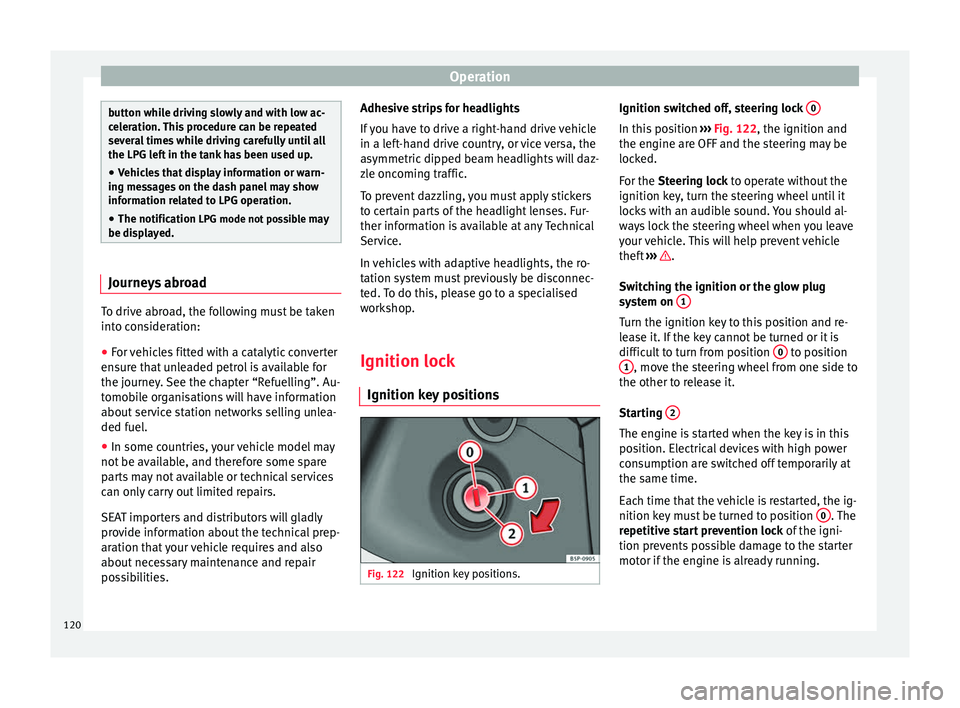
Ignition key positions Fig. 122
Ignition key positions. Ignition switched off, steering lock
0 In this position
››› Fig. 122, the ignition and
the engine are OFF and the steering may be
locked.
For the Steering lock
to operate without the
ignition k
ey, turn the steering wheel until it
locks with an audible sound. You should al-
ways lock the steering wheel when you leave
your vehicle. This will help prevent vehicle
theft ››› .
Switching the ignition or the glow plug
system on 1 Turn the ignition key to this position and re-
lease it. If the key cannot be turned or it is
difficult to turn from position
0 to position
1 , move the steering wheel from one side to
the other to release it.
Starting 2 The engine is started when the key is in this
position. Electrical devices with high power
consumption are switched off temporarily at
the same time.
Each time that the vehicle is restarted, the ig-
nition key must be turned to position
0 . The
repetitive start prevention lock of the igni-
tion prevents possible damage to the starter
motor if the engine is already running.
120
Page 123 of 236
Driving
WARNING
● The ignition key must NOT be removed from
the lock until the vehicle comes to a stand-
still. Otherwise, the steering could be imme-
diately blocked- Risk of accident!
● Always remove the key from the ignition
when leaving the vehicle, even if only for a
short period. This is especially important if
children or disabled people are left alone in
the vehicle. They could accidentally start the
engine or work electrical equipment such as
the electric windows, resulting in an acci-
dent.
● Unsupervised use of the key could start the
engine or any electrical system, such as the
electric windows. This could result in serious
injury. CAUTION
The starter motor will only work when the en-
gine is stopped (ignition key position 2 ).
Electronic immobiliser
The electronic immobiliser prevents unau-
thorised persons from driving the vehicle.
Inside the key there is a chip that deactivates
the electronic immobiliser automatically
when the key is inserted into the ignition. The electronic immobiliser will be activated
again automatically as soon as you pull the
key out of the ignition lock.
The engine can only be started using a genu-
ine SEAT key with its correct code.
Note
A perfect operation of the vehicle is ensured
if genuine SEAT keys are used. Starting petrol engines
The engine can only be started using a genu-
ine SEAT key with its correct code.
– Move the gearbox lever to the neutral posi-
tion and depress the clutch pedal thor-
oughly and hold it in this position for the
starter to turn the engine on.
– Turn the ignition key to the starting posi-
tion ›››
page 120 .
– Let
go of the ignition key as soon as the en-
gine starts; the starter motor must not run
on with the engine.
After starting a very hot engine, you may
need to slightly press down the accelerator.
When starting a cold engine, it may be a little
noisy for the first few seconds until oil pres-
sure has built up in the hydraulic valve com-
pensators. This is quite normal, and no cause
for concern. If the engine does not start immediately,
switch the starter off after 10 seconds and try
again after half a minute. If the engine still
does not start, the fuel pump fuse should be
checked
››› page 196, Fuses. WARNING
● Never start or run the engine in unventila-
ted or closed rooms. The exhaust gases con-
tain carbon monoxide, an odourless and col-
ourless poisonous gas. Risk of fatal acci-
dents. Carbon monoxide can cause loss of
consciousness and result in death.
● Never leave the vehicle unattended if the
engine is running.
● Never use “cold start sprays”, they could
explode or cause the engine to run at high
revs. Risk of injury. CAUTION
● When the engine is cold, you should avoid
high engine speeds, driving at full throttle
and over-loading the engine. Risk of engine
damage.
● The vehicle should not be pushed or towed
more than 50 metres to start the engine. Un-
burnt fuel could enter the catalytic converter
and damage it.
● Before attempting to push-start or tow a ve-
hicle in order to start it, you should first try to
start it using the battery of another vehicle.
Note and follow the instructions in
››› page 189, Jump-starting.
» 121
Technical specifications
Advice
Operation
Safety