belt Seat Arona 2017 Owner's Guide
[x] Cancel search | Manufacturer: SEAT, Model Year: 2017, Model line: Arona, Model: Seat Arona 2017Pages: 308, PDF Size: 6.66 MB
Page 148 of 308
Operation
Note
● If the el ectric
al adjustment ever fails to op-
erate, the mirrors can be adjusted by hand by
lightly pressing the edge of the mirror glass.
● In vehicles with electric exterior mirrors,
the fol
lowing points should be observed: if,
due to an external force (e.g. being knocked
while manoeuvring), the adjustment of the
mirror housing is altered, the mirror will have
to be fully folded electrically. Do not readjust
the rear vision mirror housing by hand, as
this will interfere with the mirror adjuster
function.
● The fold-in function on the exterior mirrors
wil
l not activate at speeds over 40 km/h
(25 mph). Seats and head restraints
Adju
s
tin
g the seat and head re-
straints
Adjusting the front seats Read the additional information carefully
›› ›
page 18 WARNING
The safe driving chapter contains important
inform ation, tip
s, suggestions and warnings
that you should read and observe for your
own safety and the safety of your passengers
››› page 71. WARNING
● Never a dju
st the driver or front passenger
seat while the vehicle is in motion. While ad-
justing your seat, you will assume an incor-
rect sitting position. Risk of accidents. Adjust
the driver or front passenger seat only when
the vehicle is stationary.
● To reduce the risk of injury to the driver and
front p
assenger in case of a sudden braking
or an accident, never drive with the backrest
tilted towards the rear. The maximum protec-
tion of the seat belt can be achieved only
when the backrests are in an upright position
and the driver and front passenger have prop-
erly adjusted their seat belts. The further the backrests are tilted to the rear, the greater
the risk
of
injury due to improper positioning
of the belt web!
● Exercise caution when securing the seat
height into f
orwards/backwards position. In-
juries can be caused if the seat height is ad-
justed without due care and attention.
● To move the seat forwards and backwards,
pul
l upwards and not sideways on the lever,
as the force exerted on it in that direction
could damage it. Adjusting the front head restraints
Read the additional information carefully
› ›
›
page 19
Adjust the head restraint ›››
page 19 so
that as far as possible the top of the head re-
straint is level with the top of your head.
When this is not possible, try to get as close
as possible to this position. WARNING
● Never driv e if
the head restraints have been
removed. Risk of injury.
● After refitting the head restraint, you must
alwa
ys adjust it properly for height to achieve
optimal protection.
● Please observe the safety warnings ›››
in
Corr ect
adjustment of front head restraints on
page 75. 146
Page 151 of 308
Seats and head restraints
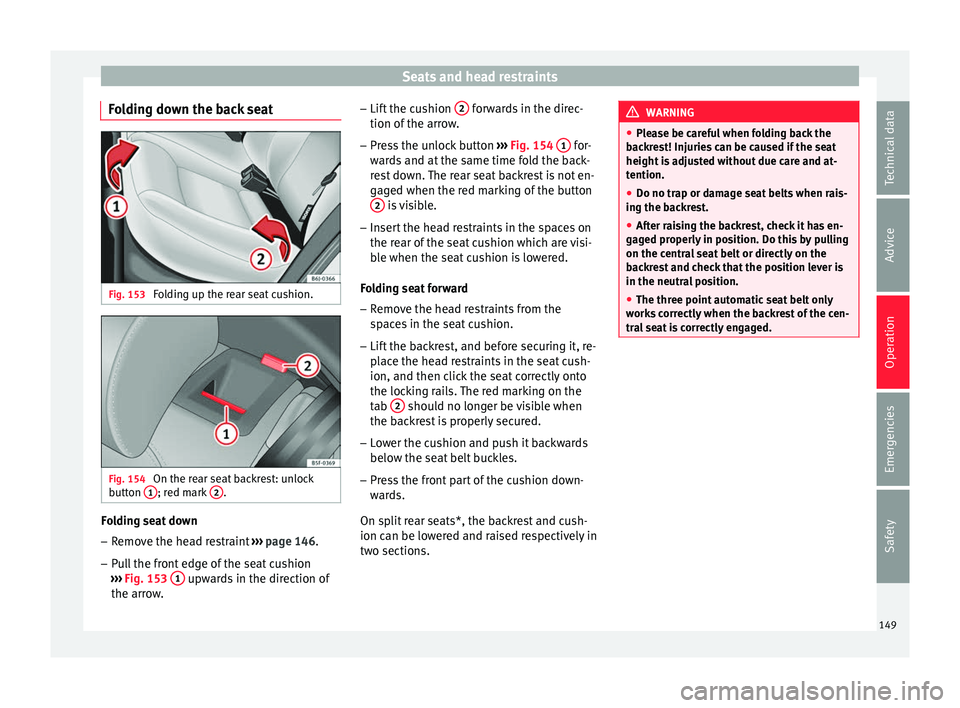
Folding down the back seat Fig. 153
Folding up the rear seat cushion. Fig. 154
On the rear seat backrest: unlock
b utt
on 1 ; red mark
2 .
Folding seat down
– Remove the head restraint ››
› page 146.
– Pull the front edge of the seat cushion
›››
Fig. 153 1 upwards in the direction of
the arr o
w
. –
Lift the c
ushion 2 forwards in the direc-
tion of the arr
o
w.
– Press the unlock button ›››
Fig. 154 1 for-
w ar
d
s and at the same time fold the back-
rest down. The rear seat backrest is not en-
gaged when the red marking of the button 2 is visible.
– Insert the head restraints in the spaces on
the r e
ar of
the seat cushion which are visi-
ble when the seat cushion is lowered.
Folding seat forward
– Remove the head restraints from the
spac
es in the seat cushion.
– Lift the backrest, and before securing it, re-
plac
e the head restraints in the seat cush-
ion, and then click the seat correctly onto
the locking rails. The red marking on the
tab 2 should no longer be visible when
the b ac
k
rest is properly secured.
– Lower the cushion and push it backwards
below the seat
belt buckles.
– Press the front part of the cushion down-
ward
s.
On split rear seats*, the backrest and cush-
ion can be lowered and raised respectively in
two sections. WARNING
● Ple a
se be careful when folding back the
backrest! Injuries can be caused if the seat
height is adjusted without due care and at-
tention.
● Do no trap or damage seat belts when rais-
ing the bac
krest.
● After raising the backrest, check it has en-
gaged pr
operly in position. Do this by pulling
on the central seat belt or directly on the
backrest and check that the position lever is
in the neutral position.
● The three point automatic seat belt only
works
correctly when the backrest of the cen-
tral seat is correctly engaged. 149
Technical data
Advice
Operation
Emergencies
Safety
Page 158 of 308
Operation
●
Do not l et
the luggage compartment floor
fall when closing it. Always carefully guide it
downwards in a controlled manner. Other-
wise, the lining and the floor of the luggage
compartment could be damaged. Note
SEAT recommends the use of straps to secure
o b j
ects to retaining rings. Roof carrier*
Intr oduction The vehicle roof has been designed to opti-
mi
se aer
ody
namics. For this reason, cross
bars or conventional roof carrier systems can-
not be secured to the roof water drains.
As the roof water drains are integrated in the
roof to reduce air resistance, only SEAT-ap-
proved cross bars and roof carrier systems
can be used.
Cases in which cross bars and the roof carri-
er system should be disassembled.
● When they are not used.
● When the vehicle is washed in a car wash.
● When the vehicle height exceeds the maxi-
mum height, for e x
ample, in some garages. WARNING
When heavy or bulky loads are transported
on the roof c
arrier system, car driving per-
formance is affected, as the centre of gravity
shifts and there is greater wind resistance.
● Always secure the load properly using belts
or retainin
g straps that are suitable and in a
good condition.
● Bulky, heavy, long or flat loads have a neg-
ative effect
on aerodynamics, the centre of
gravity and driving performance.
● Avoid sudden braking and manoeuvres.
● Adapt your speed and driving style at all
times t
o suit visibility, weather, road and traf-
fic conditions. CAUTION
● Remo v
e the cross bars and the roof carrier
system before entering a car wash.
● Vehicle height is increased by the installa-
tion of cr
oss bars or a roof carrier system and
the load secured on them. For this purpose,
check that your vehicle's height does not sur-
pass the headspace limit, for example, for un-
derpasses or for entering garage doors.
● Any cross bars, roof carrier systems or
load
s secured to them must not interfere with
the roof aerial or block the path of the rear
lid.
● On opening the rear lid make sure that it
does not
knock into the roof load. For the sake of the environment
When cross bars and a roof carrier system are
ins t
alled, the increased air resistance means
that the vehicle uses more fuel. Attach the cross bars and the roof car-
rier sys
t
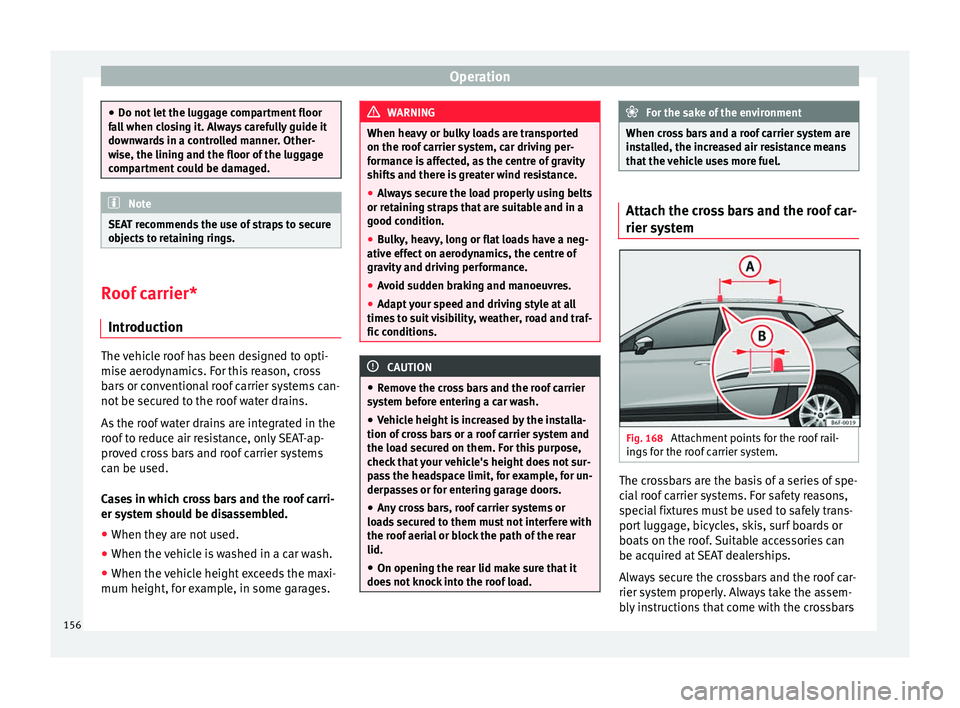
em Fig. 168
Attachment points for the roof rail-
in g
s
for the roof carrier system. The crossbars are the basis of a series of spe-
c
i
al
roof carrier systems. For safety reasons,
special fixtures must be used to safely trans-
port luggage, bicycles, skis, surf boards or
boats on the roof. Suitable accessories can
be acquired at SEAT dealerships.
Always secure the crossbars and the roof car-
rier system properly. Always take the assem-
bly instructions that come with the crossbars
156
Page 159 of 308
Transport and practical equipment
and the roof carrier system in question into
ac c
ou
nt.
The crossbars are assembled on the roof rail-
ings. The distance between cross bars
››› Fig. 168 A should be 75 cm and the dis-
t anc
e betw
een the cross bars and the brack-
ets of the roof railings B should be 5 cm.
WARNING
Incorrect attachment and use of the cross-
bar s
and the roof carrier system may cause
the whole system to detach from the roof and
cause an accident and injuries.
● Always take the manufacturer assembly in-
structions
into account.
● Use only crossbars and the roof carrier sys-
tem when they ar
e in perfect condition and
are properly secured.
● Secure the crossbars and the roof carrier
syst
em properly.
● Check threaded joints and attachments
travel
ling and if necessary tighten them after
you have travelled a short distance. When
making long trips, check the threaded joints
whenever you stop for a rest.
● Always fit the special roof carrier systems
correctly
for wheels, skis and surfboards, etc.
● Do not modify or repair the crossbars or
roof c
arrier system. Note
Always read the assembly instructions that
come w ith the c
rossbars and the roof carrier
system carefully and keep them in the vehi-
cle. Loading the roof carrier system
The load can only be secured if the crossbars
and the roof
c
arrier system are properly in-
stalled ››› .
Max imum authori
sed roof load
The maximum permissible roof load is 75 kg.
This figure comes from the combined weight
of the roof carrier, the cross bars and the load
itself on the roof ››› .
A lw
a
ys check the weight of the roof carrier
system, the cross bars and the weight of the
load to be transported and weigh them if
necessary. Never exceed the maximum au-
thorised roof load.
If you are using cross bars and a roof carrier
with a lower weight rating, you will not be
able to carry the maximum authorised roof
load. In this case, do not exceed the maxi-
mum weight limit for the roof carrier which is
listed in the fitting instructions. Distributing a load
Distrib
ute loads uniformly and secure them
correctly ››› .
Chec k
att
achments
Once the cross bars and roof carrier system
have been installed, check the bolted con-
nections and attachments after a short jour-
ney and subsequently with a certain frequen-
cy. WARNING
Exceeding the maximum authorised roof load
can r e
sult in accidents and considerable vehi-
cle damage.
● Never exceed the maximum authorised
load on the r
oof and on the axles or the vehi-
cle's maximum authorised weight.
● Never exceed the load capacity of the cross
bars
and the roof carrier system, even if the
maximum authorised roof load has not been
reached.
● Secure heavy items as far forward as possi-
ble and di
stribute the vehicle load uniformly. WARNING
If the load is loose or not secured, it could fall
from the r oof
carrier system or cause acci-
dents and injuries.
● Always use belts or retaining straps that
are suit
able and in a good condition.
● Secure the load properly. 157
Technical data
Advice
Operation
Emergencies
Safety
Page 174 of 308
Operation
Opening the driver's door when ex
itin g the
vehicle activates the electronic lock on the
steering column if the ignition is disabled.
Switching the ignition on/off manually
Briefly push the starter button without touch-
ing the brake or clutch pedal ››› .
F or
v
ehicles with both manual and automatic
transmission, the starter button text START ENGINE STOP flashes like a heartbeat
when the sy s
t
em is preset for switching the
ignition on and off.
Automatic ignition switch-off
If the driver leaves the vehicle, taking the ve-
hicle key with them but leaving the ignition
on, the ignition is not switched off automati-
cally. The ignition is switched off automati-
cally by pressing the lock button on the re-
mote control or manually by pressing the
sensor surface on the door lever ››› Fig. 141
Emergency starting function
If no valid key is detected inside the vehicle,
an emergency start-up will be required. The
relevant message will appear in the dash
panel display. This may happen when, for ex-
ample, the battery of the vehicle key button
is very low or flat:
● Immediately after pushing the starter but-
ton, k eep the
vehicle key next to the right trim of the steering column
›››
Fig. 175, as
close as possible to the Kessy logo.
● The ignition connects and the engine starts
automatic
ally.
Emergency disconnection
If the engine does not switch off after briefly
pressing the starter button, an emergency
disconnect will be required:
● Press the starter button twice within 3 sec-
onds or pr
ess it once for more than 1 sec-
ond ››› .
● The engine turns off automatically.
En gine r
e
start feature
If no valid key is detected inside the vehicle
after the engine stops, you will only have 5
seconds to restart it. A warning will display
on the dash panel screen.
After this interval, it will not be possible to
start the engine without a valid key inside
the vehicle.
Automatic deactivation of the ignition on ve-
hicles with the Start-Stop system
The ignition is switched off automatically
when the vehicle is stopped and the auto-
matic engine shutdown is active, if:
● The driver's seat belt is not fastened,
● the driver does not step on any pedal, ●
the driver door is
opened.
After automatically turning off the ignition, if
the dipped beam is on, the side light re-
mains on for approx. 30 minutes (if the bat-
tery is sufficiently charged). If the driver locks
the vehicle or manually turns off the light, the
side light goes out. WARNING
Any accidental movement of the vehicle could
re s
ult in serious injury.
● When switching on the ignition, do not
pre
ss the brake or clutch pedal, otherwise
the engine could start immediately. WARNING
If vehicle keys are used negligently or with-
out due c ar
e, this may cause accidents and
serious injury.
● Never leave any key inside the vehicle
when exitin
g. Otherwise, a child or unauthor-
ised person could lock the vehicle, start the
engine or connect the ignition and, in this
way, operate electronic equipment (e.g. the
windows). Note
● Bef or
e leaving the vehicle, always discon-
nect the ignition manually and, if appropri-
ate, take into account the instructions on the
screen of the dash panel. 172
Page 176 of 308
Operation
Stopping the engine 3 Valid for vehicles: with starter buttonStepSwitch off the engine with the starter
button
››› page 171.
1.Stop the vehicle completely ››› .
2.Press and hold the brake pedal until the step
4 is performed.
3.If you are driving an automatic vehicle, place
the selector lever in position P.
4.Apply the handbrake ››› page 174.
5.
Briefly press the start-up button ››› Fig. 174.
The START ENGINE STOP button blinks again. If
the engine fails to switch off, perform an
emergency disconnect ››› page 172.
6.If the vehicle is equipped with a manual
gearbox, put it into 1st or reverse. WARNING
Never switch off the engine while the vehicle
is mo
ving. This could cause loss of control of
the vehicle, accidents and serious injury.
● The airbags and belt tensioners do not
work when the ignition i
s switched off.
● The brake servo does not work with the en-
gine off. Ther
efore, you need to press the
break pedal harder to brake the vehicle.
● Power steering does not work when the en-
gine is not
running. You need more strength
to steer when the engine is switched off. ●
If the ignition i s
switched off, the steering
column could be locked, making it impossible
to control the vehicle. CAUTION
If the engine is made to work hard for a long
time, it ma
y overheat after being switched
off. To prevent damage to the engine before
switching it off, leave it idle for approx. 2 mi-
nutes in neutral. Note
After switching off the engine, the cooling fan
ma y
continue to operate in the engine com-
partment for a few more minutes, even with
the ignition off. The radiator fan is automati-
cally switched off. “My Beat” Function
For vehicles with a convenience key there is
the “M
y
B
eat” function. This feature provides
an additional indication of the vehicle igni-
tion system.
When accessing the vehicle, e.g. by opening
the doors with the remote control, the START ENGINE STOP button flashes, calling at-
t ention t
o the r
elevant starter system button.
Upon switching the ignition on/off, the light
of the START ENGINE STOP button flashes. With
the en gine sw
it
ched off, after a few seconds, the
STOP ENGINE
START button stops flashing
and g oe
s
out.
With the engine running, the START ENGINE STOP button light stays on, indi-
c atin
g th
at the engine is running. The time
that lapses between the moment the user
starts the engine with the START ENGINE STOP button and the lighting changes from flash-
in
g t
o fi
xed will depend on specific engine
size characteristics. Upon switching the igni-
tion off with the START ENGINE STOP button, it
s t
ar
ts flashing again.
In vehicles with the Start-Stop system , the
“My Beat” function also offers additional in-
formation:
● When the engine stops during the Stop
phase, the light
of the START ENGINE STOP but-
t on s
t
ays on, since, even though the engine
is off, the Start-Stop system is active.
● When the engine cannot be stated again
with the St
art-Stop system, ››› page 196, and
needs to be started manually, the START ENGINE STOP button flashes to indicate
thi s
f
act.
Braking and parking Brakin
g capacity and braking distance The efficiency of the brakes depends directly
on the br
ak
e p
ad wear. This wear depends to
174
Page 198 of 308
Operation
Driver assistance systems
St ar
t
-Stop System*
Related video Fig. 181
Convenience Description and operation
The Start-Stop system helps save fuel and re-
duc
e C
O
2 emi
ssions.
In Start-Stop mode, the engine will automati-
cally switch off when the vehicle stops or is
stopping; for example when stopping at traf-
fic lights. The ignition remains switched on
during the stopping phase. The engine auto-
matically switches back on when required. In
this situation, the light of the START ENGINE STOP button stays on
1)
.
As soon a
s
the ignition is switched on, the
Start-Stop function is automatically activa-
ted. Further information about the Start-Stop sys-
tem can be f
ound in the Easy Connect sys-
tem: by pressing the button in the Vehi-
cle status menu.
B a
s
ic requirements for the Start-Stop mode
● The driver door must be closed.
● The driver must have their seat belt fas-
tened.
● The bonnet mu
st be closed.
● The engine must have reached a minimum
servic
e temperature.
● The reverse gear must not be engaged.
● The vehicle must not be on a very steep
slope. WARNING
● Never sw it
ch the engine off until the vehi-
cle is stationary. The brake servo and power
steering functions will not be completely cov-
ered under warranty. More force may also be
needed to turn the steering wheel or to brake.
As you cannot steer and brake in the normal
manner, there is a greater risk of accidents
and serious injury.
● Never remove the key from the ignition if
the vehic
le is in motion. Otherwise, the steer-
ing could lock making it impossible to steer
the vehicle. ●
To av oid injur
y, make sure that the Start-
Stop system is switched off when working in
the engine compartment ››› page 198. CAUTION
The Start-Stop system must always be
sw itc
hed off when driving through flooded
areas ››› page 198. Stopping/Starting the engine
Vehicles with a manual gearbox
– Before stopping the vehicle or when it is
st
op
ped, put it into neutral and release the
clutch pedal. The engine will switch off. The
warning lamp will appear on the instru-
ment panel display. The engine may stop
before the vehicle comes to a halt in the
deceleration phase (at 7 km/h).
– When the clutch pedal is pressed the en-
gine wil
l start up again. The warning lamp
will switch off.
Vehicles with an automatic gearbox – Use the foot brake to bring the vehicle to a
stop and k
eep the brake pedal pressed
down with your foot. The engine will switch
off. The warning lamp will appear in the1)
Only in vehicles with Keyless Access.
196
Page 216 of 308
Operation
Connecting and activating the ACC
T o c
onnect
and activate the ACC, the position
of the gearbox selector lever, the vehicle
speed and the position of the third level of
the ACC must all be taken into account.
● With a manual gearbox, the gearbox selec-
tor lev
er must be in any gear except first, and
speed must be greater than approximately 30
km/h. With an automatic gearbox, the gear-
box selector lever must be in position D or S.
● To activate the ACC, press the button or
mo
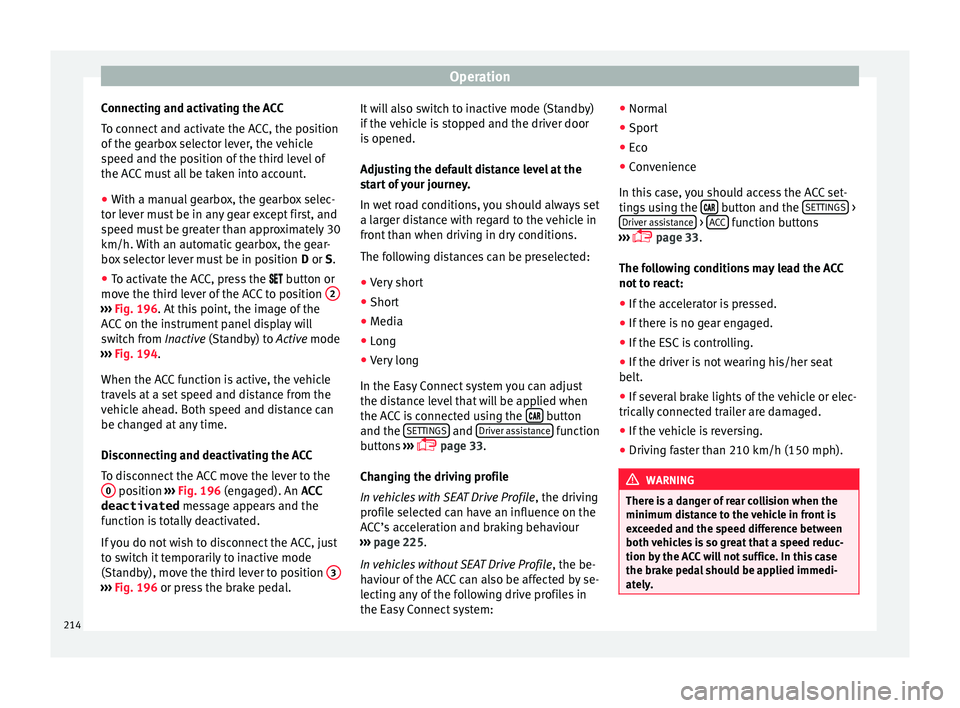
ve the third lever of the ACC to position 2›››
Fig. 196. At thi s
point, the image of the
ACC on the instrument panel display will
switch from Inactive (Standby) to Active mode
››› Fig. 194.
When the ACC function is active, the vehicle
travels at a set speed and distance from the
vehicle ahead. Both speed and distance can
be changed at any time.
Disconnecting and deactivating the ACC
To disconnect the ACC move the lever to the 0 position
››
› Fig. 196
(engaged). An ACC
deactivated message appears and the
function is totally deactivated.
If you do not wish to disconnect the ACC, just
to switch it temporarily to inactive mode
(Standby), move the third lever to position 3›››
Fig. 196 or pre s
s the brake pedal. It will also switch to inactive mode (Standby)
if the
v
ehicle is stopped and the driver door
is opened.
Adjusting the default distance level at the
start of your journey.
In wet road conditions, you should always set
a larger distance with regard to the vehicle in
front than when driving in dry conditions.
The following distances can be preselected:
● Very short
● Short
● Media
● Long
● Very long
In the Easy
Connect system you can adjust
the distance level that will be applied when
the ACC is connected using the button
and the S
ET
TINGS and
Driv
er a
s
sistance function
b utt
on
s ›››
page 33.
Changing the driving profile
In vehicles with SEAT Drive Profile , the driving
profile selected can have an influence on the
ACC’s acceleration and braking behaviour
››› page 225.
In vehicles without SEAT Drive Profile , the be-
haviour of the ACC can also be affected by se-
lecting any of the following drive profiles in
the Easy Connect system: ●
Normal
● Spor
t
● Eco
● Convenience
In this c
ase, you should access the ACC set-
tings using the button and the
S
ET
TINGS >
Driv er a
s
sistance >
A
C
C function buttons
› ›
›
page 33.
The following conditions may lead the ACC
not to react:
● If the accelerator is pressed.
● If there is no gear engaged.
● If the ESC is controlling.
● If the driver is not wearing his/her seat
belt.
● If sev
eral brake lights of the vehicle or elec-
trically
connected trailer are damaged.
● If the vehicle is reversing.
● Driving faster than 210 km/h (150 mph). WARNING
There is a danger of rear collision when the
minimum dis t
ance to the vehicle in front is
exceeded and the speed difference between
both vehicles is so great that a speed reduc-
tion by the ACC will not suffice. In this case
the brake pedal should be applied immedi-
ately. 214
Page 230 of 308
Operation
making a calculation of tiredness. This is
c on
s
tantly compared with the current driving
behaviour. If the system detects that the driv-
er is tired, an audible warning is given with a
sound and an optic warning is shown with a
symbol and complementary message on the
instrument panel display ››› Fig. 208. The
message on the instrument panel display is
shown for approximately 5 seconds, and de-
pending on the case, is repeated. The system
stores the last message displayed.
The message on the instrument panel display
can be switched off by pressing the button on the windscreen wiper lever or the
b
utt
on on the multi function steering
wheel
›
›
› page 35.
The message can be recalled to the instru-
ment panel display using the multifunction
display ›››
page 35.
Conditions of operation
Driving behaviour is only calculated on
speeds above about 65 km/h (40 mph) up to
around 200 km/h (125 mph).
Switching on and off
Fatigue detection can be activated or deacti-
vated in the Easy Connect system with the button and the
S
ET
TINGS function button
› ›
›
page 118. A mark indicates that the ad-
justment has been activated. System limitations
The Fatigue detection h
as certain limitations
inherent to the system. The following condi-
tions can limit the Fatigue detection or pre-
vent it from functioning.
● At speeds below 65 km/h (40 mph)
● At speeds above 200 km/h (125 mph)
● When cornering
● On roads in poor condition
● In unfavourable weather conditions
● When a sporty driving style is employed
● In the event of a serious distraction to the
driver
Fatigue det
ection will be restored when the
vehicle is stopped for more than 15 minutes,
when the ignition is switched off or when the
driver has unbuckled their seat belt and
opened the door.
In the event of slow driving during a long pe-
riod of time (below 65 km/h, 40 mph) the
system automatically re-establishes the tired-
ness calculation. When driving at a faster
speed the driving behaviour will be recalcula-
ted. Park Assist*
Introduction The Park Assist system is an additional func-
tion of P
arkPi
lot ››› page 236 and helps the
driver to:
● find a suitable parking space,
● select a parking mode,
● park driving in reverse in suitable perpen-
dicul
ar and parallel spaces,
● park driving forwards in suitable perpen-
dicu l
ar spaces,
● exit a parking space driving forwards from
a paral
lel space.
In vehicles with a Park Assist system and fac-
tory radio the front, rear and side areas are
represented, and the position of obstacles is
shown relative to the vehicle.
The Park Assist system is subject to certain
limitations inherent to the system and its use
requires special attention by the driver ››› .
WARNING
The smart technology incorporated into the
Park As
sist system cannot overcome the lim-
its imposed by the laws of physics; it only
works within the limits of the system. The
greater convenience provided by Park Assist
should never tempt you to take any risk that 228
Page 266 of 308
Advice
●
To av oid d
amage, stubborn stains should
be removed by a specialised workshop. Cleaning Alcantara upholstery*
Removing dust and dirt
– Moisten a cloth just a lit
tle and wipe down
the seat covers.
Removing stains – Moisten a cloth with lukewarm water or di-
luted whit
e spirits.
– Dab at the stain. Start at the outside and
work in
wards.
– Dry the clean area with a soft cloth.
Do not use l
eather cleaning products on Al-
cantara seat covers.
You may use a suitable soap on dust and dirt.
Dust and grit in the pores and seams can
scratch and damage the surface. If the car is
left standing in the sun for long periods, Al-
cantara leather should be protected against
direct sunlight to prevent it from fading. How-
ever, slight colour variations will arise in nor-
mal use. CAUTION
● Do not u se so
lvents, wax polish, shoe
cream, stain removers, leather cleaning prod-
ucts or any similar products on Alcantara.
● To avoid damage, stubborn stains should
be remov
ed by a specialised workshop.
● On no account use brushes, hard sponges
or simil
ar utensils. Seat belt cleaning
A dirty belt may not work properly. Check all
se
at
belts
regularly and keep them clean.
Seat belts cleaning
– Pull the dirty seat belt right out and unroll
it.
– Cl
ean dirty seat belts with a gentle so
ap
solution.
– Allow it to dry.
– Do not roll the seat belt up until it is dry.
If lar
ge stains form on the belts, the automat-
ic belt retractor will not work correctly. WARNING
● Do not u se c
hemical cleaning agents on the
seat belts, as this can impair the strength of
the webbing. Ensure that seat belts do not
come into contact with corrosive fluids. ●
Check the c
ondition of the seat belts at reg-
ular intervals. If you notice that the belt web-
bing, fittings, retractor mechanism or buckle
of any of the belts is damaged, the belt must
be replaced by a specialised workshop.
● Do not attempt to repair a damaged seat
belt y
ourself. The seat belts must not be re-
moved or modified in any way. CAUTION
After cleaning, allow seat belts to dry com-
p let
ely before rolling them up. Otherwise, the
belt retractors could become damaged. 264