cruise control Seat Arona 2017 Owner's Manual
[x] Cancel search | Manufacturer: SEAT, Model Year: 2017, Model line: Arona, Model: Seat Arona 2017Pages: 308, PDF Size: 6.66 MB
Page 5 of 308
Convenience: Kessy keyless access and starting system, Full LED (+ Vision Pack): Full LED + Welcome light + LED day-
time running lights + Lights sensor + LED interior lighting.››› page 129
››› page 140
››› page 142
››› page 196
Technology: SEAT Navi System Plus 8” + Full Link / + Wireless charger in centre console + / Kessy keyless access and
starting system.››› page 123
››› page 129
››› Booklet Navigation system
Safety: Adaptive cruise control + City Safety Assist with pedestrian monitoring, fatigue detector, Hill driving assistant
includes on-board computer and rear view camera.››› page 182
››› page 209
››› page 227
››› page 242
Page 7 of 308
Table of Contents
Table of Contents
The e s
senti
als . . . . . . . . . . . . . . . . . . . . . . . . 7
Exterior view . . . . . . . . . . . . . . . . . . . . . . . . . . . . 7
Exterior view . . . . . . . . . . . . . . . . . . . . . . . . . . . . 8
Driver-side general instrument panel (left-
hand drive) . . . . . . . . . . . . . . . . . . . . . . . . . . . . .
9
Driver-side general instrument panel (right-
hand drive) . . . . . . . . . . . . . . . . . . . . . . . . . . . . .
10
Centre console . . . . . . . . . . . . . . . . . . . . . . . . . . 11
Passenger-side general instrument panel (left-
hand drive) . . . . . . . . . . . . . . . . . . . . . . . . . . . . .
12
Passenger-side general instrument panel
(right-hand driv
e) . . . . . . . . . . . . . . . . . . . . . . . . 13
Interior view . . . . . . . . . . . . . . . . . . . . . . . . . . . . 14
How it works . . . . . . . . . . . . . . . . . . . . . . . . . . . . 15
Opening and closing . . . . . . . . . . . . . . . . . . . . . 15
Before driving . . . . . . . . . . . . . . . . . . . . . . . . . . . 18
Airbags . . . . . . . . . . . . . . . . . . . . . . . . . . . . . . . . 20
Child seats . . . . . . . . . . . . . . . . . . . . . . . . . . . . . 23
Starting the vehicle . . . . . . . . . . . . . . . . . . . . . . 30
Lights and visibility . . . . . . . . . . . . . . . . . . . . . . 30
Easy Connect . . . . . . . . . . . . . . . . . . . . . . . . . . . 33
Driver information system . . . . . . . . . . . . . . . . . 35
Status display . . . . . . . . . . . . . . . . . . . . . . . . . . . 38
Cruise control . . . . . . . . . . . . . . . . . . . . . . . . . . . 42
Warning lamps . . . . . . . . . . . . . . . . . . . . . . . . . . 44
Gearbox lever . . . . . . . . . . . . . . . . . . . . . . . . . . . 47
Air conditioning . . . . . . . . . . . . . . . . . . . . . . . . . 48
Fluid Level control . . . . . . . . . . . . . . . . . . . . . . . 54
Emergencies . . . . . . . . . . . . . . . . . . . . . . . . . . . . 58
Fuses . . . . . . . . . . . . . . . . . . . . . . . . . . . . . . . . . . 58
Bulbs . . . . . . . . . . . . . . . . . . . . . . . . . . . . . . . . . . 59
Action in the event of a puncture . . . . . . . . . . . 60
Changing a wheel . . . . . . . . . . . . . . . . . . . . . . . 61
Snow chains . . . . . . . . . . . . . . . . . . . . . . . . . . . . 66
Emergency towing of the vehicle . . . . . . . . . . . 66 How to jump start . . . . . . . . . . . . . . . . . . . . . . . . 67
Changing the windscreen wiper blades . . . . . . 69
Safety . . . . . . . . . . . . . . . . . . . . . . . . . . . . . . . . 71
Safe driving . . . . . . . . . . . . . . . . . . . . . . . . . . . . 71
Safety first! . . . . . . . . . . . . . . . . . . . . . . . . . . . . . 71
Advice about driving . . . . . . . . . . . . . . . . . . . . . 71
Correct position for passengers . . . . . . . . . . . . 72
Pedal area . . . . . . . . . . . . . . . . . . . . . . . . . . . . . . 76
Seat belts . . . . . . . . . . . . . . . . . . . . . . . . . . . . . . 77
Why wear a seat belt? . . . . . . . . . . . . . . . . . . . . 77
How to properly adjust your seatbelt . . . . . . . . 80
Belt pretensioners* . . . . . . . . . . . . . . . . . . . . . . 81
Airbag system . . . . . . . . . . . . . . . . . . . . . . . . . . 82
Brief introduction . . . . . . . . . . . . . . . . . . . . . . . . 82
Airbag safety instructions . . . . . . . . . . . . . . . . . 84
Deactivating airbags . . . . . . . . . . . . . . . . . . . . . 86
Transporting children safely . . . . . . . . . . . . . . . 88
Safety for children . . . . . . . . . . . . . . . . . . . . . . . 88
Child seats . . . . . . . . . . . . . . . . . . . . . . . . . . . . . 89
Event Data Recorder . . . . . . . . . . . . . . . . . . . . . . 92
Description and operation . . . . . . . . . . . . . . . . . 92
Emergencies . . . . . . . . . . . . . . . . . . . . . . . . . . 93
Self-help . . . . . . . . . . . . . . . . . . . . . . . . . . . . . . . 93
Emergency equipment . . . . . . . . . . . . . . . . . . . . 93
Tyre repair . . . . . . . . . . . . . . . . . . . . . . . . . . . . . . 94
Changing the windscreen wiper blades . . . . . . 96
Towing or tow-starting . . . . . . . . . . . . . . . . . . . . 96
Fuses and bulbs . . . . . . . . . . . . . . . . . . . . . . . . . 100
Fuses . . . . . . . . . . . . . . . . . . . . . . . . . . . . . . . . . . 100
Changing bulbs . . . . . . . . . . . . . . . . . . . . . . . . . 102
Change the front bulbs . . . . . . . . . . . . . . . . . . . 103
Change the rear bulbs . . . . . . . . . . . . . . . . . . . . 105
Changing the interior bulbs . . . . . . . . . . . . . . . . 107
Operation . . . . . . . . . . . . . . . . . . . . . . . . . . . . . 111
Controls and displays . . . . . . . . . . . . . . . . . . . . 111
General instrument panel . . . . . . . . . . . . . . . . . 110 Instruments and warning/control lamps
. . . . . 113
Instruments . . . . . . . . . . . . . . . . . . . . . . . . . . . . 113
Warning and control lamps . . . . . . . . . . . . . . . . 117
Introduction to the Easy Connect system* . . . . 118
System settings (CAR)* . . . . . . . . . . . . . . . . . . . 118
Communications and multimedia . . . . . . . . . . . 119
Steering wheel controls* . . . . . . . . . . . . . . . . . . 119
Multimedia . . . . . . . . . . . . . . . . . . . . . . . . . . . . . 123
Opening and closing . . . . . . . . . . . . . . . . . . . . . 124
Keys . . . . . . . . . . . . . . . . . . . . . . . . . . . . . . . . . . . 124
Central locking system . . . . . . . . . . . . . . . . . . . . 126
Anti-theft alarm* . . . . . . . . . . . . . . . . . . . . . . . . 132
Boot hatch . . . . . . . . . . . . . . . . . . . . . . . . . . . . . 135
Electric windows . . . . . . . . . . . . . . . . . . . . . . . . . 135
Lights and visibility . . . . . . . . . . . . . . . . . . . . . . 137
Lights . . . . . . . . . . . . . . . . . . . . . . . . . . . . . . . . . 137
Interior lights . . . . . . . . . . . . . . . . . . . . . . . . . . . 142
Visibility . . . . . . . . . . . . . . . . . . . . . . . . . . . . . . . 143
Windscreen wiper and rear window wiper sys-
tems . . . . . . . . . . . . . . . . . . . . . . . . . . . . . . . . . . 143 R
ear view mirrors . . . . . . . . . . . . . . . . . . . . . . . . 144
Seats and head restraints . . . . . . . . . . . . . . . . . 146
Adjusting the seat and head restraints . . . . . . 146
Seat functions . . . . . . . . . . . . . . . . . . . . . . . . . . 147
Transport and practical equipment . . . . . . . . . 150
Practical equipment . . . . . . . . . . . . . . . . . . . . . . 150
Luggage compartment . . . . . . . . . . . . . . . . . . . . 152
Roof carrier* . . . . . . . . . . . . . . . . . . . . . . . . . . . . 156
Air conditioning . . . . . . . . . . . . . . . . . . . . . . . . . 158
Heating, ventilation and cooling . . . . . . . . . . . . 158
Heating and fresh air . . . . . . . . . . . . . . . . . . . . . 161
Manual air conditioning* . . . . . . . . . . . . . . . . . . 163
Climatronic* . . . . . . . . . . . . . . . . . . . . . . . . . . . . 165
Driving . . . . . . . . . . . . . . . . . . . . . . . . . . . . . . . . 167
Address . . . . . . . . . . . . . . . . . . . . . . . . . . . . . . . . 167
Starting and stopping the engine . . . . . . . . . . . 168
Braking and parking . . . . . . . . . . . . . . . . . . . . . 174
Braking and stability systems . . . . . . . . . . . . . . 177 5
Page 8 of 308
Table of Contents
Manual gearbox . . . . . . . . . . . . . . . . . . . . . . . . . 183
Automatic gearbox/DSG automatic gear-
bo x*
. . . . . . . . . . . . . . . . . . . . . . . . . . . . . . . . . . . 183
Ge
ar-change indicator . . . . . . . . . . . . . . . . . . . . 190
Run-in and economical driving . . . . . . . . . . . . . 191
Engine management and exhaust gas purifica-
tion syst
em . . . . . . . . . . . . . . . . . . . . . . . . . . . . . 193
Driving tips . . . . . . . . . . . . . . . . . . . . . . . . . . . . . 195
Driver assistance systems . . . . . . . . . . . . . . . . . 196
Start-Stop System* . . . . . . . . . . . . . . . . . . . . . . . 196
Cruise control system (CCS)* . . . . . . . . . . . . . . . 198
Speed limiter . . . . . . . . . . . . . . . . . . . . . . . . . . . 200
Area monitoring system (Front Assist) includ-
ing City
emergency braking and pedestrian
monitoring* . . . . . . . . . . . . . . . . . . . . . . . . . . . . 203
Adaptive Cruise Control ACC* . . . . . . . . . . . . . . 209
Blind spot detector (BSD) with parking assis-
tance (RCT
A)* . . . . . . . . . . . . . . . . . . . . . . . . . . . 220
SEAT Drive Profile* . . . . . . . . . . . . . . . . . . . . . . . 225
Fatigue detection (break recommendation)* . . 227
Park Assist* . . . . . . . . . . . . . . . . . . . . . . . . . . . . 228
Parking aid . . . . . . . . . . . . . . . . . . . . . . . . . . . . . 236
Rear Assist “Rear View Camera”* . . . . . . . . . . . 242
Towing bracket device . . . . . . . . . . . . . . . . . . . . 245
Towing bracket device* . . . . . . . . . . . . . . . . . . . 245
Trailer towing . . . . . . . . . . . . . . . . . . . . . . . . . . . 250
Advice . . . . . . . . . . . . . . . . . . . . . . . . . . . . . . . . 255
Care and maintenance . . . . . . . . . . . . . . . . . . . . 255
Accessories and modifications to the vehi-
cle
. . . . . . . . . . . . . . . . . . . . . . . . . . . . . . . . . . . . 255
Care and cleaning . . . . . . . . . . . . . . . . . . . . . . . 256
Care of the vehicle exterior . . . . . . . . . . . . . . . . 257
Caring for the vehicle interior . . . . . . . . . . . . . . 262
Checking and refilling levels . . . . . . . . . . . . . . . 265
Refuelling . . . . . . . . . . . . . . . . . . . . . . . . . . . . . . 265
Fuel . . . . . . . . . . . . . . . . . . . . . . . . . . . . . . . . . . . 265
Working in the engine compartment . . . . . . . . 267 Engine oil . . . . . . . . . . . . . . . . . . . . . . . . . . . . . . 270
Cooling system . . . . . . . . . . . . . . . . . . . . . . . . . . 273
Brake fluid . . . . . . . . . . . . . . . . . . . . . . . . . . . . . 275
Windscreen washer reservoir . . . . . . . . . . . . . . 276
Vehicle battery . . . . . . . . . . . . . . . . . . . . . . . . . . 276
Wheels
. . . . . . . . . . . . . . . . . . . . . . . . . . . . . . . . 278
Wheels and tyres . . . . . . . . . . . . . . . . . . . . . . . . 278
Spare wheel (temporary spare wheel)* . . . . . . 283
Winter service . . . . . . . . . . . . . . . . . . . . . . . . . . . 284
Technical data . . . . . . . . . . . . . . . . . . . . . . . . 285
Technical specifications . . . . . . . . . . . . . . . . . . 285
Important information . . . . . . . . . . . . . . . . . . . . 285
Information on fuel consumption . . . . . . . . . . . 286
Trailer mode . . . . . . . . . . . . . . . . . . . . . . . . . . . . 286
Wheels . . . . . . . . . . . . . . . . . . . . . . . . . . . . . . . . 287
Engine data . . . . . . . . . . . . . . . . . . . . . . . . . . . . . 288
Dimensions . . . . . . . . . . . . . . . . . . . . . . . . . . . . . 290
Index . . . . . . . . . . . . . . . . . . . . . . . . . . . . . . . . . 293
6
Page 36 of 308
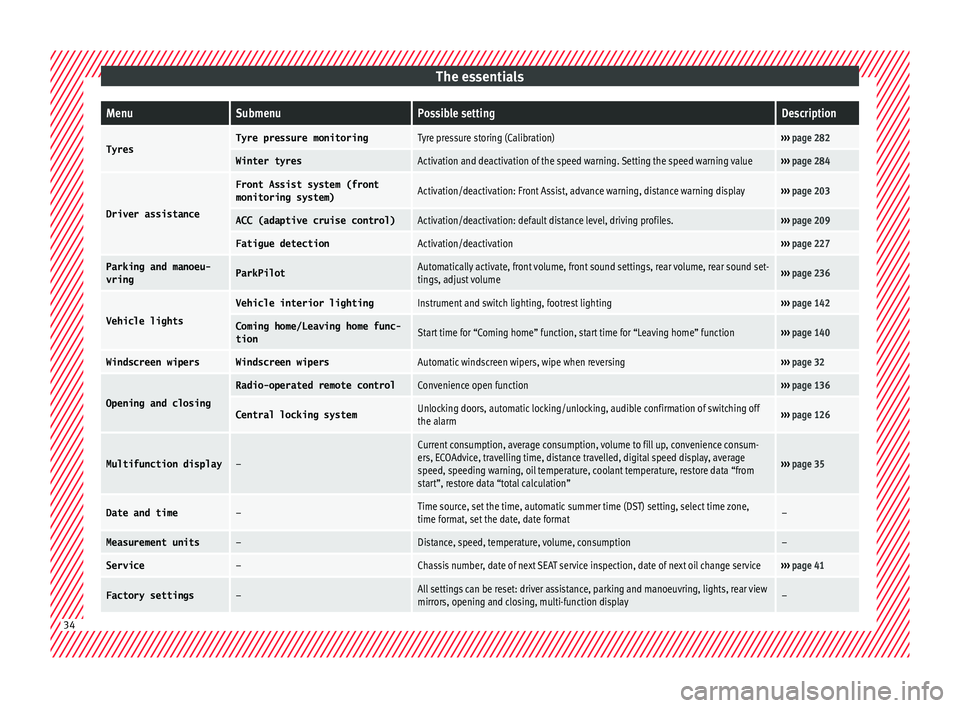
The essentialsMenuSubmenuPossible settingDescription
TyresTyre pressure monitoringTyre pressure storing (Calibration)›››
page 282
Winter tyresActivation and deactivation of the speed warning. Setting the speed warning value››› page 284
Driver assistance
Front Assist system (front
monitoring system)Activation/deactivation: Front Assist, advance warning, distance warning display››› page 203
ACC (adaptive cruise control)Activation/deactivation: default distance level, driving profiles.››› page 209
Fatigue detectionActivation/deactivation››› page 227
Parking and manoeu-
vringParkPilotAutomatically activate, front volume, front sound settings, rear volume, rear sound set-
tings, adjust volume››› page 236
Vehicle lights
Vehicle interior lightingInstrument and switch lighting, footrest lighting››› page 142
Coming home/Leaving home func‐
tionStart time for “Coming home” function, start time for “Leaving home” function››› page 140
Windscreen wipersWindscreen wipersAutomatic windscreen wipers, wipe when reversing››› page 32
Opening and closing
Radio-operated remote controlConvenience open function››› page 136
Central locking systemUnlocking doors, automatic locking/unlocking, audible confirmation of switching off
the alarm››› page 126
Multifunction display–
Current consumption, average consumption, volume to fill up, convenience consum-
ers, ECOAdvice, travelling time, distance travelled, digital speed display, average
speed, speeding warning, oil temperature, coolant temperature, restore data “from
start”, restore data “total calculation”
››› page 35
Date and time–Time source, set the time, automatic summer time (DST) setting, select time zone,
time format, set the date, date format–
Measurement units–Distance, speed, temperature, volume, consumption–
Service–Chassis number, date of next SEAT service inspection, date of next oil change service››› page 41
Factory settings–All settings can be reset: driver assistance, parking and manoeuvring, lights, rear view
mirrors, opening and closing, multi-function display– 34
Page 40 of 308
The essentialsMenuFunction
Digital dis-
play of speedCurrent speed displayed in digital
format.
Speed warning
at --- km/h or
Speed warning
at --- mphIf the stored speed is exceeded
(between 30 - 250 km/h, or 19 -
155 mph), an audible warning is
given together with a visual warn-
ing.
Oil tempera-
tureUpdated engine oil temperature
digital display
Coolant tem-
perature gaugeDigital display of the current tem-
perature of the liquid coolant. Storing a speed with the speed warning
● Select the display Speed warning at
--- km/h (---
mph)
● Press the button
on the windscreen
w iper l
ev
er or the button on the multifunc-
tion s t
eerin
g wheel to store the current speed
and activate the warning.
● To switch system on: adjust to the desired
speed within 5 sec
onds using the rocker
switch on the windscreen wiper lever or
b y
t
urning the thumbwheel on the multifunc-
tion steering wheel. Next, press the button or
again or wait several seconds.
The s peed i
s
stored and the warning activa-
ted.
● To switch system off: press the but-
ton or
. The stored speed is de-
l et
ed. Assist systems menu
MenuFunction
ACCDisplay of Adaptive Cruise Control
(ACC)
››› page 209.
Front AssistSwitching the monitoring system
on and off ››› page 203.
Fatigue detec-
tion *Switching the fatigue detection
on or off (pause recommenda-
tion) ››› page 227. Status display
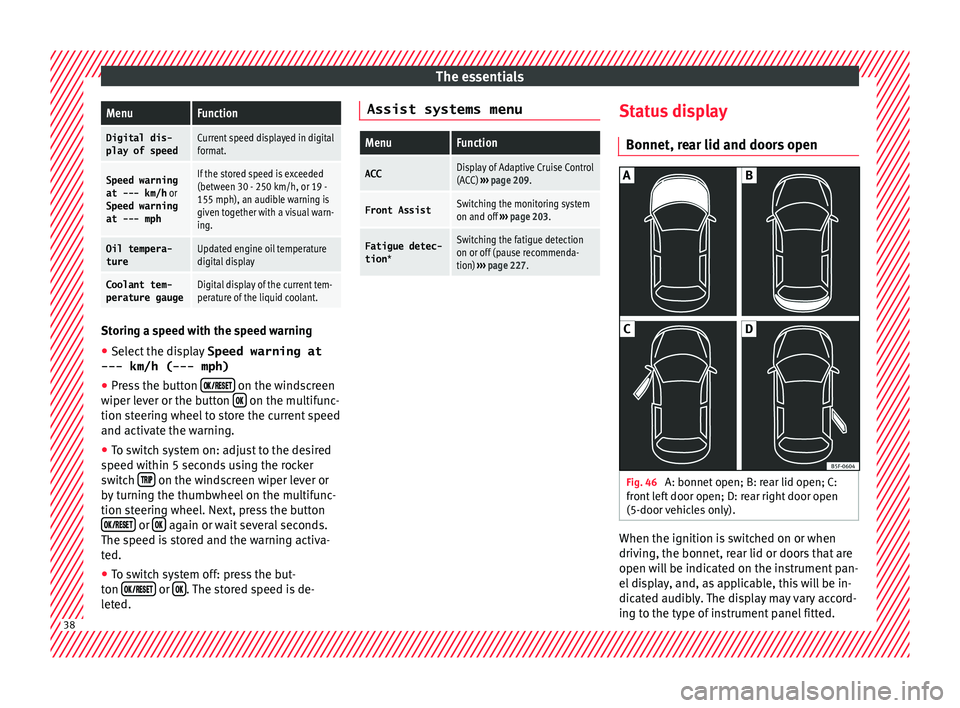
Bonnet, r e
ar lid and door
s open Fig. 46
A: bonnet open; B: rear lid open; C:
fr ont
l
eft door open; D: rear right door open
(5-door vehicles only). When the ignition is switched on or when
driv
in
g, the bonnet, r
ear lid or doors that are
open will be indicated on the instrument pan-
el display, and, as applicable, this will be in-
dicated audibly. The display may vary accord-
ing to the type of instrument panel fitted. 38
Page 44 of 308
The essentials
Service due
When the ser v
ic
e date is due, an audible
warning is given when the ignition is switch-
ed on and the spanner displayed on the
screen flashes for a few seconds .
Vehicles with text messages : Service now
will be shown on the instrument panel dis-
play.
Reading a service notification
With the ignition switched on, the engine off
and the vehicle at a standstill, the current
service notification can be read:
Press and hold the button 2 for more than 5
sec ond
s
to consult the service message.
When the service date has passed , a minus
sign is displayed in front of the number of kil-
ometres or days.
Vehicles with text messages : the following
message is displayed: Service --- km
(miles) or --- days ago .
The time can also be set via the button
and the S
ET
TINGS function button in the Easy
C onnect
sy
stem ››› page 33. Resetting service interval display
If the serv
ice was not carried out by a SEAT
dealership, the display can be reset as fol-
lows:
● Switch off the ignition, press and hold but-
ton 2 .
● Switch ignition back on.
● Release the 2 button and press it again
f or the ne
xt
20 seconds. Note
● The serv ic
e message disappears after a few
seconds, when the engine is started or when OK/RESET is pressed on the windscreen wiper
lev er
, or OK on the multifunction steering
wheel.
● In v
ehicles with the LongLife system in
which the batt
ery has been disconnected for
a long period of time, it is not possible to cal-
culate the date of the next service. Therefore
the service interval display may not be cor- rect. In this case, bear in mind the maximum
service intervals permitted in the ››› Book-
let Maintenance Programme. ●
If y
ou reset the display manually, the next
service interval will be indicated as in vehi-
cles with fixed service intervals. For this rea-
son we recommend that the service interval
display be reset by a SEAT authorised Dealer. Cruise control
Rel at
ed video Fig. 49
Dash panel42
Page 45 of 308
The essentials
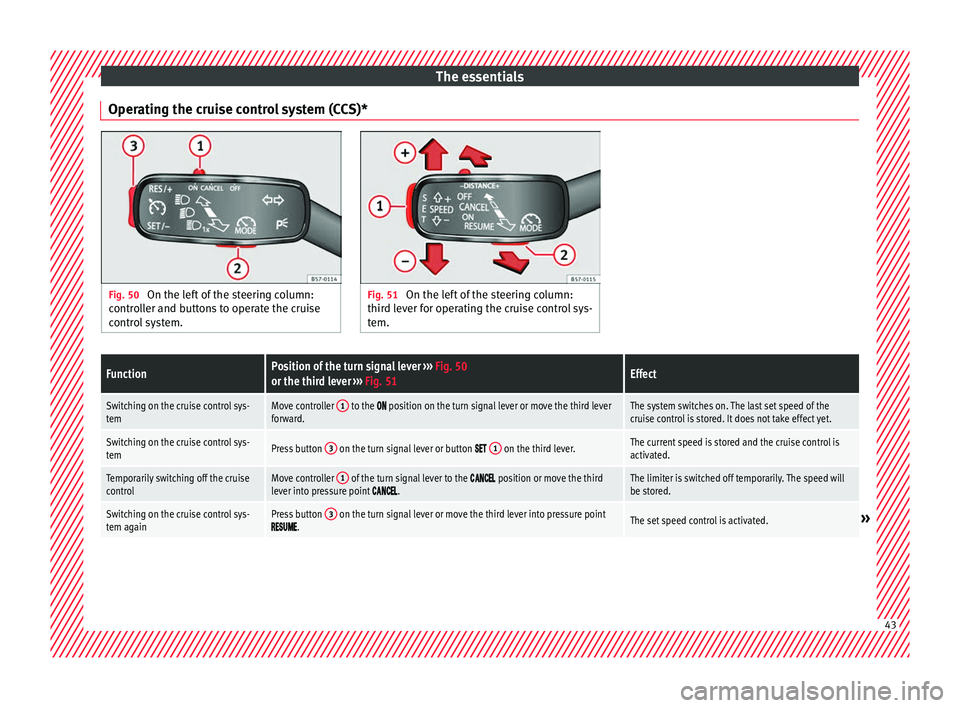
Operating the cruise control system (CCS)* Fig. 50
On the left of the steering column:
contr o
ller and buttons to operate the cruise
control system. Fig. 51
On the left of the steering column:
third l ev
er for operating the cruise control sys-
tem.
FunctionPosition of the turn signal lever ››› Fig. 50
or the third lever ››› Fig. 51Effect
Switching on the cruise control sys-
temMove controller 1 to the position on the turn signal lever or move the third lever
forward.The system switches on. The last set speed of the
cruise control is stored. It does not take effect yet.
Switching on the cruise control sys-
temPress button 3 on the turn signal lever or button 1 on the third lever.The current speed is stored and the cruise control is
activated.
Temporarily switching off the cruise
controlMove controller 1 of the turn signal lever to the position or move the third
lever into pressure point .The limiter is switched off temporarily. The speed will
be stored.
Switching on the cruise control sys-
tem againPress button 3 on the turn signal lever or move the third lever into pressure point.The set speed control is activated.» 43
Page 46 of 308
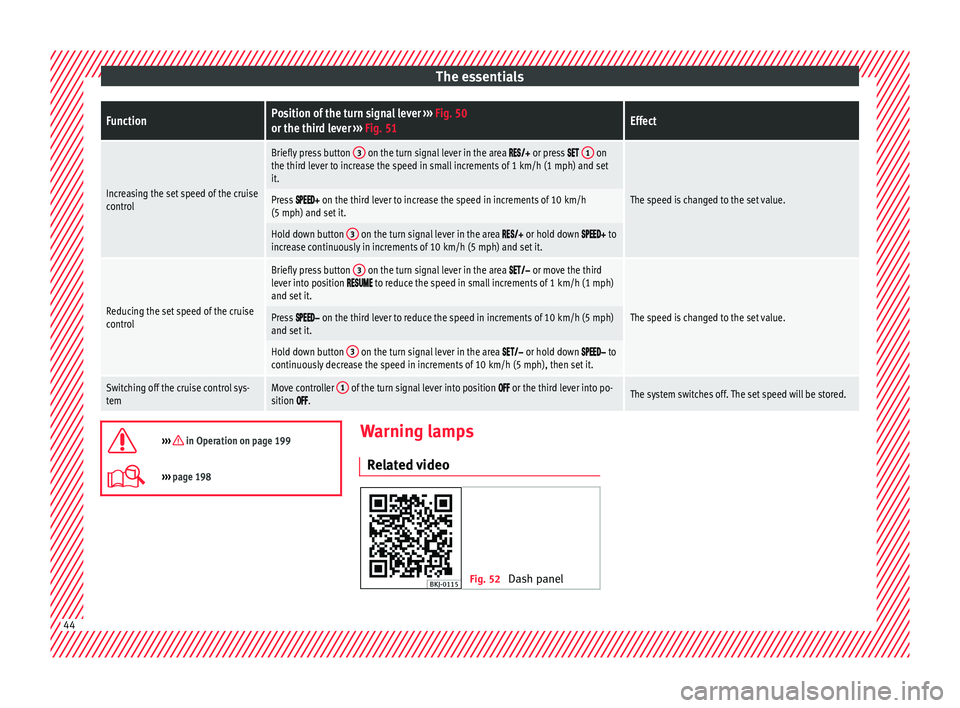
The essentialsFunctionPosition of the turn signal lever
››› Fig. 50
or the third lever ››› Fig. 51Effect
Increasing the set speed of the cruise
control
Briefly press button 3 on the turn signal lever in the area or press 1 on
the third lever to increase the speed in small increments of 1 km/h (1 mph) and set
it.
The speed is changed to the set value.Press on the third lever to increase the speed in increments of 10 km/h
(5 mph) and set it.
Hold down button 3 on the turn signal lever in the area or hold down to
increase continuously in increments of 10 km/h (5 mph) and set it.
Reducing the set speed of the cruise
control
Briefly press button 3 on the turn signal lever in the area or move the third
lever into position to reduce the speed in small increments of 1 km/h (1 mph)
and set it.
The speed is changed to the set value.Press on the third lever to reduce the speed in increments of 10 km/h (5 mph)
and set it.
Hold down button 3 on the turn signal lever in the area or hold down to
continuously decrease the speed in increments of 10 km/h (5 mph), then set it.
Switching off the cruise control sys-
temMove controller 1 of the turn signal lever into position or the third lever into po-
sition .The system switches off. The set speed will be stored.
››› in Operation on page 199
›››
page 198 Warning lamps
R el at
ed video Fig. 52
Dash panel44
Page 48 of 308
The essentials
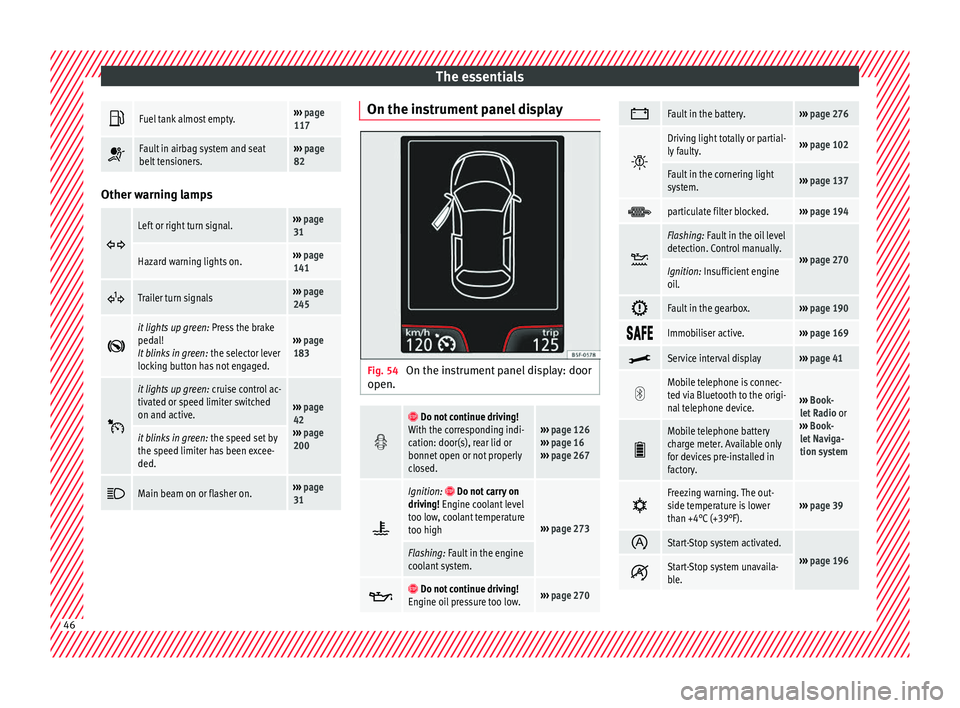
Fuel tank almost empty.›››
page
117
Fault in airbag system and seat
belt tensioners.›››
page
82 Other warning lamps
Left or right turn signal.›››
page
31
Hazard warning lights on.››› page
141
Trailer turn signals›››
page
245
it lights up green:
Press the brake
pedal!
It blinks in green: the selector lever
locking button has not engaged.››› page
183
it lights up green:
cruise control ac-
tivated or speed limiter switched
on and active.
››› page
42
››› page
200
it blinks in green: the speed set by
the speed limiter has been excee-
ded.
Main beam on or flasher on.›››
page
31 On the instrument panel display
Fig. 54
On the instrument panel display: door
open.
Do not continue driving!
With the corresponding indi-
cation: door(s), rear lid or
bonnet open or not properly
closed.››› page 126
››› page 16
››› page 267
Ignition: Do not carry on
driving! Engine coolant level
too low, coolant temperature
too high
››› page 273
Flashing: Fault in the engine
coolant system.
Do not continue driving!
Engine oil pressure too low.››› page 270
Fault in the battery.›››
page 276
Driving light totally or partial-
ly faulty.›››
page 102
Fault in the cornering light
system.››› page 137
particulate filter blocked.›››
page 194
Flashing: Fault in the oil level
detection. Control manually.
›››
page 270Ignition: Insufficient engine
oil.
Fault in the gearbox.›››
page 190
Immobiliser active.›››
page 169
Service interval display›››
page 41
Mobile telephone is connec-
ted via Bluetooth to the origi-
nal telephone device.
›››
Book-
let Radio or
››› Book-
let Naviga-
tion system
Mobile telephone battery
charge meter. Available only
for devices pre-installed in
factory.
Freezing warning. The out-
side temperature is lower
than +4°C (+39°F).›››
page 39
Start-Stop system activated.
›››
page 196 Start-Stop system unavaila-
ble.
46
Page 94 of 308
Safety
Event Data Recorder D e
s
cription and operation Your vehicle has an event data recorder
(EDR).
The EDR’s f
u
nction is to record data in the
event of a mild or serious accident. These da-
ta are used to support the analysis of how
different vehicle systems behaved.
The EDR records, over a reduced time range
(normally 10 seconds or less), dynamic driv-
ing data and data from the restraint systems,
such as:
● How different vehicle systems worked.
● Whether the driver and the occupants were
we arin
g their seatbelts.
● How hard the acceleration or brake pedal
was
pressed.
● Vehicle speed.
These dat
a will provide a better understand-
ing of the circumstances of the accident.
Data from the driving assist systems are also
recorded. This includes data such as whether
the systems were inactive or active and if
such action had an impact on the vehicle’s
dynamic behaviour, changing its path in the
aforementioned situations, accelerating or
decelerating the vehicle. Depending on vehicle equipment, this in-
cludes
data from systems such as:
● Adaptive Cruise Control (ACC)
● Front Assist.
● Park Pilot system
The EDR data ar
e only recorded in specific ac-
cident situations. No data are recorded in
normal driving conditions.
No audio or video data inside or around the
vehicle are recorded. Under no circumstances
are personal data such as name, age, or gen-
der recorded. Nevertheless, third parties
(such as criminal proceedings authorities)
may relate the contents of the EDR data to
other data sources and create a personal ref-
erence in the context of an accident investi-
gation.
In order to read the EDR data it is necessary
to access (if legally permitted to do so) the
vehicle's ODB (“On-Board-Diagnose”) inter-
face while the vehicle is switched on.
SEAT will not have access to EDR data unless
the owner (or, in “Leasing” cases, the lessee
or hirer) gives their consent. There may be ex-
ceptions to this, depending on legal or con-
tractual provisions.
Due to legal requirements in safety-related
products, SEAT may use the EDR data for field
research and in order to improve vehicle sys-
tem quality. Any data used for the purposes of research will be treated anonymously (in
other word
s, no reference will be made to the
vehicle, their owner or the lessee/hirer).
92