brake light Seat Ateca 2017 User Guide
[x] Cancel search | Manufacturer: SEAT, Model Year: 2017, Model line: Ateca, Model: Seat Ateca 2017Pages: 328, PDF Size: 6.36 MB
Page 98 of 328
Emergencies
Fig. 107
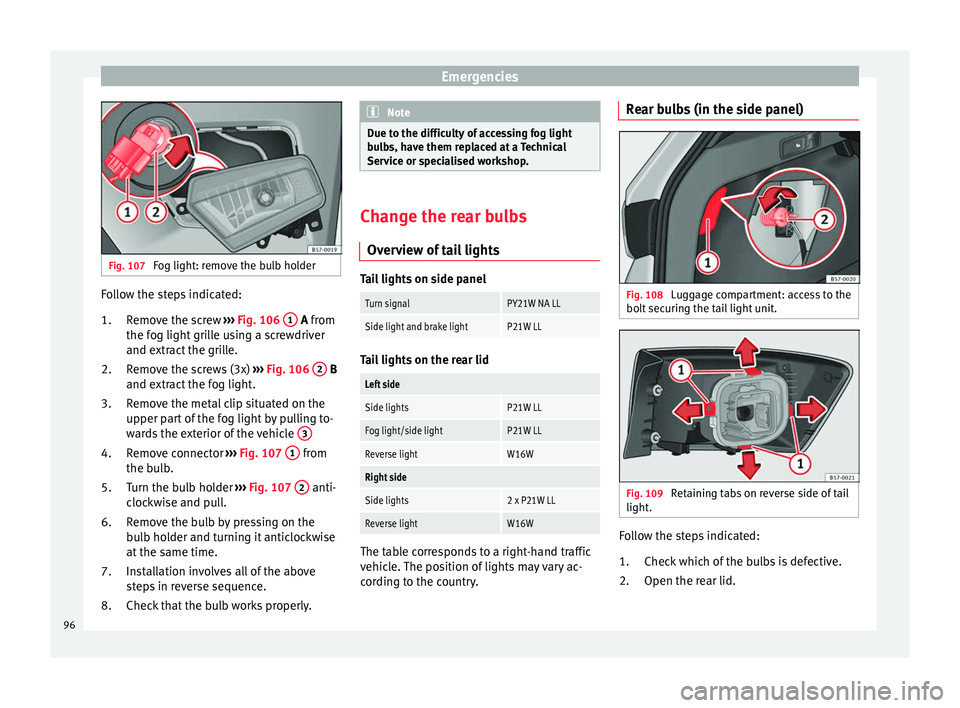
Fog light: remove the bulb holder Follow the steps indicated:
Remo
ve the screw ››› Fig. 106 1 A fr
om
the f
og light grille using a screwdriver
and extract the grille.
Remove the screws (3x) ››› Fig. 106 2 B
and e xtr
act the fog light.
Remove the metal clip situated on the
upper part of the fog light by pulling to-
wards the exterior of the vehicle 3Remove connector
››
›
Fig. 107 1 from
the b u
lb.
Turn the bulb holder ›››
Fig. 107 2 anti-
c loc
kwise and pull.
Remove the bulb by pressing on the
bulb holder and turning it anticlockwise
at the same time.
Installation involves all of the above
steps in reverse sequence.
Check that the bulb works properly.
1.
2.
3.
4.
5.
6.
7.
8. Note
Due to the difficulty of accessing fog light
b u
lbs, have them replaced at a Technical
Service or specialised workshop. Change the rear bulbs
Ov er
view of tail lights Tail lights on side panel
Turn signalPY21W NA LL
Side light and brake lightP21W LL
Tail lights on the rear lid
Left side
Side lightsP21W LL
Fog light/side lightP21W LL
Reverse lightW16W
Right side
Side lights2 x P21W LL
Reverse lightW16W
The table corresponds to a right-hand traffic
v
ehic
le. The position of lights may vary ac-
cording to the country. Rear bulbs (in the side panel)
Fig. 108
Luggage compartment: access to the
bo lt
securing the tail light unit. Fig. 109
Retaining tabs on reverse side of tail
light . Follow the steps indicated:
Chec k
which of the bulbs is defective.
Open the rear lid.
1.
2.
96
Page 103 of 328
Controls and displays
Operation
C ontr
ols and displays
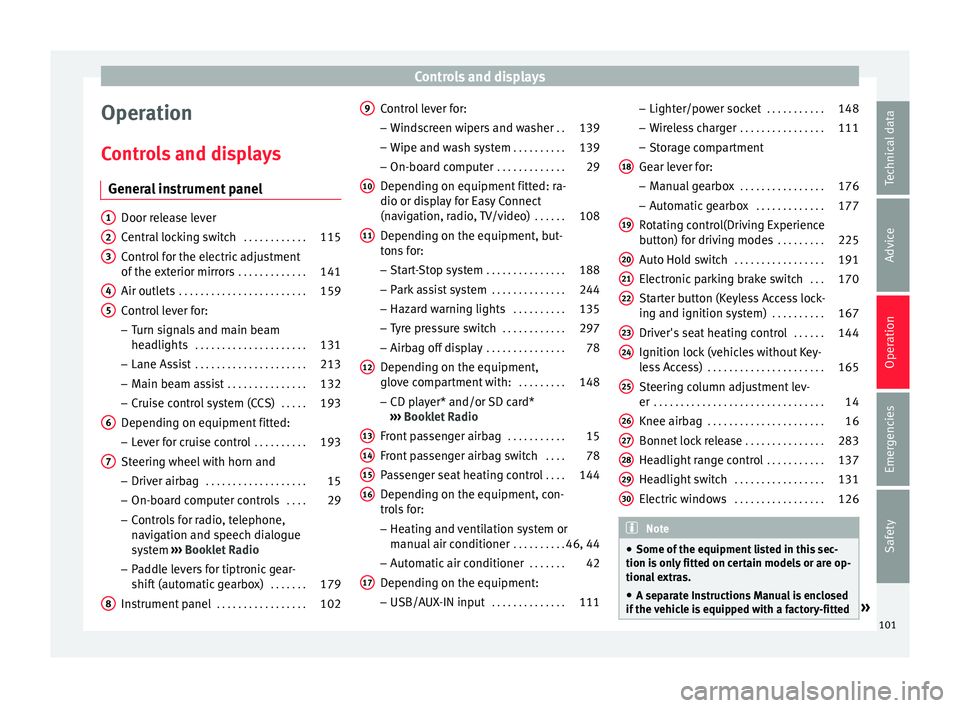
General instrument panel Door release lever
C
entr
al locking switch . . . . . . . . . . . .115
Control for the electric adjustment
of the e
xterior mirrors . . . . . . . . . . . . . 141
Air outlets . . . . . . . . . . . . . . . . . . . . . . . . 159
Control lever for:
– Turn s
ignals and main beam
headlights . . . . . . . . . . . . . . . . . . . . . 131
– Lane As s
ist . . . . . . . . . . . . . . . . . . . . . 213
– Main be
am assist . . . . . . . . . . . . . . . 132
– Crui
se control system (CCS) . . . . .193
Depending on equipment fitted:
– Lev
er for cruise control . . . . . . . . . .193
Steering wheel with horn and – Driver airb
ag . . . . . . . . . . . . . . . . . . . 15
– On-bo ar
d computer controls . . . .29
– Contr
ols for radio, telephone,
navigation and speech dialogue
system ›››
Booklet Radio
– Paddle levers for tiptronic gear-
shift (automatic gearbox) . . . . . . .179
Instrument panel . . . . . . . . . . . . . . . . . 102
1 2
3
4
5
6
7
8 Control lever for:
– Wind
screen wipers and washer . .139
– Wipe and w
ash system . . . . . . . . . . 139
– On-boar
d computer . . . . . . . . . . . . . 29
Depending on equipment fitted: ra-
dio or dis
play for Easy Connect
(navigation, radio, TV/video) . . . . . .108
Depending on the equipment, but-
ton
s for:
– Start-Stop system . . . . . . . . . . . . . . . 188
– Park
assist system . . . . . . . . . . . . . . 244
– Hazar
d warning lights . . . . . . . . . .135
– Ty
re pressure switch . . . . . . . . . . . .297
– Airbag off
display . . . . . . . . . . . . . . . 78
Depending on the equipment,
glo v
e compartment with: . . . . . . . . .148
– CD p l
ayer* and/or SD card*
››› Booklet Radio
Front passenger airbag . . . . . . . . . . .15
Front passenger airbag switch . . . .78
Passenger seat heating control . . . .144
Depending on the equipment, con-
tr o
ls for:
– Heating and ventilation system or
manual air conditioner . . . . . . . . . .46, 44
– Aut om
atic air conditioner . . . . . . .42
Depending on the equipment:
– USB/A UX
-IN input . . . . . . . . . . . . . . 111
9
10
11
12
13
14
15
16
17 –
Light er/po
wer socket . . . . . . . . . . . 148
– Wir
eless charger . . . . . . . . . . . . . . . . 111
– Stor
age compartment
Gear lever for: – Manual gearbox . . . . . . . . . . . . . . . . 176
– Autom
atic gearbox . . . . . . . . . . . . . 177
Rotating control(Driving Experience
butt
on) for driving modes . . . . . . . . .225
Auto Hold switch . . . . . . . . . . . . . . . . . 191
Electronic parking brake switch . . .170
Starter button (Keyless Access lock-
ing and ignition sy
stem) . . . . . . . . . . 167
Driver's seat heating control . . . . . .144
Ignition lock (vehicles without Key-
le
ss Access) . . . . . . . . . . . . . . . . . . . . . . 165
Steering column adjustment lev-
er . . . . . . . . . . . . . . . . . . . . . . . . . . . . . . . . 14
Knee airbag . . . . . . . . . . . . . . . . . . . . . . 16
Bonnet lock release . . . . . . . . . . . . . . .283
Headlight range control . . . . . . . . . . .137
Headlight switch . . . . . . . . . . . . . . . . . 131
Electric windows . . . . . . . . . . . . . . . . . 126 Note
● Some of the equipment
listed in this sec-
tion is only fitted on certain models or are op-
tional extras.
● A separate Instructions Manual is enclosed
if the
vehicle is equipped with a factory-fitted » 18
19
20
21
22
23
24
25
26
27
28
29
30
101
Technical data
Advice
Operation
Emergencies
Safety
Page 119 of 328
Opening and closing
● Pr e
ss & Drive: keyless starting of the en-
gine with the starter button ››› page 165.
The central locking and locking systems oper-
ate in the same way as a normal locking and
unlocking system. Only the controls change.
Unlocking the vehicle is confirmed with a
double flash of the indicator lights; locking
by a single flash.
If the vehicle is locked and then all doors and
the rear lid are closed leaving the last key
used inside the vehicle and none outside,
the vehicle will not lock immediately. All the
vehicle's indicator lights will flash four times.
The vehicle will lock again after a few sec-
onds if you fail to open any door or the rear
lid.
If you unlock the vehicle but fail to open any
door or the rear lid, the vehicle will lock again
after a few seconds.
Unlocking and opening the doors (Keyless-
Entry)
● Hold one of the front door handles. In do-
ing thi
s, the sensor surface ››› Fig. 124 A (ar-
r o
w) is touched on the handle and the vehi-
cle unlocks.
● Open the door.
On v
ehicles with selective opening or info-
tainment system configuration, pulling the
door handle twice will unlock all doors. On vehicles without a “Safe” system: locking
and un
locking doors (Keyless-Exit)
● Switch the ignition off.
● Close the driver's door.
● Touch the locking sensor surface B (arrow)
of the h
andle of one of the front doors once.
The door being operated must be closed.
On vehicles with a “Safe” system: locking
and unlocking doors (Keyless-Exit)
● Switch the ignition off.
● Close the driver's door.
● Touch the sensor surface B (arrow) of the
h andl
e of one of the front doors once. The ve-
hicle locks with the “Safe” system
››› page 119. The door being operated must
be closed.
● Touch the sensor surface B (arrow) of the
h andl
e of one of the front doors twice to lock
the vehicle without activating the “Safe” se-
curity system ››› page 119.
Unlocking and locking the rear lid
When the vehicle is locked, the rear lid auto-
matically unlocks on opening if ››› Fig. 123
there is a valid vehicle key in the proximity.
Open or close the rear lid normally.
After closing, the rear lid locks automatically.
If the complete vehicle is unlocked, the rear
lid will not lock automatically after closing it. Opening the rear lid with sensor-controlled
opening (E
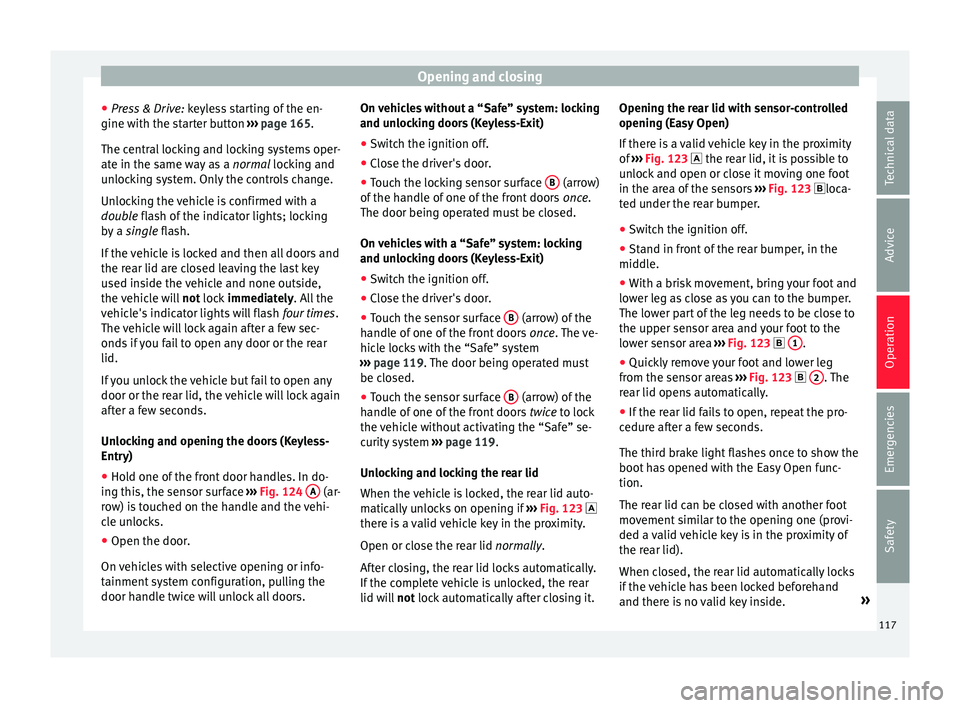
asy Open)
If there is a valid vehicle key in the proximity
of ››› Fig. 123 the rear lid, it is possible to
unlock and open or close it moving one foot
in the area of the sensors ››› Fig. 123 loca-
ted under the rear bumper.
● Switch the ignition off.
● Stand in front of the rear bumper, in the
middl
e.
● With a brisk movement, bring your foot and
low
er leg as close as you can to the bumper.
The lower part of the leg needs to be close to
the upper sensor area and your foot to the
lower sensor area ››› Fig. 123 1 .
● Quickly remove your foot and lower leg
fr om the sen
sor areas ››› Fig. 123 2 . The
r e
ar lid opens automatically.
● If the rear lid fails to open, repeat the pro-
cedur
e after a few seconds.
The third brake light flashes once to show the
boot has opened with the Easy Open func-
tion.
The rear lid can be closed with another foot
movement similar to the opening one (provi-
ded a valid vehicle key is in the proximity of
the rear lid).
When closed, the rear lid automatically locks
if the vehicle has been locked beforehand
and there is no valid key inside. »
117
Technical data
Advice
Operation
Emergencies
Safety
Page 137 of 328
Lights and visibility
● When the c ar door i
s opened, the “Coming
Home” lighting comes on. The headlights are
turned off 60 seconds after the vehicle door
is opened.
Deactivation
● If no door has been closed, they go out au-
tom
atically after 60 seconds.
● After the last door has been closed, the
hea
dlights will be switched off after the
“Coming Home” delay (as established in the
radio menu) has elapsed.
● On turning the light switch to position
››
› page 23.
● When the ignition is switched on (when
st
arting the engine).
Function “Leaving Home” The “Leaving Home” function is only availa-
b
l
e for vehicles with a light and rain sensor
(rotary light switch in position ).
This function may be connected/disconnec-
ted through the radio menu. The “Leaving
Home” function switch-off delay may also be
set (default: 30 sec).
Vehicle with halogen headlights
In the “Leaving Home” function, the daytime
running lights (DRL), the rear side lights and
the licence plate lights are switched on. Vehicle with full-LED headlights
In the “Le
aving Home” function, the dipped
beams, the daytime running lights (DRL), the
rear side lights and the registration plate
lights switch on (“Welcome Light”).
Activation
● When the vehicle is unlocked using the re-
mote c
ontrol.
● The “Leaving Home” function is only activa-
ted when the r
otary light switch is in position
and the light sensor detects darkness.
Deactivation
● When the “Leaving Home” delay period
ends
(default: 30 sec).
● When the vehicle is locked using the re-
mote c
ontrol.
● When the light control is switched into a
pos
ition other than .
● With the ignition is switched on. Hazard warning lights
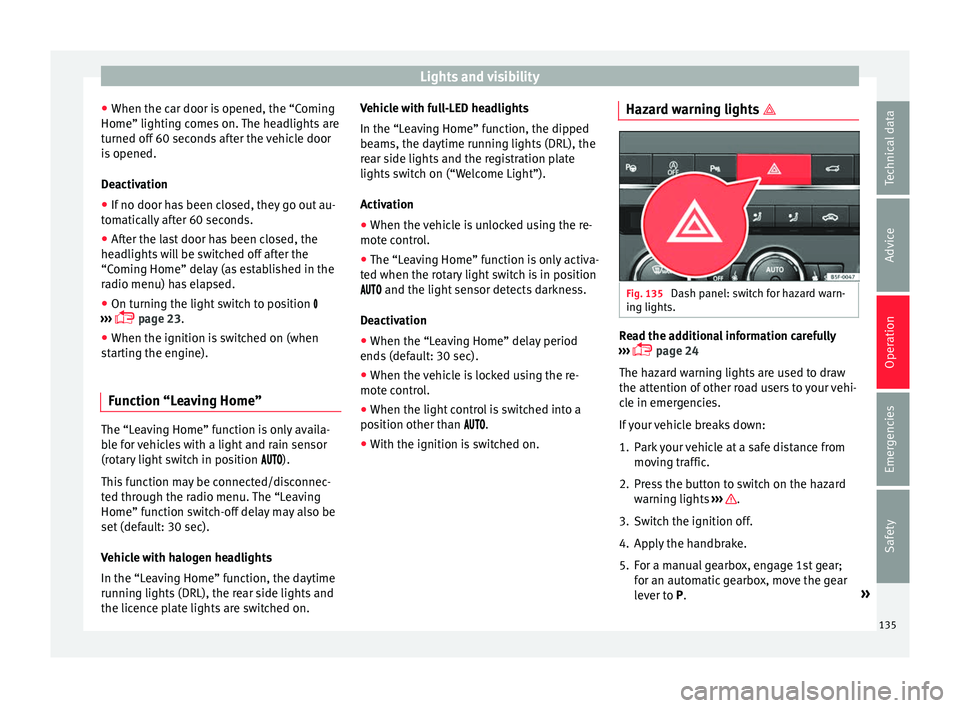
Fig. 135
Dash panel: switch for hazard warn-
in g lights. Read the additional information carefully
› ›
› page 24
The hazard warning lights are used to draw
the attention of other road users to your vehi-
cle in emergencies.
If your vehicle breaks down:
1. Park your vehicle at a safe distance from mov
ing traffic.
2. Press the button to switch on the hazard warnin
g lights ››› .
3. Switch the ignition off.
4. Apply the handbrake.
5. For a manual gearbox, engage 1st gear; for an aut
omatic gearbox, move the gear
lever to P. »
135
Technical data
Advice
Operation
Emergencies
Safety
Page 138 of 328
Operation
6. Use the warning triangle to draw the atten- tion of other r
oad users to your vehicle.
7. Always take the vehicle key with you when you l
eave the vehicle.
All turn signals flash simultaneously when
the hazard warning lights are switched on.
The two turn signal turn signal lamps
and the turn signal lamp in the switch will
flash at the same time. The simultaneous
hazard warning lights also work when the ig-
nition is switched off.
Emergency braking warning
If the vehicle brakes suddenly and continu-
ously at a speed of more than 80 km/h (50
mph), the brake light flashes several times
per second to warn the vehicles driving be-
hind. If you continue braking, the hazard
warning lights will come on automatically
when the vehicle comes to a standstill. They
switch off automatically when the vehicle
starts to move again. WARNING
● The ri sk
of an accident increases if your ve-
hicle breaks down. Always use the hazard
warning lights and a warning triangle to draw
the attention of other road users to your sta-
tionary vehicle.
● Due to the high temperatures that the cata-
lytic c
onverter can reach, never park in an
area where the catalytic converter could come into contact with highly inflammable materi-
a
l
s, for example dry grass or spilt petrol. This
could start a fire. Note
● The b att
ery will run down if the hazard
warning lights are left on for a long time,
even if the ignition is switched off.
● The use of the hazard warning lights de-
sc
ribed here is subject to the relevant statu-
tory requirements. Parking lights
When the parking light is switched on, (right
or l
ef
t turn signal), the front side light and
the rear light on the corresponding side of
the vehicle stay lit. The parking lights can on-
ly be activated with the ignition switched off
and the turn signal and main beam lever in
the central position, before being triggered.
Parking light on both sides With the ignition switched off and the light
sw
it
ch in position , when locking the vehi-
cle from the outside, the parking lights on
both sides of the vehicle light up. In doing
so, only the side lights of both headlights
light up, and additionally the tail lights will
do so partially. Motorway light* The motorway light is available on vehicles
equip
ped w
ith full-LED lights.
The function is connected/disconnected via
the corresponding Easy Connect system
menu.
● Activation: when goin
g above 110 km/h
(68 mph) for more than 30 seconds, the dip-
ped beam raises slightly to increase the driv-
er's visibility distance.
● Deactivation: when r educ
ing the speed of
the car below 100 km/h (62 mph), the dip-
ped beam returns to its normal position.
Driving abroad The light beam of the dipped beam lights is
a
symmetric: the s
ide of the road on which
you are driving is lit more intensely.
When a car that is manufactured in a country
that drives on the right travels to a country
that drives on the left (or vice versa), it is nor-
mally necessary to cover part of the headlight
bulbs with stickers or to change the adjust-
ment of the headlights to avoid dazzling oth-
er drivers.
In such cases, the regulations specify certain
light values that must be complied with for
designated points of the light distribution.
This is known as “Tourist light”.
136
Page 167 of 328

Driving
Driving St ar
t and stop the engine
Switching the ignition on and starting
the engine with the key Fig. 163
Ignition key positions. Read the additional information carefully
› ›
› page 23
Diesel engines can take a few seconds longer
than usual to start on cold days. Therefore
the clutch pedal (manual gearbox) or the
brake pedal (automatic gearbox) must re-
main pressed until the engine starts up. Dur-
ing preheating, the warning lamp remains
lit.
The preheating time depends on the coolant
and exterior temperatures. With the engine at
operating temperature, or at outside temper-
atures above +8°C, the warning lamp will light up for about one second. This means
that
the engine starts immediately.
If the engine does not immediately start up,
interrupt the starting process and try again
after 30 seconds. To start the engine again,
return the key to position 1 .
St ar
t-Stop System*
If the vehicle is stopped and the Start-Stop
system* switches off the engine, the ignition
remains switched on.
Automatic gearbox: before leaving the vehi-
cle, make sure that the ignition is switched
off and the selector lever is in position P.
Driver messages on the instrument panel
display
Press the clutch
This message appears on vehicles with a
manual gearbox if the driver tries to start the
engine without having the clutch pedal
pressed. The engine will only start if you
press the clutch pedal.
Press the brake This message appears on vehicles with an
automatic gearbox if the driver tries to start
the engine without having the brake pedal
pressed. Select N or P
This
message appears if you try to start or
stop the engine when the selector lever of
the automatic gearbox is not in position P or
N. The engine can only start or stop in certain
positions.
Engage position P; the vehicle
can move; doors can only close in
position P.For safety reasons, this driver message ap-
pears and an audible warning sounds if the
selector lever of the automatic gearbox is not
in position P after you switch off the ignition.
Put the selector lever in position P, otherwise
the vehicle could roll away.
Gear change: selector lever in
the drive position! This driver message is displayed when the
selector lever is not in the position P when
the driver door is opened. Additionally, a
buzzer will sound. Put the selector lever in
position P, otherwise the vehicle could roll
away.
Ignition is switched on
This driver message is displayed and a buz-
zer is sounded when the driver door is
opened with the ignition switched on. »
165
Technical data
Advice
Operation
Emergencies
Safety
Page 169 of 328
Driving
remains switched on. Make sure that the igni-
tion i
s
switched off before leaving the
vehicle, otherwise the battery could dis-
charge. Starter button*
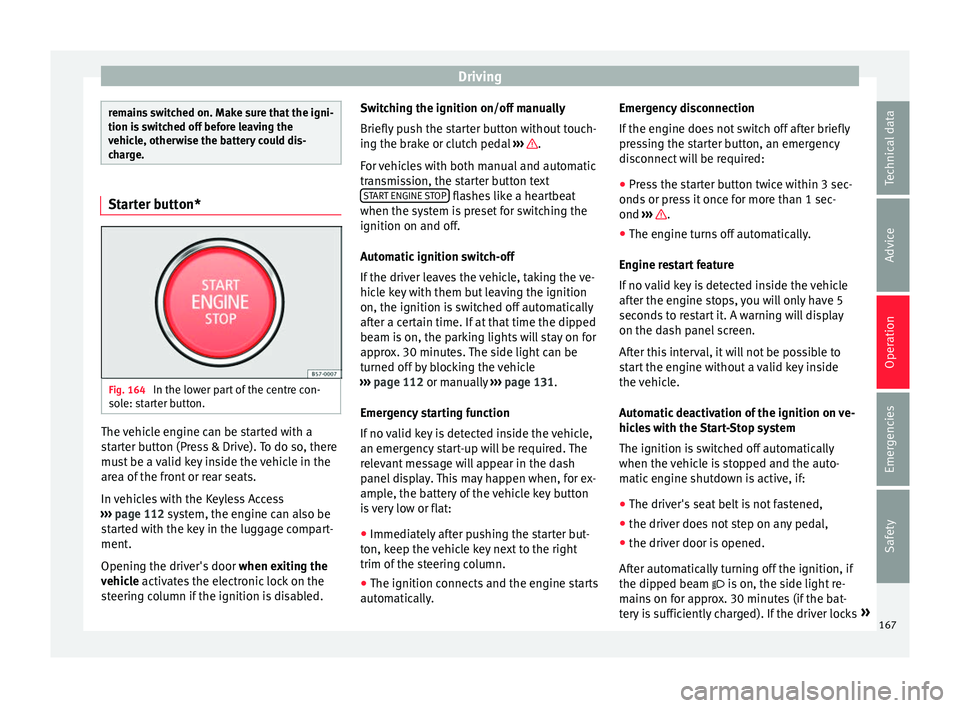
Fig. 164
In the lower part of the centre con-
so l
e: starter button. The vehicle engine can be started with a
s
t
arter button (Press & Drive). To do so, there
must be a valid key inside the vehicle in the
area of the front or rear seats.
In vehicles with the Keyless Access
››› page 112 system, the engine can also be
started with the key in the luggage compart-
ment.
Opening the driver's door when exiting the
vehicle activates the electronic lock on the
steering column if the ignition is disabled. Switching the ignition on/off manually
Briefly p
ush the starter button without touch-
ing the brake or clutch pedal ››› .
F or
vehicles with both manual and automatic
transmission, the starter button text START ENGINE STOP flashes like a heartbeat
when the sy s
tem is preset for switching the
ignition on and off.
Automatic ignition switch-off
If the driver leaves the vehicle, taking the ve-
hicle key with them but leaving the ignition
on, the ignition is switched off automatically
after a certain time. If at that time the dipped
beam is on, the parking lights will stay on for
approx. 30 minutes. The side light can be
turned off by blocking the vehicle
››› page 112 or manually ››› page 131.
Emergency starting function
If no valid key is detected inside the vehicle,
an emergency start-up will be required. The
relevant message will appear in the dash
panel display. This may happen when, for ex-
ample, the battery of the vehicle key button
is very low or flat: ● Immediately after pushing the starter but-
ton, k
eep the vehicle key next to the right
trim of the steering column.
● The ignition connects and the engine starts
autom
atically. Emergency disconnection
If the en
gine does not switch off after briefly
pressing the starter button, an emergency
disconnect will be required:
● Press the starter button twice within 3 sec-
onds
or press it once for more than 1 sec-
ond ››› .
● The engine turns off automatically.
En gine r
estart feature
If no valid key is detected inside the vehicle
after the engine stops, you will only have 5
seconds to restart it. A warning will display
on the dash panel screen.
After this interval, it will not be possible to
start the engine without a valid key inside
the vehicle.
Automatic deactivation of the ignition on ve-
hicles with the Start-Stop system
The ignition is switched off automatically
when the vehicle is stopped and the auto-
matic engine shutdown is active, if:
● The driver's seat belt is not fastened,
● the driver does not step on any pedal,
● the driver door is opened.
Aft
er automatically turning off the ignition, if
the dipped beam is on, the side light re-
mains on for approx. 30 minutes (if the bat-
tery is sufficiently charged). If the driver locks »
167
Technical data
Advice
Operation
Emergencies
Safety
Page 170 of 328
Operation
the vehicle or manually turns off the light, the
s ide light
goes out. WARNING
Any accidental movement of the vehicle could
r e
sult in serious injury.
● When switching on the ignition, do not
pr
ess the brake or clutch pedal, otherwise
the engine could start immediately. WARNING
If vehicle keys are used negligently or with-
out due c
are, this may cause accidents and
serious injury.
● Never leave any key inside the vehicle
when ex
iting. Otherwise, a child or unauthor-
ised person could lock the vehicle, start the
engine or connect the ignition and, in this
way, operate electronic equipment (e.g. the
windows). Note
● Bef
ore leaving the vehicle, always discon-
nect the ignition manually and, if appropri-
ate, take into account the instructions on the
screen of the dash panel.
● If the vehicle is stationary for a long time
with the ignition on, the
vehicle battery
might be discharged and it might not be pos-
sible to start the engine.
● In diesel vehicles, there may be a delay in
the engine s
tarting if it requires preheating. ●
If durin
g the STOP phase you press the
START ENGINE STOP button, the ignition is
sw it
ched off and the button flashes.
● If the indication “Start-Stop system deacti-
vat
ed: Start the engine manually” is dis-
played on the dash panel display, the START ENGINE STOP button will blink.
Starting the engine
3
Valid for vehicles: with Keyless Access
StepStarting the engine with the starter but-
ton ››› page 167 (Press & Drive).
1.Press and hold the brake pedal until step 5 is
performed.
1a.In vehicles with a manual gearbox: press and
hold the clutch down until the engine starts.
2.Put the gearbox lever in neutral or the selector
lever in position P or N.
3.
Briefly press the starter button ››› Fig. 164 with-
out pressing the accelerator. For the engine to
start there must be a valid key in the vehicle.
After starting the engine, the light of the START ENGINE STOP
button changes to a fixed
light indicating that the engine has started.
4.If the engine does not start, stop and wait for
approx. 1 minute before trying again. If neces-
sary, perform an emergency start ››› page 167.
5.Disconnect the electronic parking brake when
you are about to start driving ››› page 170. WARNING
Never leave the vehicle with the engine run-
nin g, e
specially if a gear or gear range is en-
gaged. The vehicle could then suddenly move
or something strange could happen that
would cause damage, fire or serious injury. WARNING
Cold start sprays could explode or cause a
s ud
den increase in the engine speed.
● Never use sprays to cold start the engine. CAUTION
● The s t
arter motor or the engine may be
damaged if you try to start the engine while
driving or if you restart it immediately after
switching it off.
● If the engine is cold, avoid high engine
speed
s, pushing the engine too hard and rap-
id acceleration.
● Do not start the engine by pushing the ve-
hicl
e or towing it. Unburnt fuel could enter
the catalytic converter and damage it. Note
● Do not w
ait until the engine warms up with
the vehicle stationary; if you have good visi-
bility through the windows, start driving im-
mediately. This helps the engine reach oper-
ating temperature faster and reduces emis-
sions. 168
Page 171 of 328
Driving
●
Electric
al components with a high power
consumption are switched off temporarily
when the engine starts.
● When starting with a cold engine, noise
lev
els may briefly increase. This is quite nor-
mal, and no cause for concern.
● When the outside temperature is below
+5°C (+41°F), if
the engine is diesel, some
smoke may appear under the vehicle when the fuel-operated auxiliary heater is on. Stopping the engine
3
V
alid for vehicles: with Keyless Access
StepSwitch off the engine with the starter
button ››› page 167.
1.Stop the vehicle completely ››› .
2.Press and hold the brake pedal until the step
4 is performed.
3.If you are driving an automatic vehicle, place
the selector lever in position P.
4.Connect the electronic parking brake
››› page 170.
5.
Briefly press the start-up button ››› Fig. 164.
The START ENGINE STOP button blinks again. If
the engine fails to switch off, perform an emer-
gency disconnect ››› page 167.
6.If the vehicle is equipped with a manual gear-
box, put it into 1st or reverse. WARNING
Never switch off the engine while the vehicle
i s
moving. This could cause loss of control of
the vehicle, accidents and serious injury.
● The airbags and belt tensioners do not
work
when the ignition is switched off.
● The brake servo does not work with the en-
gine off.
Therefore, you need to press the
break pedal harder to brake the vehicle.
● Power steering does not work when the en-
gine is
not running. You need more strength
to steer when the engine is switched off.
● If the ignition is switched off, the steering
co
lumn could be locked, making it impossible
to control the vehicle. CAUTION
If the engine is made to work hard for a long
time, it m
ay overheat after being switched
off. To prevent damage to the engine before
switching it off, leave it idle for approx. 2 mi-
nutes in neutral. Note
After switching off the engine, the cooling fan
m a
y continue to operate in the engine com-
partment for a few more minutes, even with
the ignition off. The radiator fan is automati-
cally switched off. “My Beat” Function
For vehicles with a convenience key there is
the “M
y
Beat” function. This feature provides
an additional indication of the vehicle igni-
tion system.
When accessing the vehicle, e.g. by opening
the doors with the remote control, the START ENGINE STOP button flashes, calling at-
t ention t
o the relevant starter system button.
Upon switching the ignition on/off, the light
of the START ENGINE STOP button flashes. With
the en gine sw
itched off, after a few seconds,
the STOP ENGINE START button stops flashing
and g oe
s out.
With the engine running, the START ENGINE STOP button light stays on, indi-
c atin
g that the engine is running. Upon
switching the ignition off with the START ENGINE STOP button, it starts flashing
ag ain.
In
vehicles with the Start-Stop system , the
“My Beat” function also offers additional in-
formation:
● When the engine stops during the Stop
pha
se, the light of the START ENGINE STOP but-
t on s
tays on, since, even though the engine
is off, the Start-Stop system is active.
● When the engine cannot be stated again
with the
Start-Stop system, ›››
page 188, and
needs to be started manually, the »
169
Technical data
Advice
Operation
Emergencies
Safety
Page 172 of 328
Operation
START ENGINE STOP button flashes to indicate
thi s
fact.
Braking and parking Electr
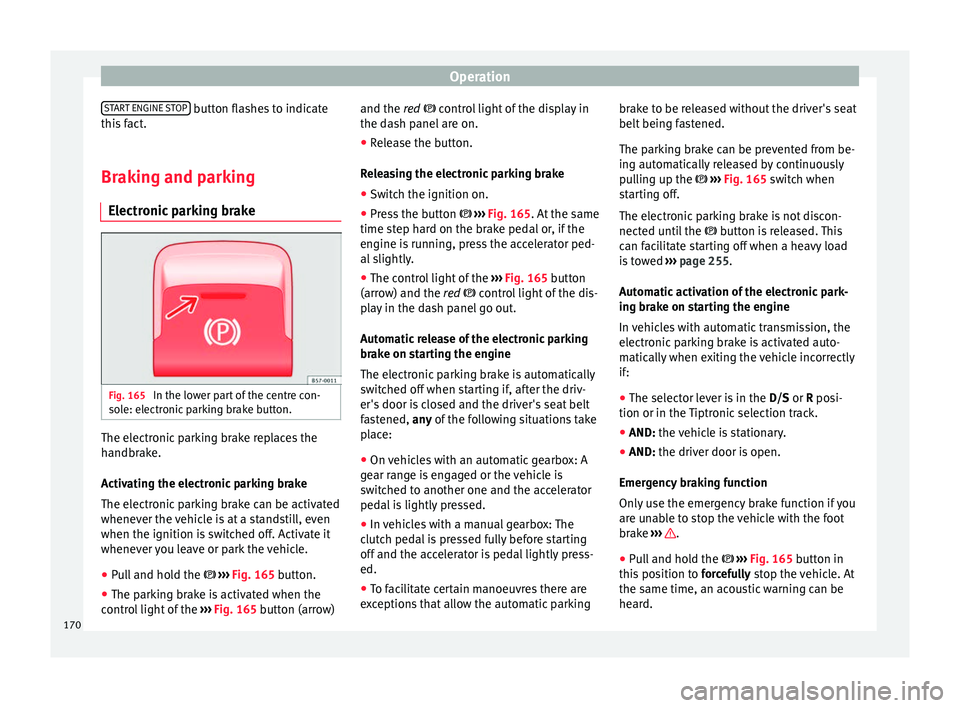
onic parking brake Fig. 165
In the lower part of the centre con-
so l
e: electronic parking brake button. The electronic parking brake replaces the
h
andbr
ake.
Activating the electronic parking brake
The electronic parking brake can be activated
whenever the vehicle is at a standstill, even
when the ignition is switched off. Activate it
whenever you leave or park the vehicle.
● Pull and hold the ››
› Fig. 165 button.
● The parking brake is activated when the
contr
ol light of the ››› Fig. 165 button (arrow) and the red control light of the display in
the d
ash panel are on.
● Release the button.
Rel
easing the electronic parking brake
● Switch the ignition on.
● Press the button ››
› Fig. 165. At the same
time step hard on the brake pedal or, if the
engine is running, press the accelerator ped-
al slightly.
● The control light of the ››
› Fig. 165 button
(arrow) and the red control light of the dis-
play in the dash panel go out.
Automatic release of the electronic parking
brake on starting the engine
The electronic parking brake is automatically
switched off when starting if, after the driv-
er's door is closed and the driver's seat belt
fastened, any of the following situations take
place:
● On vehicles with an automatic gearbox: A
ge
ar range is engaged or the vehicle is
switched to another one and the accelerator
pedal is lightly pressed.
● In vehicles with a manual gearbox: The
clut
ch pedal is pressed fully before starting
off and the accelerator is pedal lightly press-
ed.
● To facilitate certain manoeuvres there are
ex
ceptions that allow the automatic parking brake to be released without the driver's seat
belt bein
g fastened.
The parking brake can be prevented from be-
ing automatically released by continuously
pulling up the ››› Fig. 165 switch when
starting off.
The electronic parking brake is not discon-
nected until the button is released. This
can facilitate starting off when a heavy load
is towed ››› page 255.
Automatic activation of the electronic park-
ing brake on starting the engine
In vehicles with automatic transmission, the
electronic parking brake is activated auto-
matically when exiting the vehicle incorrectly
if: ● The selector lever is in the D/S or R pos
i-
tion or in the Tiptronic selection track.
● AND: the vehicle is stationary.
● AND:
the driver door i
s open.
Emergency braking function
Only use the emergency brake function if you
are unable to stop the vehicle with the foot
brake ››› .
● Pull and hold the › ›
› Fig. 165 button in
this position to forcefully stop the vehicle. At
the same time, an acoustic warning can be
heard.
170