towing Seat Ateca 2017 User Guide
[x] Cancel search | Manufacturer: SEAT, Model Year: 2017, Model line: Ateca, Model: Seat Ateca 2017Pages: 328, PDF Size: 6.36 MB
Page 90 of 328
Emergencies
● If a br
eakdown lorry is used, vehicles with
automatic transmission are only allowed to
be towed with the front wheels suspended.
Towing vehicles with four-wheel drive
(4Drive)
Four-wheel drive vehicles (4Drive) can be
towed using a tow bar or tow rope. If the ve-
hicle is towed with the front or rear axle sus-
pended, the engine must be switched off,
otherwise the transmission may be damaged.
Cases where towing a vehicle is not allowed
● If, due to a fault, the gearbox is out of lubri-
cant
.
● If the vehicle battery is discharged, be-
cau
se the steering remains locked and, if ap-
propriate, the electronic parking brake can-
not be deactivated or the electronic lock of
the steering column released.
● If a distance above 50 km needs to be trav-
ell
ed.
● When, for example, after an accident, the
smooth rot
ation of the wheels or the steering
operation cannot be guaranteed.
When the vehicle is to tow another vehicle:
● Observe legal requirements.
● Keep in mind the instructions in the man-
ual on t
owing vehicles. Note
The vehicle can only be towed if the electron-
ic p
arking brake and the electronic lock of the
steering column are deactivated. If the vehi-
cle has no power supply or there is an electric
system fault, the engine must be tow-started
››› page 58 to deactivate the electronic
parking brake and the electronic lock of the
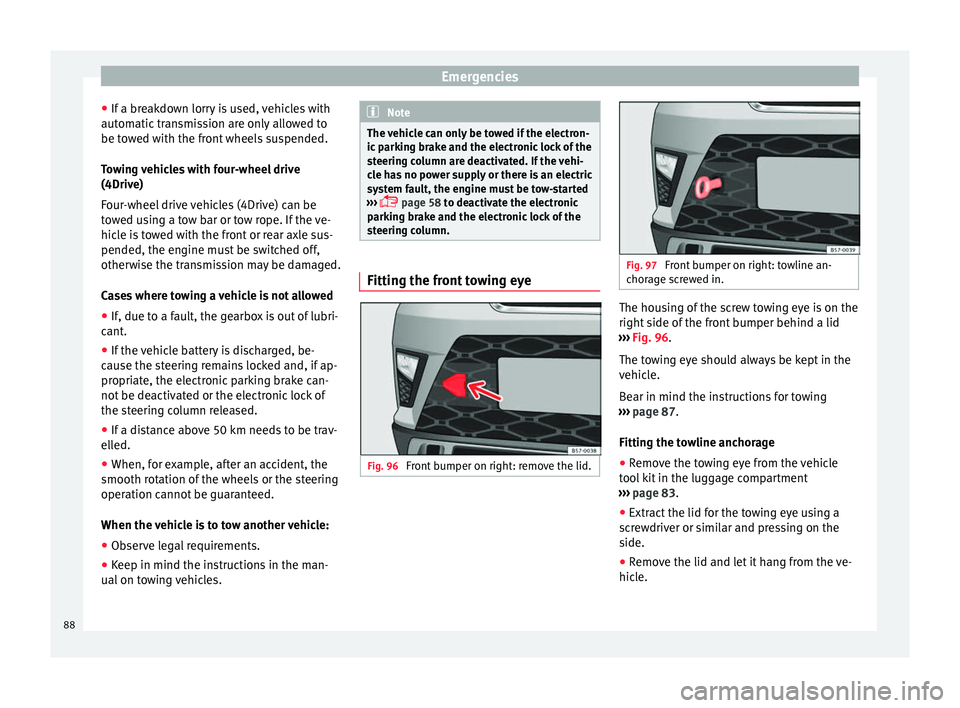
steering column. Fitting the front towing eye
Fig. 96
Front bumper on right: remove the lid. Fig. 97
Front bumper on right: towline an-
c hor
age screwed in. The housing of the screw towing eye is on the
right
s
ide of the front bumper behind a lid
››› Fig. 96.
The towing eye should always be kept in the
vehicle.
Bear in mind the instructions for towing
››› page 87.
Fitting the towline anchorage
● Remove the towing eye from the vehicle
too
l kit in the luggage compartment
››› page 83.
● Extract the lid for the towing eye using a
sc
rewdriver or similar and pressing on the
side.
● Remove the lid and let it hang from the ve-
hicl
e.
88
Page 91 of 328
Self-help
● Sc r
ew the towing eye in the housing by
turning it to the maximum anticlock-
wise ››› . Use a suitable object that can
c omp
letely and securely tighten the towing
eye in its housing.
● After towing, unscrew the towing eye cloc
k-
wise with a suitable object.
● Insert the side tab of the lid into the open-
ing of
the bumper and press until the tab is
properly clipped into the bumper.
● Clean the towing eye if necessary and then
st
ore it in the luggage compartment along
with the other vehicle tools. CAUTION
The towing eye must always be completely
and firm ly
tightened. Otherwise, it could be
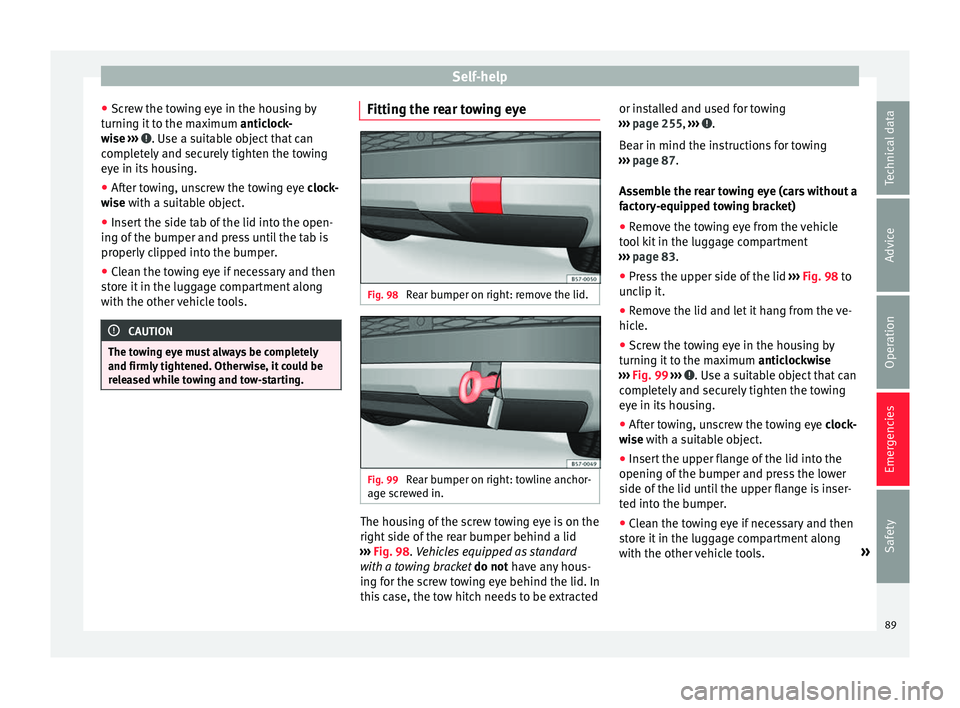
released while towing and tow-starting. Fitting the rear towing eye
Fig. 98
Rear bumper on right: remove the lid. Fig. 99
Rear bumper on right: towline anchor-
ag e s
crewed in. The housing of the screw towing eye is on the
right
s
ide of the rear bumper behind a lid
››› Fig. 98. Vehicles equipped as standard
with a towing bracket do not have any hous-
ing for the screw towing eye behind the lid. In
this case, the tow hitch needs to be extracted or installed and used for towing
››
› page 255, ››› .
B e
ar in mind the instructions for towing
››› page 87.
Assemble the rear towing eye (cars without a
factory-equipped towing bracket)
● Remove the towing eye from the vehicle
too
l kit in the luggage compartment
››› page 83.
● Press the upper side of the lid ››
› Fig. 98 to
unclip it.
● Remove the lid and let it hang from the ve-
hicl
e.
● Screw the towing eye in the housing by
turnin
g it to the maximum anticlockwise
››› Fig. 99 ››› . Use a suitable object that can
c omp
letely and securely tighten the towing
eye in its housing.
● After towing, unscrew the towing eye cloc
k-
wise with a suitable object.
● Insert the upper flange of the lid into the
opening of
the bumper and press the lower
side of the lid until the upper flange is inser-
ted into the bumper.
● Clean the towing eye if necessary and then
st
ore it in the luggage compartment along
with the other vehicle tools. »
89
Technical data
Advice
Operation
Emergencies
Safety
Page 92 of 328
Emergencies
CAUTION
● The t o
wing eye must always be completely
and firmly tightened. Otherwise, it could be
released while towing and tow-starting.
● If the vehicle is factory-equipped with a
to
wing bracket, it is only allowed to tow with
a tow bar if this has been specially designed
to be installed with a tow hitch. If an unsuita-
ble tow bar is used, both the tow hitch and
the vehicle may be damaged. Instead, a tow
rope should be used. Driving tips for towing
Towing requires some expertise and experi-
enc
e, e
specially when using a tow rope. Both
drivers should be familiar with the difficulties
involved in towing. For this reason, inexper-
ienced drivers should abstain from towing.
During towing, it should be ensured that no
impermissible tractive forces or shocks are
generated. When towing on an unpaved
road, there is always a risk of overloading
and damaging the anchorage points.
During towing, the towing vehicle can signal
the change of direction even with the hazard
warning lights turned on. To do so, at the
same time, the turn signal lever must be op-
erated with ignition switched on. Meanwhile,
the hazard warning lights will go off. When
the turn signal lever is returned to the rest position, the hazard warning lights will be
autom
atically reactivated.
Notes for the driver of the towed vehicle ● Leave the ignition on, so that the steering
is
not blocked, and the electronic parking
brake may be deactivated and the turn sig-
nals and wash/wipe operated.
● More strength is required at the steering
wheel a
s the power steering does not oper-
ate when the engine is switched off.
● You should depress the brake much harder
as
the brake servo does not operate. Avoid
hitting the towing vehicle.
● Bear in mind the information and instruc-
tions
in the manual of the vehicle to be tow-
ed.
Notes for the driver of the towing vehicle
● Accelerate with particular care and caution.
Av
oid sharp manoeuvres.
● Brake earlier than usual and smoothly.
● Bear in mind the information and instruc-
tions
in the manual of the towed vehicle. Fuses and bulbs
F u
ses
Introduction In general, a fuse can be assigned to various
el
ectric
al components. Likewise, an electrical
component can be protected by several
fuses.
Only replace fuses when the cause of the
problem has been solved. If a newly inserted
fuse blows after a short time, you must have
the electrical system checked by a special-
ised workshop as soon as possible. WARNING
The high voltages in the electrical system can
giv e seriou
s electrical shocks, causing burns
and even death!
● Never touch the electrical wiring of the igni-
tion sys
tem.
● Take care not to cause short circuits in the
electric
al system. WARNING
Using unsuitable fuses, repairing fuses or
bridgin g a c
urrent circuit without fuses can
cause a fire and serious injury. 90
Page 126 of 328
Operation
› › ›
table on page 2
Open rear lid
● Unlock the vehicle ››
› page 112 and briefly
press the handle of the rear lid. On vehicles
with Keyless Access you can directly press
the handle of the rear lid. The rear lid is un-
locked if an authorised key in the proximity of
the vehicle is recognised.
● OR: press the button on the centre console
f
or at least one second ››› Fig. 130. The but-
ton also works when the ignition is switched
off.
● OR: press and hold the
vehicle key but-
ton for approx. 1 second. If the vehicle is
locked, unlock the rear lid only (the doors re-
main locked).
● OR: on vehicles with Keyless Access and
c
ontrolled opening sensors you can open the
rear lid by moving one foot in the area of the
sensors located below the rear bumper (Easy
Open). The rear lid opens automatically.
Closing luggage lid
● Briefly press the butt
on on the rear lid
››› Fig. 129 ››› .
● OR: pr ess the
b
utton located on the
centre console until the rear lid is closed
››› Fig. 130.
● OR: on vehicles with Keyless Access, press
and ho
ld the vehicle key button until the
rear lid is closed or move one foot in the area of the sensors located below the rear bumper
(Ea
sy Open) ››› page 116. The vehicle key
must not be further than approx. 1.5 m from
the luggage compartment and should not be
in the vehicle.
● OR: move the rear lid with the hand in the
dir
ection of closing until it closes automati-
cally.
● The rear lid goes down automatically to the
final
position and also closes automatically
››› .
Int erruptin
g opening or closing
After beginning to open or close the rear lid,
the action can be halted by pressing one of
the buttons.
Continue opening or closing the rear lid by
hand. To do this, some force will have to be
used.
If you press one of the buttons again, the
rear lid will move again in the exit direction.
If the rear lid finds resistance or an obstacle
during the automatic opening or closing,
opening or closing will be interrupted imme-
diately. For the closing process, the rear lid
opens again slightly.
● Check why it has not been possible to open
or clo
se the rear lid.
● Try to open or close the rear lid again. ●
If nec
essary, the rear lid can be opened or
closed by hand using reasonable force.
Special feature for pulling a trailer
If the factory-fitted towing bracket is electri-
cally connected to a trailer ››› page 255, the
electric rear lid can only be opened or closed
with the keys available within it.
Acoustic warnings
Throughout the process of opening or closing
the rear lid, audible warnings can be heard.
Exception: when the rear lid is opened man-
ually using the handle or the Easy Open func-
tion with the movement of the foot or closed
using the button available within it
››› Fig. 129.
Modifying and memorising the opening an-
gle
If the space behind or above the vehicle is
less than the travel area of the rear lid, you
can change the opening angle of the rear lid.
To memorise a new opening angle, the rear
lid must be open at least halfway.
● Interrupt the opening process in the de-
sir
ed position.
● Press the ››
› Fig. 129 button available in
the rear lid for at least 3 seconds.
124
Page 170 of 328
Operation
the vehicle or manually turns off the light, the
s ide light
goes out. WARNING
Any accidental movement of the vehicle could
r e
sult in serious injury.
● When switching on the ignition, do not
pr
ess the brake or clutch pedal, otherwise
the engine could start immediately. WARNING
If vehicle keys are used negligently or with-
out due c
are, this may cause accidents and
serious injury.
● Never leave any key inside the vehicle
when ex
iting. Otherwise, a child or unauthor-
ised person could lock the vehicle, start the
engine or connect the ignition and, in this
way, operate electronic equipment (e.g. the
windows). Note
● Bef
ore leaving the vehicle, always discon-
nect the ignition manually and, if appropri-
ate, take into account the instructions on the
screen of the dash panel.
● If the vehicle is stationary for a long time
with the ignition on, the
vehicle battery
might be discharged and it might not be pos-
sible to start the engine.
● In diesel vehicles, there may be a delay in
the engine s
tarting if it requires preheating. ●
If durin
g the STOP phase you press the
START ENGINE STOP button, the ignition is
sw it
ched off and the button flashes.
● If the indication “Start-Stop system deacti-
vat
ed: Start the engine manually” is dis-
played on the dash panel display, the START ENGINE STOP button will blink.
Starting the engine
3
Valid for vehicles: with Keyless Access
StepStarting the engine with the starter but-
ton ››› page 167 (Press & Drive).
1.Press and hold the brake pedal until step 5 is
performed.
1a.In vehicles with a manual gearbox: press and
hold the clutch down until the engine starts.
2.Put the gearbox lever in neutral or the selector
lever in position P or N.
3.
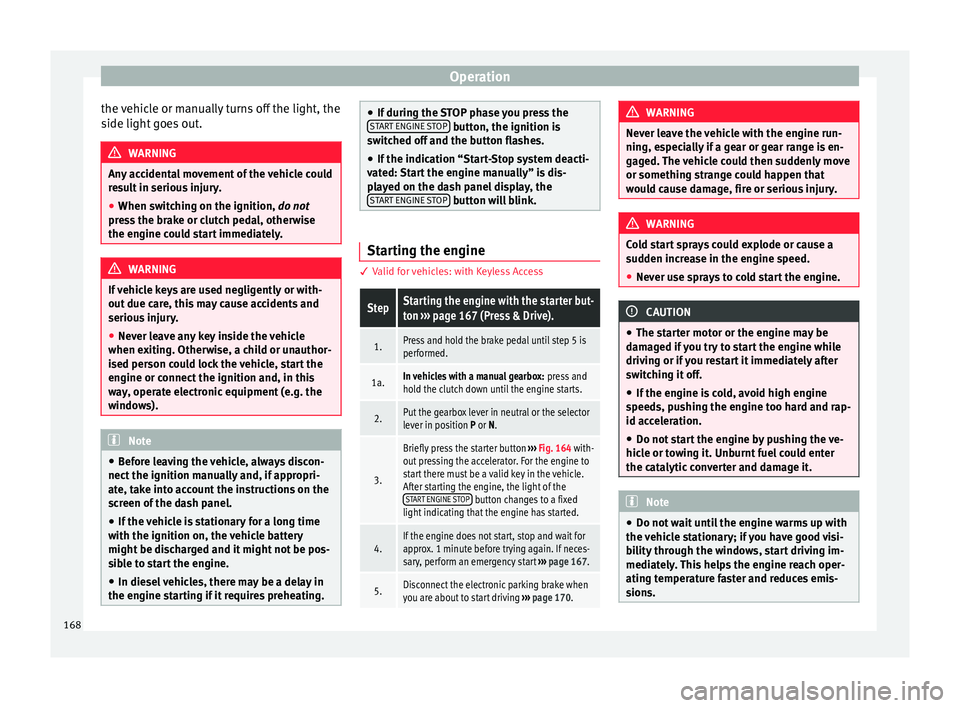
Briefly press the starter button ››› Fig. 164 with-
out pressing the accelerator. For the engine to
start there must be a valid key in the vehicle.
After starting the engine, the light of the START ENGINE STOP
button changes to a fixed
light indicating that the engine has started.
4.If the engine does not start, stop and wait for
approx. 1 minute before trying again. If neces-
sary, perform an emergency start ››› page 167.
5.Disconnect the electronic parking brake when
you are about to start driving ››› page 170. WARNING
Never leave the vehicle with the engine run-
nin g, e
specially if a gear or gear range is en-
gaged. The vehicle could then suddenly move
or something strange could happen that
would cause damage, fire or serious injury. WARNING
Cold start sprays could explode or cause a
s ud
den increase in the engine speed.
● Never use sprays to cold start the engine. CAUTION
● The s t
arter motor or the engine may be
damaged if you try to start the engine while
driving or if you restart it immediately after
switching it off.
● If the engine is cold, avoid high engine
speed
s, pushing the engine too hard and rap-
id acceleration.
● Do not start the engine by pushing the ve-
hicl
e or towing it. Unburnt fuel could enter
the catalytic converter and damage it. Note
● Do not w
ait until the engine warms up with
the vehicle stationary; if you have good visi-
bility through the windows, start driving im-
mediately. This helps the engine reach oper-
ating temperature faster and reduces emis-
sions. 168
Page 175 of 328
Driving
●
Bef
ore driving down a long, steep gradient,
it is advisable to reduce speed and select a
lower gear. This makes use of engine braking
and relieves the brakes. If you still have to
use the brakes, it is better to brake firmly at
intervals than to apply the brakes continu-
ously. Note
● If the br
ake servo is out of action, for exam-
ple when the car is being towed, you will
have to press the brake pedal considerably
harder than normal to make up for the lack of
servo assistance.
● If you wish to equip the vehicle with acces-
sories
such as a front spoiler or wheel covers,
it is important that the flow of air to the front
wheels is not obstructed, otherwise the
brakes can overheat. Front assist system
Electronic stability control (ESC)
The E
SC
helps to improve safety. It reduces
the tendency to skid and improves the stabil-
ity and roadholding of the vehicle. The ESC
detects critical handling situations, such as
vehicle understeer or oversteer, or wheelspin
on the driving wheels. It stabilises the vehi-
cle by braking individual wheels or by reduc-
ing the engine torque. The warning lamp will flash on the instrument panel when the ESC
is
intervening .
The ESC includes the anti-lock brake system
(ABS), the front assist system (HBA), the trac-
tion control system (ASR), electronic differen-
tial lock (EDS), electronic torque control
(XDS) and tractor-trailer sway mitigation*.
ESC also helps stabilise the vehicle by chang-
ing the torque.
Anti-lock brake system (ABS)
ABS prevents the wheels from locking up un-
der braking until the vehicle has reached a
virtual standstill. You can continue to steer
the vehicle even when the brakes are on full.
Keep your foot on the brake pedal and do not
pump the brakes. You will feel the brake ped-
al pulsate while the ABS is working.
Front assist system (HBA)
The brake assist system can reduce the re-
quired braking distance. The braking force is
automatically boosted if you press the brake
pedal quickly in an emergency. You must
keep pressing the brake pedal until the dan-
ger has passed.
Traction control system (ASR)
In the event of wheelspin, the traction control
system reduces the engine torque to match
the amount of grip available. This helps the car to start moving, accelerate or climb a gra-
dient.
El
ectronic differential lock (EDL)
When the EDL detects wheelspin, it brakes
the spinning wheel and directs the power to
the other driven wheel. This function is active
up to approximately 100 km/h (62 mph).
To prevent the disc brake of the braked wheel
from overheating, the EDL cuts out automati-
cally if subjected to excessive loads. The ve-
hicle can still be driven. The EDL will switch
on again automatically when the brake has
cooled down.
Tractor-trailer sway mitigation*
If the vehicle is pulling a trailer, it will control
the following: Tractor-trailers tend to sway.
When the swaying of the trailer is felt by the
vehicle and detected by the ESC, it will auto-
matically brake the towing vehicle within the
limits of the system and mitigate the sway.
Tractor-trailer sway mitigation is not available
in all countries.
Electronic torque management (XDS)
When taking a curve, the driveshaft differen-
tial mechanism allows the outer wheel to turn
at a higher speed than the inner wheel. In
this way, the wheel that is turning faster (out-
er wheel) receives less drive torque than the
inner wheel. This may mean that in certain »
173
Technical data
Advice
Operation
Emergencies
Safety
Page 182 of 328
Operation
When accelerating, the gearbox automatical-
ly shif
ts up into the next gear shortly before
the maximum engine speed is reached.
If you select a lower gear, the automatic gear-
box will not shift down until there is no risk of
over-revving the engine.
When the kick-down feature is used, the
gearbox shifts down to a lower gear, depend-
ing on road speed and engine speed.
Driving tips The gearbox changes gear ratios automatical-
ly
a
s the vehicle moves.
The engine can only start with the selector
lever in position P or N. At low temperatures,
below -10°C (50°F), the engine can only start
with the selector lever in position P.
Starting the vehicle
– Press and hold the brake pedal.
– Press and hold the interlock button (the
butt
on on the selector lever handle), move
the selector lever to the desired position,
for instance D ›››
page 177, and release the
interlock button.
– Wait for the gearbox to engage the gear (a
slight
movement can be felt).
– Release the brake and press the accelerator
››
› . Stopping briefly
– Apply the foot brake to hold the vehicle
briefly when s
tationary (for instance at traf-
fic lights). Do not press the accelerator.
Stopping/Parking
If the driver door is opened and the selector
lever is not in position P, the vehicle could
move. The driver message will be: Gear
change: selector lever in the
drive position! . Additionally, a buzzer
will sound.
– Press and hold the brake pedal ››
› .
– Apply the handbrake.
– Move the selector lever to position P.
Ho l
ding the car on a hill
– Always apply the brake pedal firmly to pre-
v
ent the vehicle from “moving backwards;
if necessary, apply the handbrake” ››› .
Do not tr y
to stop the vehicle “rolling back”
by increasing the engine speed when a
gear is engaged (pressing the accelerator)
››› .
St ar
ting off uphill
– Apply the handbrake.
– Once you have engaged a gear press the
acc
elerator carefully and disengage the
handbrake. Driving down hills: in some sit
uations (on
mountain roads or when towing a trailer or
caravan) it can be advantageous to switch
temporarily to the manual gearbox pro-
gramme so that the gear ratios can be selec-
ted manually to suit the driving conditions
››› .
On l ev
el ground it is sufficient to move the
selector lever to position P. On slopes, first
engage the parking brake and then put the
selection lever into the P position. This
avoids overloading the locking mechanism
and it will be easier to move the selector lev-
er from position P. WARNING
Observe the safety warnings ››
› in Selector
l ev
er positions on page 177.
● Never allow the brake to rub and do not use
the brak
e pedal too often or for long periods.
Constant braking causes overheating in the
brakes. This could significantly reduce brak-
ing power, increase braking distance or even
result in the total failure of the brake system.
● To avoid rolling back on gradients always
hol
d the vehicle with the footbrake or hand-
brake if you have to stop. CAUTION
● If
you stop the vehicle on a gradient, do not
attempt to stop it from rolling by depressing
the accelerator when a gear has been selec-
ted. This could cause overheating and 180
Page 227 of 328
Driver assistance systems
Open the Assistants menu.
● BSD
● P arking Assist.
If
the verification box on the control panel is
checked , the functionality will be automat-
ically activated at ignition.
When the blind spot detector is ready to op-
erate, the indications in the external mirrors
will turn on briefly as confirmation.
When the vehicle is restarted, the last adjust-
ment in the system will remain active.
If the blind spot detector was automatically
deactivated, it will only be possible to restart
the system after turning the vehicle off and
restarting it.
Automatic deactivation of the blind spot de-
tector (BSD)
The radar sensors of the blind spot detector
with rear cross traffic alert will be automati-
cally deactivated when, among other rea-
sons, one of the sensors is detected to be
permanently covered. This may be the case if,
for example, there is a layer of snow or ice in
front of one of the sensors.
The relevant text message will appear in the
dash panel display. Trailer mode
The Blind spot
detector and the rear cross
traffic alert will be automatically deactivated
and it will be impossible to activate them if
the tow hitch is electrically connected to a
trailer or other similar object.
As soon as the driver starts to drive with a
trailer connected electrically to the vehicle, a
message will appear on the instrument panel
display indicating that the blind spot detec-
tor and the rear cross traffic alert are deacti-
vated. Once the trailer has been unhitched
from the vehicle, if you want to use the blind
spot detector and the rear cross traffic alert,
you will have to reactivate them in the corre-
sponding menu.
If the towing hitch is not factory equipped,
then the blind spot detector and the rear
cross traffic alert will have to be deactivated
manually when driving with a trailer.
SEAT Drive Profile*
Introduction The SEAT Drive Profile enables the driver to
c
hoo
se between four profiles or modes, Eco,
Normal , Sport and Individual , that
modify the behaviour of various vehicle func-
tions, providing different driving experiences. In addition, the 4Drive version features the
Offroad and Snow profi
les.
The Individual profile can be configured
according to personal preferences. The other
profiles have a fixed configuration.
Description Depending on the equipment fitted in the ve-
hic
l
e, SEAT Drive Profile can operate on the
following functions:
Engine
Depending on the profile selected, the en-
gine responds more spontaneously or more
in harmony with the movements of the accel-
erator. Additionally, when the Eco profile is
selected, the Start-Stop function is automati-
cally activated.
In vehicles with automatic transmission, the
gear change points are modified to position
them in lower or higher engine speed ranges.
Additionally, the Eco profile activates the in-
ertia function, enabling consumption to be
further reduced.
In manual gearbox vehicles, the Eco profile
causes the gear change recommendation in-
dications that appear on the dash panel to
vary, facilitating more efficient driving. »
225
Technical data
Advice
Operation
Emergencies
Safety
Page 230 of 328
Operation
Traffic sign detection system* Intr oduction The traffic sign detection system records the
s
t
andard traffic signs in front of the vehicle
with a camera located on the base of the in-
terior mirror and provides information about
speed limits and overtaking prohibitions.
Within its limitations, the system also dis-
plays additional signals, such as time-specif-
ic prohibitions, signs for vehicles towing trail-
ers ›››
page 255 or limitations that only apply
in the event of rain. Even on journeys without signs, the system may display any applicable
speed limits.
In Germany, on motorways and vehicle roads,
besides speed limits and overtaking provi-
sions the system also displays the end of
prohibition signs. The valid speed limit at the
time in other countries is always shown.
Countries in which it works
When this instruction manual went to print,
the traffic sign detection system was operat-
ing in the following countries:
Andorra, Austria, Belgium, Bulgaria, Croatia,
Cyprus, Czech Republic, Denmark, Estonia,
Finland, France, Germany, Greece, Hungary,
Iceland, Ireland, Italy, Latvia, Liechtenstein,
Lithuania, Luxembourg, Malta, Monaco, the
Netherlands, Northern Ireland, Norway, Po-
land, Portugal, Romania, San Marino, Slova- kia, Slovenia, Spain, Sweden, Switzerland,
T
urk
ey, the United Kingdom and the Vatican
City. WARNING
The technology in the traffic sign detection
sy s
tem cannot change the limits imposed by
the laws of physics and only works within the
system's limits. Do not let the extra conven-
ience afforded by the traffic sign detection
system tempt you into taking any risks when
driving. The system is not a replacement for
driver awareness.
● Adapt your speed and driving style to suit
vi
sibility, weather, road and traffic condi-
tions.
● Poor visibility, darkness, snow, rain and fog
ma
y lead to the system failing to display traf-
fic signs or not displaying them correctly.
● If the camera's field of vision is dirty, cov-
ered or d
amaged, system operation may be
impaired. WARNING
The driving recommendations and traffic indi-
c ation
s shown on the traffic sign detection
system may differ from the actual current
traffic situation.
● The system may not detect or correctly
show a
ll the traffic signs.
● Traffic signs and traffic regulations have
priority o
ver the recommendations and dis-
plays provided by the system. Note
In order not to compromise the system's op-
er ation, p
lease take the following points into
account:
● Regularly clean the area of vision of the
camer
a and keep it in a clean state, without
snow or ice.
● Do not cover the field of vision of the cam-
era.
● A
lways replace damaged or worn blades
when requir
ed to avoid lines on the camera's
field of vision.
● Check that the windscreen is not damaged
in the are
a of the camera's field of vision. Note
● The u se of
outdated maps on the naviga-
tion system may cause the system to show
traffic signs incorrectly.
● In the waypoints mode of the navigation
sys
tem, the traffic sign detection system is
only partly available. 228
Page 232 of 328
Operation
interior rear-view mirror records the traffic
s ign
s in front of the vehicle. After checking
and evaluating the information from the cam-
era, the navigation system and the current
vehicle data, up to three valid traffic signs
are displayed ››› Fig. 198 B in conjunction
with their corresponding additional signs.
The sign that is currently valid for the
driver is shown in the left side of the
screen For example, a maximum speed
limit of 130 km/h (100 mph)
››› Fig. 198 A.
A sign valid only in certain circum-
stances, e.g. 100 km/h (60 mph) is
shown second, together with the addi-
tional rain sign.
If the windscreen wiper is
working while you are driving, the signal
with the additional rain sign will be
shown first, on the left, as it is the one
that is applicable at the time.
A sign valid only with restrictions, e.g.
No overtaking at certain times, will be
displayed third ››› Fig. 198 C.
Speed warning
If the system detects that the permitted
speed is exceeded, it may warn the driver
with a “gong” and visually with a message
on the dash panel display.
The speed warning can be adjusted or deacti-
vated completely on the infotainment system First:
Second:
Additional sign:
Third: using the
button and the
Set
up and
Driv er As
sistance function buttons
› ›
› page 26. The speed is adjusted in
steps of 5 km/h (3 mph) within a range of be-
tween 0 km/h (mph) and 20 km (12 mph)
above the maximum speed permitted.
Trailer mode
In vehicles equipped with a towing bracket
device from the factory and a trailer that is
electrically connected to the vehicle, it is pos-
sible to activate or deactivate the display of
specific traffic signs for vehicles with trailer,
such as speed limits or overtaking prohibi-
tions. Activation or deactivation is performed
on the infotainment system by means of the
button and the function buttons
Set
up and
Driv
er As
sistance
› ››
page 26.
For trailer mode, the display of speed limits
applicable to the type of trailer or to the legal
provisions can be adjusted. The speed is ad-
justed in steps of 10 km/h (5 mph) within a
range of between 60 km/h (40 mph) and
130 km (80 mph). If it is adjusted to a speed
greater than that which is permitted in the
country in question for driving with a trailer,
the system automatically displays the usual
speed limits, e.g. in Germany 80 km/h
(50 mph).
If the speed warning for the trailer is deacti-
vated, the system displays the speed limits
as if there were no trailer hitched. Limited operation
The traffic
sign detection system has certain
limitations. The following cases may lead the
system to operate with limitations or not at
all:
● In the case of poor visibility, e.g. in snow,
rain, f
og or intense mist.
● In cases of dazzling, e.g. caused by head-
on traffic
or by the sun.
● When driving at high speeds.
● If the camera is covered or dirty.
● If the traffic signs are out of the camera's
field of
vision.
● If the traffic signs are partially or totally
co
vered, e.g. by trees, snow, dirt or other ve-
hicles.
● In the case of traffic signs that do not fulfil
the re
gulations.
● In the case of damaged or bent traffic
sign
s.
● In the case of variable messages on over-
hea
d or gantry signs (LED-based variable traf-
fic signs or other lighting units).
● If the maps on the navigation system are
not up-t
o-date.
● In the case of adhesives affixed to vehicles
that
depict traffic signs, e.g. speed limits on
lorries.
230