ECO mode Seat Ateca 2017 Owner's Guide
[x] Cancel search | Manufacturer: SEAT, Model Year: 2017, Model line: Ateca, Model: Seat Ateca 2017Pages: 328, PDF Size: 6.36 MB
Page 209 of 328
Driver assistance systems
Trailer mode
When driv in
g with trailer the ACC controls
less dynamically.
Overheated brakes
If the brakes overheat, for example after
abrupt braking or in long and steep slopes,
the ACC may be deactivated temporarily. The
relevant text message will appear in the dash
panel display. In this case, adaptive cruise
control cannot be activated.
Adaptive cruise control can be reactivated
once brake temperature has cooled suffi-
ciently. The message will disappear from the
instrument panel display. If the message ACC
not available remains on for quite a long
time it means that there is a fault. Contact a
specialised workshop. SEAT recommends vis-
iting a SEAT dealership. WARNING
If the message ACC ready to start ap-
pe ar
s on the instrument panel display and
the vehicle in front starts up, the vehicle will
start up automatically. In this case the radar
sensor may not detect obstacles on the road.
This could cause an accident and serious in-
juries.
● Before driving off, check that the road is
cl
ear. If necessary, apply the brake. Front Assist system including
C
ity
emergency braking and
pedestrian monitoring*
Introduction The Front Assist system including City emer-
g
ency
braking and pedestrian monitoring can
help avoid collisions.
The Front Assist system may warn the driver,
within the constraints of the system, of im-
pending collisions, prepare the vehicle for
emergency braking in case of danger, provide
support during braking and apply automatic
braking.
The City emergency braking and pedestrian
monitoring functions are an integral part of
the Front Assist system.
The Front Assist is not a replacement for
driver awareness.
Distance warning
If the system detects that safety is endan-
gered by the proximity of the vehicle in front,
it may warn the driver by means of a message
on the instrument panel when driving at a
speed of between approximately 60 km/h
(37 mph) and 250 km/h (156 mph)
››› Fig. 184.
The warning moment varies depending on
the traffic situation and driver behaviour. Advance warning
If
the sy
stem detects a possible collision with
the vehicle in front, it may warn the driver by
means of an audible warning and an indica-
tion on the instrument panel when driving at
a speed of between approximately 30 km/h
(18 mph) and 250 km/h (156 mph)
››› Fig. 184.
The warning moment varies depending on
the traffic situation and driver behaviour. At
the same time, the vehicle will prepare for a
possible emergency braking ››› .
C ritic
al warning
If the driver fails to react to the advance
warning, the system may actively intervene in
the brakes when driving at a speed of be-
tween approximately 30 km/h (18 mph) and
250 km/h (156 mph), generating a brief jolt
to warn of the imminent collision.
Automatic braking
If the driver also fails to react to the advance
warning, the system may brake the vehicle
automatically, by progressively increasing
braking effect driving at a speed of between
approximately 4 km/h (2.5 mph) and
250 km/h (156 mph). By reducing speed in
case of a possible collision, the system may
contribute to reducing the consequences of
an accident. »
207
Technical data
Advice
Operation
Emergencies
Safety
Page 212 of 328
Operation
SEAT recommends leaving the Front Assist al-
w a
ys switched on. Exceptions ››› page 210,
Temporarily switching the Front Assist sys-
tem off in the following situations .
Switching the Front Assist monitoring sys-
tem on and off
With the ignition switched on, the Front As-
sist can be switched on and off as follows:
● Select the corresponding menu option us-
ing the b
utton for the driver assistance sys-
tems ›››
page 30.
● OR: switch the system on and off in Easy
C
onnect using the button and the
Set
up and
Driv
er a
ssistance function buttons
› ›
› page 26.
When the Front Assist monitoring system is
switched off, the instrument panel will inform
that it has been switched off with the follow-
ing indicator ››› Fig. 186.
Switching the advance warning function on
or off
The advance warning function may be switch-
ed on and off in the Easy Connect system us-
ing the button and the
Set
up and
Driv er a
ssistance function buttons
› ›
› page 26.
The system will store the setting for the next
time the ignition is switched on. SEAT recommends keeping the advance
warnin
g function switched on at all times.
Depending on the infotainment system in-
stalled in the vehicle, the advance warning
function may be adjusted as follows:
● Ready
● Medium
● Delayed
● Deactivated
SEA
T recommends driving with the function
in “Medium” mode.
Switching distance warning on and off
If the safe distance with regard to the vehicle
in front is exceeded, the relevant warning will
appear on the instrument panel display
. In this case, increase the safe dis-
tance.
The distance warning may be switched on
and off in the Easy Connect system using
the button and the
Set
up and
Driv er a
ssistance function buttons
› ›
› page 26.
The system will store the setting for the next
time the ignition is switched on.
SEAT recommends keeping the distance
warning switched on at all times. Temporarily switching the Front Assist
sys
tem off in the following situations In the following situations the Front Assist
Monit
orin
g System should be deactivated
due to the system's limitations ››› :
● When the vehicle is to be towed.
● If the vehicle is on a test bed.
● When the radar sensor is damaged.
● If the radar sensor takes a heavy knock, for
e x
ample in a rear collision.
● If it intervenes several times unnecessarily.
● If the radar sensor is covered temporarily
w ith some k
ind of accessory, such as an ad-
ditional headlight or the like.
● When the vehicle is to be loaded on a lorry,
ferr
y or train. WARNING
If the Front Assist is not switched off in the
s it
uations described, serious accidents and
injuries may occur.
● Switch off the Front Assist in critical situa-
tions. System limitations
The Front Assist Monitoring System has cer-
t
ain ph
ysical limitations inherent in the sys-
tem. Thus, in certain circumstances some of
210
Page 223 of 328
Driver assistance systems
Some warning and control lamps will light up
briefly when the ignition i
s switched on to
check certain functions. They will switch off
after a few seconds.
If there are no indications from the control
lamp in the external rear view mirror, this
means that the blind spot detector has not
detected any other vehicles in the area ››› .
If the dip
ped beam is on, then the control
lamps in the external rear view mirrors will be
dimmed (night mode). WARNING
If the warning lamps and the corresponding
me s
sages are ignored when they light up, the
vehicle may stall in traffic and cause acci-
dents and severe injuries.
● Never ignore the warning lamps or messag-
es.
● C
arry out the necessary operations. CAUTION
Failure to heed the control lamps and corre-
s pondin
g text messages when they light up
may result in damage to the vehicle. Blind spot detector (BSD)
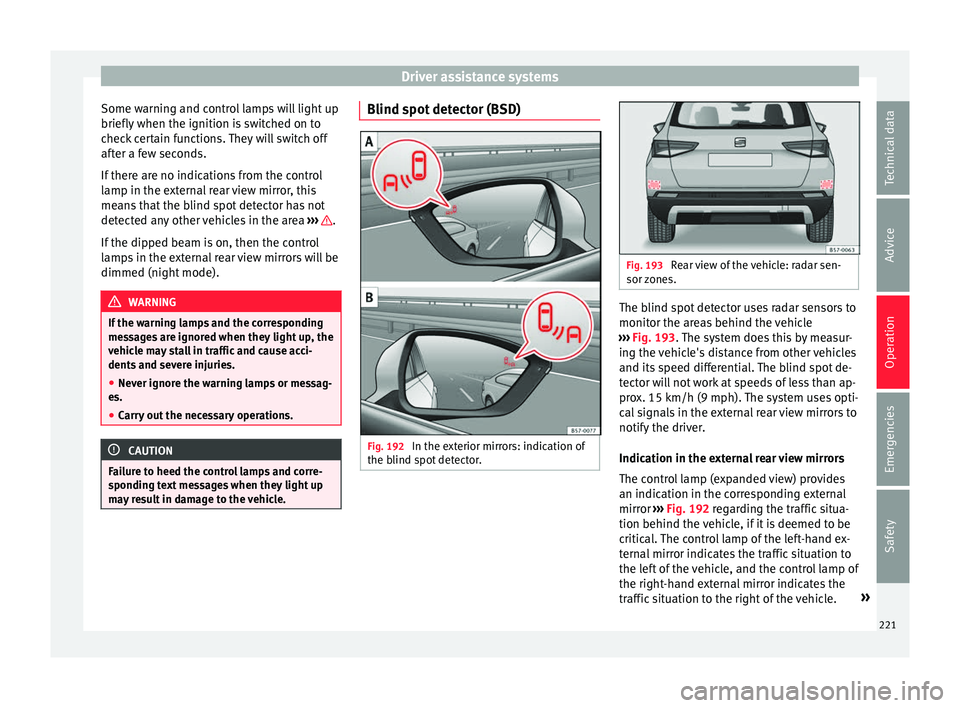
Fig. 192
In the exterior mirrors: indication of
the b lind s
pot detector. Fig. 193
Rear view of the vehicle: radar sen-
sor z
ones. The blind spot detector uses radar sensors to
monit
or the ar
eas behind the vehicle
››› Fig. 193. The system does this by measur-
ing the vehicle's distance from other vehicles
and its speed differential. The blind spot de-
tector will not work at speeds of less than ap-
prox. 15 km/h (9 mph). The system uses opti-
cal signals in the external rear view mirrors to
notify the driver.
Indication in the external rear view mirrors
The control lamp (expanded view) provides
an indication in the corresponding external
mirror ››› Fig. 192 regarding the traffic situa-
tion behind the vehicle, if it is deemed to be
critical. The control lamp of the left-hand ex-
ternal mirror indicates the traffic situation to
the left of the vehicle, and the control lamp of
the right-hand external mirror indicates the
traffic situation to the right of the vehicle. »
221
Technical data
Advice
Operation
Emergencies
Safety
Page 227 of 328
Driver assistance systems
Open the Assistants menu.
● BSD
● P arking Assist.
If
the verification box on the control panel is
checked , the functionality will be automat-
ically activated at ignition.
When the blind spot detector is ready to op-
erate, the indications in the external mirrors
will turn on briefly as confirmation.
When the vehicle is restarted, the last adjust-
ment in the system will remain active.
If the blind spot detector was automatically
deactivated, it will only be possible to restart
the system after turning the vehicle off and
restarting it.
Automatic deactivation of the blind spot de-
tector (BSD)
The radar sensors of the blind spot detector
with rear cross traffic alert will be automati-
cally deactivated when, among other rea-
sons, one of the sensors is detected to be
permanently covered. This may be the case if,
for example, there is a layer of snow or ice in
front of one of the sensors.
The relevant text message will appear in the
dash panel display. Trailer mode
The Blind spot
detector and the rear cross
traffic alert will be automatically deactivated
and it will be impossible to activate them if
the tow hitch is electrically connected to a
trailer or other similar object.
As soon as the driver starts to drive with a
trailer connected electrically to the vehicle, a
message will appear on the instrument panel
display indicating that the blind spot detec-
tor and the rear cross traffic alert are deacti-
vated. Once the trailer has been unhitched
from the vehicle, if you want to use the blind
spot detector and the rear cross traffic alert,
you will have to reactivate them in the corre-
sponding menu.
If the towing hitch is not factory equipped,
then the blind spot detector and the rear
cross traffic alert will have to be deactivated
manually when driving with a trailer.
SEAT Drive Profile*
Introduction The SEAT Drive Profile enables the driver to
c
hoo
se between four profiles or modes, Eco,
Normal , Sport and Individual , that
modify the behaviour of various vehicle func-
tions, providing different driving experiences. In addition, the 4Drive version features the
Offroad and Snow profi
les.
The Individual profile can be configured
according to personal preferences. The other
profiles have a fixed configuration.
Description Depending on the equipment fitted in the ve-
hic
l
e, SEAT Drive Profile can operate on the
following functions:
Engine
Depending on the profile selected, the en-
gine responds more spontaneously or more
in harmony with the movements of the accel-
erator. Additionally, when the Eco profile is
selected, the Start-Stop function is automati-
cally activated.
In vehicles with automatic transmission, the
gear change points are modified to position
them in lower or higher engine speed ranges.
Additionally, the Eco profile activates the in-
ertia function, enabling consumption to be
further reduced.
In manual gearbox vehicles, the Eco profile
causes the gear change recommendation in-
dications that appear on the dash panel to
vary, facilitating more efficient driving. »
225
Technical data
Advice
Operation
Emergencies
Safety
Page 228 of 328
Operation
Address
The po w
er steering varies its driving modes
and adapts to the profile selected, thus offer-
ing the best behaviour for each situation.
Air conditioning
In vehicles with Climatronic, this can operate
in Eco mode, especially restricting fuel con-
sumption.
Adaptive cruise control (ACC)
The acceleration gradient of the adaptive
cruise control varies according to the active
driving profile ››› page 197.
Electronic stability control (ESC)
In the Offroad and Snow driving profiles,
the electronic stability Control (ESC)
››› page 173 adjusts to adapt to the terrain.
In addition, hill descent control (HDC) is acti-
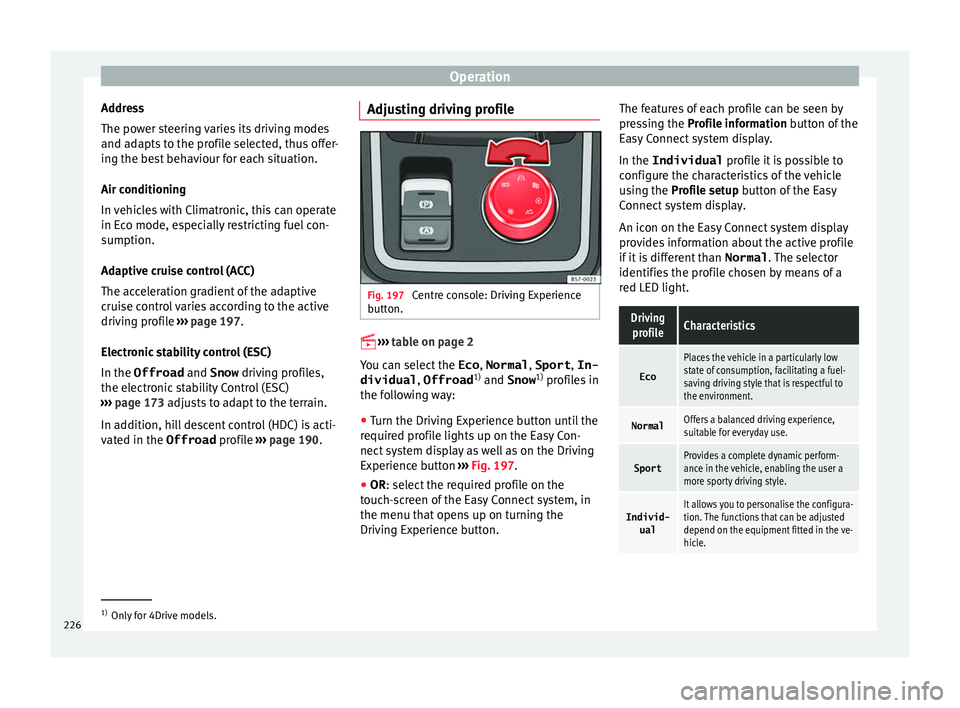
vated in the Offroad profile ››› page 190. Adjusting driving profile Fig. 197
Centre console: Driving Experience
b utt
on.
› ›
›
table on page 2
You can select the Eco, Normal , Sport, In-
dividual , Offroad1)
and Snow 1)
profiles in
the following way:
● Turn the Driving Experience button until the
r equir
ed profile lights up on the Easy Con-
nect system display as well as on the Driving
Experience button ››› Fig. 197.
● OR: select the required profile on the
t
ouch-screen of the Easy Connect system, in
the menu that opens up on turning the
Driving Experience button. The features of each profile can be seen by
pre
ssing the Profile information button of the
Easy Connect system display.
In the Individual profile it is possible to
configure the characteristics of the vehicle
using the Profile setup button of the Easy
Connect system display.
An icon on the Easy Connect system display
provides information about the active profile
if it is different than Normal. The selector
identifies the profile chosen by means of a
red LED light.
Driving profileCharacteristics
Eco
Places the vehicle in a particularly low
state of consumption, facilitating a fuel-
saving driving style that is respectful to
the environment.
NormalOffers a balanced driving experience,
suitable for everyday use.
SportProvides a complete dynamic perform-
ance in the vehicle, enabling the user a
more sporty driving style.
Individ- ualIt allows you to personalise the configura-
tion. The functions that can be adjusted
depend on the equipment fitted in the ve-
hicle. 1)
Only for 4Drive models.
226
Page 229 of 328
Driver assistance systemsDriving
profileCharacteristics
Offroad a)It adjusts the vehicle's parameters in or-
der to maintain optimal off-road driving.
Snowa)It adjusts the vehicle's behaviour for driv-
ing on slippery road surfaces, optimising
grip and manoeuvrability.
a)
Only for 4Drive models. WARNING
When operating SEAT Drive Profile, pay atten-
tion t o a
ll traffic: doing otherwise could cause
an accident. Note
● When the v
ehicle is switched off it will al-
ways store the driving profile that was selec-
ted when the ignition key was removed, ex-
cept in the following cases:
– When the vehicle is restarted after using
the Sport profile, the engine and the
gearbox will not restart in the sportiest
setting so as to reduce fuel consumption.
To return the engine and the gearbox to
their sportiest position, select the Sport
driving profile again.
– When the vehicle is restarted after using
the Offroad or Snow settings, the sys-
tem is always activated in the Normal
profile. ●
Your s
peed and driving style must always
be adjusted to visibility, weather, and traffic
conditions.
● The Eco profile is not recommended when
t
owing a vehicle. Kick-down
The Kick-down feature allows maximum ac-
c
el
eration to be reached.
If the Eco* profile has been selected in the
SEAT Drive Profile ››› page 226 and the
accelerator is pressed beyond a hard point,
the engine power is automatically controlled
to give your vehicle maximum acceleration. WARNING
Please note that if the road surface is slip-
per y
or wet, the kick-down feature could
cause the driving wheels to spin, which could
result in skidding. 227
Technical data
Advice
Operation
Emergencies
Safety
Page 230 of 328
Operation
Traffic sign detection system* Intr oduction The traffic sign detection system records the
s
t
andard traffic signs in front of the vehicle
with a camera located on the base of the in-
terior mirror and provides information about
speed limits and overtaking prohibitions.
Within its limitations, the system also dis-
plays additional signals, such as time-specif-
ic prohibitions, signs for vehicles towing trail-
ers ›››
page 255 or limitations that only apply
in the event of rain. Even on journeys without signs, the system may display any applicable
speed limits.
In Germany, on motorways and vehicle roads,
besides speed limits and overtaking provi-
sions the system also displays the end of
prohibition signs. The valid speed limit at the
time in other countries is always shown.
Countries in which it works
When this instruction manual went to print,
the traffic sign detection system was operat-
ing in the following countries:
Andorra, Austria, Belgium, Bulgaria, Croatia,
Cyprus, Czech Republic, Denmark, Estonia,
Finland, France, Germany, Greece, Hungary,
Iceland, Ireland, Italy, Latvia, Liechtenstein,
Lithuania, Luxembourg, Malta, Monaco, the
Netherlands, Northern Ireland, Norway, Po-
land, Portugal, Romania, San Marino, Slova- kia, Slovenia, Spain, Sweden, Switzerland,
T
urk
ey, the United Kingdom and the Vatican
City. WARNING
The technology in the traffic sign detection
sy s
tem cannot change the limits imposed by
the laws of physics and only works within the
system's limits. Do not let the extra conven-
ience afforded by the traffic sign detection
system tempt you into taking any risks when
driving. The system is not a replacement for
driver awareness.
● Adapt your speed and driving style to suit
vi
sibility, weather, road and traffic condi-
tions.
● Poor visibility, darkness, snow, rain and fog
ma
y lead to the system failing to display traf-
fic signs or not displaying them correctly.
● If the camera's field of vision is dirty, cov-
ered or d
amaged, system operation may be
impaired. WARNING
The driving recommendations and traffic indi-
c ation
s shown on the traffic sign detection
system may differ from the actual current
traffic situation.
● The system may not detect or correctly
show a
ll the traffic signs.
● Traffic signs and traffic regulations have
priority o
ver the recommendations and dis-
plays provided by the system. Note
In order not to compromise the system's op-
er ation, p
lease take the following points into
account:
● Regularly clean the area of vision of the
camer
a and keep it in a clean state, without
snow or ice.
● Do not cover the field of vision of the cam-
era.
● A
lways replace damaged or worn blades
when requir
ed to avoid lines on the camera's
field of vision.
● Check that the windscreen is not damaged
in the are
a of the camera's field of vision. Note
● The u se of
outdated maps on the naviga-
tion system may cause the system to show
traffic signs incorrectly.
● In the waypoints mode of the navigation
sys
tem, the traffic sign detection system is
only partly available. 228
Page 232 of 328
Operation
interior rear-view mirror records the traffic
s ign
s in front of the vehicle. After checking
and evaluating the information from the cam-
era, the navigation system and the current
vehicle data, up to three valid traffic signs
are displayed ››› Fig. 198 B in conjunction
with their corresponding additional signs.
The sign that is currently valid for the
driver is shown in the left side of the
screen For example, a maximum speed
limit of 130 km/h (100 mph)
››› Fig. 198 A.
A sign valid only in certain circum-
stances, e.g. 100 km/h (60 mph) is
shown second, together with the addi-
tional rain sign.
If the windscreen wiper is
working while you are driving, the signal
with the additional rain sign will be
shown first, on the left, as it is the one
that is applicable at the time.
A sign valid only with restrictions, e.g.
No overtaking at certain times, will be
displayed third ››› Fig. 198 C.
Speed warning
If the system detects that the permitted
speed is exceeded, it may warn the driver
with a “gong” and visually with a message
on the dash panel display.
The speed warning can be adjusted or deacti-
vated completely on the infotainment system First:
Second:
Additional sign:
Third: using the
button and the
Set
up and
Driv er As
sistance function buttons
› ›
› page 26. The speed is adjusted in
steps of 5 km/h (3 mph) within a range of be-
tween 0 km/h (mph) and 20 km (12 mph)
above the maximum speed permitted.
Trailer mode
In vehicles equipped with a towing bracket
device from the factory and a trailer that is
electrically connected to the vehicle, it is pos-
sible to activate or deactivate the display of
specific traffic signs for vehicles with trailer,
such as speed limits or overtaking prohibi-
tions. Activation or deactivation is performed
on the infotainment system by means of the
button and the function buttons
Set
up and
Driv
er As
sistance
› ››
page 26.
For trailer mode, the display of speed limits
applicable to the type of trailer or to the legal
provisions can be adjusted. The speed is ad-
justed in steps of 10 km/h (5 mph) within a
range of between 60 km/h (40 mph) and
130 km (80 mph). If it is adjusted to a speed
greater than that which is permitted in the
country in question for driving with a trailer,
the system automatically displays the usual
speed limits, e.g. in Germany 80 km/h
(50 mph).
If the speed warning for the trailer is deacti-
vated, the system displays the speed limits
as if there were no trailer hitched. Limited operation
The traffic
sign detection system has certain
limitations. The following cases may lead the
system to operate with limitations or not at
all:
● In the case of poor visibility, e.g. in snow,
rain, f
og or intense mist.
● In cases of dazzling, e.g. caused by head-
on traffic
or by the sun.
● When driving at high speeds.
● If the camera is covered or dirty.
● If the traffic signs are out of the camera's
field of
vision.
● If the traffic signs are partially or totally
co
vered, e.g. by trees, snow, dirt or other ve-
hicles.
● In the case of traffic signs that do not fulfil
the re
gulations.
● In the case of damaged or bent traffic
sign
s.
● In the case of variable messages on over-
hea
d or gantry signs (LED-based variable traf-
fic signs or other lighting units).
● If the maps on the navigation system are
not up-t
o-date.
● In the case of adhesives affixed to vehicles
that
depict traffic signs, e.g. speed limits on
lorries.
230
Page 252 of 328
OperationExamples of optical illusions caused by the
cameras:
– If the vehicle approaches protruding objects. These
objects may be outside the cameras' angle of visibility.
Trailer mode
The Ar
e
a View system conceals, in the rear
camera area, all the auxiliary guiding lines
when the factory-fitted towing bracket is con-
nected electrically to a trailer ››› page 255. Note
In order to become familiar with the system
and it s
functions, SEAT recommends that you
practice handling the Area View system in an
area where there is not too much traffic or in
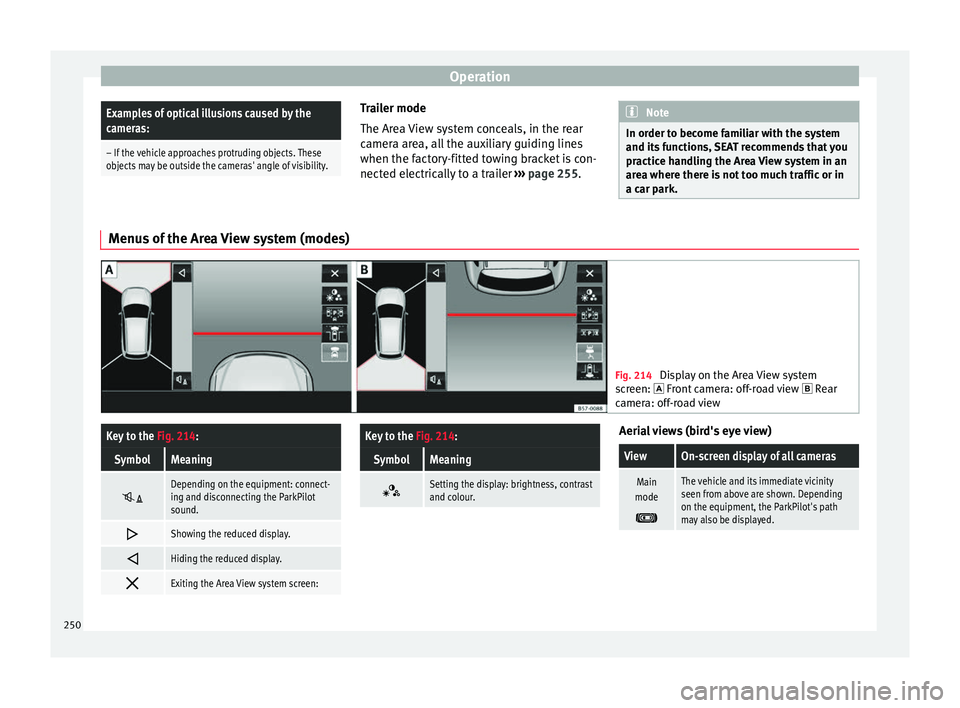
a car park. Menus of the Area View system (modes)
Fig. 214
Display on the Area View system
sc
reen: Front camera: off-road view Rear
camera: off-road view
Key to the Fig. 214:
SymbolMeaning
Depending on the equipment: connect-
ing and disconnecting the ParkPilot
sound.
Showing the reduced display.
Hiding the reduced display.
Exiting the Area View system screen:
Key to the
Fig. 214:
SymbolMeaning
Setting the display: brightness, contrast
and colour. Aerial views (bird's eye view)
ViewOn-screen display of all cameras
Main
mode
The vehicle and its immediate vicinity
seen from above are shown. Depending
on the equipment, the ParkPilot's path
may also be displayed. 250
Page 256 of 328
Operation
Parking and manoeuvring with the
r e
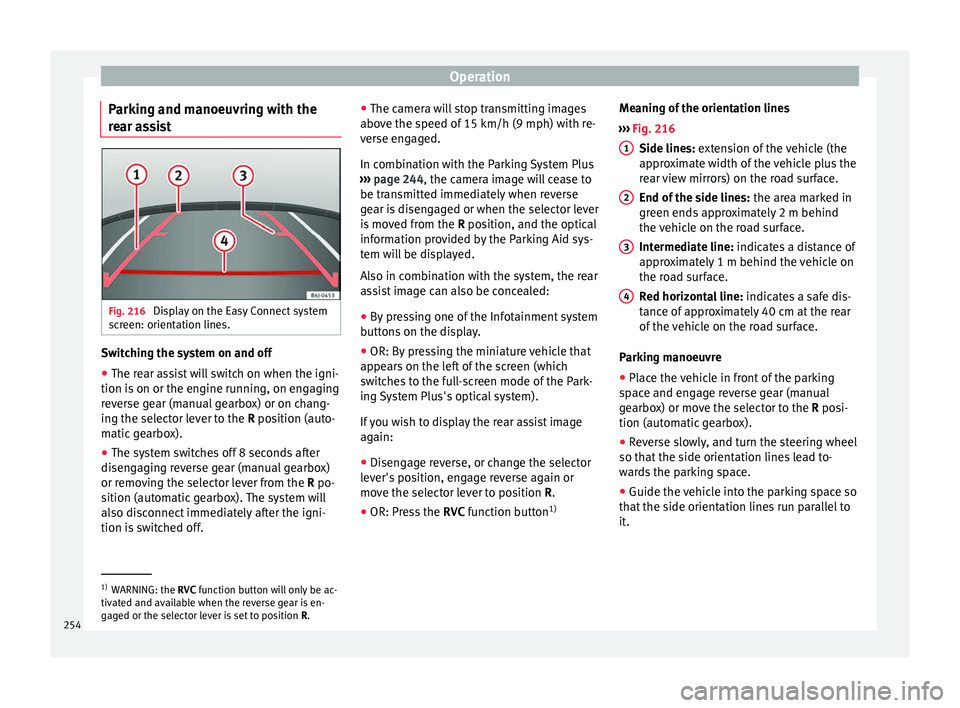
ar assist Fig. 216
Display on the Easy Connect system
s c
reen: orientation lines. Switching the system on and off
●
The rear assist will switch on when the igni-
tion i s
on or the engine running, on engaging
reverse gear (manual gearbox) or on chang-
ing the selector lever to the R position (auto-
matic gearbox).
● The system switches off 8 seconds after
disen
gaging reverse gear (manual gearbox)
or removing the selector lever from the R po-
sition (automatic gearbox). The system will
also disconnect immediately after the igni-
tion is switched off. ●
The camer
a will stop transmitting images
above the speed of 15 km/h (9 mph) with re-
verse engaged.
In combination with the Parking System Plus
››› page 244, the camera image will cease to
be transmitted immediately when reverse
gear is disengaged or when the selector lever
is moved from the R position, and the optical
information provided by the Parking Aid sys-
tem will be displayed.
Also in combination with the system, the rear
assist image can also be concealed:
● By pressing one of the Infotainment system
butt
ons on the display.
● OR: By pressing the miniature vehicle that
appe
ars on the left of the screen (which
switches to the full-screen mode of the Park-
ing System Plus's optical system).
If you wish to display the rear assist image
again:
● Disengage reverse, or change the selector
lev
er's position, engage reverse again or
move the selector lever to position R.
● OR: Press the RVC fu
nction button1)Meaning of the orientation lines
››
› Fig. 216
Side lines: extension of the vehicle (the
approximate width of the vehicle plus the
rear view mirrors) on the road surface.
End of the side lines: the area marked in
green ends approximately 2 m behind
the vehicle on the road surface.
Intermediate line: indicates a distance of
approximately 1 m behind the vehicle on
the road surface.
Red horizontal line: indicates a safe dis-
tance of approximately 40 cm at the rear
of the vehicle on the road surface.
Parking manoeuvre
● Place the vehicle in front of the parking
sp
ace and engage reverse gear (manual
gearbox) or move the selector to the R posi-
tion (automatic gearbox).
● Reverse slowly, and turn the steering wheel
so that
the side orientation lines lead to-
wards the parking space.
● Guide the vehicle into the parking space so
that
the side orientation lines run parallel to
it. 1
2
3
4
1)
WARNING: the RVC fu
nction button will only be ac-
tivated and available when the reverse gear is en-
gaged or the selector lever is set to position R.
254