park assist Seat Ateca 2017 Owner's Guide
[x] Cancel search | Manufacturer: SEAT, Model Year: 2017, Model line: Ateca, Model: Seat Ateca 2017Pages: 328, PDF Size: 6.36 MB
Page 248 of 328
Operation
Parking Aid connection
● Engage reverse (for manual gears) or set
the sel ect
or lever to R (for automatic gears).
Parking Aid disconnection
● Place the selector level in position P, N or D
(for aut
omatic gearboxes) or disengage re-
verse (for manual gearboxes). If you set the
lever to N or D, the system will remain active
for approximately 8 seconds before switching
off, except with Area View, when it will be
switched off immediately after engaging re-
verse.
Temporary suppression of sound in Parking
Aid
● Press the fu
nction button. If you have the
Area View system installed you cannot use
the temporary suppression of sound in Park-
ing Aid.
Switch from reduced to full-screen view if the
rear assist is fitted (Rear View Camera
“RVC”)
● Press the car icon in the reduced view.
If nec
essary, switch to the rear-assist image
(Rear View Camera “RVC”)
● Engage reverse gear or turn the selector
lev
er to position R.
● OR: press the RVC f
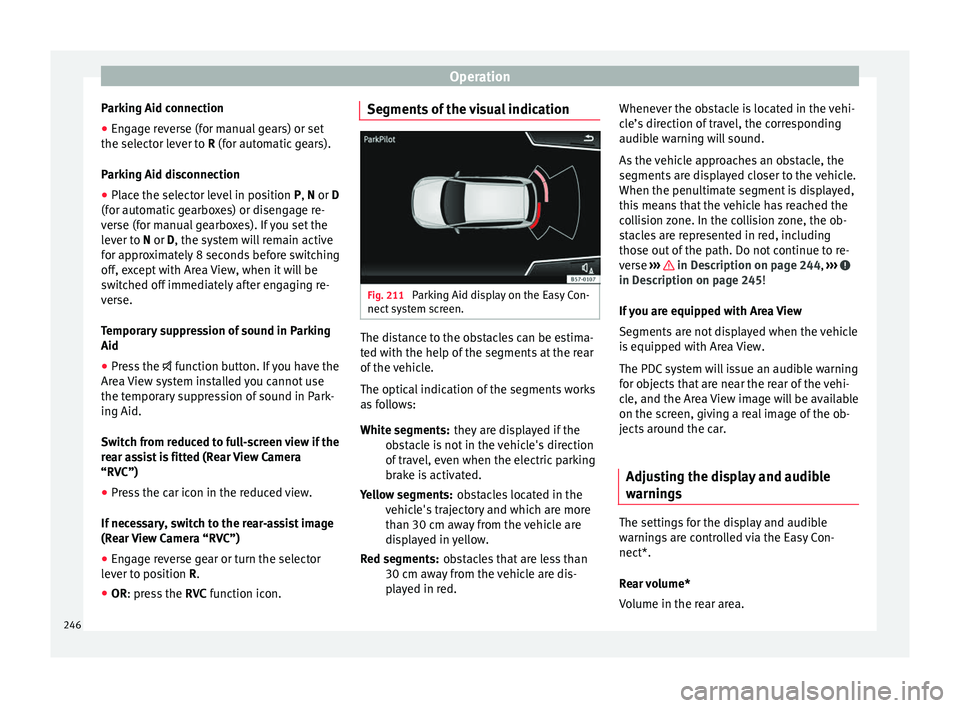
unction icon. Segments of the visual indication
Fig. 211
Parking Aid display on the Easy Con-
nect sy
stem screen. The distance to the obstacles can be estima-
t
ed w
ith the help of the segments at the rear
of the vehicle.
The optical indication of the segments works
as follows:
they are displayed if the
obstacle is not in the vehicle's direction
of travel, even when the electric parking
brake is activated.
obstacles located in the
vehicle's trajectory and which are more
than 30 cm away from the vehicle are
displayed in yellow.
obstacles that are less than
30 cm away from the vehicle are dis-
played in red.
White segments:
Yellow segments:
Red segments: Whenever the obstacle is located in the vehi-
cl
e’s direction of travel, the corresponding
audible warning will sound.
As the vehicle approaches an obstacle, the
segments are displayed closer to the vehicle.
When the penultimate segment is displayed,
this means that the vehicle has reached the
collision zone. In the collision zone, the ob-
stacles are represented in red, including
those out of the path. Do not continue to re-
verse ››› in Description on page 244,
››
› in Description on page 245!
If
you are equipped with Area View
Segments are not displayed when the vehicle
is equipped with Area View.
The PDC system will issue an audible warning
for objects that are near the rear of the vehi-
cle, and the Area View image will be available
on the screen, giving a real image of the ob-
jects around the car.
Adjusting the display and audible
warnin
gs The settings for the display and audible
w
arnin
gs are controlled via the Easy Con-
nect*.
Rear volume*
Volume in the rear area.
246
Page 249 of 328
Driver assistance systems
Rear sound settings/sharpness*
Fr equency
(tone) of the sound in the rear
area.
Adjust volume
With the parking aid switched on, the active
audio/video source volume will be reduced
to the intensity of the selected setting.
Error messages When the Parking Aid is activated or when it
i
s
switched on, if a message reporting a Park-
ing aid error is displayed on the instrument
panel, there is a fault in the system.
If the fault disappears before disconnecting
the ignition, next time that parking aid is en-
gaged in reverse it will not be indicated.
If there is a fault in a sensor, the symbol is
displayed on the Easy Connect display.
Have the fault corrected by a specialised
workshop without delay.
Towing bracket In vehicles equipped with a towing bracket
dev
ic
e from the factory, when the trailer is
connected electrically, the Parking Aid rear
sensors will not be activated when reverse
gear is engaged (manual gears) nor when the selector lever is turned to position
R (auto-
m
atic gears).
Area View* Introduction
› ›
›
table on page 2
Using 4 cameras, the system generates a rep-
resentation that is shown on the infotain-
ment system display. The cameras are loca-
ted on the radiator grille, the exterior mirrors
and the rear lid.
The functions and representations of the
Area View system may vary depending on
whether or not the vehicle has ParkPilot. WARNING
The image from the cameras does not make it
po s
sible to calculate the distance to the ob-
stacles (people, vehicles, etc.) precisely, so
using them could cause serious accidents
and injury.
● The camera lenses augment and distort the
vi
sual field and the objects on the screen are
seen differently and imprecisely.
● Certain objects may not be shown or may
not be sho
wn very clearly, for example, posts
or thin rails, due to the screen resolution or if
light conditions are insufficient. ●
The c amer
as have blind spots in which ob-
stacles and people are not registered.
● The camera lens must be kept free, without
sno
w or ice, and should not be covered. WARNING
The smart technology incorporated into the
Ar e
a View system cannot overcome the limits
imposed by the laws of physics and it only
works within the limits of the system. The
greater convenience provided by the Area
View system should never tempt you to take
any risk that may compromise safety. If used
negligently or involuntarily, it may cause se-
rious accidents and injuries. The system is
not a replacement for driver awareness.
● Adapt your speed and driving style to suit
vi
sibility, weather, road and traffic condi-
tions.
● Do not be distracted from the traffic by
lookin
g at the screen.
● Monitor the area around the vehicle at all
times, s
ince the cameras do not capture small
children, animals and certain objects in all
situations.
● The use of a number plate may interfere in
the v
iews shown on the screen, since the
cameras' field of vision may be reduced.
● The system will probably be unable to rep-
re
sent all areas clearly. » 247
Technical data
Advice
Operation
Emergencies
Safety
Page 251 of 328
Driver assistance systems
system should be checked by a specialised
w ork
shop.
Camera image view
● Aerial view (bird's eye view) : to o
btain a
panoramic view of the vehicle , three-di-
mensional views, from different camera posi-
tions.
● Front Camera (front view) : to o
bserve traffic
ahead of the vehicle (vehicles crossing) ,
for front parallel parking , when approach-
ing an obstacle and in off-road driving .
● Side cameras (side view) : to
view the area
close to the sides of the vehicle, both on the
left and on the right , or a combination of
both sides .
● Rear camera (rear view) : T
o observe traffic
behind the vehicle (vehicles crossing) , for
reverse perpendicular parking , for reverse
parallel parking and for hitching a trailer
to the vehicle .
The selected view is displayed on the right
side of the screen. The reduced aerial view
shown on the right side displays the view
framed in yellow. In addition, the right mar-
gin of the screen displays the menu options
possible and the views (the so-called
“modes”) of the camera in question. The ac-
tive view (mode) at the time is highlighted.
The reduced aerial view can be hidden by
pressing the symbol to thus display the se-
lected view full-screen. Instructions for use
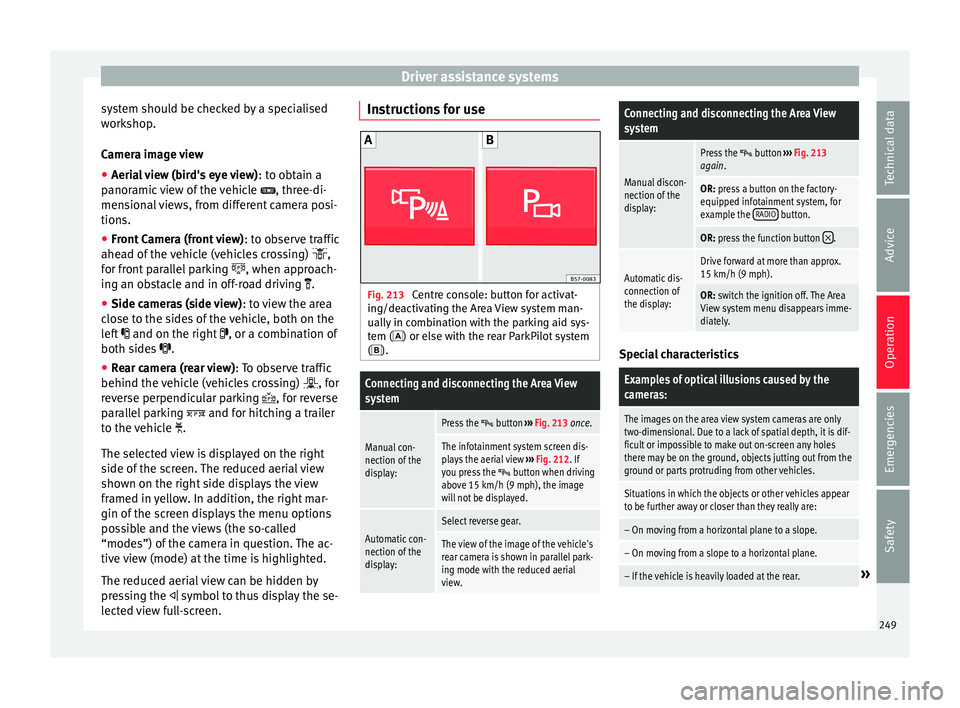
Fig. 213
Centre console: button for activat-
in g/de
activating the Area View system man-
ually in combination with the parking aid sys-
tem () or else with the rear ParkPilot system ().
Connecting and disconnecting the Area View
system
Manual con-
nection of the
display:
Press the button ››› Fig. 213 once.
The infotainment system screen dis-
plays the aerial view ››› Fig. 212. If
you press the
button when driving
above 15 km/h (9 mph), the image
will not be displayed.
Automatic con-
nection of the
display:
Select reverse gear.
The view of the image of the vehicle's
rear camera is shown in parallel park-
ing mode with the reduced aerial
view.
Connecting and disconnecting the Area View
system
Manual discon-
nection of the
display:
Press the button ››› Fig. 213
again.
OR: press a button on the factory-
equipped infotainment system, for
example the RADIO
button.
OR: press the function button .
Automatic dis-
connection of
the display:Drive forward at more than approx.
15 km/h (9 mph).
OR: switch the ignition off. The Area
View system menu disappears imme-
diately. Special characteristics
Examples of optical illusions caused by the
cameras:
The images on the area view system cameras are only
two-dimensional. Due to a lack of spatial depth, it is dif-
ficult or impossible to make out on-screen any holes
there may be on the ground, objects jutting out from the
ground or parts protruding from other vehicles.
Situations in which the objects or other vehicles appear
to be further away or closer than they really are:
– On moving from a horizontal plane to a slope.
– On moving from a slope to a horizontal plane.
– If the vehicle is heavily loaded at the rear.»
249
Technical data
Advice
Operation
Emergencies
Safety
Page 253 of 328
Driver assistance systemsViewOn-screen display of all cameras
Three-di-
mensional views
The vehicle and its vicinity seen
from above are shown.
The vehicle and its vicinity seen
from above are shown oblique-
ly.
The vehicle and its vicinity seen
obliquely are shown.
Swipe the infotainment system display with
y
our fin
ger in the direction of the arrows to
change the angle of vision in the three-di-
mensional views of the vehicle and its vicini-
ty.
Front camera views (front view)
ViewOn-screen display of the front
camera
Cross traffic at the front
Left area of the screen: street to the left.
Central area of the screen: area directly
in front of the vehicle.
Right area of the screen: street to the
right.
Parallel park- ing
The area in front of the vehicle is
shown. Orientation lines are shown to
give guidance.
ViewOn-screen display of the front
camera
Off-road
The area directly in front of the vehicle
seen from above is shown. For example,
on a slope, in order to see the area di-
rectly in front of the vehicle. The red line
is shown at a distance of approx. 0.4 m
from the vehicle. Side camera views (side view)
ViewOn-screen display of the side
cameras
Right and left
sides
The areas located directly to the side of
the vehicle seen from above are repre-
sented in order to navigate possible ob-
stacles more precisely. The orange aux-
iliary lines are shown at a distance of
approx. 0.4 m from the vehicle.
Left side
The area directly next to the vehicle, on
the driver's or front passenger's side, is
displayed, and the blind spots all along
the vehicle can be seen. The orange
auxiliary line is shown at a distance of
approx. 0.4 m from the vehicle.
Right side
Rear camera views (rear view)
ViewOn-screen display of the rear
camera
Parallel park-
ing
The area behind the vehicle is shown.
Auxiliary lines are shown to give guid-
ance.
Parallel park-ing
The vehicle's initial position on initiat-
ing this function will be a decisive fac-
tor in determining the place where the
manoeuvre executed by the assistant
will end.
Off-road orhitching a
trailer func- tion
The vehicle's rear is presented. The red
auxiliary line establishes the safety dis-
tance.
Green and red semicircular auxiliary
lines are displayed in vehicles with a
factory-fitted towing bracket. The auxili-
ary lines indicate the distance from the
towing bracket. The distance between
the auxiliary lines (green and red) is ap-
prox. 0.3 m. The orange auxiliary line in-
dicates, depending on the turn of the
steering wheel, the pre-calculated di-
rection of the towing bracket.
In vehicles with a factory-fitted towing
bracket, the distance from the red auxil-
iary line to the vehicle is approx. 0.4 m.
No other auxiliary line is displayed.
» 251
Technical data
Advice
Operation
Emergencies
Safety
Page 254 of 328
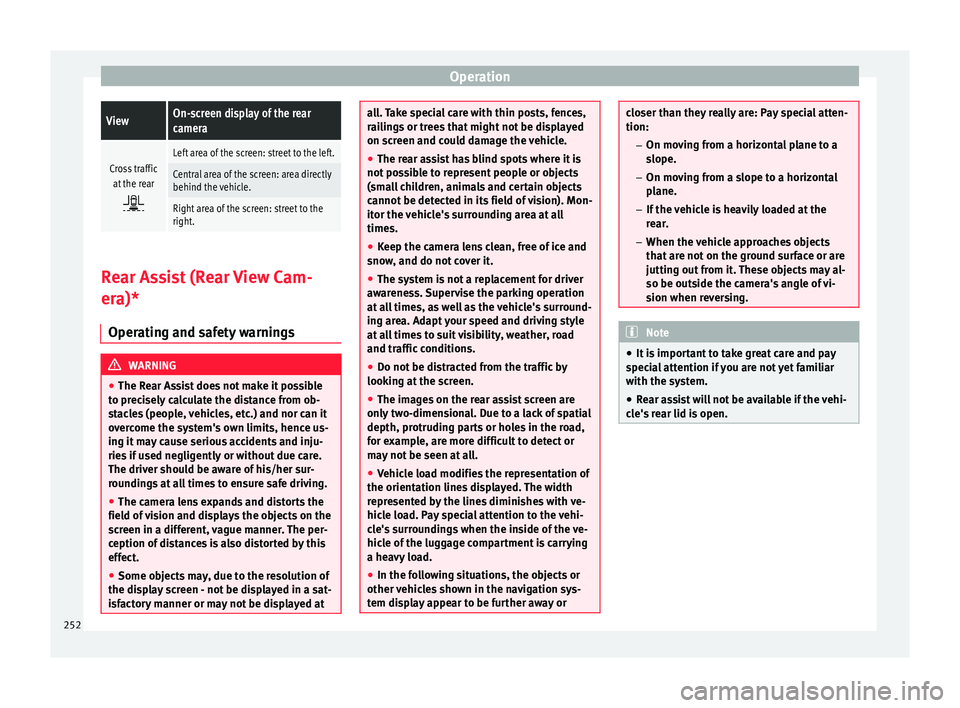
OperationViewOn-screen display of the rear
camera
Cross traffic
at the rear
Left area of the screen: street to the left.
Central area of the screen: area directly
behind the vehicle.
Right area of the screen: street to the
right. Rear Assist (Rear View Cam-
er
a)*
Oper
ating and safety warnings WARNING
● The R e
ar Assist does not make it possible
to precisely calculate the distance from ob-
stacles (people, vehicles, etc.) and nor can it
overcome the system's own limits, hence us-
ing it may cause serious accidents and inju-
ries if used negligently or without due care.
The driver should be aware of his/her sur-
roundings at all times to ensure safe driving.
● The camera lens expands and distorts the
field of
vision and displays the objects on the
screen in a different, vague manner. The per-
ception of distances is also distorted by this
effect.
● Some objects may, due to the resolution of
the dis
play screen - not be displayed in a sat-
isfactory manner or may not be displayed at all. Take special care with thin posts, fences,
r
ai
lings or trees that might not be displayed
on screen and could damage the vehicle.
● The rear assist has blind spots where it is
not po
ssible to represent people or objects
(small children, animals and certain objects
cannot be detected in its field of vision). Mon-
itor the vehicle's surrounding area at all
times.
● Keep the camera lens clean, free of ice and
sno
w, and do not cover it.
● The system is not a replacement for driver
aw
areness. Supervise the parking operation
at all times, as well as the vehicle's surround-
ing area. Adapt your speed and driving style
at all times to suit visibility, weather, road
and traffic conditions.
● Do not be distracted from the traffic by
lookin
g at the screen.
● The images on the rear assist screen are
only
two-dimensional. Due to a lack of spatial
depth, protruding parts or holes in the road,
for example, are more difficult to detect or
may not be seen at all.
● Vehicle load modifies the representation of
the orientation line
s displayed. The width
represented by the lines diminishes with ve-
hicle load. Pay special attention to the vehi-
cle's surroundings when the inside of the ve-
hicle of the luggage compartment is carrying
a heavy load.
● In the following situations, the objects or
other v
ehicles shown in the navigation sys-
tem display appear to be further away or closer than they really are: Pay special atten-
tion:
– On mo v
ing from a horizontal plane to a
slope.
– On moving from a slope to a horizontal
plane.
– If the vehicle is heavily loaded at the
rear.
– When the vehicle approaches objects
that are not on the ground surface or are
jutting out from it. These objects may al-
so be outside the camera's angle of vi-
sion when reversing. Note
● It i
s important to take great care and pay
special attention if you are not yet familiar
with the system.
● Rear assist will not be available if the vehi-
cl
e's rear lid is open. 252
Page 255 of 328
Driver assistance systems
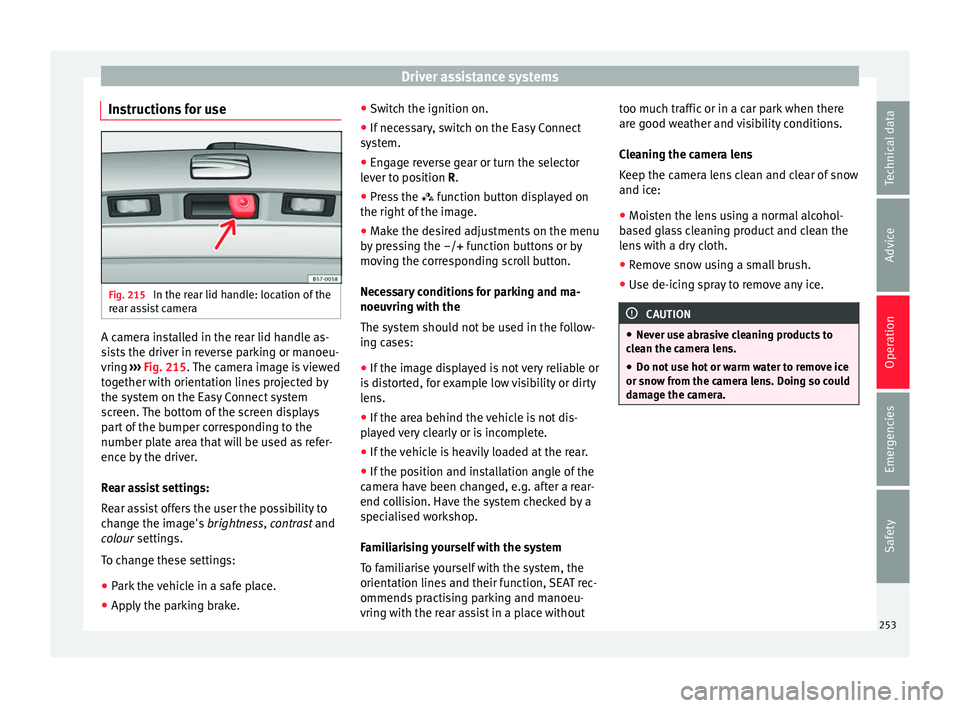
Instructions for use Fig. 215
In the rear lid handle: location of the
r e
ar assist camera A camera installed in the rear lid handle as-
s
i
sts the driver in reverse parking or manoeu-
vring ››› Fig. 215. The camera image is viewed
together with orientation lines projected by
the system on the Easy Connect system
screen. The bottom of the screen displays
part of the bumper corresponding to the
number plate area that will be used as refer-
ence by the driver.
Rear assist settings:
Rear assist offers the user the possibility to
change the image's brightness, contrast and
colour settings.
To change these settings:
● Park the vehicle in a safe place.
● Apply the parking brake. ●
Swit
ch the ignition on.
● If necessary, switch on the Easy Connect
sys
tem.
● Engage reverse gear or turn the selector
lev
er to position R.
● Press the fu
nction button displayed on
the right of the image.
● Make the desired adjustments on the menu
by
pressing the –/+ function buttons or by
moving the corresponding scroll button.
Necessary conditions for parking and ma-
noeuvring with the
The system should not be used in the follow-
ing cases:
● If the image displayed is not very reliable or
is
distorted, for example low visibility or dirty
lens.
● If the area behind the vehicle is not dis-
pl
ayed very clearly or is incomplete.
● If the vehicle is heavily loaded at the rear.
● If the position and installation angle of the
camer
a have been changed, e.g. after a rear-
end collision. Have the system checked by a
specialised workshop.
Familiarising yourself with the system
To familiarise yourself with the system, the
orientation lines and their function, SEAT rec-
ommends practising parking and manoeu-
vring with the rear assist in a place without too much traffic or in a car park when there
are g
ood weather and visibility conditions.
Cleaning the camera lens
Keep the camera lens clean and clear of snow
and ice:
● Moisten the lens using a normal alcohol-
ba
sed glass cleaning product and clean the
lens with a dry cloth.
● Remove snow using a small brush.
● Use de-icing spray to remove any ice. CAUTION
● Nev er u
se abrasive cleaning products to
clean the camera lens.
● Do not use hot or warm water to remove ice
or sno
w from the camera lens. Doing so could
damage the camera. 253
Technical data
Advice
Operation
Emergencies
Safety
Page 256 of 328
Operation
Parking and manoeuvring with the
r e
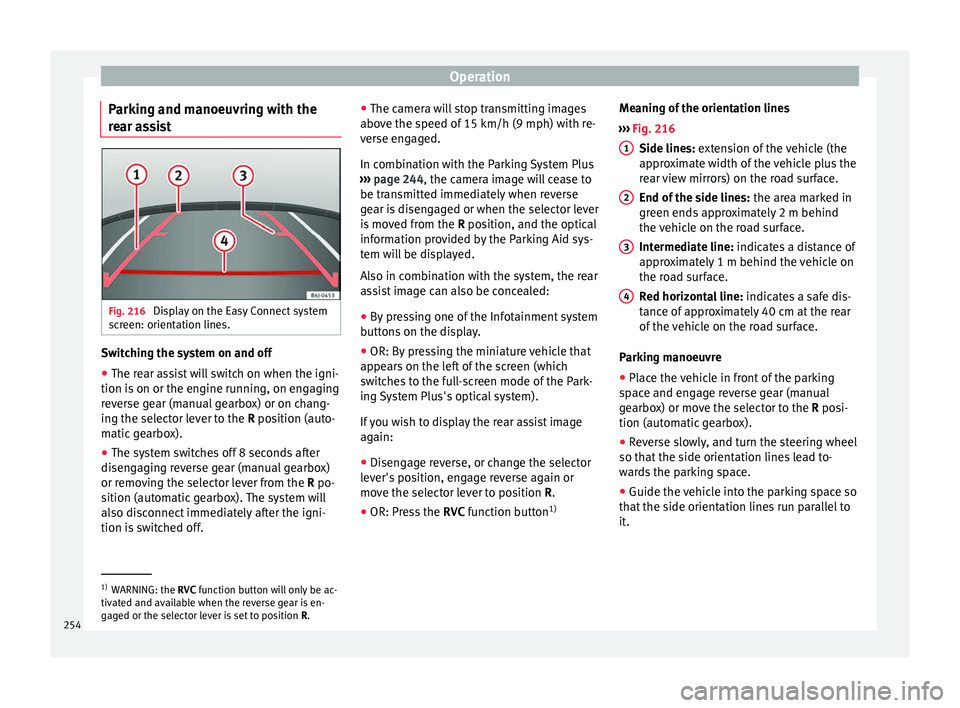
ar assist Fig. 216
Display on the Easy Connect system
s c
reen: orientation lines. Switching the system on and off
●
The rear assist will switch on when the igni-
tion i s
on or the engine running, on engaging
reverse gear (manual gearbox) or on chang-
ing the selector lever to the R position (auto-
matic gearbox).
● The system switches off 8 seconds after
disen
gaging reverse gear (manual gearbox)
or removing the selector lever from the R po-
sition (automatic gearbox). The system will
also disconnect immediately after the igni-
tion is switched off. ●
The camer
a will stop transmitting images
above the speed of 15 km/h (9 mph) with re-
verse engaged.
In combination with the Parking System Plus
››› page 244, the camera image will cease to
be transmitted immediately when reverse
gear is disengaged or when the selector lever
is moved from the R position, and the optical
information provided by the Parking Aid sys-
tem will be displayed.
Also in combination with the system, the rear
assist image can also be concealed:
● By pressing one of the Infotainment system
butt
ons on the display.
● OR: By pressing the miniature vehicle that
appe
ars on the left of the screen (which
switches to the full-screen mode of the Park-
ing System Plus's optical system).
If you wish to display the rear assist image
again:
● Disengage reverse, or change the selector
lev
er's position, engage reverse again or
move the selector lever to position R.
● OR: Press the RVC fu
nction button1)Meaning of the orientation lines
››
› Fig. 216
Side lines: extension of the vehicle (the
approximate width of the vehicle plus the
rear view mirrors) on the road surface.
End of the side lines: the area marked in
green ends approximately 2 m behind
the vehicle on the road surface.
Intermediate line: indicates a distance of
approximately 1 m behind the vehicle on
the road surface.
Red horizontal line: indicates a safe dis-
tance of approximately 40 cm at the rear
of the vehicle on the road surface.
Parking manoeuvre
● Place the vehicle in front of the parking
sp
ace and engage reverse gear (manual
gearbox) or move the selector to the R posi-
tion (automatic gearbox).
● Reverse slowly, and turn the steering wheel
so that
the side orientation lines lead to-
wards the parking space.
● Guide the vehicle into the parking space so
that
the side orientation lines run parallel to
it. 1
2
3
4
1)
WARNING: the RVC fu
nction button will only be ac-
tivated and available when the reverse gear is en-
gaged or the selector lever is set to position R.
254
Page 275 of 328
Intelligent technology
The retract function may not operate properly
in v
ery dirty belts. Make sure that the inertia
reel seat belts are completely dry before al-
lowing them to retract. CAUTION
● Do not r
emove the seat belts from the vehi-
cle to clean them.
● Do not use chemical cleaning agents on the
seat
belts, as this can damage the webbing.
Ensure that the seat belts do not come into
contact with corrosive fluids.
● If you find any damage to the belt webbing,
belt fittin
gs, the belt retractor or the buckle,
the belt in question must be replaced by a
specialised workshop. Intelligent technology
El ectr
omechanical steering Electro-mechanical power steering assists
the driv
er when s
teering.
Electro-mechanical power steering adapts
electronically to the speed of the car, torque
and turning angle.
If the power steering should fail at any time
or the engine is switched off (for instance
when being towed), the car can still be
steered. However, more effort than normal
will be required to turn the steering wheel.
Driver warning lamps and messages (in red) Faulty steering! To
park the vehicle
If the warning lamp remains on and the driver
indication appears, the power steering could
be faulty.
Do not continue driving. Seek specialist as-
sistance. (in yellow) Steering: System
fault! You may continue driving.
If the warning lamp comes on, the steering
could react with more difficultly or more sen-
sitivity than normal. In addition, when driving
in a straight line the steering wheel may be
off-centre. Drive slowly to a specialised workshop and
h
av
e the fault repaired.
(in yellow) Steering lock:
fault! Go to an Official Service
The electronic steering lock is malfunction-
ing.
Go to a specialised workshop as soon as
possible and have the fault repaired. WARNING
Take it immediately to a specialised work-
shop and h av
e the fault repaired: risk of acci-
dent! Note
If the lamp (in red) or el
se (in yellow)
lights up briefly, you may continue driving. Four-wheel drive
3
V
alid for vehicles: with four-wheel drive
On four-wheel drive models, the engine pow-
er is distributed to all four wheels
General notes
On four-wheel drive vehicles, the engine
power is distributed to all four wheels. The
distribution of power is controlled automati-
cally according to your driving style and the
road conditions. Also see ›››
page 173. »
273
Technical data
Advice
Operation
Emergencies
Safety
Page 311 of 328
Index
Index
A
ABS se
e Anti-lock brake system . . . . . . . . . . . . . . . 173
ACC . . . . . . . . . . . . . . . . . . . . . . . . . . . . . . . . . . . . 197 radar sensor . . . . . . . . . . . . . . . . . . . . . . . . . . . 200
Accessories . . . . . . . . . . . . . . . . . . . . . . . . . 148, 265
Adaptive cruise control . . . . . . . . . . . . . . . . . . . . 197 indications on the display . . . . . . . . . . . . . . . . 199
malfunction . . . . . . . . . . . . . . . . . . . . . . . . . . . . 198
radar sensor . . . . . . . . . . . . . . . . . . . . . . . . . . . 200
special driving situations . . . . . . . . . . . . . . . . . 205
warning and control lamp . . . . . . . . . . . . . . . . 199
Adaptive Cruise Control deactivating temporarily . . . . . . . . . . . . . . . . . 205
operating . . . . . . . . . . . . . . . . . . . . . . . . . . . . . . 201
AdBlue control lamp . . . . . . . . . . . . . . . . . . . . . . . . . . . 279
information . . . . . . . . . . . . . . . . . . . . . . . 279, 280
maximum filling capacity . . . . . . . . . . . . . . . . . 280
refilling . . . . . . . . . . . . . . . . . . . . . . . . . . . . . . . 280
specification . . . . . . . . . . . . . . . . . . . . . . . . . . . 280
tank capacity . . . . . . . . . . . . . . . . . . . . . . 279, 280
warning lamp . . . . . . . . . . . . . . . . . . . . . . . . . . 279
additional electrical appliances (efficiency pro- gramme) . . . . . . . . . . . . . . . . . . . . . . . . . . . . . . . 34
Adjusting front head restraints . . . . . . . . . . . . . . . . . . . . . . 66
front seats . . . . . . . . . . . . . . . . . . . . . . . . . . . . . 143
Adjusting the head restraints front head restraints . . . . . . . . . . . . . . . . . . . . . 143
Adjustment CAR menu . . . . . . . . . . . . . . . . . . . . . . . . . . . . . 108
front head restraints . . . . . . . . . . . . . . . . . . . . . 143 lights . . . . . . . . . . . . . . . . . . . . . . . . . . . . . . . . . 137
re
ar head restraints . . . . . . . . . . . . . . . . . 66, 143
seats . . . . . . . . . . . . . . . . . . . . . . . . . . . . . . . . . . 63
Airbag covers . . . . . . . . . . . . . . . . . . . . . . . . . . . . . 15
Airbags . . . . . . . . . . . . . . . . . . . . . . . . . . . . . . . . . . 73 description . . . . . . . . . . . . . . . . . . . . . . . . . . . . . 74
Airbag system . . . . . . . . . . . . . . . . . . . . . . . . . . 15, 73 activation . . . . . . . . . . . . . . . . . . . . . . . . . . . . . . 74
deactivation of front airbag . . . . . . . . . . . . . . . . 77
description . . . . . . . . . . . . . . . . . . . . . . . . . . . . . 74
front airbags . . . . . . . . . . . . . . . . . . . . . . . . . 15, 75
functioning . . . . . . . . . . . . . . . . . . . . . . . . . . . . . 74
head-protection airbags . . . . . . . . . . . . . . . . . . 17
Knee airbag . . . . . . . . . . . . . . . . . . . . . . . . . . . . . 16
side airbags . . . . . . . . . . . . . . . . . . . . . . . . . . . . 16
Air conditioning Climatronic . . . . . . . . . . . . . . . . . . . . . . . . 42, 156
heating and fresh air . . . . . . . . . . . . . . . . . . . . . 46
manual air conditioning . . . . . . . . . . . . . . . . . . . 44
User instructions . . . . . . . . . . . . . . . . . . . . . . . 158
Air conditioning system auxiliary heater . . . . . . . . . . . . . . . . . . . . . . . . . 161
Air outlets . . . . . . . . . . . . . . . . . . . . . . . . . . . . . . . 159
Air recirculation . . . . . . . . . . . . . . . . . . . . . . . . . . 160
Alcantara: cleaning . . . . . . . . . . . . . . . . . . . . . . . 272
Ambient lighting . . . . . . . . . . . . . . . . . . . . . . . . . 138
Anti-freeze . . . . . . . . . . . . . . . . . . . . . . . . . . . . . . . 49
Anti-lock brake system . . . . . . . . . . . . . . . . . . . . . 173
Anti-puncture . . . . . . . . . . . . . . . . . . . . . . . . . . 53, 83
Anti-puncture kit . . . . . . . . . . . . . . . . . . . . . . . . 53, 83 Check after 10 minutes . . . . . . . . . . . . . . . . . . . 85
Anti-puncture set . . . . . . . . . . . . . . . . . . . . . . . . . . 83
Anti-slip regulation . . . . . . . . . . . . . . . . . . . . . . . 173
Anti-theft alarm . . . . . . . . . . . . . . . . . . . . . 112, 121 trailer . . . . . . . . . . . . . . . . . . . . . . . . . . . . . . . . . 260
vehicle interior monitoring and anti-tow sys-tem . . . . . . . . . . . . . . . . . . . . . . . . . . . . . . . . . 123
Anti-theft security system . . . . . . . . . . . 9, 112, 119 Anti-theft system
trai ler . . . . . . . . . . . . . . . . . . . . . . . . . . . . . . . . . 260
Anti-tow protection . . . . . . . . . . . . . . . . . . . . . . . 123
Anti-trap function sun blind (sunroof) . . . . . . . . . . . . . . . . . . . . . . 130
sunroof . . . . . . . . . . . . . . . . . . . . . . . . . . . . . . . 130
Area View . . . . . . . . . . . . . . . . . . . . . . . . . . . . . . . 247 see area View . . . . . . . . . . . . . . . . . . . . . . . . . . 247
Area View system instructions for use . . . . . . . . . . . . . . . . . . . . . 249
menus . . . . . . . . . . . . . . . . . . . . . . . . . . . . . . . . 250
modes . . . . . . . . . . . . . . . . . . . . . . . . . . . . . . . . 250
screen . . . . . . . . . . . . . . . . . . . . . . . . . . . . . . . . 249
Special characteristics . . . . . . . . . . . . . . . . . . . 249
Aspects to take into account before starting the vehicle . . . . . . . . . . . . . . . . . . . . . . . . . . . . . . . . . 62
Assistance systems ACC . . . . . . . . . . . . . . . . . . . . . . . . . . . . . . . . . . 197
adaptive cruise control . . . . . . . . . . . . . . . . . . . 197
Area View . . . . . . . . . . . . . . . . . . . . . . . . . . . . . 247
Auto Hold function . . . . . . . . . . . . . . . . . . . . . . 191
blind spot detector (BSD) with parking assis-tance (RCTA) . . . . . . . . . . . . . . . . . . . . . . . . . 220
Cruise control system . . . . . . . . . . . . . . . . . . . . 193
Emergency Assist . . . . . . . . . . . . . . . . . . . . . . . 218
Front Assist . . . . . . . . . . . . . . . . . . . . . . . . . . . . 207
Hill Descent Control . . . . . . . . . . . . . . . . . . . . . 190
parking assistance (RCTA) . . . . . . . . . . . . . . . . 220
Pedestrian Monitoring system . . . . . . . . . . . . . 212
rear parking aid . . . . . . . . . . . . . . . . . . . . . . . . 244
Traffic Jam Assist . . . . . . . . . . . . . . . . . . . . . . . . 216
traffic sign detection system . . . . . . . . . . . . . . 228
tyre monitoring . . . . . . . . . . . . . . . . . . . . . . . . . 296
tyre monitoring indicator . . . . . . . . . . . . . . . . . 297
Assistance Systems fatigue detection . . . . . . . . . . . . . . . . . . . . . . . 231
tyre monitoring systems . . . . . . . . . . . . . . . . . 295
Assisted starting . . . . . . . . . . . . . . . . . . . . . . . . . . 58 309
Page 312 of 328
Index
Assist systems Park
Assist . . . . . . . . . . . . . . . . . . . . . . . . . . . . 232
parking system Plus . . . . . . . . . . . . . . . . . . . . . 239
speed limiter . . . . . . . . . . . . . . . . . . . . . . . . . . . 194
Audible signal lights . . . . . . . . . . . . . . . . . . . . . . . . . . . . . . . . . 131
Audible warning signal seat belt not fastened . . . . . . . . . . . . . . . . . . . . 68
warning and control lamps . . . . . . . . . . . . . . . 106
Auto Hold . . . . . . . . . . . . . . . . . . . . . . . . . . . . . . . 191
Auto Hold function . . . . . . . . . . . . . . . . . . . . . . . . 191
Auto Lock (central locking) . . . . . . . . . . . . . . . . . 112
Automatic car washes switching the Auto Hold function off . . . . . . . . 192
Automatic dipped beam control . . . . . . . . . . . . . 132
Automatic gear safety interlock for ignition key . . . . . . . . . . . . 165
Automatic gearbox . . . . . . . . . . . . . . . . . . . . . . . . 177 backup programme . . . . . . . . . . . . . . . . . . . . . 183
downhill speed control . . . . . . . . . . . . . . . . . . 182
driving tips . . . . . . . . . . . . . . . . . . . . . . . . . . . . 180
kick-down feature . . . . . . . . . . . . . . . . . . . . . . . 181
launch control programme . . . . . . . . . . . . . . . . 181
manual release of selector lever . . . . . . . . . . . . 41
selector lever lock . . . . . . . . . . . . . . . . . . . . . . . 178
selector lever positions . . . . . . . . . . . . . . . . . . 177
Steering wheel with gearshift paddles . . . . . . 179
tiptronic . . . . . . . . . . . . . . . . . . . . . . . . . . 177, 179
towing . . . . . . . . . . . . . . . . . . . . . . . . . . . . . . . . . 87
AUX-IN . . . . . . . . . . . . . . . . . . . . . . . . . . . . . . . . . . 111
Auxiliary heater . . . . . . . . . . . . . . . . . . . . . . . . . . 161 activating . . . . . . . . . . . . . . . . . . . . . . . . . . . . . 163
electric consumers . . . . . . . . . . . . . . . . . . . . . . 164
operating instructions . . . . . . . . . . . . . . . . . . . 164
programming . . . . . . . . . . . . . . . . . . . . . . . . . . 163
remote control . . . . . . . . . . . . . . . . . . . . . . . . . 162
remote control range . . . . . . . . . . . . . . . . . . . . 163 special features . . . . . . . . . . . . . . . . . . . . . . . . 162
swit
ching off . . . . . . . . . . . . . . . . . . . . . . . . . . . 161
switching on . . . . . . . . . . . . . . . . . . . . . . . . . . . 161
things to note . . . . . . . . . . . . . . . . . . . . . . . . . . 164
B Battery . . . . . . . . . . . . . . . . . . . . . . . . . . . . . . . . . . 120 replacement in the remote control (auxiliaryheater) . . . . . . . . . . . . . . . . . . . . . . . . . . . . . . 162
Before starting the vehicle . . . . . . . . . . . . . . . . . . 62
Belt tightening . . . . . . . . . . . . . . . . . . . . . . . . . . . . 72
Bench seat . . . . . . . . . . . . . . . . . . . . . . . . . . . . . . 146
Bicycle rack Fitting on the retractable tow hitch . . . . . . . . . 258
maximum load . . . . . . . . . . . . . . . . . . . . . . . . . 258
Biodiesel . . . . . . . . . . . . . . . . . . . . . . . . . . . . . . . . 278
Blind spot detector (BSD) . . . . . . . . . . . . . . . . . . 220 control lamps . . . . . . . . . . . . . . . . . . . . . . . . . . 220
driving situations . . . . . . . . . . . . . . . . . . . . . . . 223
indication in the external rear view mirror . . . 221
malfunction . . . . . . . . . . . . . . . . . . . . . . . . . . . . 220
operating . . . . . . . . . . . . . . . . . . . . . . . . . . . . . . 221
towing . . . . . . . . . . . . . . . . . . . . . . . . . . . . . . . . 225
Bonnet . . . . . . . . . . . . . . . . . . . . . . . . . . . . . 11, 282 opening the bonnet . . . . . . . . . . . . . . . . . . . . . 283
Brake emergency braking function . . . . . . . . . . . . . . 170
brake fluid . . . . . . . . . . . . . . . . . . . . . . . . . . . . . . . . 50
Brakes . . . . . . . . . . . . . . . . . . . . . . . . . . . . . . . . . . 172 brake fluid . . . . . . . . . . . . . . . . . . . . . . . . . . . . . 287
brake servo . . . . . . . . . . . . . . . . . . . . . . . . . . . . 172
electronic parking brake . . . . . . . . . . . . . . . . . 170
new brake pads . . . . . . . . . . . . . . . . . . . . . . . . 172
Braking front assist . . . . . . . . . . . . . . . . . . . . . . . . . . . . 173
BSD see Blind spot detector (BSD) . . . . . . . . . . . . . 220 C
Camer
a
cleaning . . . . . . . . . . . . . . . . . . . . . . . . . . . . . . 268
cleanliness . . . . . . . . . . . . . . . . . . . . . . . . . . . . 228
Lane Assist . . . . . . . . . . . . . . . . . . . . . . . . . . . . 215
Capacities . . . . . . . . . . . . . . . . . . . . . . . . . . . . . . . . 48 AdBlue tank . . . . . . . . . . . . . . . . . . . . . . 279, 280
fuel tank . . . . . . . . . . . . . . . . . . . . . . . . . . . . . . 106
windscreen washer water . . . . . . . . . . . . . . . . 288
Car-care products . . . . . . . . . . . . . . . . . . . . . . . . . 266
Catalytic converter . . . . . . . . . . . . . . . . . . . . . . . . 186 malfunction . . . . . . . . . . . . . . . . . . . . . . . . . . . . 186
CCS . . . . . . . . . . . . . . . . . . . . . . . . . . . . . . . . . . . . . 36
CD-ROM player (navigation) . . . . . . . . . . . . . . . . 148
Central locking anti-theft alarm . . . . . . . . . . . . . . . . . . . . . . . . . 121
central locking switch . . . . . . . . . . . . . . . . . . . . 115
Electric windows . . . . . . . . . . . . . . . . . . . . . . . . 127
Keyless Access . . . . . . . . . . . . . . . . . . . . . . . . . 116
Manual locking . . . . . . . . . . . . . . . . . . . . . . . . . . 10
programming . . . . . . . . . . . . . . . . . . . . . . . . . . 115
remote control key . . . . . . . . . . . . . . . . . . . . . . 114
selective unlocking system . . . . . . . . . . . . . . . 114
sliding/tilting sunroof . . . . . . . . . . . . . . . . . . . 127
Central locking system . . . . . . . . . . . . . . . . . . . . . 112
Central wheel trim . . . . . . . . . . . . . . . . . . . . . . . . . 54
Cetane number (diesel fuel) . . . . . . . . . . . . . . . . 278
Changing parts . . . . . . . . . . . . . . . . . . . . . . . . . . . . . . . . . 265
changing a bulb dipped beam . . . . . . . . . . . . . . . . . . . . . . . . . . . 94
rear bulb in the side panel . . . . . . . . . . . . . . . . . 96
rear light in the rear lid . . . . . . . . . . . . . . . . . . . . 97
Changing a bulb . . . . . . . . . . . . . . . . . . . . . . . . . . . 93 fog light . . . . . . . . . . . . . . . . . . . . . . . . . . . . . . . . 95
main beam . . . . . . . . . . . . . . . . . . . . . . . . . . . . . 94
turn signal . . . . . . . . . . . . . . . . . . . . . . . . . . . . . . 94
310