wheel Seat Ateca 2017 Manual PDF
[x] Cancel search | Manufacturer: SEAT, Model Year: 2017, Model line: Ateca, Model: Seat Ateca 2017Pages: 328, PDF Size: 6.36 MB
Page 245 of 328
Driver assistance systems
Moreover, with the SEAT Media System
Plu s/Nav
i System radios, a yellow trail indi-
cates the vehicle's expected trajectory based
on the steering wheel angle.
Whenever the obstacle is located in the vehi-
cle’s direction of travel, the corresponding
audible warning will sound.
As the vehicle approaches an obstacle, the
segments are displayed closer to the vehicle.
When the penultimate segment is displayed,
this means that the vehicle has reached the
collision zone. In the collision zone, the ob-
stacles are represented in red, including
those out of the path. Do not continue to
move forward (or backward) ››› in Descrip-
tion on p ag
e 240, ››› in Description on
p ag
e 240 !
In the event the car is equipped with the Area
View system, visual indication of Park Assist
will appear depending on the selected view
in the Area View system.
Adjusting the display and audible
warnin
gs The settings for the display and audible
w
arnin
gs are controlled via the Easy Con-
nect*. Automatic activation
on – activat
es the Automatic activa-
tion option ››› page 242.
off – deactivates the Automatic ac-
tivation option ››› page 242.
Front volume*
Volume in the front and rear area.
Front sound settings/sharpness*
Frequency (tone) of the sound in the front
area.
Rear volume*
Volume in the rear area.
Rear sound settings/sharpness*
Frequency (tone) of the sound in the rear
area.
Adjust volume
With the parking aid switched on, the active
audio/video source volume will be reduced
to the intensity of the selected setting.
Error messages When the Parking Aid is activated or when it
i
s
switched on, if a message reporting a Park- ing aid error is displayed on the instrument
panel, ther
e is a fault in the system.
If the fault doesn't disappear before discon-
necting the ignition, next time that parking
aid is engaged in reverse, it will not be indi-
cated.
If there is a fault in the parking aid system a
message will appear on the instrument panel
indicating the error. In addition the key
LED will blink.
If there is a fault in a sensor, the symbol is
displayed on the Easy Connect display in
front of/behind the vehicle. If a rear sensor is
faulty, only the obstacles in the areas A and
B are displayed
››
› Fig. 206. If a front sensor
is faulty, only the obstacles in the areas C and
D are displayed.
Hav e the f
ault corrected by a specialised
workshop without delay.
243
Technical data
Advice
Operation
Emergencies
Safety
Page 247 of 328
Driver assistance systems
●
The u ltr
asound sensors have blind spots in
which obstacles and people are not regis-
tered. Pay special attention to children and
animals.
● Always keep visual control of the vehicle
surr
oundings: use the mirrors for additional
help. CAUTION
Parking Aid functions may be negatively af-
f ect
ed by different factors that may lead to
damage to the vehicle or its immediate sur-
rounds:
● Under certain circumstances, the system
does
not detect or display certain objects:
– Objects such as chains, trailer draw bars,
fences, posts and thin trees.
– Objects that are located above the sen-
sors, such as protrusions in a wall.
– Objects with certain surfaces or struc-
tures, such as wire mesh fences or pow-
der snow.
● Certain surfaces of objects and garments
do not r
eflect the ultrasound sensors' sig-
nals. The system cannot detect these objects
or people wearing such clothes correctly.
● Ultrasound sensor signals may be affected
by
external sound sources. In certain circum-
stances this may prevent them from detect-
ing people or objects.
● Please note that low obstacles detected by
the sys
tem may no longer be registered by the sensors as the car moves closer, so the
sy
s
tem will not give any further warning. In
certain circumstances, objects such as high
kerbs that could damage the bottom of the
vehicle are not detected either.
● If the first warning from the ParkPilot is ig-
nored, the
vehicle could suffer considerable
damage.
● The knocks or damage on the radiator
gril
le, bumper, wheel arch and vehicle under-
body can adjust the orientation of the sen-
sors. This can affect the parking aid function.
In this case, have the function checked by a
specialised workshop. Note
● In c er
tain situations, the system can give a
warning even though there is no obstacle in
the detected area, e.g:
–with rough or cobbled floors or ground
with long grass;
– with external ultrasound sources, such as
cleaning vehicles or other vehicles equip-
ped with ultrasound systems;
– in downpours, intense snow, hail or
dense exhaust gases,
– if the number plate is not perfectly se-
cured to the bumper surface,
– or in locations such as the brow of a hill.
● In order to guarantee good system opera-
tion, keep the u
ltrasound sensors clean, free of snow or ice, and do not cover them with
a
dhe
sives or other objects.
● If you use high-pressure or vapour equip-
ment t
o clean the ultrasound sensors, apply
it directly only very briefly and always from a
distance of more than 10 cm.
● Retrofitting of accessories to the vehicle,
suc
h as a bicycle rack, may interfere with the
operation of the Parking Aid.
● In order to familiarise yourself with the sys-
tem, it
is advised that you practice parking in
an area or car park that is free from traffic.
There must be good weather and light condi-
tions.
● The volume and tone of the warnings can
be modified, in ad
dition to the indications
››› page 246.
● In vehicles without
an infotainment system,
these parameters can be modified in a SEAT
Official Service or in a specialised workshop.
● Please observe information on towing a
trai
ler ››› page 247.
● The display on the Easy Connect screen
show
s a slight time delay. Parking Aid operation
Manual disconnection of Parking Aid display
(the audib
l
e sounds remain active)
● Press a button on the main menu of the fac-
t or
y-assembled infotainment system.
● OR: Pr ess the BACK f
unction button. »
245
Technical data
Advice
Operation
Emergencies
Safety
Page 253 of 328
Driver assistance systemsViewOn-screen display of all cameras
Three-di-
mensional views
The vehicle and its vicinity seen
from above are shown.
The vehicle and its vicinity seen
from above are shown oblique-
ly.
The vehicle and its vicinity seen
obliquely are shown.
Swipe the infotainment system display with
y
our fin
ger in the direction of the arrows to
change the angle of vision in the three-di-
mensional views of the vehicle and its vicini-
ty.
Front camera views (front view)
ViewOn-screen display of the front
camera
Cross traffic at the front
Left area of the screen: street to the left.
Central area of the screen: area directly
in front of the vehicle.
Right area of the screen: street to the
right.
Parallel park- ing
The area in front of the vehicle is
shown. Orientation lines are shown to
give guidance.
ViewOn-screen display of the front
camera
Off-road
The area directly in front of the vehicle
seen from above is shown. For example,
on a slope, in order to see the area di-
rectly in front of the vehicle. The red line
is shown at a distance of approx. 0.4 m
from the vehicle. Side camera views (side view)
ViewOn-screen display of the side
cameras
Right and left
sides
The areas located directly to the side of
the vehicle seen from above are repre-
sented in order to navigate possible ob-
stacles more precisely. The orange aux-
iliary lines are shown at a distance of
approx. 0.4 m from the vehicle.
Left side
The area directly next to the vehicle, on
the driver's or front passenger's side, is
displayed, and the blind spots all along
the vehicle can be seen. The orange
auxiliary line is shown at a distance of
approx. 0.4 m from the vehicle.
Right side
Rear camera views (rear view)
ViewOn-screen display of the rear
camera
Parallel park-
ing
The area behind the vehicle is shown.
Auxiliary lines are shown to give guid-
ance.
Parallel park-ing
The vehicle's initial position on initiat-
ing this function will be a decisive fac-
tor in determining the place where the
manoeuvre executed by the assistant
will end.
Off-road orhitching a
trailer func- tion
The vehicle's rear is presented. The red
auxiliary line establishes the safety dis-
tance.
Green and red semicircular auxiliary
lines are displayed in vehicles with a
factory-fitted towing bracket. The auxili-
ary lines indicate the distance from the
towing bracket. The distance between
the auxiliary lines (green and red) is ap-
prox. 0.3 m. The orange auxiliary line in-
dicates, depending on the turn of the
steering wheel, the pre-calculated di-
rection of the towing bracket.
In vehicles with a factory-fitted towing
bracket, the distance from the red auxil-
iary line to the vehicle is approx. 0.4 m.
No other auxiliary line is displayed.
» 251
Technical data
Advice
Operation
Emergencies
Safety
Page 256 of 328
Operation
Parking and manoeuvring with the
r e
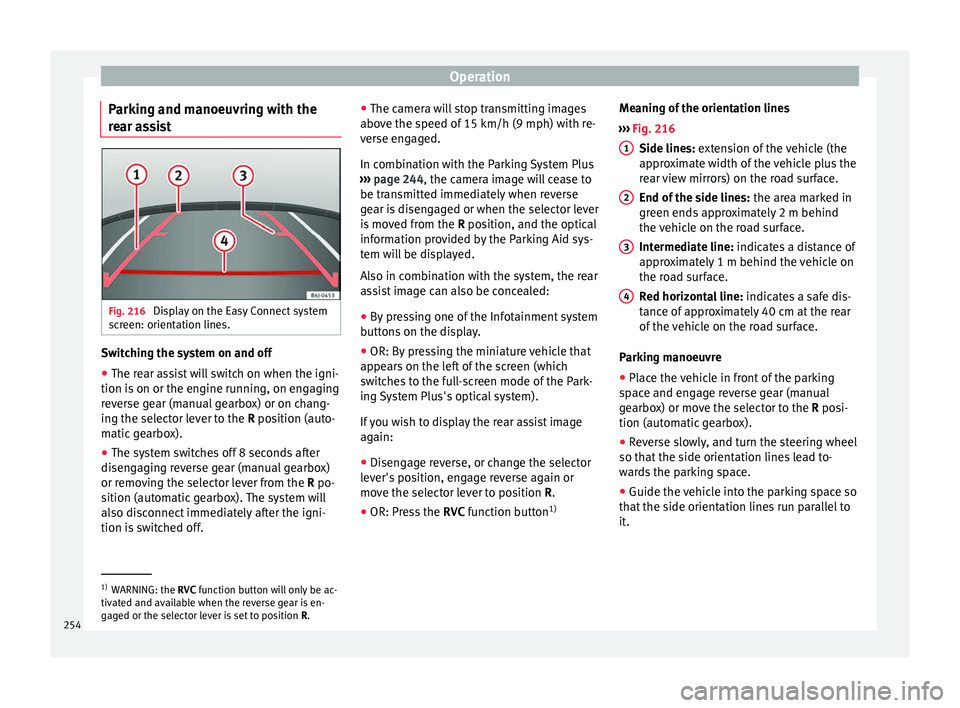
ar assist Fig. 216
Display on the Easy Connect system
s c
reen: orientation lines. Switching the system on and off
●
The rear assist will switch on when the igni-
tion i s
on or the engine running, on engaging
reverse gear (manual gearbox) or on chang-
ing the selector lever to the R position (auto-
matic gearbox).
● The system switches off 8 seconds after
disen
gaging reverse gear (manual gearbox)
or removing the selector lever from the R po-
sition (automatic gearbox). The system will
also disconnect immediately after the igni-
tion is switched off. ●
The camer
a will stop transmitting images
above the speed of 15 km/h (9 mph) with re-
verse engaged.
In combination with the Parking System Plus
››› page 244, the camera image will cease to
be transmitted immediately when reverse
gear is disengaged or when the selector lever
is moved from the R position, and the optical
information provided by the Parking Aid sys-
tem will be displayed.
Also in combination with the system, the rear
assist image can also be concealed:
● By pressing one of the Infotainment system
butt
ons on the display.
● OR: By pressing the miniature vehicle that
appe
ars on the left of the screen (which
switches to the full-screen mode of the Park-
ing System Plus's optical system).
If you wish to display the rear assist image
again:
● Disengage reverse, or change the selector
lev
er's position, engage reverse again or
move the selector lever to position R.
● OR: Press the RVC fu
nction button1)Meaning of the orientation lines
››
› Fig. 216
Side lines: extension of the vehicle (the
approximate width of the vehicle plus the
rear view mirrors) on the road surface.
End of the side lines: the area marked in
green ends approximately 2 m behind
the vehicle on the road surface.
Intermediate line: indicates a distance of
approximately 1 m behind the vehicle on
the road surface.
Red horizontal line: indicates a safe dis-
tance of approximately 40 cm at the rear
of the vehicle on the road surface.
Parking manoeuvre
● Place the vehicle in front of the parking
sp
ace and engage reverse gear (manual
gearbox) or move the selector to the R posi-
tion (automatic gearbox).
● Reverse slowly, and turn the steering wheel
so that
the side orientation lines lead to-
wards the parking space.
● Guide the vehicle into the parking space so
that
the side orientation lines run parallel to
it. 1
2
3
4
1)
WARNING: the RVC fu
nction button will only be ac-
tivated and available when the reverse gear is en-
gaged or the selector lever is set to position R.
254
Page 262 of 328
Operation
Tow rope
The t o
w rope must always be securely fixed
to the towing vehicle and loose enough so
that the vehicle can handle turns smoothly.
However, make sure that the cable does not
rub on the ground while driving.
Trailer rear lights
Always check the trailer's rear lights to en-
sure they are working correctly and that they
comply with the relevant safety regulations.
Make sure that the maximum permissible
power that can be absorbed by the trailer is
not exceeded ››› page 257.
Connection to the anti-theft system
The trailer is included in the anti-theft system
if the following conditions are met: ● If the vehicle is factory-equipped with an
anti-theft
alarm and towing bracket.
● If the trailer is electrically connected to the
to
wing vehicle through the trailer power
socket.
● If the electrical systems of the vehicle and
trai
ler are in perfect condition and have no
faults or damage.
● If the vehicle is locked with the key and the
anti-theft
alarm is activated.
When the vehicle is locked, the alarm is trig-
gered if the electrical connection with the
trailer is cut off. Before hitching or unhitching a trailer, always
turn off
the anti-theft alarm. Otherwise, the
tilt sensor could cause the alarm to go off.
Trailers with LED rear lights
For technical reasons, trailers fitted with LED
rear lights cannot be connected to the anti-
theft alarm system.
When the vehicle is locked, the alarm does
not go off when the electrical connection with
the trailer is cut if it has rear lights with light-
emitting diodes.
If the Eco driving profile was selected when
hitching the trailer, this will automatically
switch to the Normal profile. If the system
cannot detect the attached trailer or if the
towing bracket has been retrofitted by an au-
to repair shop other than SEAT, you must
manually select the Normal profile before you
start driving with a trailer attached. To recon-
nect the Eco profile once the trailer has been
unhitched, switch the ignition off and back
on once. WARNING
If the cables are improperly or incorrectly
c onnect
ed, it may lead to an excessive
amount of current supplied to the trailer,
which can cause abnormalities in the entire
vehicle electronic system, as well as acci-
dents and serious injuries. ●
En s
ure that any repairs that need to be car-
ried out on the electrical system are carried
out by a specialised workshop.
● Never connect the trailer's electric system
directly
to the electrical connections of the
tail lights or any other power sources. WARNING
Contact between the pins of the trailer power
soc k
et can cause short circuits, overloading
of the electrical system or failure of the light-
ing system, and consequently can cause acci-
dents and serious injuries.
● Never connect the pins of the trailer power
sock
et to each other.
● Make sure any work on bent pins is carried
out b
y a specialised workshop. CAUTION
Do not leave the trailer connected to the vehi-
c l
e when parked; place it on its support
wheel or its supports. If the vehicle rises or
falls due, for example, to a variation of the
load or a burst tyre, increased pressure will
be placed on the towing bracket and the trail-
er, and both the vehicle and the trailer can be
damaged. Note
● In c a
se of malfunctioning of the electrical
systems of the vehicle or trailer, as well as of 260
Page 264 of 328
Operation
Driving with a trailer Adjusting the headlights
When t
o
wing a trailer, the front part of the ve-
hicle could lift up, and if the dipped beams
are on, this could dazzle other drivers. Use
the headlight range control to lower the cone
of light. If you do not have headlight range
control, have the headlights adjusted by a
specialised workshop.
Special characteristics of driving with a trail-
er
● If your trailer has an ov
errun brake, brake
gently at first and then rapidly. This will pre-
vent the jerking that can be caused by the
locking of trailer wheels.
● Due to the gross combination weight of the
to
wing vehicle and trailer, the braking dis-
tance increases.
● When going down a slope, go into lower
ge
ar (if using a manual gearbox or the Tip-
tronic automatic gearbox) to take advantage
of the braking power provided by the engine.
Otherwise, the braking system could over-
heat and even fail.
● The trailer weight, as well as the gross com-
bin
ation weight of the towing vehicle and
trailer, change the centre of gravity and the
properties of the vehicle.
● If the towing vehicle is empty and the trail-
er is
loaded, then the load distribution is in- correct. Under these conditions, drive slowly
and with e
xtra caution.
Hill starts with a trailer
Depending on the slope of the hill and the
combination weight of the towing vehicle
and trailer, the vehicle might start rolling
backwards slightly when you first start up.
For hill-starting with a trailer, do the follow-
ing:
● Press and hold the brake pedal.
● Press the butt
on to disconnect the elec-
tronic parking brake ››› page 170.
● If the vehicle is equipped with a manual
ge
arbox, push the clutch pedal all the way
down.
● Put the vehicle into first gear or turn the se-
lect
or lever to position D/S ››› page 176.
● Pull out the butt
on and hold it in that
position to stop the towing vehicle and trailer
with the electronic parking brake.
● Release the brake pedal.
● Start driving slowly. To do this, in the case
of a m
anual gearbox, slowly release the
clutch pedal.
● Do not release the butt
on until the en-
gine has sufficient force to start driving. WARNING
If a trailer is pulled incorrectly, this may lead
t o lo
ss of control of the vehicle and serious
injury.
● Driving with a trailer and transporting
heavy
or large objects will change the vehicle
handling and braking distances.
● Always drive cautiously and carefully.
Brak
e earlier than usual.
● Adapt your speed and driving style at all
times
to suit visibility, weather, road and traf-
fic conditions. Slow down, especially when
driving down hills or slopes.
● Accelerate with particular care and caution.
Av
oid sudden braking and manoeuvres.
● Take great care when overtaking. Reduce
speed immedi
ately if you notice that the trail-
er is swaying, however slightly.
● Never attempt to “straighten” the towing
vehic
le and trailer while accelerating.
● Take into account the speed limit for vehi-
cl
es with a trailer, as it could be lower than
for vehicles without a trailer. Stabilisation of the towing vehicle
and tr
ai
ler The stabilisation of the towing vehicle and
tr
ai
ler together is an additional function of
the electronic stability control (ESC).
262
Page 269 of 328
Care and maintenance
Automatic car washes
B ef
ore going through a car wash, be sure to
take the usual precautions such as closing
the windows and roof. If the vehicle has spe-
cial accessories such as spoilers or a roof
rack or two-way radio aerial, etc., it is advisa-
ble to consult the car wash tunnel operator.
It is best to use a car wash without revolving
bristles if possible.
Washing the vehicle with a high pressure
cleaner
When washing the vehicle with a high-pres-
sure cleaner, always follow the operating in-
structions for the equipment. This applies
particularly to the operating pressure and the
spraying distance. Do not hold the nozzle too
close to soft materials such as rubber hoses
or seals. The same applies to the parking aid
sensors*, which are located in the rear bump-
er.
Do not use a nozzle that sprays the water out
in a direct stream or one that has a rotating
jet for forcing off dirt.
Washing the car by hand
When washing the car by hand, use plenty of
water to soften the dirt first, and rinse off as
well as possible.
Then clean the vehicle with a soft sponge,
glove or brush using only slight pressure.
You should start on the roof and work down. Special car
soap should only be used for very
persistent dirt.
Rinse the sponge or glove thoroughly and of-
ten.
Wheels, sills and similar should be cleaned
last. Use a second sponge for this. WARNING
● The v
ehicle should only be washed with the
ignition switched off. Failure to follow this in-
struction could result in an accident.
● Do not clean the underside of chassis, the
ins
ide of wheel arches or wheel trims without
protecting your hands and arms. You may cut
yourself on sharp-edged metal parts. Other-
wise, there is a risk of sustaining cuts.
● When washing the car during the winter
sea
son: water and ice in the brake system
can reduce braking effectiveness: risk of acci-
dent! CAUTION
● Do not w
ash the vehicle in direct sunlight –
otherwise the paint can be damaged.
● Do not use sponges, abrasive household
spon
ges or similar to clean insect remains.
This could damage the surface.
● Clean off stubborn dirt (insects, etc.) from
the hea
dlights at regular intervals, for in-
stance when filling the fuel tank. The head-
lights should only be washed with water, do not wipe them with a dry cloth or sponge. It
i
s
best to use soapy water.
● Never wash tyres with a jet that sprays the
wat
er out in a direct stream. This could dam-
age the tyres even if the spray is kept at a
distance and only used for a very short time.
● Before washing the vehicle in an automatic
car w
ash, please make sure to retract the ex-
terior mirrors to prevent them from being
damaged. Electrically retractable exterior
mirrors must not be folded in or out by hand,
always use the electrical power control. CAUTION
● Bef
ore washing the vehicle in an automatic
car wash, please proceed as follows to lock
the wiper arms so that they are not moved to-
wards the top of the windscreen:
–the bonnet must be closed.
– switch the ignition on and off.
– press the windscreen wiper lever forward
briefly (windscreen washer function).
This will lock the wiper arms. For the sake of the environment
The car should only be washed in special
w a
sh bays. These areas are prepared to pre-
vent oily water from getting into the public
drains. In some places, washing vehicles out-
side the areas intended for this purpose is
prohibited. 267
Technical data
Advice
Operation
Emergencies
Safety
Page 271 of 328
Care and maintenance
Carbon parts The carbon parts on your vehicle have a pain-
t
ed s
urface. They do not need any special
care and are cleaned just like any other pain-
ted part ››› page 266.
Paint damage Minor damage to the paint, such as scratches
or s
t
one chips, should be touched up without
delay before the metal starts to corrode. Suit-
able touch-up brushes or sprays for your car
can be obtained from a SEAT Official Service.
The number of the original paint finish on the
vehicle is given on the data sticker
››› page 301.
If corrosion is already visible it must be thor-
oughly removed by a specialised workshop.
Windows Clear vision is an essential safety factor.
The w
ind
screen must not be cleaned with in-
sect remover or wax, otherwise the wind-
screen wipers will not function properly (jud-
dering).
Traces of rubber, oil, grease or silicone can
be removed with a window cleaning solution
or a silicone remover. Wax residue can only be removed with a special cleaner. Your SEAT
Offic
ial Service will be able to provide you
with more detailed information.
The windows should also be cleaned on the
inside at regular intervals.
Use a separate cloth or chamois to dry the
windows. Cloths used for waxing and polish-
ing contain residues that will cause smears
on the glass. WARNING
Do not use water-repellent coatings on the
w ind
screen. In bad visibility conditions (e.g.
in the rain, dark or with a low sun), these
coatings may cause dazzle: risk of accident!
Such coatings can also cause the windscreen
wiper blades to make noise. CAUTION
● Remo
ve snow and ice from windows and ex-
terior mirrors with a plastic scraper only. To
avoid scratches caused by dirt on the glass,
the scraper should only be pushed in one di-
rection and not moved to and fro.
● The heating element for the rear window is
locat
ed on the inner side of the window. To
avoid damaging them, do not apply stickers
to these heating elements.
● Never use warm or hot water to remove
sno
w and ice from windows and mirrors. This
could cause the glass to crack! Wheels
The wheels require regular attention to pre-
ser
v
e their appearance. It is important to re-
move road salt and brake dust by washing
the wheels at regular intervals, otherwise the
finish will be impaired.
After washing, the wheels should only be
cleaned with an "acid-free" cleaning agent
for alloy wheels. This is available from SEAT
Official Services and specialist retailers. Nev-
er leave the cleaning agent on the rims for
any longer than specified in the instructions
before rinsing it off. If the wheel cleaner fluid
contains acid it can attack the surfaces of the
wheel bolts.
Car polish or other abrasive agents should
not be used for maintaining the rims. If the
protective coating is damaged, e.g. by flying
stones, the damaged area should be re-
paired immediately. WARNING
Please note when cleaning the wheels that
w at
er, ice and road salt can impair the effec-
tiveness of the brakes; this can cause an acci-
dent. Exhaust tail pipe
It is important to remove road salt and brake
du
s
t by washing the wheels at regular »
269
Technical data
Advice
Operation
Emergencies
Safety
Page 275 of 328
Intelligent technology
The retract function may not operate properly
in v
ery dirty belts. Make sure that the inertia
reel seat belts are completely dry before al-
lowing them to retract. CAUTION
● Do not r
emove the seat belts from the vehi-
cle to clean them.
● Do not use chemical cleaning agents on the
seat
belts, as this can damage the webbing.
Ensure that the seat belts do not come into
contact with corrosive fluids.
● If you find any damage to the belt webbing,
belt fittin
gs, the belt retractor or the buckle,
the belt in question must be replaced by a
specialised workshop. Intelligent technology
El ectr
omechanical steering Electro-mechanical power steering assists
the driv
er when s
teering.
Electro-mechanical power steering adapts
electronically to the speed of the car, torque
and turning angle.
If the power steering should fail at any time
or the engine is switched off (for instance
when being towed), the car can still be
steered. However, more effort than normal
will be required to turn the steering wheel.
Driver warning lamps and messages (in red) Faulty steering! To
park the vehicle
If the warning lamp remains on and the driver
indication appears, the power steering could
be faulty.
Do not continue driving. Seek specialist as-
sistance. (in yellow) Steering: System
fault! You may continue driving.
If the warning lamp comes on, the steering
could react with more difficultly or more sen-
sitivity than normal. In addition, when driving
in a straight line the steering wheel may be
off-centre. Drive slowly to a specialised workshop and
h
av
e the fault repaired.
(in yellow) Steering lock:
fault! Go to an Official Service
The electronic steering lock is malfunction-
ing.
Go to a specialised workshop as soon as
possible and have the fault repaired. WARNING
Take it immediately to a specialised work-
shop and h av
e the fault repaired: risk of acci-
dent! Note
If the lamp (in red) or el
se (in yellow)
lights up briefly, you may continue driving. Four-wheel drive
3
V
alid for vehicles: with four-wheel drive
On four-wheel drive models, the engine pow-
er is distributed to all four wheels
General notes
On four-wheel drive vehicles, the engine
power is distributed to all four wheels. The
distribution of power is controlled automati-
cally according to your driving style and the
road conditions. Also see ›››
page 173. »
273
Technical data
Advice
Operation
Emergencies
Safety
Page 276 of 328
Advice
The four-wheel drive is specially designed to
c omp
lement the superior engine power. This
combination gives the vehicle exceptional
handling and performance capabilities, both
on normal roads and in more difficult condi-
tions, such as snow and ice. Even so (or per-
haps especially for this reason), it is impor-
tant to observe certain safety points ››› .
W int
er tyres
Thanks to four-wheel drive, your vehicle will
have plenty of traction in winter conditions,
even with the standard tyres. Nevertheless,
we still recommend that winter tyres or all-
season tyres be fitted on all four wheels to
give even better braking response.
Snow chains
On roads where snow chains are mandatory,
this also applies to cars with four-wheel drive
››› page 56.
Changing tyres
On vehicles with four-wheel drive, all four
tyres must have the same rolling circumfer-
ence. Also avoid using tyres with varying
tread depths ››› page 293.
Off-roader?
Your SEAT is not an off-road vehicle: it does
not have enough ground clearance to be
used as such. It is therefore best to avoid rough tracks and uneven terrain as much as
pos
sible. WARNING
● Ev
en with four-wheel drive, you should al-
ways adjust your speed to suit the condi-
tions. Do not let the extra safety features
tempt you into taking any risks when driving.
Risk of accident!
● The braking capability of your vehicle is
limited b
y the tyres' grip. It is therefore no
different from a car without four-wheel drive.
So do not be tempted to drive too fast on firm
or slippery roads just because the vehicle
still has good acceleration in these condi-
tions. Risk of accident!
● On wet roads bear in mind that the front
wheels
may start to “aquaplane” and lose
contact with the road if the car is driven too
fast. If this should happen, there will be no
sudden increase in engine speed to warn the
driver, as occurs with a front-wheel drive car.
For this reason you should always choose a
driving speed suitable for the road condi-
tions. Risk of accident! Power Management
Thi s
system helps to ensure reliable
starting The power management controls the distribu-
tion of
el
ectrical energy and thus helps to en- sure that there is always enough power avail-
abl
e to start the engine.
If a vehicle with a conventional electrical sys-
tem is left parked for a long time, the battery
will gradually lose its charge because certain
electrical devices, such as the electronic
gearbox lock continues to draw current even
when the ignition is off. In some cases there
may not be enough power available to start
the engine.
Your vehicle is equipped with an intelligent
power management system to control the
distribution of electrical energy. This signifi-
cantly improves reliability when starting the
engine, and also prolongs the useful life of
the battery.
The main functions incorporated in the power
management system are battery diagnosis,
residual current management and dynamic
power management.
Battery diagnosis
The battery diagnosis function constantly
registers the condition of the battery. Sen-
sors detect the battery voltage, battery cur-
rent and battery temperature. This enables
the system to calculate the current power lev-
el and charge condition of the battery.
Residual current management
The residual current management reduces
power consumption while the vehicle is
274