gearbox Seat Ateca 2018 User Guide
[x] Cancel search | Manufacturer: SEAT, Model Year: 2018, Model line: Ateca, Model: Seat Ateca 2018Pages: 348, PDF Size: 7.32 MB
Page 98 of 348
Emergencies
●
The sea l
ant is a health hazard and must be
cleaned immediately if it comes into contact
with the skin.
● Always keep the tyre mobility set out of the
reac
h of small children.
● Never use an equivalent jack, even if it has
been appro
ved for your vehicle.
● Always stop the engine, apply the hand-
brake l
ever firmly and engage gear if using a
manual gearbox, in order to reduce the risk of
vehicle involuntary movement. WARNING
A tyre filled with sealant does not have the
same per f
ormance properties as a conven-
tional tyre.
● Never drive faster than 80 km/h (50 mph).
● Avoid heavy acceleration, hard braking and
fas
t cornering.
● Drive for only 10 minutes at a maximum
speed of 80
km/h (50 mph) and then check
the tyre. For the sake of the environment
Dispose of used or expired sealant observing
any l
egal requirements. Note
A new bottle of sealant can be purchased at
SEA T de
alerships. Note
Take into account the separate instruction
manua l
of the tyre mobility set* manufactur-
er. Contents of the tyre mobility system*
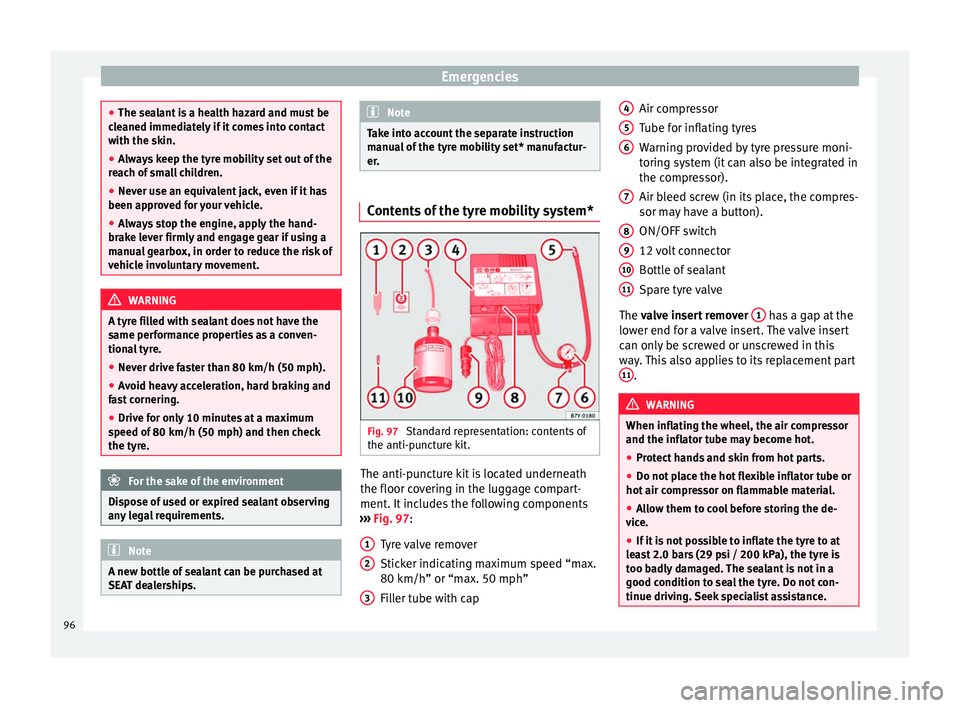
Fig. 97
Standard representation: contents of
the anti-p u
nct
ure kit. The anti-puncture kit is located underneath
the floor c
o
v
ering in the luggage compart-
ment. It includes the following components
››› Fig. 97:
Tyre valve remover
Sticker indicating maximum speed “max.
80 km/h” or “max. 50 mph”
Filler tube with cap
1 2
3 Air compressor
T
ube f
or infl
ating tyres
Warning provided by tyre pressure moni-
toring system (it can also be integrated in
the compressor).
Air bleed screw (in its place, the compres-
sor may have a button).
ON/OFF switch
12 volt connector
Bottle of sealant
Spare tyre valve
The valve insert remover 1 has a gap at the
lo w
er end f
or a valve insert. The valve insert
can only be screwed or unscrewed in this
way. This also applies to its replacement part 11 .
WARNING
When inflating the wheel, the air compressor
and the inflat or t
ube may become hot.
● Protect hands and skin from hot parts.
● Do not place the hot flexible inflator tube or
hot air compr
essor on flammable material.
● Allow them to cool before storing the de-
vice.
● If
it is not possible to inflate the tyre to at
lea
st 2.0 bars (29 psi / 200 kPa), the tyre is
too badly damaged. The sealant is not in a
good condition to seal the tyre. Do not con-
tinue driving. Seek specialist assistance. 4
5
6
7
8
9
10
11
96
Page 101 of 348
Self-help
–
Ac c
elerate with particular care and cau-
tion.
– Avoid sudden braking and manoeuvres.
– Brake earlier than usual and more
smoothly. CAUTION
● To av oid d
amaging the vehicle, for example
the paint, remove and replace the lid and
towing eye carefully.
● Unburnt fuel could enter the catalytic con-
vert
er and damage it during towing. Indications for tow-starting
Vehicle's should not generally be tow-star-
t
ed.
The jump s
tart should be used instead
››› page 69.
For technical reasons, towing the following
vehicles is not allowed:
● Vehicles with an automatic gearbox.
● If the vehicle battery is discharged, be-
cause in
vehicles with the Keyless Access
locking and ignition system the steering re-
mains locked and the electronic parking
brake cannot be deactivated nor can the elec-
tronic lock of the steering column be re-
leased if they are activated. ●
If the batt
ery is flat, it is possible that the
engine control units may not operate correct-
ly.
However, if the vehicle must absolutely be
tow-started (in the case of manual gearbox-
es):
● Engage the 2nd or 3rd gear.
● Keep the clutch pressed down.
● Switch on the ignition and the hazard warn-
ing lights.
● Once both
vehicles are moving, release the
clutc
h.
● Once the engine starts, press the clutch
and diseng
age the gear to avoid colliding
with the towing vehicle. CAUTION
When tow-starting, unburnt fuel could enter
the cat a
lytic converter and damage it. Note
The vehicle can only be tow-started if the
electr onic
parking brake and, if appropriate,
the electronic lock of the steering column are
deactivated. If the vehicle has no power sup-
ply or there is an electric system fault, the
engine must be tow-started to deactivate the
electronic parking brake and the electronic
lock of the steering column. Indications for towing
Tow rope or tow bar
It i
s
safer for the vehicle to be towed using a
tow bar, avoiding damage to the vehicle. A
tow rope should only be used if a tow bar is
not available.
A tow rope should be slightly elastic to avoid
damage to both vehicles. It is advisable to
use a tow rope made of synthetic fibre or sim-
ilarly elastic material.
Only attach the tow rope or the tow bar to the
towing eyes provided or a towing bracket.
If the vehicle is factory-equipped with a tow-
ing bracket, it is only allowed to tow with a
tow bar if this has been specially designed to
be installed with a tow hitch ›››
page 276.
When the vehicle needs to be towed:
Check whether the vehicle may be towed
››› page 100, Cases where towing a vehicle
is not allowed .
● Switch the ignition on.
● Put the gearbox lever in neutral or the se-
lect or l
ever in the N ›››
page 192 position.
● Do not allow the vehicle to be towed at
speeds
of over 50 km/h (30 mph).
● The vehicle must not be towed further than
50 km (30 mil e
s). »
99
Technical data
Advice
Operation
Emergencies
Safety
Page 102 of 348
Emergencies
● If a br
e
akdown lorry is used, vehicles with
automatic transmission are only allowed to
be towed with the front wheels suspended.
Towing vehicles with four-wheel drive
(4Drive)
Four-wheel drive vehicles (4Drive) can be
towed using a tow bar or tow rope. If the ve-
hicle is towed with the front or rear axle sus-
pended, the engine must be switched off,
otherwise the transmission may be damaged.
Cases where towing a vehicle is not allowed
● If, due to a fault, the gearbox is out of lubri-
cant.
● If
the vehicle battery is discharged, be-
cause the s
teering remains locked and, if ap-
propriate, the electronic parking brake can-
not be deactivated or the electronic lock of
the steering column released.
● If a distance above 50 km needs to be trav-
elled.
● When, f
or example, after an accident, the
smooth rotation of
the wheels or the steering
operation cannot be guaranteed.
When the vehicle is to tow another vehicle:
● Observe legal requirements.
● Keep in mind the instructions in the man-
ual on to
wing vehicles. Note
The vehicle can only be towed if the electron-
ic p ark
ing brake and the electronic lock of the
steering column are deactivated. If the vehi-
cle has no power supply or there is an electric
system fault, the engine must be tow-started
››› page 69 to deactivate the electronic
parking brake and the electronic lock of the
steering column. Fitting the front towing eye
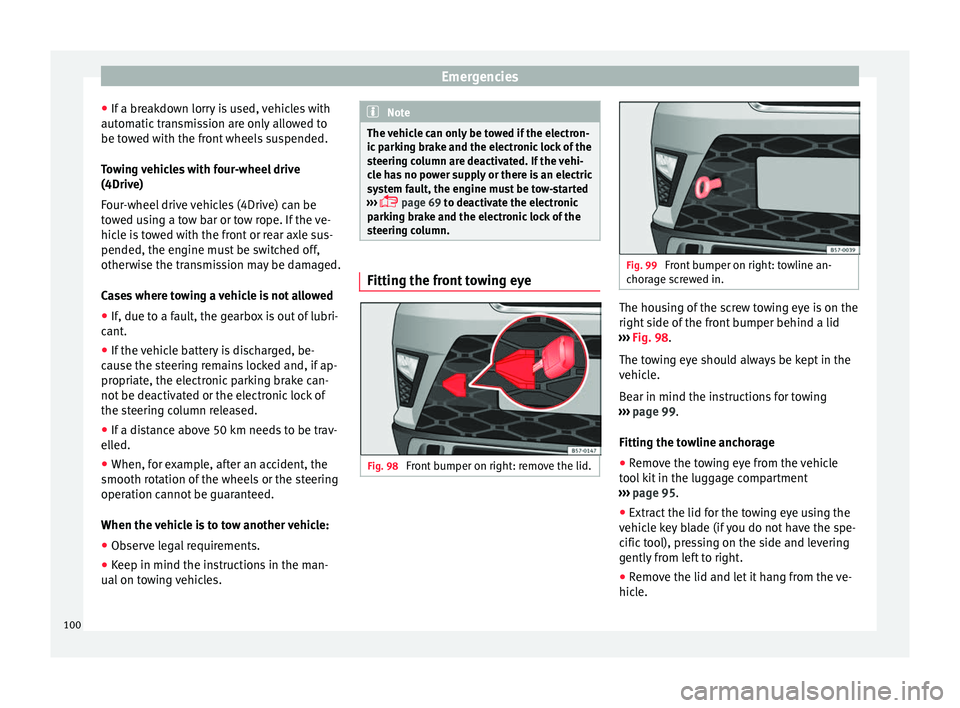
Fig. 98
Front bumper on right: remove the lid. Fig. 99
Front bumper on right: towline an-
chor ag
e screwed in. The housing of the screw towing eye is on the
right
s
ide of
the front bumper behind a lid
››› Fig. 98.
The towing eye should always be kept in the
vehicle.
Bear in mind the instructions for towing
››› page 99.
Fitting the towline anchorage
● Remove the towing eye from the vehicle
tool
kit in the luggage compartment
››› page 95.
● Extract the lid for the towing eye using the
vehicl
e key blade (if you do not have the spe-
cific tool), pressing on the side and levering
gently from left to right.
● Remove the lid and let it hang from the ve-
hicle.
100
Page 106 of 348
Emergencies
● Undo the openin g limit
er ›
›› Fig. 103 A in
tw o s
t
eps: first, unlock the limiter by pulling
back on it (arrow 1 ) and then move it gently
t o the right
(arr
ow 2 ). Remove the guide
when the c o
v
er is in the normal opening po-
sition (30°).
● Free the side pivots B to release the cover
t o its
sec
ond opening position (60°).
Follow the same procedure in reverse order to
return the glove compartment to its normal
position. CAUTION
● Alw a
ys carefully remove the fuse box cov-
ers and refit them correctly to avoid problems
with your vehicle.
● Protect the fuse boxes when open to avoid
the entry of
dust or humidity. Dirt and humid-
ity inside fuse boxes can cause damage to
the electrical system. Engine compartment fuses
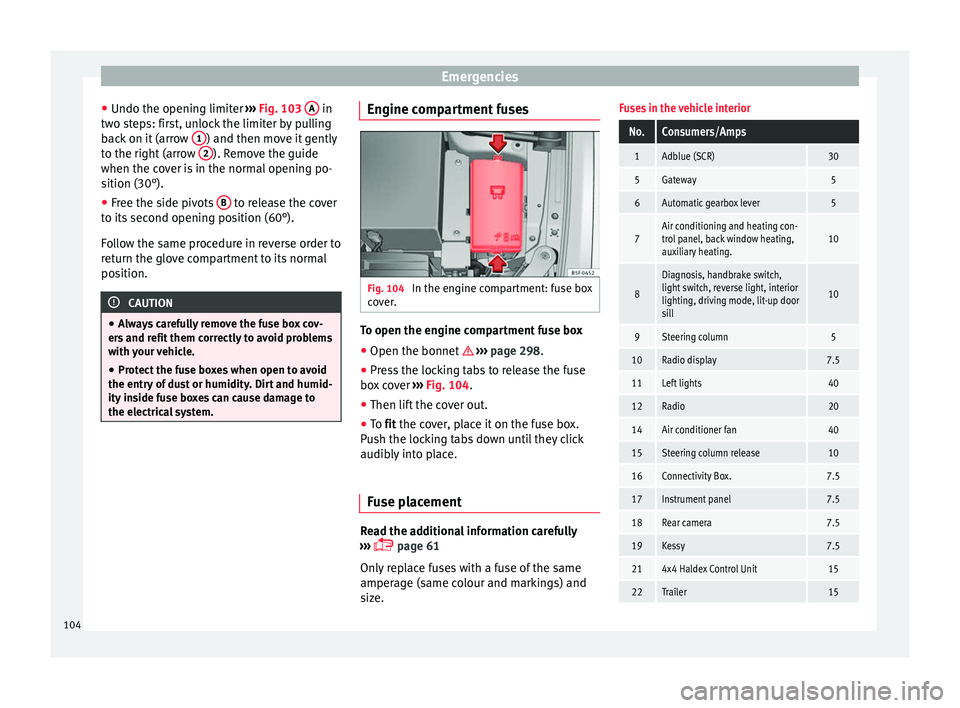
Fig. 104
In the engine compartment: fuse box
c o
v
er. To open the engine compartment fuse box
● Open the bonnet › ›
›
page 298.
● Press the locking tabs to release the fuse
box c
over ››› Fig. 104.
● Then lift the cover out.
● To fit the cover, place it on the fuse box.
Pu
sh the locking tabs down until they click
audibly into place.
Fuse placement Read the additional information carefully
› ›
›
page 61
Only replace fuses with a fuse of the same
amperage (same colour and markings) and
size.
Fuses in the vehicle interior
No.Consumers/Amps
1Adblue (SCR)30
5Gateway5
6Automatic gearbox lever5
7Air conditioning and heating con-
trol panel, back window heating,
auxiliary heating.10
8
Diagnosis, handbrake switch,
light switch, reverse light, interior
lighting, driving mode, lit-up door
sill
10
9Steering column5
10Radio display7.5
11Left lights40
12Radio20
14Air conditioner fan40
15Steering column release10
16Connectivity Box.7.5
17Instrument panel7.5
18Rear camera7.5
19Kessy7.5
214x4 Haldex Control Unit15
22Trailer15 104
Page 107 of 348
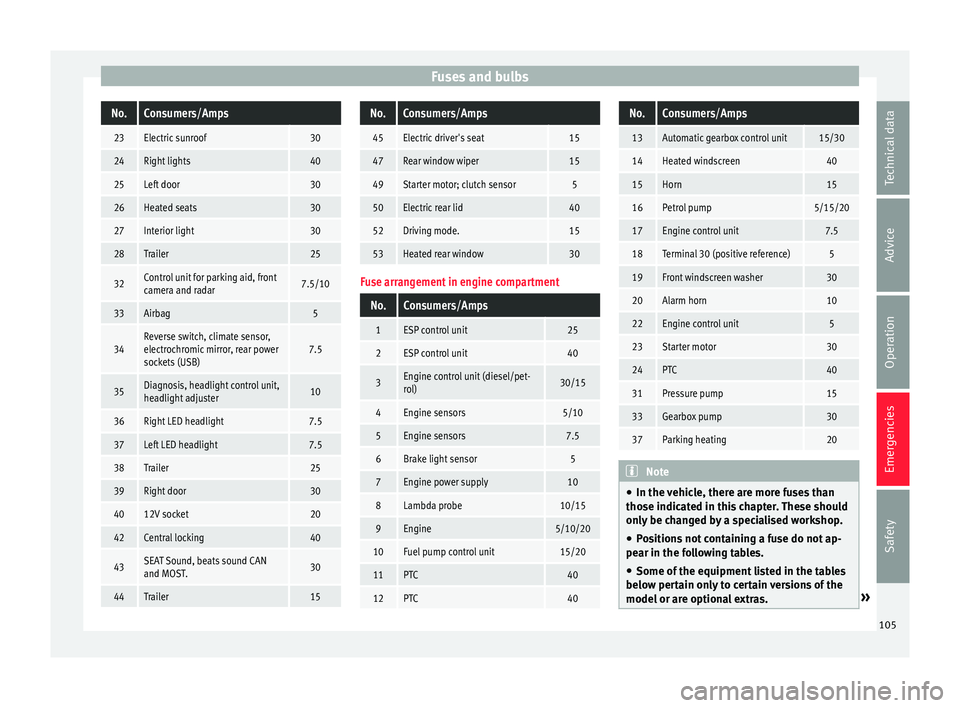
Fuses and bulbsNo.Consumers/Amps
23Electric sunroof30
24Right lights40
25Left door30
26Heated seats30
27Interior light30
28Trailer25
32Control unit for parking aid, front
camera and radar7.5/10
33Airbag5
34Reverse switch, climate sensor,
electrochromic mirror, rear power
sockets (USB)7.5
35Diagnosis, headlight control unit,
headlight adjuster10
36Right LED headlight7.5
37Left LED headlight7.5
38Trailer25
39Right door30
4012V socket20
42Central locking40
43SEAT Sound, beats sound CAN
and MOST.30
44Trailer15
No.Consumers/Amps
45Electric driver's seat15
47Rear window wiper15
49Starter motor; clutch sensor5
50Electric rear lid40
52Driving mode.15
53Heated rear window30
Fuse arrangement in engine compartment
No.Consumers/Amps
1ESP control unit25
2ESP control unit40
3Engine control unit (diesel/pet-
rol)30/15
4Engine sensors5/10
5Engine sensors7.5
6Brake light sensor5
7Engine power supply10
8Lambda probe10/15
9Engine5/10/20
10Fuel pump control unit15/20
11PTC40
12PTC40
No.Consumers/Amps
13Automatic gearbox control unit15/30
14Heated windscreen40
15Horn15
16Petrol pump5/15/20
17Engine control unit7.5
18Terminal 30 (positive reference)5
19Front windscreen washer30
20Alarm horn10
22Engine control unit5
23Starter motor30
24PTC40
31Pressure pump15
33Gearbox pump30
37Parking heating20
Note
● In the v ehic
le, there are more fuses than
those indicated in this chapter. These should
only be changed by a specialised workshop.
● Positions not containing a fuse do not ap-
pear in the fo
llowing tables.
● Some of the equipment listed in the tables
below pert
ain only to certain versions of the
model or are optional extras. » 105
Technical data
Advice
Operation
Emergencies
Safety
Page 115 of 348
Controls and displays
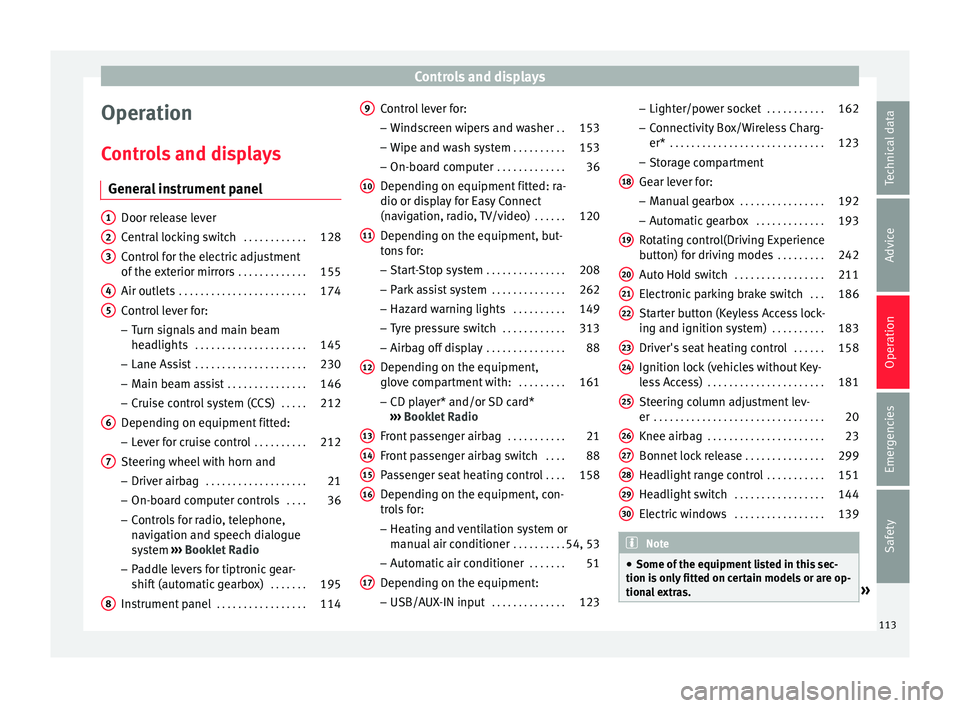
Operation
C ontr
o
ls and displays
General instrument panel Door release lever
Centr
al
locking switch . . . . . . . . . . . .128
Control for the electric adjustment
of the ext
erior mirrors . . . . . . . . . . . . . 155
Air outlets . . . . . . . . . . . . . . . . . . . . . . . . 174
Control lever for:
– Turn s ign
als and main beam
headlights . . . . . . . . . . . . . . . . . . . . . 145
– Lane Ass i
st . . . . . . . . . . . . . . . . . . . . . 230
– Main beam a
ssist . . . . . . . . . . . . . . . 146
– Cruise c
ontrol system (CCS) . . . . .212
Depending on equipment fitted:
– Lev er f
or cruise control . . . . . . . . . .212
Steering wheel with horn and – Driver airbag . . . . . . . . . . . . . . . . . . . 21
– On-boar d c
omputer controls . . . .36
– Contro
ls for radio, telephone,
navigation and speech dialogue
system ›››
Booklet Radio
– Paddle levers for tiptronic gear-
shift (automatic gearbox) . . . . . . .195
Instrument panel . . . . . . . . . . . . . . . . . 114
1 2
3
4
5
6
7
8 Control lever for:
– Wind
s
creen wipers and washer . .153
– Wipe and wa
sh system . . . . . . . . . . 153
– On-board c
omputer . . . . . . . . . . . . . 36
Depending on equipment fitted: ra-
dio or disp
lay for Easy Connect
(navigation, radio, TV/video) . . . . . .120
Depending on the equipment, but-
tons
for:
– Start-Stop system . . . . . . . . . . . . . . . 208
– Park a
ssist system . . . . . . . . . . . . . . 262
– Hazard w
arning lights . . . . . . . . . .149
– Tyr
e pressure switch . . . . . . . . . . . .313
– Airbag off di
splay . . . . . . . . . . . . . . . 88
Depending on the equipment,
glov e c
ompartment with: . . . . . . . . .161
– CD pl a
yer* and/or SD card*
››› Booklet Radio
Front passenger airbag . . . . . . . . . . .21
Front passenger airbag switch . . . .88
Passenger seat heating control . . . .158
Depending on the equipment, con-
tro l
s for:
– Heating and ventilation system or
manual air conditioner . . . . . . . . . .54, 53
– Autom atic
air conditioner . . . . . . .51
Depending on the equipment:
– USB/A UX-IN inp
ut . . . . . . . . . . . . . . 123
9
10
11
12
13
14
15
16
17 –
Light er/po
w
er socket . . . . . . . . . . . 162
– Connectivity
Box/Wireless Charg-
er* . . . . . . . . . . . . . . . . . . . . . . . . . . . . . 123
– Storag
e compartment
Gear lever for: – Manual gearbox . . . . . . . . . . . . . . . . 192
– Automatic
gearbox . . . . . . . . . . . . . 193
Rotating control(Driving Experience
button) f
or driving modes . . . . . . . . .242
Auto Hold switch . . . . . . . . . . . . . . . . . 211
Electronic parking brake switch . . .186
Starter button (Keyless Access lock-
ing and ignition sys
tem) . . . . . . . . . . 183
Driver's seat heating control . . . . . .158
Ignition lock (vehicles without Key-
les
s Access) . . . . . . . . . . . . . . . . . . . . . . 181
Steering column adjustment lev-
er . . . . . . . . . . . . . . . . . . . . . . . . . . . . . . . . 20
Knee airbag . . . . . . . . . . . . . . . . . . . . . . 23
Bonnet lock release . . . . . . . . . . . . . . .299
Headlight range control . . . . . . . . . . .151
Headlight switch . . . . . . . . . . . . . . . . . 144
Electric windows . . . . . . . . . . . . . . . . . 139 Note
● Some of the equipment li
sted in this sec-
tion is only fitted on certain models or are op-
tional extras. » 18
19
20
21
22
23
24
25
26
27
28
29
30
113
Technical data
Advice
Operation
Emergencies
Safety
Page 117 of 348
Instruments and warning/control lamps
engine hot. However, it is advisable to
c h
an
ge up a gear or move the selector
lever to D (or lift your foot off the acceler-
ator) before the needle reaches the red
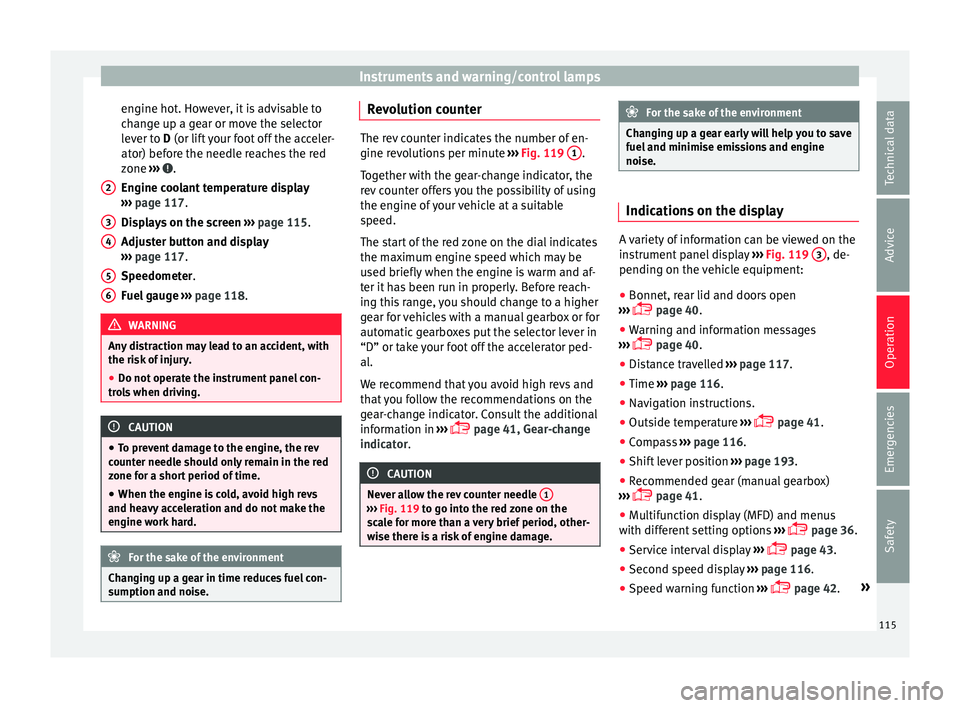
zone ››› .
En gine c
oo
lant temperature display
››› page 117.
Displays on the screen ››› page 115.
Adjuster button and display
››› page 117.
Speedometer.
Fuel gauge ››› page 118. WARNING
Any distraction may lead to an accident, with
the risk of
injury.
● Do not operate the instrument panel con-
trol
s when driving. CAUTION
● To pr ev
ent damage to the engine, the rev
counter needle should only remain in the red
zone for a short period of time.
● When the engine is cold, avoid high revs
and heavy ac
celeration and do not make the
engine work hard. For the sake of the environment
Changing up a gear in time reduces fuel con-
sumption and noi se.2
3
4
5
6 Revolution counter
The rev counter indicates the number of en-
gine rev
o
lutions per minute ››› Fig. 119 1 .
Tog ether w
ith the gear-change indicator, the
rev counter offers you the possibility of using
the engine of your vehicle at a suitable
speed.
The start of the red zone on the dial indicates
the maximum engine speed which may be
used briefly when the engine is warm and af-
ter it has been run in properly. Before reach-
ing this range, you should change to a higher
gear for vehicles with a manual gearbox or for
automatic gearboxes put the selector lever in
“D” or take your foot off the accelerator ped-
al.
We recommend that you avoid high revs and
that you follow the recommendations on the
gear-change indicator. Consult the additional
information in ›››
page 41, Gear-change
indicator. CAUTION
Never allow the rev counter needle 1 ›››
Fig. 119 to g o int
o the red zone on the
scale for more than a very brief period, other-
wise there is a risk of engine damage. For the sake of the environment
Changing up a gear early will help you to save
fuel and minimi
se emissions and engine
noise. Indications on the display
A variety of information can be viewed on the
ins
trument
panel display ››› Fig. 119 3 , de-
pending on the v
ehicle equipment:
● Bonnet, rear lid and doors open
›› ›
page 40.
● Warning and information messages
›››
page 40.
● Distance travelled ›››
page 117.
● Time ›››
page 116.
● Navigation instructions.
● Outside temperature ›››
page 41.
● Compass ›››
page 116.
● Shift lever position ›››
page 193.
● Recommended gear (manual gearbox)
›››
page 41.
● Multifunction display (MFD) and menus
with differ
ent setting options ›››
page 36.
● Service interval display ›››
page 43.
● Second speed display ›››
page 116.
● Speed warning function ›››
page 42. »
115
Technical data
Advice
Operation
Emergencies
Safety
Page 118 of 348
Operation
● St ar
t
-Stop system status display
››› page 208.
● Active cylinder management display
(ACT ®
)* ››
› page 202
● Signs recognised by the traffic signal de-
tection sys
tem ››› page 245
● Low consumption driving status (ECO)
›››
page 116
● Engine code (MKB) ›››
page 117.
Distance travelled
The odometer registers the total distance
travelled by the car.
The odometer (trip ) shows the distance
travelled since the last odometer reset. The
last digit of the trip recorder indicates distan-
ces of 100 metres or one tenths of a mile.
● Briefly press the button ›››
Fig. 119 4 to re-
set the trip r
ec
order to 0.
● Keep the button 4 pressed for about 3
sec ond
s
and the previous value will be dis-
played.
Time
● To set the time, keep the button ›››
Fig. 119
4 pressed for more than 3 seconds to select
the hour or minut e di
s
play.
● To continue setting the time, press the up-
per or lower p
art of the button 4 . Hold but-ton down to scroll through the numbers
quic
k
ly
.
● Press the button 4 again in order to finish
settin g the time.
The time c an al
so be set on the Easy Connect
system using the button and the function
b utt
on
SETTINGS > Date and time
››› page 33.
Compass
With the ignition on and the navigation sys-
tem on, the cardinal point corresponding to
the direction of travel of the vehicle is dis-
played on the instrument panel.
Selector lever position
The selected gear is displayed on the side of
the selector lever and on the instrument pan-
el display. In positions D and S, and with the
Tiptronic, the corresponding gear is also dis-
played.
Recommended gear (manual gearbox)
The recommended gear in order to save fuel
is displayed on the instrument panel while
you are driving ›››
page 41.
Second speed display (mph or km/h)
In addition to the speedometer, the speed
can also be displayed in a different unit of
measurement (in miles or in km per hour). This option cannot be deactivated in models
destined f
or countries in which the second
speed must always be visible.
The second speed display can be adjusted in
the Easy Connect system by means of the button and the function button SETTINGS >
Units › ›
›
page 33.
Speed warning
When the speed setting is exceeded, this will
be indicated on the instrument panel display.
This is very useful, for example when using
winter tyres that are not designed for driving
at the maximum speed of the vehicle
››› page 42.
The speed warning settings can be adjusted
in the Easy Connect system by means of the button and the function button SET-
TINGS > Driver Assistance
› ›
›
page 33.
Start-Stop operating display
Updated information relating to the status is
displayed on the instrument panel
››› page 208.
Low consumption driving status (ECO)*
Depending on the equipment, when driving,
the “ECO ” display appears on the instrument
panel when the vehicle is in low consump-
tion status due to active cylinder manage-
ment (ACT ®
)* ››› page 202.
116
Page 134 of 348
Operation
● Mo v
e the g
ear lever to position P (if the ve-
hicle has automatic gearbox), since other-
wise the vehicle cannot be locked.
● Close the door.
● Push the central locking button on the
remote c
ontrol and touch the locking sensor
surface ››› Fig. 132 B on the driver door han-
dl e onc
e w
ithin the following 5 seconds. Do
not grip the door handle, otherwise the vehi-
cle will not lock. Deactivation is also possible
if the vehicle is locked through the driver’s
door lock.
● To check that the function has been deacti-
vated, w
ait at least 10 seconds, grip and pull
on the door handle. The door should not
open.
The next time the door can only be unlocked
via the remote control or the lock cylinder.
The next time the door is locked/unlocked,
Keyless Access will be active again.
Convenience functions
To close all the electric windows using the
convenience function, keep a finger on the
locking sensor surface B (arrow) of the door
h andl
e f
or a few seconds until the windows
have closed.
The doors opened by touching the sensor
surface of the door handle depend on the
settings that have been activated in the info-
tainment system with the button and theSETTINGS and
Openin
g and c
lo
sing function but-
t on
s. WARNING
If there is a valid key in the proximity of the
re ar lid, in some c
ases the Easy Open func-
tion may be accidentally activated and the
rear lid will open, for example, when sweep-
ing under the rear bumper, when directing a
water jet or high pressure steam to the area
or when carrying out maintenance work or re-
pairs in that area. If accidentally opened, the
rear lid could injure somebody situated in its
area of operation or cause material damage.
● Therefore, always make sure that there is
no uns
upervised valid key in the area near
the rear lid.
● Before carrying out any maintenance or re-
pair work
on the vehicle, always disable the
Easy Open feature via the infotainment sys-
tem.
● Before washing the vehicle, always disable
the Easy
Open feature via the infotainment
system.
● Before attaching a bicycle rack or a trailer,
›››
page 273, always disable the Easy Open
feature via the infotainment system. CAUTION
The sensor surfaces on the door handles
cou l
d engage if hit with a water jet or high
pressure steam if there is a valid vehicle key
in the proximity. If at least one of the electric windows is open and the sensor surface
B (arrow) on one of the handles is activated
continuou
s
ly, all windows will close. Note
● If the v
ehicle battery has little or no charge,
or the vehicle key battery is almost or entire-
ly out of charge, you will probably not be able
to lock or unlock the vehicle with the Keyless
Access system. The vehicle can be unlocked
or locked manually ››› page 97.
● To control the proper locking of the vehicle,
the rele
ase function is disabled for approx. 2
seconds.
● If the message Keyless access system
faulty is di
splayed on the screen of the
dash panel, abnormalities may occur in the
operation of the Keyless Access system. Con-
tact a specialised workshop. SEAT recom-
mends visiting a SEAT dealership for this.
● Depending on the function set on the info-
tainment sy
stem for the mirrors, the exterior
mirrors will unfold and the surround lighting
will come on when unlocking the vehicle us-
ing the sensor surface on the driver and pas-
senger door handles ››› page 155.
● If there is no valid key inside the vehicle or
the syst
em fails to detect one, a warning will
display on the dash panel screen. This could
happen if any other radio frequency signal in-
terferes with the key signal (e.g. from a mo-
bile device accessory) or if the key is covered
by another object (e.g. an aluminium case). 132
Page 151 of 348
Lights and visibility
Function “Leaving Home” The “Leaving Home” function is only availa-
bl
e f
or vehicles with a light and rain sensor
(rotary light switch in position ).
This function may be connected/disconnec-
ted through the radio menu. The “Leaving
Home” function switch-off delay may also be
set (default: 30 sec).
Vehicle with halogen headlights
In the “Leaving Home” function, the daytime
running lights (DRL), the rear side lights and
the licence plate lights are switched on.
Vehicle with full-LED headlights
In the “Leaving Home” function, the dipped
beams, the daytime running lights (DRL), the
rear side lights, the number plate lights and
the courtesy lights in the rear view mirror
(“Welcome Light”) switch on.
Activation
● When the vehicle is unlocked using the re-
mote c ontr
ol.
● The “Leaving Home” function is only activa-
ted when the rot
ary light switch is in position
and the light sensor detects darkness.
Deactivation
● When the “Leaving Home” delay period
ends (def
ault: 30 sec). ●
When the vehic
le is locked using the re-
mote control.
● When the light control is switched into a
position other th
an .
● With the ignition is switched on.
Welcome light* 3
Valid for vehicles with a light and rain sensor
(light sw
itch in position ) and Full LED head-
lights.
The Welcome light is a light located on the
exterior mirrors facing the ground which is
switched on or off if the lights control is in
the position and the “Coming Home” /
“Leaving Home” function is switched on or
off. Hazard warning lights
Fig. 144
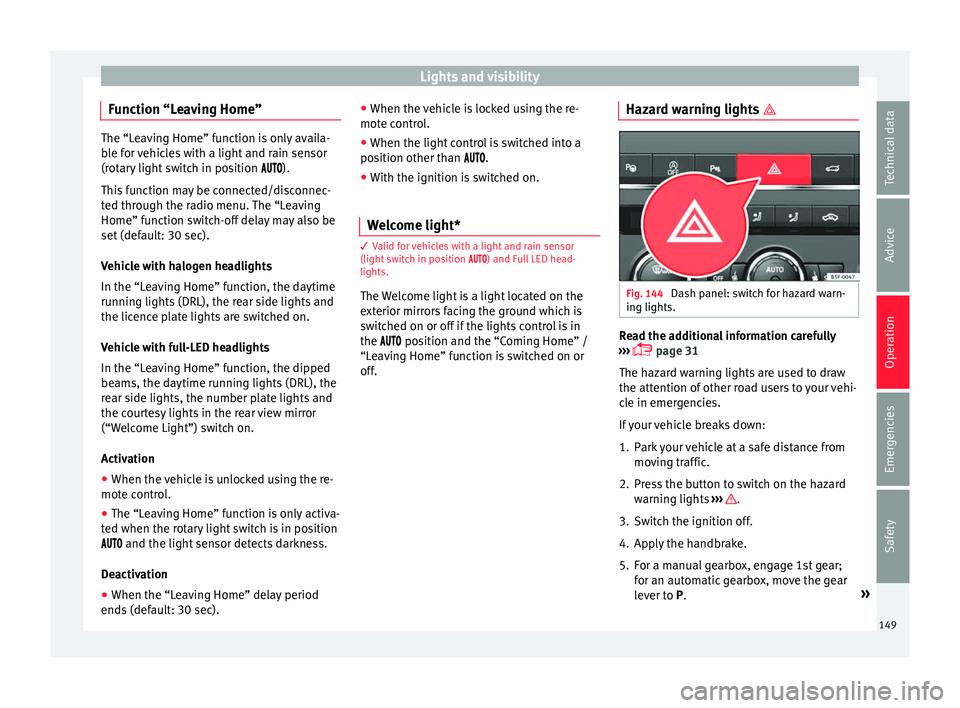
Dash panel: switch for hazard warn-
in g lights. Read the additional information carefully
› ›
›
page 31
The hazard warning lights are used to draw
the attention of other road users to your vehi-
cle in emergencies.
If your vehicle breaks down:
1. Park your vehicle at a safe distance from movin
g traffic.
2. Press the button to switch on the hazard warning lights
››› .
3. Switch the ignition off.
4. Apply the handbrake.
5. For a manual gearbox, engage 1st gear; for an aut
om
atic gearbox, move the gear
lever to P. »
149
Technical data
Advice
Operation
Emergencies
Safety