belt Seat Ateca 2018 Owner's Guide
[x] Cancel search | Manufacturer: SEAT, Model Year: 2018, Model line: Ateca, Model: Seat Ateca 2018Pages: 348, PDF Size: 7.32 MB
Page 96 of 348
Safety
Event Data Recorder D e
s
cription and operation Your vehicle has an event data recorder
(EDR).
The EDR’s f
u
nction is to record data in the
event of a mild or serious accident. These da-
ta are used to support the analysis of how
different vehicle systems behaved.
The EDR records, over a reduced time range
(normally 10 seconds or less), dynamic driv-
ing data and data from the restraint systems,
such as:
● How different vehicle systems worked.
● Whether the driver and the occupants were
we arin
g their seatbelts.
● How hard the acceleration or brake pedal
was
pressed.
● Vehicle speed.
These dat
a will provide a better understand-
ing of the circumstances of the accident.
Data from the driving assist systems are also
recorded. This includes data such as whether
the systems were inactive or active and if
such action had an impact on the vehicle’s
dynamic behaviour, changing its path in the
aforementioned situations, accelerating or
decelerating the vehicle. Depending on vehicle equipment, this in-
cludes
data from systems such as:
● Adaptive Cruise Control (ACC)
● Emergency brake assist system (Front As-
sis
t).
● Park Pilot system
● Parking aid system (Park Assist).
● Lane Assist
The EDR data ar
e only recorded in specific ac-
cident situations. No data are recorded in
normal driving conditions.
No audio or video data inside or around the
vehicle are recorded. Under no circumstances
are personal data such as name, age, or gen-
der recorded. Nevertheless, third parties
(such as criminal proceedings authorities)
may relate the contents of the EDR data to
other data sources and create a personal ref-
erence in the context of an accident investi-
gation.
In order to read the EDR data it is necessary
to access (if legally permitted to do so) the
vehicle's ODB (“On-Board-Diagnose”) inter-
face while the vehicle is switched on.
SEAT will not have access to EDR data unless
the owner (or, in “Leasing” cases, the lessee
or hirer) gives their consent. There may be ex-
ceptions to this, depending on legal or con-
tractual provisions. Due to legal requirements in safety-related
products, S
EAT may use the EDR data for field
research and in order to improve vehicle sys-
tem quality. Any data used for the purposes
of research will be treated anonymously (in
other words, no reference will be made to the
vehicle, their owner or the lessee/hirer).
94
Page 158 of 348
Operation
● Turn the kno
b t
o position L1)
.
● Adjust the left-hand exterior mirror. The
right ext
erior mirror will be adjusted at the
same time (synchronised).
● If necessary the right exterior mirror adjust-
ment ma
y need correcting. turn the control to
position R 1)
.
● In the Easy Connect system the exterior mir-
rors
can be adjusted using the button
and the S
ET
TINGS function button.
F o
l
d in the exterior mirrors after parking
(convenience function)*
The Easy Connect system, the button and
the f u
nction b
uttons SETTINGS and
Mirr or
s
and windscreen wipers can be used to
h av
e the e
xterior mirrors fold in when the ve-
hicle is parked ››› page 120.
When the vehicle is locked with the remote
control, by pressing for more than approxi-
mately 1 second the exterior mirrors are fol-
ded in automatically. When the vehicle is
opened with the remote control, the exterior
mirrors are deployed automatically. WARNING
Convex or wide-angle* exterior mirrors give a
lar g
er field of vision. However, they make ob- jects look smaller and further away than they
re
a
lly are. If you use these mirrors to esti-
mate the distance to vehicles behind you
when changing lane, you could misjudge the
distance. Risk of accident! CAUTION
● If one of the mirr
or housings is knocked out
of position (e.g. when parking), the mirrors
must first be fully retracted with the electric
control. Do not readjust the mirror housing by
hand, as this will interfere with the mirror ad-
juster function.
● Before washing the vehicle in an automatic
car wa
sh, please make sure to retract the ex-
terior mirrors to prevent them from being
damaged. Electrically retractable exterior
mirrors must not be folded in or out by hand.
Always use the electrical power control. Note
If the electrical adjustment should fail to op-
erat e, both of
the mirrors can be adjusted by
hand by lightly pressing the edge of the mir-
ror glass. Seats and head restraints
Adju
s
tin
g the seats and headr-
ests
Manual adjustment of the seats Read the additional information carefully
›› ›
page 18 WARNING
The safe driving chapter contains important
inform ation, tip
s, suggestions and warnings
that you should read and observe for your
own safety and the safety of your passengers
››› page 73. WARNING
● Adjus t
the front seats only when the vehi-
cle is stationary. Failure to follow this instruc-
tion could result in an accident.
● Be careful when adjusting the seat height.
Carel
ess or uncontrolled adjustment can
cause injuries.
● The front seat backrests must not be re-
clined for driv
ing. Otherwise, seat belts and
the airbag system might not protect as they
should, with the subsequent danger of injury. 1)
Regulation in right-hand drive vehicles is symmet-
rical .
156
Page 162 of 348
Operation
● Open the r e
ar lid.
● P
ull the remote release lever of the left part
›››
Fig. 153 1 or right part
2 of the backrest
in the dir ection of
the arr
ow. The released
part of the rear seat backrest is folded auto-
matically down and forwards.
● If this occurs, close the rear lid.
The rear se
at backrest is not engaged when
the red marking of the button ››› Fig. 152 2 is visible.
F
o
l
ding up the rear seat backrest
● Lift the backrest and press it firmly into the
lock u
ntil it engages ››› .
● It should not be possible to see the red
m ark
of
the unlock button 2 .
● The backrest must be properly engaged. WARNING
Serious injuries can be caused if the rear seat
bac k
rest is lowered or lifted without due care
and attention.
● Never lower or lift the rear seat backrest
while driv
ing.
● Do no trap or damage the seat belt when
rais
ing the rear seat backrest.
● When lowering or lifting the rear seat back-
res
t, keep your hands, fingers, feet and other
body parts out of its path.
● For the rear seat belts to offer the necessa-
ry pr
otection all the parts of the rear backrest must be properly engaged. This is particular-
ly impor
t
ant in the case of the centre rear
seat. If someone is seated in a seat whose
backrest is not properly engaged they will fly
forward, along with the backrest, during an
accident or a sudden driving or braking ma-
noeuvre.
● A red signal on the button 2 warns that
the bac k
rest is not engaged. Always check
that the red marking is not visible when the
backrest is in the upright position.
● When the rear seat backrest is lowered or is
not properly
engaged nobody else can travel
in the corresponding seats (not even a child). CAUTION
Serious damage can be caused to the vehicle
and other ob j
ects if the rear seat backrest is
lowered or lifted without due care and atten-
tion.
● Before lowering the rear seat backrest, al-
way
s adjust the front seats so that neither
the head restraints nor the cushions of the
rear backrest can hit them. Transport and practical
equipment
St or
ag
e compartments
Storage areas under the front seats* Fig. 154
Storage compartment under the
fr ont
se
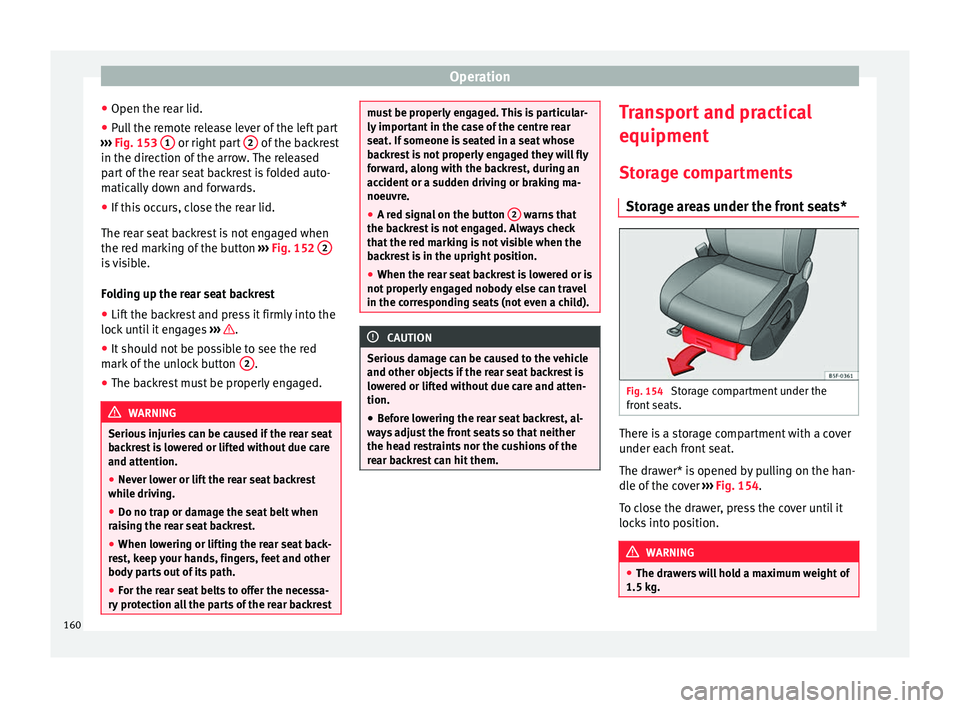
ats. There is a storage compartment with a cover
u
nder e
ac
h front seat.
The drawer* is opened by pulling on the han-
dle of the cover ››› Fig. 154.
To close the drawer, press the cover until it
locks into position. WARNING
● The dra w
ers will hold a maximum weight of
1.5 kg. 160
Page 167 of 348
Transport and practical equipment
On the rear seat, behind the central armrest,
ther e i
s
a tailboard for transporting long
items in the interior, such as skis.
To avoid soiling the interior, dirty objects
should be wrapped (e.g. in a blanket) before
they are inserted through the tailboard.
When the armrest is down, nobody may trav-
el in the centre rear seat.
Opening the tailboard
● Lower the centre armrest.
● Pull the release lever in the direction of the
arrow and p
ush the tailboard cover
››› Fig. 163 1 down and forwards.
● Open the rear lid.
● Insert the long objects through the gap
fr om the lug
g
age compartment.
● Secure the objects with the seatbelt.
● Close the rear lid.
Clos
ing the tailboard
● Lift the tailboard cover until it engages. The
red mark
on the luggage compartment side
should never be visible.
● Close the rear lid.
● Lift the centre armrest if necessary. Note
The tailboard can also be opened from the
lugg ag
e compartment. To do so, press the re- lease lever down, in the direction of the ar-
ro
w
, and the cover upwards ››› Fig. 164. Fastening rings*
Fig. 165
In the luggage compartment: fasten-
in g rin
g
s In the front and rear part of the luggage com-
p
ar
tment
there are fastening rings to secure
the luggage ››› Fig. 165.
In order to use the front fastening rings, they
must be lifted beforehand. WARNING
If unsuitable or damaged belts or retaining
str ap
s are used, they could break in the event
of braking or an accident. Objects could then
be launched across the passenger compart-
ment and cause serious or fatal injuries. ●
Alw a
ys use belts or retaining straps that
are suitable and in a good condition.
● Belts and retaining straps should be se-
curely
fastened to the fastening rings.
● Objects in the luggage compartment that
are un
secured could move suddenly and mod-
ify the handling of the vehicle.
● Secure all objects, little and large.
● Never exceed the maximum tensile load of
the fas
tening ring when securing objects.
● Never secure a child seat to the fastening
rings. Note
● The max imum t
ensile load that the fasten-
ing rings can support is 3.5 kN.
● Belts and securing systems for the appro-
priate lo
ad can be obtained from specialised
dealerships. SEAT recommends visiting a
SEAT dealership for this.
● The fastening rings are rendered unusable
for v
ersions with a spare wheel. 165
Technical data
Advice
Operation
Emergencies
Safety
Page 170 of 348
Operation
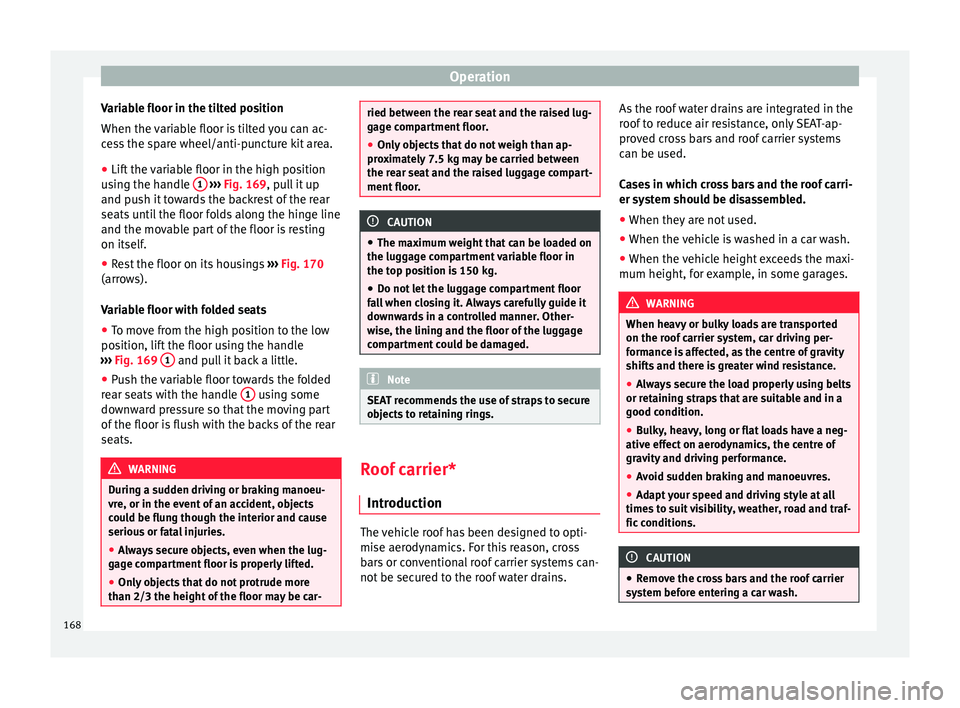
Variable floor in the tilted position
When the v
ari
able floor is tilted you can ac-
cess the spare wheel/anti-puncture kit area.
● Lift the variable floor in the high position
usin
g the handle 1
› ››
Fig. 169
, p ull it up
and push it towards the backrest of the rear
seats until the floor folds along the hinge line
and the movable part of the floor is resting
on itself.
● Rest the floor on its housings ›››
Fig. 170
(arrows).
Variable floor with folded seats
● To move from the high position to the low
position, lif
t the floor using the handle
››› Fig. 169 1 and pull it back a little.
● Push the variable floor towards the folded
r e
ar se
ats with the handle 1 using some
do wn
w
ard pressure so that the moving part
of the floor is flush with the backs of the rear
seats. WARNING
During a sudden driving or braking manoeu-
vre, or in the ev ent
of an accident, objects
could be flung though the interior and cause
serious or fatal injuries.
● Always secure objects, even when the lug-
gage c
ompartment floor is properly lifted.
● Only objects that do not protrude more
than 2/3 the height of
the floor may be car- ried between the rear seat and the raised lug-
gag
e c
ompartment floor.
● Only objects that do not weigh than ap-
prox
imately 7.5 kg may be carried between
the rear seat and the raised luggage compart-
ment floor. CAUTION
● The m aximum w
eight that can be loaded on
the luggage compartment variable floor in
the top position is 150 kg.
● Do not let the luggage compartment floor
fal
l when closing it. Always carefully guide it
downwards in a controlled manner. Other-
wise, the lining and the floor of the luggage
compartment could be damaged. Note
SEAT recommends the use of straps to secure
ob j
ects to retaining rings. Roof carrier*
Intr oduction The vehicle roof has been designed to opti-
mi
se aer
ody
namics. For this reason, cross
bars or conventional roof carrier systems can-
not be secured to the roof water drains. As the roof water drains are integrated in the
roof t
o reduce air resistance, only SEAT-ap-
proved cross bars and roof carrier systems
can be used.
Cases in which cross bars and the roof carri-
er system should be disassembled.
● When they are not used.
● When the vehicle is washed in a car wash.
● When the vehicle height exceeds the maxi-
mum height, for ex
ample, in some garages. WARNING
When heavy or bulky loads are transported
on the roof c
arrier system, car driving per-
formance is affected, as the centre of gravity
shifts and there is greater wind resistance.
● Always secure the load properly using belts
or retainin
g straps that are suitable and in a
good condition.
● Bulky, heavy, long or flat loads have a neg-
ative effect
on aerodynamics, the centre of
gravity and driving performance.
● Avoid sudden braking and manoeuvres.
● Adapt your speed and driving style at all
times t
o suit visibility, weather, road and traf-
fic conditions. CAUTION
● Remo v
e the cross bars and the roof carrier
system before entering a car wash. 168
Page 172 of 348
Operation
Loading the roof carrier system The load can only be secured if the crossbars
and the roof
c
arrier system are properly in-
stalled ››› .
Max imum authori
sed roof load
The maximum permissible roof load is 75 kg.
This figure comes from the combined weight
of the roof carrier, the cross bars and the load
itself on the roof ››› .
Alw a
ys check the weight of the roof carrier
system, the cross bars and the weight of the
load to be transported and weigh them if
necessary. Never exceed the maximum au-
thorised roof load.
If you are using cross bars and a roof carrier
with a lower weight rating, you will not be
able to carry the maximum authorised roof
load. In this case, do not exceed the maxi-
mum weight limit for the roof carrier which is
listed in the fitting instructions.
Distributing a load
Distribute loads uniformly and secure them
correctly ››› .
Chec k
att
achments
Once the cross bars and roof carrier system
have been installed, check the bolted con-
nections and attachments after a short jour- ney and subsequently with a certain frequen-
cy. WARNING
Exceeding the maximum authorised roof load
can r e
sult in accidents and considerable vehi-
cle damage.
● Never exceed the maximum authorised
load on the r
oof and on the axles or the vehi-
cle's maximum authorised weight.
● Never exceed the load capacity of the cross
bars
and the roof carrier system, even if the
maximum authorised roof load has not been
reached.
● Secure heavy items as far forward as possi-
ble and di
stribute the vehicle load uniformly. WARNING
If the load is loose or not secured, it could fall
from the r oof
carrier system or cause acci-
dents and injuries.
● Always use belts or retaining straps that
are suit
able and in a good condition.
● Secure the load properly. Air conditioning
He atin
g,
ventilation and cool-
ing
Introduction Read the additional information carefully
›› ›
page 51
Viewing Climatronic information
On the screen of Climatronic control unit and
on the screen of the factory-fitted Easy Con-
nect system, the theoretical values of the
temperature zones are shown.
The unit of temperature measurement can be
changed in the Easy Connect system.
Dust and pollen filter
The dust and pollen filter with its activated
charcoal cartridge serves as a barrier against
impurities in the air taken into the vehicle in-
terior.
The dust and pollen filter must be changed
regularly so that air conditioner performance
is not adversely affected.
If the filter loses efficiency prematurely due
to use in areas with very high levels of air
pollution, the filter must be changed more
frequently than stated in the Service Sched-
ule.
170
Page 186 of 348
Operation
Automatic deactivation of the ignition on ve-
hic l
e
s with the Start-Stop system
The ignition is switched off automatically
when the vehicle is stopped and the auto-
matic engine shutdown is active, if:
● The driver's seat belt is not fastened,
● the driver does not step on any pedal,
● the driver door is opened.
After aut
omatically turning off the ignition, if
the dipped beam is on, the side light re-
mains on for approx. 30 minutes (if the bat-
tery is sufficiently charged). If the driver locks
the vehicle or manually turns off the light, the
side light goes out. WARNING
Any accidental movement of the vehicle could
re s
ult in serious injury.
● When switching on the ignition, do not
pre
ss the brake or clutch pedal, otherwise
the engine could start immediately. WARNING
If vehicle keys are used negligently or with-
out due c ar
e, this may cause accidents and
serious injury.
● Never leave any key inside the vehicle
when exitin
g. Otherwise, a child or unauthor-
ised person could lock the vehicle, start the
engine or connect the ignition and, in this way, operate electronic equipment (e.g. the
windo
w
s). Note
● Bef or
e leaving the vehicle, always discon-
nect the ignition manually and, if appropri-
ate, take into account the instructions on the
screen of the dash panel.
● If the vehicle is stationary for a long time
with the ignition on, the v
ehicle battery
might be discharged and it might not be pos-
sible to start the engine.
● In diesel vehicles, there may be a delay in
the engine st
arting if it requires preheating.
● If during the STOP phase you press the
STAR
T ENGINE STOP button, the ignition is
swit c
hed off and the button flashes.
● If the indication “Start-Stop system deacti-
vated:
Start the engine manually” is dis-
played on the dash panel display, the START ENGINE STOP button will blink.
Starting the engine
3 V
alid for vehicles: with Keyless Access
StepStarting the engine with the starter
button ››› page 183 (Press & Drive).
1.Press and hold the brake pedal until step 5
is performed.
StepStarting the engine with the starter
button ››› page 183 (Press & Drive).
1a.In vehicles with a manual gearbox: press
and hold the clutch down until the engine
starts.
2.Put the gearbox lever in neutral or the selec-
tor lever in position P or N.
3.
Briefly press the starter button ››› Fig. 178
without pressing the accelerator. For the en-
gine to start there must be a valid key in the
vehicle.
After starting the engine, the light of the START ENGINE STOP
button changes to a fixed
light indicating that the engine has started.
4.
If the engine does not start, stop and wait
for approx. 1 minute before trying again. If
necessary, perform an emergency start
››› page 183.
5.Disconnect the electronic parking brake
when you are about to start driving
››› page 186. WARNING
Never leave the vehicle with the engine run-
ning, e s
pecially if a gear or gear range is en-
gaged. The vehicle could then suddenly move
or something strange could happen that
would cause damage, fire or serious injury. WARNING
Cold start sprays could explode or cause a
sud den inc
rease in the engine speed.184
Page 187 of 348
Driving
●
Never u se s
prays to cold start the engine. CAUTION
● The s tar
ter motor or the engine may be
damaged if you try to start the engine while
driving or if you restart it immediately after
switching it off.
● If the engine is cold, avoid high engine
speeds, p
ushing the engine too hard and rap-
id acceleration.
● Do not start the engine by pushing the ve-
hicle or t
owing it. Unburnt fuel could enter
the catalytic converter and damage it. Note
● Do not w ait
until the engine warms up with
the vehicle stationary; if you have good visi-
bility through the windows, start driving im-
mediately. This helps the engine reach oper-
ating temperature faster and reduces emis-
sions.
● Electrical components with a high power
cons
umption are switched off temporarily
when the engine starts.
● When starting with a cold engine, noise
level
s may briefly increase. This is quite nor-
mal, and no cause for concern.
● When the outside temperature is below
+5°C (+41°F), if the en
gine is diesel, some
smoke may appear under the vehicle when
the fuel-operated auxiliary heater is on. Stopping the engine
3 Valid for vehicles: with Keyless Access
StepSwitch off the engine with the starter
button
››› page 183.
1.Stop the vehicle completely ››› .
2.Press and hold the brake pedal until the step
4 is performed.
3.If you are driving an automatic vehicle, place
the selector lever in position P.
4.Connect the electronic parking brake
››› page 186.
5.
Briefly press the start-up button ››› Fig. 178.
The START ENGINE STOP button blinks again. If
the engine fails to switch off, perform an
emergency disconnect ››› page 183.
6.If the vehicle is equipped with a manual
gearbox, put it into 1st or reverse. WARNING
Never switch off the engine while the vehicle
is mo
ving. This could cause loss of control of
the vehicle, accidents and serious injury.
● The airbags and belt tensioners do not
work when the ignition i
s switched off.
● The brake servo does not work with the en-
gine off. Ther
efore, you need to press the
break pedal harder to brake the vehicle. ●
Po w
er steering does not work when the en-
gine is not running. You need more strength
to steer when the engine is switched off.
● If the ignition is switched off, the steering
column c
ould be locked, making it impossible
to control the vehicle. CAUTION
If the engine is made to work hard for a long
time, it ma
y overheat after being switched
off. To prevent damage to the engine before
switching it off, leave it idle for approx. 2 mi-
nutes in neutral. Note
After switching off the engine, the cooling fan
ma y
continue to operate in the engine com-
partment for a few more minutes, even with
the ignition off. The radiator fan is automati-
cally switched off. “My Beat” Function
For vehicles with a convenience key there is
the “M
y
B
eat” function. This feature provides
an additional indication of the vehicle igni-
tion system.
When accessing the vehicle, e.g. by opening
the doors with the remote control, the START ENGINE STOP button flashes, calling at-
t ention t
o the r
elevant starter system button. »
185
Technical data
Advice
Operation
Emergencies
Safety
Page 188 of 348
Operation
Upon switching the ignition on/off, the light
of the S
T
ART ENGINE STOP button flashes. With
the en gine sw
it
ched off, after a few seconds,
the STOP ENGINE START button stops flashing
and g oe
s
out.
With the engine running, the START ENGINE STOP button light stays on, indi-
c atin
g th
at the engine is running. The time
that lapses between the moment the user
starts the engine with the START ENGINE STOPbutton and the lighting changes from flash-
in
g t
o fi
xed will depend on specific engine
size characteristics. Upon switching the igni-
tion off with the START ENGINE STOP button, it
s t
ar
ts flashing again.
In vehicles with the Start-Stop system , the
“My Beat” function also offers additional in-
formation:
● When the engine stops during the Stop
phase, the light
of the START ENGINE STOP but-
t on s
t
ays on, since, even though the engine
is off, the Start-Stop system is active.
● When the engine cannot be stated again
with the St
art-Stop system, ››› page 208, and
needs to be started manually, the START ENGINE STOP button flashes to indicate
thi s
f
act. Braking and parking
Electronic
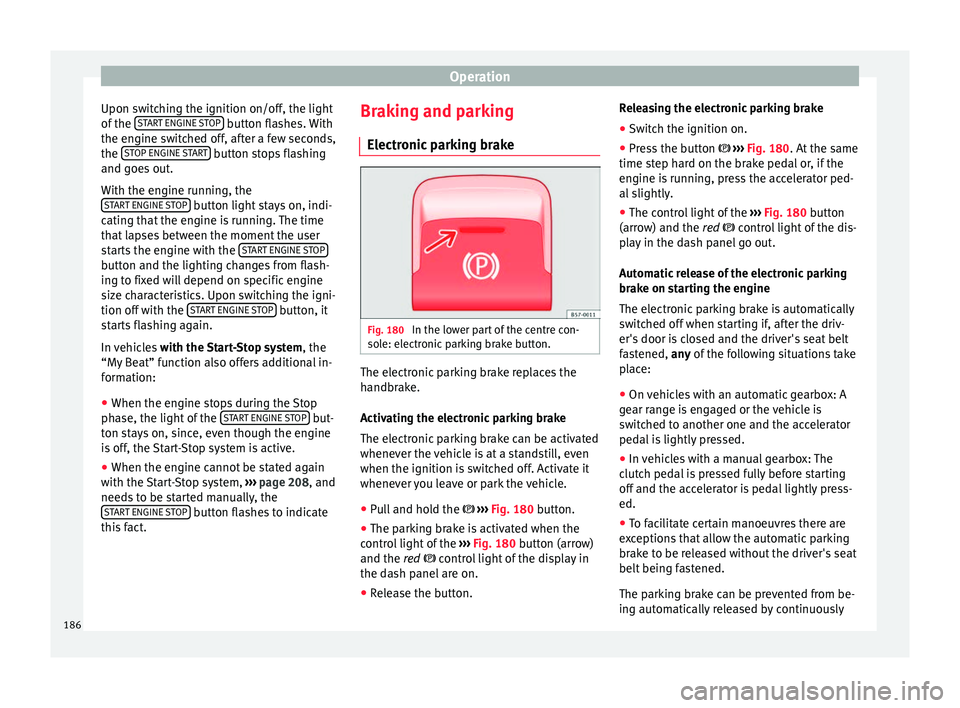
parking brake Fig. 180
In the lower part of the centre con-
so l
e: el
ectronic parking brake button. The electronic parking brake replaces the
h
andbr
ak
e.
Activating the electronic parking brake
The electronic parking brake can be activated
whenever the vehicle is at a standstill, even
when the ignition is switched off. Activate it
whenever you leave or park the vehicle.
● Pull and hold the ›››
Fig. 180 button.
● The parking brake is activated when the
contro
l light of the ››› Fig. 180 button (arrow)
and the red control light of the display in
the dash panel are on.
● Release the button. Releasing the electronic parking brake
●
Switch the ignition on.
● Press the button ›››
Fig. 180. At the same
time step hard on the brake pedal or, if the
engine is running, press the accelerator ped-
al slightly.
● The control light of the ›››
Fig. 180 button
(arrow) and the red control light of the dis-
play in the dash panel go out.
Automatic release of the electronic parking
brake on starting the engine
The electronic parking brake is automatically
switched off when starting if, after the driv-
er's door is closed and the driver's seat belt
fastened, any of the following situations take
place:
● On vehicles with an automatic gearbox: A
gear r
ange is engaged or the vehicle is
switched to another one and the accelerator
pedal is lightly pressed.
● In vehicles with a manual gearbox: The
clutc
h pedal is pressed fully before starting
off and the accelerator is pedal lightly press-
ed.
● To facilitate certain manoeuvres there are
exc
eptions that allow the automatic parking
brake to be released without the driver's seat
belt being fastened.
The parking brake can be prevented from be-
ing automatically released by continuously
186
Page 210 of 348
Operation
Driver assistance systems
St ar
t
-Stop System*
Description and operation The Start-Stop system helps save fuel and re-
duce C
O
2 emi
ssions.
In Start-Stop mode, the engine will automati-
cally switch off when the vehicle stops or is
stopping; for example when stopping at traf-
fic lights. The ignition remains switched on
during the stopping phase. The engine auto-
matically switches back on when required. In
this situation, the light of the START ENGINE STOP button stays on
1)
.
As soon a
s
the ignition is switched on, the
Start-Stop function is automatically activa-
ted.
Further information about the Start-Stop sys-
tem can be found in the Easy Connect sys-
tem: by pressing the button in the Vehi-
cle status menu.
B a
s
ic requirements for the Start-Stop mode
● The driver door must be closed.
● The driver must have their seat belt fas-
tened. ●
The bonnet mus
t be closed.
● The engine must have reached a minimum
servic
e temperature.
● The reverse gear must not be engaged.
● The vehicle must not be on a very steep
slope. WARNING
● Never sw it
ch the engine off until the vehi-
cle is stationary. The brake servo and power
steering functions will not be completely cov-
ered under warranty. More force may also be
needed to turn the steering wheel or to brake.
As you cannot steer and brake in the normal
manner, there is a greater risk of accidents
and serious injury.
● Never remove the key from the ignition if
the vehic
le is in motion. Otherwise, the steer-
ing could lock making it impossible to steer
the vehicle.
● To avoid injury, make sure that the Start-
Stop sys
tem is switched off when working in
the engine compartment ››› page 210. CAUTION
The Start-Stop system must always be
swit c
hed off when driving through flooded
areas ››› page 210. Stopping/Starting the engine
Vehicles with a manual gearbox
– Before stopping the vehicle or when it is
stop
ped, put it into neutral and release the
clutch pedal. The engine will switch off. The
warning lamp will appear on the instru-
ment panel display. The engine may stop
before the vehicle comes to a halt in the
deceleration phase (at 7 km/h).
– When the clutch pedal is pressed the en-
gine wil
l start up again. The warning lamp
will switch off.
Vehicles with an automatic gearbox – Use the foot brake to bring the vehicle to a
stop and k
eep the brake pedal pressed
down with your foot. The engine will switch
off. The warning lamp will appear in the
display. The engine may stop before the ve-
hicle comes to a halt in the deceleration
phase (at 7 km/h or 2 km/h, depending on
the vehicle’s gearbox).
– When you take your foot off the brake pedal
the engine wi
ll start up again. The warning
lamp will switch off. In vehicles with the Au-
to Hold* system, when the system is active,
the engine will not start if you remove your
foot from the brake pedal. The car starts
when you press the accelerator pedal. 1)
Only in vehicles with Keyless Access.
208