warning light Seat Ateca 2018 Service Manual
[x] Cancel search | Manufacturer: SEAT, Model Year: 2018, Model line: Ateca, Model: Seat Ateca 2018Pages: 348, PDF Size: 7.32 MB
Page 158 of 348
Operation
● Turn the kno
b t
o position L1)
.
● Adjust the left-hand exterior mirror. The
right ext
erior mirror will be adjusted at the
same time (synchronised).
● If necessary the right exterior mirror adjust-
ment ma
y need correcting. turn the control to
position R 1)
.
● In the Easy Connect system the exterior mir-
rors
can be adjusted using the button
and the S
ET
TINGS function button.
F o
l
d in the exterior mirrors after parking
(convenience function)*
The Easy Connect system, the button and
the f u
nction b
uttons SETTINGS and
Mirr or
s
and windscreen wipers can be used to
h av
e the e
xterior mirrors fold in when the ve-
hicle is parked ››› page 120.
When the vehicle is locked with the remote
control, by pressing for more than approxi-
mately 1 second the exterior mirrors are fol-
ded in automatically. When the vehicle is
opened with the remote control, the exterior
mirrors are deployed automatically. WARNING
Convex or wide-angle* exterior mirrors give a
lar g
er field of vision. However, they make ob- jects look smaller and further away than they
re
a
lly are. If you use these mirrors to esti-
mate the distance to vehicles behind you
when changing lane, you could misjudge the
distance. Risk of accident! CAUTION
● If one of the mirr
or housings is knocked out
of position (e.g. when parking), the mirrors
must first be fully retracted with the electric
control. Do not readjust the mirror housing by
hand, as this will interfere with the mirror ad-
juster function.
● Before washing the vehicle in an automatic
car wa
sh, please make sure to retract the ex-
terior mirrors to prevent them from being
damaged. Electrically retractable exterior
mirrors must not be folded in or out by hand.
Always use the electrical power control. Note
If the electrical adjustment should fail to op-
erat e, both of
the mirrors can be adjusted by
hand by lightly pressing the edge of the mir-
ror glass. Seats and head restraints
Adju
s
tin
g the seats and headr-
ests
Manual adjustment of the seats Read the additional information carefully
›› ›
page 18 WARNING
The safe driving chapter contains important
inform ation, tip
s, suggestions and warnings
that you should read and observe for your
own safety and the safety of your passengers
››› page 73. WARNING
● Adjus t
the front seats only when the vehi-
cle is stationary. Failure to follow this instruc-
tion could result in an accident.
● Be careful when adjusting the seat height.
Carel
ess or uncontrolled adjustment can
cause injuries.
● The front seat backrests must not be re-
clined for driv
ing. Otherwise, seat belts and
the airbag system might not protect as they
should, with the subsequent danger of injury. 1)
Regulation in right-hand drive vehicles is symmet-
rical .
156
Page 164 of 348
Operation
WARNING
● Ple a
se make sure that any items of clothing
hanging from the coat hooks do not obstruct
your view to the rear.
● The coat hooks should only be used for
lightweight c
lothing. Do not leave any heavy
or sharp objects in the pockets.
● Do not use clothes hangers to hang up the
clothing, a
s this could interfere with the func-
tion of the head-protection airbags. Power sockets
Fig. 157
Centre console: 12 volt socket Fig. 158
Centre console, rear section: USB
pow er soc
kets. ●
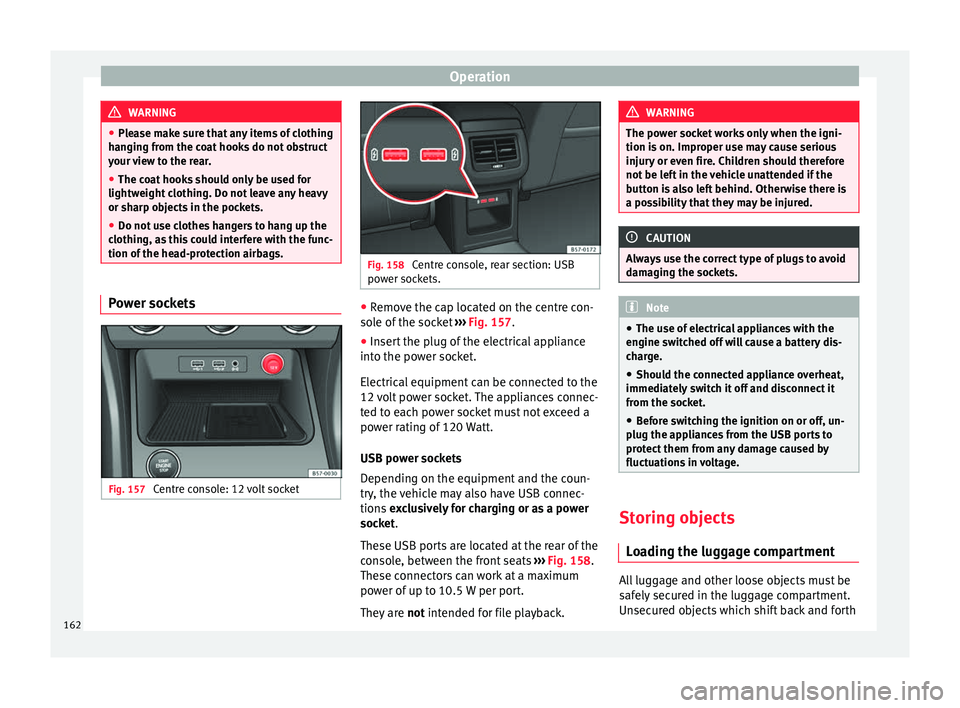
Remove the cap located on the centre con-
so l
e of
the socket ››› Fig. 157.
● Insert the plug of the electrical appliance
into the pow
er socket.
Electrical equipment can be connected to the
12 volt power socket. The appliances connec-
ted to each power socket must not exceed a
power rating of 120 Watt.
USB power sockets
Depending on the equipment and the coun-
try, the vehicle may also have USB connec-
tions exclusively for charging or as a power
socket.
These USB ports are located at the rear of the
console, between the front seats ››› Fig. 158.
These connectors can work at a maximum
power of up to 10.5 W per port.
They are not intended for file playback. WARNING
The power socket works only when the igni-
tion is on. Impr
oper use may cause serious
injury or even fire. Children should therefore
not be left in the vehicle unattended if the
button is also left behind. Otherwise there is
a possibility that they may be injured. CAUTION
Always use the correct type of plugs to avoid
dam agin
g the sockets. Note
● The use of el
ectrical appliances with the
engine switched off will cause a battery dis-
charge.
● Should the connected appliance overheat,
immediately
switch it off and disconnect it
from the socket.
● Before switching the ignition on or off, un-
plug the app
liances from the USB ports to
protect them from any damage caused by
fluctuations in voltage. Storing objects
Lo
a
ding the luggage compartment All luggage and other loose objects must be
s
af
ely
secured in the luggage compartment.
Unsecured objects which shift back and forth
162
Page 168 of 348
Operation
Retaining hooks Fig. 166
In the luggage compartment: retain-
in g hook
s At the rear of the luggage compartment, on
the l
ef
t
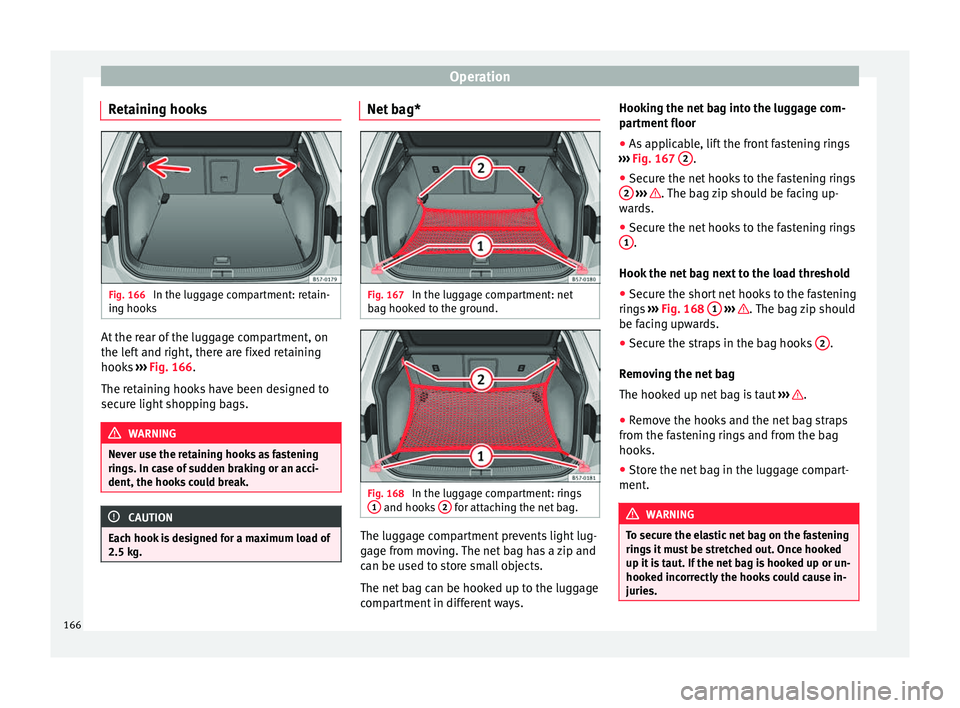
and right, there are fixed retaining
hooks ››› Fig. 166.
The retaining hooks have been designed to
secure light shopping bags. WARNING
Never use the retaining hooks as fastening
ring s. In c
ase of sudden braking or an acci-
dent, the hooks could break. CAUTION
Each hook is designed for a maximum load of
2.5 kg. Net bag*
Fig. 167
In the luggage compartment: net
b ag hook
ed t
o the ground. Fig. 168
In the luggage compartment: rings
1 and hooks
2 for attaching the net bag.
The luggage compartment prevents light lug-
g
ag
e fr
om moving. The net bag has a zip and
can be used to store small objects.
The net bag can be hooked up to the luggage
compartment in different ways. Hooking the net bag into the luggage com-
partment
floor
● As applicable, lift the front fastening rings
›››
Fig. 167 2 .
● Secure the net hooks to the fastening rings
2
› ›› . The bag zip should be facing up-
w ar
d
s.
● Secure the net hooks to the fastening rings
1 .
Hook the net
b
ag next to the load threshold
● Secure the short net hooks to the fastening
rings
››› Fig. 168 1
› ›
› . The bag zip should
be f ac
in
g upwards.
● Secure the straps in the bag hooks 2 .
R emo
v
ing the net bag
The hooked up net bag is taut ››› .
● Remove the hooks and the net bag straps
fr om the f
a
stening rings and from the bag
hooks.
● Store the net bag in the luggage compart-
ment. WARNING
To secure the elastic net bag on the fastening
ring s
it must be stretched out. Once hooked
up it is taut. If the net bag is hooked up or un-
hooked incorrectly the hooks could cause in-
juries. 166
Page 173 of 348

Air conditioning
WARNING
Reduced visibility through the windows in-
cr e
ases the risk of serious accidents.
● Always ensure that all windows are free of
ice and sno
w, and that they are not fogged,
so as to maintain good visibility of everything
outside.
● The maximum heat output required to de-
fros
t windows as quickly as possible is only
available when the engine has reached its
normal running temperature. Only drive when
you have good visibility.
● Always ensure that you use the heating
syst
em, fresh air system, air conditioner and
the heated rear window to maintain good visi-
bility to the outside.
● Never leave the air recirculation on for a
long period of time. If
the cooling system is
switched off and air recirculation mode
switched on, the windows can mist over very
quickly, considerably limiting visibility.
● Switch air recirculation mode off when it is
not requir
ed. WARNING
Stuffy or used air will increase fatigue and re-
duce driv er c
oncentration possibly resulting
in a serious accident.
● Never leave the fresh air fan turned off or
use the air rec
irculation for long periods of
time; the air in the vehicle interior will not be
refreshed. CAUTION
● To r ep
lace the pollen filter, always visit a
service centre.
● Switch the air conditioner off if you think it
may
be broken. This will avoid additional
damage. Have the air conditioner checked by
a specialised workshop.
● Repairs to the air conditioner require spe-
cia
list knowledge and special tools. SEAT rec-
ommends visiting a SEAT Official Service. Note
● When the coo lin
g system is turned off, air
coming from the outside will not be dried. To
prevent fogging of the windows, SEAT recom-
mends leaving the cooling system (compres-
sor) turned on. To do this, press the button . The button lamp should light up.
● The maximum heat output required to de-
fro s
t windows as quickly as possible is only
available when the engine has reached its
normal running temperature.
● Keep the air intake slots in front of the
winds
creen free of snow, ice and leaves to en-
sure heating and cooling are not impaired,
and to prevent the windows from misting
over. Operating the Climatronic through the
E
a
sy
Connect system* 3 Applies to vehicles with a Media System
T ouc
h/Colour. Fig. 172
Easy Connect screen: air conditioner
menu. In the Easy Connect system it is also possible
t
o per
f
orm various adjustments to the Clima-
tronic.
Open the air conditioner menu
● Press the button on the Climatronic
c ontr
o
l panel.
● OR: press the button in Easy Connect.
W ith the r
ot
ating switch select the air con-
ditioner menu and open it.
On the touch screen you can see and change
the current settings, for example, the temper-
ature set for the driver and passenger sides,
the air distribution and the fan speed. »
171
Technical data
Advice
Operation
Emergencies
Safety
Page 176 of 348
Operation
Air outlets Fig. 174
On the dash panel: air vents Air vents
T
o en
s
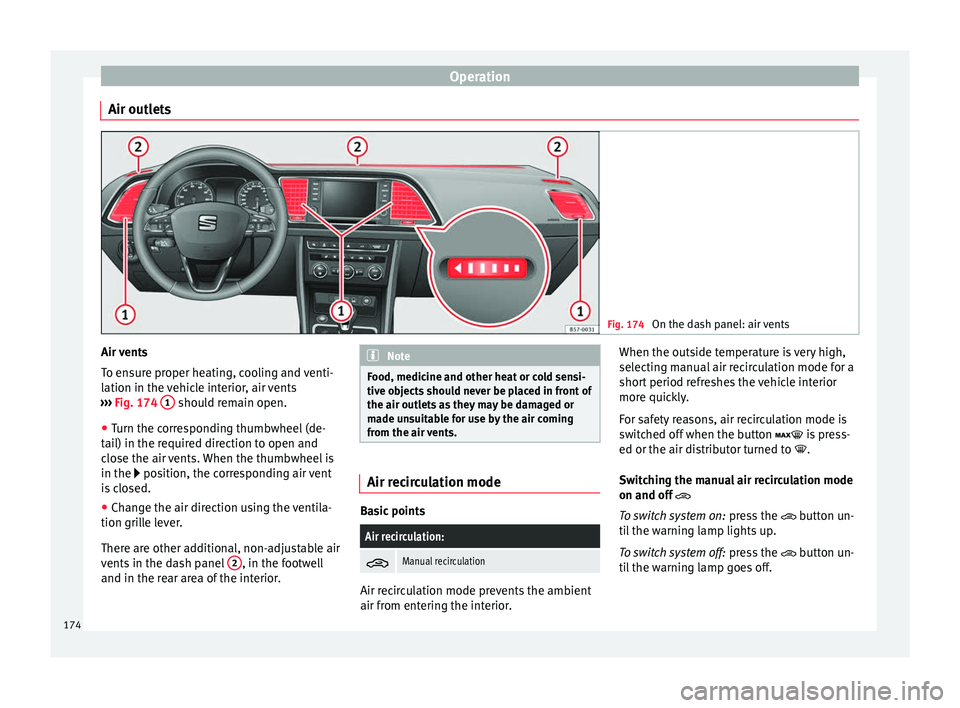
ure proper heating, cooling and venti-
lation in the vehicle interior, air vents
››› Fig. 174 1 should remain open.
● Turn the corresponding thumbwheel (de-
t ai
l) in the r
equired direction to open and
close the air vents. When the thumbwheel is
in the position, the corresponding air vent
is closed.
● Change the air direction using the ventila-
tion grill
e lever.
There are other additional, non-adjustable air
vents in the dash panel 2 , in the footwell
and in the r ear ar
ea of the interior. Note
Food, medicine and other heat or cold sensi-
tive o b
jects should never be placed in front of
the air outlets as they may be damaged or
made unsuitable for use by the air coming
from the air vents. Air recirculation mode
Basic points
Air recirculation:
Manual recirculation
Air recirculation mode prevents the ambient
air fr
om ent
erin
g the interior. When the outside temperature is very high,
selecting m
anual air recirculation mode for a
short period refreshes the vehicle interior
more quickly.
For safety reasons, air recirculation mode is
switched off when the button is press-
ed or the air distributor turned to .
Switching the manual air recirculation mode
on and off
To switch system on: press the button un-
til the warning lamp lights up.
To switch system off: press the button un-
til the warning lamp goes off.
174
Page 179 of 348
Air conditioning
Auxiliary heater (additional
he at
er)*
Intr
oduction The auxiliary heater runs on fuel from the ve-
hicl
e's
tank and can be used while you are
driving and when the vehicle is stationary.
The auxiliary heater can be switched on using
the fast heating button of the air condition-
ing controls, with the remote control or by
previously programming a departure time in
the auxiliary heater menu of the infotainment
system.
In winter, with the auxiliary heater switched
on, you can defog the windscreen and leave
it free of ice and snow (if it is a thin layer) be-
fore you start driving.
If the outside temperature is very high, the
vehicle interior can be ventilated with the en-
gine off using the auxiliary heater. WARNING
Swallowing a battery with a 20 mm diameter
or any other b
utton battery can cause serious
and even fatal injuries within a very short
time.
● Always keep the remote control, keyrings
with batt
eries, the spare batteries, button
batteries and all other batteries over 20 mm
out of reach of children. ●
If y
ou suspect that someone may have
swallowed a battery, seek immediate medical
attention. WARNING
The auxiliary heater exhaust fumes contain
c arbon mono x
ide, an odourless and colour-
less toxic gas. Carbon monoxide can cause
people to lose consciousness. It can also
cause death.
● Never switch on the auxiliary heater or
leav
e it running in enclosed spaces or areas
with no ventilation.
● Never programme the auxiliary heater so
that it
switches itself on and is running in an
enclosed space or an area with no ventila-
tion. WARNING
The components of the auxiliary heater are
extr emely
hot and could cause a fire.
● Always park your vehicle so that no part of
the exhau
st system can come in contact with
easily flammable materials that might be be-
low the vehicle, such as dried grass. CAUTION
Never place food, medicines or other temper-
atur e-
sensitive objects close to the air vents.
Food, medicines and other objects sensitive
to heat or cold may be damaged or made un- suitable for use by the air coming from the
vent
s. Note
After switching the engine on with a 12-volt
b att er
y that is heavily discharged or newly
changed or after a jump start some system
settings (such as the time, the date, the per-
sonalised comfort settings and the program-
ming) might be altered or deleted. Check and
correct these settings once the battery is suf-
ficiently charged. Switching on and off the auxiliary
he
at
er
Switching the auxiliary heater on:
Manually with the fast heating button of the air
conditioner controls. The control lamp of the
button will light up
››› page 170.
Manually with the remote control
››› page 178.
Automatically by programming and activating a
departure time ››› page 179.
Switching the auxiliary heater off:
Manually with the fast heating button of the air
conditioner controls. The control lamp of the
button goes off
››› page 170.
Manually with the remote control
››› page 178.» 177
Technical data
Advice
Operation
Emergencies
Safety
Page 182 of 348
Operation
WARNING
Never programme the auxiliary heater so that
it sw it
ches itself on and is running in an en-
closed space or an area with no ventilation.
The auxiliary heater exhaust fumes contain
carbon monoxide, an odourless and colour-
less toxic gas. Carbon monoxide can cause
people to lose consciousness. It can also
cause death. Operating instructions
The auxiliary heater exhaust system located
belo
w the
v
ehicle must be kept clear of snow,
mud and other objects. The exhaust fumes
must be able to exit freely. The emissions
generated by the auxiliary heater are re-
moved via an exhaust pipe fitted underneath
the vehicle.
On heating the vehicle interior, depending on
the outside temperature, the warm air is first
directed at the windscreen and then to the
rest of the vehicle interior through the air
vents. Directing the diffusers – towards the
windows for example – can affect air distribu-
tion.
When will the auxiliary heater not be activa-
ted?
● The auxiliary heater requires about as
much po w
er as the dipped beam headlights.
If the 12-volt battery charge is too low, the auxiliary heater switches off automatically
and cannot
be sw
itched on. This avoids prob-
lems when starting the engine.
● The heating must be activated every time
you want
to set off. Similarly, the departure
time must reactivate each time.
● The control lamp (fuel l
evel indicator)
lights up. Note
● Noise s
will be heard while the auxiliary
heater is running.
● When the air humidity is high and the in-
side temper
ature low, condensation from the
heating and ventilating system may evapo-
rate when the auxiliary heater is switched on.
In this case, steam may be released from un-
derneath the vehicle. This does not mean
that there is a vehicle malfunction.
● If the vehicle is tilted, e.g. if parked on a
slope, the operation of
the auxiliary heater
may be restricted if the fuel tank level is low
(just above the reserve level).
● If the auxiliary heater is used a number of
times f
or a long period of time, the 12-volt
battery will lose its charge. To recharge the
battery, the vehicle must be driven for a num-
ber of kilometres from time to time. As a
guideline: The journey should last approxi-
mately as long as the heater was connected.
● At temperatures below +5°C (+41°F), the
auxili
ary heater may switch itself on automat-
ically when the engine is switched on. The auxiliary heater is switched off again after a
cer
t
ain time.180
Page 183 of 348
Driving
Driving St ar
tin
g and stopping the en-
gine
Switching the ignition on and starting
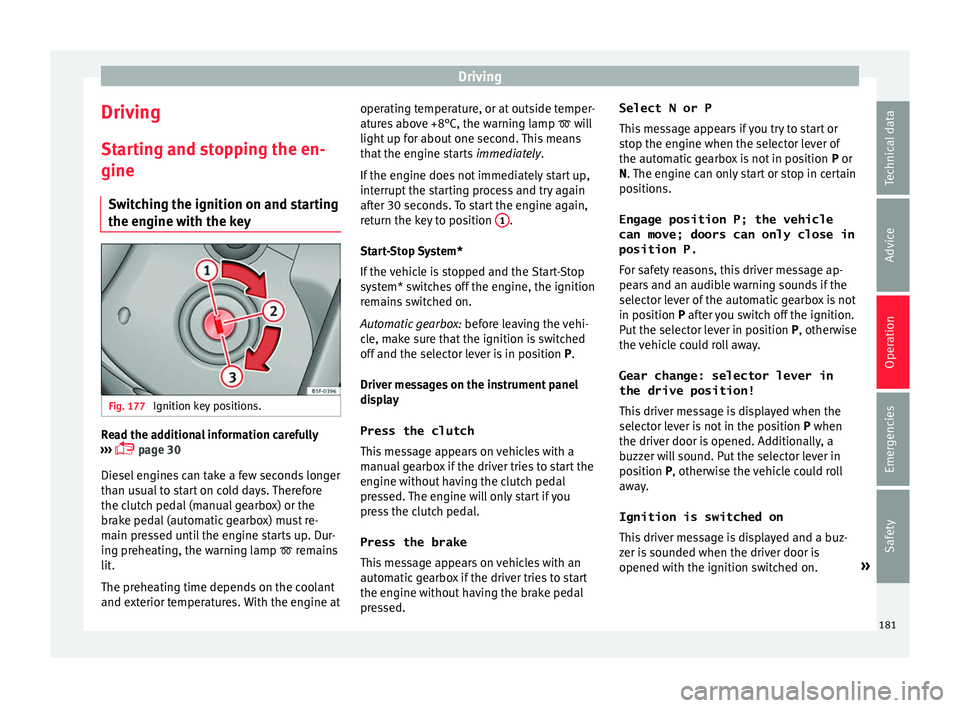
the engine with the key Fig. 177
Ignition key positions. Read the additional information carefully
› ›
›
page 30
Diesel engines can take a few seconds longer
than usual to start on cold days. Therefore
the clutch pedal (manual gearbox) or the
brake pedal (automatic gearbox) must re-
main pressed until the engine starts up. Dur-
ing preheating, the warning lamp remains
lit.
The preheating time depends on the coolant
and exterior temperatures. With the engine at operating temperature, or at outside temper-
ature
s above +8°C, the warning lamp will
light up for about one second. This means
that the engine starts immediately.
If the engine does not immediately start up,
interrupt the starting process and try again
after 30 seconds. To start the engine again,
return the key to position 1 .
St ar
t
-Stop System*
If the vehicle is stopped and the Start-Stop
system* switches off the engine, the ignition
remains switched on.
Automatic gearbox: before leaving the vehi-
cle, make sure that the ignition is switched
off and the selector lever is in position P.
Driver messages on the instrument panel
display
Press the clutch
This message appears on vehicles with a
manual gearbox if the driver tries to start the
engine without having the clutch pedal
pressed. The engine will only start if you
press the clutch pedal.
Press the brake This message appears on vehicles with an
automatic gearbox if the driver tries to start
the engine without having the brake pedal
pressed. Select N or P
This me
ssage appears if you try to start or
stop the engine when the selector lever of
the automatic gearbox is not in position P or
N. The engine can only start or stop in certain
positions.
Engage position P; the vehicle
can move; doors can only close in
position P.For safety reasons, this driver message ap-
pears and an audible warning sounds if the
selector lever of the automatic gearbox is not
in position P after you switch off the ignition.
Put the selector lever in position P, otherwise
the vehicle could roll away.
Gear change: selector lever in
the drive position! This driver message is displayed when the
selector lever is not in the position P when
the driver door is opened. Additionally, a
buzzer will sound. Put the selector lever in
position P, otherwise the vehicle could roll
away.
Ignition is switched on
This driver message is displayed and a buz-
zer is sounded when the driver door is
opened with the ignition switched on. »
181
Technical data
Advice
Operation
Emergencies
Safety
Page 186 of 348
Operation
Automatic deactivation of the ignition on ve-
hic l
e
s with the Start-Stop system
The ignition is switched off automatically
when the vehicle is stopped and the auto-
matic engine shutdown is active, if:
● The driver's seat belt is not fastened,
● the driver does not step on any pedal,
● the driver door is opened.
After aut
omatically turning off the ignition, if
the dipped beam is on, the side light re-
mains on for approx. 30 minutes (if the bat-
tery is sufficiently charged). If the driver locks
the vehicle or manually turns off the light, the
side light goes out. WARNING
Any accidental movement of the vehicle could
re s
ult in serious injury.
● When switching on the ignition, do not
pre
ss the brake or clutch pedal, otherwise
the engine could start immediately. WARNING
If vehicle keys are used negligently or with-
out due c ar
e, this may cause accidents and
serious injury.
● Never leave any key inside the vehicle
when exitin
g. Otherwise, a child or unauthor-
ised person could lock the vehicle, start the
engine or connect the ignition and, in this way, operate electronic equipment (e.g. the
windo
w
s). Note
● Bef or
e leaving the vehicle, always discon-
nect the ignition manually and, if appropri-
ate, take into account the instructions on the
screen of the dash panel.
● If the vehicle is stationary for a long time
with the ignition on, the v
ehicle battery
might be discharged and it might not be pos-
sible to start the engine.
● In diesel vehicles, there may be a delay in
the engine st
arting if it requires preheating.
● If during the STOP phase you press the
STAR
T ENGINE STOP button, the ignition is
swit c
hed off and the button flashes.
● If the indication “Start-Stop system deacti-
vated:
Start the engine manually” is dis-
played on the dash panel display, the START ENGINE STOP button will blink.
Starting the engine
3 V
alid for vehicles: with Keyless Access
StepStarting the engine with the starter
button ››› page 183 (Press & Drive).
1.Press and hold the brake pedal until step 5
is performed.
StepStarting the engine with the starter
button ››› page 183 (Press & Drive).
1a.In vehicles with a manual gearbox: press
and hold the clutch down until the engine
starts.
2.Put the gearbox lever in neutral or the selec-
tor lever in position P or N.
3.
Briefly press the starter button ››› Fig. 178
without pressing the accelerator. For the en-
gine to start there must be a valid key in the
vehicle.
After starting the engine, the light of the START ENGINE STOP
button changes to a fixed
light indicating that the engine has started.
4.
If the engine does not start, stop and wait
for approx. 1 minute before trying again. If
necessary, perform an emergency start
››› page 183.
5.Disconnect the electronic parking brake
when you are about to start driving
››› page 186. WARNING
Never leave the vehicle with the engine run-
ning, e s
pecially if a gear or gear range is en-
gaged. The vehicle could then suddenly move
or something strange could happen that
would cause damage, fire or serious injury. WARNING
Cold start sprays could explode or cause a
sud den inc
rease in the engine speed.184
Page 189 of 348
Driving
pulling up the ››
› Fig. 180 switch when
starting off.
The electronic parking brake is not discon-
nected until the button is released. This
can facilitate starting off when a heavy load
is towed ››› page 273.
Automatic activation of the electronic park-
ing brake when exiting the vehicle incorrect-
ly
In vehicles with automatic transmission, the
electronic parking brake is activated auto-
matically when exiting the vehicle incorrectly
if: ● The selector lever is in the D/S or R posi-
tion or in the
Tiptronic selector gate.
● AND: the vehicle is stationary.
● AND: the driv
er door is
open.
Emergency braking function
Only use the emergency brake function if you
are unable to stop the vehicle with the foot
brake ››› .
● Pull and hold the › ›
›
Fig. 180 button in
this position to forcefully stop the vehicle. At
the same time, an acoustic warning can be
heard.
● To stop the braking process, release the
button or pr
ess the accelerator. WARNING
The improper use of the electronic parking
brak e c
an cause accidents and serious injury.
● Never use the electronic parking brake to
stop the
vehicle, unless it is an emergency.
Braking distances can be considerably lon-
ger, since, under certain circumstances, only
the rear wheels brake. Always use the foot
brake.
● Never accelerate from the engine when a
gear r
ange or a gear is engaged and the en-
gine is running. The vehicle could move, even
if the electronic parking brake is activated. CAUTION
To prevent the vehicle from unintentionally
mov in
g when parking it, first apply the elec-
tronic parking brake and then remove your
foot from the brake pedal. Note
● In v ehic
les with a manual gearbox, releas-
ing the clutch and accelerating at the same
time automatically disconnects the electronic
parking brake.
● If the vehicle battery is flat, it will not be
poss
ible to disconnect the electronic parking
brake. Use the jump-start ›››
page 69.
● When the electronic parking brake is ap-
plied or rel
eased, noises may be heard.
● The system performs automatic and audi-
ble t
ests sporadically in the parked vehicle if some time elapses without the electronic
park
in
g brake being used. Parking
The electronic parking brake should always
be app
lied when the
vehicle is parked.
Always note the following points when park-
ing the vehicle: – Use the brake pedal to stop the vehicle.
– Apply the electronic parking brake.
– Put it in 1st gear.
– Switch the engine off and remove the key
from the ignition. T
urn the steering wheel
slightly to engage the steering lock.
– Never leave a vehicle key in the vehicle.
Additiona
l notes on parking the vehicle on
gradients:
Turn the steering wheel so that the vehicle
rolls against the kerb if it started to roll.
● If the vehicle is parked facing downhil
l,
turn the front wheels so that they point to-
wards the kerb .
● If the vehicle is parked facing uphill
, turn
the front wheels so that they point away from
the kerb. »
187
Technical data
Advice
Operation
Emergencies
Safety