tow Seat Ateca 2018 Workshop Manual
[x] Cancel search | Manufacturer: SEAT, Model Year: 2018, Model line: Ateca, Model: Seat Ateca 2018Pages: 348, PDF Size: 7.32 MB
Page 258 of 348
Operation
Exiting a parking space with Park As-
s i
s
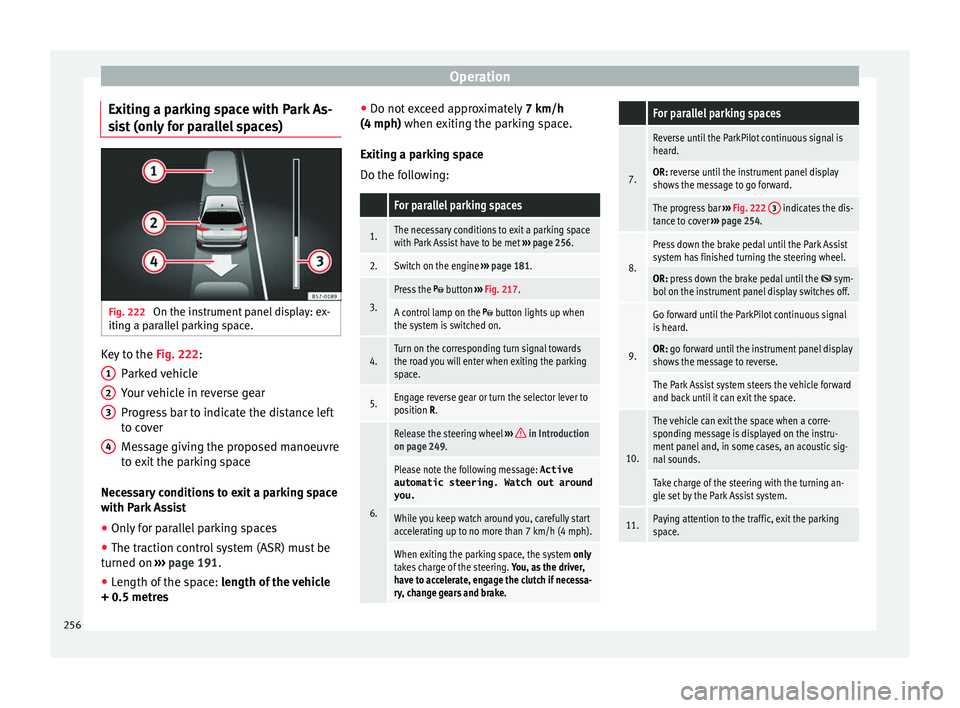
t (only for parallel spaces) Fig. 222
On the instrument panel display: ex-
itin g a p
ar
allel parking space. Key to the
Fig. 222:
P ark
ed
vehicle
Your vehicle in reverse gear
Progress bar to indicate the distance left
to cover
Message giving the proposed manoeuvre
to exit the parking space
Necessary conditions to exit a parking space
with Park Assist
● Only for parallel parking spaces
● The traction control system (ASR) must be
turned on ››
› page 191.
● Length of the space: leng
th of the vehicle
+ 0.5 metres 1 2
3
4 ●
Do not e
x
ceed approximately 7 km/h
(4 mph) when exiting the parking space.
Exiting a parking space
Do the following:
For parallel parking spaces
1.The necessary conditions to exit a parking space
with Park Assist have to be met ››› page 256.
2.Switch on the engine ››› page 181.
3.
Press the button ››› Fig. 217.
A control lamp on the button lights up when
the system is switched on.
4.Turn on the corresponding turn signal towards
the road you will enter when exiting the parking
space.
5.Engage reverse gear or turn the selector lever to
position R.
6.
Release the steering wheel ››› in Introduction
on page 249.
Please note the following message: Active
automatic steering. Watch out around
you.
While you keep watch around you, carefully start
accelerating up to no more than 7 km/h (4 mph).
When exiting the parking space, the system only
takes charge of the steering. You, as the driver,
have to accelerate, engage the clutch if necessa-
ry, change gears and brake.
For parallel parking spaces
7.
Reverse until the ParkPilot continuous signal is
heard.
OR: reverse until the instrument panel display
shows the message to go forward.
The progress bar ››› Fig. 222 3 indicates the dis-
tance to cover ››› page 254.
8.
Press down the brake pedal until the Park Assist
system has finished turning the steering wheel.
OR: press down the brake pedal until the sym-
bol on the instrument panel display switches off.
9.
Go forward until the ParkPilot continuous signal
is heard.
OR: go forward until the instrument panel display
shows the message to reverse.
The Park Assist system steers the vehicle forward
and back until it can exit the space.
10.
The vehicle can exit the space when a corre-
sponding message is displayed on the instru-
ment panel and, in some cases, an acoustic sig-
nal sounds.
Take charge of the steering with the turning an-
gle set by the Park Assist system.
11.Paying attention to the traffic, exit the parking
space. 256
Page 261 of 348
Driver assistance systems
–
if the number p l
ate is not perfectly se-
cured to the bumper surface,
– or in locations such as the brow of a hill.
● In order to guarantee good system opera-
tion, keep the ultr
asound sensors clean, free
of snow or ice, and do not cover them with
adhesives or other objects.
● If you use high-pressure or vapour equip-
ment to c
lean the ultrasound sensors, apply
it directly only very briefly and always from a
distance of more than 10 cm.
● Retrofitting of accessories to the vehicle,
such a
s a bicycle rack, may interfere with the
operation of the Parking Aid.
● Fitting certain accessories to the front of
the vehic
le, such as a plate holder with ad-
vertising, may interfere with the operation of
the Park Assist.
● In order to familiarise yourself with the sys-
tem, it i
s advised that you practice parking in
an area or car park that is free from traffic.
There must be good weather and light condi-
tions.
● The volume and tone of the warnings can
be modified, in addition t
o the indications
››› page 265.
● In vehicles without an inf
otainment system,
these parameters can be modified in a SEAT
Official Service or in a specialised workshop.
● Please observe information on towing a
trail
er ››› page 265.
● The display on the Easy Connect screen
shows
a slight time delay. Parking Aid operation
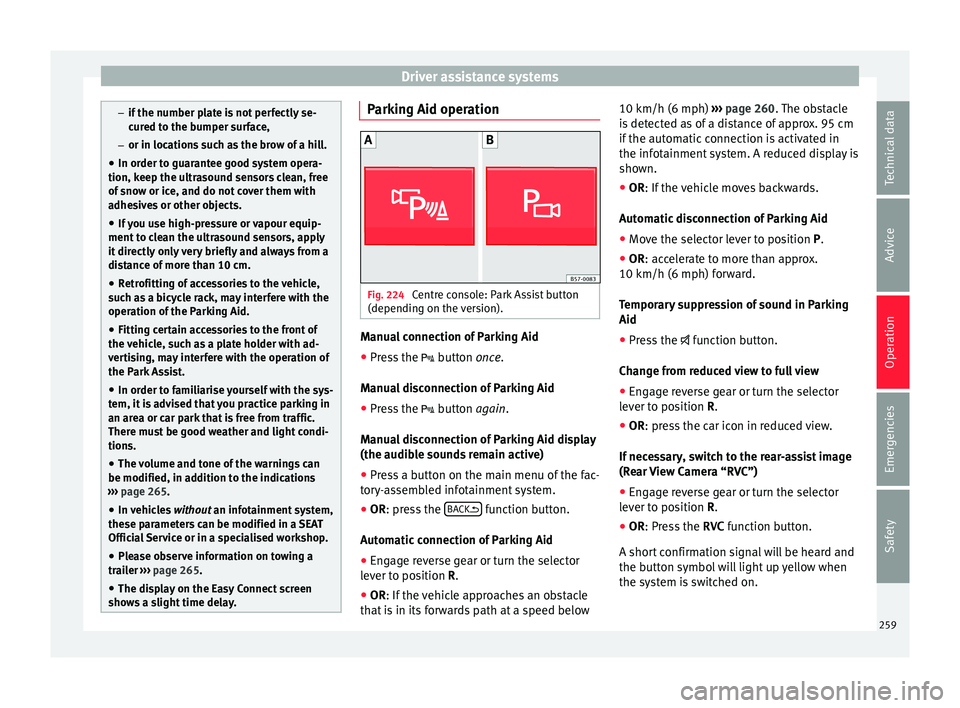
Fig. 224
Centre console: Park Assist button
(dependin g on the
v
ersion). Manual connection of Parking Aid
● Press the butt
on
once.
Manual disconnection of Parking Aid
● Press the button
again.
Manual disconnection of Parking Aid display
(the audible sounds remain active)
● Press a button on the main menu of the fac-
tory
-assembled infotainment system.
● OR: press the BA
CK function button.
Aut om
atic
connection of Parking Aid
● Engage reverse gear or turn the selector
lever t
o position R.
● OR: If the vehicle approaches an obstacle
that
is in its forwards path at a speed below 10 km/h (6 mph)
›››
page 260. The obstacle
is detected as of a distance of approx. 95 cm
if the automatic connection is activated in
the infotainment system. A reduced display is
shown.
● OR: If the vehicle moves backwards.
Autom
atic disconnection of Parking Aid
● Move the selector lever to position P.
● OR: accelerate to more than approx.
10 km/h (6 mph) for
ward.
Temporary suppression of sound in Parking
Aid
● Press the function b
utton.
Change from reduced view to full view
● Engage reverse gear or turn the selector
lever t
o position R.
● OR: press the car icon in reduced view.
If nec
essary, switch to the rear-assist image
(Rear View Camera “RVC”)
● Engage reverse gear or turn the selector
lever t
o position R.
● OR: Press the RVC fu
nction button.
A short confirmation signal will be heard and
the button symbol will light up yellow when
the system is switched on.
259
Technical data
Advice
Operation
Emergencies
Safety
Page 264 of 348
Operation
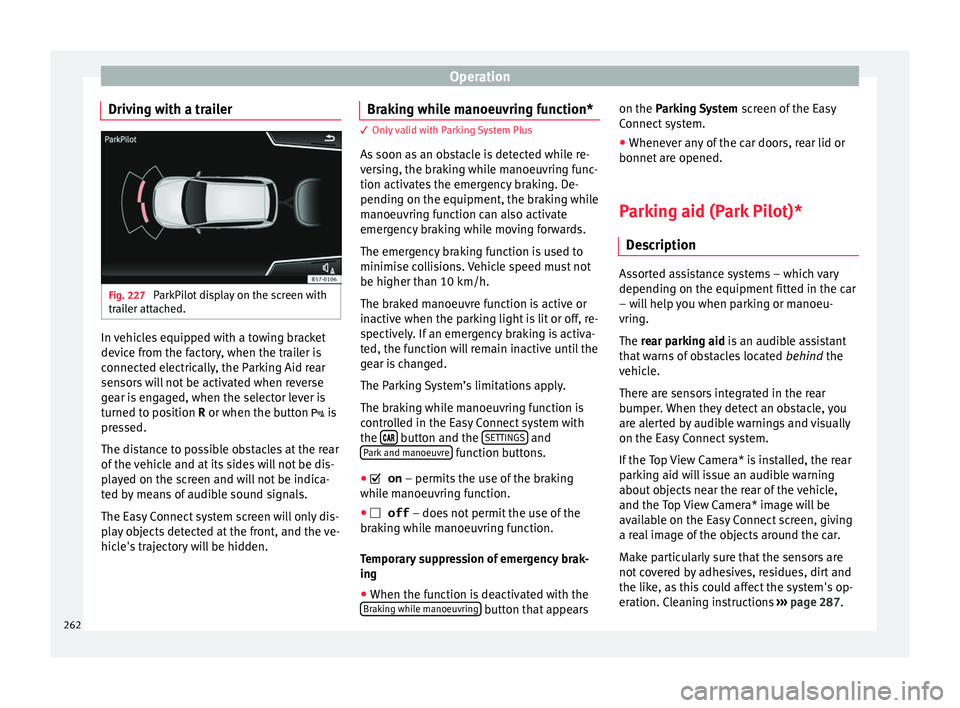
Driving with a trailer Fig. 227
ParkPilot display on the screen with
tr ai
l
er attached. In vehicles equipped with a towing bracket
dev
ic
e fr
om the factory, when the trailer is
connected electrically, the Parking Aid rear
sensors will not be activated when reverse
gear is engaged, when the selector lever is
turned to position R or when the button is
pressed.
The distance to possible obstacles at the rear
of the vehicle and at its sides will not be dis-
played on the screen and will not be indica-
ted by means of audible sound signals.
The Easy Connect system screen will only dis-
play objects detected at the front, and the ve-
hicle's trajectory will be hidden. Braking while manoeuvring function* 3 Only valid with Parking System Plus
As
soon a
s an obstacle is detected while re-
versing, the braking while manoeuvring func-
tion activates the emergency braking. De-
pending on the equipment, the braking while
manoeuvring function can also activate
emergency braking while moving forwards.
The emergency braking function is used to
minimise collisions. Vehicle speed must not
be higher than 10 km/h.
The braked manoeuvre function is active or
inactive when the parking light is lit or off, re-
spectively. If an emergency braking is activa-
ted, the function will remain inactive until the
gear is changed.
The Parking System’s limitations apply.
The braking while manoeuvring function is
controlled in the Easy Connect system with
the button and the
S
ET
TINGS and
P ark
and m
anoeuvre function buttons.
● on – permits the u
se of the braking
while manoeuvring function.
● off – does not
permit the use of the
braking while manoeuvring function.
Temporary suppression of emergency brak-
ing
● When the function is deactivated with the
Brak in
g while manoeuvring button that appearson the P
arking System
s
c
reen of the Easy
Connect system.
● Whenever any of the car doors, rear lid or
bonnet are opened.
P
arking aid (Park Pilot)*
Des
cription Assorted assistance systems – which vary
depending on the equipment
fitt
ed in the car
– will help you when parking or manoeu-
vring.
The rear parking aid is an audible assistant
that warns of obstacles located behind the
vehicle.
There are sensors integrated in the rear
bumper. When they detect an obstacle, you
are alerted by audible warnings and visually
on the Easy Connect system.
If the Top View Camera* is installed, the rear
parking aid will issue an audible warning
about objects near the rear of the vehicle,
and the Top View Camera* image will be
available on the Easy Connect screen, giving
a real image of the objects around the car.
Make particularly sure that the sensors are
not covered by adhesives, residues, dirt and
the like, as this could affect the system's op-
eration. Cleaning instructions ››› page 287.
262
Page 266 of 348
Operation
–
or in location s
such as the brow of a hill.
● In order to guarantee good system opera-
tion, keep the ultr
asound sensors clean, free
of snow or ice, and do not cover them with
adhesives or other objects.
● If you use high-pressure or vapour equip-
ment to c
lean the ultrasound sensors, apply
it directly only very briefly and always from a
distance of more than 10 cm.
● Retrofitting of accessories to the vehicle,
such a
s a bicycle rack, may interfere with the
operation of the Parking Aid.
● In order to familiarise yourself with the sys-
tem, it i
s advised that you practice parking in
an area or car park that is free from traffic.
There must be good weather and light condi-
tions.
● The volume and tone of the warnings can
be modified, in addition t
o the indications
››› page 265.
● In vehicles without an inf
otainment system,
these parameters can be modified in a SEAT
Official Service or in a specialised workshop.
● Please observe information on towing a
trail
er ››› page 265.
● The display on the Easy Connect screen
shows
a slight time delay. Parking Aid operation
Manual disconnection of Parking Aid display
(the audibl
e sou
nds remain active)
● Press a button on the main menu of the fac-
tory
-assembled infotainment system.
● OR: press the BA
CK function button.
Park in
g Aid connection
● Engage reverse (for manual gears) or set
the selector l
ever to R (for automatic gears).
Parking Aid disconnection
● Place the selector level in position P, N or D
(for aut om
atic gearboxes) or disengage re-
verse (for manual gearboxes). If you set the
lever to N or D, the system will remain active
for approximately 8 seconds before switching
off, except with Top View Camera*, when it
will be switched off immediately after engag-
ing reverse.
Temporary suppression of sound in Parking
Aid
● Press the function b
utton. If you have the
Top View Camera* system installed, you can-
not use the temporary suppression of sound
in Parking Aid. Switch from reduced to full-screen view if the
rear a
ssist is fitted (Rear View Camera
“RVC”)
● Press the car icon in the reduced view.
If nece
ssary, switch to the rear-assist image
(Rear View Camera “RVC”)
● Engage reverse gear or turn the selector
lever t
o position R.
● OR: press the RVC fu
nction icon.
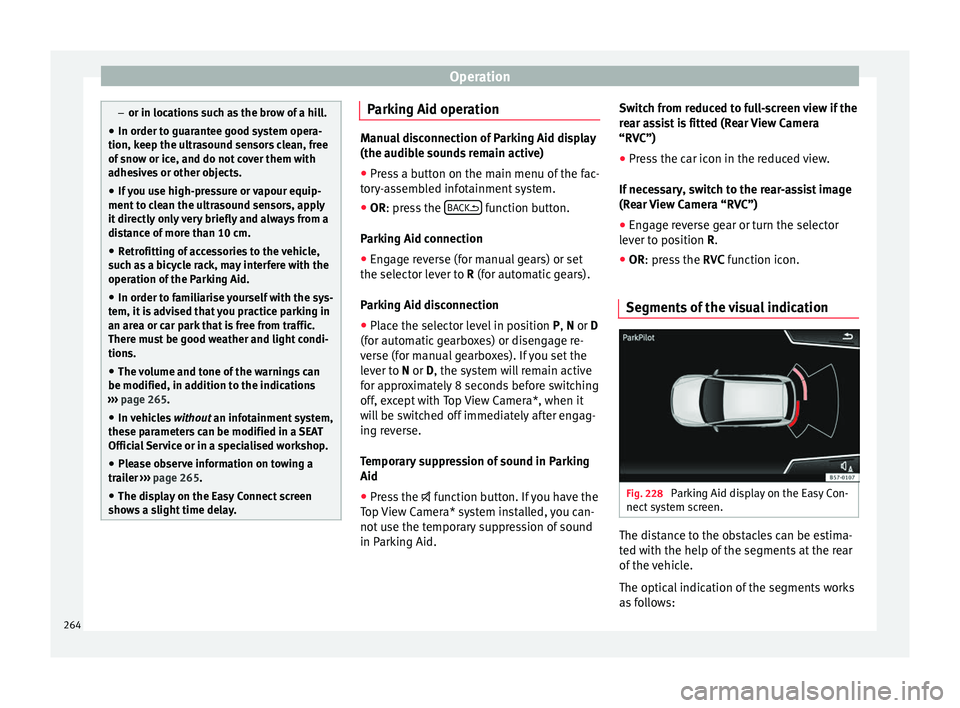
Segments of the visual indication Fig. 228
Parking Aid display on the Easy Con-
nect sy
s
tem screen. The distance to the obstacles can be estima-
t
ed w
ith the help of
the segments at the rear
of the vehicle.
The optical indication of the segments works
as follows:
264
Page 267 of 348
Driver assistance systems
they are displayed if the
o b
s
tacle is not in the vehicle's direction
of travel, even when the electronic park-
ing brake is activated.
obstacles located in the
vehicle's trajectory and which are more
than 30 cm away from the vehicle are
displayed in yellow.
obstacles that are less than
30 cm away from the vehicle are dis-
played in red.
Whenever the obstacle is located in the vehi-
cle’s direction of travel, the corresponding
audible warning will sound.
As the vehicle approaches an obstacle, the
segments are displayed closer to the vehicle.
When the penultimate segment is displayed,
this means that the vehicle has reached the
collision zone. In the collision zone, the ob-
stacles are represented in red, including
those out of the path. Do not continue to re-
verse ››› in Description on page 263,
››
›
in Description on page 263 !
If
y
ou are equipped with the Top View
Camera*
Segments are not displayed when the vehicle
is equipped with Top View Camera*.
The PDC system will issue an audible warning
for objects that are near the rear of the vehi-
cle, and the Top View Camera* image will be White segments:
Yellow segments:
Red segments: available on the screen, giving a real image
of the ob
jects around the car.
Adjusting the display and audible
warning
s The settings for the display and audible
warnin
g
s are controlled via the Easy Con-
nect*.
Rear volume*
Volume in the rear area.
Rear sound settings/sharpness*
Frequency (tone) of the sound in the rear
area.
Adjust volume
With the parking aid switched on, the active
audio/video source volume will be reduced
to the intensity of the selected setting.
Error messages When the Parking Aid is activated or when it
i
s
sw
itched on, if a message reporting a Park-
ing aid error is displayed on the instrument
panel, there is a fault in the system.
If the fault disappears before disconnecting
the ignition, the next time that the parking aid is engaged in reverse, no audible signal
of the ex
istence of a fault will be issued.
If there is a fault in a sensor, the symbol is
displayed on the Easy Connect display.
Have the fault corrected by a specialised
workshop without delay.
Towing bracket In vehicles equipped with a towing bracket
devic
e fr
om the factory, when the trailer is
connected electrically, the Parking Aid rear
sensors will not be activated when reverse
gear is engaged (manual gears) nor when the
selector lever is turned to position R (auto-
matic gears).
Top View Camera* Rel at
ed video Fig. 229
Smart solutions 265
Technical data
Advice
Operation
Emergencies
Safety
Page 270 of 348
Operation
Instructions for use Fig. 231
Centre console: button for activat-
in g/de
activ
ating the Area View system man-
ually in combination with the parking aid sys-
tem () or else with the rear ParkPilot system ().
Connecting and disconnecting the Area View
system
Manual con-
nection of the
display:
Press the button ››› Fig. 231 once.
The infotainment system screen dis-
plays the aerial view ››› Fig. 230. If
you press the
button when driving
above 15 km/h (9 mph), the image
will not be displayed.
Automatic con-
nection of the
display:
Engage reverse gear.
OR: The vehicle moves backwards.
The view of the image of the vehicle's
rear camera is shown in parallel park-
ing mode with the reduced aerial
view.
Connecting and disconnecting the Area View
system
Manual discon-
nection of the
display:
Press the button ››› Fig. 231
again.
OR: press a button on the factory-
equipped infotainment system, for
example the RADIO
button.
OR: press the function button .
Automatic dis-
connection of
the display:Drive forward at more than approx.
15 km/h (9 mph).
OR: switch the ignition off. The Area
View system menu disappears imme-
diately. Special characteristics
Examples of optical illusions caused by the
cameras:
The images on the area view system cameras are only
two-dimensional. Due to a lack of spatial depth, it is dif-
ficult or impossible to make out on-screen any holes
there may be on the ground, objects jutting out from the
ground or parts protruding from other vehicles.
Situations in which the objects or other vehicles appear
to be further away or closer than they really are:
– On moving from a horizontal plane to a slope.
– On moving from a slope to a horizontal plane.
– If the vehicle is heavily loaded at the rear.
Examples of optical illusions caused by the
cameras:
– If the vehicle approaches protruding objects. These
objects may be outside the cameras' angle of visibility. Trailer mode
The Are
a
View system conceals, in the rear
camera area, all the auxiliary guiding lines
when the factory-fitted towing bracket is con-
nected electrically to a trailer ››› page 273. Note
In order to become familiar with the system
and its f
unctions, SEAT recommends that you
practice handling the Area View system in an
area where there is not too much traffic or in
a car park. 268
Page 272 of 348
Operation
Side camera views (side view)ViewOn-screen display of the side
cameras
Right and left sides
The areas located directly to the side of
the vehicle seen from above are repre-
sented in order to navigate possible ob-
stacles more precisely. The orange aux-
iliary lines are shown at a distance of
approx. 0.4 m from the vehicle.
Left side
The area directly next to the vehicle, on
the driver's or front passenger's side, is
displayed, and the blind spots all along
the vehicle can be seen. The orange
auxiliary line is shown at a distance of
approx. 0.4 m from the vehicle.
Right side
Rear camera views (rear view)
ViewOn-screen display of the rear
camera
Parallel park-
ing
The area behind the vehicle is shown.
Auxiliary lines are shown to give guid-
ance.
Parallel park-ing
The vehicle's initial position on initiat-
ing this function will be a decisive fac-
tor in determining the place where the
manoeuvre executed by the assistant
will end.
ViewOn-screen display of the rear
camera
Off-road orhitching a
trailer func- tion
The vehicle's rear is presented. The red
auxiliary line establishes the safety dis-
tance.
Green and red semicircular auxiliary
lines are displayed in vehicles with a
factory-fitted towing bracket. The auxili-
ary lines indicate the distance from the
towing bracket. The distance between
the auxiliary lines (green and red) is ap-
prox. 0.3 m. The orange auxiliary line in-
dicates, depending on the turn of the
steering wheel, the pre-calculated di-
rection of the towing bracket.
In vehicles with a factory-fitted towing
bracket, the distance from the red auxil-
iary line to the vehicle is approx. 0.4 m.
No other auxiliary line is displayed.
Cross trafficat the rear
Left area of the screen: street to the left.
Central area of the screen: area directly
behind the vehicle.
Right area of the screen: street to the
right. Rear Assist (Rear View Cam-
er
a)*
Oper atin
g and safety warnings WARNING
● The Re ar As
sist does not make it possible
to precisely calculate the distance from ob-
stacles (people, vehicles, etc.) and nor can it
overcome the system's own limits, hence us-
ing it may cause serious accidents and inju-
ries if used negligently or without due care.
The driver should be aware of his/her sur-
roundings at all times to ensure safe driving.
● The camera lens expands and distorts the
field of
vision and displays the objects on the
screen in a different, vague manner. The per-
ception of distances is also distorted by this
effect.
● Due to the screen resolution or insufficient
light condition
s, some items may be dis-
played in an unsatisfactory manner or not at
all. Take special care with thin posts, fences,
railings or trees that might not be displayed
on screen and could damage the vehicle.
● The rear assist has blind spots where it is
not pos
sible to represent people or objects
(small children, animals and certain objects
cannot be detected in its field of vision). Mon-
itor the vehicle's surrounding area at all
times.
● Keep the camera lens clean, free of ice and
snow
, and do not cover it.270
Page 275 of 348
Towing bracket device*
● OR: Pr e
s
s the RVC function button 1)
Meaning of the orientation lines
››› Fig. 234
Side lines: extension of the vehicle (the
approximate width of the vehicle plus the
rear view mirrors) on the road surface.
End of the side lines: the area marked in
green ends approximately 2 m behind
the vehicle on the road surface.
Intermediate line: indicates a distance of
approximately 1 m behind the vehicle on
the road surface.
Red horizontal line: indicates a safe dis-
tance of approximately 40 cm at the rear
of the vehicle on the road surface.
Parking manoeuvre ● Place the vehicle in front of the parking
spac
e and engage reverse gear (manual
gearbox) or move the selector to the R posi-
tion (automatic gearbox).
● Reverse slowly, and turn the steering wheel
so that the s
ide orientation lines lead to-
wards the parking space. 1 2
3
4 ●
Guide the v
ehic
le into the parking space so
that the side orientation lines run parallel to
it. Towing bracket device*
T r
ai
ler mode
Introduction Take into account country-specific regula-
tions
about
driving with a trailer and the use
of a towing bracket.
The vehicle has been developed primarily for
carrying people, although it can also be used
to tow a trailer if fitted with the correspond-
ing technical equipment. This additional load
has an effect on the useful life, fuel con-
sumption and vehicle performance and in
some cases can reduce the service intervals.
Driving with a trailer requires more force from
the vehicle, and thus more concentration
from the driver.
In winter, winter tyres should be fitted on
both the vehicle and the trailer.
Maximum vertical load technically permissi-
ble on the coupling
The maximum vertical load technically per-
mitted from the trailer draw bar on the towing
bracket's tow hitch is 80 kg. »1)
WARNING: the RVC function b
utton will only be ac-
tivated and available when the reverse gear is en-
gaged or the selector lever is set to position R.
273
Technical data
Advice
Operation
Emergencies
Safety
Page 276 of 348
Operation
Vehicles with the Start-Stop system
If the
v
ehicle has a factory-fitted towing
bracket or one that is retrofitted by SEAT, the
Start-Stop system operates as normal. No
special characteristics need to be taken into
account.
If the system does not recognise the trailer or
the trailer bracket has not been retrofitted by
SEAT, the Start-Stop system must be discon-
nected by pressing the corresponding button
in the lower part of the centre console before
driving with the trailer, and it should remain
off for the rest of the journey ››› .
V ehic
l
es with driving profile selection
If you are going to be towing a trailer, the use
of the Eco driving profile is not recommen-
ded. You are advised to select another of the
available driving profiles before beginning to
drive with a trailer. WARNING
Never use the trailer to transport people,
sinc e it
would put their life in danger and is
also prohibited. WARNING
Undue use of the towing bracket may cause
injury and ac
cidents.
● Only use the towing bracket if it is in a per-
fect s
tate of repair and is properly secured. ●
Never modif y
or repair the towing bracket
in any way.
● In order to reduce the danger of injury in
the event of
rear-end collisions and to avoid
injury to pedestrians and cyclists when park-
ing the vehicle, cover or remove the tow hitch
when you are not using a trailer.
● Never fit a towing bracket “with weight dis-
tribution” or “loa
d compensation”. The vehi-
cle has not been designed for this type of
towing bracket. The towing bracket could fail
and the trailer could be released from the ve-
hicle. WARNING
Driving with a trailer and transporting heavy
or lar g
e objects can affect driving properties
and even cause an accident.
● Always secure the load properly using belts
or strap
s that are suitable and in good condi-
tion.
● Adapt your speed and driving style at all
times t
o suit visibility, weather, road and traf-
fic conditions.
● Trailers with a high centre of gravity are
more likely
to overturn than those with a low
one.
● Avoid sudden braking and manoeuvres.
● Take great care when overtaking.
● Reduce speed immediately if you notice
that the tr
ailer is swaying, however slightly. ●
Never driv e at
more than 80 km/h (50 mph)
when towing a trailer (or at more than
100 km/h (60 mph) in exceptional circum-
stances). This also applies in countries where
driving at higher speeds is permitted. Take
into account the speed limit for vehicles with
trailers in the corresponding country, as it
could be less than the speed limit for vehi-
cles without a trailer.
● Never attempt to “straighten” the towing
vehicl
e and trailer while accelerating. WARNING
If the towing bracket has been retrofitted by a
non-S EA
T workshop, the Start-Stop system
must be disconnected manually whenever
driving with a trailer. Otherwise the brake
system could be damaged and could conse-
quently cause a serious accident or injury.
● Always disconnect the Start-Stop system
manual
ly when using a towing bracket that
has not been fitted by a SEAT workshop. Note
● Bef or
e hitching or unhitching a trailer, al-
ways deactivate the anti-theft alarm
››› page 125. Otherwise, the tilt sensor could
cause the alarm to go off.
● Do not drive with a trailer for the engine's
first
1000 km ››› page 201.
● SEAT recommends that, if possible, the tow
hitch be di
sassembled or covered when it is274
Page 277 of 348

Towing bracket device*
not going to be used. In the event of a rear-
end co
l
lision, the damage to the vehicle
could be greater if the bracket is fitted.
● Some retrofitted towing brackets cover the
rear t
owing eye. In these cases, the towing
eye should not be used for tow-starting or for
towing other vehicles. For this reason, if the
vehicle has been retrofitted with a towing
bracket, always keep the tow hitch in the ve-
hicle when you disassemble it. Control lamp
Lamp on button lights up
The tow hitch is not securely locked in position.
Check that the towing bracket is locked
››› page 276. Some warning and control lamps will light up
briefly
when the ignition i
s
switched on to
check certain functions. They will switch off
after a few seconds. WARNING
If the warning lamps and the corresponding
mes s
ages are ignored when they light up, the
vehicle may stall in traffic and cause acci-
dents and severe injuries.
● Never ignore the warning lamps or messag-
es.
● Stop the
vehicle at the next opportunity
and in a safe p
lace. CAUTION
Failure to heed the control lamps and corre-
spondin g t
ext messages when they light up
may result in damage to the vehicle. Technical requirements
Vehicles that are
factor
y-equipped with a
towing bracket fulfil all the technical and le-
gal requirements for driving with a trailer.
If the vehicle is retrofitted with a towing
bracket, only a bracket that is authorised for
the maximum authorised load of the trailer
that is to be towed may be fitted. The towing
bracket must be suitable for the vehicle and
the trailer and must be properly secured to
the vehicle's chassis. Only use a towing
bracket that has been authorised by SEAT for
this vehicle. Always check and take into ac-
count the towing bracket manufacturer's in-
structions. Never fit a towing bracket “with
weight distribution” or “load compensation”.
Towing bracket fitted on the bumper
Never fit a towing bracket to the bumper or to
the area where the bumper is mounted. The
towing bracket should not impair the bum-
per's function. Do not make modifications or
repairs to the exhaust system or the brake
system. Make regular checks to ensure that
the towing bracket is secure. Engine cooling system
Drivin
g w
ith a trailer increases the load on
the engine and cooling system. The cooling
system should have sufficient coolant and be
prepared for the additional effort involved in
driving with a trailer.
Trailer brakes
If the trailer has its own brake system, please
take the relevant legal requirements into ac-
count. Never connect the trailer's brake sys-
tem to the vehicle's brake system.
Tow rope
Always use a cable between the vehicle and
the trailer ››› page 278.
Trailer rear lights
The trailer's rear lights should comply with
the statutory safety regulations ››› page 278.
Never connect the trailer's rear lights directly
to the vehicle's electric system. If you are not
sure that the trailer's electrical connection is
correct, have it checked by a specialised
workshop. SEAT recommends visiting a SEAT
dealership for this.
Exterior mirrors
If you cannot see the area behind the trailer
with the exterior mirrors of the towing vehi-
cle, additional mirrors will have to be instal-
led in accordance with the regulations of the »
275
Technical data
Advice
Operation
Emergencies
Safety