low beam Seat Ateca 2018 Owner's Manual
[x] Cancel search | Manufacturer: SEAT, Model Year: 2018, Model line: Ateca, Model: Seat Ateca 2018Pages: 348, PDF Size: 7.32 MB
Page 32 of 348
The essentials
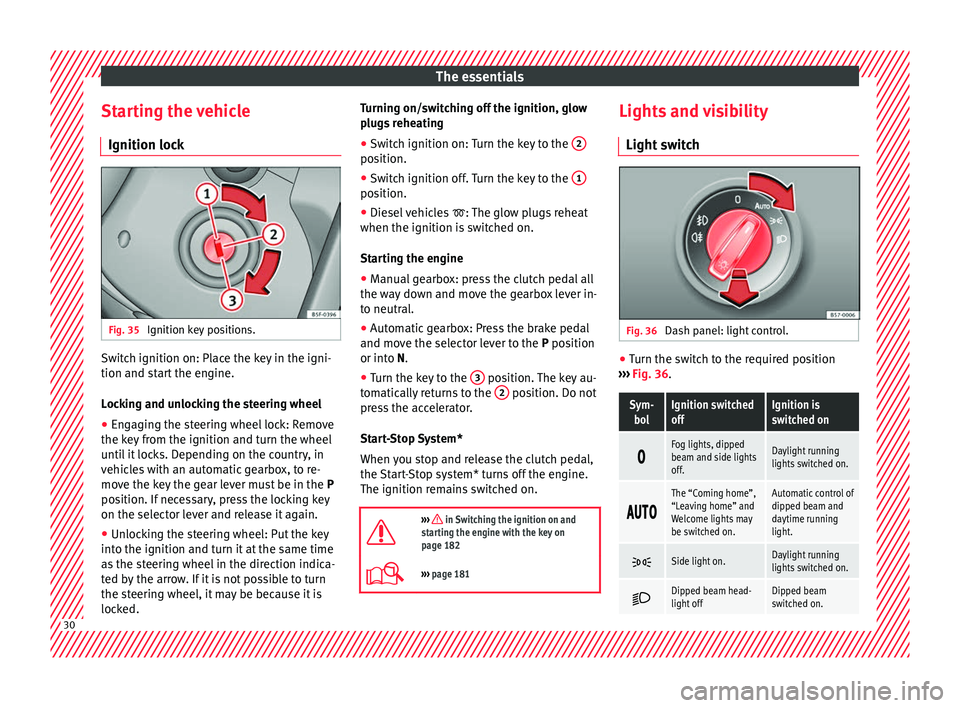
Starting the vehicle Ignition loc kFig. 35
Ignition key positions. Switch ignition on: Place the key in the igni-
tion and s
t
ar
t the engine.
Locking and unlocking the steering wheel
● Engaging the steering wheel lock: Remove
the key fr
om the ignition and turn the wheel
until it locks. Depending on the country, in
vehicles with an automatic gearbox, to re-
move the key the gear lever must be in the P
position. If necessary, press the locking key
on the selector lever and release it again.
● Unlocking the steering wheel: Put the key
into the ignition and turn it
at the same time
as the steering wheel in the direction indica-
ted by the arrow. If it is not possible to turn
the steering wheel, it may be because it is
locked. Turning on/switching off the ignition, glow
plugs
reheating
● Switch ignition on: Turn the key to the 2 position.
●
Switch ignition off. Turn the key to the 1 position.
●
Diesel vehicles : The glo
w p
lugs reheat
when the ignition is switched on.
Starting the engine
● Manual gearbox: press the clutch pedal all
the way
down and move the gearbox lever in-
to neutral.
● Automatic gearbox: Press the brake pedal
and move the sel
ector lever to the P position
or into N.
● Turn the key to the 3 position. The key au-
t om
atic
ally returns to the 2 position. Do not
pr e
s
s the accelerator.
Start-Stop System*
When you stop and release the clutch pedal,
the Start-Stop system* turns off the engine.
The ignition remains switched on.
››› in Switching the ignition on and
starting the engine with the key on
page 182
››› page 181 Lights and visibility
Light sw
it
ch Fig. 36
Dash panel: light control. ●
Turn the switch to the required position
› ›
›
Fig. 36.
Sym-
bolIgnition switched
offIgnition is
switched on
Fog lights, dipped
beam and side lights
off.Daylight running
lights switched on.
The “Coming home”,
“Leaving home” and
Welcome lights may
be switched on.Automatic control of
dipped beam and
daytime running
light.
Side light on.Daylight running
lights switched on.
Dipped beam head-
light offDipped beam
switched on.
30
Page 49 of 348
The essentials
Front brake pads worn.›››
page
188
it lights up:
Fault in the ESC, or dis-
connection caused by the system.››› page
189
flashes: ESC or ASR activated.
ASR manually deactivated.›››
page
189ESC in Sport mode.
ABS faulty or does not work.
Rear fog light switched on.›››
page
144
lights up or flashes:
fault in the
emission control system.››› page
204
it lights up:
pre-heating of diesel
engine.
››› page
205
flashes: fault in the diesel engine
management.
fault in the petrol engine manage-
ment.›››
page
205
lights up or flashes:
fault in the
steering system.››› page
200
Tyre pressure too low, or fault in
the tyre pressure monitoring sys-
tem.›››
page
311
Fuel tank almost empty.›››
page
118
Fault in airbag system and seat
belt tensioners.›››
page
89
Lane Assist is switched on, but not
active.›››
page
230 Other warning lamps
Left or right turn signal.›››
page
145
Hazard warning lights on.››› page
149
Trailer turn signals.›››
page
273
it lights up green:
Auto Hold activa-
ted.››› page
211
it lights up green:
Press the brake
pedal!
It blinks in green: the selector lever
locking button has not engaged.››› page
193
it lights up green:
cruise control ac-
tivated or speed limiter switched
on and active.
››› page
212
it blinks in green: the speed set by
the speed limiter has been excee-
ded.
it lights up green:
Lane Assist is
switched on and active.››› page
230
Main beam on or flasher on.›››
page
145
››› in Warning and control lamps on
page 119
››› page 119 On the instrument panel display
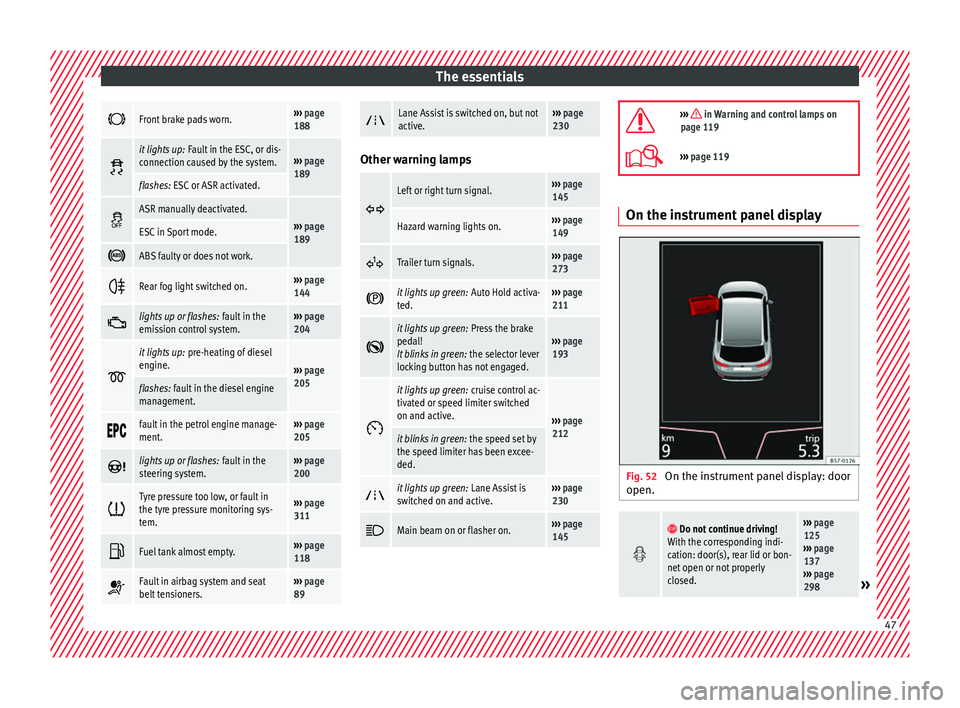
Fig. 52
On the instrument panel display: door
open.
Do not continue driving!
With the corresponding indi-
cation: door(s), rear lid or bon-
net open or not properly
closed.››› page
125
››› page
137
››› page
298
» 47
Page 64 of 348
The essentials
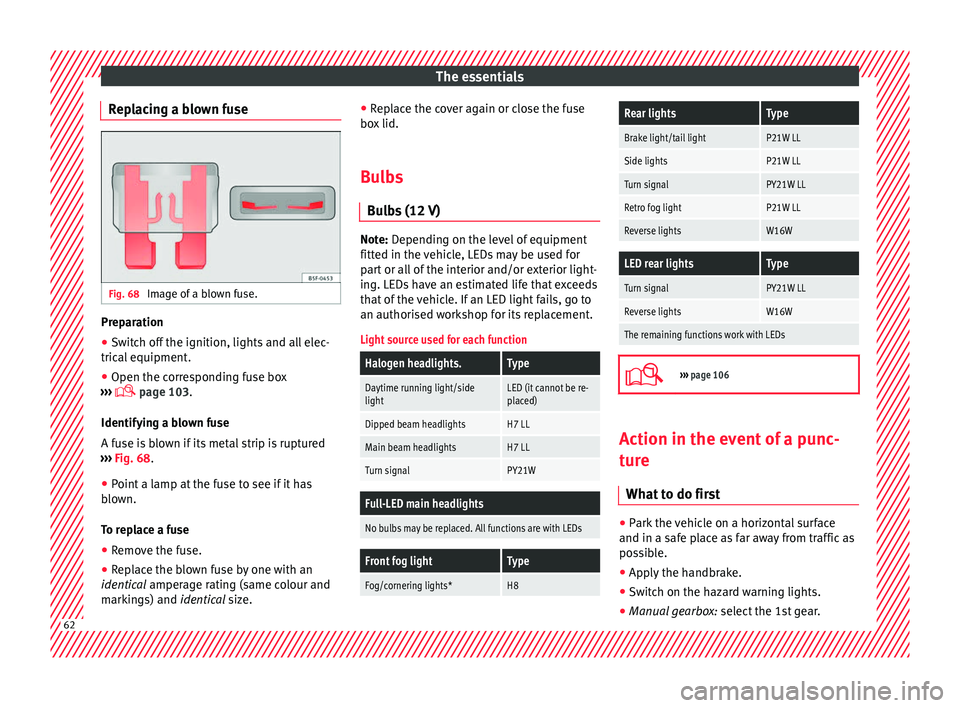
Replacing a blown fuse Fig. 68
Image of a blown fuse. Preparation
●
Switch off the ignition, lights and all elec-
tric al
equipment
.
● Open the corresponding fuse box
›››
page 103.
Identifying a blown fuse
A fuse is blown if its metal strip is ruptured
››› Fig. 68.
● Point a lamp at the fuse to see if it has
blown.
T
o replace a fuse
● Remove the fuse.
● Replace the blown fuse by one with an
identica
l amperage rating (same colour and
markings) and identical size. ●
Repl
ace the cover again or close the fuse
box lid.
Bulbs Bul
bs (12 V) Note: Depending on the level of equipment
fitt
ed in the
vehicle, LEDs may be used for
part or all of the interior and/or exterior light-
ing. LEDs have an estimated life that exceeds
that of the vehicle. If an LED light fails, go to
an authorised workshop for its replacement.
Light source used for each function
Halogen headlights.Type
Daytime running light/side
lightLED (it cannot be re-
placed)
Dipped beam headlightsH7 LL
Main beam headlightsH7 LL
Turn signalPY21W
Full-LED main headlights
No bulbs may be replaced. All functions are with LEDs
Front fog lightType
Fog/cornering lights*H8
Rear lightsType
Brake light/tail lightP21W LL
Side lightsP21W LL
Turn signalPY21W LL
Retro fog lightP21W LL
Reverse lightsW16W
LED rear lightsType
Turn signalPY21W LL
Reverse lightsW16W
The remaining functions work with LEDs
›››
page 106 Action in the event of a punc-
t
ur
e
Wh
at to do first ●
Park the vehicle on a horizontal surface
and in a s af
e p
lace as far away from traffic as
possible.
● Apply the handbrake.
● Switch on the hazard warning lights.
● Manual gearbox: select the 1s
t gear.62
Page 72 of 348
The essentials
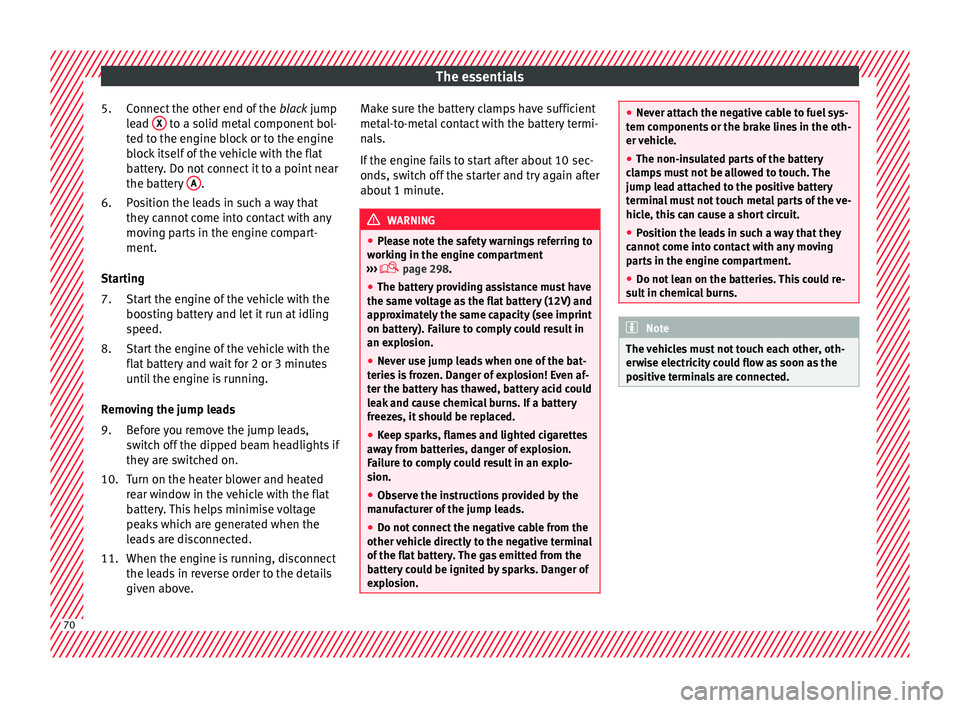
Connect the other end of the blac
k jump
lead X to a solid metal component bol-
t ed t
o the en
gine block or to the engine
block itself of the vehicle with the flat
battery. Do not connect it to a point near
the battery A .
P o
s
ition the leads in such a way that
they cannot come into contact with any
moving parts in the engine compart-
ment.
Starting Start the engine of the vehicle with the
boosting battery and let it run at idling
speed.
Start the engine of the vehicle with the
flat battery and wait for 2 or 3 minutes
until the engine is running.
Removing the jump leads Before you remove the jump leads,
switch off the dipped beam headlights if
they are switched on.
Turn on the heater blower and heated
rear window in the vehicle with the flat
battery. This helps minimise voltage
peaks which are generated when the
leads are disconnected.
When the engine is running, disconnect
the leads in reverse order to the details
given above.
5.
6.
7.
8.
9.
10.
11.
Make sure the battery clamps have sufficient
metal-to-met
al contact with the battery termi-
nals.
If the engine fails to start after about 10 sec-
onds, switch off the starter and try again after
about 1 minute. WARNING
● Ple a
se note the safety warnings referring to
working in the engine compartment
››› page 298.
● The battery providing assistance must have
the same v
oltage as the flat battery (12V) and
approximately the same capacity (see imprint
on battery). Failure to comply could result in
an explosion.
● Never use jump leads when one of the bat-
teries
is frozen. Danger of explosion! Even af-
ter the battery has thawed, battery acid could
leak and cause chemical burns. If a battery
freezes, it should be replaced.
● Keep sparks, flames and lighted cigarettes
awa
y from batteries, danger of explosion.
Failure to comply could result in an explo-
sion.
● Observe the instructions provided by the
manufact
urer of the jump leads.
● Do not connect the negative cable from the
other vehic
le directly to the negative terminal
of the flat battery. The gas emitted from the
battery could be ignited by sparks. Danger of
explosion. ●
Never att ac
h the negative cable to fuel sys-
tem components or the brake lines in the oth-
er vehicle.
● The non-insulated parts of the battery
clamp
s must not be allowed to touch. The
jump lead attached to the positive battery
terminal must not touch metal parts of the ve-
hicle, this can cause a short circuit.
● Position the leads in such a way that they
cannot c
ome into contact with any moving
parts in the engine compartment.
● Do not lean on the batteries. This could re-
sult
in chemical burns. Note
The vehicles must not touch each other, oth-
erw i
se electricity could flow as soon as the
positive terminals are connected. 70
Page 109 of 348
Fuses and bulbs
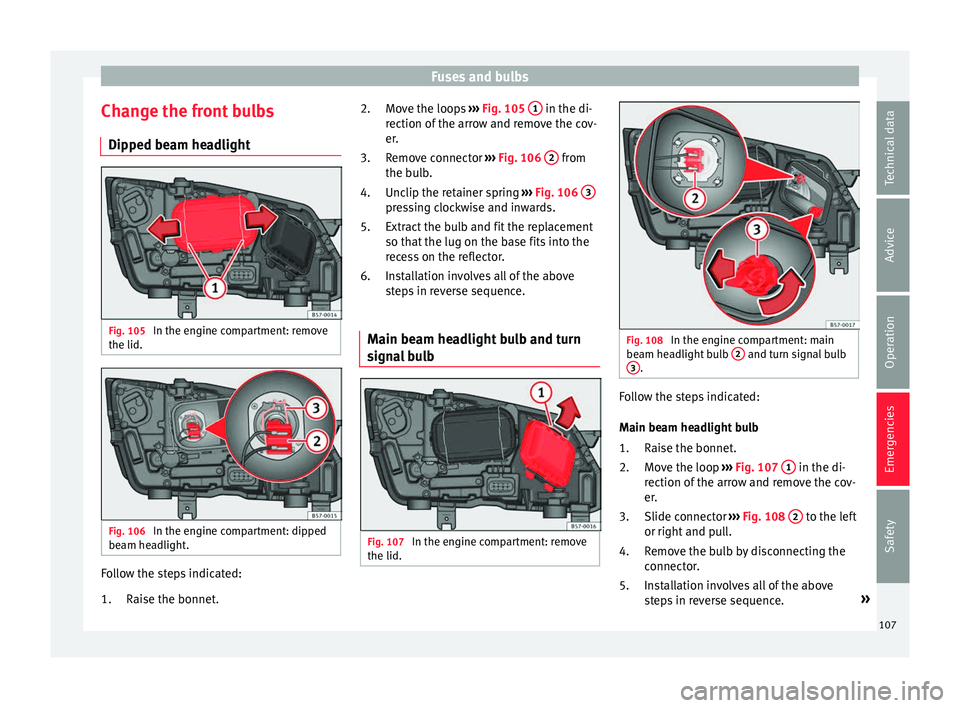
Change the front bulbs Dip ped be
am he
adlightFig. 105
In the engine compartment: remove
the lid. Fig. 106
In the engine compartment: dipped
be am he
a
dlight. Follow the steps indicated:
Rai
se the bonnet
.
1. Move the loops
›››
Fig. 105 1 in the di-
r ection of
the arr
ow and remove the cov-
er.
Remove connector ››› Fig. 106 2 from
the b u
l
b.
Unclip the retainer spring ››› Fig. 106 3 pressing clockwise and inwards.
Extr
act
the b
ulb and fit the replacement
so that the lug on the base fits into the
recess on the reflector.
Installation involves all of the above
steps in reverse sequence.
Main beam headlight bulb and turn
signa
l bulb Fig. 107
In the engine compartment: remove
the lid. 2.
3.
4.
5.
6.
Fig. 108
In the engine compartment: main
be am he
a
dlight bulb 2 and turn signal bulb
3 .
Follow the steps indicated:
M
ain be
am he
adlight bulb
Raise the bonnet.
Move the loop ››› Fig. 107 1 in the di-
r ection of
the arr
ow and remove the cov-
er.
Slide connector ››› Fig. 108 2 to the left
or right and p
u
ll.
Remove the bulb by disconnecting the
connector.
Installation involves all of the above
steps in reverse sequence. »
1.
2.
3.
4.
5.
107
Technical data
Advice
Operation
Emergencies
Safety
Page 146 of 348
Operation
● If the s
u
nroof or sun blind will still not
close, visit a specialised workshop. WARNING
Closing the sunroof or sun blind without the
anti-trap f u
nction can cause serious injuries.
● Always be careful when closing the sunroof
and sun b
lind.
● No person should ever remain in the way of
the sunr
oof or sun blind, especially when
closing without the anti-trap function.
● The anti-trap function does not prevent fin-
gers
or other parts of the body from becom-
ing trapped against the roof frame and inju-
ries occurring. Lights and visibility
Light s
R el
ated video Fig. 142
Vehicle lights Side light and dipped beam headlight
Read the additional information carefully
› ›
›
page 30
The driver is personally responsible for the
correct use and adjustment of the lights in all
situations.
Audible warnings to advise the driver that
the lights have not been switched off
If the key is not in the ignition and the driver
door is open, an audible warning signal is
heard in the following cases: this is a remind-
er to turn off the lights. ●
When the parkin
g light is on ››› page 145.
● When the light switch is in position or
. WARNING
The side lights or daytime running lights are
not bright enough t
o illuminate the road
ahead and to ensure that other road users are
able to see you.
● Always use your dipped beam head lights if
it is
raining or if visibility is poor. WARNING
If the headlights are set too high and not
used c orr
ectly, there is a risk of dazzling or
distracting other road users. This could result
in a serious accident.
● Always make sure that the headlights are
correctly
adjusted. Note
The legal requirements regarding the use of
vehic l
e lights in each country must be ob-
served. 144
Page 148 of 348
Operation
●
In co l
d or damp weather conditions, the
headlights, tail lights and turn signals may
mist up inside temporarily. This is normal and
in no way effects the useful life of the vehicle
lighting system. Automatic dipped beam control
*The automatic dipped beam control is merely
intended a
s
an aid and is not able to recog-
nise all driving situations.
When the light switch is in position , the
vehicle lights and the instrument panel and
switch lighting switch on and off automatical-
ly in the following situations ››› in Daytime
ru nnin
g light
s on page 145:
Automatic switching
onAutomatic switching
off
The photo sensor detects
darkness, for example,
when driving through a
tunnel.When adequate lighting is
detected.
The rain sensor detects
rain and activates the
windscreen wipers.When the windscreen wip-
ers have been inactive for
a few minutes. WARNING
If the road is not well lit and other road users
cannot see the
vehicle well enough or at all,
accidents may occur. ●
The autom atic
dipped beam control ( )
only switches on the dipped beam when
there are no changes in brightness, and not,
for example when it is foggy. Main beam assist*
Main beam assist (Light Assist)
The main be
am a
ssist acts within the limits
of the system and depending on environmen-
tal and traffic conditions. Once switched on,
the system is activated as of a speed of
about 60 km/h (37 mph) and is deactivated
below about 30 km/h (18 mph) ››› .
When the sy s
t
em is activated and the camera
detects other vehicles that may be dazzled,
the main beam is automatically switched off.
Otherwise, the main beam is automatically
switched on.
The main beam assist generally detects illu-
minated areas and deactivates the main
beam when passing through a town, for ex-
ample. Switching the main beam assist on and off
Func-
tionUse
Activate:
– Switch the ignition on and turn the light
switch to position .
– From the base position, move the main
beam and turn signal lever forwards
››› page 145. When the warning lamp
is
displayed on the instrument panel display,
the main beam assist is switched on.
To switch system off:
– Switch off the ignition.
– OR: turn the light switch to a different po-
sition to
››› page 144.
– OR: with main beam on, move the main
beam and turn signal lever backwards.
– OR: move the main beam and turn the
signal lever forwards to manually switch
the main beam on. The main beam assist
will then be deactivated. Malfunctions
The f
o
l
lowing conditions may prevent the
main beam headlight control from turning off
the headlights in time or from turning off al-
together:
● In poorly lit towns with highly reflective
signs.
● Other in
sufficiently lit road users (such as
pedestri
ans or cyclists).
● On tight bends and steep slopes (bumps)
and when oncoming
vehicles are partially ob-
scured.
146
Page 149 of 348
Lights and visibility
● When the driv er
s
of other oncoming vehi-
cles (such as a truck) can see over a guard
rail in the centre of the road.
● If the camera is damaged or the power sup-
ply i
s cut off.
● In fog, snow and heavy rain.
● With dust and sand turbulence.
● With loose gravel in the field of vision of
the camera.
● When the fiel
d of vision of the camera is
mist
ed up, dirty or covered by stickers, snow,
ice, etc. WARNING
The convenience features of the main beam
as s
ist should not encourage the taking of
risks. The system is not a replacement for
driver concentration.
● You are always in control of the main beam
and adaptin
g it to the light, visibility and traf-
fic conditions.
● It is possible that the main beam headlight
contro
l does not recognise all driving situa-
tions and is limited under certain circumstan-
ces.
● When the field of vision of the camera is
dirty, c
overed or damaged, operation of the
main beam control may be affected. This also
applies when changes are made to the vehi- cle lighting system, for example, if additional
hea
dlight
s are installed. CAUTION
To avoid affecting the operation of the sys-
t em, t ak
e the following points into considera-
tion:
● Clean the field of vision of the camera regu-
larly and m
ake sure it is free of snow and ice.
● Do not cover the field of vision of the cam-
era.
● Check
that the windscreen is not damaged
in the area of
the field of vision of the camera. Note
Main beam and headlight flasher can be
turned on and off m
anually at any time with
the turn signal and main beam lever
››› page 145. Fog lights
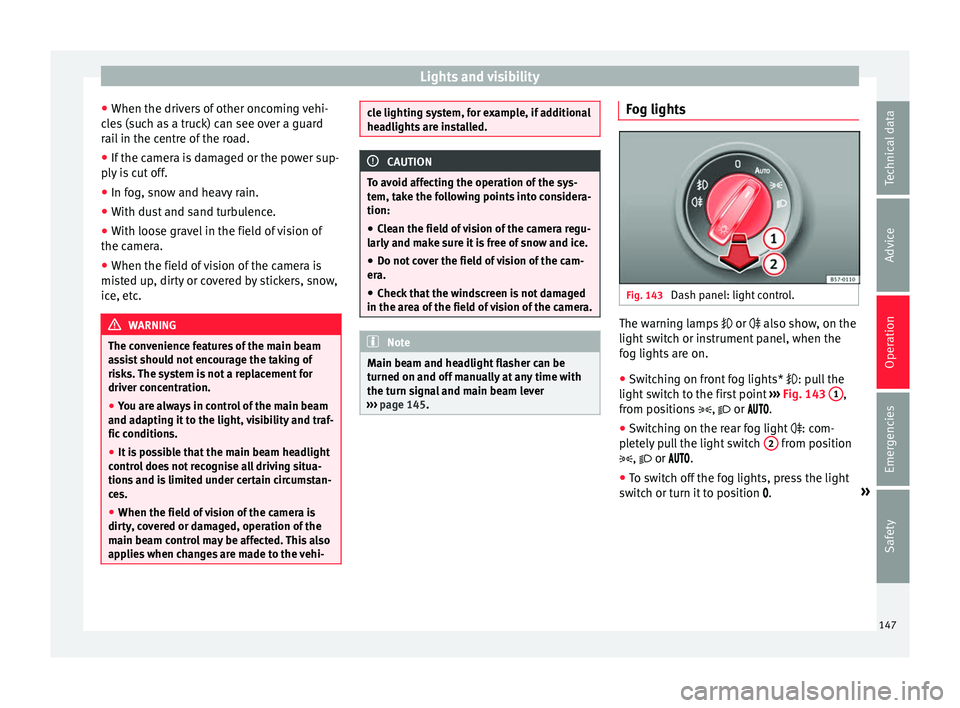
Fig. 143
Dash panel: light control. The warning lamps
or also sho
w
, on the
light switch or instrument panel, when the
fog lights are on.
● Switching on front fog lights* : pul
l the
light switch to the first point ››› Fig. 143 1 ,
fr om po
s
itions , or .
● Switching on the rear fog light : com-
pl
etely pull the light switch 2 from position
, or .
● To sw
itch off the fog lights, press the light
switc
h or turn it to position .»
147
Technical data
Advice
Operation
Emergencies
Safety
Page 150 of 348
Operation
Note
The rear fog light can dazzle drivers behind
you. Y
ou should use the rear fog light only
when visibility is very poor. Cornering lights*
1)When turning slowly or on very tight bends,
the cornerin
g lights
are activated automati-
cally. The cornering lights may be integrated
in the fog lights and are switched on only at
speeds of less than 40 km/h (25 mph).
When reverse gear is engaged, the cornering
lights on both sides of the vehicle switch on,
in order to better illuminate the area for park-
ing.
“Coming home” function This function may be connected/disconnec-
t
ed thr
ough the r
adio menu. The “Coming
Home” and/or “Leaving Home” delay time
may also be set (default: 30 sec). Vehicle with halogen headlights
In the “Coming Home” f
unction, the daytime
running lights (DRL), the rear side lights and
the licence plate lights are turned on.
Vehicle with full-LED headlights
In the “Coming Home” function, the dipped
beams, the daytime running lights (DRL), the
rear side lights, the number plate lights and
the courtesy lights in the rear view mirror
(Welcome Light) switch on.
Automatic* activation of “Coming Home”
For vehicles with a light and rain sensor (rota-
ry light switch in position ).
● Switch off the engine and remove the key
from the ignition with the r
otary light switch
in position ›››
page 30.
● The automatic “Coming Home” function is
only activ
e when the light sensor detects
darkness.
● When the car door is opened, the “Coming
Home” lighting come
s on.
Manual “Coming Home” activation
For vehicles with a light and rain sensor (rota-
ry light switch without position ). ●
Switc
h off the engine and remove the key
from the ignition.
● Activate the headlight flashers for approxi-
mately
1 second.
● Activated for any position of the rotary light
switc
h.
● When the car door is opened, the “Coming
Home” lighting come
s on. The headlights are
turned off 60 seconds after the vehicle door
is opened.
Deactivation
● If no door has been closed, they go out au-
tomatic
ally after 60 seconds.
● After the last door has been closed, the
headlights
will be switched off after the
“Coming Home” delay (as established in the
radio menu) has elapsed.
● On turning the light switch to position
›››
page 30.
● When the ignition is switched on (when
star
ting the engine). 1)
This function is not available on vehicles equipped
with f u
ll-LED headlights.
148
Page 152 of 348
Operation
6. Use the warning triangle to draw the atten- tion of other r
o
ad users to your vehicle.
7. Always take the vehicle key with you when you le
ave the vehicle.
All turn signals flash simultaneously when
the hazard warning lights are switched on.
The two turn signal turn signal lamps
and the turn signal lamp in the switch will
flash at the same time. The simultaneous
hazard warning lights also work when the ig-
nition is switched off.
Emergency braking warning
If the vehicle brakes suddenly and continu-
ously at a speed of more than 80 km/h (50
mph), the brake light flashes several times
per second to warn the vehicles driving be-
hind. If you continue braking, the hazard
warning lights will come on automatically
when the vehicle comes to a standstill. They
switch off automatically when the vehicle
starts to move again. WARNING
● The risk of
an accident increases if your ve-
hicle breaks down. Always use the hazard
warning lights and a warning triangle to draw
the attention of other road users to your sta-
tionary vehicle.
● Due to the high temperatures that the cata-
lytic con
verter can reach, never park in an
area where the catalytic converter could come into contact with highly inflammable materi-
al
s, f
or example dry grass or spilt petrol. This
could start a fire. Note
● The b atter
y will run down if the hazard
warning lights are left on for a long time,
even if the ignition is switched off.
● The use of the hazard warning lights de-
scribed her
e is subject to the relevant statu-
tory requirements. Parking lights
When the parking light is switched on, (right
or l
ef
t
turn signal), the front side light and
the rear light on the corresponding side of
the vehicle stay lit. The parking lights can on-
ly be activated with the ignition switched off
and the turn signal and main beam lever in
the central position, before being triggered.
Parking light on both sides With the ignition switched off and the light
sw
it
c
h in position , when locking the vehi-
cle from the outside, the parking lights on
both sides of the vehicle light up. In doing
so, only the side lights of both headlights
light up, and additionally the tail lights will
do so partially. Motorway light* The motorway light is available on vehicles
equipped w
ith f
ull-LED lights.
The function is connected/disconnected via
the corresponding Easy Connect system
menu.
● Activation: when going abo
ve 110 km/h
(68 mph) for more than 30 seconds, the dip-
ped beam raises slightly to increase the driv-
er's visibility distance.
● Deactivation: when reduc in
g the speed of
the car below 100 km/h (62 mph), the dip-
ped beam returns to its normal position.
Driving abroad The light beam of the dipped beam lights is
a
symmetric: the s
ide of
the road on which
you are driving is lit more intensely.
When a car that is manufactured in a country
that drives on the right travels to a country
that drives on the left (or vice versa), it is nor-
mally necessary to cover part of the headlight
bulbs with stickers or to change the adjust-
ment of the headlights to avoid dazzling oth-
er drivers.
In such cases, the regulations specify certain
light values that must be complied with for
designated points of the light distribution.
This is known as “Tourist light”.
150