light Seat Ibiza 5D 2007 Repair Manual
[x] Cancel search | Manufacturer: SEAT, Model Year: 2007, Model line: Ibiza 5D, Model: Seat Ibiza 5D 2007Pages: 272, PDF Size: 8.32 MB
Page 144 of 272
Driving
142
– Switch off the engine and remove the key from the ignition lock. Turn the steering wheel slightly to engage the steering lock.
– Always take you car keys with you when you leave the vehicle ⇒ .Additional notes on parking the vehicle on gradients:
Turn the steering wheel so that the vehicle would roll against the kerb if it did
start to roll.•
If the vehicle is facing downhill, turn the front wheels so that they point
towards the kerb.
•
If the vehicle is facing uphill, turn the front wheels so that they point away
from the kerb .
•
Secure the vehicle as normal by applying the handbrake firmly and
selecting first gear.
WARNING
•
Take measures to reduce the risk of injury when you leave your vehicle
unattended.
•
Never park where the hot exhaust system could ignite inflammable
materials, such as dry grass, low bushes, spilt fuel etc.
•
Never allow vehicle occupants to remain in the vehicle when it is
locked. They would be unable to open the vehicle from the inside, and
could become trapped in the vehicle in an emergency. In the event of an
emergency, locked doors will delay assistance to occupants.
•
Never leave children unsupervised in the vehicle. They could set the
vehicle in motion, for example, by releasing the handbrake or the gear
lever / selector lever.
•
Depending on weather conditions, it may become extremely hot or cold
inside the vehicle. This can be fatal.
Cruise control system (CCS)*Description
The cruise control system is able to maintain the set speed in
the range from approx. 30 km/h to 180 km/h.Once the speed setting has been saved, you may take your foot off the accel-
erator.
WARNING
It could be dangerous to use the cruise control system if it is not possible
to drive at constant speed.•
For safety reasons the cruise control system should not be used in
dense traffic, in sections with bends or where roads conditions are poor
(e.g. aquaplaning, loose chippings, slippery surfaces, snow). Risk of acci-
dent.
•
Always switch off the CCS when you have finished using it. This will
prevent you using it by mistake.
•
It is dangerous to use a set speed which is too high for the current road,
traffic or weather conditions. Risk of accident.Note
The cruise control cannot maintain a co nstant speed when descending gradi-
ents. The vehicle will accelerate under its own weight. Use the foot brake to
slow the vehicle.
IBI_ANG_0707 Seite 142 Montag, 6. August 2007 3:59 15
Page 145 of 272
Driving143
Safety First
Operating instructions
Tips and Maintenance
Te c h n i c a l D a t a
Switching the cruise control system on and offSwitching on the system
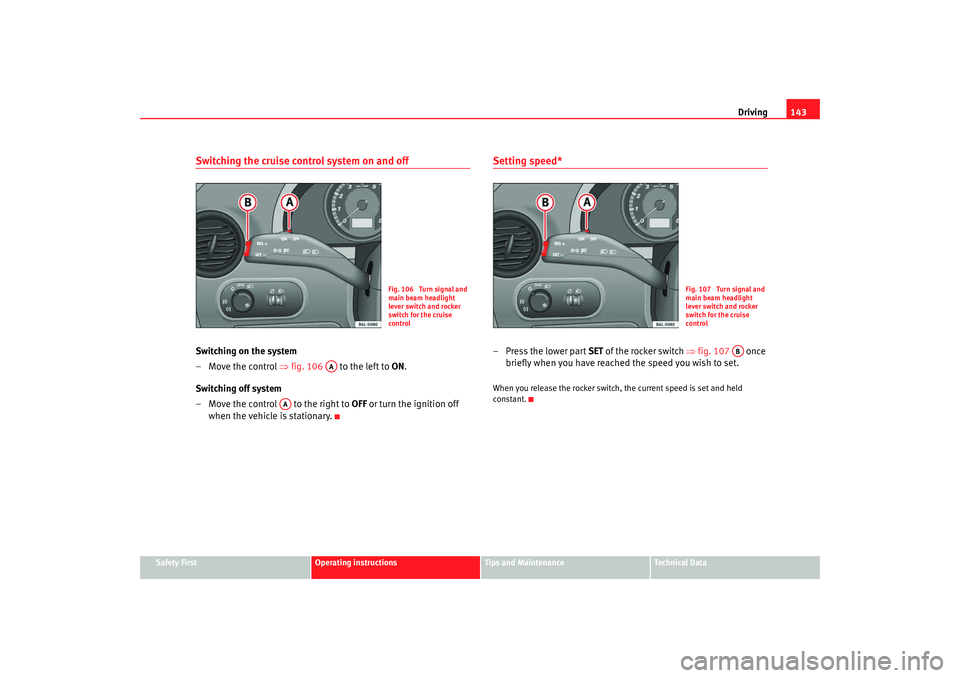
– Move the control ⇒fig. 106 to the left to ON .
Switching off system
– Move the control to the right to OFF or turn the ignition off
when the vehicle is stationary.
Setting speed*– Press the lower part SET of the rocker switch ⇒fig. 107 once
briefly when you have reached the speed you wish to set.When you release the rocker switch, the current speed is set and held
constant.
Fig. 106 Turn signal and
main beam headlight
lever switch and rocker
switch for the cruise
control
AA
AA
Fig. 107 Turn signal and
main beam headlight
lever switch and rocker
switch for the cruise
control
AB
IBI_ANG_0707 Seite 143 Montag, 6. August 2007 3:59 15
Page 146 of 272
Driving
144Adjusting set speed*
The speed can be altered without touching the accelerator or
the brake.Setting a higher speed
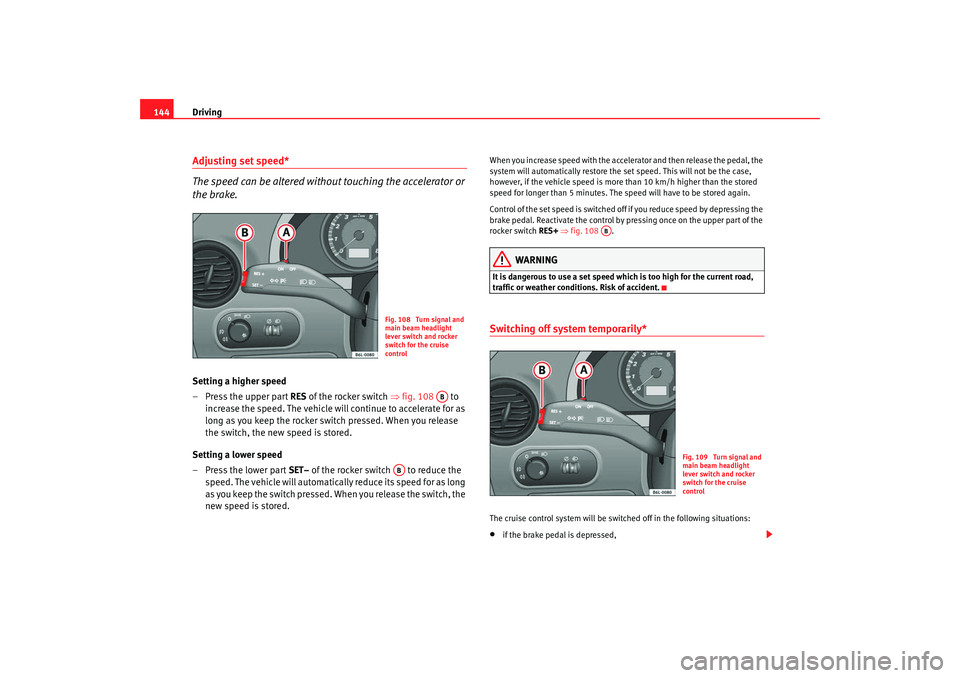
– Press the upper part RES of the rocker switch ⇒fig. 108 to
increase the speed. The vehicle will continue to accelerate for as
long as you keep the rocker switch pressed. When you release
the switch, the new speed is stored.
Setting a lower speed
– Press the lower part SET– of the rocker switch to reduce the
speed. The vehicle will automatically reduce its speed for as long
as you keep the switch pressed. When you release the switch, the
new speed is stored.
When you increase speed with the accelerator and then release the pedal, the
system will automatically restore the set speed. This will not be the case,
however, if the vehicle speed is more than 10 km/h higher than the stored
speed for longer than 5 minutes. The speed will have to be stored again.
Control of the set speed is switched off if you reduce speed by depressing the
brake pedal. Reactivate the control by pressing once on the upper part of the
rocker switch RES+ ⇒ fig. 108 .
WARNING
It is dangerous to use a set speed which is too high for the current road,
traffic or weather conditions. Risk of accident.Switching off system temporarily*The cruise control system will be switched off in the following situations:•
if the brake pedal is depressed,
Fig. 108 Turn signal and
main beam headlight
lever switch and rocker
switch for the cruise
control
AB
AB
AB
Fig. 109 Turn signal and
main beam headlight
lever switch and rocker
switch for the cruise
control
IBI_ANG_0707 Seite 144 Montag, 6. August 2007 3:59 15
Page 147 of 272
Driving145
Safety First
Operating instructions
Tips and Maintenance
Te c h n i c a l D a t a
•
if the clutch pedal is depressed,
•
if the vehicle is accelerated to over 180 km/h,
•
when the lever is move d in the direction of OFF without fully being
engaged.
To resume cruise control, release the brake or clutch pedal or reduce the
vehicle speed to less than 180 km/h and press once on the upper part of the
rocker switch RES ⇒page 144, fig. 109 .
WARNING
It is dangerous to use a set speed wh ich is too high for the current road,
traffic or weather conditions. Risk of accident.Completely switching off the system
Vehicles with a manual gearbox
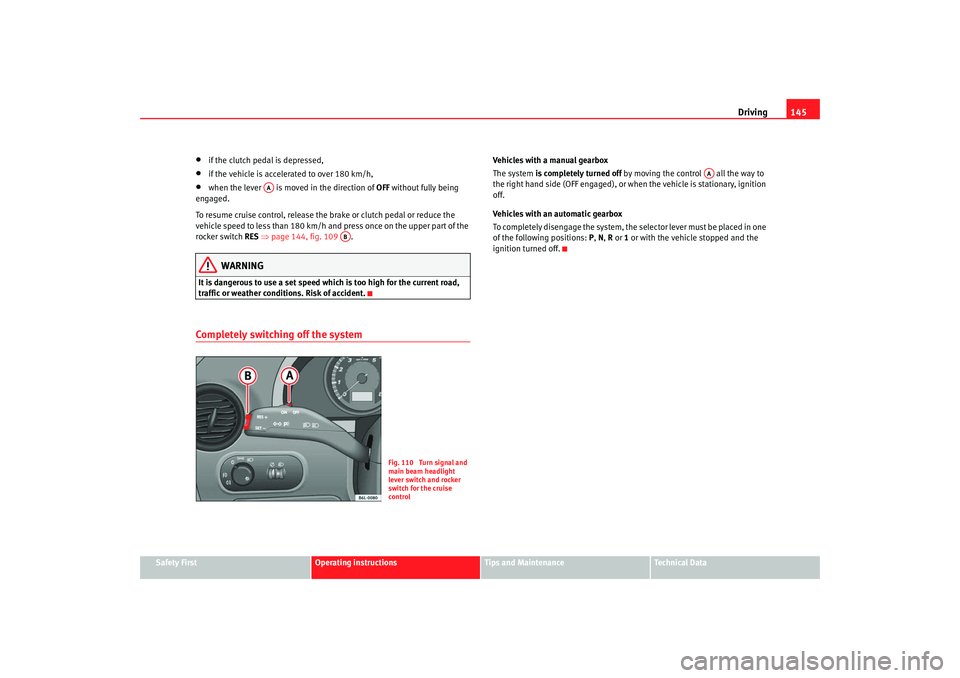
The system is completely turned off by moving the control all the way to
the right hand side (OFF engaged), or when the vehicle is stationary, ignition
off.
Vehicles with an automatic gearbox
To completely disengage the system, the selector lever must be placed in one
of the following positions: P, N , R or 1 or with the vehicle stopped and the
ignition turned off.
AA
AB
Fig. 110 Turn signal and
main beam headlight
lever switch and rocker
switch for the cruise
control
AA
IBI_ANG_0707 Seite 145 Montag, 6. August 2007 3:59 15
Page 152 of 272
Intelligent technology
150Anti-lock brake system (ABS)The anti-lock brake system prevents the wheels locking during braking
⇒ page 148.Electronic differential lock (EDL)*
The electronic differential lock helps prevent the loss of trac-
tion caused if one of the driven wheels starts spinning.EDL helps the vehicle to start moving, accelerate and climb a gradient in slip-
pery conditions where this may otherwise be difficult or even impossible.
The system will control the revolutions of the drive wheels using the ABS
sensors (in case of an EDL fault the warning lamp for ABS lights up)
⇒page 64.
At speeds of up to approximately 80 km/h, it is able to balance out differ-
ences in the speed of the driven wheel s of approximately 100 rpm caused by
a slippery road surface on one side of the vehicle. It does this by braking the
wheel which has lost traction and distributing more driving force to the other
driven wheel via the differential.
To prevent the disc brake of the braked wheel from overheating, the EDL cuts
out automatically if subjected to excessive loads. The vehicle will continue to
function normally without EDL. For this reason, the driver is not informed that
the EDL has been switched off.
The EDL will switch on again automatically when the brake has cooled down.
WARNING
•
When accelerating on a slippery surface, for example on ice and snow,
press the accelerator carefully. Despite EDL, the driven wheels may start to
spin. This could impair the vehicle’s stability.
•
Always adapt your driving style to suit road conditions and the traffic
situation. Do not let the extra safety afforded by EDL tempt you into taking
any risks when driving, this can cause accidents.Caution
Modifications to the vehi cle (e.g. to the engine, the brake system, running
gear or any components affecting the wheels and tyres) could affect the effi-
ciency of the EDL ⇒page 172.The traction control system (TCS)The traction control system prevents the drive wheels from spinning when the
car is accelerating ⇒page 148.
WARNING (continued)
IBI_ANG_0707 Seite 150 Montag, 6. August 2007 3:59 15
Page 154 of 272
Driving and the environment
152Braking effect and braking distance
The braking effect and braking distance are influenced by
driving situations and road conditions.The efficiency of the brakes depends directly on the brake pad wear. The rate
of wear of the brake pads depends to a great extent on the conditions under
which the vehicle is operated and the way the vehicle is driven. If you often
drive in town traffic, drive short distances or have a sporty driving style, we
recommend that you have the thickness of your brake pads checked by an
Authorised Service Centre more frequently than recommended in the Service
Schedule.
If you drive with wet brakes, for example, after crossing areas of water, in
heavy rainfall or even after washing the car, the effect of the brakes is less-
ened as the brake discs are wet or even frozen (in winter): The brakes should
be “dried” by pressing the pedal to restore full braking effect.
WARNING
Longer braking distances and faults in the brake system increase the risk
of accidents.•
New brake pads must be run in and do not have the correct friction
during the first 200 km. However, the reduced braking capacity may be
compensated by pressing on the brake pedal a little harder. This also
applies when new brake pads are fitted.
•
If brakes are wet or frozen, or if you are driving on roads which have
been gritted with salt, braking power may set in later than normal.
•
On steep descents if the brakes are excessively used they will over
heat. Before driving down a long steep gradient, it is advisable to reduce
speed and change to a lower gear (or mo ve the selector lever to a lower gear
if your vehicle has automatic transmission). This makes use of engine
braking and relieves the brakes.
•
Never let the brakes “rub” by applying light pressure. Continuous
braking will cause the brakes to overheat and will increase the braking
distance. Apply and then release the brakes alternately.
•
Never let the vehicle coast with the engine switched off. The braking
distance is increased considerably as the brake servo does not function.
•
Very heavy use of the brakes may cause a vapour lock if the brake fluid
is left in the system for too long . This impairs the braking effect.
•
Non-standard or damaged front spoilers could restrict the airflow to the
brakes and cause them to overheat. Observe the relevant instructions
before purchasing accessories ⇒page 172, “Modifications”.
•
If a brake circuit fails, the braking distance will be increased consider-
ably. Contact a qualified workshop immediately and avoid unnecessary
journeys.
Exhaust gasses purification systemCatalytic converter*To conserve the useful life of the catalytic converter
– Always use unleaded petrol.
– Do not run the fuel tank dry.
– For engine oil changes, do not replenish with too much engine oil ⇒page 186, “Topping up engine oil ”.
– Never tow the vehicle to start it, use jump leads if necessary ⇒page 230.
WARNING (continued)
IBI_ANG_0707 Seite 152 Montag, 6. August 2007 3:59 15
Page 155 of 272
Driving and the environment153
Safety First
Operating instructions
Tips and Maintenance
Te c h n i c a l D a t a
If you notice misfiring, uneven running
or loss of power when the vehicle is
moving, reduce speed immediately and have the vehicle inspected at the
nearest qualified workshop. In general, the exhaust warning lamp will light
up when any of the described symptoms occur ⇒page 60. If this happens,
unburnt fuel can enter the exhaust system and escape into the environment.
The catalytic converter can also be damaged by overheating.
WARNING
The catalytic converter reaches very high temperatures! Fire hazard!•
Never park where the catalytic converter could come into contact with
dry grass or inflammable materials under the vehicle.
•
Do not apply additional underseal or anti-corrosion coatings to the
exhaust pipes, catalytic converter or the heat shields on the exhaust
system. These materials could catch fire when the vehicle is driven.Caution
Never fully drain the fuel tank, in this case, the irregularity of the fuel supply
may cause ignition problems. This allow s unburnt fuel to enter the exhaust
system, which could cause overheating and damage the catalytic converter.
For the sake of the environment
Even when the emission control system is working perfectly, there may be a
smell of sulphur from the exhaust unde r some conditions. This depends on
the sulphur content of the fuel used. Quite often the problem can be reme-
died by changing to another brand of fuel.
Diesel engine particulate filter*
The diesel engine particulate filter eliminates soot produced
by burning diesel.The diesel engine dust filter eliminates most of the soot from the exhaust gas
system. Under normal driving conditions, the filter cleans itself. If the driving
conditions do not allow the filter to clean itself (for example, multiple short
trips) the filter will be obstructed by dust and pollen and the indicator
for
the diesel engine particulate filter indicator will light. See under Warning
Lights.
WARNING
•
The diesel engine particulate filter may reach extremely high tempera-
tures; it should not enter into contact with flammable materials under-
neath the vehicle. Failure to comply could result in fire.Caution
Vehicles equipped with a diesel engine particulate filter must not be refueled
using biodiesel (RME), given that the fuel system may be damaged.Driving abroadNotesFor driving abroad, the following must be taken into consideration:•
For vehicles fitted with a catalytic converter ensure that unleaded petrol is
available for the journey. See the chap ter “Refuelling”. Automobile organisa-
IBI_ANG_0707 Seite 153 Montag, 6. August 2007 3:59 15
Page 156 of 272
Driving and the environment
154tions will have information about service station networks selling unleaded
fuel.•
In some countries it is possible that a vehicle model is sold under condi-
tions where some spare parts are not available or that the Authorised Service
Centre may only carr y out limited repairs.
SEAT importers and distributors will gladly provide information about the
technical preparation of your vehicle in addition to necessary maintenance
and repair possibilities.
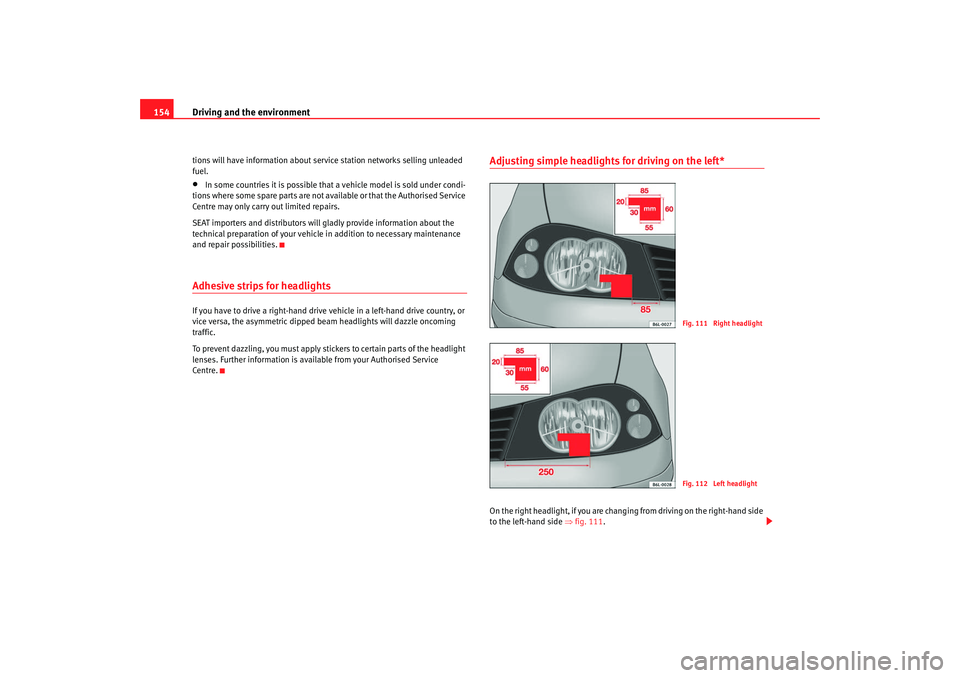
Adhesive strips for headlightsIf you have to drive a right-hand drive vehicle in a left-hand drive country, or
vice versa, the asymmetric dipped beam headlights will dazzle oncoming
traffic.
To prevent dazzling, you must apply stickers to certain parts of the headlight
lenses. Further information is available from your Authorised Service
Centre.
Adjusting simple headlights for driving on the left*On the right headlight, if you are changi ng from driving on the right-hand side
to the left-hand side ⇒fig. 111 .
Fig. 111 Right headlightFig. 112 Left headlight
IBI_ANG_0707 Seite 154 Montag, 6. August 2007 3:59 15
Page 157 of 272
Driving and the environment155
Safety First
Operating instructions
Tips and Maintenance
Te c h n i c a l D a t a
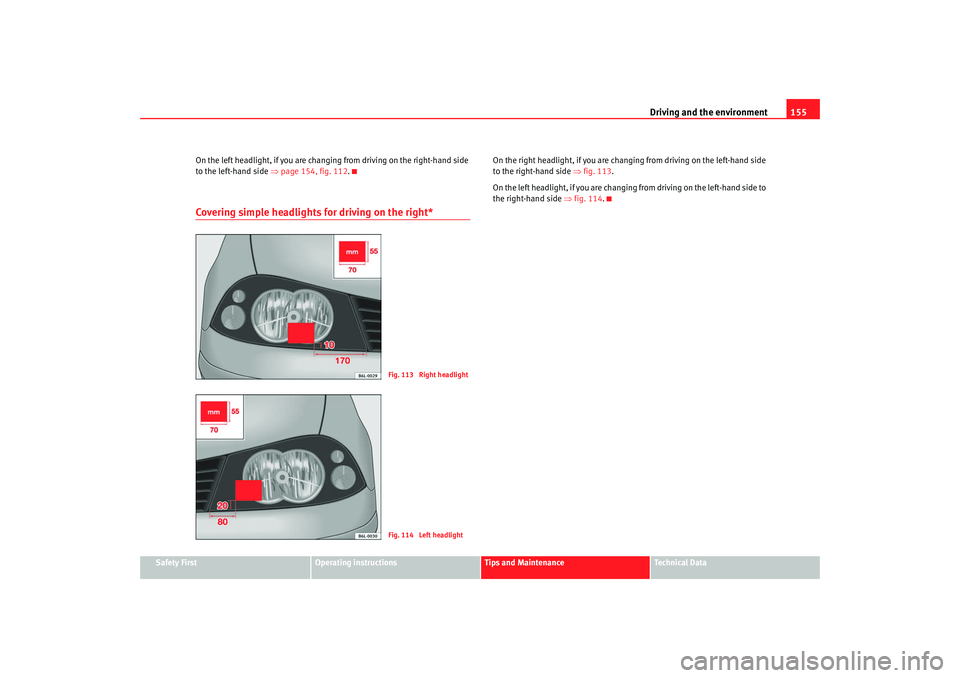
On the left headlight, if you are changi
ng from driving on the right-hand side
to the left-hand side ⇒page 154, fig. 112.
Covering simple headlights for driving on the right*
On the right headlight, if you are chan ging from driving on the left-hand side
to the right-hand side ⇒fig. 113 .
On the left headlight, if you are changing from driving on the left-hand side to
the right-hand side ⇒fig. 114 .
Fig. 113 Right headlightFig. 114 Left headlight
IBI_ANG_0707 Seite 155 Montag, 6. August 2007 3:59 15
Page 158 of 272
Driving and the environment
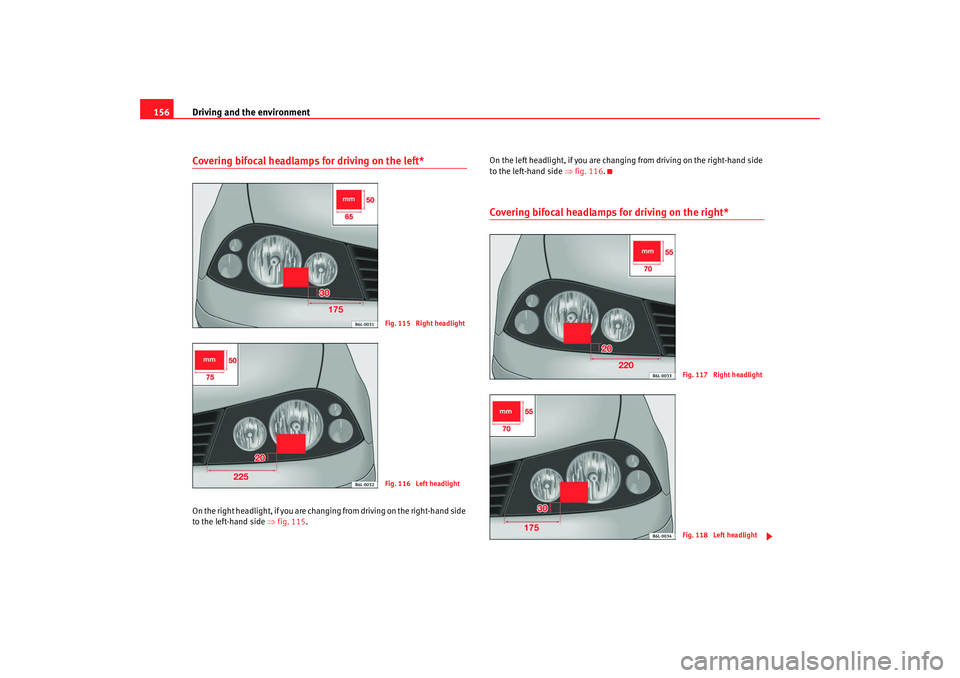
156Covering bifocal headlamps for driving on the left*On the right headligh t, if you are changing from dr iving on the right-hand side
to the left-hand side ⇒fig. 115 . On the left headlight, if you are changing
from driving on the right-hand side
to the left-hand side ⇒fig. 116 .
Covering bifocal headlamps for driving on the right*
Fig. 115 Right headlightFig. 116 Left headlight
Fig. 117 Right headlightFig. 118 Left headlight
IBI_ANG_0707 Seite 156 Montag, 6. August 2007 3:59 15