wheel Seat Ibiza SC 2009 Owner's Guide
[x] Cancel search | Manufacturer: SEAT, Model Year: 2009, Model line: Ibiza SC, Model: Seat Ibiza SC 2009Pages: 257, PDF Size: 6.61 MB
Page 105 of 257
Seats and stowage103
Safety First
Controls and equipment
Practical tips
Technical Data
•When fitting the head restraints again, insert the tubes as far as possible
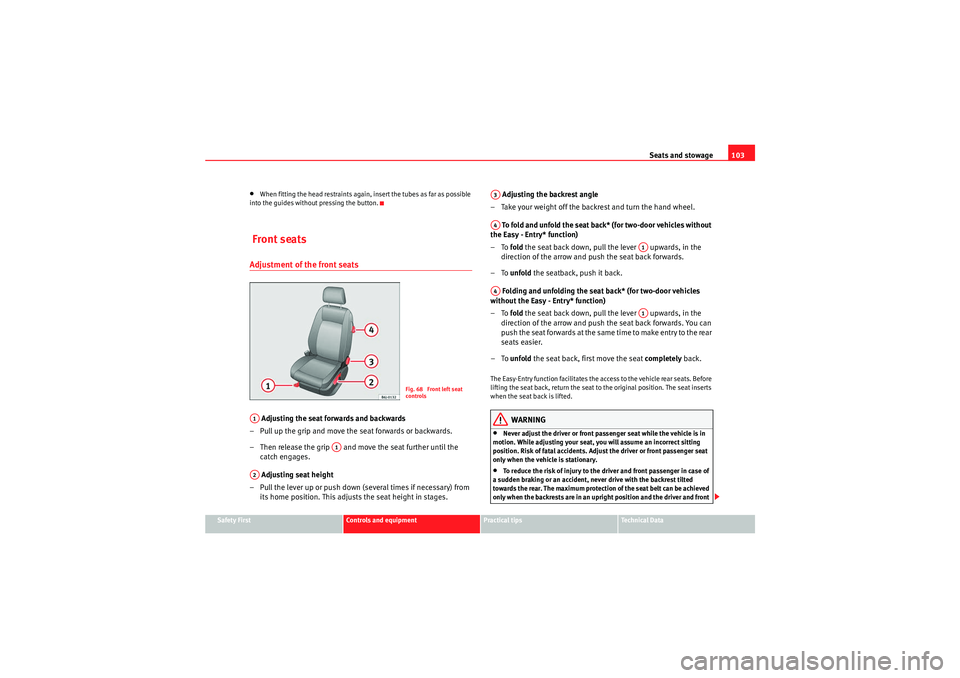
into the guides without pressing the button. Front seatsAdjustment of the front seats Adjusting the seat forwards and backwards
– Pull up the grip and move the seat forwards or backwards.
– Then release the grip and move the seat further until the catch engages.
Adjusting seat height
– Pull the lever up or push down (several times if necessary) from its home position. This adjust s the seat height in stages. Adjusting the backrest angle
– Take your weight off the backrest and turn the hand wheel.
To fold and unfold the seat back* (for two-door vehicles without
the Easy - Entry* function)
–To fold the seat back down, pull the lever upwards, in the
direction of the arrow and push the seat back forwards.
–To unfold the seatback, push it back.
Folding and unfolding the seat back* (for two-door vehicles
without the Easy - Entry* function)
–To fold the seat back down, pull the lever upwards, in the
direction of the arrow and push the seat back forwards. You can
push the seat forwards at the same time to make entry to the rear
seats easier.
–To unfold the seat back, first move the seat completely back.
The Easy-Entry function facilitates the access to the vehicle rear seats. Before
lifting the seat back, return the seat to the original position. The seat inserts
when the seat back is lifted.
WARNING
•Never adjust the driver or front passenger seat while the vehicle is in
motion. While adjusting your seat, you will assume an incorrect sitting
position. Risk of fatal accidents. Adjust the driver or front passenger seat
only when the vehicle is stationary.•To reduce the risk of injury to the driver and front passenger in case of
a sudden braking or an accident, ne ver drive with the backrest tilted
towards the rear. The maximum protection of the seat belt can be achieved
only when the backrests are in an upright position and the driver and front
Fig. 68 Front left seat
controls
A1
A1
A2
A3A4
A1
A4
A1
IbizaSC_EN.book Seite 103 Mittwoch, 16. September 2009 12:11 12
Page 128 of 257
Driving
126DrivingAddressAdjusting the steering wheel position
The height and reach of the steering wheel can be freely
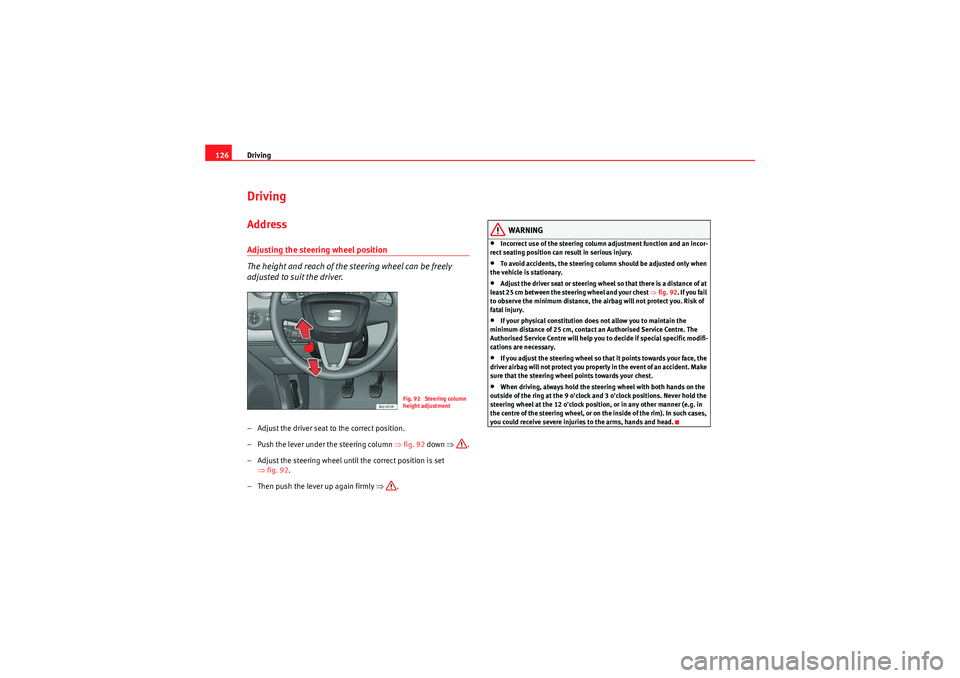
adjusted to suit the driver.– Adjust the driver seat to the correct position.
– Push the lever under the steering column ⇒fig. 92 down ⇒.
– Adjust the steering wheel until the correct position is set ⇒fig. 92 .
– Then push the lever up again firmly ⇒.
WARNING
•Incorrect use of the steering column adjustment function and an incor-
rect seating position can result in serious injury.•To avoid accidents, the steering column should be adjusted only when
the vehicle is stationary.•Adjust the driver seat or steering wheel so that there is a distance of at
least 25 cm between the steering wheel and your chest ⇒fig. 92 . If you fail
to observe the minimum distance, the airbag will not protect you. Risk of
fatal injury.•If your physical constitution does not allow you to maintain the
minimum distance of 25 cm, contact an Authorised Service Centre. The
Authorised Service Centre will help you to decide if special specific modifi-
cations are necessary.•If you adjust the steering wheel so that it points towards your face, the
driver airbag will not protect you properly in the event of an accident. Make
sure that the steering wheel points towards your chest.•When driving, always hold the steering wheel with both hands on the
outside of the ring at the 9 o'clock and 3 o'clock positions. Never hold the
steering wheel at the 12 o'clock position, or in any other manner (e.g. in
the centre of the steering wheel, or on the inside of the rim). In such cases,
you could receive severe injuries to the arms, hands and head.
Fig. 92 Steering column
height adjustment
IbizaSC_EN.book Seite 126 Mittwoch, 16. September 2009 12:11 12
Page 130 of 257
Driving
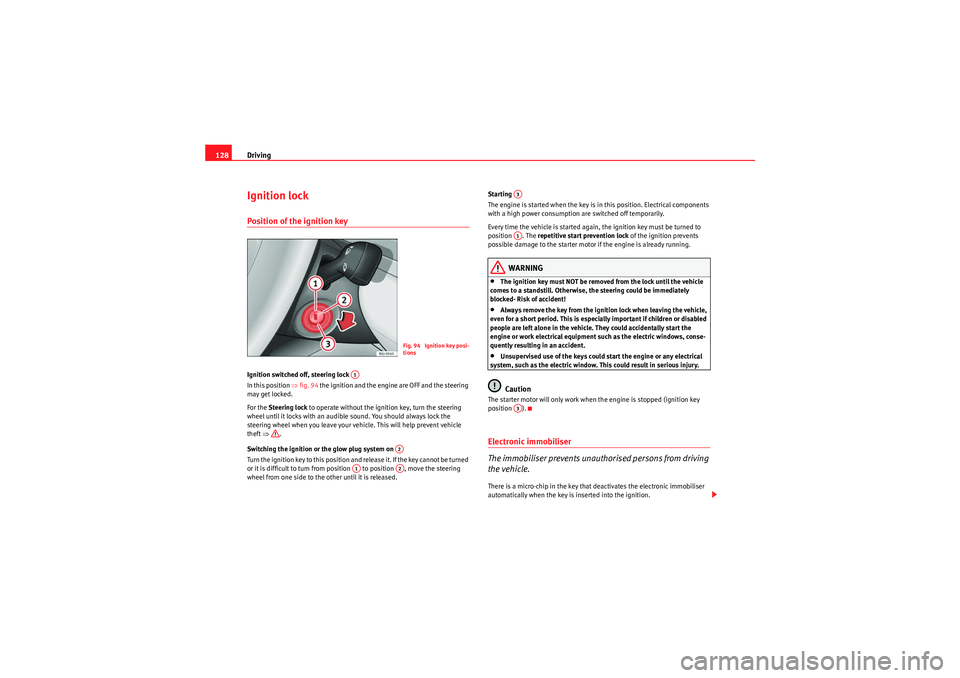
128Ignition lockPosition of the ignition keyIgnition switched off, steering lock
In this position ⇒ fig. 94 the ignition and the engine are OFF and the steering
may get locked.
For the Steering lock to operate without the ignition key, turn the steering
wheel until it locks with an audible sound. You should always lock the
steering wheel when you leave your vehicle. This will help prevent vehicle
theft ⇒ .
Switching the ignition or the glow plug system on
Turn the ignition key to this position and release it. If the key cannot be turned
or it is difficult to turn from position to position , move the steering
wheel from one side to the other until it is released. Starting
The engine is started when the key is in this position. Electrical components
with a high power consumption are switched off temporarily.
Every time the vehicle is started again, the ignition key must be turned to
position . The
repetitive start prevention lock of the ignition prevents
possible damage to the starter motor if the engine is already running.
WARNING
•The ignition key must NOT be removed from the lock until the vehicle
comes to a standstill. Otherwise, the steering could be immediately
blocked- Risk of accident!•Always remove the key from the ignition lock when leaving the vehicle,
even for a short period. This is especially important if children or disabled
people are left alone in the vehicle. They could accidentally start the
engine or work electrical equipment such as the electric windows, conse-
quently resulting in an accident.•Unsupervised use of the keys could start the engine or any electrical
system, such as the electric window. This could result in serious injury.Caution
The starter motor will only work when the engine is stopped (ignition key
position ).Electronic immobiliser
The immobiliser prevents unauthorised persons from driving
the vehicle.There is a micro-chip in the key that deactivates the electronic immobiliser
automatically when the key is inserted into the ignition.
Fig. 94 Ignition key posi-
tions
A1
A2
A1
A2
A3A1A3
IbizaSC_EN.book Seite 128 Mittwoch, 16. September 2009 12:11 12
Page 138 of 257
Driving
136Changing gear in Tiptronic* mode
The Tiptronic system allows the driver to select gears manu-
ally
General information about driving in Tiptronic mode
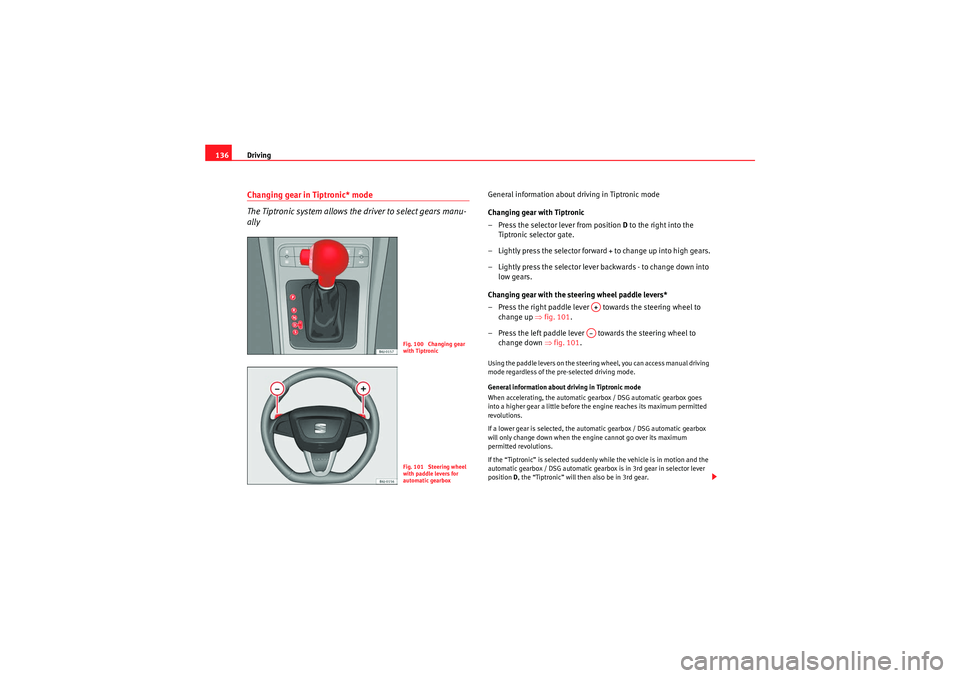
Changing gear with Tiptronic
– Press the selector lever from position D to the right into the
Tiptronic selector gate.
– Lightly press the selector forward + to change up into high gears.
– Lightly press the selector lever backwards - to change down into
low gears.
Changing gear with the steering wheel paddle levers*
– Press the right paddle lever towards the steering wheel to change up ⇒ fig. 101.
– Press the left paddle lever towards the steering wheel to change down ⇒ fig. 101.Using the paddle levers on the steering wheel, you can access manual driving
mode regardless of the pre-selected driving mode.
General information about driving in Tiptronic mode
When accelerating, the automatic gearbox / DSG automatic gearbox goes
into a higher gear a little before the engine reaches its maximum permitted
revolutions.
If a lower gear is selected, the automatic gearbox / DSG automatic gearbox
will only change down when the engine cannot go over its maximum
permitted revolutions.
If the “Tiptronic” is selected suddenly while the vehicle is in motion and the
automatic gearbox / DSG automatic gearbox is in 3rd gear in selector lever
position D, the “Tiptronic” will then also be in 3rd gear.
Fig. 100 Changing gear
with TiptronicFig. 101 Steering wheel
with paddle levers for
automatic gearbox
A+A–
IbizaSC_EN.book Seite 136 Mittwoch, 16. September 2009 12:11 12
Page 139 of 257
Driving137
Safety First
Controls and equipment
Practical tips
Technical Data
Changing gears in the normal or sport programme using the steering wheel
paddle levers
If the paddle levers ⇒
page 136, fig. 101 are used in the normal or sport
programme, the system switches temporarily to “Tiptronic” mode. To exit
“Tiptronic” mode again, press the right paddle lever towards the steering
wheel for approximately one second. You will also leave “Tiptronic” mode if
the paddle levers are not moved for a certain time.
Note
•The gear paddle levers on the steering wheel can be operated with the
gear stick in any position and with the vehicle in motion.Selector lever positions
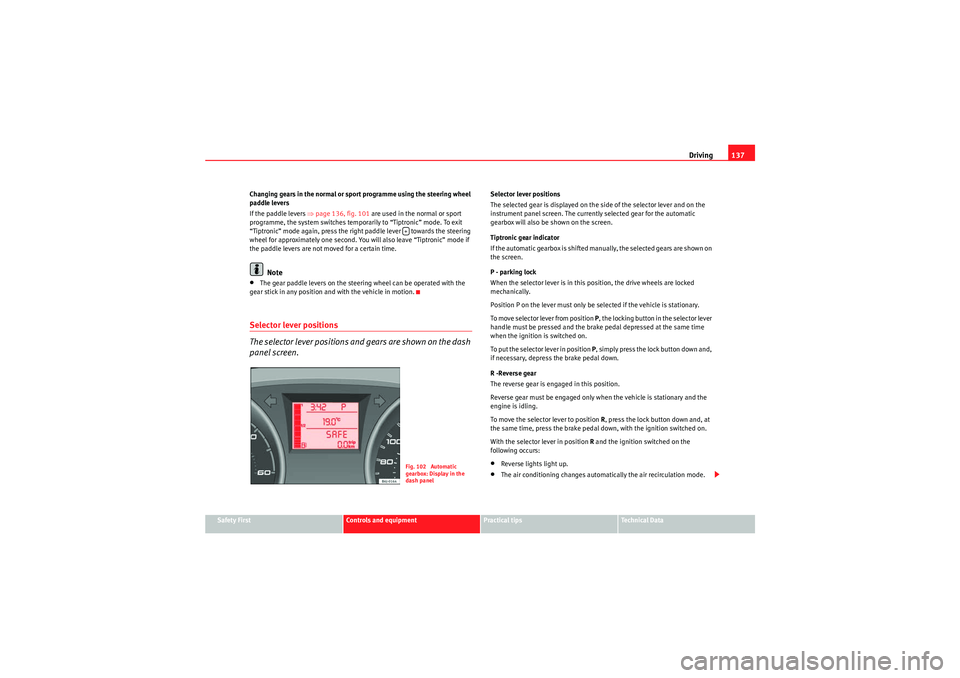
The selector lever positions and gears are shown on the dash
panel screen.
Selector lever positions
The selected gear is displayed on the side of the selector lever and on the
instrument panel screen. The currently selected gear for the automatic
gearbox will also be shown on the screen.
Tiptronic gear indicator
If the automatic gearbox is shifted manually, the selected gears are shown on
the screen.
P - parking lock
When the selector lever is in this position, the drive wheels are locked
mechanically.
Position P on the lever must only be selected if the vehicle is stationary.
To move selector lever from position P, the locking button in the selector lever
handle must be pressed and the brak e pedal depressed at the same time
when the ignition is switched on.
To put the selector lever in position P, simply press the lock button down and,
if necessary, depress the brake pedal down.
R -Reverse gear
The reverse gear is engaged in this position.
Reverse gear must be engaged only when the vehicle is stationary and the
engine is idling.
To move the selector lever to position R, press the lock button down and, at
the same time, press the brake pedal down, with the ignition switched on.
With the selector lever in position R and the ignition switched on the
following occurs:•Reverse lights light up.•The air conditioning changes automatically the air recirculation mode.
+Fig. 102 Automatic
gearbox: Display in the
dash panel
IbizaSC_EN.book Seite 137 Mittwoch, 16. September 2009 12:11 12
Page 140 of 257
Driving
138•The wiper starts if the windscreen washer is on.•The parking distance warning system switches on.*
N - Neutral (idling)
If this position is selected, the gearbox is in neutral. Power is not transmitted
to the wheels and the engine does not have a braking function.
Never use the N position to drive down a hill. The engine does not function as
a brake and the brakes are subjected to excessive stain.
You could damage the automatic gearbox if you drive down hills with the
selector lever in position N and the engine switched off.
D - Drive (forwards)
In this position the gearbox automatically changes to a lower or higher gear,
according to the engine's demand, driving style and speed. The braking
effect of the engine when driving downhill is ver y limited when the selector is
in this position. The instrument panel screen displays the selected gear as
well as the selector lever in position D .
If position N has been selected and you wish to select D, you must press the
foot brake if the vehicle is stationary, or travelling at under 5 km/h.
S - Standard driving position (Sport programme)
When the selector lever is in position S, it will automatically change up into a
higher gear later, and change down into a low gear, if compared with position
D . This way, it is possible to take full advantage of the engine reserve power,
depending on the engine demand, driving style and speed. The braking
effect of the engine when driving downhill is very limited. On the instrument
panel screen the selected gear is shown as well as the selector lever to posi-
tion S.
To se lec t gea r range S, press the lock button on the selector lever.
WARNING
If the vehicle moves with no control, an accident and serious injury may
occur.•As a driver, you should never leave your vehicle if the engine is running
and a gear is engaged. If you have to leave your vehicle while the engine is
running, you must always apply the parking brake and engage parking lock
P.•If the engine is running and if D or R are engaged, you will need to hold
the vehicle stopped by depressing footbrake down. The car would creep
forward as the power transmission is not fully interrupted even when the
engine is idling.•Never accelerate when changing gear or you may cause an accident.•Never move the selector lever to “R” or “P” when driving. Risk of acci-
dent.•Before driving down a very steep slope, reduce your speed and shift to
position 1st.•Always hold the vehicle on the foot brake if you stop uphill. Otherwise,
the vehicle could roll back.•Never allow the brake to rub and do not use the brake pedal too often
or for long periods. Constant braking will cause the brakes to overheat and
will considerably reduce the brake effect. This increases the braking
distance and could cause the brake system to fail.WARNING
Never switch the engine off until the vehicle is stationary. You could lose
control of your vehicle. This could cause an accident and serious injury.•The airbags and belt tensioners do not work when the ignition is
switched off.•The brake servo does not work when the engine is not running. You
need more force to stop the vehicle.
IbizaSC_EN.book Seite 138 Mittwoch, 16. September 2009 12:11 12
Page 141 of 257
Driving139
Safety First
Controls and equipment
Practical tips
Technical Data
•Power assisted steering does not work when the engine is not running.
That is why it is much more difficult to turn the steering wheel.•Never remove the key from the ignition if the vehicle is in motion. The
steering lock could suddenly engage, and you would not be able to steer
the vehicle.•Never allow the car to roll downhill with the gear in “N”, regardless of
whether the engine is running or not.Caution
If you allow the vehicle to move when the engine is switched off or with the
selector lever in position “N”, take your foot off the accelerator and wait until
the engine starts idling before returning to position “D”.Kickdown feature
The kickdown feature is designed to give maximum accelera-
tion.If you press the accelerator down thoroughly, the gearbox automatically
changes down, depending on speed and e ngine speed, into a lower gear to
take full advantage of give the vehicle maximum acceleration.
The gearbox does not change gear until the engine reaches the maximum
determined engine speed for the gear.
WARNING
You could lose control of the vehicle if you accelerate on slippery road
surfaces. Risk of serious injury.
•Be particularly careful when using the kickdown features on slippery
road surfaces. With a fast acceleration, the vehicle could lose traction and
skid.•You should use the kickdown feature only when traffic and weather
conditions allow it to be used safely.
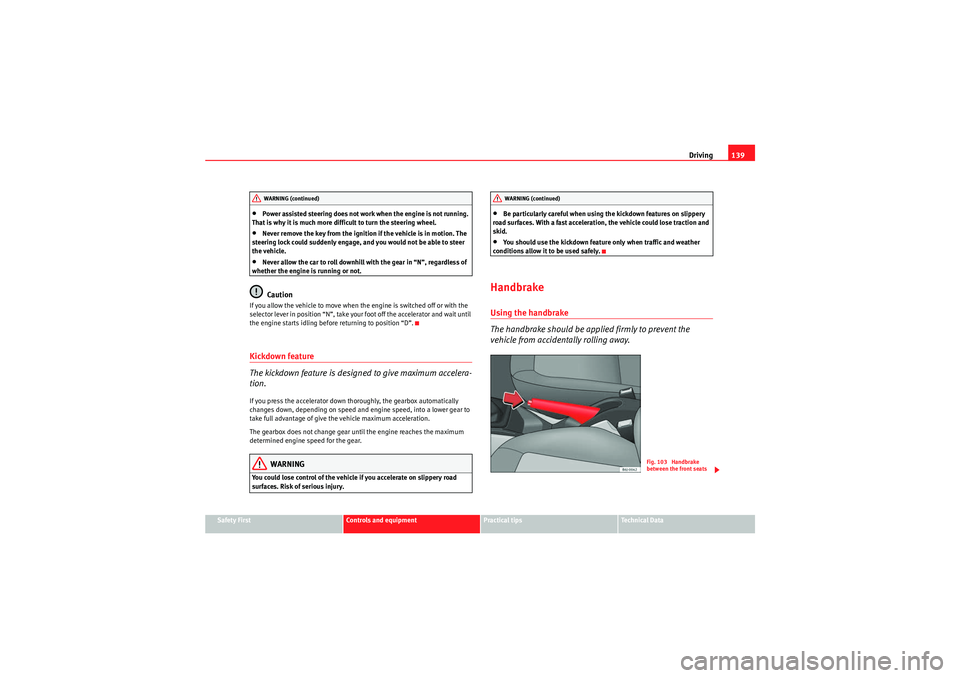
HandbrakeUsing the handbrake
The handbrake should be applied firmly to prevent the
vehicle from accidentally rolling away.
WARNING (continued)
WARNING (continued)
Fig. 103 Handbrake
between the front seats
IbizaSC_EN.book Seite 139 Mittwoch, 16. September 2009 12:11 12
Page 142 of 257
Driving
140
Always apply the handbrake when you leave your vehicle and when
you park.
Applying the handbrake
– Pull the handbrake lever up firmly ⇒fig. 103 .
Releasing the handbrake
– Pull the lever up slightly and press the release knob in the direc- tion of the arrow ⇒page 139, fig. 103 and guide the handbrake
lever down fully ⇒.Always apply the handbrake as far as it will go in order to prevent you from
driving with the handbrake applied by mistake ⇒.
The handbrake warning lamp
lights up when the handbrake is applied
and the ignition switched on. The warning turns off when the handbrake is
released.
WARNING
•Never use the handbrake to stop the vehicle when it is in motion. The
braking distance is considerably longer, because braking is only applied to
the rear wheels. Risk of accident!•If it is only partially released, this will cause rear brakes overheating,
which can impair the function of the brake system and could lead to an acci-
dent. This also causes premature wear on the rear brake pads.Caution
Always apply the handbrake before you leave the vehicle. The first gear
should also be selected.
Parking
The handbrake should always be firmly applied when the
vehicle is parked.Always note the following points when parking the vehicle:
– Use the foot brake to stop the vehicle.
– Apply the handbrake.
– The first gear should also be selected.
– Switch the engine off and remove the key from the ignition lock. Turn the steering wheel slightly to engage the steering lock.
– Always take you car keys with you when you leave the vehicle ⇒ .Additional notes on parking the vehicle on gradients:
Turn the steering wheel so that the vehicle rolls against the kerb if it started
to roll.•If the vehicle is parked facing downhill , turn the front wheels so that they
point towards the kerb .•If the vehicle is parked facing uphill, turn the front wheels so that they
point away from the kerb .•Secure the vehicle as normal by applying the handbrake firmly and
engaging first gear.WARNING
•Take measures to reduce the risk of injury when you leave your vehicle
unattended.
IbizaSC_EN.book Seite 140 Mittwoch, 16. September 2009 12:11 12
Page 150 of 257
Intelligent technology
148•The brake assist system cannot defy the laws of physics. Slippery and
wet roads are dangerous even with the brake assist system! Therefore, it is
essential that you adjust your speed to suit the road and traffic conditions.
Do not let the extra safety features tempt you into taking any risks when
driving.
Anti-lock brake system and traction control
ABSAnti-lock brake system (ABS)
The anti-lock brake system prevents the wheels locking
during braking.The anti-lock brake system (ABS) is an important part of the vehicle's active
safety system.
How the ABS works
If one of the wheels is turns too slowly in relation to the road speed, and is
close to locking, the system will reduce the braking pressure for this wheel.
The driver is made aware of this control process by a pulsating of the brake
pedal and audible noise. This is a deliberate warning to the driver that one or
more of the wheels is tending to lock and the ABS control function has inter-
vened. In this situation it is important to keep the brake pedal fully depressed
so the ABS can regulate the brake application. Do not “pump”.
If you brake hard on a slippery road surface, the best possible control is
retained as the wheels do not lock. However, ABS will not necessarily gu
arantee shorter braking distances in all
conditions. The braking distance could even be longer if you brake on gravel
or on fresh snow covering a slippery surface.
WARNING
•The anti-lock brake system cannot defy the laws of physics. Slippery
and wet roads are dangerous even with ABS! If you notice that the ABS is
working (to counteract locked wheels under braking), you should reduce
speed immediately to suit the road and traffic conditions. Do not let the
extra safety features tempt you into taking any risks when driving.•The effectiveness of ABS is also determined by the tyres fitted
⇒ page 191.•If the running gear or brakes are modified, the effectiveness of the ABS
could be severely limited.
Traction control system (TCS)*
The traction control system prevents the drive wheels from
spinning when the car is accelerating. The system always
includes ABSDescription and operation of the traction control system during acceleration
(TCS)
TCS reduces engine power to help prevent the drive wheels of front-wheel
drive vehicles losing traction during acceleration. The system works in the
entire speed range in conjunction with ABS. If a malfunction should occur in
the ABS, the TCS will also be out of action.
TCS helps the vehicle to start moving, accelerate and climb a gradient in slip-
pery conditions where this may otherwise be difficult or even impossible.
WARNING (continued)
IbizaSC_EN.book Seite 148 Mittwoch, 16. September 2009 12:11 12
Page 151 of 257
Intelligent technology149
Safety First
Controls and equipment
Practical tips
Technical Data
T h e T C S is s w i tch e d o n a u t o m a t i ca ll y w h e n t h e e n g i n e is s ta r t e d . I f n e ce s sa r y,
it may be turned on or off by briefly pushing the ESP button on the centre
console.
When the TCS is switched off, the warning lamp flashes slowly. The TCS
should normally be left switched on at all times. Only in exceptional circum-
stances, when the slipping of the wheels is required, they can be discon-
nected with the ESP button, for example.
•With compact temporary spare wheel.•When using the snow chains.•When driving in deep snow or on loose surfaces•When the vehicle is bogged-down, to free it by “rocking.”
The TCS should be switched on again afterwards as soon as possible.WARNING
•It must be remembered that TCS cannot defy the laws of physics. This
should be kept in mind, particularly on slippery and wet roads and when
towing a trailer.•Always adapt your driving style to suit the condition of the roads and
the traffic situation. Do not let the extra safety afforded by TCS tempt you
into taking any risks when driving, this can cause accidents.Caution
•In order to ensure that TCS function correctly, all four wheels must be
fitted with the same tyres. Any differences in the rolling radius of the tyres can
cause the system to reduce engine power when this is not desired.•Modifications to the vehicle (e.g. to the engine, the brake system, running
gear or any components affecting the wheels and tyres) could affect the effi-
ciency of the ABS and TCS.
XDS*
Driveshaft differentialWhen taking a bend, the driveshaft differential mechanism allows the outer
wheel to turn at a higher speed than the inner wheel. In this way, the wheel
that is turning faster (outer wheel) receives less drive torque than the inner
wheel. This may mean that in certain situations the torque delivered to the
inner wheel is too high, causing the wheels to spin. On the other hand, the
outer wheel is receiving a lower drive torque than it could transmit. This
causes an overall loss of lateral grip on the front axle, resulting in understeer
or “lengthening” of the trajectory.
By using the ESP sensors and signals, the XDS system is able to detect and
correct this effect.
Through the ESP, the XDS brakes the inner wheel, thereby counteracting the
excess drive torque in this wheel. This means that the driver's desired trajec-
tory is much more precise,
The XDS system operates in combination with the ESP and is always active,
even when the traction control, TCS, is disconnected.Electronic stabilisation programme (ESP)*General notes
The electronic stabilisation programme increases the
vehicle's stability on the road.The electronic stabilisation programme helps reduce the danger of skidding.
The electronic stabilisation programme (ESP) consists of ABS, EDL and TCS.
IbizaSC_EN.book Seite 149 Mittwoch, 16. September 2009 12:11 12