radio Seat Leon 5D 2012 User Guide
[x] Cancel search | Manufacturer: SEAT, Model Year: 2012, Model line: Leon 5D, Model: Seat Leon 5D 2012Pages: 289, PDF Size: 3.81 MB
Page 138 of 289
137
Air conditioning
To switch a function on or off, or to select a submenu, you must press the
corresponding function button.
For more information about functions ⇒ page 79.
Function
buttonFunction
OFFSwitch off and switch on the Climatronic.
SETTINGS
The air conditioning settings submenu is opened. It is possi-
ble to make the following adjustments:
Function button Air conditioning profile.
: to adjust the level of the
fan in AUTO mode. You can choose between low, medium and
high.
Function button Automatic air recirculation
to switch on and off au-
tomatic air recirculation ⇒ page 141.
BACK
function button to close the submenu.
Operating by using the Easy Connect* system (valid for
Standard Radio)
In the Easy Connect system it is also possible to perform various adjust-
ments to the Climatronic.
Open the air conditioner menu
● Press the Setup
button
On the top of the screen you can see and change the current settings, such
as, for example, the temperature set for the driver side and for that of pas-
senger. Temperatures up to +22 ° C (+72 ° F) are shown with blue arrows,
and temperatures over +22 ° C (+72 ° F) with red arrows.
To switch a function on or off, or to select a submenu, you must press the
corresponding function button.
Function buttonFunction
Air conditioning profileAdjust the fan level in AUTO mode. You can choose be-
tween low, medium and high.
Climatronic is switched off.
Climatronic is switched on.
SETTINGS
The air conditioning settings submenu is opened. It is
possible to make the following adjustments:
Function button Air conditioning profile.
: to adjust the level
of the fan in AUTO mode. You can choose between low,
medium and high.
Function button Automatic air recirculation
to switch on and
off automatic air recirculation ⇒ page 141.
BACK
function button to close the submenu.
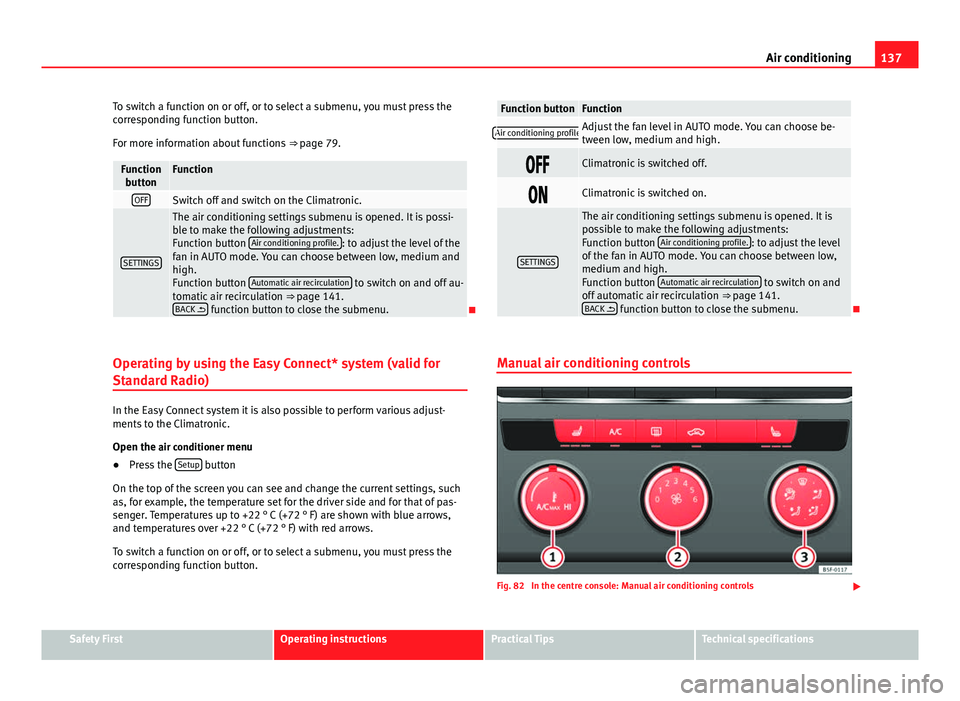
Manual air conditioning controls
Fig. 82 In the centre console: Manual air conditioning controls
Safety FirstOperating instructionsPractical TipsTechnical specifications
Page 141 of 289

140Air conditioning
● Turn the air distribution control to the required position.
● Press the button
to switch on the cooling system. The button will
light up.
With Climatronic
● Press button
.
● Set the temperature to +22 °C (+72 °F).
● Open and direct all the air outlets in the dash panel.
Climatronic: change the temperature unit on the screen of the radio or on
the factory-fitted navigation system
Changing the temperature display from Celsius to Fahrenheit on radio or on
the factory-fitted navigation system is done using the menu on the instru-
ment panel ⇒ page 73.
The cooling system cannot be activated
If the air conditioning system cannot be switched on, this may be caused by
the following:
● The engine is not running.
● The fan is switched off.
● The air conditioner fuse has blown.
● The outside temperature is lower than approximately +3 °C (+38 °F).
● The air conditioner compressor has been temporarily switched off be-
cause the engine coolant temperature is too high.
● Another fault in the vehicle. Have the air conditioner checked by a speci-
alised workshop.
Special Characteristics
If the humidity and temperature outside the vehicle are high, condensation
can drip off the evaporator in the cooling system and form a pool under-
neath the vehicle. This is normal and does not indicate a leak!
Note
After starting the engine, any residual humidity in the air conditioner could
mist over the windscreen. Switch on the defrost function as soon as possi-
ble to clear the windscreen of condensation.
Air vents
Fig. 84 On the dash panel: air vents Air vents
To ensure proper heating, cooling and ventilation in the vehicle interior, air
vents ⇒ Fig. 84 1
should remain open.
● Turn the corresponding thumbwheel (detail) in the required direction to
open and close the air vents. When the thumbwheel is in the position, the
corresponding air vent is closed.
● Change the air direction using the ventilation grille lever.
Page 150 of 289

149
Driving
Speed warning function
Introduction
The speed warning function can help prevent you exceeding
a particular pre-set maximum speed. The speed warning function will warn the driver if a pre-set maximum speed
is exceeded. The system gives a warning buzzer signal if the set speed is
exceeded by about 3 km/h (2 mph). The warning lamp and the driver
message Speed limit exceeded! will be displayed simultaneously on the in-
strument panel display. The warning lamp switches off when reducing
speed below the stored maximum limit.
You are recommended to store this speed limit warning if you always wish
to be reminded of a particular speed limit. This could be when driving in
countries with general speed limits, or if a particular speed should not be
exceeded when winter tyres are fitted etc.
Note
● Please bear in mind that, even with the speed warning function, it is still
important to keep an eye on the vehicle speed with the speedometer and to
observe the legal speed limits.
● The speed limit warning function in the version for several countries
warns you at a speed of 120 km/h (80 mph). This is a factory-set speed lim-
it. Setting speed limit warning
You can use the radio or the Easy Connect* to set, alter or
cancel the speed limit warning.
Vehicles with radio
– Select: SETUP
button > control button
Driver assistant > Speed
warning.
Vehicles with Easy Connect
– Select: Systems control button or Vehicle systems > Driver assis-
tant > Speed warning.
The warning limit can be set from 30 to 240 km/h (20 to 150 mph). The ad-
justment is done in 10 km/h (mph) intervals.
Start-Stop system*
Description and operation
The Start-Stop system helps save fuel and reduce CO 2 emissions.
In Start-Stop mode, the engine will automatically switch off when the vehi-
cle stops, when stopping at traffic lights for example. The ignition remains
switched on during the stopping phase. The engine automatically switches
back on when required.
As soon as the ignition is switched on, the Start-Stop function is automati-
cally activated.
Safety FirstOperating instructionsPractical TipsTechnical specifications
Page 181 of 289

180Driver assistance systems
Activating/Deactivating
Fig. 104 Centre console:
parking aid button
Switching on
– Engage reverse gear or
– Press the button on the centre console ⇒ Fig. 104. A short
confirmation signal will be heard and the button symbol will
light up yellow.
Switching off
– Drive forwards at more than 10 km/h (6 mph), or
– Press the
button, or
– Switch the ignition off Segments of the visual indication
The distance of separation from the obstacle can be estimated using the
segments around the vehicle. With certain equipment (Radio Standard), the
yellow lines* mark the estimated path, depending on the angle of the
turned steering wheel. A white segment is seen when an obstacle is detec-
ted out of the path of the vehicle. The red segments represent obstacles de-
tected within the path. As the vehicle approaches an obstacle, the seg-
ments are displayed closer to the vehicle. When the penultimate segment is
displayed, this means that the vehicle has reached the collision zone. In the
collision zone the obstacles are represented in red, including those out of
the path. Do not continue to move forward (or backward)
⇒
in General
information on page 178, ⇒ in General information on page 178 !
Automatic activation 1)
When the parking aid (ParkPilot) is automatically switched on this is shown
in miniature on the left side of the display.
When slowly approaching an obstacle located in front of the vehicle, the au-
tomatic activation only functions each time the speed is reduced below ap-
proximately 10 km/h (6 mph) for the first time. If the parking aid is deactiva-
ted using the button, the following actions must be carried out in order
for it to automatically reactivate:
● Switch off the ignition and switch it on again.
● ALTERNATIVELY: Accelerate above 10 km/h (6 mph) before reducing
speed below this number again.
● ALTERNATIVELY: Place the selector lever in position P and then move it
from this position.
● ALTERNATIVELY: Switch on and off the automatic activation in the Easy
Connect system menu.
The automatic activation with parking aid miniature indication can be
switched on and off from the Easy Connect system menu ⇒ page 81:
1)
Available only with certain equipment.
Page 182 of 289

181
Driver assistance systems
● Switch the ignition on.
● Press button
.
● Press the Setup function button.
● Press the Parking and Manoeuvring function button.
● Select the parking aid (ParkPilot) from the list.
● Automatic activation.
When the function button check box is activated , the function is on.
Adjusting the display and audible warnings
The settings for the display and audible warnings are con-
trolled via the Easy Connect*.
Requirements: the parking aid must be switched on.
– Select: button CAR
> control button Car* Systems > Driver assis-
tant > Parking aid ⇒ page 81.
Automatic activation 1)
on – activates the Automatic activation option ⇒ page 180
off – deactivates the Automatic activation option ⇒ page 180.
Front volume
Volume in the front and rear area.
Front sound settings
Frequency (tone) of the sound in the front area. Rear volume
Volume in the rear area
Rear sound settings
Frequency (tone) of the sound in the rear area.
Adjust volume
With the parking aid switched on, the active audio/video source volume will
be reduced to the intensity of the selected setting.
You will hear a short test tone from the corresponding speaker each time
you make a new setting.
Error messages
When the parking aid is activated or when switching it on, if a continuous
warning can be heard over several seconds (additionally, in the case of Plus
parking aid the LED of the button flashes), there is a fault in the system.
If the fault does not disappear before switching off the ignition, the next
time the parking aid is switched on by engaging reverse gear the fault will
only be indicated with the flashing LED on the button.
Plus parking aid*
If there is a fault in a sensor, the symbol is displayed on the Easy Con-
nect display in front of/behind the vehicle. If a rear sensor is faulty, only the
obstacles in the areas A
and B are displayed ⇒ Fig. 103. If a front sensor
is faulty, only the obstacles in the areas C and D are displayed.
Have the fault corrected by a specialised workshop without delay.
1)
available only with certain equipment - Radio Standard
Safety FirstOperating instructionsPractical TipsTechnical specifications
Page 199 of 289

198Care and cleaning
Care and cleaning
General information
Regular care helps to maintain the value of the vehicle.
Regular and careful care helps to maintain the value of the vehicle. This may
also be one of the requirements for upholding any warranty claims in the
event of corrosion or paint defects.
SEAT Official Services and specialist retailers carry stocks of suitable car
care materials. Please follow the instructions for use on the packaging.
WARNING
● Cleaning products and other materials used for car care can be dam-
aging to your health if misused.
● Always keep care products in a safe place, out of the reach of chil-
dren. Failure to comply could result in poisoning.
For the sake of the environment
● If possible, use environmentally friendly products.
● The remains of car care products should not be disposed of with ordina-
ry household waste. Care of vehicle exterior
Washing the vehicle
The longer substances such as insects, bird droppings, resinous tree sap,
road dirt, industrial deposits, tar, soot or road salt and other aggressive ma-
terials remain on the vehicle, the more damage they do to the paintwork.
High temperatures (for instance due to strong sunlight) further intensify the
corrosive effect.
After the period when salt is put on the roads it is important to have the un-
derside of the vehicle washed thoroughly.
Automatic car washes
Before going through a car wash, be sure to take the usual precautions such
as closing the windows and roof. If the vehicle has special accessories such
as spoilers or a roof carrier or two-way radio aerial, etc., it is advisable to
consult the car wash operator.
It is best to use a car wash without revolving bristles if possible.
Washing the vehicle with a high pressure cleaner
When washing the vehicle with a high-pressure cleaner, always follow the
operating instructions for the equipment. This applies particularly to the op-
erating pressure and the spraying distance. Do not hold the nozzle too
close to soft materials such as rubber hoses or seals. The same applies to
the parking aid sensors*, which are located in the rear bumper.
Do not use a nozzle that sprays the water out in a direct stream or one that
has a rotating jet for forcing off dirt.
Page 203 of 289

202Care and cleaning
Care of the vehicle interior
Radio display/Easy Connect* and control panel*
The display can be cleaned with a soft cloth and a professionally available
“LCD cleaner”. Moisten the cloth with a small amount of the cleaning fluid.
The Easy Connect control panel* should first be cleaned with a brush so
that no dirt goes into the device or between the keys and housing. Next, we
recommend cleaning the Easy Connect control panel* using a cloth damp-
ened with water and washing-up liquid.
CAUTION
● To avoid scratching the screen, do not wipe the display with a dry cloth.
● To avoid damage, ensure that no liquid goes into the Easy Connect con-
trol panel*.
Plastic and leatherette parts
Plastic parts and leatherette can be cleaned with a damp cloth. If this is not
sufficient, plastic parts and leatherette should only be treated with a special
solvent-free plastic cleaner .
Textile covers and trim parts
Textile covers and trim parts (e.g. seats, door trim) should be cleaned regu-
larly with a vacuum cleaner. This will remove surface dirt which could other-
wise be rubbed into the textile material during use. Do not use steam clean-
ers, as the steam could carry the dirt deeper into the textile material. Normal cleaning
We recommend that you use a soft sponge or a commercially available lint-
free, micro-fibre cloth for normal cleaning. Only use brushes on floor cover-
ings and mats, as other textile surfaces could become damaged.
In the case of normal surface dirt you can use a foam cleaner. Use a sponge
to spread the foam on the textile surface and to work it into the material
lightly. However, make sure that the textile material does not become soak-
ing wet. Then dab off the foam with a dry and absorbent cloth (e.g. a micro-
fibre cloth) and vacuum off any residue once the surface is completely dry.
Cleaning stains
Treat drink stains (such as coffee or fruit juice, etc.) with a cleaning solution
for delicate fabrics. The cleaning product solution should be applied with a
sponge. If the stains are difficult to remove, a washing paste can be applied
directly onto the stain and worked into the fabric. The surface will then have
to be wiped with clear water to remove any residue left by the paste. To do
so, use a damp cloth or sponge and then dab the stain with an absorbent
cloth.
Remove chocolate or make-up stains with a cleaning paste (for e.g., soft
soap). Then remove the soap with water (wet sponge).
A spirit-based cleaner can be used to remove grease, oil, lipstick or ball
point pen. Then dab the dissolved grease or colour particles off with an ab-
sorbent cloth or similar. You may also have to treat the stain once more us-
ing washing paste and water.
If the covers or textile trim panels are badly soiled we recommend that you
have them cleaned by a professional cleaning company with a shampoo
and spray.Note
Open Velcro fasteners on clothes can damage the seat upholstery. Make
sure that Velcro fasteners are closed.
Page 231 of 289

230Accessories and modifications to the vehicle
Accessories and modifications to the vehicle
Accessories, replacement parts and repairs
Always ask your dealer or specialist retailer for advice be-
fore purchasing accessories and replacement parts.
Your vehicle is designed to offer a high standard of active and passive safe-
ty. For this reason, we recommend that you ask a SEAT Official Service for
advice before fitting accessories or replacement parts. Your SEAT Official
Service has the latest information from the manufacturer and can recom-
mend accessories and replacement parts which are suitable for your re-
quirements. They can also answer any questions you might have regarding
official regulations.
We recommend you to use only SEAT accessories and Genuine SEAT parts ®
.
SEAT has tested these parts and accessories for suitability, reliability and
safety. SEAT Official Services have the necessary experience and facilities to
ensure that the parts are installed correctly and professionally.
Any retro-fitted equipment which has a direct effect on the vehicle and/or
the way it is driven (e.g. cruise control system or electronically-controlled
suspension) must be approved for use in your vehicle and bear the e mark
(the European Union's authorisation symbol).
If any additional electrical components are fitted which do not serve to con-
trol the vehicle itself (for instance a refrigerator box, laptop or ventilator fan,
etc.), these must bear the mark (manufacturer conformity declaration in
the European Union).
WARNING
Accessories, for example telephone holders or cup holders, should never
be fitted on the covers, or within the working range of the airbags. Other-
wise, there is a danger of injury if the airbag is triggered in an accident.
Technical modifications
Modifications must always be carried out according to our
specifications.
Unauthorised modifications to the electronic components, software, wiring
or data transfer in the vehicle may cause malfunctioning. Due to the way the
electronic components are linked together in networks, other indirect sys-
tems may be affected by the faults. This can seriously impair safety, lead to
excessive wear of components, and also invalidate your vehicle registration
documents.
You will appreciate that your SEAT dealership cannot be held liable for any
damage caused by modifications and/or work performed incorrectly.
We recommend that all work should be performed by a SEAT Official Service
using Genuine SEAT parts
®
.
WARNING
Incorrectly performed modifications or other work on your vehicle can
lead to malfunctions and cause accidents.
Radio transmitters and business equipment
Radio transmitters (fixed installation)
Any retrofit installations of radio transmitters in the vehicle require prior ap-
proval. SEAT generally authorises in-vehicle installations of approved types
of radio transmitters provided that:
Page 232 of 289

231
Accessories and modifications to the vehicle
● the aerial is installed correctly.
● the aerial is installed on the exterior of the vehicle (and shielded cables
are used together with non-reflective aerial trimming).
● the effective transmitting power does not exceed 10 Watts at the aerial
base.
A SEAT Official Service and specialised workshop will be able to inform you
about options for installing and operating radio transmitters with a higher
transmitting power.
Mobile radio transmitters
Commercial mobile telephones or radio equipment might interfere with the
electronics of your vehicle and cause malfunctions. This may be due to:
● no external aerial
● external aerial incorrectly installed
● transmitting power more than 10 W
You must, therefore, do not operate portable mobile telephones or radio
equipment inside the vehicle without a properly installed external aerial
⇒
.
Please note also that the maximum range of the equipment can only be ach-
ieved with an external aerial.
Business equipment
Retrofit installation of business or private equipment in the vehicle is per-
mitted, provided the equipment cannot interfere with the driver's immedi-
ate control of the vehicle and that any such equipment carries the mark.
Any retrofit equipment that could influence the driver's control of the vehi-
cle must have a type approval for your vehicle and must carry the e mark.
WARNING
Mobile telephones or radio equipment which is operated inside the vehi-
cle without a properly installed external aerial can create excessive mag-
netic fields that could cause a health hazard.
Note
● The posterior fitting of electric and electronic equipment in this vehicle
affects its licence type and could lead to the withdrawal of the vehicle regis-
tration document under certain circumstances.
● Please use the mobile telephone/radio operating instructions.
Safety FirstOperating instructionsPractical TipsTechnical specifications
Page 241 of 289

240Emergencies
To benefit from the advantages of tyres with this type of tread pattern, the
defective tyre should be replaced as soon as possible so that all tyres again
rotate in the correct direction.
After changing a wheel
– On alloy wheels: replace the wheel bolt caps.
– On plate wheels: replace the wheel hubcap ⇒ page 236.
– Put the tools and jack back in the luggage compartment.
– If the replaced wheel does not fit in the spare wheel housing,
store it safely in the luggage compartment ⇒ page 17.
– Check the tyre pressure of the newly mounted tyre as soon as
possible.
– In vehicles fitted with a tyre pressure indicator, adjust the pres-
sure and store the reading in the radio/Easy Connect system*
⇒ page 175.
– The wheel bolts should be tightened to 120 Nm. Check the tor-
que as soon as possible with a torque wrench. Meanwhile, drive
carefully.
– Have the flat tyre replaced as quickly as possible. Spare wheel
General information
Fig. 125 Compact tem-
porary spare wheel:
raised floor panel
The temporary spare wheel has been designed to be used for short
periods of time. Have the tyres checked, and if necessary, replaced
as soon as possible at a SEAT Official Service or at a specialised
workshop.
Please note the following restrictions when using the compact tem-
porary spare wheel. The compact temporary spare wheel is de-
signed specifically for this model. For this reason, do not use a
temporary spare wheel from a different type of vehicle.
Removing the temporary spare wheel
– Lift and hold up the floor panel to remove the temporary spare
wheel ⇒ Fig. 125.
– Turn the thumb wheel anti-clockwise.