radio Seat Leon 5D 2012 Owner's manual
[x] Cancel search | Manufacturer: SEAT, Model Year: 2012, Model line: Leon 5D, Model: Seat Leon 5D 2012Pages: 289, PDF Size: 3.81 MB
Page 5 of 289
Trailer . . . . . . . . . . . . . . . . . . . . . . . . . . . . . . . . . . . . . 194
Trailer towing . . . . . . . . . . . . . . . . . . . . . . . . . . . . . 194
Retrofitting a towing bracket* . . . . . . . . . . . . . . . 196
Care and cleaning . . . . . . . . . . . . . . . . . . . . . . . . . 198
General information . . . . . . . . . . . . . . . . . . . . . . . 198
Care of vehicle exterior . . . . . . . . . . . . . . . . . . . . . 198
Care of the vehicle interior . . . . . . . . . . . . . . . . . . 202
Checking and refilling levels . . . . . . . . . . . . . . . 206
Fuel . . . . . . . . . . . . . . . . . . . . . . . . . . . . . . . . . . . . 206
Filling the tank . . . . . . . . . . . . . . . . . . . . . . . . . . . . 207
Bonnet . . . . . . . . . . . . . . . . . . . . . . . . . . . . . . . . . . 209
Engine oil . . . . . . . . . . . . . . . . . . . . . . . . . . . . . . . . 211
Cooling system . . . . . . . . . . . . . . . . . . . . . . . . . . . 215
Brake fluid . . . . . . . . . . . . . . . . . . . . . . . . . . . . . . . 217
Battery . . . . . . . . . . . . . . . . . . . . . . . . . . . . . . . . . . 217
Windscreen washer reservoir and wiper blades . 220
Wheels and tyres . . . . . . . . . . . . . . . . . . . . . . . . . . 223
Wheels . . . . . . . . . . . . . . . . . . . . . . . . . . . . . . . . . . 223
Accessories and modifications to the vehicle 230
Accessories, replacement parts and repairs . . . . 230
Technical modifications . . . . . . . . . . . . . . . . . . . . 230
Radio transmitters and business equipment . . . 230
Emergencies . . . . . . . . . . . . . . . . . . . . . . . . . . . . . . 232
General information . . . . . . . . . . . . . . . . . . . . . . . 232
Equipment . . . . . . . . . . . . . . . . . . . . . . . . . . . . . . . 232
Tyre repair kit . . . . . . . . . . . . . . . . . . . . . . . . . . . . . 233
Changing a wheel . . . . . . . . . . . . . . . . . . . . . . . . . 235
Spare wheel . . . . . . . . . . . . . . . . . . . . . . . . . . . . . . 240
Jump starting . . . . . . . . . . . . . . . . . . . . . . . . . . . . . 241
Towing and tow-starting the vehicle . . . . . . . . . . 244
Fuses and bulbs . . . . . . . . . . . . . . . . . . . . . . . . . . . 249
Electrical fuses . . . . . . . . . . . . . . . . . . . . . . . . . . . 249
Bulbs . . . . . . . . . . . . . . . . . . . . . . . . . . . . . . . . . . . 252
Changing bulbs in headlight unit . . . . . . . . . . . . 254
Changing bulb for front fog light . . . . . . . . . . . . . 256
Changing tail light bulbs (on side panel) . . . . . . 257 Changing tail light bulbs (on rear lid) . . . . . . . . . 259
Changing number plate light bulbs . . . . . . . . . . . 261
Technical specifications . . . . . . . . . . . . 263
Technical specifications . . . . . . . . . . . . . . . . . . . . 263
Important . . . . . . . . . . . . . . . . . . . . . . . . . . . . . . . . 263
Vehicle identification data . . . . . . . . . . . . . . . . . . 264
Information on fuel consumption . . . . . . . . . . . . 265
Towing a trailer . . . . . . . . . . . . . . . . . . . . . . . . . . . 265
Wheels . . . . . . . . . . . . . . . . . . . . . . . . . . . . . . . . . . 266
Engine specifications . . . . . . . . . . . . . . . . . . . . . . 267
Dimensions and capacities . . . . . . . . . . . . . . . . . 276
Index . . . . . . . . . . . . . . . . . . . . . . . . . . . . . . . . . . . 277
4Table of Contents
Page 60 of 289
59
Controls and displays
Operating instructions Controls and displays
Overview
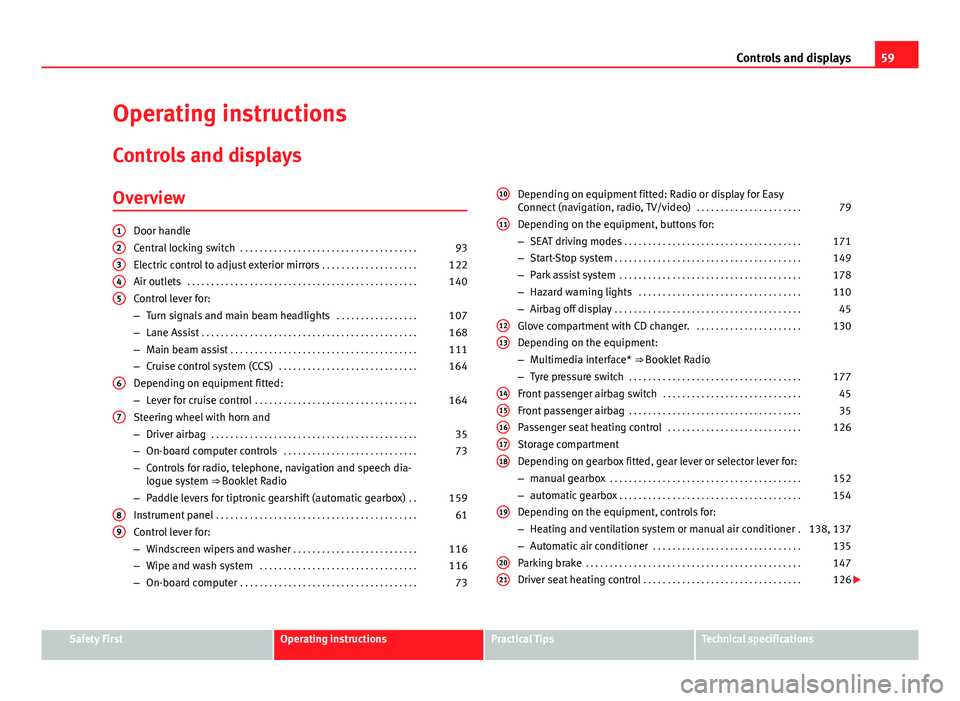
Door handle
Central locking switch . . . . . . . . . . . . . . . . . . . . . . . . . . . . . . . . . . . . . 93
Electric control to adjust exterior mirrors . . . . . . . . . . . . . . . . . . . .122
Air outlets . . . . . . . . . . . . . . . . . . . . . . . . . . . . . . . . . . . . . . . . . . . . . . . . 140
Control lever for:
– Turn signals and main beam headlights . . . . . . . . . . . . . . . . .107
– Lane Assist . . . . . . . . . . . . . . . . . . . . . . . . . . . . . . . . . . . . . . . . . . . . . 168
– Main beam assist . . . . . . . . . . . . . . . . . . . . . . . . . . . . . . . . . . . . . . . 111
– Cruise control system (CCS) . . . . . . . . . . . . . . . . . . . . . . . . . . . . . 164
Depending on equipment fitted:
– Lever for cruise control . . . . . . . . . . . . . . . . . . . . . . . . . . . . . . . . . . 164
Steering wheel with horn and
– Driver airbag . . . . . . . . . . . . . . . . . . . . . . . . . . . . . . . . . . . . . . . . . . . 35
– On-board computer controls . . . . . . . . . . . . . . . . . . . . . . . . . . . . 73
– Controls for radio, telephone, navigation and speech dia-
logue system ⇒ Booklet Radio
– Paddle levers for tiptronic gearshift (automatic gearbox) . .159
Instrument panel . . . . . . . . . . . . . . . . . . . . . . . . . . . . . . . . . . . . . . . . . . 61
Control lever for:
– Windscreen wipers and washer . . . . . . . . . . . . . . . . . . . . . . . . . . 116
– Wipe and wash system . . . . . . . . . . . . . . . . . . . . . . . . . . . . . . . . . 116
– On-board computer . . . . . . . . . . . . . . . . . . . . . . . . . . . . . . . . . . . . . 73
12345
6
7
89
Depending on equipment fitted: Radio or display for Easy
Connect (navigation, radio, TV/video)
. . . . . . . . . . . . . . . . . . . . . .79
Depending on the equipment, buttons for:
– SEAT driving modes . . . . . . . . . . . . . . . . . . . . . . . . . . . . . . . . . . . . . 171
– Start-Stop system . . . . . . . . . . . . . . . . . . . . . . . . . . . . . . . . . . . . . . . 149
– Park assist system . . . . . . . . . . . . . . . . . . . . . . . . . . . . . . . . . . . . . . 178
– Hazard warning lights . . . . . . . . . . . . . . . . . . . . . . . . . . . . . . . . . . 110
– Airbag off display . . . . . . . . . . . . . . . . . . . . . . . . . . . . . . . . . . . . . . . 45
Glove compartment with CD changer. . . . . . . . . . . . . . . . . . . . . . .130
Depending on the equipment:
– Multimedia interface* ⇒ Booklet Radio
– Tyre pressure switch . . . . . . . . . . . . . . . . . . . . . . . . . . . . . . . . . . . . 177
Front passenger airbag switch . . . . . . . . . . . . . . . . . . . . . . . . . . . . . 45
Front passenger airbag . . . . . . . . . . . . . . . . . . . . . . . . . . . . . . . . . . . . 35
Passenger seat heating control . . . . . . . . . . . . . . . . . . . . . . . . . . . . 126
Storage compartment
Depending on gearbox fitted, gear lever or selector lever for:
– manual gearbox . . . . . . . . . . . . . . . . . . . . . . . . . . . . . . . . . . . . . . . . 152
– automatic gearbox . . . . . . . . . . . . . . . . . . . . . . . . . . . . . . . . . . . . . . 154
Depending on the equipment, controls for:
– Heating and ventilation system or manual air conditioner .138, 137
– Automatic air conditioner . . . . . . . . . . . . . . . . . . . . . . . . . . . . . . . 135
Parking brake . . . . . . . . . . . . . . . . . . . . . . . . . . . . . . . . . . . . . . . . . . . . . 147
Driver seat heating control . . . . . . . . . . . . . . . . . . . . . . . . . . . . . . . . . 126
10
11
1213
1415161718
19
2021
Safety FirstOperating instructionsPractical TipsTechnical specifications
Page 68 of 289
67
Instruments and warning/control lamps
Trip recorder
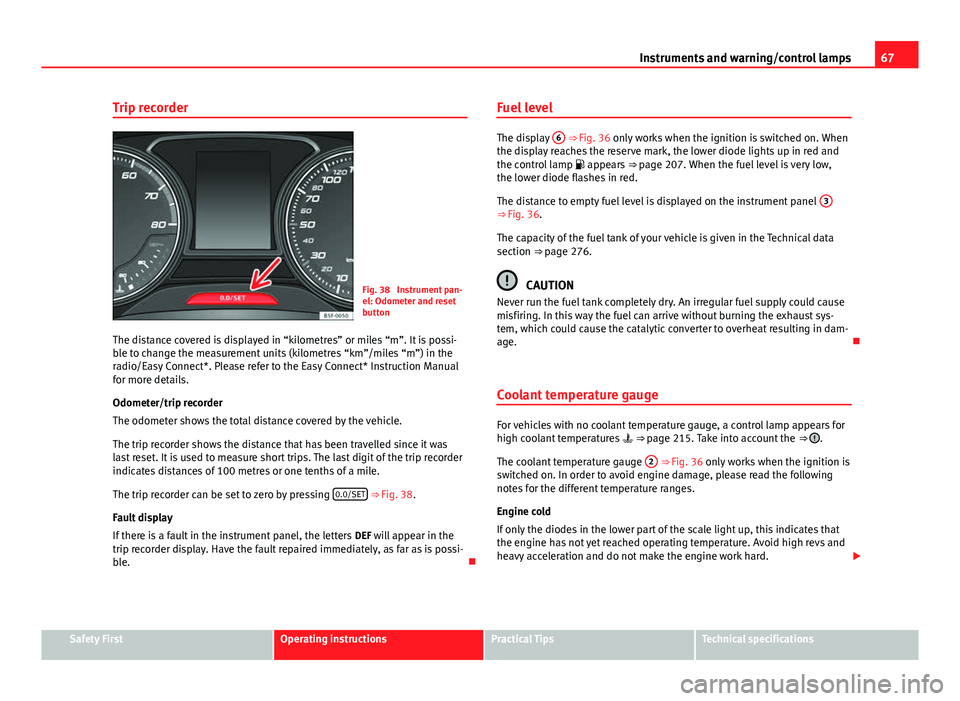
Fig. 38 Instrument pan-
el: Odometer and reset
button
The distance covered is displayed in “kilometres” or miles “m”. It is possi-
ble to change the measurement units (kilometres “km”/miles “m”) in the
radio/Easy Connect*. Please refer to the Easy Connect* Instruction Manual
for more details.
Odometer/trip recorder
The odometer shows the total distance covered by the vehicle.
The trip recorder shows the distance that has been travelled since it was
last reset. It is used to measure short trips. The last digit of the trip recorder
indicates distances of 100 metres or one tenths of a mile.
The trip recorder can be set to zero by pressing 0.0/SET
⇒ Fig. 38.
Fault display
If there is a fault in the instrument panel, the letters DEF will appear in the
trip recorder display. Have the fault repaired immediately, as far as is possi-
ble. Fuel level
The display
6 ⇒ Fig. 36 only works when the ignition is switched on. When
the display reaches the reserve mark, the lower diode lights up in red and
the control lamp appears ⇒ page 207. When the fuel level is very low,
the lower diode flashes in red.
The distance to empty fuel level is displayed on the instrument panel 3
⇒ Fig. 36.
The capacity of the fuel tank of your vehicle is given in the Technical data
section ⇒ page 276.
CAUTION
Never run the fuel tank completely dry. An irregular fuel supply could cause
misfiring. In this way the fuel can arrive without burning the exhaust sys-
tem, which could cause the catalytic converter to overheat resulting in dam-
age.
Coolant temperature gauge
For vehicles with no coolant temperature gauge, a control lamp appears for
high coolant temperatures ⇒ page 215. Take into account the ⇒ .
The coolant temperature gauge 2
⇒ Fig. 36 only works when the ignition is
switched on. In order to avoid engine damage, please read the following
notes for the different temperature ranges.
Engine cold
If only the diodes in the lower part of the scale light up, this indicates that
the engine has not yet reached operating temperature. Avoid high revs and
heavy acceleration and do not make the engine work hard.
Safety FirstOperating instructionsPractical TipsTechnical specifications
Page 74 of 289
73
Driver information system
Driver information system Information system
Introduction
With the ignition switched on, it is possible to read the different functions of
the display by scrolling through the menus.
In vehicles with multifunction steering wheel, the multifunction display can
only be operated with the multifunction steering wheel buttons.
The number of menus displayed on the instrument panel will vary according
to the vehicle electronics and equipment.
A specialised workshop will be able to programme or modify additional
functions, according to the vehicle equipment. SEAT recommends visiting a
SEAT Official Service.
Some menu options can only be read when the vehicle is at a standstill.
As long as a priority 1 warning is displayed, it will not be possible to read
the menus. Some warning messages can be confirmed and made to disap-
pear with the windscreen wiper lever button or the multifunction steering
wheel button.
Additional information and warnings:
● Easy Connect system ⇒ page 79
● Driver assistance systems ⇒ page 164
● Radio or navigation system ⇒ Booklet Radio or ⇒ Booklet Navigation
system
WARNING
Any distraction may lead to an accident, with the risk of injury.
● Do not read the instrument panel display menus when driving.
Overview of the menu structure
Driving data ⇒ page 75
■ Vehicle status
■ MFD from departure
■ MFD from refuelling
■ MFD total calculation
Assist systems ⇒ table on page 75
■ Activate/deactivate Lane Assist
■ Reverse (optional)
Navigation ⇒ Booklet Navigation system Audio ⇒ Booklet Radio or ⇒ Booklet Navigation systemTelephone ⇒ Booklet Bluetooth systemVehicle ⇒ table on page 75
Safety FirstOperating instructionsPractical TipsTechnical specifications
Page 76 of 289
75
Driver information system
Button for the driving assistance systems
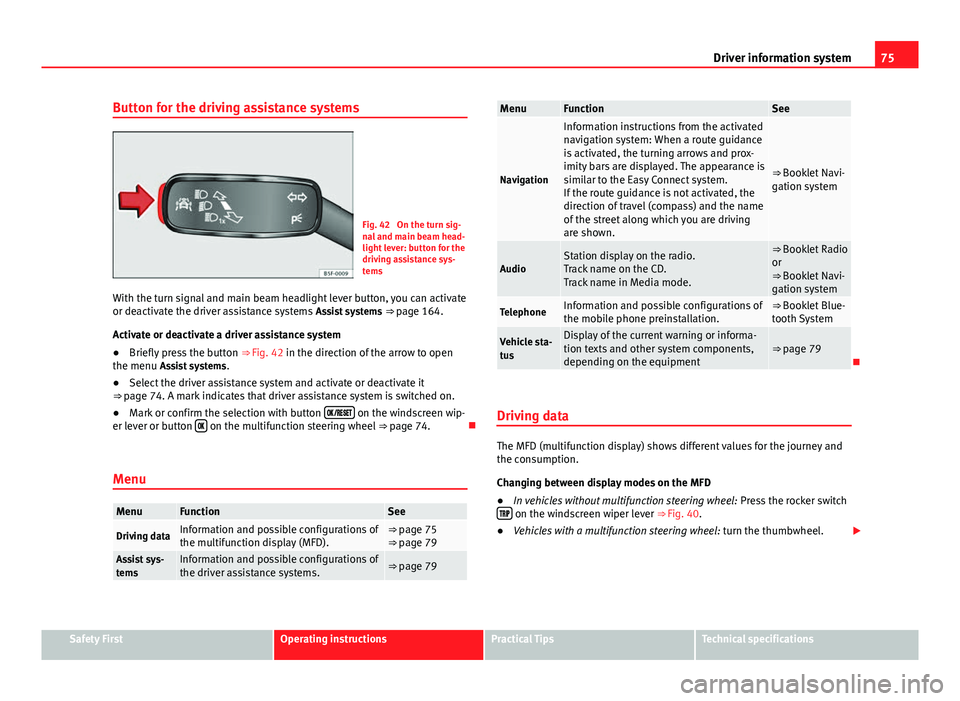
Fig. 42 On the turn sig-
nal and main beam head-
light lever: button for the
driving assistance sys-
tems
With the turn signal and main beam headlight lever button, you can activate
or deactivate the driver assistance systems Assist systems ⇒ page 164.
Activate or deactivate a driver assistance system
● Briefly press the button ⇒ Fig. 42 in the direction of the arrow to open
the menu Assist systems .
● Select the driver assistance system and activate or deactivate it
⇒ page 74. A mark indicates that driver assistance system is switched on.
● Mark or confirm the selection with button
on the windscreen wip-
er lever or button on the multifunction steering wheel
⇒ page 74.
Menu
MenuFunctionSee
Driving dataInformation and possible configurations of
the multifunction display (MFD).⇒ page 75
⇒ page 79
Assist sys-
temsInformation and possible configurations of
the driver assistance systems.⇒ page 79
MenuFunctionSee
Navigation
Information instructions from the activated
navigation system: When a route guidance
is activated, the turning arrows and prox-
imity bars are displayed. The appearance is
similar to the Easy Connect system.
If the route guidance is not activated, the
direction of travel (compass) and the name
of the street along which you are driving
are shown.
⇒ Booklet Navi-
gation system
AudioStation display on the radio.
Track name on the CD.
Track name in Media mode.⇒ Booklet Radio
or
⇒ Booklet Navi-
gation system
TelephoneInformation and possible configurations of
the mobile phone preinstallation.⇒ Booklet Blue-
tooth System
Vehicle sta-
tusDisplay of the current warning or informa-
tion texts and other system components,
depending on the equipment⇒ page 79
Driving data
The MFD (multifunction display) shows different values for the journey and
the consumption.
Changing between display modes on the MFD
● In vehicles without multifunction steering wheel: Press the rocker switch
on the windscreen wiper lever ⇒ Fig. 40.
● Vehicles with a multifunction steering wheel: turn the thumbwheel.
Safety FirstOperating instructionsPractical TipsTechnical specifications
Page 84 of 289

83
Introduction to the Easy Connect system*
– Press the Opening and closing
function button to open the Open-
ing and closing settings menu.
When the function button check box is activated , the function is active.
Pressing the menu button
will always take you to the last menu used.
MenuSubmenuPossible settingDescription
Opening and
Closing settings
Radio-operated
remote controlConvenience open
function.⇒ page 91
Central locking
Unlocking doors, au-
tomatic locking/un-
locking, audible
confirmation.
⇒ page 86
Any changes made using the settings menus are automatically saved on
closing those menus.
WARNING
Any distraction may lead to an accident, with the risk of injury. Operating
the Easy Connect system while driving could distract you from traffic.
Multifunction Display settings menu
–Switch the ignition on.
– Switch on the Easy Connect system.
– Press the Easy Connect button
.
– Press the Setup
function button. –
Press the Multifunction Display
function button to open the Multi-
function Display settings menu.
When the function button check box is activated , the function is active.
Pressing the menu button
will always take you to the last menu used.
MenuSubmenuPossible settingDescription
Multifunction dis-
play settings–
Current consumption, aver-
age consumption, volume
to fill up, convenience
equipments, ECOAdvice,
duration of journey, dis-
tance travelled, digital
average speed display,
speed, speeding warning,
oil temperature, coolant
temperature, restore data
“from start”, restore “total
calculation” data.
⇒ page 73
Any changes made using the settings menus are automatically saved on
closing those menus.
WARNING
Any distraction may lead to an accident, with the risk of injury. Operating
the Easy Connect system while driving could distract you from traffic.
Safety FirstOperating instructionsPractical TipsTechnical specifications
Page 90 of 289
89
Opening and closing
CAUTION
All of the vehicle keys contain electronic components. Protect the vehicle
keys from damage, impacts and humidity.
Note
● Only use the key button when you require the corresponding function.
Pushing the button unnecessarily could accidentally unlock the vehicle or
trigger the alarm. It is also possible even when you are outside the radius of
action.
● Key operation can be greatly influenced by overlapping radio signals
close the vehicle working in the same range of frequencies, for example, ra-
dio transmitters, mobile telephones.
● Obstacles between the remote control and the vehicle, bad weather con-
ditions and discharged batteries can considerably reduce the range of the
remote control.
● If buttons ⇒ Fig. 43 or ⇒ Fig. 44 on the vehicle key, or one of the central
locking buttons ⇒ page 93 are pressed repeatedly in short succession,
the central locking is briefly switched off to protect against overloading. The
vehicle is then unlocked. Lock the vehicle if necessary. Control lamp on the vehicle key
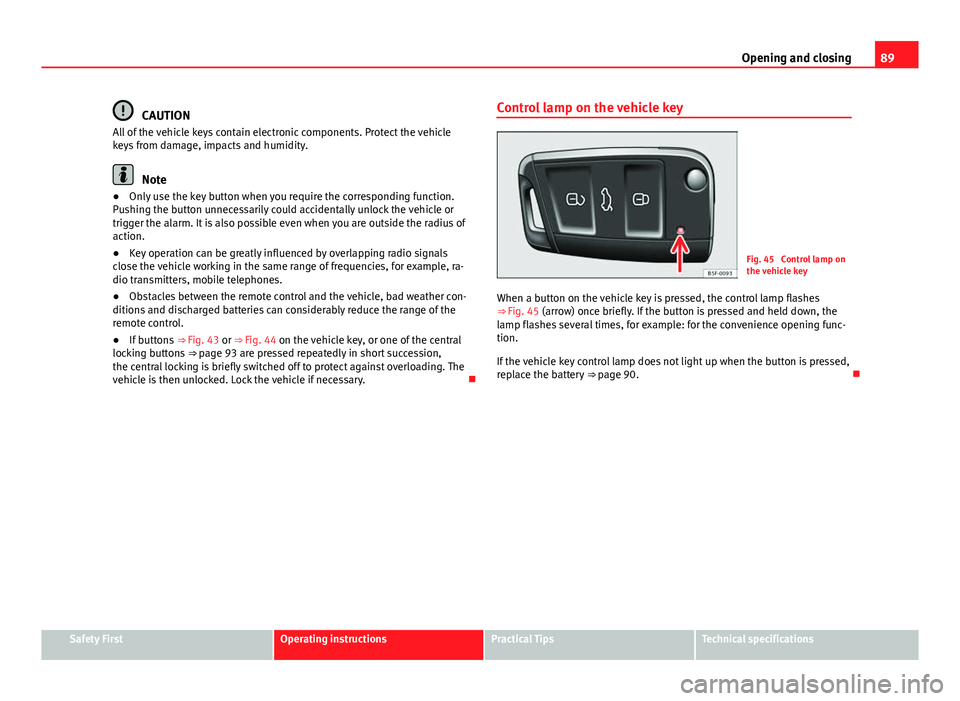
Fig. 45 Control lamp on
the vehicle key
When a button on the vehicle key is pressed, the control lamp flashes
⇒ Fig. 45 (arrow) once briefly. If the button is pressed and held down, the
lamp flashes several times, for example: for the convenience opening func-
tion.
If the vehicle key control lamp does not light up when the button is pressed,
replace the battery ⇒ page 90.
Safety FirstOperating instructionsPractical TipsTechnical specifications
Page 93 of 289

92Opening and closing
Unlocking all the doors, the rear lid and the tank flap
simultaneously.
–Within 5 seconds, press button
on the remote control key
twice, or turn the key to open twice within 5 seconds.
The anti-theft security system* and the anti-theft alarm* are immediately
disabled if you unlock only the driver door, without unlocking the other
doors.
In vehicles with Easy Connect*, you can programme the security central
locking system directly ⇒ page 92.
Programming the central locking system
You can use Easy Connect* to select which doors are unlocked with
the central locking system. Using the radio or the Easy Connect*
system, you can select whether the vehicle automatically closes
with the “Auto Lock” programme at speeds of more than 15 km/h
(10 mph).
Programming the unlocking of the doors (vehicles with Easy
Connect)
– Select: control button Systems or Vehicle systems > Vehicle set-
tings > Central locking > Unlocking doors.
Programming the Auto Lock (vehicles with radio)
– Select: SETUP
button > control button
Central locking > Locking
while driving. Programming the Auto Lock (vehicles with Easy Connect)
–
Select: control button Systems or Vehicle systems > Vehicle set-
tings > Locking while driving.
Unlocking the doors - You can programme the system to unlock all the doors
or only the driver door when you unlock the vehicle. In all the options, the
fuel tank flap is also unlocked.
With the setting, Driver, all the doors and the rear lid are unlocked if button
on the remote control key is pressed twice.
With this setting, you can continue to unlock all the vehicle doors. To do so,
press button
on the remote control key
twice. Or, in vehicles with a con-
ventional key, turn the key to open in the door lock twice within 2 seconds.
If the button
is pressed, all the vehicle doors are locked. At the same
time, a confirmation signal is heard 1)
.
Auto Lock/Locking while driving - If you select on, all the vehicle doors are
locked at speeds above 15 km/h (10 mph).
1)
This function is not available on all export versions.
Page 116 of 289

115
Lights and visibility
Interior and reading lights 1)
Button/
SwitchFunction
Switches interior lights off.
Switches interior lights on.
Switches door contact control on (central position).
The interior lights come on automatically when the vehicle is
unlocked, a door is opened or the key is removed from the ig-
nition.
The lights go off a few seconds after all the doors are closed,
the vehicle is locked or the ignition is switched on.
Turning the reading light on and off
Glove compartment and luggage compartment lighting
When opening and closing the glove compartment on the front passenger
side and the rear lid, the respective light will automatically switch on and
off.
Footwell lighting*
The lights in the footwell area below the dash (driver and front passenger
sides) will switch on when the doors are opened and will decrease in inten-
sity while driving. The intensity of these lights can be adjusted using the ra-
dio menu (see Easy Connect > Adjusting Lighting > Interior lighting⇒ page 81).
Ambient light*
The ambient light in the door panel changes colour (white or red) depend-
ing on the driving mode. The intensity of these lights can be adjusted using the radio menu (see Easy Connect > Adjusting Lights > Interior lighting
⇒ page 81).
Note
The reading lights switch off when the vehicle is locked using a key or after
several minutes if the key is removed from the ignition. This prevents the
battery from discharging.
Sun blind Introduction
WARNING
Folded sun blinds can reduce visibility.
● Always store sun blinds and visors in their housing when not in use.
1)
Depending on the level of equipment fitted in the vehicle, LEDs can be used for the follow-
ing interior lights: front courtesy light, rear courtesy light, footwell light and sun visor light.
Safety FirstOperating instructionsPractical TipsTechnical specifications
Page 137 of 289

136Air conditioning
Control but-
tonAdditional information. Climatronic.
4Indications on the temperature display screen selected for
the right and left sides.
Defrost function. The air drawn in from outside the vehicle is
directed at the windscreen and air recirculation is automati-
cally switched off. To defrost the windscreen more quickly,
the air is dehumidified at temperatures over approximately
+3 °C (+38 °F) and the fan runs at maximum output.
The air is directed at the chest of driver and passengers by
the dash panel air vents.
Air distribution towards the footwell.
Upward air distribution.
Heated rear window: this only works when the engine is run-
ning and switches off automatically after a maximum of 10
minutes.
Air recirculation ⇒ page 141.
Buttons for seat heating ⇒ page 126.
Press the button to switch on or off the cooling system.
Press the button to make maximum cooling capacity availa-
ble. The recirculation of air and the cooling system turn on
automatically and air distribution adjusts automatically to
the position .
Transfer the driver side temperature settings to the passen-
ger side: when the button lamp is lit , the temperature
settings on the driver side also apply to the passenger side.
Press the button or the temperature control on the passenger
side in order to change the temperature on that side. The
button lamp is lit.
Control but- tonAdditional information. Climatronic.
Automatic adjustment of temperature, fan, and air distribu-
tion. Press the button to switch on the function. The button
will light up
.
When the configuration button is pressed the air condi-
tioner management menu will be shown on the Easy Connect
system screen.
Switching offTurn the fan control to the 0 position or press the button .
WARNING
Stuffy or used air will increase fatigue and reduce driver concentration
possibly resulting in a serious accident.
● Never leave the fresh air fan turned off or use the air recirculation for
long periods of time; the air in the vehicle interior will not be refreshed.
Operating by using the Easy Connect* system (valid for
Radio Entry)
In the Easy Connect system it is also possible to perform various adjust-
ments to the Climatronic.
Open the air conditioner menu
● Press the Setup
button
● ALTERNATIVELY: press the MENU button in Easy Connect. With the rotat-
ing switch select the air conditioner menu and open it.
On the screen you can see and change the current settings, for example, the
temperature set for the driver side and for that of the passenger.