speed Seat Leon 5D 2012 Owner's Guide
[x] Cancel search | Manufacturer: SEAT, Model Year: 2012, Model line: Leon 5D, Model: Seat Leon 5D 2012Pages: 289, PDF Size: 3.81 MB
Page 87 of 289

86Opening and closing
Opening and closing
Central locking system
Description
The vehicle can be locked and unlocked via the central locking system.
There are several methods, depending on the vehicle equipment:
● key with remote control ⇒ page 91,
● lock on driver door (emergency opening ⇒ page 97) or
● interior central locking switch ⇒ page 93.
Unlocking one side of the vehicle only
When you lock the vehicle with the key, the doors and the rear lid are
locked. When you open the door, you can either unlock only the driver door,
or all the vehicle doors. To select the required option, use Easy Connect*
⇒ page 92.
Central locking (Auto Lock)
The Auto Lock function locks the doors and the rear lid when the vehicle ex-
ceeds a speed of about 15 km/h (10 mph).
The vehicle is unlocked again when the ignition key is removed. Alternative-
ly, the vehicle can also be unlocked via the central locking switch or by pull-
ing one of the inside door handles. The Auto Lock function can be switched
on and off on the sound system or on the Easy Connect* system
⇒ page 92.
In the event of an accident in which the airbags inflate, the doors will be au-
tomatically unlocked to facilitate access and assistance. Anti-theft security system (Safelock)
1)
The following message is displayed on the instrument panel to remind the
driver that when the vehicle is closed from the outside, the anti-theft securi-
ty system is switched on. Do not forget the Safelock. Please see Instruction
Manual. The vehicle cannot be opened from inside. This makes it more diffi-
cult for unauthorised persons to break into the vehicle ⇒ .
The anti-theft security system can be switched off each time the vehicle is
locked:
● Turn the key a second time to the lock position, in the door lock, for the
next two seconds . If necessary, remove the protective cover on the driver
door handle ⇒ page 97. or
● Press
on the remote control key for a second time
for the following 2
seconds.
The flashing frequency of the diode in the door sill immediately confirms
the process. Initially, the diode flashes in a fast sequence for a brief period,
then it stops for approximately 30 seconds and, lastly continues flashing
slowly.
Anti-theft alarm system*
If the anti-theft alarm system senses interference with the vehicle it triggers
an audible and visible alarm.
The anti-theft alarm system is automatically switched on when locking the
vehicle. It switches off when the vehicle is unlocked from a distance.
When the driver door is unlocked with the key, you should switch on the ig-
nition within 15 seconds. Otherwise the alarm will be triggered. On some
export versions, the alarm is triggered immediately when you open a door.
1)
The availability of this function depends on the vehicle equipment.
Page 93 of 289

92Opening and closing
Unlocking all the doors, the rear lid and the tank flap
simultaneously.
–Within 5 seconds, press button
on the remote control key
twice, or turn the key to open twice within 5 seconds.
The anti-theft security system* and the anti-theft alarm* are immediately
disabled if you unlock only the driver door, without unlocking the other
doors.
In vehicles with Easy Connect*, you can programme the security central
locking system directly ⇒ page 92.
Programming the central locking system
You can use Easy Connect* to select which doors are unlocked with
the central locking system. Using the radio or the Easy Connect*
system, you can select whether the vehicle automatically closes
with the “Auto Lock” programme at speeds of more than 15 km/h
(10 mph).
Programming the unlocking of the doors (vehicles with Easy
Connect)
– Select: control button Systems or Vehicle systems > Vehicle set-
tings > Central locking > Unlocking doors.
Programming the Auto Lock (vehicles with radio)
– Select: SETUP
button > control button
Central locking > Locking
while driving. Programming the Auto Lock (vehicles with Easy Connect)
–
Select: control button Systems or Vehicle systems > Vehicle set-
tings > Locking while driving.
Unlocking the doors - You can programme the system to unlock all the doors
or only the driver door when you unlock the vehicle. In all the options, the
fuel tank flap is also unlocked.
With the setting, Driver, all the doors and the rear lid are unlocked if button
on the remote control key is pressed twice.
With this setting, you can continue to unlock all the vehicle doors. To do so,
press button
on the remote control key
twice. Or, in vehicles with a con-
ventional key, turn the key to open in the door lock twice within 2 seconds.
If the button
is pressed, all the vehicle doors are locked. At the same
time, a confirmation signal is heard 1)
.
Auto Lock/Locking while driving - If you select on, all the vehicle doors are
locked at speeds above 15 km/h (10 mph).
1)
This function is not available on all export versions.
Page 94 of 289

93
Opening and closing
Central locking switch
Fig. 50 Driver door: cen-
tral locking switch
– To lock the vehicle, press the
button ⇒ .
– To unlock the vehicle, press the
button ⇒ Fig. 50.
Please note the following when using the central locking switch to lock your
vehicle:
● It is not possible to open the doors or the rear lid from the outside (for
safety reasons, e.g. when stopped at traffic lights).
● The LED in the central locking switch lights up when all the doors are
closed and locked.
● You can open the doors individually from the inside by pulling the inside
door handle.
● In the event of an accident in which the airbags inflate, doors locked
from the inside will be automatically unlocked to facilitate access and assis-
tance.
WARNING
● The central locking switch also operates when the ignition is switch-
ed off and automatically locks all the vehicle doors when the button
is
pressed.
● The central locking switch does not operate if the vehicle is locked
from the outside and the anti-theft security system is switched on.
● Locked doors could delay assistance in an emergency, potentially
putting lives at risk. Do not leave anyone (especially children) in the vehi-
cle.
Note
The doors and the rear lid are locked automatically when the vehicle rea-
ches a speed of about 15 km/h (10 mph) (Auto Lock) ⇒ page 86. You can
unlock the vehicle again using button
on the central locking switch.
Anti-theft alarm system
Description
The anti-theft alarm makes it more difficult to break into the vehicle or steal
it.
The anti-theft alarm is automatically turned on when the vehicle is locked
with the key.
When does the system trigger an alarm?
The anti-theft alarm siren will be triggered for about 30 seconds accompa-
nied by optical warning signals for about five minutes when the vehicle is
locked and the following unauthorised actions are taken:
Safety FirstOperating instructionsPractical TipsTechnical specifications
Page 109 of 289
108Lights and visibility
Note
● The turn signal only works when the ignition is switched on. The hazard
warning lights also work when the ignition is switched off.
● If a trailer turn signal malfunctions, the control lamp will stop flashing
(trailer turn signals) and the vehicle turn signal will flash at double speed.
● The main beam headlights can only be switched on if the dipped beam
headlights are already on.
Turning lights on and off
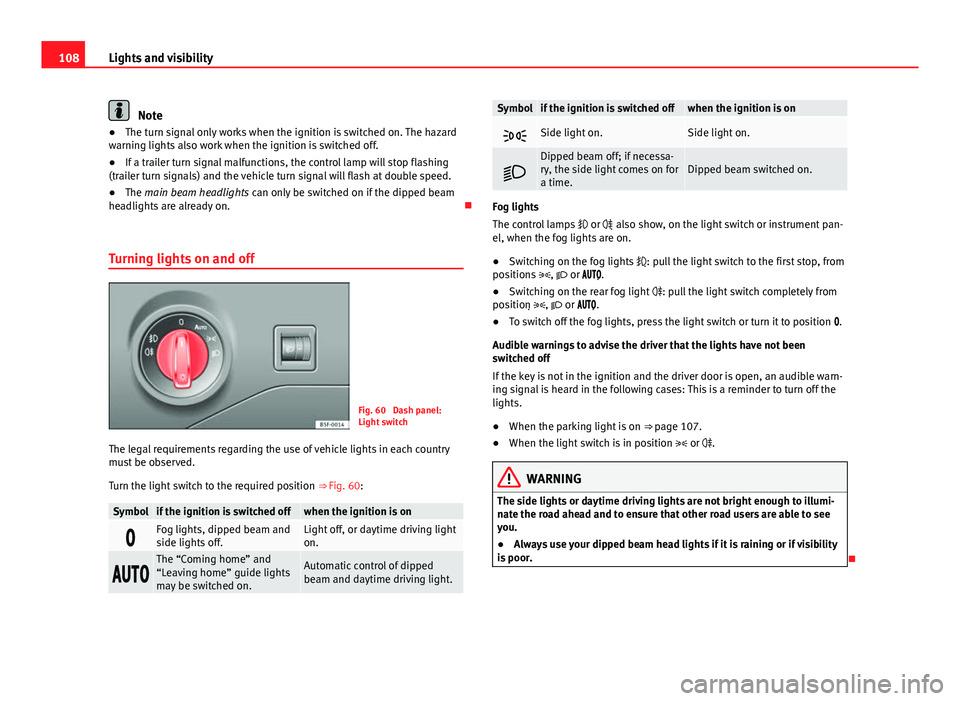
Fig. 60 Dash panel:
Light switch
The legal requirements regarding the use of vehicle lights in each country
must be observed.
Turn the light switch to the required position ⇒ Fig. 60:
Symbolif the ignition is switched offwhen the ignition is on
Fog lights, dipped beam and
side lights off.Light off, or daytime driving light
on.
The “Coming home” and
“Leaving home” guide lights
may be switched on.Automatic control of dipped
beam and daytime driving light.
Symbolif the ignition is switched offwhen the ignition is on
Side light on.Side light on.
Dipped beam off; if necessa-
ry, the side light comes on for
a time.Dipped beam switched on.
Fog lights
The control lamps
or also show, on the light switch or instrument pan-
el, when the fog lights are on.
● Switching on the fog lights : pull the light switch to the first stop, from
positions , or .
● Switching on the rear fog light : pull the light switch completely from
position , or .
● To switch off the fog lights, press the light switch or turn it to position .
Audible warnings to advise the driver that the lights have not been
switched off
If the key is not in the ignition and the driver door is open, an audible warn-
ing signal is heard in the following cases: This is a reminder to turn off the
lights.
● When the parking light is on ⇒ page 107.
● When the light switch is in position or .
WARNING
The side lights or daytime driving lights are not bright enough to illumi-
nate the road ahead and to ensure that other road users are able to see
you.
● Always use your dipped beam head lights if it is raining or if visibility
is poor.
Page 110 of 289

109
Lights and visibility
Lights and visibility: functions
Parking light
When the parking light is switched on, (right or left turn signal), the front
side light and the rear light on the corresponding side of the vehicle stay lit.
The parking lights can only be activated with the ignition switched off and
the turn signal and main beam lever in the central position, before being
triggered.
Parking light on both sides
With the ignition switched off and the light switch in position , when lock-
ing the vehicle from the outside, the parking lights on both sides of the ve-
hicle light up. In doing so, only the side lights of both headlights light up,
and additionally the tail lights will do so partially.
Daytime driving light*
The daytime driving lights consist of individual lights, integrated in the front
headlights. With the daylight driving lights on, only these lights switch on
⇒
.
The daytime driving lights switch on every time the ignition is switched on,
if the switch is in positions or , according to the level of exterior light-
ing.
When the light switch is in position , a light sensor automatically
switches dipped beam on and off (including the control and instrument
lighting) or the daytime driving lights depending on the level of exterior
lighting.
Automatic dipped beam control
The automatic dipped beam control is merely intended as an aid and is not
able to recognise all driving situations. When the light switch is in position
, the vehicle lights and the instru-
ment panel and switch lighting switch on and off automatically in the fol-
lowing situations ⇒
:
Automatic switching on:Automatic switching off:The photo sensor detects darkness,
for example, when driving through a
tunnel.When adequate lighting is detected.
The rain sensor detects rain and ac-
tivates the windscreen wipers.When the windscreen wipers have
been inactive for a few minutes.
Cornering lights* 1)
When turning slowly or on very tight bends, the cornering lights are activa-
ted automatically. The cornering lights may be integrated in the fog lights
and are switched on only at speeds of less than 40 km/h (25 mph).
When reverse gear is engaged, the cornering lights on both sides of the ve-
hicle switch on, in order to better illuminate the area for parking.
Motorway lights*
The motorway lights are available on vehicles equipped both with full-LED
lights and headlights that switch on automatically.
● They are activated when the light switch is in position .
● They are deactivated when the light switch is not in position .
When going above 110 km/h (75 mph) for more than 30 seconds, the dip-
ped beam raises slightly to increase the distance of visibility of the driver.
When reducing the speed of the car below 100 km/h (60 mph), the dipped
beam returns to its normal position.
1)
This function is not available on vehicles equipped with full-LED headlights.
Safety FirstOperating instructionsPractical TipsTechnical specifications
Page 112 of 289
111
Lights and visibility
7. Always take the vehicle key with you when you leave the vehi- cle.
Switch on the hazard warning lights to warn other road users, for example:
● reaching the tail end of a traffic jam,
● there is an emergency
● your vehicle breaks down due to a technical fault,
● you are towing another vehicle or your vehicle is being towed.
All turn signals flash simultaneously when the hazard warning lights are
switched on. The two turn signal turn signal lamps and the turn signal
lamp in the switch will flash at the same time. The hazard warning lights
also work when the ignition is switched off.
Emergency braking warning
If the vehicle is braked suddenly and continuously at a speed of more than
80 km/h (50 mph), the brake light flashes several times per second to warn
vehicles driving behind. If you continue braking, the hazard warning lights
will come on automatically when the vehicle comes to a standstill. They
switch off automatically when the vehicle starts to move again.
WARNING
● The risk of an accident increases if your vehicle breaks down. Always
use the hazard warning lights and a warning triangle to draw the atten-
tion of other road users to your stationary vehicle.
● Never park where the catalytic converter could come into contact with
inflammable materials under the vehicle, for example dry grass or spilt
petrol. This could start a fire!
Note
● The battery will run down if the hazard warning lights are left on for a
long time, even if the ignition is switched off.
● The use of the hazard warning lights described here is subject to the rel-
evant statutory requirements.
Main beam assist*
Main beam assist (Light Assist)
The main beam assist operates, within the limits of the system and depend-
ing on the environmental and traffic conditions, as of a speed of 60 km/h
(40 mph) when it switches on automatically, and is then deactivated again
below 30 km/h (20 mph) ⇒
. This is managed via a camera situated on
the base of the interior rear vision mirror.
The main beam assist generally detects illuminated areas and deactivates
the main beam when passing through a town, for example.
Safety FirstOperating instructionsPractical TipsTechnical specifications
Page 119 of 289

118Lights and visibility
Window wiper lever
Fig. 64 Operating the
windscreen wiper and
rear wiper
Move the lever to the required position ⇒ :0OFFWindscreen wiper off.
1INTWindscreen wipers interval wipe.
Using the control ⇒ Fig. 64 A adjust the interval (vehicles
without the rain sensor), or the sensitivity of the rain sensor.
2LOWSlow wipe.3HIGHContinuous wipe.
41xBrief press, short clean. Hold the lever down for more time to
increase the wipe frequency.
5
The windscreen washer function is activated by pushing the
lever forwards, and simultaneously the windscreen wipers
start.
6Interval wipe for rear window. The rear wiper will wipe the win-
dow approximately every six seconds.
7The windscreen washer function is activated by pressing the
lever, and the rear wiper starts simultaneously.
CAUTION
If the ignition is switched off with the windscreen wipers active, they com-
plete their wipe before returning to the rest position. Ice, snow and other
obstacles on the windscreen may damage the wiper and the windscreen
wiper motor.
● If necessary, remove snow and ice from the windscreen wipers before
starting your journey.
● Carefully lift the frozen windscreen wipers from the glass. SEAT recom-
mends a de-icer spray for this operation.
CAUTION
Do not switch on the windscreen wipers if the windscreen is dry. Cleaning
with the windscreen wipers while dry can cause damage.
Note
● The windscreen wipers will only function when the ignition is switched
on and the respective bonnet or rear lid are closed.
● The interval wipe speed varies according to the vehicle speed. The faster
the vehicle is moving, the more often the windscreen is cleaned.
● The rear wiper is automatically switched on when the windscreen wiper
is on and the car is in reverse gear.
Page 120 of 289

119
Lights and visibility
Windscreen wiper functions
Windscreen wiper performance in different situations:If the vehicle is at a stand-
still:The activated position provisionally changes
to the previous position.
During the automatic wipe:
The air conditioner comes on for approxi-
mately 30 seconds in air recirculation mode
to prevent the smell of the windscreen wash-
er fluid entering the inside the vehicle.
For the interval wipe:The intervals between wipes vary according
to the speed of the vehicle. The higher the
vehicle speed the shorter the intervals.
Heated windscreen washer jets
The heating only thaws the frozen jets, it does not thaw the water in the
washer hoses. The heated windscreen washer jets automatically adjust the
heat depending on the ambient temperature, when the ignition is switched
on.
Headlight wash/wipe system
The headlight washers/wipers clean the headlight lenses.
After the ignition is switched on, the first and every fifth time the wind-
screen washer is switched on, the headlights are also washed. Therefore,
the windscreen wiper lever should be pulled towards the steering wheel
when the dipped beam or main beam are on. Any incrusted dirt (such as in-
sects) should be cleaned regularly (e.g. when refuelling).
To ensure the headlight washers work correctly in winter, any snow which
has got into the bumper jet supports should be cleaned away. If necessary,
remove snow with an anti-icing spray.
Note
The wiper will try to wipe away any obstacles that are on the windscreen.
The wiper will stop moving if the obstacle blocks its path. Remove the ob-
stacle and switch the wiper back on again.
Windscreen wipers service position
Fig. 65 Wipers in service
position
The wiper arms can be raised when the wipers are in service position
⇒ Fig. 65. To place the windscreen wipers in the service position, proceed
as follows:
● The bonnet must be closed ⇒ page 209.
● Switch the ignition on and off.
● Press the windscreen wiper lever downwards briefly ⇒ Fig. 64 4
.
Before driving, always lower the wiper arms. Using the windscreen wiper
lever, the windscreen wiper arms return to their initial position.
Safety FirstOperating instructionsPractical TipsTechnical specifications
Page 132 of 289
131
Seats and storage
WARNING
● Please make sure that any items of clothing hanging from the coat
hooks do not obstruct your view to the rear.
● The coat hooks should only be used for lightweight clothing. Do not
leave any heavy or sharp objects in the pockets.
● Do not use clothes hangers to hang up the clothing, as this could in-
terfere with the function of the head-protection airbags.
Roof carrier
Note the following points if you intend to carry loads on the roof:
● In your car only certain roof carriers should be used. Roof carriers are the
basis of a complete roof carrier system. To transport luggage and sports
equipment, additional structures/transport systems are needed. We recom-
mend roof carriers and structures from the SEAT accessories programme.
● When mounting the roof carrier, be sure to mount only on the points al-
ready provided on the roof. The front and rear attachment points are only
visible when the doors are open.
● The maximum permissible roof load for your vehicle is 75 kg. The load
limit applies to the combined weight of the roof carrier, the structures, and
load itself. However, check the load permitted by the specific loading sys-
tem being used. Permissible axle weight and permissible total weight for
your vehicle ⇒ page 267.
WARNING
● Take note of the mounting instructions for the roof carrier system. If
the carrier system and the roof load are not properly secured, items of
luggage could fall from the vehicle and cause an accident.
● When you use a roof carrier system the style of driving changes due
to a shift of emphasis and the larger surface area exposed to wind drag,
which could cause an accident. Therefore, it is essential to adjust your
speed and driving style accordingly, to avoid accidents.
CAUTION
Check that when the rear lid is open, it does not touch loads carried on the
roof. When a roof carrier is fitted, DO NOT open the panoramic roof*.
For the sake of the environment
Greater aerodynamic drag increases fuel consumption. For this reason you
should always take off the roof carrier when it is not in use.
Luggage compartment
General notes
WARNING
The Safe driving chapter contains important information, tips, sugges-
tions and warnings that you should read and observe for your own safety
and the safety of your passengers ⇒ page 7.
Safety FirstOperating instructionsPractical TipsTechnical specifications
Page 146 of 289

145
Driving
Start-Stop System*
If the vehicle is stopped and the Start-Stop system* switches off the engine,
the ignition remains switched on.
Automatic gearbox: Before leaving the vehicle, make sure that the ignition
is switched off and the selector lever is in position P.
Driver messages on the instrument panel display
Press the clutch This message appears on vehicles with a manual gearbox if the driver tries
to start the engine without having the clutch pedal pressed. The engine will
only start if you press the clutch pedal.
Press the brake
This message appears on vehicles with an automatic gearbox if the driver
tries to start the engine without having the brake pedal pressed.
Select N or P
This message appears if you try to start or stop the engine when the selec-
tor lever of the automatic gearbox is not in position P or N. The engine can
only start or stop in these positions.
Engage position P; the vehicle can move; doors can only close in position P. For safety reasons, this driver message appears and an audible warning
sounds if the selector lever of the automatic gearbox is not in position P af-
ter you switch off the ignition. Otherwise the vehicle could move.
Gear change: selector lever in the drive position! This driver message is displayed and a buzzer is sounded when the selector
lever is not in the position P when the driver door is opened. Put the selec-
tor lever in position P; otherwise the vehicle can roll away.
Ignition is switched onThis driver message is displayed and a buzzer is sounded when the driver
door is opened with the ignition switched on.
WARNING
● Never run the engine in confined spaces, as the exhaust gases are
poisonous.
● Never remove the key from the ignition if the vehicle is in motion.
Otherwise, the steering could suddenly lock, making it impossible to
steer the vehicle: risk of accident!
● Always take the key with you when you leave the vehicle. This is par-
ticularly important if there are children in the vehicle, as they might oth-
erwise be able to start the engine or use power-operated equipment (e.g.
the electric windows), which could cause injuries.
CAUTION
Avoid high engine speeds, full throttle and extreme load conditions until
the engine has reached its normal operating temperature, otherwise this
can damage the engine.
For the sake of the environment
Do not warm up the engine by running it with the car stationary. You should
drive off as soon as you start the engine. This will help avoid unnecessary
exhaust emissions.
Note
● If it is difficult to turn the ignition key to the position 1, turn the steer-
ing wheel to both sides to release the steering lock.
● When starting from cold, the engine may be a little noisy for the first few
seconds until oil pressure has built up in the hydraulic valve lifters. This is
quite normal, and no cause for concern.
● If the vehicle battery is disconnected and reconnected, the key must re-
main in the position 1
for around 5 seconds before starting up.
● Vehicles with automatic gearbox: After switching off the ignition, you
can only remove the ignition key if the selector lever is in position “P” (park-
ing lock). Next, the selector lever is locked.
Safety FirstOperating instructionsPractical TipsTechnical specifications