turn signal Seat Leon 5D 2012 Owner's Guide
[x] Cancel search | Manufacturer: SEAT, Model Year: 2012, Model line: Leon 5D, Model: Seat Leon 5D 2012Pages: 289, PDF Size: 3.81 MB
Page 172 of 289

171
Driver assistance systems
Switching the Lane Assist system on or off
● The Assistants menu ⇒ page 77 drops down in the instrument panel by
pressing the Assistants button on the turn signal lever or by operating the
menu in the multifunction steering wheel.
● OR: by pressing the OK
button on the steering wheel the
⇒ page 77
function is activated/deactivated.
● The Lane centring guide is activated/deactivated in the Easy Connect
system using the CAR
button and the button on the Setup function
⇒ page 79.
Self-deactivation: The Lane Assist system can be automatically deactivated
if there is a system malfunction. The control lamp disappears.
Hands-Off Function
● If the driver does not exert any physical action on the steering wheel for
about 10 to 12 sec. the function deactivates.
● Visual and audible warnings on the instrument panel.
● The function switches off 2 seconds after the warning.
The Lane Assist system is active but it is not available (the control lamp is
lit up yellow)
● When driving at speeds below 65 km/h (38 mph).
● When the Lane Assist system does not detect the dividing lines of the
road. For example, in the event warnings indicating road works, and snow,
dirt, moisture or reflections.
● When the radius of a curve is too small.
● When no road markings can be seen.
● When the distance to the next marking to too great.
● When the system does not detect any clear and active steering move-
ment during a long period of time.
● Temporarily, in the event of very dynamic driving styles.
● If a turn signal is activated.
● With the stability control system ESC in Sport mode.
Note
● Before starting a journey, verify that the field of vision of the camera is
not covered ⇒ Fig. 99.
● Always keep the field of vision of the camera clean.
Switching off the Lane Assist system in the following
situations
Due to the limits of the Lane Assist system, switch it off in the following sit-
uations:
● When more attention is required of the driver
● When driving in a sporty style
● In unfavourable weather conditions
● On roads in poor condition
● In areas of road works
Note
The Lane Assist system deactivates when driving below 60 km/h (40 mph).
SEAT Drive Modes* Introduction
SEAT Drive Mode enables the driver to choose between four profiles or
modes, normal, sport, eco and individual , that modify the behaviour of vari-
ous vehicle functions, providing different driving experiences.
Safety FirstOperating instructionsPractical TipsTechnical specifications
Page 181 of 289

180Driver assistance systems
Activating/Deactivating
Fig. 104 Centre console:
parking aid button
Switching on
– Engage reverse gear or
– Press the button on the centre console ⇒ Fig. 104. A short
confirmation signal will be heard and the button symbol will
light up yellow.
Switching off
– Drive forwards at more than 10 km/h (6 mph), or
– Press the
button, or
– Switch the ignition off Segments of the visual indication
The distance of separation from the obstacle can be estimated using the
segments around the vehicle. With certain equipment (Radio Standard), the
yellow lines* mark the estimated path, depending on the angle of the
turned steering wheel. A white segment is seen when an obstacle is detec-
ted out of the path of the vehicle. The red segments represent obstacles de-
tected within the path. As the vehicle approaches an obstacle, the seg-
ments are displayed closer to the vehicle. When the penultimate segment is
displayed, this means that the vehicle has reached the collision zone. In the
collision zone the obstacles are represented in red, including those out of
the path. Do not continue to move forward (or backward)
⇒
in General
information on page 178, ⇒ in General information on page 178 !
Automatic activation 1)
When the parking aid (ParkPilot) is automatically switched on this is shown
in miniature on the left side of the display.
When slowly approaching an obstacle located in front of the vehicle, the au-
tomatic activation only functions each time the speed is reduced below ap-
proximately 10 km/h (6 mph) for the first time. If the parking aid is deactiva-
ted using the button, the following actions must be carried out in order
for it to automatically reactivate:
● Switch off the ignition and switch it on again.
● ALTERNATIVELY: Accelerate above 10 km/h (6 mph) before reducing
speed below this number again.
● ALTERNATIVELY: Place the selector lever in position P and then move it
from this position.
● ALTERNATIVELY: Switch on and off the automatic activation in the Easy
Connect system menu.
The automatic activation with parking aid miniature indication can be
switched on and off from the Easy Connect system menu ⇒ page 81:
1)
Available only with certain equipment.
Page 190 of 289

189
Intelligent technology
Information recorded in the control units
Your vehicle is fitted at the factory with a series of electronic control units
responsible for the engine and gearbox management. In addition, the con-
trol units supervise the correct performance of the exhaust gas system and
the airbag systems.
Therefore, while the vehicle is being driven, these electronic control units
are continuously analysing the vehicle data. In the event of faults or devia-
tions from the theoretical values, only this data is stored. Generally, the in-
strument panel warning lamps indicate whether there are any malfunctions.
This data can only be read and analysed using special equipment.
The storing of the data allows specialised workshops to detect and repair
faults. Stored data may include:
● Important data about the engine and gearbox
● Speed
● Direction of travel
● Braking force
● Seat belt check
The vehicle control units never record conversations held by passengers in
the vehicle.
If the control unit records an accident with airbag activation, the system
may automatically send a signal. This will depend on the network operator.
Normally, transmission is only possible in areas with sufficient coverage.
Event Data Recorder
The vehicle is not fitted with an event data recorder.
An event data recorder temporarily stores the vehicle information. There-
fore, in the event of accident, it is possible to obtain detailed information
about how the accident occurred. For example, in vehicles with airbag sys-
tems, data relating to speed of impact, seat belt status, seat positions and airbag activation times may be stored. The volume of data depends on the
manufacturer.
Event data recorders can only be mounted with authorisation from the vehi-
cle owner and, in some countries, they are governed by local legislation.
Reprogramming control units
On the whole, all the data required for the component management is stor-
ed in the control units. The programming of certain convenience functions,
such as the turn signal convenience mode, individual door opening and dis-
play indications can be modified using special equipment at the workshop.
If the convenience functions are reprogrammed, the Instruction Manual in-
formation and descriptions will not coincide with the modified functions.
Therefore, SEAT recommends that any changes are recorded in the “Other
workshop notes section” of the Service Plan.
You can find out about possible reprogramming at your SEAT Official Serv-
ice.
Event recorder
In the footwell on the driver side you will find the diagnostics connection
socket for reading the event recorder. The event recorder stores operating
data and data on the status of the electronic control units. The events re-
corder should only be read and deleted by a SEAT Official Service or special-
ised workshop.
WARNING
The diagnostics connection socket must not be used for private purpo-
ses. Improper use can cause malfunctions: risk of accident!
Safety FirstOperating instructionsPractical TipsTechnical specifications
Page 245 of 289
244Emergencies
Towing and tow-starting the vehicle
General information
Points to observe when tow-starting or towing away If you use a tow rope:
Notes for the driver of the towing vehicle
– The tow rope must be taut before you drive off.
– Release the clutch very carefully when starting the vehicle
(manual gearbox), or accelerate gently (automatic gearbox).
Notes for the driver of the towed vehicle
– The ignition should be switched on so that the turn signals,
horn, windscreen wipers and washers can be used. Please en-
sure that the steering wheel is unlocked when you switch on the
ignition, and that it moves freely.
– Put the gearbox lever in neutral (manual gearbox) or move the
selector lever to position N (automatic gearbox).
– The brake servo only works when the engine is running. Consid-
erably more effort is required on the brake pedal when the en-
gine is switched off.
– Remember that the brake servo only works when the ignition is
switched on and the vehicle is moving 1)
. Otherwise, considera-
bly more strength than usual will be required when steering. –
Ensure that the tow rope remains taut at all times.
Tow rope or tow bar
It is easier and safer to tow a vehicle with a tow bar. You should only use a
tow rope if you do not have a tow bar.
A tow rope should be slightly elastic to avoid damage to both vehicles. It is
advisable to use a tow rope made of synthetic fibre or similarly elastic mate-
rial.
Only attach the tow rope or the tow bar to the towing rings ⇒ page 245.
Driving style
Towing requires some experience, especially when using a tow rope. Both
drivers should be familiar with the technique required for towing. Inexper-
ienced drivers should not attempt to tow.
Do not pull too hard with the towing vehicle and take care to avoid jerking
the tow rope. When towing on an unpaved road, there is always a risk of
overloading and damaging the anchorage points.
WARNING
If the vehicle has no electrical power, the brake lights, turn signals and
all other lights will no longer function. Do not have the vehicle towed
away. Failure to do so could result in an accident.
CAUTION
If there is no oil in the gearbox or no lubricant in the automatic transmission
the car may only be towed with the driven wheels lifted clear of the road, or
transported on a special car transporter or trailer.
1)
Important: the battery must be correctly charged.
Page 253 of 289

252Fuses and bulbs
No.Electrical consumerAmpsF24PTC40F31Vacant-F32Vacant-F37Vacant-
Note
Please note that the above list, while correct at the time of printing, is sub-
ject to alterations.
Bulbs
Changing a bulb
Changing bulbs requires a certain degree of practical skill. If you choose to change engine compartment lamps yourself, remember
that it is a dangerous area ⇒
in Working on components in the engine
compartment on page 209.
Always use identical bulbs with the same designation. The name can be
found on the base of the bulb holder.
Depending on how equipped the vehicle is, there are different sets of head-
lights and tail lights:
● Halogen headlights
● Full-LED main headlights*
● Rear bulb light
● LED rear light* Full-LED headlight system*
Full-LED headlights handle all light functions (daylight, side light, turn sig-
nal, dipped beam and route light) with light emitting diodes (LEDs) as a
light source.
Full-LED headlights are designed to last the lifetime of the car and light
bulbs cannot be replaced. In case of headlight failure, go to an authorised
workshop to have it replaced.
Bulbs (12 V)
Halogen headlightsTypeDaytime driving light/side lightP21W SLLDipped beam headlightsH7 LLMain beam headlightsH7 LLTurn signalPY21W LL
Full-LED main headlightsTypeNo bulbs may be replaced. All functions are
with LEDs
Front fog lightTypeFog light/cornering*H8
Rear bulb lightTypeBrake lights/tail lightsP21W LLSide lights2x W5W LLTurn signalPY21W LLRear fog lightH21WReverse lightsP21W LL
LED rear lightTypeTurn signalPY21W LLRear fog lightH21W
Page 256 of 289
255
Fuses and bulbs
Turn signal bulb
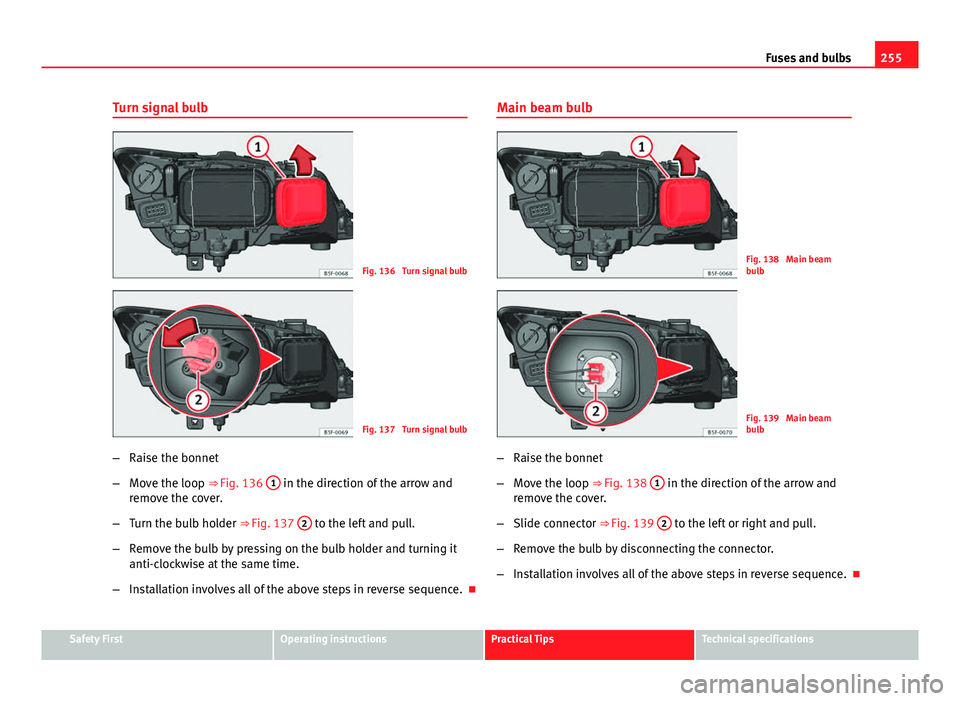
Fig. 136 Turn signal bulb
Fig. 137 Turn signal bulb
– Raise the bonnet
– Move the loop ⇒ Fig. 136 1
in the direction of the arrow and
remove the cover.
– Turn the bulb holder ⇒ Fig. 137 2
to the left and pull.
– Remove the bulb by pressing on the bulb holder and turning it
anti-clockwise at the same time.
– Installation involves all of the above steps in reverse sequence. Main beam bulb
Fig. 138 Main beam
bulb
Fig. 139 Main beam
bulb
– Raise the bonnet
– Move the loop ⇒ Fig. 138 1
in the direction of the arrow and
remove the cover.
– Slide connector ⇒ Fig. 139 2
to the left or right and pull.
– Remove the bulb by disconnecting the connector.
– Installation involves all of the above steps in reverse sequence.
Safety FirstOperating instructionsPractical TipsTechnical specifications
Page 258 of 289

257
Fuses and bulbs
Remove the bulb holder
Fig. 142 Front fog light
– Remove connector ⇒ Fig. 142 A
from the bulb.
– Turn bulb holder ⇒ Fig. 142 B
to the left and pull.
– Remove the bulb by pressing on the bulb holder and turning it
anti-clockwise at the same time.
– Installation involves all of the above steps in reverse sequence.
– Check that the bulb works properly. Changing tail light bulbs (on side panel)
Overview of tail lights
Rear lights on the side panel
Turn signalPY21W NA LLSide light and brake lightP21W LL
Safety FirstOperating instructionsPractical TipsTechnical specifications
Page 260 of 289

259
Fuses and bulbs
Remove the bulb holder
When changing a bulb, you must first remove the bulb hold-
er.
Fig. 145 Retaining tabs
on reverse side of tail
light
– Remove the bulb holder ⇒ Fig. 145 unlocking the A
retaining
tabs.
– Raise the bulb holder.
– Change the defective bulb.
– To refit follow the steps in reverse order, taking special care
when fitting the bulb holder. And especially that all retaining
tabs are properly in place.
– Place the light back into place and tighten with a screwdriver.
Note
In the case of LED lights, change only the turn signal bulb.
Changing tail light bulbs (on rear lid)
Overview of tail lights
Rear lid lights 1)
Left sideSide lights2x W5W LLFog lightsH21 WRight sideSide lights2x W5W LLReverse lightP21W LL
1)
The above table corresponds to a right-hand traffic vehicle. The position of lights may vary
according to the country.
Safety FirstOperating instructionsPractical TipsTechnical specifications
Page 279 of 289
Brakes . . . . . . . . . . . . . . . . . . . . . . . . . . . . . . . . 185Brake fluid . . . . . . . . . . . . . . . . . . . . . . . . . 217
Brake servo . . . . . . . . . . . . . . . . . . . . . . . . . 185
New brake pads . . . . . . . . . . . . . . . . . . . . . 185
Braking Brake assist system . . . . . . . . . . . . . . . . . . 183
Moving off on a hill . . . . . . . . . . . . . . . . . . 148
C
Carbon components: Cleaning . . . . . . . . . . . . 200
Care . . . . . . . . . . . . . . . . . . . . . . . . . . . . . . . . . . 198
Care of vehicle . . . . . . . . . . . . . . . . . . . . . . . . . 198
Care (paint care) . . . . . . . . . . . . . . . . . . . . . . . . 200
Catalytic converter . . . . . . . . . . . . . . . . . . . . . . 190
CD-ROM reader (navigation) . . . . . . . . . . . . . . 130
Central locking Anti-theft alarm . . . . . . . . . . . . . . . . . . . . . . 93
Central locking switch . . . . . . . . . . . . . . . . . 93
Electric windows . . . . . . . . . . . . . . . . . . . . . 101
Programming . . . . . . . . . . . . . . . . . . . . . . . . 92
Remote control key . . . . . . . . . . . . . . . . . . . . 91
Selective unlocking system . . . . . . . . . . . . . 91
Sliding/tilting sunroof . . . . . . . . . . . . . . . . 101
Central locking system . . . . . . . . . . . . . . . . . . . . 86 Manual locking in an emergency . . . . . . . . 97
Rear lid . . . . . . . . . . . . . . . . . . . . . . . . . . . . . 98
Cetane number (Diesel fuel) . . . . . . . . . . . . . . 207
Changing Windscreen and rear window wiper blades . .221
Changing a bulb . . . . . . . . . . . . . . . . . . . . . . . . 252 Bulb sizes . . . . . . . . . . . . . . . . . . . . . . . . . . 252 Changing gear
Engaging gears (manual gearbox) . . . . . . 152
Manual gearbox . . . . . . . . . . . . . . . . . . . . . 152
Changing main headlight main beam . . . . . . . . . . . . . . . . . . . . . . . . . 255
turn signal . . . . . . . . . . . . . . . . . . . . . . . . . . 255
Changing main headlight bulbs daylight bulb . . . . . . . . . . . . . . . . . . . . . . . 254
Dipped beam . . . . . . . . . . . . . . . . . . . . . . . 254
Changing the battery of the vehicle key . . . . . . . . . . . . . . . . . . . . . 90
Chassis number . . . . . . . . . . . . . . . . . . . . . . . . 264
Child-proof lock Electric windows . . . . . . . . . . . . . . . . . . . . . 100
Child safety . . . . . . . . . . . . . . . . . . . . . . . . . . . . . 47
Child seat Categorisation in groups . . . . . . . . . . . . . . . 49
Group 1 . . . . . . . . . . . . . . . . . . . . . . . . . . . . . 50
Group 2 . . . . . . . . . . . . . . . . . . . . . . . . . . . . . 50
Group 3 . . . . . . . . . . . . . . . . . . . . . . . . . . . . . 50
Groups 0 and 0+ . . . . . . . . . . . . . . . . . . . . . . 49
Safety notes . . . . . . . . . . . . . . . . . . . . . . . . . 47
Securing . . . . . . . . . . . . . . . . . . . . . . . . . . . . 52
Child seats . . . . . . . . . . . . . . . . . . . . . . . . . . . . . 49 ISOFIX system . . . . . . . . . . . . . . . . . . . . . . . . 54
on the front passenger seat . . . . . . . . . . . . . 31
Top Tether system . . . . . . . . . . . . . . . . . 54, 55
Cleaning . . . . . . . . . . . . . . . . . . . . . . . . . . . . . . 198 Alcantara . . . . . . . . . . . . . . . . . . . . . . . . . . . 204
Carbon components . . . . . . . . . . . . . . . . . . 200
Display/Easy Connect control panel . . . . . 202
Exhaust pipe . . . . . . . . . . . . . . . . . . . . . . . . 201 Leather . . . . . . . . . . . . . . . . . . . . . . . . . . . . 203
Plastic parts . . . . . . . . . . . . . . . . . . . . 200, 202
Radio display . . . . . . . . . . . . . . . . . . . . . . . 202
Rims . . . . . . . . . . . . . . . . . . . . . . . . . . . . . . 201
Seat belts . . . . . . . . . . . . . . . . . . . . . . . . . . 205
Trim parts . . . . . . . . . . . . . . . . . . . . . . . . . . 202
Trims . . . . . . . . . . . . . . . . . . . . . . . . . . . . . . 200
Washing the vehicle . . . . . . . . . . . . . . . . . . 198
Windows . . . . . . . . . . . . . . . . . . . . . . . . . . . 201
Windscreen and rear window wiper blades . .221
Cleaning/De-icing the windows . . . . . . . . . . . 201
Cleaning the rims . . . . . . . . . . . . . . . . . . . . . . . 201
Cleaning the upholstery Natural leather . . . . . . . . . . . . . . . . . . . . . . 203
Closing Bonnet . . . . . . . . . . . . . . . . . . . . . . . . . . . . 210
Panoramic sliding sunroof . . . . . . . . . . . . . 103
Panoramic sunroof . . . . . . . . . . . . . . . . . . . 103
Windows . . . . . . . . . . . . . . . . . . . . . . . . . . . 100
Clutch (warning lamp) . . . . . . . . . . . . . . . . . . . 162
Coming Home . . . . . . . . . . . . . . . . . . . . . . . . . . 113
Compartments . . . . . . . . . . . . . . . . . . . . . . . . . 129
Consumption (fuel) . . . . . . . . . . . . . . . . . . . . . 264
Control lamp Airbag system . . . . . . . . . . . . . . . . . . . . . . . . 33
Cruise control . . . . . . . . . . . . . . . . . . . . . . . 164
Tyre monitor indicator warning lamp . . . . 175
Tyre monitoring systems . . . . . . . . . . . . . . 175
Windscreen wiper fluid level . . . . . . . . . . . 117
Control lamps Lights . . . . . . . . . . . . . . . . . . . . . . . . . . . . . 106
Control of function Rain sensor . . . . . . . . . . . . . . . . . . . . . . . . . 120
278 Index
Page 283 of 289

Leather CareNatural leather . . . . . . . . . . . . . . . . . . . . . . 203
Leather: Care . . . . . . . . . . . . . . . . . . . . . . . . . . 203
Leaving Home . . . . . . . . . . . . . . . . . . . . . . . . . . 113
Lighting Changing a bulb . . . . . . . . . . . . . . . . . . . . . 252
Lights . . . . . . . . . . . . . . . . . . . . . . . . . . . . . . . . 106 Acoustic warnings . . . . . . . . . . . . . . . . . . . 108
AUTO . . . . . . . . . . . . . . . . . . . . . . . . . . . . . . 109
Changing a bulb . . . . . . . . . . . . . . . . . . . . . 252
Coming home . . . . . . . . . . . . . . . . . . . . . . . 113
Control lamps . . . . . . . . . . . . . . . . . . . . . . . 106
Controls lighting . . . . . . . . . . . . . . . . . . . . . 114
Cornering lights . . . . . . . . . . . . . . . . . . . . . 109
Daytime driving light . . . . . . . . . . . . . . . . . 109
Fog light . . . . . . . . . . . . . . . . . . . . . . . . . . . 108
Functions . . . . . . . . . . . . . . . . . . . . . . . . . . 109
Headlight range control . . . . . . . . . . . . . . . 114
Instrument lighting . . . . . . . . . . . . . . . . . . 114
Interior lights . . . . . . . . . . . . . . . . . . . . . . . 115
Leaving home . . . . . . . . . . . . . . . . . . . . . . . 113
Main beam lever . . . . . . . . . . . . . . . . . . . . . 107
Motorway lights . . . . . . . . . . . . . . . . . . . . . 109
Parking light . . . . . . . . . . . . . . . . . . . . . . . . 109
Reading lights . . . . . . . . . . . . . . . . . . . . . . 115
Turn signal lever . . . . . . . . . . . . . . . . . . . . . 107
Load compartment in the luggage compart- ment
see Loading the luggage compartment . . . 17
Loading the luggage compartment . . . . . . . . . . 17
Locking/Unlocking In the lock cylinder . . . . . . . . . . . . . . . . . . . . 97
With the central locking switch . . . . . . . . . . 93 Longlife inspection service . . . . . . . . . . . . . . . 211
Luggage carrier . . . . . . . . . . . . . . . . . . . . . . . . . 131
Luggage compartment . . . . . . . . . . . . . . . . . . . 131
Cover . . . . . . . . . . . . . . . . . . . . . . . . . . . . . . 132
Fastening rings . . . . . . . . . . . . . . . . . . . . . . 133
Luggage compartment lighting . . . . . . . . . 115
see also Loading the luggage compartment . .17
Lumbar support . . . . . . . . . . . . . . . . . . . . . . . . 125
M
Main beam assist . . . . . . . . . . . . . . . . . . . . . . . 111
Main beam headlight . . . . . . . . . . . . . . . . . . . . 108
Main beam lever . . . . . . . . . . . . . . . . . . . . . . . . 107
Maintenance Airbags . . . . . . . . . . . . . . . . . . . . . . . . . . . . . 34
Manual gearbox . . . . . . . . . . . . . . . . . . . . . . . . 152 Kick-down . . . . . . . . . . . . . . . . . . . . . . . . . . 146
Manual locking of passenger door in an emer- gency . . . . . . . . . . . . . . . . . . . . . . . . . . . . . . . . 97
Manual operation Selector lever . . . . . . . . . . . . . . . . . . . . . . . 163
Manual operation in an emergency Passenger door . . . . . . . . . . . . . . . . . . . . . . 97
Rear lid . . . . . . . . . . . . . . . . . . . . . . . . . . . . . 99
Mobile phones . . . . . . . . . . . . . . . . . . . . . . . . . 230
Modifications (technical) . . . . . . . . . . . . . . . . . 230
Motorway lights . . . . . . . . . . . . . . . . . . . . . . . . 109
Mounting pin (tyre change) . . . . . . . . . . . . . . . 232
Mounting points (jack) . . . . . . . . . . . . . . . . . . . 238
Moving off Hill hold assist . . . . . . . . . . . . . . . . . . . . . . 148 Multi-collision Brake . . . . . . . . . . . . . . . . . . . . 184
Multiple CD loader . . . . . . . . . . . . . . . . . . . . . . 130
N
Navigation system CD-ROM Reade . . . . . . . . . . . . . . . . . . . . . . 130
Note regarding the environment Roof carrier . . . . . . . . . . . . . . . . . . . . . . . . . 131
Number of colour . . . . . . . . . . . . . . . . . . . . . . . 264
Number of seats . . . . . . . . . . . . . . . . . . . . . . . . . 19
O
Object holders . . . . . . . . . . . . . . . . . . . . . . . . . 129
Octane rating (petrol) . . . . . . . . . . . . . . . . . . . . 206
Odometer . . . . . . . . . . . . . . . . . . . . . . . . . . . . . . 61
Oil change . . . . . . . . . . . . . . . . . . . . . . . . . . . . . 214
Oil properties . . . . . . . . . . . . . . . . . . . . . . . . . . 212
One-touch opening and closing Electric windows . . . . . . . . . . . . . . . . . . . . . 101
Opening . . . . . . . . . . . . . . . . . . . . . . . . . . . . . . . 86 Bonnet . . . . . . . . . . . . . . . . . . . . . . . . . . . . 210
Fuel tank flap . . . . . . . . . . . . . . . . . . . . . . . 207
Panoramic sliding sunroof . . . . . . . . . . . . . 103
Panoramic sunroof . . . . . . . . . . . . . . . . . . . 103
Rear lid . . . . . . . . . . . . . . . . . . . . . . . . . . . . . 98
Windows . . . . . . . . . . . . . . . . . . . . . . . . . . . 100
Opening/Closing In the lock cylinder . . . . . . . . . . . . . . . . . . . . 97
With remote control . . . . . . . . . . . . . . . . . . . 91
With the central locking switch . . . . . . . . . . 93
282 Index