left Seat Leon 5D 2013 Owner's Guide
[x] Cancel search | Manufacturer: SEAT, Model Year: 2013, Model line: Leon 5D, Model: Seat Leon 5D 2013Pages: 339, PDF Size: 4.8 MB
Page 135 of 339
133
Seats and storage
Storage compartments
Storage areas under the front seats*
There is a storage compartment with a cover under each
front seat.
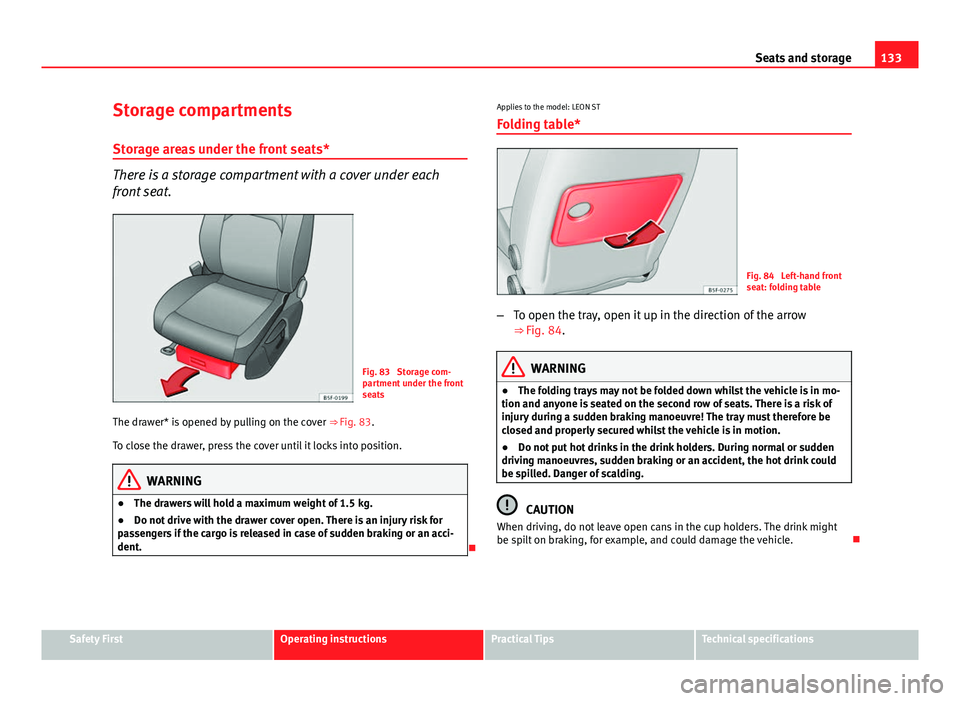
Fig. 83 Storage com-
partment under the front
seats
The drawer* is opened by pulling on the cover ⇒ Fig. 83.
To close the drawer, press the cover until it locks into position.
WARNING
● The drawers will hold a maximum weight of 1.5 kg.
● Do not drive with the drawer cover open. There is an injury risk for
passengers if the cargo is released in case of sudden braking or an acci-
dent.
Applies to the model: LEON ST
Folding table*
Fig. 84 Left-hand front
seat: folding table
– To open the tray, open it up in the direction of the arrow
⇒ Fig. 84.
WARNING
● The folding trays may not be folded down whilst the vehicle is in mo-
tion and anyone is seated on the second row of seats. There is a risk of
injury during a sudden braking manoeuvre! The tray must therefore be
closed and properly secured whilst the vehicle is in motion.
● Do not put hot drinks in the drink holders. During normal or sudden
driving manoeuvres, sudden braking or an accident, the hot drink could
be spilled. Danger of scalding.
CAUTION
When driving, do not leave open cans in the cup holders. The drink might
be spilt on braking, for example, and could damage the vehicle.
Safety FirstOperating instructionsPractical TipsTechnical specifications
Page 137 of 339

135
Seats and storage
Other storage compartments
You will find more object holders, compartments and supports in other
parts of the vehicle:
● In the top of the glove compartment in vehicles that do not have a CD
reader. The load must not exceed 1.2 kg.
● In the centre console under the centre armrest*.
● In the driver side panel there is a removable box for access to fuses and
relays. The load of the compartment should not exceed 0.2 kg.
● Coat hooks in the pillar B ⇒
.
● Other storage compartments are found in the rear seat, to the left and
the right of the seats.
WARNING
● Please make sure that any items of clothing hanging from the coat
hooks do not obstruct your view to the rear.
● The coat hooks should only be used for lightweight clothing. Do not
leave any heavy or sharp objects in the pockets.
● Do not use clothes hangers to hang up the clothing, as this could in-
terfere with the function of the head-protection airbags.
Power sockets
Electrical equipment can be connected to the 12 volt power
socket.
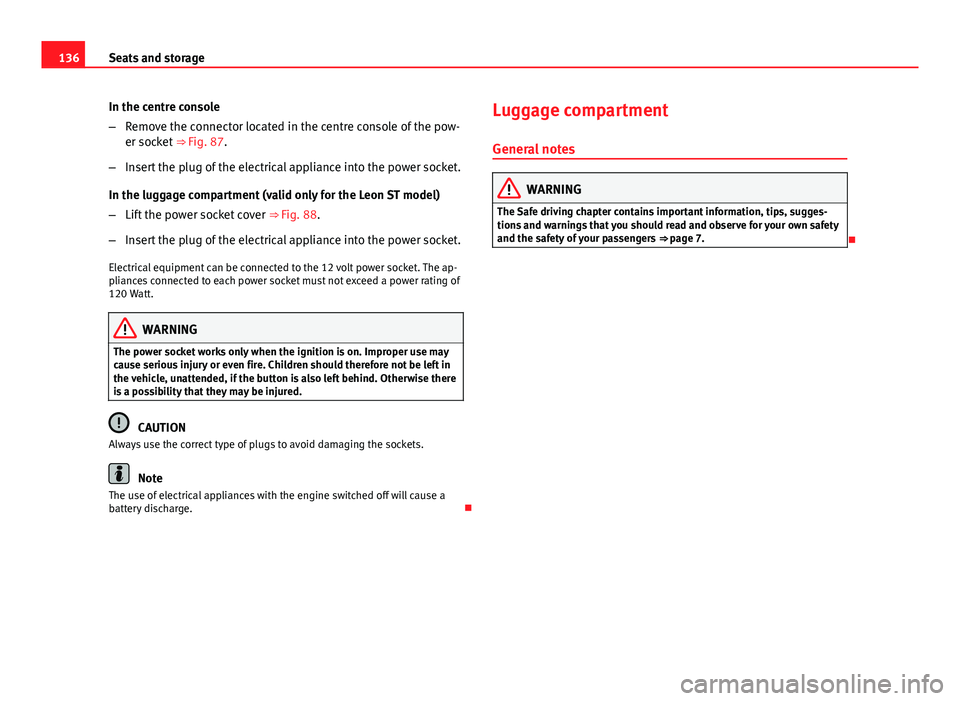
Fig. 87 Centre console:
front/rear 12-volt power
socket
Fig. 88 Detailed view of
the side trim in the lug-
gage compartment: 12-
volt power sockets (valid
only for the LEON ST
model)
Safety FirstOperating instructionsPractical TipsTechnical specifications
Page 138 of 339
136Seats and storage
In the centre console
–Remove the connector located in the centre console of the pow-
er socket ⇒ Fig. 87.
– Insert the plug of the electrical appliance into the power socket.
In the luggage compartment (valid only for the Leon ST model)
– Lift the power socket cover ⇒ Fig. 88.
– Insert the plug of the electrical appliance into the power socket.
Electrical equipment can be connected to the 12 volt power socket. The ap-
pliances connected to each power socket must not exceed a power rating of
120 Watt.
WARNING
The power socket works only when the ignition is on. Improper use may
cause serious injury or even fire. Children should therefore not be left in
the vehicle, unattended, if the button is also left behind. Otherwise there
is a possibility that they may be injured.
CAUTION
Always use the correct type of plugs to avoid damaging the sockets.
Note
The use of electrical appliances with the engine switched off will cause a
battery discharge. Luggage compartment
General notes
WARNING
The Safe driving chapter contains important information, tips, sugges-
tions and warnings that you should read and observe for your own safety
and the safety of your passengers ⇒ page 7.
Page 140 of 339
138Seats and storage
Applies to the model: LEON ST
Folding down and lifting the rear seat backrest
Fig. 91 In the rear seat
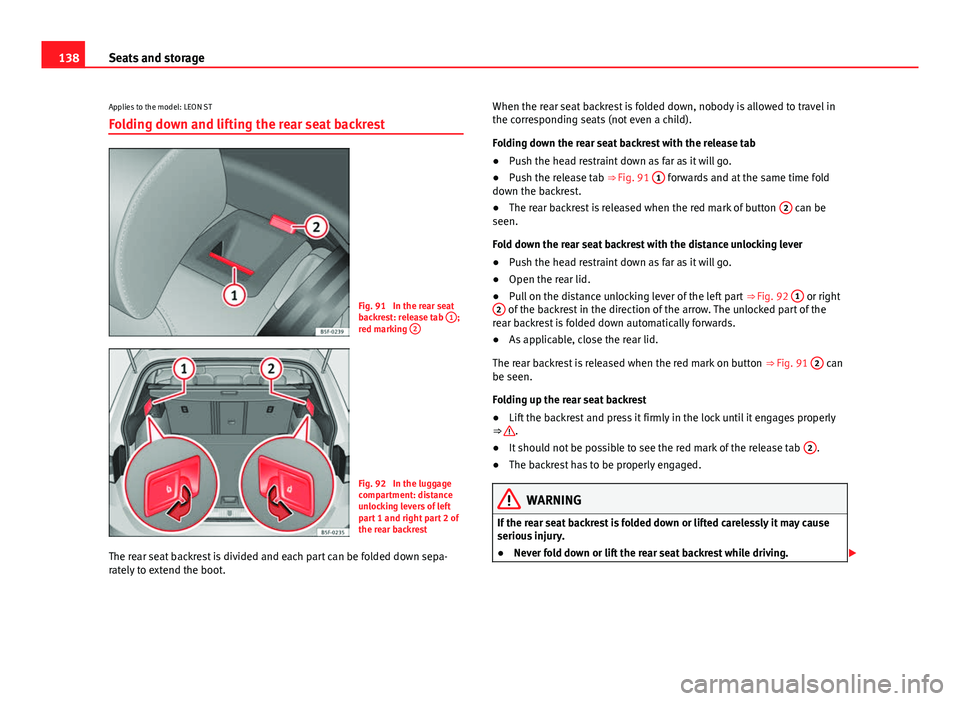
backrest: release tab 1;
red marking 2
Fig. 92 In the luggage
compartment: distance
unlocking levers of left
part 1 and right part 2 of
the rear backrest
The rear seat backrest is divided and each part can be folded down sepa-
rately to extend the boot. When the rear seat backrest is folded down, nobody is allowed to travel in
the corresponding seats (not even a child).
Folding down the rear seat backrest with the release tab
●
Push the head restraint down as far as it will go.
● Push the release tab ⇒ Fig. 91 1
forwards and at the same time fold
down the backrest.
● The rear backrest is released when the red mark of button 2
can be
seen.
Fold down the rear seat backrest with the distance unlocking lever
● Push the head restraint down as far as it will go.
● Open the rear lid.
● Pull on the distance unlocking lever of the left part ⇒ Fig. 92 1
or right
2 of the backrest in the direction of the arrow. The unlocked part of the
rear backrest is folded down automatically forwards.
● As applicable, close the rear lid.
The rear backrest is released when the red mark on button ⇒ Fig. 91 2
can
be seen.
Folding up the rear seat backrest
● Lift the backrest and press it firmly in the lock until it engages properly
⇒
.
● It should not be possible to see the red mark of the release tab 2.
● The backrest has to be properly engaged.
WARNING
If the rear seat backrest is folded down or lifted carelessly it may cause
serious injury.
● Never fold down or lift the rear seat backrest while driving.
Page 142 of 339
140Seats and storage
WARNING
● The luggage compartment cover must always be fixed properly (risk
of accident).
● The luggage compartment cover should not be used as a storage
shelf. Articles placed on this cover could cause injury to vehicle occu-
pants in an accident or if the brakes are applied suddenly.
Applies to the model: LEON ST
Retractable rear shelf
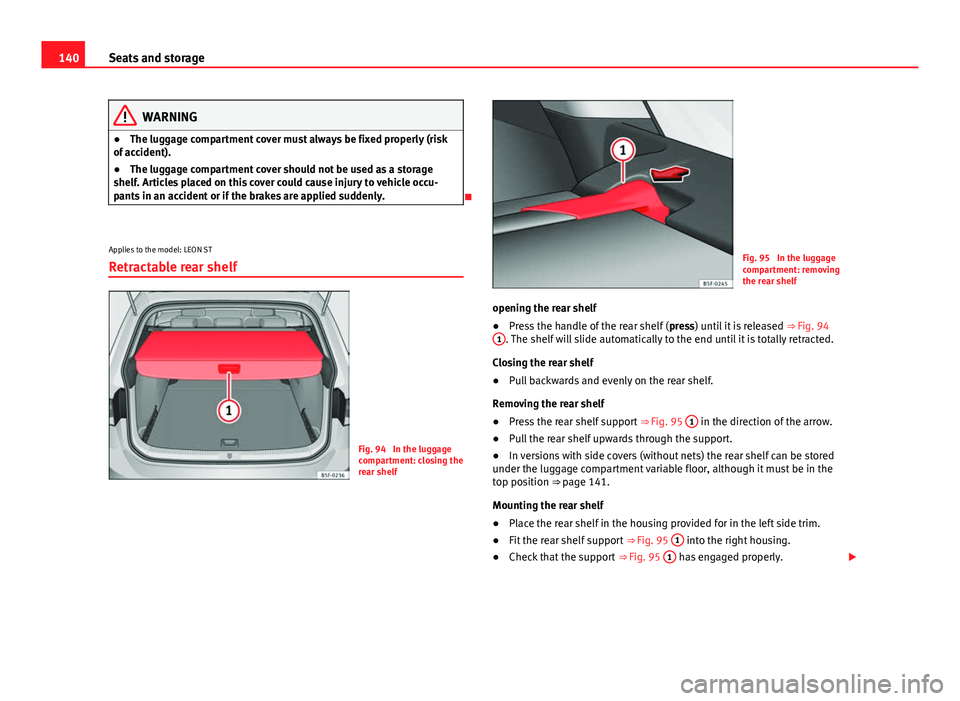
Fig. 94 In the luggage
compartment: closing the
rear shelf
Fig. 95 In the luggage
compartment: removing
the rear shelf
opening the rear shelf
● Press the handle of the rear shelf ( press) until it is released
⇒ Fig. 94
1
. The shelf will slide automatically to the end until it is totally retracted.
Closing the rear shelf
● Pull backwards and evenly on the rear shelf.
Removing the rear shelf
● Press the rear shelf support
⇒ Fig. 95 1
in the direction of the arrow.
● Pull the rear shelf upwards through the support.
● In versions with side covers (without nets) the rear shelf can be stored
under the luggage compartment variable floor, although it must be in the
top position ⇒ page 141.
Mounting the rear shelf
● Place the rear shelf in the housing provided for in the left side trim.
● Fit the rear shelf support
⇒ Fig. 95 1
into the right housing.
● Check that the support
⇒ Fig. 95 1 has engaged properly.
Page 143 of 339
141
Seats and storage
WARNING
If animals or other vehicles or stationary objects are carried incorrectly
on the rear shelf, they could cause serious injuries in case of sudden
braking or brusque manoeuvre or an accident.
● Do not leave hard, heavy or sharp objects loose on the rear shelf.
● Never transport animals on the rear shelf.
Applies to the model: LEON ST
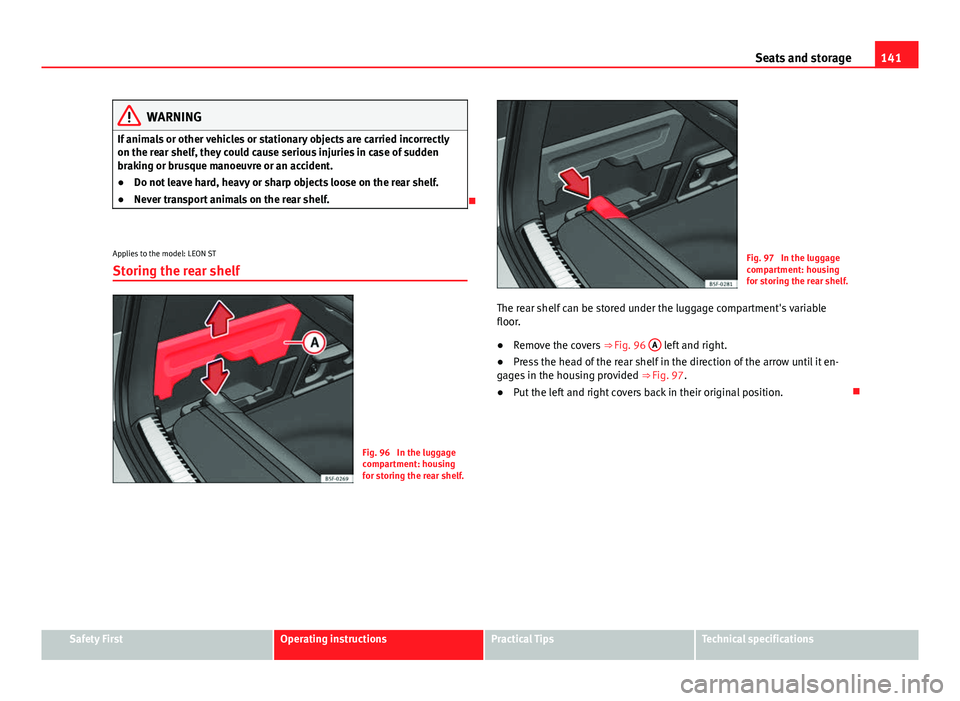
Storing the rear shelf
Fig. 96 In the luggage
compartment: housing
for storing the rear shelf.
Fig. 97 In the luggage
compartment: housing
for storing the rear shelf.
The rear shelf can be stored under the luggage compartment's variable
floor.
● Remove the covers
⇒ Fig. 96 A
left and right.
● Press the head of the rear shelf in the direction of the arrow until it en-
gages in the housing provided ⇒ Fig. 97.
● Put the left and right covers back in their original position.
Safety FirstOperating instructionsPractical TipsTechnical specifications
Page 144 of 339
142Seats and storage
Applies to the model: LEON ST
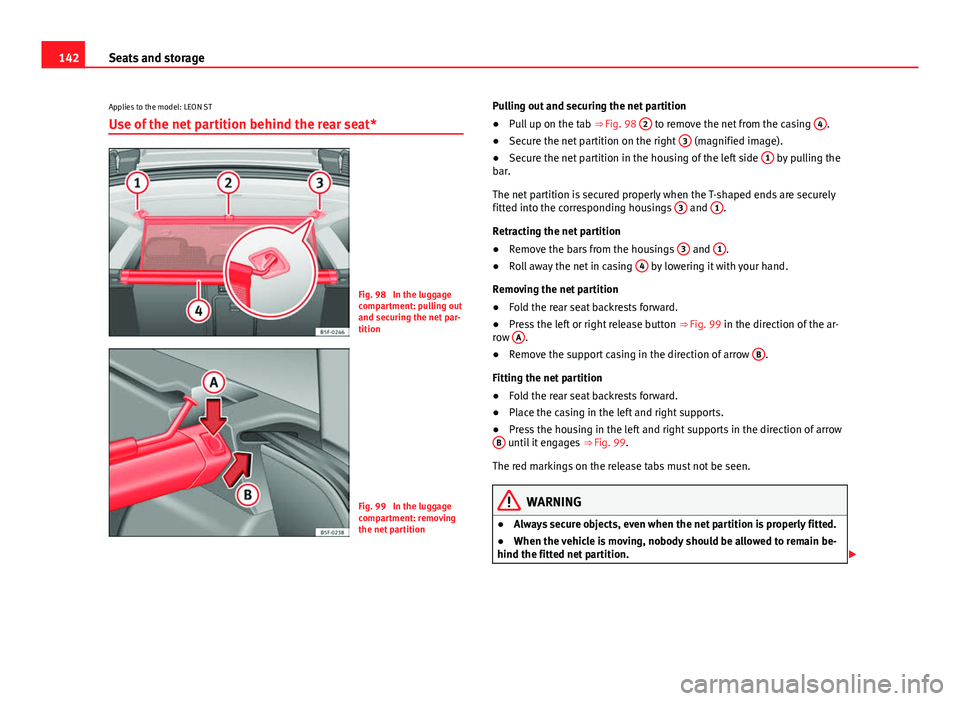
Use of the net partition behind the rear seat*
Fig. 98 In the luggage
compartment: pulling out
and securing the net par-
tition
Fig. 99 In the luggage
compartment: removing
the net partition Pulling out and securing the net partition
●
Pull up on the tab ⇒ Fig. 98 2
to remove the net from the casing 4.
● Secure the net partition on the right 3 (magnified image).
● Secure the net partition in the housing of the left side 1 by pulling the
bar.
The net partition is secured properly when the T-shaped ends are securely
fitted into the corresponding housings 3
and 1.
Retracting the net partition
● Remove the bars from the housings 3
and 1.
● Roll away the net in casing 4 by lowering it with your hand.
Removing the net partition
● Fold the rear seat backrests forward.
● Press the left or right release button ⇒ Fig. 99 in the direction of the ar-
row A
.
● Remove the support casing in the direction of arrow B.
Fitting the net partition
● Fold the rear seat backrests forward.
● Place the casing in the left and right supports.
● Press the housing in the left and right supports in the direction of arrow
B
until it engages ⇒ Fig. 99.
The red markings on the release tabs must not be seen.
WARNING
● Always secure objects, even when the net partition is properly fitted.
● When the vehicle is moving, nobody should be allowed to remain be-
hind the fitted net partition.
Page 145 of 339
143
Seats and storage
CAUTION
Incorrect handling of the net partition may cause damage.
● Do not “release” the partition net on lowering it; otherwise the net and
other parts of the vehicle might be damaged. Roll down the net partition by
hand.
Applies to the model: LEON ST
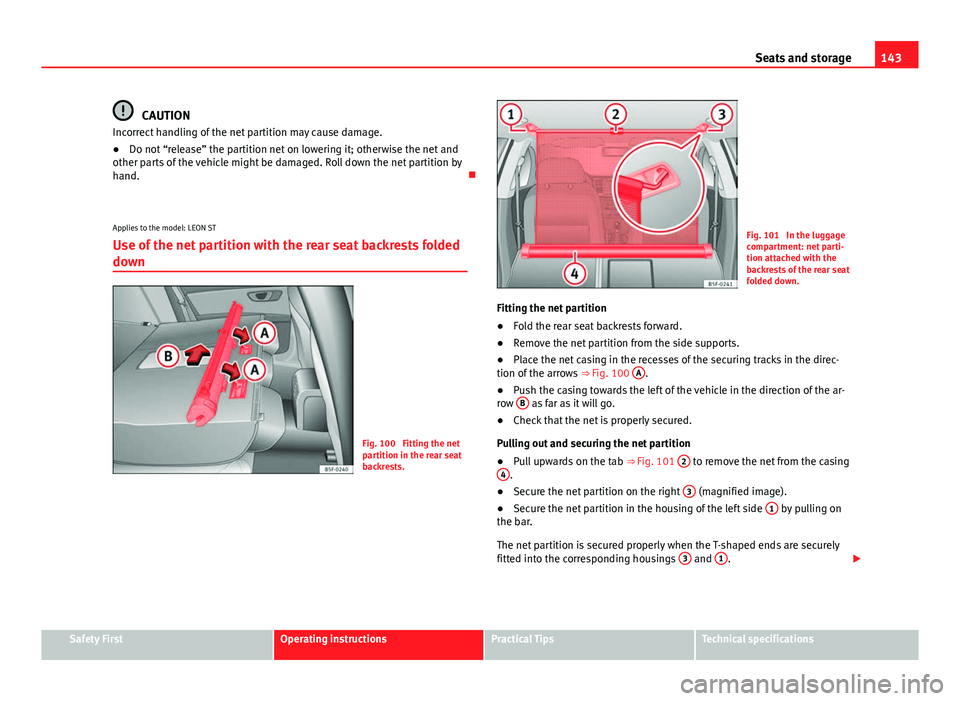
Use of the net partition with the rear seat backrests folded
down
Fig. 100 Fitting the net
partition in the rear seat
backrests.
Fig. 101 In the luggage
compartment: net parti-
tion attached with the
backrests of the rear seat
folded down.
Fitting the net partition
● Fold the rear seat backrests forward.
● Remove the net partition from the side supports.
● Place the net casing in the recesses of the securing tracks in the direc-
tion of the arrows ⇒ Fig. 100 A
.
● Push the casing towards the left of the vehicle in the direction of the ar-
row B
as far as it will go.
● Check that the net is properly secured.
Pulling out and securing the net partition
● Pull upwards on the tab
⇒ Fig. 101 2
to remove the net from the casing
4.
● Secure the net partition on the right 3 (magnified image).
● Secure the net partition in the housing of the left side 1 by pulling on
the bar.
The net partition is secured properly when the T-shaped ends are securely
fitted into the corresponding housings 3
and 1.
Safety FirstOperating instructionsPractical TipsTechnical specifications
Page 148 of 339
146Seats and storage
In order to use the fastening rings, they must be lifted beforehand 1)
.
WARNING
If unsuitable or damaged belts or retaining straps are used, they could
break in the event of braking or an accident. Objects could then be
launched across the passenger compartment and cause serious or fatal
injuries.
● Always use belts or retaining straps that are suitable and in a good
condition.
● Fasten the belts and straps to the fastening rings safely.
● Objects in the luggage compartment that are unsecured could move
suddenly and modify the handling of the vehicle.
● Secure all objects, small and light.
● The maximum tensile load of the fastening ring should never be ex-
ceeded for securing objects.
● Never secure a child seat to the fastening rings.
Note
● The maximum tensile load that the fastening rings can support is 3.5
kN.
● Belts and securing systems for the appropriate load can be obtained
from specialised dealerships. SEAT recommends visiting a SEAT dealership
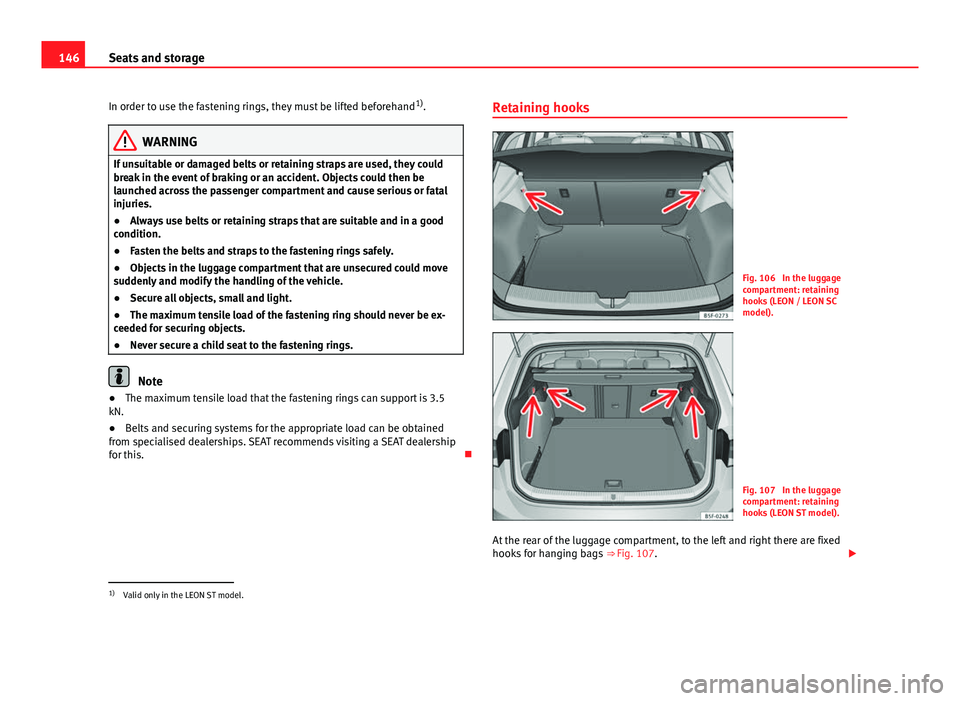
for this. Retaining hooks
Fig. 106 In the luggage
compartment: retaining
hooks (LEON / LEON SC
model).
Fig. 107 In the luggage
compartment: retaining
hooks (LEON ST model).
At the rear of the luggage compartment, to the left and right there are fixed
hooks for hanging bags ⇒ Fig. 107.
1)
Valid only in the LEON ST model.
Page 156 of 339

154Air conditioning
CAUTION
● Switch the air conditioner off if you think it may be broken. This will
avoid additional damage. Have the air conditioner checked by a specialised
workshop.
● Repairs to the air conditioner require specialist knowledge and special
tools. SEAT recommends visiting a SEAT Official Service.
Note
● When the cooling system is turned off, air coming from the outside will
not be dried. To prevent fogging of the windows, SEAT recommends leaving
the cooling system (compressor) turned on. To do this, press the button
.
The button lamp should light up.
● The maximum heat output required to defrost windows as quickly as
possible is only available when the engine has reached its normal running
temperature.
● Keep the air intake slots in front of the windscreen free of snow, ice and
leaves to ensure heating and cooling are not impaired, and to prevent the
windows from misting over. Air conditioner controls
Fig. 113 In the centre console: Climatronic controls
To switch a function on or off, press the appropriate button. Press the but-
ton again to switch off the function.
The LED on each control lights up to indicate that the respective function of
a control has been switched on.
Control but- tonAdditional information. Climatronic.
1TemperatureThe left and right sides can be adjusted separately. Rotate
the control to adjust the temperature accordingly.
2FanThe power of the fan is automatically adjusted. The fan is
also adjusted manually by turning the control.
3Air distribu-tionThe airflow adjusts automatically for comfort. You can also
switch it on manually using the buttons 3.
4Indications on the temperature display screen selected for
the right and left sides.