left Seat Leon 5D 2013 Owner's Guide
[x] Cancel search | Manufacturer: SEAT, Model Year: 2013, Model line: Leon 5D, Model: Seat Leon 5D 2013Pages: 339, PDF Size: 4.8 MB
Page 164 of 339

162Driving
Driving
SteeringAdjusting the steering wheel position
The height and reach of the steering wheel can be freely ad-
justed to suit the driver.
Fig. 117 Lever in the
lower left side of the
steering column
– Press the lever 1
⇒ Fig. 117 down ⇒
–
Move the steering wheel to the desired position.
– Move the lever up, applying pressure until the close position is
reached.
WARNING
● Never adjust the position of the steering wheel when the vehicle is
moving, as this could cause an accident.
● Move the lever up firmly so the steering wheel position does not acci-
dentally change during driving. risk of accident!
● Make sure you are capable of reaching and firmly holding the upper
part of the steering wheel while your back remains well supported by the
backrest: risk of accident!
Ignition lock Warning and control lamps
Lights upPossible causeSolution
Preheating of the diesel en-
gine before starting the en-
gine⇒ page 164
Foot not on the brake pedal.Press the brake model to start the
engine.
Some warning and control lamps will light up briefly when the ignition is
switched on to check certain functions. They will switch off after a few sec-
onds.
Page 174 of 339
172Driving
Driver messages on the instrument panel display
Start-Stop system deactivated. Start the engine manually
This driver message is displayed when certain conditions are not met during
the stopping phase and the Start-Stop system cannot restart the engine.
The engine must be started manually.
Start-Stop system: Fault! Function not available
There is a fault in the Start-Stop system. Take the vehicle to a workshop to
have the fault repaired.
Manual gearbox
Changing gears
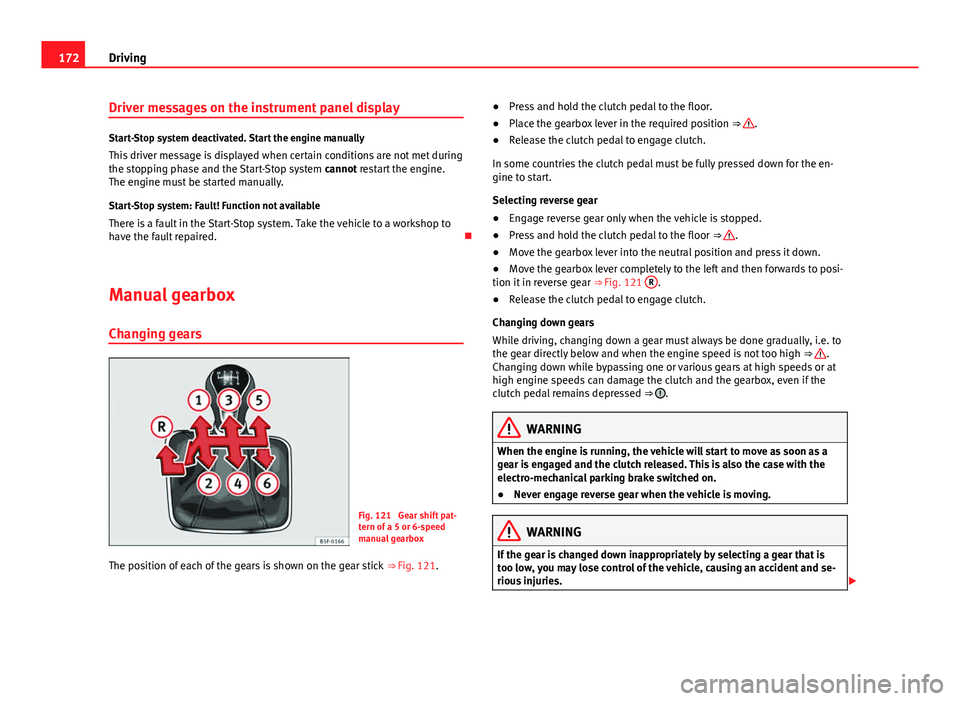
Fig. 121 Gear shift pat-
tern of a 5 or 6-speed
manual gearbox
The position of each of the gears is shown on the gear stick ⇒ Fig. 121. ●
Press and hold the clutch pedal to the floor.
● Place the gearbox lever in the required position ⇒
.
● Release the clutch pedal to engage clutch.
In some countries the clutch pedal must be fully pressed down for the en-
gine to start.
Selecting reverse gear
● Engage reverse gear only when the vehicle is stopped.
● Press and hold the clutch pedal to the floor ⇒
.
● Move the gearbox lever into the neutral position and press it down.
● Move the gearbox lever completely to the left and then forwards to posi-
tion it in reverse gear ⇒ Fig. 121 R
.
● Release the clutch pedal to engage clutch.
Changing down gears
While driving, changing down a gear must always be done gradually, i.e. to
the gear directly below and when the engine speed is not too high ⇒
.
Changing down while bypassing one or various gears at high speeds or at
high engine speeds can damage the clutch and the gearbox, even if the
clutch pedal remains depressed ⇒
.
WARNING
When the engine is running, the vehicle will start to move as soon as a
gear is engaged and the clutch released. This is also the case with the
electro-mechanical parking brake switched on.
● Never engage reverse gear when the vehicle is moving.
WARNING
If the gear is changed down inappropriately by selecting a gear that is
too low, you may lose control of the vehicle, causing an accident and se-
rious injuries.
Page 182 of 339
180Driving
flash slowly depending on whether or not the vehicle has a driver
information system* 1)
.
– When the engine is running, switch off the traction control
(ASR) 1)
2)
.
– Move the selector lever to position “S” or tiptronic, or select the
driving mode Sport from the SEAT Drive Mode* ⇒ page 211.
– Press the brake pedal firmly with your left foot and hold it down
for at least one second.
– With your right foot, press the accelerator down to the full throt-
tle or kick-down position. The engine speed will stabilise at ap-
prox. 3200 rpm (petrol engine) or approx. 2000 rpm (diesel en-
gine).
– Take your left foot off the brake pedal.
WARNING
● Always adapt your driving style to the traffic conditions.
● Only use the “Launch control programme” when road and traffic con-
ditions permit, and make sure the way in which you drive and accelerate
the vehicle does not inconvenience or endanger other road users.
WARNING (Continued)
● Make sure that the ESC remains switched on. Please note that when
the ASR and ESC are deactivated, the wheels may start to spin, causing
the vehicle to lose grip. Risk of accident!
● After putting the vehicle into gear, the “sport” mode of the ESC
should be deactivated again by briefly pressing the
OFF
button.
Note
● After using the “Launch control programme”, the gearbox temperature
may have increased considerably. In this case, the programme could be dis-
abled for several minutes. The programme can be used again after the cool-
ing phase.
● Accelerating with the “Launch control programme” places a heavy load
on all parts of the vehicle. This can result in increased wear and tear.
Inertia mode
The inertia mode enables the kinetic energy of the vehicle to be
harnessed enabling certain stretches to be driven without using
the accelerator. This enables fuel to be saved. Use the inertia mode
to “let the vehicle roll” before, for example, arriving in a town.
Switching on inertia mode
Important: selector lever must be in position D, gradients below
12 %.
1)
On vehicles with the driver information system, the ESC lamp lights up permanently and
the corresponding text message Stability control deactivated (temporary) appears on the in-
strument panel to indicate the deactivation status.
2) Vehicles without driver information system: the warning lamp flashes slowly/Vehicles with
driver information system: the warning lamp stays on.
Page 188 of 339
186Driver assistance systems
Operating the cruise control system*
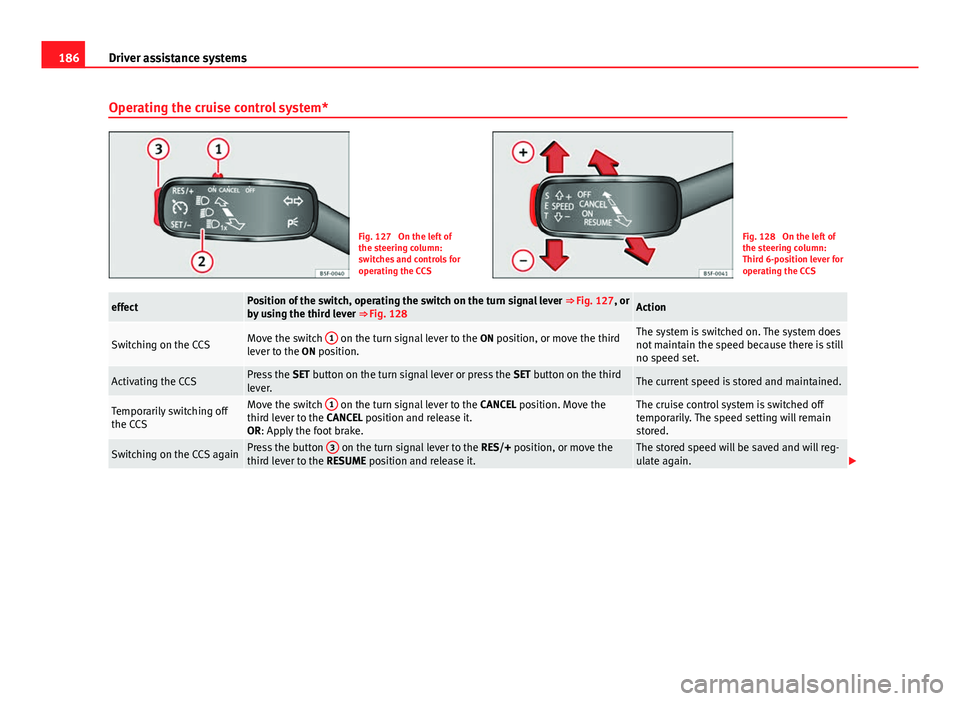
Fig. 127 On the left of
the steering column:
switches and controls for
operating the CCSFig. 128 On the left of
the steering column:
Third 6-position lever for
operating the CCS
effectPosition of the switch, operating the switch on the turn signal lever ⇒ Fig. 127, or
by using the third lever ⇒ Fig. 128Action
Switching on the CCSMove the switch 1 on the turn signal lever to the
ON position, or move the third
lever to the ON position.The system is switched on. The system does
not maintain the speed because there is still
no speed set.
Activating the CCSPress the SET button on the turn signal lever or press the SET button on the third
lever.The current speed is stored and maintained.
Temporarily switching off
the CCSMove the switch 1 on the turn signal lever to the
CANCEL position. Move the
third lever to the CANCEL position and release it.
OR: Apply the foot brake.The cruise control system is switched off
temporarily. The speed setting will remain
stored.
Switching on the CCS againPress the button 3 on the turn signal lever to the
RES/+ position, or move the
third lever to the RESUME position and release it.The stored speed will be saved and will reg-
ulate again.
Page 195 of 339
193
Driver assistance systems
Using the adaptive cruise control (ACC)
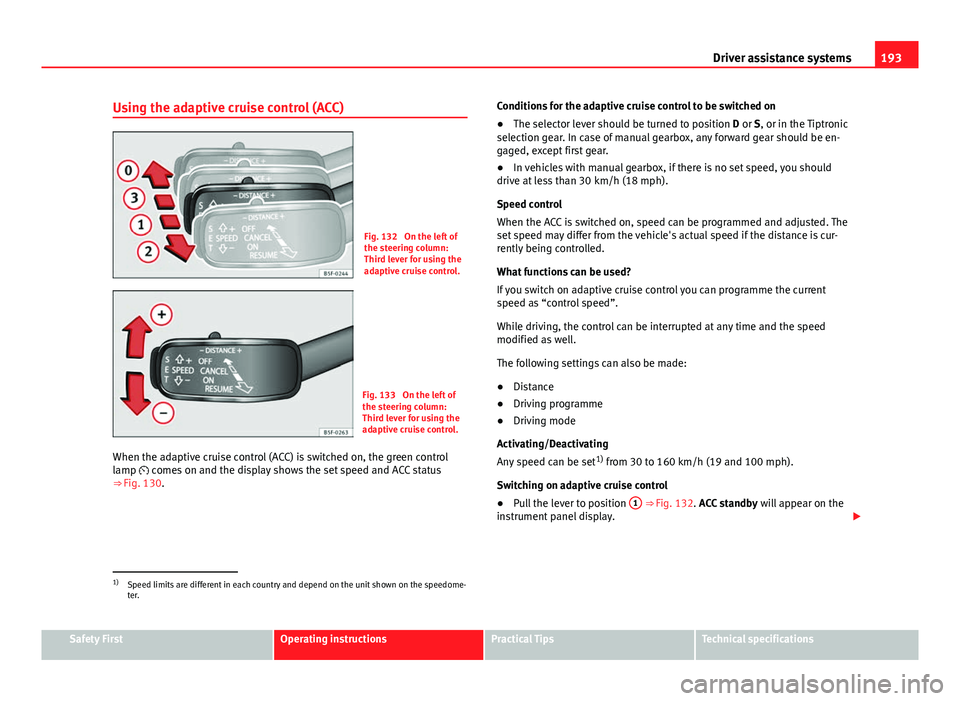
Fig. 132 On the left of
the steering column:
Third lever for using the
adaptive cruise control.
Fig. 133 On the left of
the steering column:
Third lever for using the
adaptive cruise control.
When the adaptive cruise control (ACC) is switched on, the green control
lamp comes on and the display shows the set speed and ACC status
⇒ Fig. 130. Conditions for the adaptive cruise control to be switched on
●
The selector lever should be turned to position D or S, or in the Tiptronic
selection gear. In case of manual gearbox, any forward gear should be en-
gaged, except first gear.
● In vehicles with manual gearbox, if there is no set speed, you should
drive at less than 30 km/h (18 mph).
Speed control
When the ACC is switched on, speed can be programmed and adjusted. The
set speed may differ from the vehicle's actual speed if the distance is cur-
rently being controlled.
What functions can be used?
If you switch on adaptive cruise control you can programme the current
speed as “control speed”.
While driving, the control can be interrupted at any time and the speed
modified as well.
The following settings can also be made:
● Distance
● Driving programme
● Driving mode
Activating/Deactivating
Any speed can be set 1)
from 30 to 160 km/h (19 and 100 mph).
Switching on adaptive cruise control
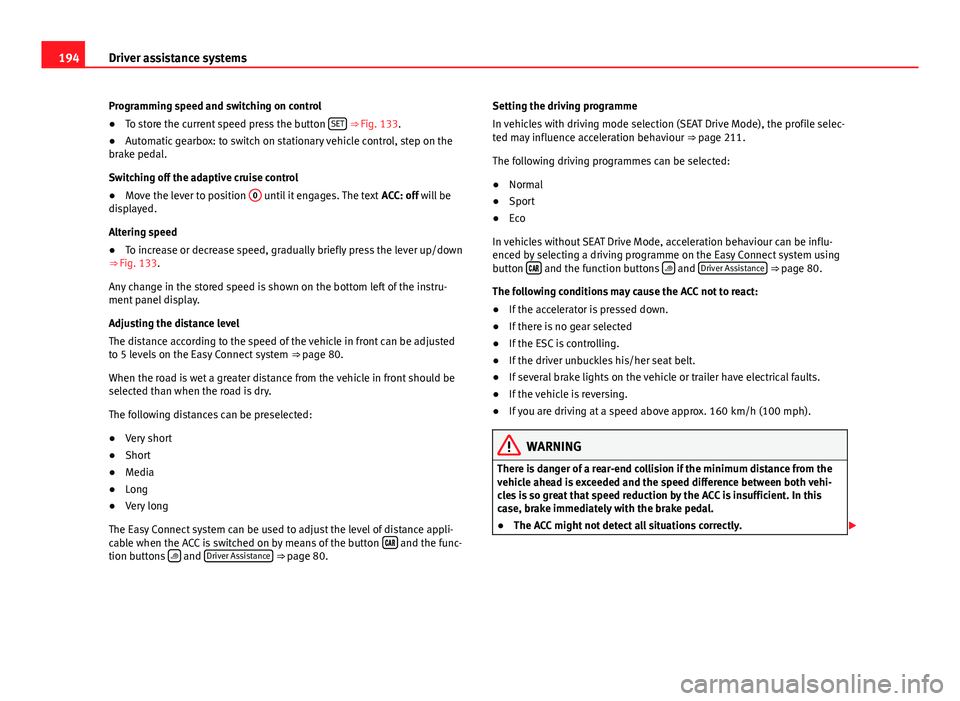
● Pull the lever to position 1
⇒ Fig. 132. ACC standby
will appear on the
instrument panel display.
1)
Speed limits are different in each country and depend on the unit shown on the speedome-
ter.
Safety FirstOperating instructionsPractical TipsTechnical specifications
Page 196 of 339
194Driver assistance systems
Programming speed and switching on control
● To store the current speed press the button SET
⇒ Fig. 133.
● Automatic gearbox: to switch on stationary vehicle control, step on the
brake pedal.
Switching off the adaptive cruise control
● Move the lever to position 0
until it engages. The text
ACC: off will be
displayed.
Altering speed
● To increase or decrease speed, gradually briefly press the lever up/down
⇒ Fig. 133.
Any change in the stored speed is shown on the bottom left of the instru-
ment panel display.
Adjusting the distance level
The distance according to the speed of the vehicle in front can be adjusted
to 5 levels on the Easy Connect system ⇒ page 80.
When the road is wet a greater distance from the vehicle in front should be
selected than when the road is dry.
The following distances can be preselected:
● Very short
● Short
● Media
● Long
● Very long
The Easy Connect system can be used to adjust the level of distance appli-
cable when the ACC is switched on by means of the button
and the func-
tion buttons and Driver Assistance ⇒ page 80. Setting the driving programme
In vehicles with driving mode selection (SEAT Drive Mode), the profile selec-
ted may influence acceleration behaviour
⇒ page 211.
The following driving programmes can be selected:
● Normal
● Sport
● Eco
In vehicles without SEAT Drive Mode, acceleration behaviour can be influ-
enced by selecting a driving programme on the Easy Connect system using
button
and the function buttons and Driver Assistance ⇒ page 80.
The following conditions may cause the ACC not to react:
● If the accelerator is pressed down.
● If there is no gear selected
● If the ESC is controlling.
● If the driver unbuckles his/her seat belt.
● If several brake lights on the vehicle or trailer have electrical faults.
● If the vehicle is reversing.
● If you are driving at a speed above approx. 160 km/h (100 mph).
WARNING
There is danger of a rear-end collision if the minimum distance from the
vehicle ahead is exceeded and the speed difference between both vehi-
cles is so great that speed reduction by the ACC is insufficient. In this
case, brake immediately with the brake pedal.
● The ACC might not detect all situations correctly.
Page 198 of 339
196Driver assistance systems
Interrupting cruise control
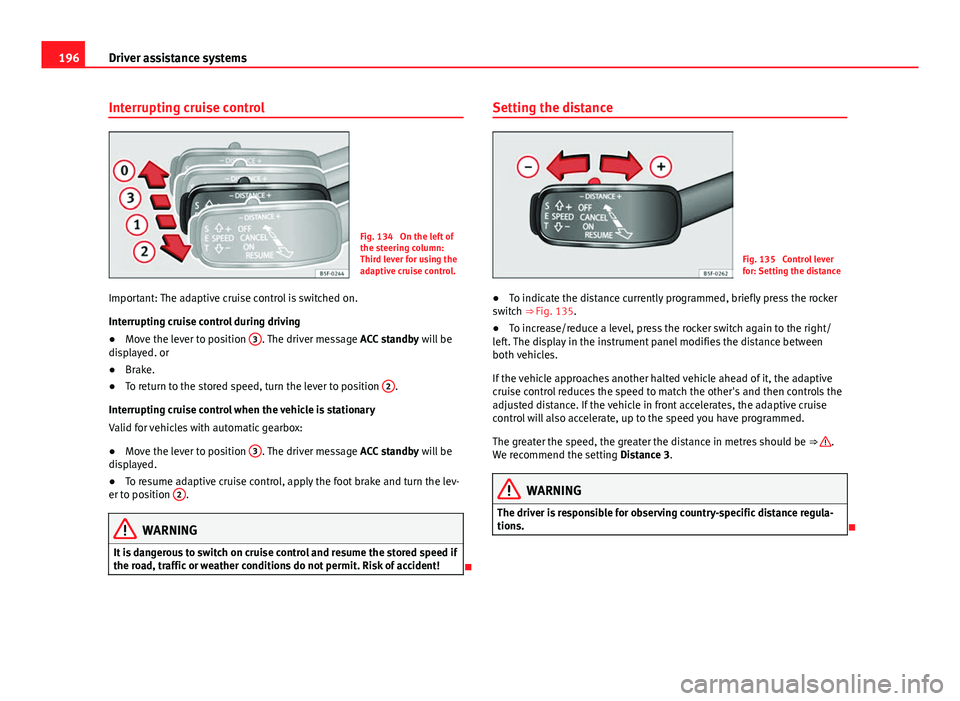
Fig. 134 On the left of
the steering column:
Third lever for using the
adaptive cruise control.
Important: The adaptive cruise control is switched on.
Interrupting cruise control during driving
● Move the lever to position 3
. The driver message
ACC standby will be
displayed. or
● Brake.
● To return to the stored speed, turn the lever to position 2
.
Interrupting cruise control when the vehicle is stationary
Valid for vehicles with automatic gearbox:
● Move the lever to position 3
. The driver message
ACC standby will be
displayed.
● To resume adaptive cruise control, apply the foot brake and turn the lev-
er to position 2
.
WARNING
It is dangerous to switch on cruise control and resume the stored speed if
the road, traffic or weather conditions do not permit. Risk of accident!
Setting the distance
Fig. 135 Control lever
for: Setting the distance
● To indicate the distance currently programmed, briefly press the rocker
switch ⇒ Fig. 135.
● To increase/reduce a level, press the rocker switch again to the right/
left. The display in the instrument panel modifies the distance between
both vehicles.
If the vehicle approaches another halted vehicle ahead of it, the adaptive
cruise control reduces the speed to match the other's and then controls the
adjusted distance. If the vehicle in front accelerates, the adaptive cruise
control will also accelerate, up to the speed you have programmed.
The greater the speed, the greater the distance in metres should be ⇒
.
We recommend the setting Distance 3.
WARNING
The driver is responsible for observing country-specific distance regula-
tions.
Page 218 of 339
216Driver assistance systems
WARNING (Continued)
● Driving with tyres at the wrong pressure can cause them damage and
result in an accident. Ensure that the tyre pressures of all the tyres corre-
spond to the vehicle load.
● Before starting a journey, always inflate tyres to the correct pressure.
● Tyres with insufficient pressure are subjected to more flexing. Due to
this, the tyre could become excessively hot, causing tread separation
and also tyre blow-out.
● With an overloaded vehicle at high speed, the tyres can overheat and
burst resulting in a loss of vehicle control.
● Tyre pressures which are too high or too low reduce the useful life of
the tyre, affecting vehicle performance.
● If a tyre has not been punctured then it does not have to be changed
immediately; drive to the nearest specialised workshop at a moderate
speed and have the tyre checked and inflated to the correct pressure.
WARNING
If the warning lamps and messages are ignored, the vehicle may stall in
traffic, or may cause accidents and severe injuries.
● Never ignore the warning lamps or text messages.
● Stop the vehicle safely as soon as possible.
CAUTION
Failure to heed the control lamps and text messages when they appear may
result in faults in the vehicle.
Note
● If excessively low tyre pressure is detected with the ignition on, an audi-
ble warning will sound. In the event that there is a fault in the system, an
audible warning will sound.
● Driving on dirt tracks for a long period of time or driving in a sporty style
can temporarily deactivate the TPMS. The control lamp shows a fault, but
disappears when road conditions or the driving style change.
Tyre monitoring indicator
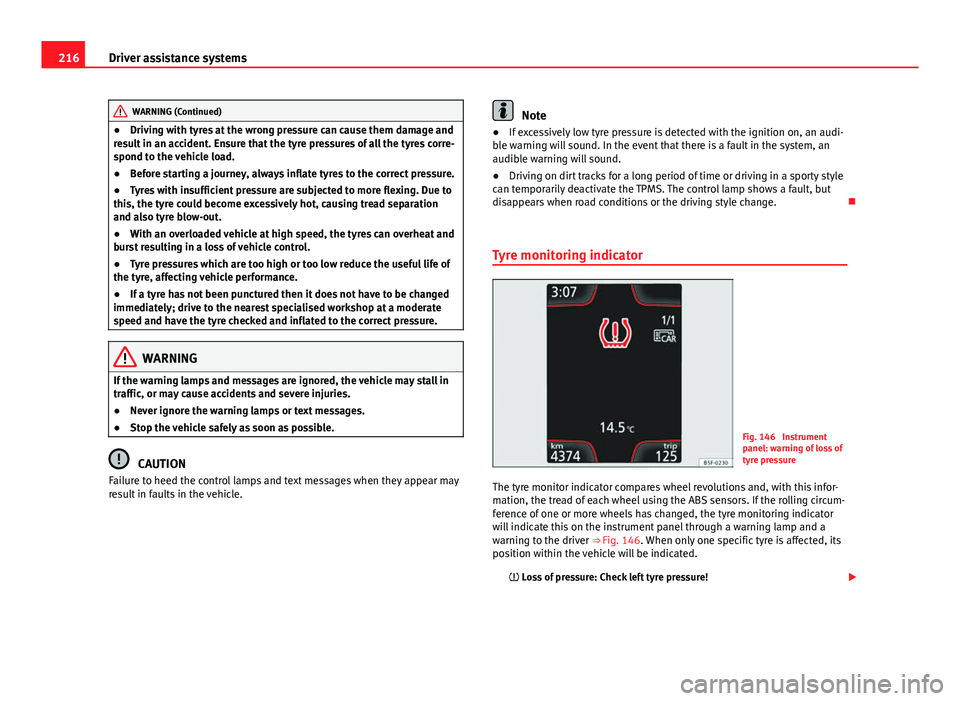
Fig. 146 Instrument
panel: warning of loss of
tyre pressure
The tyre monitor indicator compares wheel revolutions and, with this infor-
mation, the tread of each wheel using the ABS sensors. If the rolling circum-
ference of one or more wheels has changed, the tyre monitoring indicator
will indicate this on the instrument panel through a warning lamp and a
warning to the driver ⇒ Fig. 146. When only one specific tyre is affected, its
position within the vehicle will be indicated. Loss of pressure: Check left tyre pressure!
Page 222 of 339
220Driver assistance systems
Switching on
–Engage reverse gear or
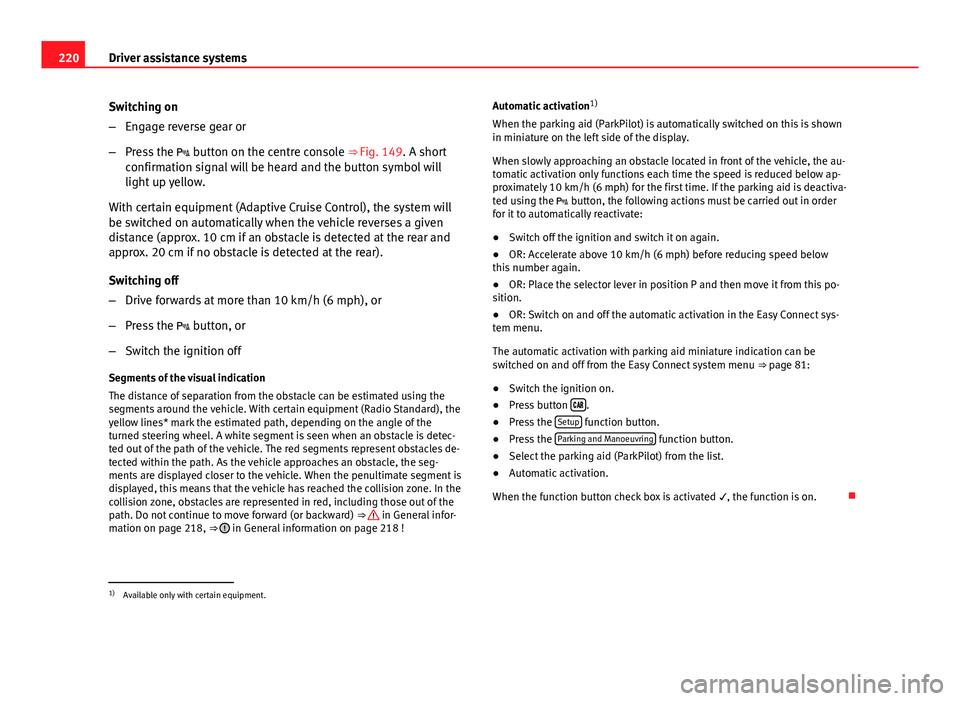
– Press the button on the centre console ⇒ Fig. 149. A short
confirmation signal will be heard and the button symbol will
light up yellow.
With certain equipment (Adaptive Cruise Control), the system will
be switched on automatically when the vehicle reverses a given
distance (approx. 10 cm if an obstacle is detected at the rear and
approx. 20 cm if no obstacle is detected at the rear).
Switching off
– Drive forwards at more than 10 km/h (6 mph), or
– Press the button, or
– Switch the ignition off
Segments of the visual indication
The distance of separation from the obstacle can be estimated using the
segments around the vehicle. With certain equipment (Radio Standard), the
yellow lines* mark the estimated path, depending on the angle of the
turned steering wheel. A white segment is seen when an obstacle is detec-
ted out of the path of the vehicle. The red segments represent obstacles de-
tected within the path. As the vehicle approaches an obstacle, the seg-
ments are displayed closer to the vehicle. When the penultimate segment is
displayed, this means that the vehicle has reached the collision zone. In the
collision zone, obstacles are represented in red, including those out of the
path. Do not continue to move forward (or backward) ⇒
in General infor-
mation on page 218, ⇒ in General information on page 218 ! Automatic activation
1)
When the parking aid (ParkPilot) is automatically switched on this is shown
in miniature on the left side of the display.
When slowly approaching an obstacle located in front of the vehicle, the au-
tomatic activation only functions each time the speed is reduced below ap-
proximately 10 km/h (6 mph) for the first time. If the parking aid is deactiva-
ted using the button, the following actions must be carried out in order
for it to automatically reactivate:
● Switch off the ignition and switch it on again.
● OR: Accelerate above 10 km/h (6 mph) before reducing speed below
this number again.
● OR: Place the selector lever in position P and then move it from this po-
sition.
● OR: Switch on and off the automatic activation in the Easy Connect sys-
tem menu.
The automatic activation with parking aid miniature indication can be
switched on and off from the Easy Connect system menu ⇒ page 81:
● Switch the ignition on.
● Press button
.
● Press the Setup function button.
● Press the Parking and Manoeuvring function button.
● Select the parking aid (ParkPilot) from the list.
● Automatic activation.
When the function button check box is activated , the function is on.
1)
Available only with certain equipment.
Page 228 of 339
226Intelligent technology
If the warning lamp remains on and the driver indication appears, the power
steering could be faulty.
Do not continue driving. Seek specialist assistance. (in yellow) Steering: System fault! You may continue driving.
If the warning lamp comes on, the steering could react with more difficultly
or more sensitivity than normal. In addition, when driving in a straight line
the steering wheel may be off-centre.
Drive slowly to a specialised workshop and have the fault repaired. (in yellow) Steering lock: fault! Go to an Official Service
The electronic steering lock is malfunctioning.
Go to a specialised workshop as soon as possible and have the fault re-
paired.
WARNING
Take it immediately to a specialised workshop and have the fault re-
paired: risk of accident!
Note
If a red or yellow warning lamp come on briefly, you can continue driv-
ing.
Progressive steering
Depending on the vehicle's equipment, the progressive steering can adapt
steering hardness to the driving conditions. Progressive steering only works
when the engine is running. In city traffic
there is no need to turn the wheel so much when parking, ma-
noeuvring or in tight turns.
On the road or on motorways, the progressive steering transmits, e.g., on
bends, a sportier, more direct and perceptibly more dynamic sensation to
the steering wheel
Power Management This system helps to ensure reliable starting
The power management controls the distribution of electri-
cal energy and thus helps to ensure that there is always
enough power available to start the engine.
If a vehicle with a conventional electrical system is left parked for a long
time, the battery will gradually lose its charge because certain electrical
equipment (such as the electronic gearbox lock) continues to draw current
even when the ignition is off. In some cases there may not be enough power
available to start the engine.
Your vehicle is equipped with an intelligent power management system to
control the distribution of electrical energy. This significantly improves relia-
bility when starting the engine, and also prolongs the useful life of the bat-
tery.
The main functions incorporated in the power management system are bat-
tery diagnosis , residual current management and dynamic power manage-
ment.