change time Seat Mii 2017 Owner's manual
[x] Cancel search | Manufacturer: SEAT, Model Year: 2017, Model line: Mii, Model: Seat Mii 2017Pages: 232, PDF Size: 4.91 MB
Page 2 of 232

SEAT S.A. is permanently concerned about continuous development of its t\
ypes and models. For this reason we ask you to under-
stand, that at any given time, changes regarding shape, equipment and te\
chnique may take place on the car delivered. For this reason
no right at all may derive based on the data, drawings and descriptions \
in this current handbook.
All texts, illustrations and standards in this handbook are based on the\
status of information at the time of printing. Except for error
or omission, the information included in the current handbook is valid a\
s of the date of closing print.
Re-printing, copying or translating, whether total or partial is not all\
owed unless SEAT allows it in written form.
SEAT reserves all rights in accordance with the “Copyright” Act.
All rights on changes are reserved.
❀This paper has been manufactured using bleached non-chlorine cellulose.
© SEAT S.A. - Reprint: 15.11.17
About this manual
This manual contains a description of the
equipment supplied with the vehicle at the
time this manual was published. Some of the
units described herein will not be available
until a later date or are only available in cer -
tain markets.
Because this is a general manual for the Mii,
some of the equipment and functions that are
described in this manual are not included in
all types or variants of the model; they may
vary or be modied depending on the techni -
cal requirements and on the market; this is in
no way deceptive advertising.
The illustrations are intended as a general
guide and may vary from the equipment tted
in your vehicle in some details.
The steering indications (left, right, forward,
reverse) appearing in this manual refer to the
normal driving movements of the vehicle ex -
cept when otherwise indicated.
The equipment marked with an aster -
isk* is tted as standard only in certain
versions, and is only supplied as op -
tional extras for some versions, or are
only offered in certain countries.
® All registered marks are indicated with
®. Although the copyright symbol does
not appear, it is a copyrighted mark.
>> The section is continued on the follow -
ing page.
Important warnings on a given page
Detailed contents on a given page
General information on a given page
Emergency information on a given page
WARNING
Texts preceded by this symbol contain infor -
mation on safety. They warn you about possi -
ble dangers of accident or injury.
CAUTION
Texts with this symbol draw your attention to
potential sources of damage to your vehicle.
For the sake of the environment
Texts preceded by this symbol contain rele-
vant information concerning environmental
protection.
Note
Texts preceded by this symbol contain additio -
nal information.
This manual is divided into six large parts,
which are:
1. The essentials
2. Safety
3. Emergencies
4. Operation
5. Tips
6. Technical data
At the end of this manual, there is a detailed
alphabetical index that will help you quickly
nd the information you require.
Page 4 of 232
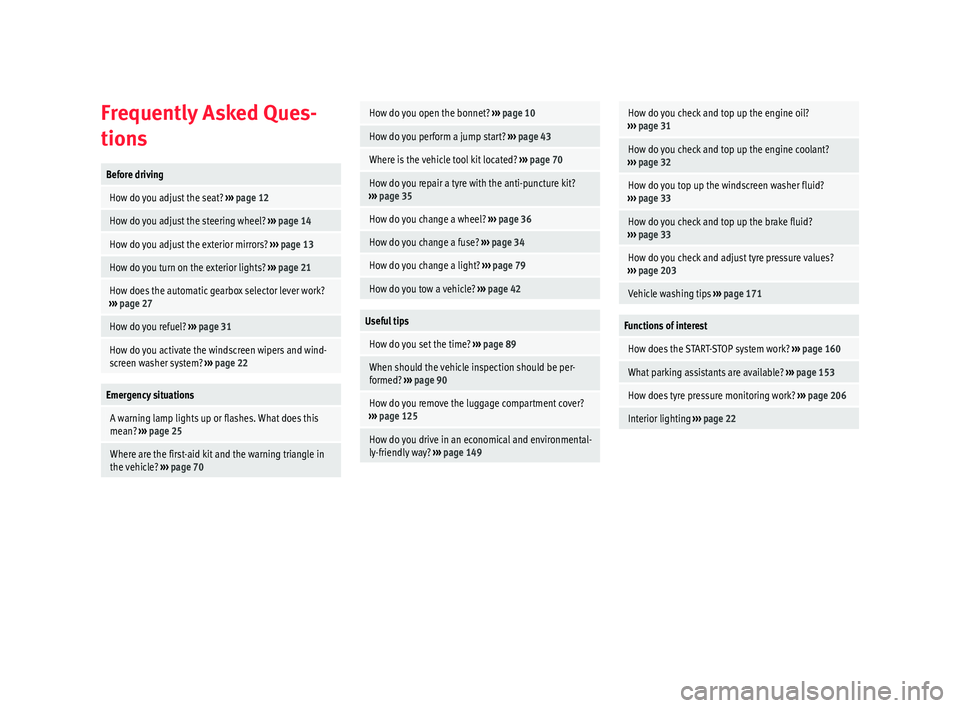
Frequently Asked Ques-
tion
sBefore driving
How do you adjust the seat?
››› page 12
How do you adjust the steering wheel? ››› page 14
How do you adjust the exterior mirrors? ››› page 13
How do you turn on the exterior lights? ››› page 21
How does the automatic gearbox selector lever work?
››› page 27
How do you refuel? ››› page 31
How do you activate the windscreen wipers and wind-
screen washer system? ››› page 22
Emergency situations
A warning lamp lights up or flashes. What does this
mean? ››› page 25
Where are the first-aid kit and the warning triangle in
the vehicle? ››› page 70
How do you open the bonnet? ››› page 10
How do you perform a jump start? ››› page 43
Where is the vehicle tool kit located? ››› page 70
How do you repair a tyre with the anti-puncture kit?
››› page 35
How do you change a wheel? ››› page 36
How do you change a fuse? ››› page 34
How do you change a light? ››› page 79
How do you tow a vehicle? ››› page 42
Useful tips
How do you set the time? ››› page 89
When should the vehicle inspection should be per-
formed? ››› page 90
How do you remove the luggage compartment cover?
››› page 125
How do you drive in an economical and environmental-
ly-friendly way? ››› page 149
How do you check and top up the engine oil?
››› page 31
How do you check and top up the engine coolant?
››› page 32
How do you top up the windscreen washer fluid?
››› page 33
How do you check and top up the brake fluid?
››› page 33
How do you check and adjust tyre pressure values?
››› page 203
Vehicle washing tips ››› page 171
Functions of interest
How does the START-STOP system work? ››› page 160
What parking assistants are available? ››› page 153
How does tyre pressure monitoring work? ››› page 206
Interior lighting ››› page 22
Page 25 of 232

The essentialsMore the lever to the required position:
7
Automatic wipe for cleaning rear win-
dows with the lever pressed.
›››
page 108
››› page 45 SEAT information system
Intr oduction With the ignition switched on it is possible to
ac
c
e
ss different messages via the display on
the instrument panel display.
The number of messages displayed on the in-
strument panel display will vary according to
the vehicle electronics and equipment.
A specialised workshop will be able to pro-
gramme or modify additional functions, ac-
cording to the vehicle equipment. SEAT rec-
ommends taking your car in for technical
service. WARNING
Any distraction may lead to an accident, with
the risk of
injury. ●
Do not c on
sult the messages on the instru-
ment panel screen when driving. Management of indications on the
dis
p
lay Fig. 33
Windscreen wiper lever: control but-
t on
s. Calling up options
● Switch the ignition on.
● If a message or vehicle symbol is dis-
p l
a
yed, press OK/RESET (
››
› Fig. 33 A ).
● Press the top or bottom part of the rocker
sw it
c
h ››› Fig. 33 B until the desired option
ap pe
ar
s. Multifunction display (MFI) The multifunction display (MFD) has two au-
tom
atic
memories: 1 - Partial memory and 2 -
Total memory . The selected memory will be
shown in the lower right-hand corner of the
display.
With the ignition switched on, and memory 1 or
2 displayed, briefly press OK to change from
one memory to another.
Trip memory
(for a single journey).
The memory stores the values for the
journey and the consumption from the
moment the ignition is switched on until
it is switched off again.
If the journey is broken for more than 2
hours, the memory is automatically
erased. If the journey is continued in
less than 2 hours after the ignition is
switched off, the new data is added to
the data already stored in the memory.
Total memo-
ry (for all
journeys).
The memory stores the values of any
number of journeys, until it counts a to-
tal of 19 hours and 59 minutes of driv-
ing, or 1999.9 km or miles of driving,
depending on the type of instrument
panel fitted. On reaching either of these
limits, the memory is automatically
erased and starts to count from 0 again. Possible displays
MenuFunction
TimeCurrent time in hours (h) and mi-
nutes (min).»
23
Page 37 of 232
The essentials
● Rep
l
ace the cover again or close the fuse
box lid.
Bulbs Bul
bs (12 V)
Light source used for each function
Halogen headlights.Type
Daytime running light/side
lightW21/5W
Dipped beam headlightsH4 LL
Main beam headlightsH4 LL
Turn signalPY21W NA
Front fog lightType
Fog lights*HB4
Rear bulb lightType
Brake/side lightsP21/5W LL
Side lightsP21/5W LL
Turn signalPY21W NA LL
Retro fog lightP21W
Reverse lightsR10W Action in the event of a punc-
t
ur
e
Wh
at to do first ●
Park the vehicle on a horizontal surface
and in a saf e p
lace as far away from traffic as
possible.
● Apply the handbrake.
● Switch on the hazard warning lights.
● Manual gearbox: select the 1s
t gear.
● Automatic gearbox: move the sel
ector lever
to D or R.
● If you are towing a trailer, unhitch it from
your v
ehicle.
● Have the vehicle tool kit ›››
page 71
and the spare wheel* ready
››› page 207.
● Observe the applicable legislation for each
countr
y (reflective vest, warning triangles,
etc.).
● All occupants should leave the vehicle and
wait in a s
afe place (for instance behind the
roadside crash barrier). WARNING
● Alw a
ys observe the above steps and pro-
tect yourself and other road users.
● If you change the wheel on a slope, block
the wheel on the oppo
site side of the car with a stone or similar to prevent the vehicle from
mov
in
g. Repairing a tyre with the anti-punc-
tur
e k
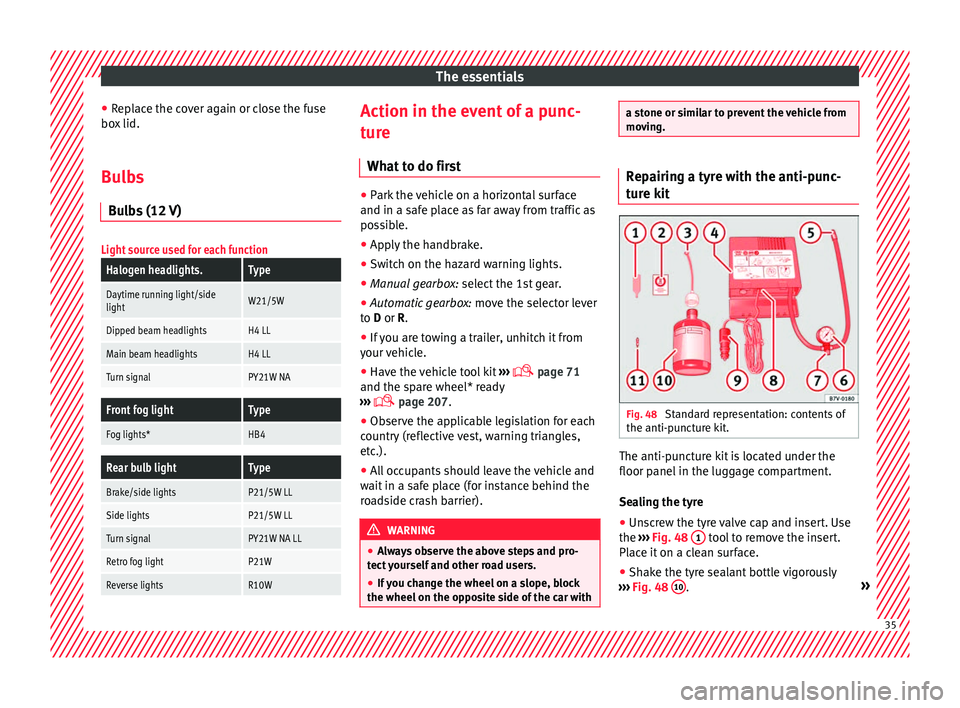
it Fig. 48
Standard representation: contents of
the anti-p u
nct
ure kit. The anti-puncture kit is located under the
floor p
anel
in the lug
gage compartment.
Sealing the tyre
● Unscrew the tyre valve cap and insert. Use
the ›››
Fig. 48 1 tool to remove the insert.
Pl ac
e it
on a clean surface.
● Shake the tyre sealant bottle vigorously
›› ›
Fig. 48 10 .
» 35
Page 51 of 232
Safe driving
● Adju s
t
the height of the driver seat so that
you can easily reach the top of the steering
wheel.
● Keep both feet in the footwell so that you
have the
vehicle under control at all times.
● Adjust and fasten your seat belt correctly
›››
page 52.
Valid for the passenger:
● Adjust the seat backrest to an upright posi-
tion so that
your back rests completely
against it.
● Move the front passenger seat back as far
as po
ssible for optimum protection should
the airbag deploy.
● Always keep your feet in the footwell while
the vehic
le is in motion.
● Adjust and fasten your seat belt correctly
›››
page 52.
Valid for the passengers in the rear section:
● Adjust the head restraint so that its upper
edge is
at the same level as the top of your
head, or as close as possible to the same lev-
el as the top of your head and under no cir-
cumstances below eye level. Keep the back
of your neck as close as possible to the head
restraint ››› Fig. 64 and ››› Fig. 65.
● Short people must lower the head restraint
to the fir s
t anchorage position, even if your
head is below its upper edge. ●
Tal l
people must raise the head restraint
completely.
● Always keep your feet in the footwell while
the vehic
le is in motion.
● Adjust and fasten your seat belt correctly
›››
page 52.
Adjusting the steering wheel position Read the additional information carefully
›› ›
page 14.
Adjust the steering wheel before your trip
and only when the vehicle is stationary.
Adjust the correct distance between the driv-
er and the steering wheel ››› Fig. 64 using the
controls on the driver seat ›››
page 12. WARNING
Incorrect use of the steering wheel adjust-
ment f u
nction and an incorrect adjustment of
the steering wheel can result in severe or fa-
tal injury.
● After adjusting the steering column, push
the lever firm
ly upwards to ensure the steer-
ing wheel does not accidentally change posi-
tion while driving.
● Never adjust the steering wheel while the
vehicl
e is in motion. If you need to adjust the
steering wheel while the vehicle is in motion,
stop safely and make the proper adjustment. ●
The adju s
ted steering wheel should be fac-
ing your chest and not your face so as not to
hinder the driver's front airbag protection in
the event of an accident.
● When driving, always hold the steering
wheel with both h
ands on the outside of the
ring at the 9 o'clock and 3 o'clock positions
to reduce injuries when the driver's front air-
bag deploys.
● Never hold the steering wheel at the 12
o'clock
position or in any other manner (e.g.
in the centre of the steering wheel). In such
cases, if the driver's airbag deploys, you may
sustain injuries to your arms, hands and
head. Danger of injuries due to an incorrect
s
ittin
g po
sition Number of seats
The
v
ehic
le has a total of 4 seats: 2 front
seats and 2 rear seats. Each seat is equipped
with a seat belt.
If the seat belts are worn incorrectly or not at
all, the risk of severe injuries increases. Seat
belts can provide optimal protection only if
the belt web is properly worn. Being seated
in an incorrect position means the seat belt
cannot offer its full protection. This could re-
sult in severe and even fatal injuries. The risk »
49
Technical data
Advice
Operation
Emergencies
Safety
Page 60 of 232
Safety
in the direction of the collision. The belt ten-
s ioner w
ork
s in combination with the airbag
system. The belt tensioner will not be trig-
gered in the event of the vehicle overturning
if the side airbags are not deployed.
If the belt tensioner is triggered, a fine dust is
produced. This is normal and it is not an indi-
cation of fire in the vehicle.
Belt tension limiter
The belt tension limiter reduces the force of
the seat belt on the body in the event of an
accident. Note
The relevant safety requirements must be ob-
serv ed when the
vehicle is dismantled or sys-
tem components are removed. These require-
ments are known to specialised workshops
››› page 58. Service and disposal of belt tension
dev
ice
s If you work on the belt tensioners or remove
and in
s
t
all other parts of the vehicle when
performing other repair work, the seat belt
may be damaged. The consequence may be
that, in the event of an accident, the belt ten-
sioners function incorrectly or not at all. So that the effectiveness of the belt tensioner
is not
reduced and that removed parts do not
cause any injuries or environmental pollu-
tion, regulations must be observed. These re-
quirements are known to specialised work-
shops. WARNING
● Improper u se or r
epairs not carried out by
qualified mechanics increase the risk of se-
vere or fatal injuries. The belt tensioners may
fail to trigger or may trigger in the wrong cir-
cumstances.
● Never attempt to repair, adjust, remove or
inst
all parts of the belt tensioners or seat
belts.
● The seat belt tensioner, seat belt and auto-
matic r
etractor cannot be repaired.
● Any work on the belt tensioners and seat
belts, includin
g the removal and refitting of
system parts in conjunction with other repair
work, must be performed by a specialised
workshop only.
● The belt tensioners will only provide pro-
tection for one ac
cident and must be changed
if they have been activated. For the sake of the environment
Airbag modules and belt tensioners may con-
tain per c
hlorate. Observe the legal require-
ments for their disposal. Airbag system
Brief intr
oduction
Intr
oduction Front airbags have been installed for both
driver and p
a
ssenger. The front airbags can
also protect the chest and head of driver and
passenger if the seats, seat belts head re-
straints and, for the driver, the steering
wheel are correctly adjusted and used. Air-
bags are considered as additional safety
equipment. An airbag cannot replace the
seat belt, which must be worn at all times,
even in front seats where front airbags have
been installed.
The airbag can protect vehicle occupants in
the event of an accidents, cushioning the
movement of the occupants in the direction
of the collision in frontal and side accidents.
Deployed airbags fill with a propellant gas.
This causes the airbag covers to break and
the airbags to deploy extremely quickly in
their entire deployment space within frac-
tions of a second. When an occupant with the
seat belt properly fastened puts pressure on
the inflated airbag, the propellant gas es-
capes to absorb the force of the impact and
slow the movement. This reduces the risk of
severe or fatal injuries. Airbag deployment
does not mean that other types of injury such
58
Page 73 of 232
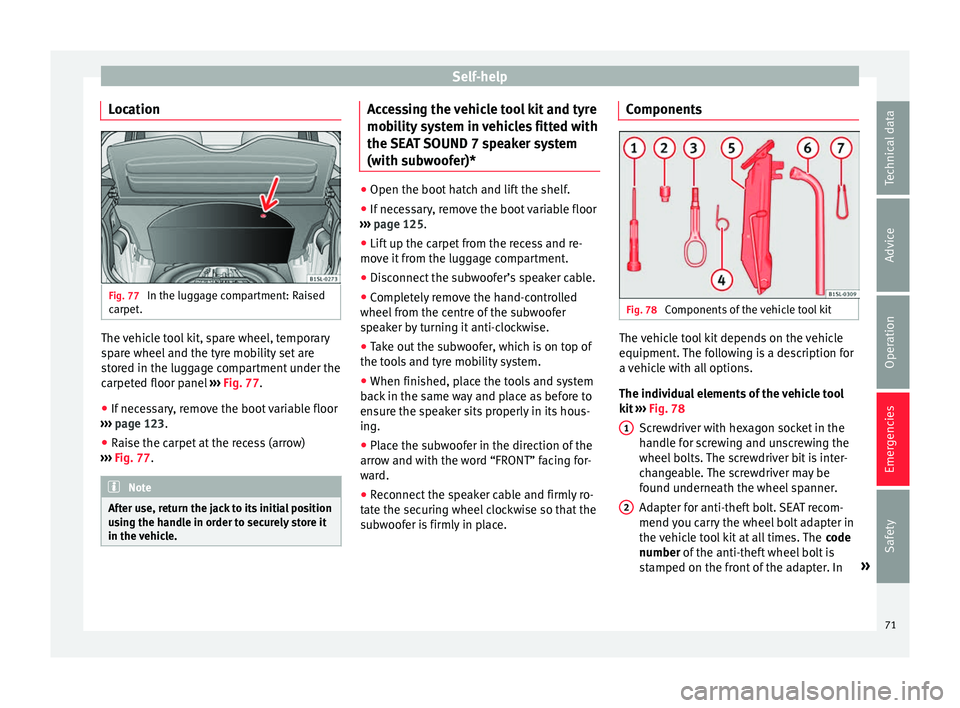
Self-help
Location Fig. 77
In the luggage compartment: Raised
c arpet
. The vehicle tool kit, spare wheel, temporary
s
p
ar
e wheel and the tyre mobility set are
stored in the luggage compartment under the
carpeted floor panel ›››
Fig. 77.
● If necessary, remove the boot variable floor
›››
page 123.
● Raise the carpet at the recess (arrow)
›››
Fig. 77. Note
After use, return the jack to its initial position
us in
g the handle in order to securely store it
in the vehicle. Accessing the vehicle tool kit and tyre
mo
b
i
lity system in vehicles fitted with
the SEAT SOUND 7 speaker system
(with subwoofer)* ●
Open the boot hatch and lift the shelf.
● If necessary, remove the boot variable floor
›› ›
page 125.
● Lift up the carpet from the recess and re-
move it
from the luggage compartment.
● Disconnect the subwoofer’s speaker cable.
● Completely remove the hand-controlled
wheel fr om the c
entre of the subwoofer
speaker by turning it anti-clockwise.
● Take out the subwoofer, which is on top of
the tool
s and tyre mobility system.
● When finished, place the tools and system
back
in the same way and place as before to
ensure the speaker sits properly in its hous-
ing.
● Place the subwoofer in the direction of the
arrow and w
ith the word “FRONT” facing for-
ward.
● Reconnect the speaker cable and firmly ro-
tate the sec
uring wheel clockwise so that the
subwoofer is firmly in place. Components
Fig. 78
Components of the vehicle tool kit The vehicle tool kit depends on the vehicle
equipment
.
The f
ollowing is a description for
a vehicle with all options.
The individual elements of the vehicle tool
kit ››› Fig. 78
Screwdriver with hexagon socket in the
handle for screwing and unscrewing the
wheel bolts. The screwdriver bit is inter-
changeable. The screwdriver may be
found underneath the wheel spanner.
Adapter for anti-theft bolt. SEAT recom-
mend you carry the wheel bolt adapter in
the vehicle tool kit at all times. The code
number of the anti-theft wheel bolt is
stamped on the front of the adapter. In »
1 2
71
Technical data
Advice
Operation
Emergencies
Safety
Page 90 of 232
Operation
Instruments V iew of
in
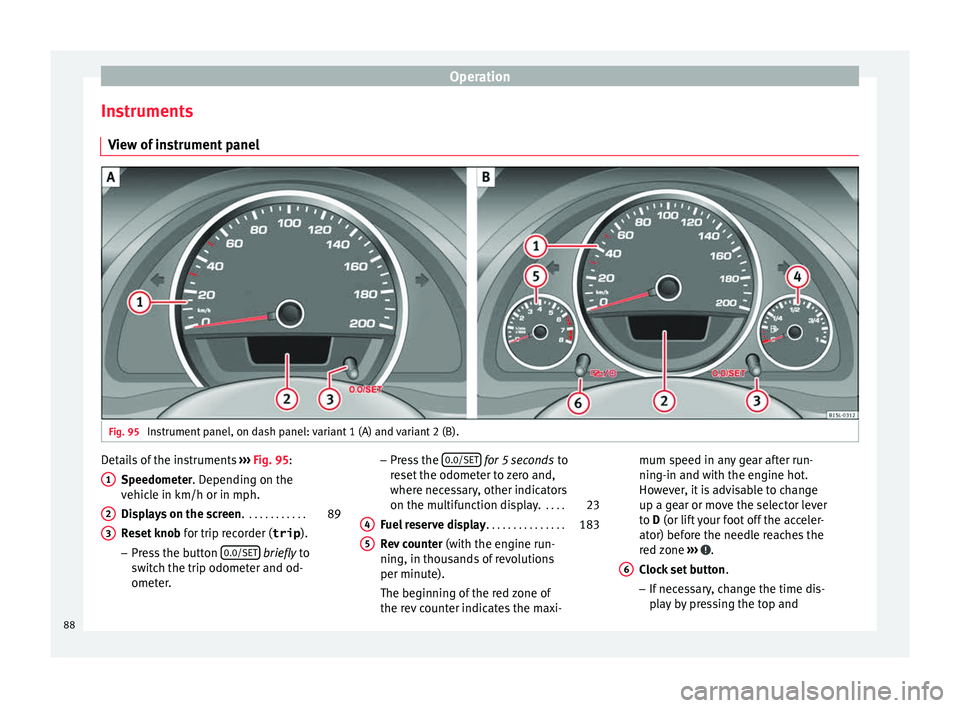
strument panelFig. 95
Instrument panel, on dash panel: variant 1 (A) and variant 2 (B). Details of the instruments
››
›
Fig. 95:
Speedometer. Depending on the
vehicle in km/h or in mph.
Displays on the screen . . . . . . . . . . . . 89
Reset knob for trip rec
order (trip).
– Press the button 0.0/SET bri
efly to
sw it
ch the trip odometer and od-
ometer.
1 2
3 –
Pr e
s
s the 0.0/SET for
5 seconds
t
o
r
eset the odometer to zero and,
where necessary, other indicators
on the multifunction display. . . . .23
Fuel reserve display . . . . . . . . . . . . . . . 183
Rev counter (with the engine ru
n-
ning, in thousands of revolutions
per minute).
The beginning of the red zone of
the rev counter indicates the maxi-
4 5 mum speed in any gear after run-
nin
g
-in and w
ith the engine hot.
However, it is advisable to change
up a gear or move the selector lever
to D (or lift your foot off the acceler-
ator) before the needle reaches the
red zone ››› .
C loc
k
set button .
– If necessary, change the time dis-
play by pressing the top and
6
88
Page 91 of 232
General instrument panel
bottom buttons of the rocker
sw it
c
h ›››
Fig. 33
B .
– Pr e
s
s the button to change the
hour, so that it is flashing.
– To continue setting the time,
press button 0.0/SET . Hold button
do wn t
o s
croll through the num-
bers quickly.
– Press the button again to
change the minutes, so that it
flashes.
– To continue setting the time,
press button 0.0/SET . Hold button
do wn t
o s
croll through the num-
bers quickly.
– Press the button again to end
the clock setting. CAUTION
● When the engine i s
cold, avoid high revs
and heavy acceleration and do not make the
engine work hard.
● To prevent damage to the engine, the rev
count
er needle should only remain in the red
zone for a short period of time. For the sake of the environment
Changing up a gear in time reduces fuel con-
sumption and noi se. Indications on the display
A variety of information can be viewed on the
ins
trument
panel display ››› Fig. 95 2 , de-
pending on the v
ehicle equipment:
● Warning and information messages.
● Odometer.
● Time.
● Outside temperature.
● Selector lever positions ›››
page 142.
● Recommended gear (manual gearbox)
›› ›
page 142.
● Multifunction display (MFI) ›››
page 23
● Service interval display ›››
page 90 .
● Start-Stop system status display
›››
page 160.
● Fuel gauge ›››
page 183.
● Seat belt status display for rear seats
›››
page 52.
Warning and information messages
The system runs a check on certain compo-
nents and functions when the ignition is
switched on and while the vehicle is moving.
Faults in the operation are displayed on the
screen using red and yellow symbols on the
instrument panel display ( ›››
page 25)
and, in some cases, with audible warnings.
The display may vary according to the type of
instrument panel fitted.
Priority 1 warning (red symbols)
Symbol flashing or lit; partly combined with audible
warnings.
Stop the vehicle! It is dangerous ››› !
Check the function that is faulty and repair it. If necessa-
ry, request assistance from specialised personnel.
Priority 2 warning (yellow symbols)
Symbol flashing or lit; partly combined with audible
warnings.
A faulty function, or fluids which are below the correct
levels may cause damage to the vehicle! ›››
Check the faulty function as soon as possible. If neces-
sary, request assistance from specialised personnel. Odometer
The odomet
er
r
egisters the total distance
travelled by the car.
The odometer (trip ) shows the distance
travelled since the last odometer reset. The
last figure indicates 100 m.
Outside temperature indicator!
When the outside temperature is below +4°C
(+39°F), the “ice crystal” symbol (warning of
risk of freezing) is also displayed next to the
temperature. At first this symbol flashes and
then it remains lit until the outside tempera-
ture rises above +6°C (+43°F) ››› .
When the v
ehic
le is stationary or travelling at
very low speeds, the temperature displayed
may be slightly higher than the actual »
89
Technical data
Advice
Operation
Emergencies
Safety
Page 92 of 232

Operation
outside temperature as a result of heat com-
in g fr
om the en
gine.
The temperatures measured range from
-40°C to +50°C (-40°F to +122°F).
Selector lever position
The range of engaged gears of the selector
lever is shown on the side of the lever, and
on the instrument panel display. In positions
D and M, and with the Tiptronic, the corre-
sponding gear is also indicated on the dis-
play.
Recommended gear* (manual gearbox)
The recommended gear to save fuel can be
displayed on the instrument panel display
while you are driving ››› page 142.
Seat belt status display for the rear seats*
The seat belt status display on the instru-
ment panel display informs the driver, when
the ignition is switched on, whether any pas-
sengers in the rear seats have fastened their
seat belts ››› page 52.
Start-Stop system status display
The instrument panel display shows informa-
tion on the current status ››› page 160. WARNING
If the warning lamps are ignored, the vehicle
ma y
stall in traffic, or may cause accidents
and severe injuries.
● Never ignore the warning lamps.
● Stop the vehicle safely as soon as possible.
● A faulty vehicle represents a risk of acci-
dent for the driv
er and for other road users. If
necessary, switch on the hazard warning
lamps and put out the warning triangle to ad-
vise other drivers.
● Park the vehicle away from traffic and en-
sure th
at no highly flammable materials are
under the vehicle that could come into con-
tact with the exhaust system (e.g. dry grass,
fuel). WARNING
Even though outside temperatures are above
freez in
g, some roads and bridges may be icy.
● At outside temperatures above +4°C
(+39°F), even when the “ice c
rystal” symbol
is not visible, there may still be patches of ice
on the road.
● Do not rely on the outside temperature in-
dicator! CAUTION
Failure to heed the warning lamps when they
appe ar m
ay result in faults in the vehicle. Note
● Differ ent
versions of the instrument panel
are available and therefore the versions and
instructions on the display may vary.
● When several warnings are active at the
same time, the symbol
s are shown succes-
sively for a few seconds and will stay on until
the fault is rectified. Service interval display
The inspection message appears on the in-
s
trument
p
anel display ›››
Fig. 95 2 .
S EA
T di
stinguishes between services with en-
gine oil change (Oil Change Service) and
services without engine oil change (Inspec-
tion Service). The service interval display only
gives information for service dates which in-
volve an engine oil change. The dates of the
remaining services (e.g. the next Inspection
Service or change of brake fluid) are listed on
the label attached to the door strut, or in the
Maintenance Programme.
The set service intervals have been specified
with the service dependent on time/distance
travelled.
Inspection reminder
If the inspection period is due to expire
shortly, Inspection reminder appears when
starting the ignition abbreviated to
and a
90