ECO mode Seat Toledo 2008 User Guide
[x] Cancel search | Manufacturer: SEAT, Model Year: 2008, Model line: Toledo, Model: Seat Toledo 2008Pages: 289, PDF Size: 9.18 MB
Page 86 of 289
Steering wheel controls85
Safety First
Operating instructions
Practical tips
Te c h n i c a l D a t a
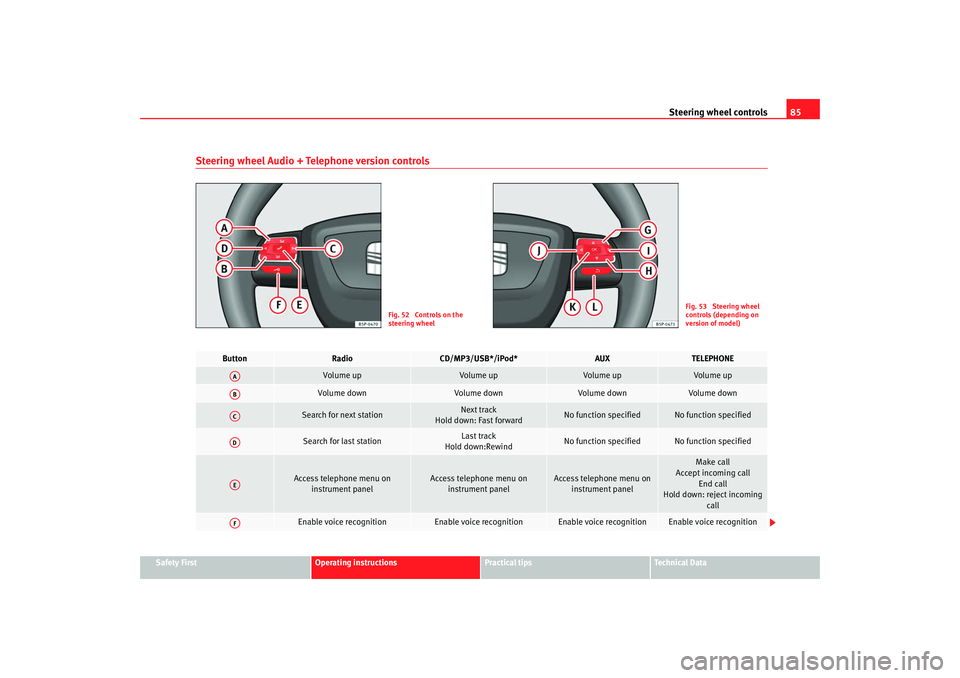
Steering wheel Audio + Telephone version controls
Fig. 52 Controls on the
steering wheel
Fig. 53 Steering wheel
controls (depending on
version of model)
Button
Radio
CD/MP3/USB*/iPod*
AUX
TELEPHONE
Volume up
Volume up
Vol ume up
Volume up
Volume down
Volume down
Vol ume down
Volume down
Search for next station
Next track
Hold down: Fast forward
No function specified
No function specified
Search for last station
Last track
Hold down:Rewind
No function specified
No function specified
Access telephone menu on
instrument panel
Access telephone menu on instrument panel
Access telephone menu on instrument panel
Make call
Accept incoming call
End call
Hold down: reject incoming call
Enable voice recognition
Enable voice recognition
Enable voice recognition
Enable voice recognition
AAABACADAEAF
Toledo_EN.book Seite 85 Dienstag, 20. Januar 2009 12:58 12
Page 88 of 289
Steering wheel controls87
Safety First
Operating instructions
Practical tips
Te c h n i c a l D a t a
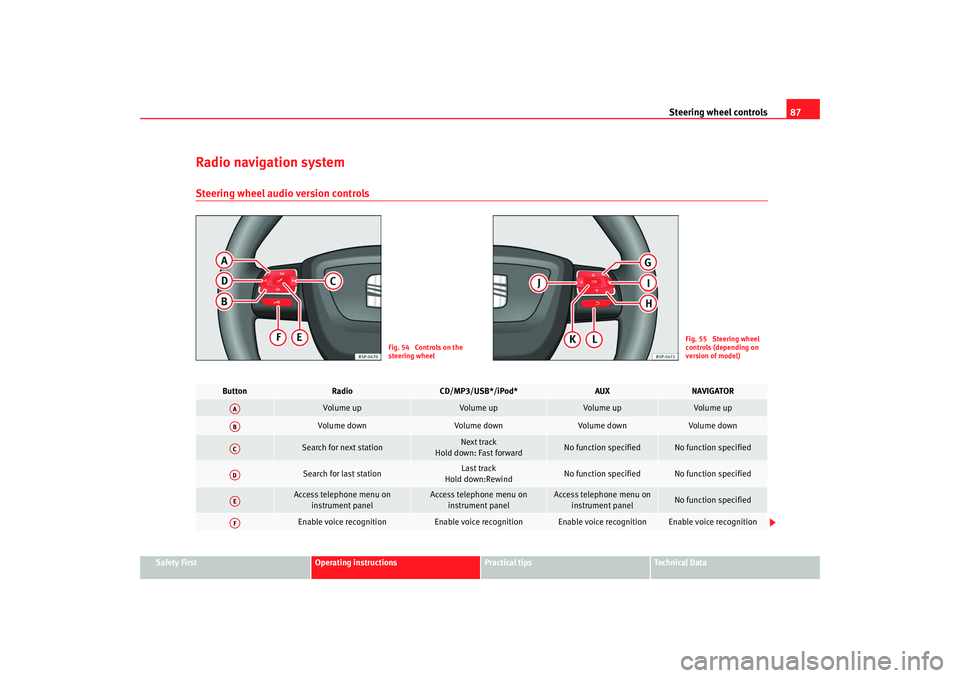
Radio navigation systemSteering wheel audio version controls
Fig. 54 Controls on the
steering wheel
Fig. 55 Steering wheel
controls (depending on
version of model)
Button
Radio
CD/MP3/USB*/iPod*
AUX
NAVIGATOR
Volume up
Volume up
Vol ume up
Volume up
Volume down
Volume down
Vol ume down
Volume down
Search for next station
Next track
Hold down: Fast forward
No function specified
No function specified
Search for last station
Last track
Hold down:Rewind
No function specified
No function specified
Access telephone menu on instrument panel
Access telephone menu on instrument panel
Access telephone menu on instrument panel
No function specified
Enable voice recognition
Enable voice recognition
Enable voice recognition
Enable voice recognition
AAABACADAEAF
Toledo_EN.book Seite 87 Dienstag, 20. Januar 2009 12:58 12
Page 90 of 289
Steering wheel controls89
Safety First
Operating instructions
Practical tips
Te c h n i c a l D a t a
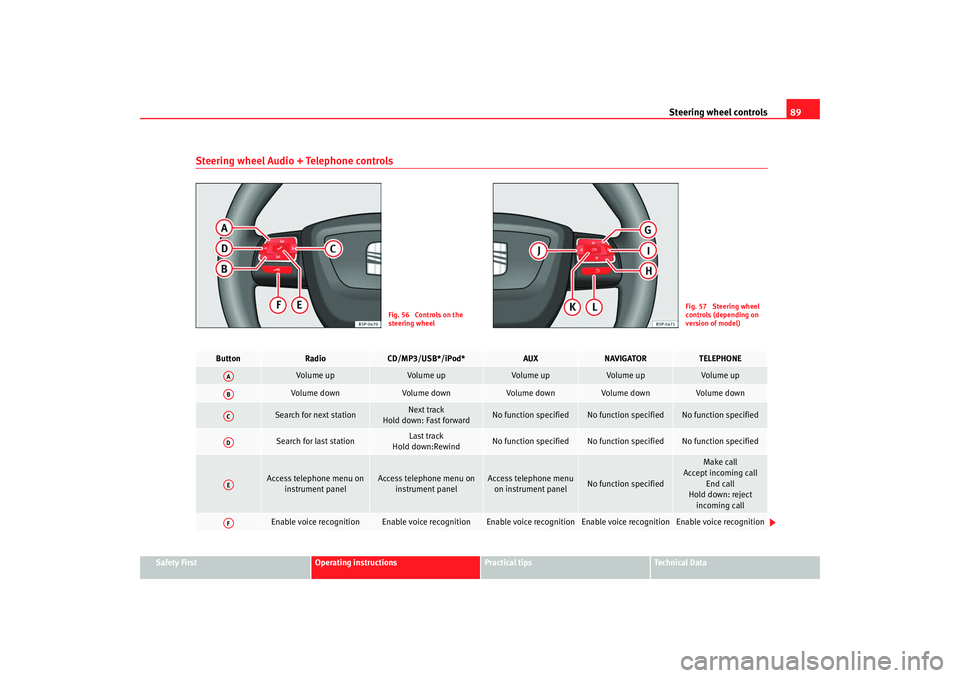
Steering wheel Audio + Telephone controls
Fig. 56 Controls on the
steering wheel
Fig. 57 Steering wheel
controls (depending on
version of model)
Button
Radio
CD/MP3/USB*/iPod*
AUX
NAVIGATOR
TELEPHONE
Volume up
Volume up
Volume up
Volume up
Volume up
Volume down
Volume down
Volume down
Volume down
Vol ume down
Search for next station
Next track
Hold down: Fast forward
No function specified
No function specified
No function specified
Search for last station
Last track
Hold down:Rewind
No function specified
No function specified
No function specified
Access telephone menu on
instrument panel
Access telephone menu on instrument panel
Access telephone menu on instrument panel
No function specified
Make call
Accept incoming call
End call
Hold down: reject incoming call
Enable voice recognition
Enable voice recognition
Enable voice recognition
Enable voice recognition
Enable voice recognition
AAABACADAEAF
Toledo_EN.book Seite 89 Dienstag, 20. Januar 2009 12:58 12
Page 112 of 289

Lights and visibility111
Safety First
Operating instructions
Practical tips
Te c h n i c a l D a t a
•
If the daylight driving automatic light function is switched on, the fog
lights or rear fog light cannot be switched on in addition.
•
The use of the lighting described here is subject to the relevant statutory
requirements.
•
Do not put stickers on the windscreen in front of the sensor. This may
cause disruptions or faults in the automatic lighting system.
•
To avoid damage to the tail lights, the lights mounted on the tailgate go
off when the tailgate is opened (according to country).
Daytime lights*
The daytime light reduces the risk of accidents by increasing
the visibility of the vehicle. The daytime running lights are
enabled automatically when the ignition is switched on. It is
automatically switched off when the side lights are turned on.Daytime lights (halogen lamps)
18)
The daytime lights increase road safety in vehicles fitted with halogen lamps.
These include the dipped, side and registration plate lights.
The daytime lights are switched on each time the ignition is turned on if the
light setting is in position 0 or
. Depending upon the model, a control
lamp
on the light control switch or the lighting up of the instrument panel
will indicate that the daytime lighting is on.
It is not possible for the driver to switch the daytime lights on or off. Please
contact a qualified workshop if you wish to deactivate the lights. Daytime lights (bi-xenon lamps)
The daytime lights increase road safety in vehicles fitted with bi-xenon lamps.
The lights are built-in separately to the headlights and are switched on each
time the ignition is turned on if the light setting is in position
0 or
.
Automatic control of the dipped lig ht in combination with the daytime
lighting (bi-xenon headlamps)
If the dipped light control and the daytime lighting are activated at the same
time, the dipped lights and the instrument panel lighting will automatically
come on as required (e.g. on entering a tunnel) and the daytime lights will go
off. When the automatic dipped light control switches off the dipped lights
(e.g. on coming out of the tunnel), the daytime lights come back on.
Activating/deactivating the daytime lights*
In vehicles with daytime lights* combined with bi-xenon headlamps, these
lights may be activated or deactivated with the indicator and main beam
lever. In vehicles with daytime lights combined with halogen lamps, this func-
tion can only be activated or deactivated in a specialist workshop.
Deactivating daytime lights (bi-xenon lamps)
With the ignition switched off, move the indicator and main beam lever
upwards and back (left indicator and headlamp flash).
Switch on the ignition for 3 seconds. The daytime lights are deactivated and
can not be switched on.
Activating daytime lights (bi-xenon lamps)
With the ignition switched off, move the indicator and main beam lever
upwards and back (left indicator and headlamp flash).
Switch on the ignition for 3 seconds. The daytime lights are activated and can
be switched on.
18)It is only available in some countries or as an optional extra
Toledo_EN.book Seite 111 Dienstag, 20. Januar 2009 12:58 12
Page 160 of 289
Heating, Ventilation and Air conditioning 159
Safety First
Operating instructions
Practical tips
Te c h n i c a l D a t a
The LEDs on the Climatronic controls indicate that the selected function has
been activated.
In addition, the radio or radio and navigation displays mounted at factory
briefly display the current settings of the Climatronic if any are modified.
The symbols used on the radio or radio and navigation displays are the same
as the symbols used for the Climatronic controls.
Automatic mode
In automatic mode air temperature, air flow and distribution
are automatically regulated so that a specified temperature is
attained as quickly as possible and then maintained.The temperature can be adjusted separately for the left and right
sides of the vehicle interior.
Switching on automatic mode
–Press the ⇒
page 157, fig. 129 button. “AUTO High” is
shown on the radio display (high fan speed).
– Press the button again ⇒ page 157, fig. 129. “AUTO Low”
is shown on the radio display (low fan speed).Depending upon the version and finish, the vehicle may include:
When a temperature of 22°C (72°F) is set in automatic mode a comfortable
interior climate is quickly reached. Therefore, we recommend you not to
change this adjustment, except as necessary to suit individual preferences or
particular circumstances. The compartment temperature can be set between
+18°C (64°F) and +26°C (80°F). These ar e approximate temperatures and the actual temperature may be slightly higher or lower depending on the ambient
conditions.
Climatronic maintains a constant temperature. The temperature of the air
supplied to the interior, the blower speed and the air distribution are regu-
lated automatically. The system also considers the sunlight radiation, so
there is no need for manual readjustment. Therefore,
automatic mode almost
always provides the best comfort for the vehicle occupants throughout the
year.
Automatic mode is switched off whenever an adjustment is made using the
buttons for the air distribution, air flow or or the air recirculation button
. The temperature will continue to be regulated within the parameters
manually selected by the user.
Note
There are two automatic modes:•
Automatic mode LO: This calculates the air flow for two people.
•
Automatic mode HI: This calculates the air flow for more than two
people.
AUTOAUTO
Toledo_EN.book Seite 159 Dienstag, 20. Januar 2009 12:58 12
Page 163 of 289

Heating, Ventilation and Air conditioning
162Air conditioner
When the air conditioning system is switched on, not only the temperature,
but also the air humidity in the vehicle interior is reduced. This improves
comfort for the vehicle occupants and prevents misting of the windows when
the ambient air hu midity is high.
If the air conditioning system cannot be switched on this may be caused by
the following reasons:•
The engine is not running.
•
The button is disconnected.
•
The outside temperature is below +3°C.
•
The air conditioning system compressor has been temporarily switched
off because the engine coola nt temperature is too high.
•
The air conditioning fuse is faulty.
•
Another fault in the vehicle. Have the air conditioning checked by a qual-
ified workshop.Caution
•
If you suspect that the air conditioning is damaged, switch it off with the button to prevent further damage and have it checked by a qualified
workshop.
•
Repairs to the air conditioning system require specialist knowledge and
special tools. Therefore, we recommend you to take the vehicle to a qualified
workshop.Note
•
If the humidity and temperature outside the vehicle are high, condensa-
tion can drip off the evaporator in the cooling system and so forming a puddle
underneath the vehicle. This is completely normal and there is no need to
suspect a leak.
•
Keep the air intake slots in front of the windscreen free of snow, ice and
leaves to ensure heating and cooling are not impaired, and to prevent the
windows from misting over.
•
The air from the vents flows through the passenger compartment and is
extracted by slots designed for this purpose. Therefore, do not cover these
slots with items of clothing or other objects.
•
The air conditioning system operates most effectively with the windows
and the sliding/tilting roof* closed. Howe ver, if the vehicle has been over-
heated by sun, the air inside can be cooled quicklier by opening the windows
for a short time.
•
Do not smoke while air recirculation mode is on, as smoke drawn into the
air conditioning system leaves a r esidue on the evaporator, producing a
permanent unpleasant odour.
•
It is advisable to connect the air conditioning at least once a month, to
lubricate the system gaskets and prevent leaks. If a decrease in the cooling
capacity is detected, an Authorised Service Centre should be consulted to
check the system.
AC
AC
Toledo_EN.book Seite 162 Dienstag, 20. Januar 2009 12:58 12
Page 171 of 289
Driving
170Automatic gearbox* / DSG automatic
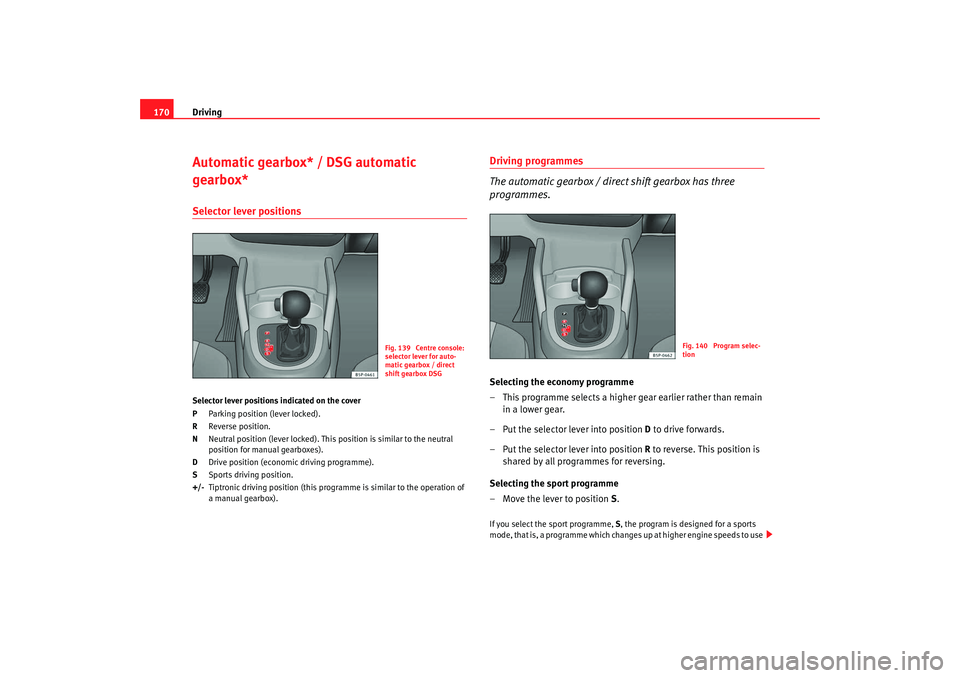
gearbox*Selector lever positionsSelector lever positions indicated on the cover
P Parking position (lever locked).
R Reverse position.
N Neutral position (lever locked). This position is similar to the neutral
position for manual gearboxes).
D Drive position (economic driving programme).
S Sports driving position.
+/- Tiptronic driving position (this progra mme is similar to the operation of
a manual gearbox).
Driving programmes
The automatic gearbox / direct shift gearbox has three
programmes.Selecting the economy programme
– This programme selects a higher gear earlier rather than remain in a lower gear.
– Put the selector lever into position D to drive forwards.
– Put the selector lever into position R to reverse. This position is
shared by all programmes for reversing.
Selecting the sport programme
– Move the lever to position S.If you select the sport programme, S, the program is designed for a sports
mode, that is, a programme which changes up at higher engine speeds to use
Fig. 139 Centre console:
selector lever for auto-
matic gearbox / direct
shift gearbox DSG
Fig. 140 Program selec-
tion
Toledo_EN.book Seite 170 Dienstag, 20. Januar 2009 12:58 12
Page 173 of 289
Driving
172
Driving
– Press and hold the foot brake.
– Press the button on the selector lever knob (on the left) ⇒page 171, fig. 142 .
– Select a gear for driving ( R, D or S).
– Release the button and wait a few seconds for the gear to engage, a light jerk will be felt.
– Release the brake and accelerate.
Short stop
– Hold the vehicle stationary with the brake pressed down (for example at traffic lights). The selector lever does not need to be
put into the positions P or N for this.
– Do not press the accelerator.
Parking the vehicle
– Press the foot brake and hold to bring the vehicle to a stop.
–Apply the handbrake firmly.
– Press in the button on the selector lever knob, move the lever to the position P and release the button.
Driving slowly
– Move the selector lever to the position D and press to the right to
put the lever into Tiptronic mode.
– Press the gear lever towards (-) to select a lower gear. Hill stop
– Hold the vehicle, in all cases, using the foot brake to prevent
rolling back.
– Do not try to slow the vehicle using another forward gear (engine braking).
Descending gradients
– With the gear engaged, release the brake and accelerate.
The steeper the gradient the lower the gear must be for effective engine
braking. For example, if 3rd gear is used on a very steep gradient, the engine
braking is insufficient and vehicle accelerates. So that the engine speed does
not become excessive, the gearbox changes to the next highest gear. Depress
the brake pedal and move the selector lever to the Tiptronic gate to return to
3rd gear.
WARNING
•
The driver should never leave the ve hicle while the engine is running or
with any gear selected. If for any reason you must leave the vehicle with the
engine running, apply the handbrake and move the selector lever to posi-
tion P.
•
When the engine is running and the positions D, S or R are selected, it
is necessary to hold the vehicle with the foot brake because the vehicle will
creep at a low speed.
•
Never accelerate while changing the position of the selector lever (risk
of an accident).
•
The selector lever must never be mo ved into the positions R or P while
moving (risk of an accident).
•
Before descending a steep gradient, reduce speed and use the Tiptronic
programme to select a lower gear.
Toledo_EN.book Seite 172 Dienstag, 20. Januar 2009 12:58 12
Page 188 of 289
Intelligent technology187
Safety First
Operating instructions
Practical tips
Te c h n i c a l D a t a
WARNING
•
When accelerating on a slippery surface, for example on ice and snow,
press the accelerator carefully. Despite EDL, the driven wheels may start to
spin. This could impair the vehicle‘s stability.
•
Always adapt your driving style to suit road conditions and the traffic
situation. Do not let the extra safety afforded by EDL tempt you into taking
any risks when driving, this can cause accidents.Caution
Modifications to the vehicle (e.g. to the engine, the brake system, running
gear or any components affecting the wh eels and tyres) could affect the effi-
ciency of the EDL ⇒ page 208.The traction control system (TCS)The traction control system prevents th e drive wheels from spinning when the
car is accelerating ⇒page 184.Four-wheel drive*
On four-wheel drive models, the engine power is distributed
to all four wheelsGeneral notes
The four-wheel-drive system operates completely automatically. The propul-
sion force is distributed among the four wheels and adapted to the driving
style and the road conditions. The four-wheel drive is specially designed to complement the superior engine
power. This combination gives the car exceptional handling and performance
capabilities – both on normal roads and in more difficult conditions, such as
snow and ice.
Winter tyres
Thanks to its four-wheel drive, your car will have plenty of traction in winter
conditions, even with the standard tyres. Nevertheless, we still recommend
that winter tyres or all-season tyres sh
ould be fitted on all four wheels when
winter road conditions are expected, mainly because this will give a better
braking response.
Snow chains
On roads where snow chains are mandatory, this also applies to cars with
four-wheel drive.
Changing tyres
On vehicles with four-wheel drive, all four tyres must have the same rolling
circumference ⇒page 235.
WARNING
•
Even with four-wheel drive, you should always adjust your speed to suit
the conditions. Do not let the extra safety features tempt you into taking
any risks when driving. Failure to do so could result in an accident.
•
The braking capability of your vehicle is limited by the tyres' grip.
Vehicle behaviour is no different from a vehicle without four-wheel drive.
So do not be tempted to drive too fast on icy or slippery roads just because
the car still has good acceleration in these conditions. Failure to do so
could result in an accident.
•
On wet roads bear in mind that the front wheels may start to “aqua-
plane” and lose contact with the road if the car is driven too fast. If this
should happen, there will be no su dden increase in engine speed when
“aquaplaning” begins to warn the driver, as with a front-wheel drive car.
For this reason and for that mentio ned above, always choose a driving
Toledo_EN.book Seite 187 Dienstag, 20. Januar 2009 12:58 12
Page 189 of 289
Intelligent technology
188speed suitable for the road conditions. Failure to do so could result in an
accident.Brakes
What factors can have a negative effect on the brakes?New brake pads
New brake pads do not provide optimal performance during the first 400 km
they must be “run in”. However, the reduced braking capacity may be
compensated by pressing on the brake pedal a little harder. Avoid over-
loading the brakes during run-in.
Wear
The rate of wear on the brake pads depends a great deal on how you drive and
the conditions in which the vehicle is operated. Negative factors are, for
instance, city traffic, frequent short tr ips or hard driving with abrupt starts
and stops.
Wet roads; road salt
When the velocity is over 80 km/h windscreen wipers are on, the brake
system moves the pads towards the brake discs for a few seconds. This
occurs - without warning to the driver - at regular intervals and requires a
more rapid response from the brakes when driving on wet roads.
In certain conditions, such as in heavy rain, or after washing the car or driving
through water, the full braking effect ca n be delayed by moisture (or in winter
by ice) on the discs and brake pads. The brakes should be “dried” by pressing
the pedal to restore full braking effect.
The effectiveness of the brakes can also be temporarily reduced if the car is
driven for some distance without using the brakes when there is a lot of salt on the road in winter. In this case, the layer of salt on the brake discs and pads
has to wear off before braking.
Corrosion
There may be a tendency for dirt to build up on the brake pads and corrosion
to form on the discs if the car is used infrequently, or if you only drive low
mileages without using the brakes very much.
If the brakes are not used frequently, or
if rust has formed on the disks, it is
advisable to clean off the pads and disks by braking firmly a few times from a
moderately high speed ⇒ .
Faults in the brake system
If the brake pedal travel should ever increase suddenly, this may mean that
one of the two brake circuits has failed. Drive immediately to the nearest qual-
ified workshop and have the fault rectified. On the way to the dealer, be
prepared to use more pressure on the brake pedal, and allow for longer stop-
ping distances.
Low brake fluid level
Malfunctions can occur in the brake system if the brake fluid level is too low.
The brake fluid level is monitored electronically.
Brake servo
The brake servo amplifies the pressure you apply to the brake pedal. The
brake servo works only when the engine is running.
WARNING
•
When applying the brakes to clean off deposits on the pads and discs,
select a clear, dry road. Be sure not to inconvenience or endanger other
road users. Risk of accident.
•
Ensure the vehicle does not move wh ile in neutral, when the motor is
stopped. Failure to do so could result in an accident.
WARNING (continued)
Toledo_EN.book Seite 188 Dienstag, 20. Januar 2009 12:58 12