Rear Seat Entertainment
4This system has the following components:
– Triple RCA connector (audio and video) ⇒page 3, fig. 1 .
– Screen on ceiling ⇒page 3, fig. 2 .
WARNING
•
Do not expose the Rear Seat Entertainment to liquids and humidity .
Otherwise, this may cause a short-circ uit and the resultant risk of fire.
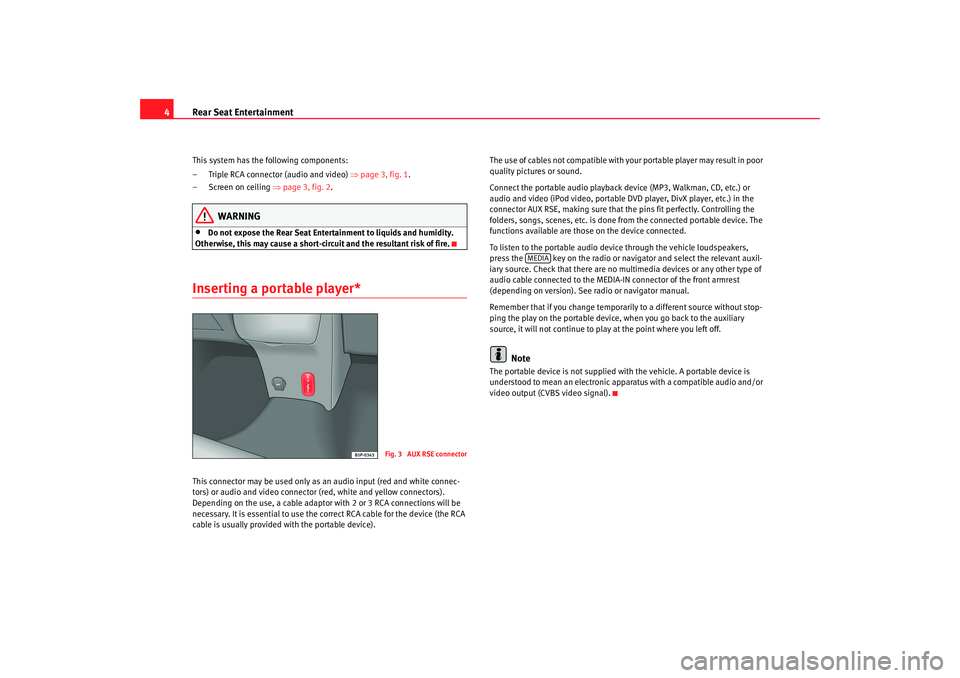
Inserting a portable player*This connector may be used only as an audio input (red and white connec-
tors) or audio and video connector (red, white and yellow connectors).
Depending on the use, a cable adaptor with 2 or 3 RCA connections will be
necessary. It is essential to use the correct RCA cab le for the device (the RCA
cable is usually provided with the portable devic e).The use of cables not compatible with your portable play
er may result in poor
quality pictures or sound.
Connect the portable audio playback device (MP3, Walkman, CD, etc.) or
audio and video (iPod video, portable DVD player, DivX player, etc.) in the
connector AUX RSE, making sure that th e pins fit perfectly. Controlling the
folders, songs, scenes, etc. is done from the conne cted portable device. The
functions available are those on the device connecte d.
To listen to the portable audio device through the vehicle loud speakers,
press the key on the radio or navigator and select the relevant auxil-
iary source. Check that there are no multimedia devices or any other type of
audio cable connected to the MEDIA- IN connector of the front armrest
(depending on version). See radio or navigator m anual.
Remember that if you change temporarily to a differ ent source without stop-
ping the play on the portable device, when you go back to the auxiliary
source, it will not continue to play at the point where y ou left off.
Note
The portable device is not supplied with the vehicle. A portable device is
understood to mean an electronic apparatus with a c ompatible audio and/or
video output (CVBS video signal).
Fig. 3 AUX RSE connecto
r
MEDIA
Rear seat_EN Seite 4 Montag, 15. Dezember 2008 4:43 16