lock Seat Toledo 2012 User Guide
[x] Cancel search | Manufacturer: SEAT, Model Year: 2012, Model line: Toledo, Model: Seat Toledo 2012Pages: 249, PDF Size: 3.6 MB
Page 56 of 249

55
Controls and displays
Instruments and warning lamps
General instrument panel – summary
Fig. 31 General instrument panel Rev counter ⇒ page 55
Digital display:
– with trip counter
⇒ page 57
– with service interval display
⇒ page 57
– with digital clock
⇒ page 58
– with multifunction display
⇒ page 59
– with informative digital display
⇒ page 62
Speedometer ⇒ page 56
Coolant temperature indicator ⇒ page 56
1
2
34
Control for selecting the mode:
–
adjust hours/minutes
– activate/deactivate according to speed in mph or km/h respectively
– service intervals – show the days and kilometres (miles) remaining
Switch for:
– delete trip counter
– reset the service intervals
– adjust hours/minutes
– activate/deactivate the selected mode
Fuel reserve indicator ⇒ page 56
WARNING
● Always keep your attention on driving! As the driver, you have the full
responsibility for the safety of traffic.
● Never use the instrument panel controls when the vehicle is in mo-
tion. Do so only when the vehicle is stopped!
Rev counter
The red part of the rev counter scale 1 ⇒ Fig. 31 ⇒
page 55 marks the zone
where the engine control unit begins to limit the engine speed. The engine
control unit is responsible for reducing the revs to a safe limit.
Before the needle reaches the red zone change up into a higher gear, or
move the selector lever of the automatic gearbox to D.
In order to drive at an optimum RPM, respect the gear change indications
⇒ page 58.
5
6
7
Safety FirstOperating instructionsPractical TipsTechnical specifications
Page 59 of 249
58Controls and displays
In vehicles equipped with an informative display the service interval display
can be reset from the menu, Settings ⇒ page 63.
CAUTION
We advise against resetting the service interval display yourself, given that
this action could cause an imbalance in the service intervals, and as a re-
sult, faults in the vehicle.
Note
● Never reset the display between service intervals as this could lead to
erroneous indications.
● After disconnecting the battery of the vehicle, the service interval dis-
play values remain stored.
● If the general instrument panel is changed after a repair, the correct val-
ues must be input in the service interval display. This operation is carried
out by a specialised service.
● After resetting the display with flexible service intervals, the information
will be indicated in the same way as vehicles with fixed service intervals.
Therefore, we recommend that a SEAT Authorised Service resets the service
interval display, who will do so correctly using diagnostics equipment.
● For more detailed information please consult the Maintenance Pro-
gramme.
Digital clock
The clock is set using the buttons 5 to 6
⇒ Fig. 31
⇒ page 55.
Select the indication you want to change with button 5
and make the ad-
justment with button 6.
In vehicles equipped with an informative display this can be reset from the
menu, Time ⇒ page 63. Recommended gear display
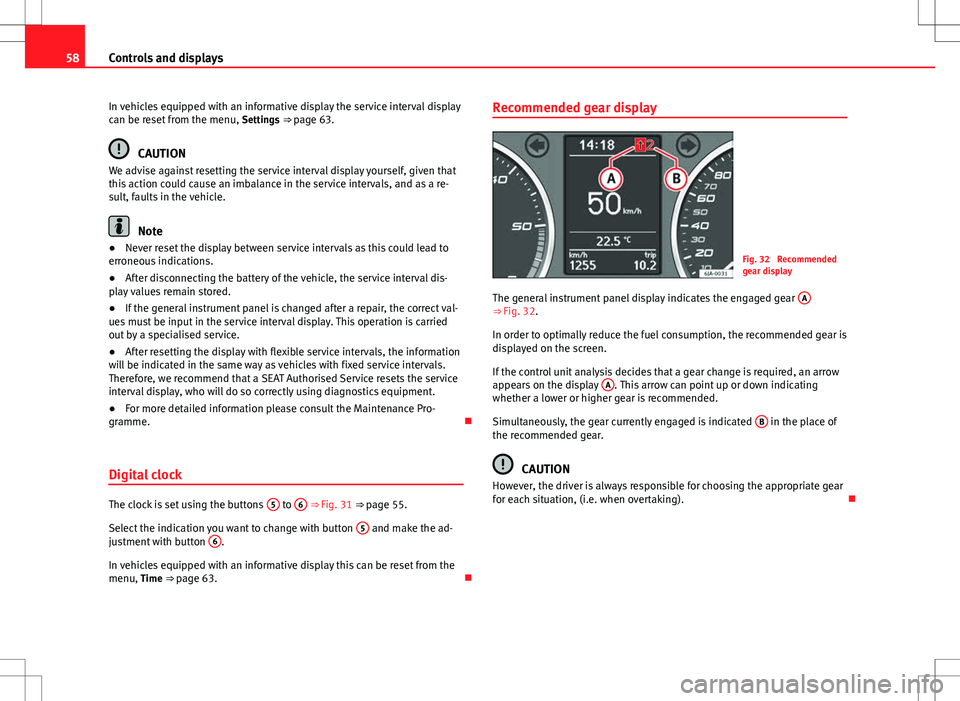
Fig. 32 Recommended
gear display
The general instrument panel display indicates the engaged gear A
⇒ Fig. 32.
In order to optimally reduce the fuel consumption, the recommended gear is
displayed on the screen.
If the control unit analysis decides that a gear change is required, an arrow
appears on the display A
. This arrow can point up or down indicating
whether a lower or higher gear is recommended.
Simultaneously, the gear currently engaged is indicated B
in the place of
the recommended gear.
CAUTION
However, the driver is always responsible for choosing the appropriate gear
for each situation, (i.e. when overtaking).
Page 66 of 249
65
Controls and displays
Stop the vehicle in this case, stop the engine and wait until the symbol
has switched off. Danger of damage to the gearbox! You can continue driv-
ing once the symbol is switched off.
Engine oil pressure fault
If the symbol appears on the informative display, the vehicle must be im-
mediately taken to a specialised service. Information regarding the maxi-
mum engine speed is displayed together with this symbol.
WARNING
If the vehicle has to be stopped for technical reasons, park it a safe dis-
tance away from moving traffic, switch off the engine and turn on the
hazard warning lights ⇒ page 98.
Note
● If a warning appears on the informative display it must be confirmed by
pressing the button, B
⇒ Fig. 35 ⇒
page 63 before proceeding to the main
menu.
● The symbols are displayed again until the fault is corrected. After the
first time a symbol is displayed they reappear, but without a message for
the driver.
Control lamps Summary
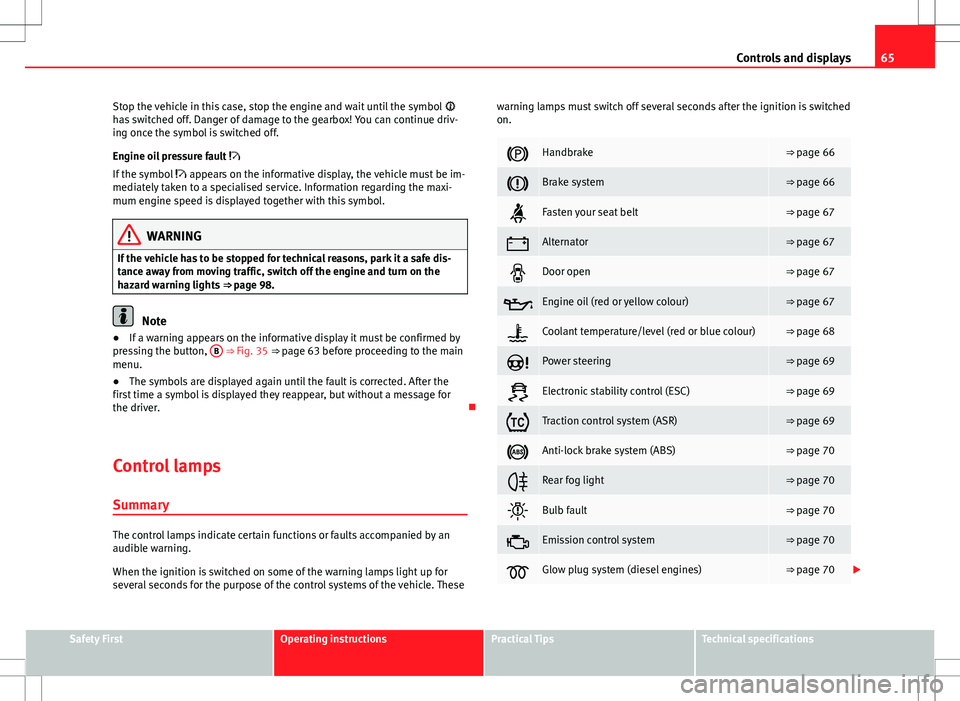
The control lamps indicate certain functions or faults accompanied by an
audible warning.
When the ignition is switched on some of the warning lamps light up for
several seconds for the purpose of the control systems of the vehicle. These warning lamps must switch off several seconds after the ignition is switched
on.
Handbrake⇒ page 66
Brake system⇒ page 66
Fasten your seat belt⇒ page 67
Alternator⇒ page 67
Door open⇒ page 67
Engine oil (red or yellow colour)⇒ page 67
Coolant temperature/level (red or blue colour)⇒ page 68
Power steering⇒ page 69
Electronic stability control (ESC)⇒ page 69
Traction control system (ASR)⇒ page 69
Anti-lock brake system (ABS)⇒ page 70
Rear fog light⇒ page 70
Bulb fault⇒ page 70
Emission control system⇒ page 70
Glow plug system (diesel engines)⇒ page 70
Safety FirstOperating instructionsPractical TipsTechnical specifications
Page 67 of 249

66Controls and displays
Engine electronics control (petrol engines)⇒ page 71
Particulate filter (diesel engines)⇒ page 71
Fuel reserve⇒ page 71
Airbag system⇒ page 72
Tyre pressure⇒ page 72
Liquid level in the window washer system⇒ page 73
Turn signals (left/right)⇒ page 73
Fog lights⇒ page 73
Cruise speed⇒ page 73
Selector lever lock⇒ page 73
Main beams⇒ page 73
WARNING
● Failure to observe control lamps and warning messages can result in
serious personal injuries or damage to your vehicle.
● The engine compartment is a dangerous area! Carrying out work in
the engine compartment, i.e. checking and filling service liquids, can
lead to injury, scalding, burns and fires. Therefore the corresponding
warnings must always be observed ⇒ page 173, Engine compartment.
Handbrake
If the
warning lamp lights up, the handbrake is applied. Additionally,
driving the vehicle at speeds exceeding 6 km/h (4 mph) for at least 3 sec-
onds produces an audible warning.
The informative display indicates:
Release the handbrake!
Brake system
The warning lamp lights up if the brake fluid level falls too low or if there
is a fault in the ABS system.
The informative display indicates:
Brake fluid Instruction Manual!
Stop the vehicle, switch off the engine and check the level of the brake fluid
⇒ page 181
WARNING
● If the vehicle has to be stopped for technical reasons, park it a safe
distance away from moving traffic, switch off the engine and turn on the
hazard warning lights ⇒ page 98.
● The following indications must be taken into account when opening
the engine compartment to check the brake fluid ⇒ page 173, Engine
compartment.
Page 68 of 249
67
Controls and displays
WARNING (Continued)
● If the warning lamp lights up together with the warning lamp
⇒ page 70, Anti-lock system (ABS) , , Stop the vehicle! Seek pro-
fessional help.
● A fault in the brake system or in the Anti-lock brake system (ABS) can
lead to longer braking distances – Risk of accident!
Fastening seat belts
After switching on the ignition, the warning lamp lights up to instruct the
driver or front passenger to fasten their seat belt. The warning lamp switch-
ed off when the driver or front passenger fastens their seat belt.
While driving at a speed in excess of 20 km/h (12 mph), and if the driver or
front passenger does not have their seat belt fastened an audible warning
is given and the control lamp lights up.
If the driver or front passenger does not fasten their seat belt during the fol-
lowing 90 seconds the audible warning switches off while the warning lamp
will remain up.
Alternator
If the control lamp is lit up while the engine is running, the battery is not
charging.
Seek professional help. Have the car's electrical equipment inspected.
WARNING
If the vehicle has to be stopped for technical reasons, park it a safe dis-
tance away from moving traffic, switch off the engine and turn on the
hazard warning lights ⇒ page 98, Hazard warning light switch.
CAUTION
Additionally, if the warning lamp lights up while driving, the warning
lamp also lights up (cooling system fault). Stop the vehicle and switch off
the engine – Risk of engine damage!
Door open
If the control lamp, lights up, one of the doors, the rear lid or the bonnet
is open.
WARNING
If the vehicle has to be stopped for technical reasons, park it a safe dis-
tance away from moving traffic, switch off the engine and turn on the
hazard warning lights ⇒ page 98.
Engine oil
The control lamp
flashes red (oil pressure low)
The informative display indicates:
Oil pressure. Switch off the engine! Instruction Manual!
Stop the vehicle, switch off the engine and check the engine oil level
⇒ page 177
Safety FirstOperating instructionsPractical TipsTechnical specifications
Page 71 of 249

70Controls and displays
Anti-lock system (ABS)
If the warning lamp, is lit up there is a fault in the ABS.
The informative display indicates: ABS fault
The brake system alone is operational in the vehicle, without ABS.
Seek professional help.
WARNING
● If the vehicle has to be stopped for technical reasons, park it a safe
distance away from moving traffic, switch off the engine and turn on the
hazard warning lights ⇒ page 98.
● If the warning lamp ⇒ page 66 lights up together with the warning
lamp , , Stop the vehicle! Seek professional help.
● A fault in the Anti-lock brake system (ABS) can lead to longer braking
distances – Risk of accident!
Rear fog light
The control lamp lights up when the rear fog light is switched on
⇒ page 96. Bulb fault
The control lamp lights up when there is a fault in a bulb:
● For several seconds after switching on the ignition
● When connecting a faulty bulb
This is indicated on the informative display, e.g.: Check the front right dipped beam headlight!
Note
The rear side lights and number plate light contain several bulbs. The con-
trol lamp lights up only when there is a fault in all the number plate
bulbs or side light bulbs (of a combined tail light). Therefore it is advisable
to regularly check the bulb operation.
Emission control system
If the warning lamp is lit up, there is a fault in the emission system. The
engine control unit allows driving to continue in an emergency program.
Seek professional help.
Preheating (diesel engines)
When you switch on the ignition, the warning lamp lights up. The engine
can be started straight away when the lamp switches off.
If the warning lamp does not light up or if it does not switch off , there is
a fault in the glow plug system.
Page 74 of 249

73
Controls and displays
Windscreen washer fluid level
If the warning lamp lights up, the level of windscreen washer fluid in the
tank is very low. Fill the windscreen washer fluid ⇒ page 182, Windscreen
washer.
The informative display indicates:
Refill windscreen washer fluid!
Turn signals
Depending on the position of the turn signal lever the left warning lamp on
the left or right flashes.
If there is a turn signal fault the warning lamp flashes at approximately dou-
ble speed.
All the turn signals flash in addition to both warning lamps when the hazard
warning lights are switched on.
Further information ⇒ page 97, Turn signal and main beam lever.
Fog lights
The control lamp lights up when the fog lights are switched on
⇒ page 95. Cruise speed
The warning lamp
lights up when the cruise control is switched on
(cruise speed) ⇒ page 149.
Selector lever lock
If the control lamp lights up, press the brake pedal. This is necessary
when you require the automatic gearbox selector lever to move out of the
positions P or N ⇒ page 146.
Mean beams
The warning lamp lights up with the main beam headlights or when the
headlights are flashed ⇒ page 97.
Safety FirstOperating instructionsPractical TipsTechnical specifications
Page 82 of 249
81
Opening and closing
Opening and closing Keys
General notes
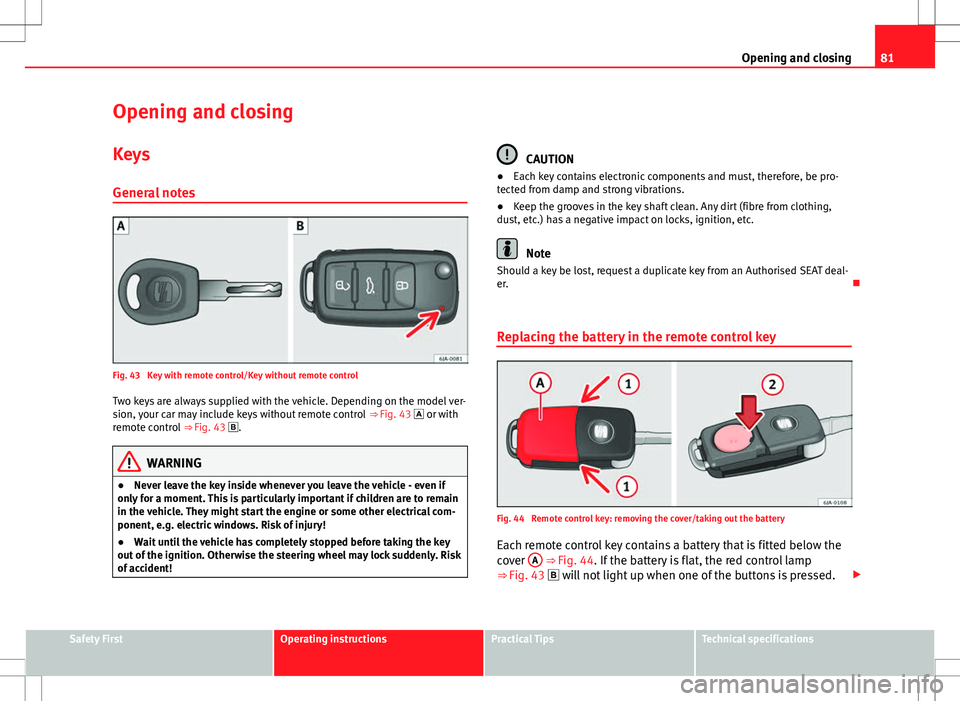
Fig. 43 Key with remote control/Key without remote control Two keys are always supplied with the vehicle. Depending on the model ver-
sion, your car may include keys without remote control ⇒ Fig. 43 or with
remote control ⇒ Fig. 43 .
WARNING
● Never leave the key inside whenever you leave the vehicle - even if
only for a moment. This is particularly important if children are to remain
in the vehicle. They might start the engine or some other electrical com-
ponent, e.g. electric windows. Risk of injury!
● Wait until the vehicle has completely stopped before taking the key
out of the ignition. Otherwise the steering wheel may lock suddenly. Risk
of accident!
CAUTION
● Each key contains electronic components and must, therefore, be pro-
tected from damp and strong vibrations.
● Keep the grooves in the key shaft clean. Any dirt (fibre from clothing,
dust, etc.) has a negative impact on locks, ignition, etc.
Note
Should a key be lost, request a duplicate key from an Authorised SEAT deal-
er.
Replacing the battery in the remote control key
Fig. 44 Remote control key: removing the cover/taking out the battery
Each remote control key contains a battery that is fitted below the
cover A
⇒ Fig. 44. If the battery is flat, the red control lamp
⇒ Fig. 43 will not light up when one of the buttons is pressed.
Safety FirstOperating instructionsPractical TipsTechnical specifications
Page 83 of 249
82Opening and closing
We recommend replacing the battery at a SEAT dealer. You can
replace the battery yourself as follows.
–Unfold the key shaft.
– Remove the battery cover by pressing down with your thumb or
a flat screwdriver in the location of the arrows 1
⇒ Fig. 44.
– Remove the flat battery from the key by pressing downwards in
the location of the arrows 2
.
– Insert the new battery. Check that the “+” symbol on the battery
is facing upwards. The correct polarity is indicated on the bat-
tery cover.
– Replace the battery cover and press down until it clicks.
CAUTION
● The correct polarity must always be observed when replacing the bat-
tery.
● The new battery must be of the same type as the original.
For the sake of the environment
Dispose of the used battery in line with national legislation.
Note
If it is not possible to unlock or lock the door with the remote control key
once the battery has been replaced, it will need to be re-synchronised
⇒ page 88. Childproof locks
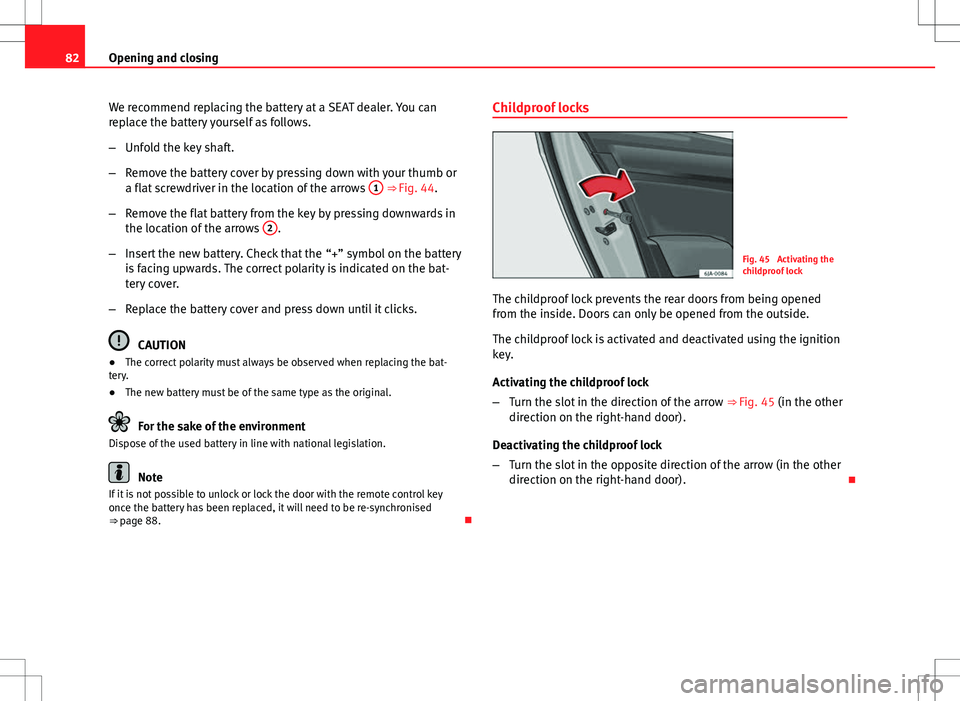
Fig. 45 Activating the
childproof lock
The childproof lock prevents the rear doors from being opened
from the inside. Doors can only be opened from the outside.
The childproof lock is activated and deactivated using the ignition
key.
Activating the childproof lock
– Turn the slot in the direction of the arrow ⇒ Fig. 45 (in the other
direction on the right-hand door).
Deactivating the childproof lock
– Turn the slot in the opposite direction of the arrow (in the other
direction on the right-hand door).
Page 84 of 249

83
Opening and closing
Central locking system
General notes
All of the doors will unlock or lock at the same time when the central locking
system is used. The rear lid is unlocked. It is then possible to open the rear
lid by pressing the release catch located at the top of the registration plate
recess ⇒ page 90.
Warning lamp on the driver door
Once the doors are locked, the warning lamp will flash quickly for 2 seconds
and then at a slower rate.
If the vehicle is locked with the Safe lock engaged ⇒ page 83, the warning
lamp on the driver door will flash quickly for 2 seconds before switching off
for 30 seconds and then flashing at a slower rate.
If the warning lamp flashes quickly for 2 seconds and then remains switch-
ed on before flashing at a slower rate after 30 seconds, there is a fault in
the interior monitor and tow-away protection system ⇒ page 89. Seek pro-
fessional help.
Individual settings
Unlocking single doors
This optional function unlocks the driver door only. The other doors remain
locked and are only unlocked when the next command is given (unlock).
Automatic unlock and lock
The doors and the rear lid are locked automatically when the vehicle rea-
ches a speed of about 15 km/h (9 mph). The doors unlock automatically when the key is removed from the ignition.
Additionally, the driver or front passenger can unlock the doors by pressing
the ⇒
page 85 central lock button or by pulling the front door handle.
WARNING
Locking the doors prevents intruders from getting into the car, e.g. while
waiting at junctions. However, it can also delay assistance in the event of
an accident. Risk of death!
Note
● Activation of the single door setting can be requested at your SEAT deal-
er.
● In the event of an accident in which the airbags activate, the doors will
be automatically unlocked for easier access and assistance.
● If the central locking system should fail to work at any time, only the
driver door can be locked or unlocked using the key ⇒ page 85. All other
doors and the rear lid can be operated manually.
–Manual release ⇒ page 86.
– Manual release of the rear lid ⇒ page 91.
Safe Lock
The central locking system is equipped with a Safe lock. If the vehicle is
closed from outside, the door locks will automatically lock. The warning
lamp on the driver door will flash quickly for 2 seconds and then at a slower
rate. It is not possible to open any of the doors from the inside or outside
using the handle. This limits the possibility of intruders getting into the ve-
hicle.
The Safe lock can be deactivated by pressing the lock button twice in less
than 2 seconds.
Safety FirstOperating instructionsPractical TipsTechnical specifications