tow Seat Toledo 2012 User Guide
[x] Cancel search | Manufacturer: SEAT, Model Year: 2012, Model line: Toledo, Model: Seat Toledo 2012Pages: 249, PDF Size: 3.6 MB
Page 98 of 249
97
Lights and visibility
Note
Make sure you set the range of the main lights when the dipped beam
headlights are switched on.
Turn signal and main beam lever
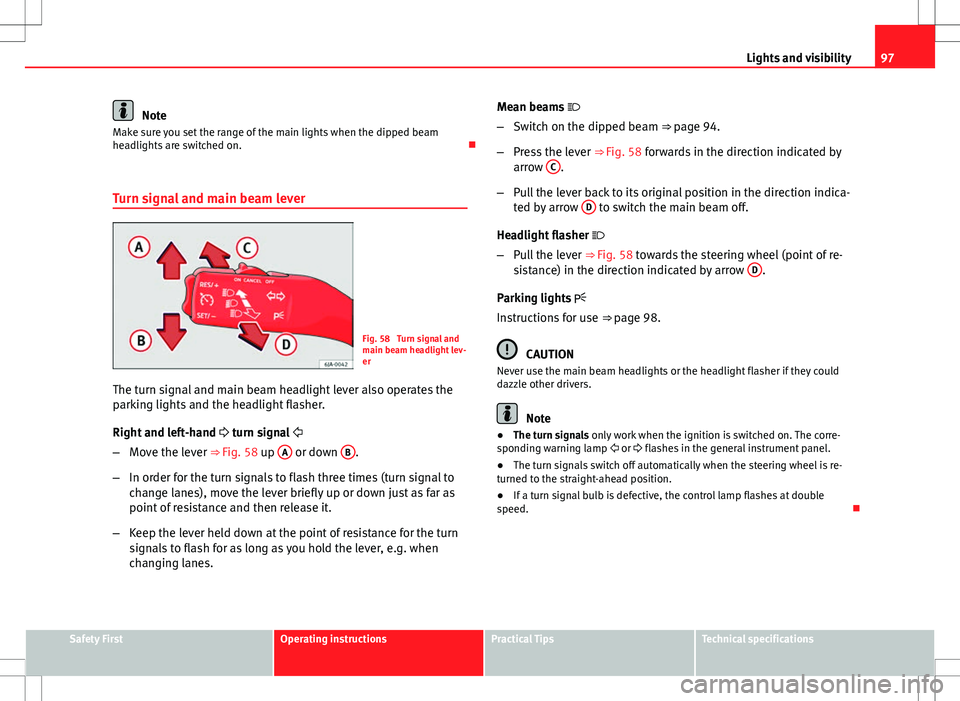
Fig. 58 Turn signal and
main beam headlight lev-
er
The turn signal and main beam headlight lever also operates the
parking lights and the headlight flasher.
Right and left-hand turn signal
– Move the lever ⇒ Fig. 58 up A
or down B.
– In order for the turn signals to flash three times (turn signal to
change lanes), move the lever briefly up or down just as far as
point of resistance and then release it.
– Keep the lever held down at the point of resistance for the turn
signals to flash for as long as you hold the lever, e.g. when
changing lanes. Mean beams
– Switch on the dipped beam ⇒ page 94.
– Press the lever ⇒ Fig. 58 forwards in the direction indicated by
arrow C
.
– Pull the lever back to its original position in the direction indica-
ted by arrow D
to switch the main beam off.
Headlight flasher
– Pull the lever ⇒ Fig. 58 towards the steering wheel (point of re-
sistance) in the direction indicated by arrow D
.
Parking lights
Instructions for use ⇒ page 98.
CAUTION
Never use the main beam headlights or the headlight flasher if they could
dazzle other drivers.
Note
● The turn signals only work when the ignition is switched on. The corre-
sponding warning lamp or flashes in the general instrument panel.
● The turn signals switch off automatically when the steering wheel is re-
turned to the straight-ahead position.
● If a turn signal bulb is defective, the control lamp flashes at double
speed.
Safety FirstOperating instructionsPractical TipsTechnical specifications
Page 100 of 249

99
Lights and visibility
Note
Switch on the hazard warning lights to warn other road users, for example:
● When reaching the tail end of a traffic jam
● If the vehicle has a technical fault or you are involved in an emergency
situation.
Interior lights
Interior lighting – version 1
Fig. 60 Interior lighting
– version 1
Switching on the interior light
– Move the switch A
⇒ Fig. 60 towards the side of the light. The
symbol will be displayed.
Switching off the interior light
– Move the switch A
⇒
Fig. 60 to the centre position O
. Operating the courtesy light
–
Move the switch A
⇒ Fig. 60 to the centre of the light. The sym-
bol will be displayed.
Reading lights
– The reading lights are switched on and off by pressing switch
B
⇒ Fig. 60.
Where the courtesy light is on (switch A
⇒ Fig. 60 in position ), the light
will come on if:
● The vehicle is unlocked
● One of the doors is opened
● The key is removed from the ignition
When the courtesy light is on (switch A
in position ), the light will switch
off if:
● The vehicle is locked
● The ignition is switched on
● 30 seconds after all of the doors have been closed
If a door is left open or if switch A
is in position
, the interior lighting is
switched off after about 10 minutes to prevent the battery from running flat.
Safety FirstOperating instructionsPractical TipsTechnical specifications
Page 102 of 249

101
Lights and visibility
Visibility Heated rear window
Fig. 63 Heated rear win-
dow switch
– Switch the heated rear window on or off by pressing the button
⇒ Fig. 63, the warning lamp in the button will come on or go
off respectively.
The heated rear window only works when the engine is running.
After approx. 7 minutes, the rear window heating device switches off auto-
matically.
For the sake of the environment
The heated rear window should be switched off as soon as the glass is dem-
isted. By saving electrical power you can also save fuel ⇒ page 157, Save
electrical energy.
Note
In the event of a drop in voltage in the onboard systems, the heated rear
window switches off automatically to ensure enough power to control the
engine ⇒ page 186, Automatic disconnection of electrical equipment. Sun visors
Fig. 64 Driver sun visor
Fig. 65 Front passenger
sun visor
The sun visors for the driver and the front passenger can be pulled out of
their central supports and turned towards the doors in the direction of arrow 1
⇒ Fig. 64 and 2
⇒ Fig. 65 respectively.
The strip A
is to store small objects such as notepaper, etc.
The front passenger sun visor includes a vanity mirror B
with a cover. The
cover is opened by sliding it in the direction indicated by arrow 3
⇒
Fig. 65.
Safety FirstOperating instructionsPractical TipsTechnical specifications
Page 105 of 249
104Lights and visibility
Interval wipe
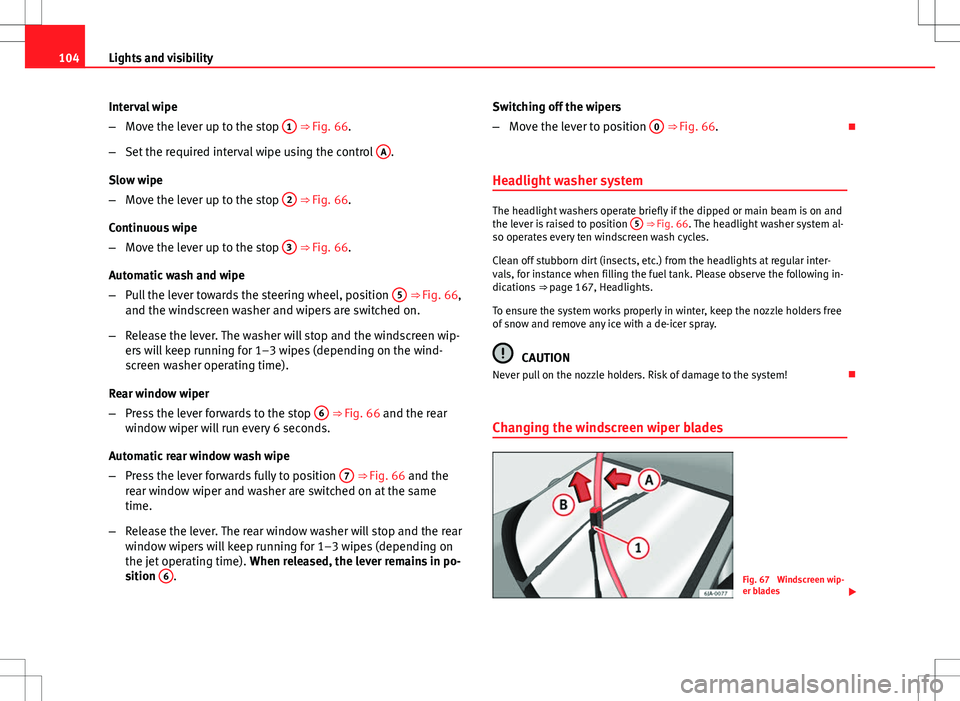
–Move the lever up to the stop 1
⇒ Fig. 66.
– Set the required interval wipe using the control A
.
Slow wipe
– Move the lever up to the stop 2
⇒ Fig. 66.
Continuous wipe
– Move the lever up to the stop 3
⇒ Fig. 66.
Automatic wash and wipe
– Pull the lever towards the steering wheel, position 5
⇒ Fig. 66,
and the windscreen washer and wipers are switched on.
– Release the lever. The washer will stop and the windscreen wip-
ers will keep running for 1–3 wipes (depending on the wind-
screen washer operating time).
Rear window wiper
– Press the lever forwards to the stop 6
⇒ Fig. 66 and the rear
window wiper will run every 6 seconds.
Automatic rear window wash wipe
– Press the lever forwards fully to position 7
⇒ Fig. 66 and the
rear window wiper and washer are switched on at the same
time.
– Release the lever. The rear window washer will stop and the rear
window wipers will keep running for 1–3 wipes (depending on
the jet operating time). When released, the lever remains in po-
sition 6
. Switching off the wipers
–
Move the lever to position 0
⇒ Fig. 66.
Headlight washer system
The headlight washers operate briefly if the dipped or main beam is on and
the lever is raised to position 5 ⇒ Fig. 66. The headlight washer system al-
so operates every ten windscreen wash cycles.
Clean off stubborn dirt (insects, etc.) from the headlights at regular inter-
vals, for instance when filling the fuel tank. Please observe the following in-
dications ⇒ page 167, Headlights.
To ensure the system works properly in winter, keep the nozzle holders free
of snow and remove any ice with a de-icer spray.
CAUTION
Never pull on the nozzle holders. Risk of damage to the system!
Changing the windscreen wiper blades
Fig. 67 Windscreen wip-
er blades
Page 107 of 249
106Lights and visibility
Rear vision mirrors
Interior rear vision mirror with manual anti-dazzle
adjustment
Basic settings
– Push the lever at the bottom of the mirror away from you.
Rear vision mirror anti-dazzle setting
– Pull the lever at the bottom of the mirror towards you.
Exterior mirrors
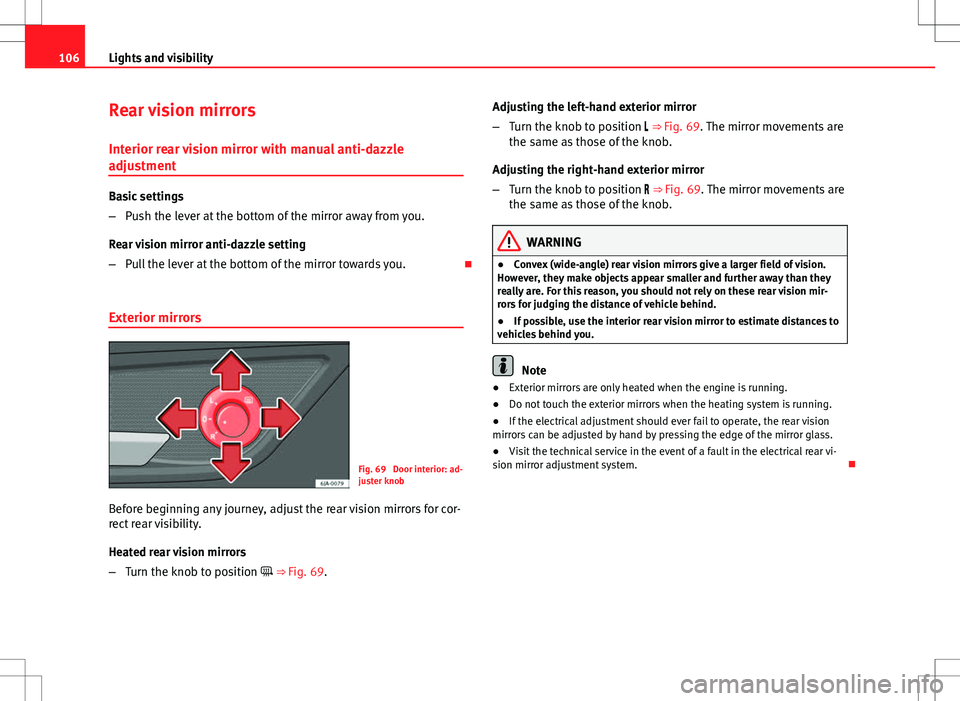
Fig. 69 Door interior: ad-
juster knob
Before beginning any journey, adjust the rear vision mirrors for cor-
rect rear visibility.
Heated rear vision mirrors
– Turn the knob to position ⇒ Fig. 69. Adjusting the left-hand exterior mirror
–
Turn the knob to position ⇒ Fig. 69. The mirror movements are
the same as those of the knob.
Adjusting the right-hand exterior mirror
– Turn the knob to position ⇒ Fig. 69. The mirror movements are
the same as those of the knob.
WARNING
● Convex (wide-angle) rear vision mirrors give a larger field of vision.
However, they make objects appear smaller and further away than they
really are. For this reason, you should not rely on these rear vision mir-
rors for judging the distance of vehicle behind.
● If possible, use the interior rear vision mirror to estimate distances to
vehicles behind you.
Note
● Exterior mirrors are only heated when the engine is running.
● Do not touch the exterior mirrors when the heating system is running.
● If the electrical adjustment should ever fail to operate, the rear vision
mirrors can be adjusted by hand by pressing the edge of the mirror glass.
● Visit the technical service in the event of a fault in the electrical rear vi-
sion mirror adjustment system.
Page 129 of 249

128Heating and air conditioning
Heating selection
Recommended settings for the different modes:
SettingsControl positionbutton 1Air vents 4ABC
Windscreen and side window de-
frostClockwise as far as it
will go3Do not switch onOpen and direct towards the side window
Windscreen and side window de-
frostRequired tempera-ture2 or 3 Do not switch onOpen and direct towards the side window
Heat as quickly as possibleClockwise as far as itwill go3Switch on brieflyOpen
Mild heatingRequired tempera- ture2 or 3 Do not switch onOpen
Fresh air mode - blowerAnti-clockwise as faras it will goRequired positionDo not switch onOpen
Note
● Controls A ⇒ Fig. 98 ⇒ page 127, B, C and button 1.
● Air vents 4 ⇒ page 126.
● We recommend you leave the air vents 3 ⇒ page 126 in the open posi-
tion.
Air recirculation
Air recirculation prevents unpleasant smells, e.g. when passing
through a tunnel or in queuing traffic, from entering the interior. Switching on air recirculation mode
–
Press button
1 ⇒ Fig. 98 ⇒ page 127 and the lamp in the
button will light up.
Switching off air recirculation mode
– Press button
1 ⇒ Fig. 98 ⇒ page 127 again and the lamp
in the button will switch off.
If air vent C
⇒ Fig. 98 ⇒
page 127 is in position
, air recirculation
mode switches off automatically. Press the button to switch air recircula-
tion mode back on in this position.
Page 131 of 249
130Heating and air conditioning
Switching cooling on and off
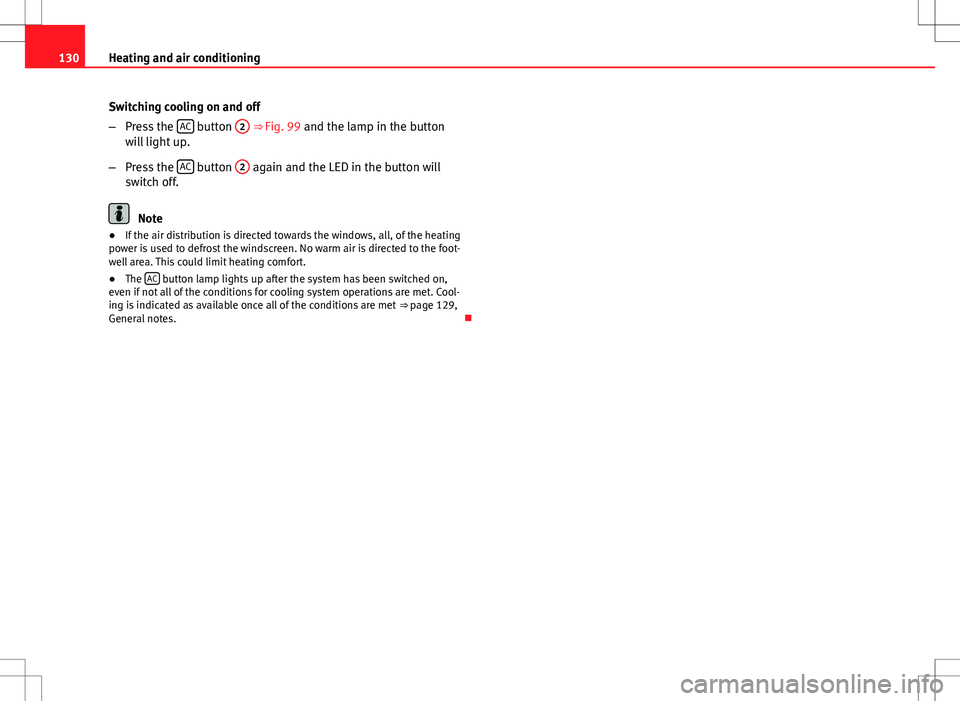
–Press the AC
button
2 ⇒ Fig. 99 and the lamp in the button
will light up.
– Press the AC
button
2 again and the LED in the button will
switch off.
Note
● If the air distribution is directed towards the windows, all, of the heating
power is used to defrost the windscreen. No warm air is directed to the foot-
well area. This could limit heating comfort.
● The AC
button lamp lights up after the system has been switched on,
even if not all of the conditions for cooling system operations are met. Cool-
ing is indicated as available once all of the conditions are met ⇒ page 129,
General notes.
Page 132 of 249

131
Heating and air conditioning
Air conditioning selection
Basic air conditioning control settings recommended for the corresponding
operating modes:
SettingsControl positionButtonAir vents 4ABC12
Windscreen and side window
defrost a)Required temper-
ature3 or 4Do not switch onSwitched on automat- icallyb)Open and direct towards
the side window
Heat as quickly as possibleClockwise as faras it will go3Switch on brieflyOffOpen
Mild heatingRequired temper- ature2 or 3 Do not switch onOffOpen
Heat as quickly as possibleAnti-clockwise as
far as it will goBriefly 4, then 2 or 3Switch on briefly c)OnOpen
Optimum coolingRequired temper-
ature1 or 2, respec-tively. 3Do not switch onOnOpen and direct towards the roof
Fresh air mode - blowerAnti-clockwise asfar as it will goRequired posi- tionDo not switch onOffOpen
a)This type of setting is not recommended in countries with high air humidity. The windows could cool too quickly and cause them to mist over on the outside.
b) The lamp in button 2 lights up, even if not all of the conditions for cooling system operations are met. Cooling is indicated as available once all of the conditions are met
⇒ page 129, General
notes.
c) In certain conditions, air recirculation mode can switch on automatically ⇒ page 131, a lamp lights up in the
button.
Note
● Controls A ⇒ Fig. 99 ⇒ page 129, B, C and buttons 1 and 2.
● Air vents 4 ⇒ page 126.
● We recommend you leave the air vents 3 ⇒ page 126 in the open posi-
tion. Air recirculationAir recirculation prevents unpleasant smells, e.g. when passing
through a tunnel or in queuing traffic, from entering the interior.
Switching on air recirculation mode
–
Press button
1 ⇒ Fig. 99 ⇒ page 129 and the lamp in the
button will light up.
Safety FirstOperating instructionsPractical TipsTechnical specifications
Page 137 of 249

136Driving
Driving
Starting and stopping the engine
Introduction
WARNING
● Never adjust the steering wheel while the vehicle is moving!
● Maintain at least 25 cm distance between the steering wheel and the
upper part of your body 1
⇒ Fig. 101
⇒ page 137. The airbag system
will not be able to give the required protection if the minimum distance is
not observed. This can cause a risk of fatal injury!
● For safety reasons, the steering wheel adjustment lever must always
be pushed securely against the steering column to prevent the steering
wheel from accidentally changing position while driving. Risk of acci-
dent!
● If the steering wheel is adjusted closer to your face, the protective ef-
fect of the driver airbag will be decreased in the event of an accident.
Check that the steering wheel is pointing towards the upper part of your
body.
● When driving, always hold the steering wheel with both hands on the
outside part at the 9 o'clock and 3 o'clock positions. Never hold the
steering wheel at the 12 o'clock position, or in any other manner (e.g. in
the centre of the steering wheel). In such cases, if the airbag is triggered,
you may sustain injuries to the arms, hands and head.
● When moving with the engine switched off, the ignition key must al-
ways remain in position 2
⇒ Fig. 102 ⇒
page 138 (ignition on). The
control lamps will light up in this position. Otherwise, the steering lock
could engage suddenly. Risk of accident!
WARNING (Continued)
● Do not remove the key from the ignition until the vehicle has come to
a standstill and is secure (e.g. the handbrake is engaged). Otherwise, the
steering lock could suddenly engage. Risk of accident!
● Always take the ignition key with you when you leave the vehicle.
This is particularly important if you leave children in the vehicle. Children
could start the engine, for example, with the subsequent risk of accident.
● Never leave the engine running in unventilated or closed rooms. The
exhaust gases contain carbon monoxide, an odourless and colourless
poisonous gas. Risk of fatal accidents! Carbon monoxide can cause peo-
ple to lose consciousness and can cause death.
● Never leave the vehicle unattended if the engine is running.
● Never switch the engine off until the vehicle is stationary. Risk of ac-
cident!
CAUTION
● Turning the steering wheel fully in either direction when the vehicle is
stationary and the engine in gear puts the power steering under great
stress. This could lead to noise. Never leave the steering wheel turned fully
in either direction for more than 15 seconds. Risk of damage to the power
steering system!
● The starter motor may only be used (key position 3
⇒ Fig. 102
⇒ page 138 in the ignition) if the engine is off. Using the starter motor
when the engine is running could cause damage.
● Immediately release the ignition key when the engine starts, otherwise
damage could be caused to the starter motor.
● When the engine is cold, you should avoid high engine speeds, driving
at full throttle and over-loading the engine before it reaches operating tem-
perature. Risk of engine damage!
Page 138 of 249

137
Driving
● Do not tow-start the engine. Risk of engine damage! In vehicles with a
catalytic converter, unburnt fuel could reach the catalytic converter and
catch fire in it. This would lead to a fault in the catalytic converter. Use the
battery from another vehicle for help in starting the engine ⇒ page 205,
Jump-starting.
● After the engine has been working hard for a long time, leave the engine
idling for about one minute before switching it off at the end of a journey.
This will stop the engine from overheating.
For the sake of the environment
Do not warm up the engine when the vehicle is stationary. If possible, move
off immediately after starting the engine. This will help the engine reach op-
erating temperature more quickly, reducing the quantity of emissions.
Note
● The engine can only be started with the original SEAT key.
● Loud running noises may be heard briefly after cold-starting the engine.
This is normal and is no cause for concern.
● After the engine has been stopped and the ignition switched off, the ra-
diator fan may continue running for around 10 minutes.
● If the engine still does not start after a second attempt, the fuel pump
fuse might have blown. Check the fuse and replace if necessary
⇒ page 211, Fuses in the dash panel or contact your Specialised Service.
● You should always engage the steering lock when you leave the vehicle.
This will hinder any attempts at theft. Adjusting the steering wheel position
Fig. 101 Adjustable steering wheel: lever beneath steering column/safe distance from
steering wheel
The steering wheel can be adjusted vertically and horizontally.
– First adjust the position of the driver seat ⇒ page 107, Front
seats.
– Pull down the leave located below the steering wheel
⇒ Fig. 101 .
– Adjust the steering wheel vertically or horizontally.
– Pull the lever upwards as far as it will go.
Power steering
The power steering allows you to turn the steering wheel more easily.
If the power steering fails or the engine is off (towing), it is still possible to
turn the vehicle's steering wheel fully. However, you need more strength to
steer the vehicle.
Safety FirstOperating instructionsPractical TipsTechnical specifications