radio Seat Toledo 2012 Owner's manual
[x] Cancel search | Manufacturer: SEAT, Model Year: 2012, Model line: Toledo, Model: Seat Toledo 2012Pages: 249, PDF Size: 3.6 MB
Page 63 of 249
62Controls and displays
Speed warning
Adjust the speed limit while the vehicle is stopped
–Press the button, A
⇒ Fig. 34 ⇒
page 60 select Speed warning.
– Press the button, B
to activate the possibility of adjusting the
speed limit.
– Press the button, A
to select the required speed limit, i.e.
50 km/h (31 mph).
– Press the button, B
to confirm the selected speed or wait sev-
eral seconds until the adjustment is automatically stored.
The speed limit can be adjusted in 5 km/h (mph) intervals.
Adjust the speed limit while driving
– Press the button, A
⇒ Fig. 34 ⇒
page 60 select Speed warning.
– Drive to the required speed, i.e. 50 km/h (31 mph).
– Press the button B
to set the current driving speed as the
speed limit.
If you want to change the speed limit, this will be regulated in 5
km/h (mph) intervals (i.e. the speed set at 47 km/h increases to
50 km/h or decreases to 45 km/h).
– Press the button, B
to confirm the selected speed or wait sev-
eral seconds until the adjustment is automatically stored.
Changing or resetting the speed limit
– Press the button, A
⇒ Fig. 34 ⇒
page 60 select Speed warning.
– Press the button, B
to reset the speed limit. –
Press the button, B
again to activate the possibility of adjust-
ing the speed limit.
If the indicated speed is exceeded at any time, an audible warning is given.
The message Speed warning appears simultaneously on the display with
the imputed speed limit.
The speed limit stays in the memory even after switching the ignition off
and on.
MAXI DOT* (Informative display) Introduction
The informative display informs about the current operational status of your
vehicle. Additionally, the screen also displays the information for the radio,
the multifunction display, the telephone, the navigation system, the devices
connected to the MDI input and the automatic gearbox ⇒ page 143.
WARNING
Always keep your attention on driving! As the driver, you have the full re-
sponsibility for the safety of traffic.
Page 75 of 249

74Communication
Communication
Steering wheel controls General information
The vehicle includes a multifunction module from where it is possible to
control the audio, telephone and radio/navigation functions without need-
ing to distract the driver.
There are two versions of the multifunction module:
● Audio version, to control the available audio functions from the steering
wheel (Radio, CD audio, MP3 CD, iPod ®1)
, USB 1)
).
● Audio version + telephone, to control the available audio functions from
the steering wheel (Radio, CD audio, MP3 CD, iPod ®1)
, USB 1)
, SD 1)
) and the
Bluetooth system.
1)
Depending on the vehicle equipment.
Page 76 of 249

75
Communication
Audio system adjustment
Fig. 36 Controls on the
steering wheelFig. 37 Steering wheel
controls (depending on
version of model)
ButtonRadioCD/MP3/USB*/iPod ®
*AUXAVolume upVolume upVolume upBVolume downVolume downVolume down
CSearch for next stationNext track
Hold down: Fast forwardNo function specified
DSearch for last stationPrevious track
Hold down: RewindNo function specified
ENo function specifiedNo function specifiedNo function specifiedFSilencePauseSilence
Ga)Operates on instrument panel displayOperates on instrument panel displayOperates on instrument panel displayNext preset b)Next trackb)No function specified b)
Ha)Operates on instrument panel displayOperates on instrument panel displayOperates on instrument panel displayPrevious presetb)Previous trackb)No function specified b)
Ia)Next presetChange folderNo function specifiedChange menu on instrument panelChange menu on instrument panelChange menu on instrument panel
Safety FirstOperating instructionsPractical TipsTechnical specifications
Page 77 of 249
76Communication
ButtonRadioCD/MP3/USB*/iPod ®
*AUX
Ja)Previous presetChange folderNo function specifiedChange menu on instrument panelChange menu on instrument panelChange menu on instrument panelKOperates on instrument panelOperates on instrument panelOperates on instrument panel
La)Change sourceChange sourceChange sourceOperates on instrument panelOperates on instrument panelOperates on instrument panela) Depending on the model version
b) Only if the panel is in Audio menu.
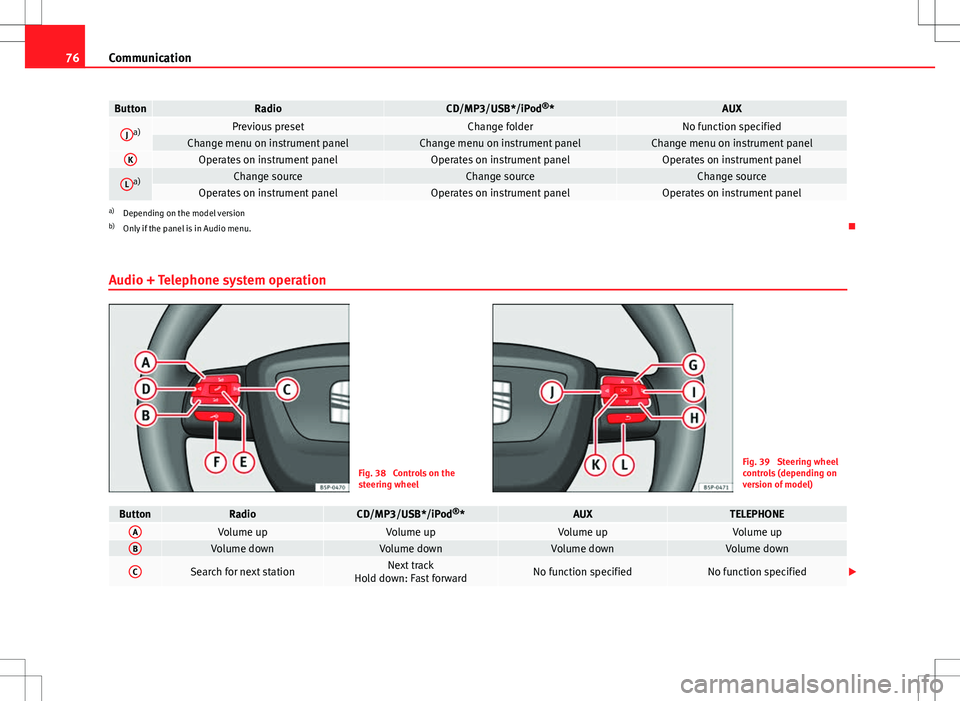
Audio + Telephone system operation
Fig. 38 Controls on the
steering wheelFig. 39 Steering wheel
controls (depending on
version of model)
ButtonRadioCD/MP3/USB*/iPod ®
*AUXTELEPHONEAVolume upVolume upVolume upVolume upBVolume downVolume downVolume downVolume down
CSearch for next stationNext track
Hold down: Fast forwardNo function specifiedNo function specified
Page 78 of 249

77
Communication
ButtonRadioCD/MP3/USB*/iPod ®
*AUXTELEPHONE
DSearch for last stationPrevious track
Hold down: RewindNo function specifiedNo function specified
EAccess telephone menu on in- strument panelAccess telephone menu on instru- ment panelAccess telephone menu on instru-ment panelMake call
Accept incoming call End call
Hold down: reject incoming call
FEnable voice recognitionEnable voice recognitionEnable voice recognitionActivate voice control/
Interrupt current message/ Deactivate voice control
GNext preset a)Next tracka)No function specified
Previous option in the menu/
list/
selection shown on instrument pan- elb)
HPrevious preset a)Previous tracka)No function specified
Next option in the menu/
list/
selection shown on instrument pan- elb)
IChange menu on instrument
panelChange menu on instrument panelChange menu on instrument panelChange menu on instrument panel
JChange menu on instrumentpanelChange menu on instrument panelChange menu on instrument panelChange menu on instrument panel
KOperates on instrument panelOperates on instrument panelOperates on instrument panelConfirmLOperates on instrument panelOperates on instrument panelOperates on instrument panelBack to last-opened menua)Only if the panel is in Audio menu.
b) Only if the instrument panel is in the “TELEPHONE” menu. Examples of use: Agenda, List of calls, Select numbers, Select letters, Main menu.
Safety FirstOperating instructionsPractical TipsTechnical specifications
Page 79 of 249
78Communication
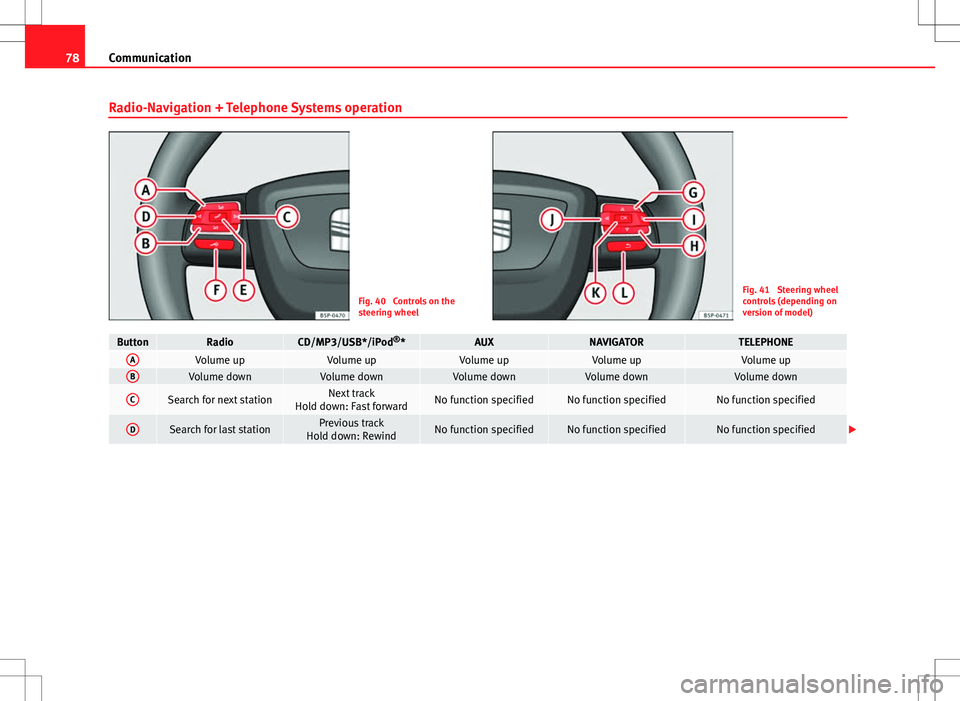
Radio-Navigation + Telephone Systems operation
Fig. 40 Controls on the
steering wheelFig. 41 Steering wheel
controls (depending on
version of model)
ButtonRadioCD/MP3/USB*/iPod ®
*AUXNAVIGATORTELEPHONEAVolume upVolume upVolume upVolume upVolume upBVolume downVolume downVolume downVolume downVolume down
CSearch for next stationNext track
Hold down: Fast forwardNo function specifiedNo function specifiedNo function specified
DSearch for last stationPrevious track
Hold down: RewindNo function specifiedNo function specifiedNo function specified
Page 80 of 249

79
Communication
ButtonRadioCD/MP3/USB*/iPod ®
*AUXNAVIGATORTELEPHONE
EAccess telephone menu
in the instrument panelAccess telephone menu in the instrument panelAccess telephone menuin the instrument panelAccess telephone menu in the instrument panel
Accept incoming call (press brief- ly)
Access telephone menu in the in- strument panel
Reject incoming call (press and hold down)
End ongoing call/establish call (press briefly)
Switch to private mode (press and hold down)
Redial last number (press and hold down) a)
F
Activation of voice recog-
nition for mobile tele-
phone connected to the
system (if the telephone has this function)*Activation of voice recogni-tion for mobile telephone
connected to the system (if the telephone has this function)*Activation of voice recog-nition for mobile tele-
phone connected to the
system (if the telephone has this function)*Activation of voice recogni-tion for mobile telephone
connected to the system (if the telephone has this function)*Activation of voice recognition
for mobile telephone connected to the system (if the telephone has this function)*
GNext preset b)Next trackb)No function specifiedOperates on instrument
panelOperates on instrument panel/No function specified
HPrevious preset b)Previous trackb)No function specifiedOperates on instrument
panelOperates on instrument panel/No function specified
IChange menu on instru- ment panelChange menu on instru- ment panelChange menu on instru-ment panelChange menu on instru- ment panelChange menu on instrument panel
JChange menu on instru-ment panelChange menu on instru- ment panelChange menu on instru-ment panelChange menu on instru- ment panelChange menu on instrument panel
KOperates on instrumentpanelOperates on instrumentpanelOperates on instrument panelOperates on instrumentpanelOperates on instrument panel/No function specified
LOperates on instrument panelOperates on instrumentpanelOperates on instrument panelOperates on instrumentpanelOperates on instrument panel/No function specified
a)For a more detailed description of how to use this button, please refer to the Radio navigation System User Handbook (SEAT Media System 2.2)
b) Only if the panel is in Audio menu.
Safety FirstOperating instructionsPractical TipsTechnical specifications
Page 89 of 249
88Opening and closing
Remote control synchronisation
If the vehicle cannot be locked or unlocked using the remote control, the
code of the key might not match that of the control unit. This can occur
when the remote control buttons are frequently pressed outside the range
of the system or if the remote control battery has been replaced.
In this case, it must be synchronised as follows:
●Press any key on the remote control key.
● Open the door using the key within the next minute.
Anti-theft alarm system
General notes
The anti-theft alarm system increases vehicle protection from intruders. If
the anti-theft alarm system senses interference with the vehicle it triggers
an audible and visible alarm.
Activating the alarm system
The anti-theft alarm switches on automatically when the vehicle is locked
using the remote control key or inserting the key in the driver door. The
alarm is activated around 30 seconds after the vehicle is locked.
Deactivating the alarm system
The anti-theft alarm system is deactivated when the remote control unlock
button is pressed. If the vehicle is not opened within 30 seconds after emit-
ting the radiofrequency signal, the system will be reactivated.
If the vehicle is unlocked using by inserting the key in the driver door, the
ignition must be switched on within 15 seconds. This deactivates the alarm system. If, during these 15 seconds, the vehicle is not started
, the alarm is
triggered.
When does the system trigger an alarm?
The following areas of the vehicle are monitored:
● Bonnet
● Rear lid
● Doors
● Ignition
● Tilt angle ⇒ page 89, Vehicle interior monitoring and tow-away protec-
tion system
● The interior ⇒ page 89, Vehicle interior monitoring and tow-away pro-
tection system
● Drop in voltage in the car systems
● The factory-fitted towing bracket
The alarm is triggered immediately if one of the battery cables is disconnec-
ted while the alarm system is active.
How to turn off the alarm
To deactivate the alarm, press the unlock button on the remote control key
or switch on the ignition.
Note
● The alarm horn power supply has a 5-year useful life. Contact an Official
Service for more detailed information.
● To make sure that the anti-theft alarm is fully operative when leaving the
vehicle, check that all the doors and windows are closed.
● Remote control and receiver unit coding means that the remote control
cannot be used on other vehicles.
Page 149 of 249

148Driving
–Press the interlock button on the selector lever knob at the
same time and move the selector lever to position N (if the se-
lector lever were to be moved back to position P then it would
lock again).
Foot pedals
Under no circumstances must correct use of the pedals be impaired!
Only a floor mat secured to the two corresponding fastening points may be
used in the driver footwell.
Only use floor mats from the catalogue of SEAT Original Accessories that
fasten at two points.
WARNING
No object must be left in the driver footwell. Risk of preventing or limit-
ing use of the foot pedals!
Parking aid*
Fig. 109 Parking aid:
sensor range
Ultrasound sensors are used so that the parking aid system can calculate
the distance between the rear bumper and an obstacle. The sensors are lo-
cated in the rear bumper.
Sensor range
The warning begins at a distance of 160 cm from the obstacle (zone A
⇒ Fig. 109). As the obstacle is approached, the audible warning sounds
with increasing frequency.
At a distance of approx. 30 cm (zone B
), a warning tone will sound contin-
uously. Danger zone. Stop reversing immediately!
In vehicles factory-fitted with certain audio or radio-navigation system mod-
els, the distance from the obstacle is displayed graphically on the screen.
See the audio or navigation system Instruction Manual.
In vehicles factory-fitted with a towing system, the rear area at which the
system starts to indicate the obstacle is extended by around 5 centimetres.
The length of the vehicle can be extended by a detachable towing bracket.
In vehicles factory-fitted with towing equipment, the sensors are deactiva-
ted when towing a trailer or caravan.
Page 165 of 249

164Care of the vehicle and cleaning
Care of the vehicle and cleaning
Care of the vehicle
Introduction
Regular and suitable care helps to maintain the useful life of your vehicle.
This may also be one of the requirements for upholding any warranty claims
in the event of corrosion or paint defects.
We recommend you use cleaning products from the SEAT Original Accesso-
ries programme available in SEAT dealers. Please follow the instructions for
use on the packaging.
WARNING
● Cleaning products and other materials used for car care can damage
the health if misused.
● Always keep car care materials in a safe place out of the reach of chil-
dren. Risk of poisoning!
● When washing the car during the winter season: Moisture and ice on
the brakes may affect braking efficiency. Risk of accident!
● The ignition must always be switched off when the car is washed.
Risk of accident!
● Do not clean the underside of the car or inside the wheel arches with-
out protecting your hands and arms. You may cut yourself on sharp metal
parts!
● Perfumes and air fresheners inside the vehicle may be harmful to
health at high temperatures in the interior.
CAUTION
● Check the colour stability of your clothing to avoid damaging or visibly
staining the fabric (leather), upholstery and fabric trim.
● Cleaning products containing solvents may damage the material being
cleaned.
● Do not wash the vehicle in direct sunlight. Risk of damage to paintwork.
● If washing the vehicle with a hose in winter, do not direct the jet of water
directly at the locks or at the door seals or bonnet. Risk of freezing.
● Do not use insect sponges or abrasive household sponges, etc. on pain-
ted surfaces. Risk of damage to the painted surface.
● Do not put stickers on the inner side of the window in areas where heat-
ing elements or the aerial is located. This could cause damage and, in the
case of the aerial, radio and navigation system reception faults.
● Do not clean the inner side of the window with sharp objects or corro-
sive or acidic cleaning products. Risk of damaging the heating elements or
the aerial.
● Do not attach any fragrance or air freshener to the dash panel. Risk of
damage to the dash panel.
● To avoid damaging the parking aid system sensors, spray them only
briefly at a minimum distance of 10 cm when cleaning the vehicle with a
high-pressure or steam cleaner.
● Do not clean the roof panel with a brush. Risk of damage to the panel
surface!
For the sake of the environment
● The packaging of the product used to care for your vehicle is hazardous
waste. It must be disposed of according to current local law.
● Only wash the car in special wash bays.