instrument panel Seat Toledo 2013 User Guide
[x] Cancel search | Manufacturer: SEAT, Model Year: 2013, Model line: Toledo, Model: Seat Toledo 2013Pages: 258, PDF Size: 3.94 MB
Page 96 of 258
94Opening and closing
Opening the rear lid
–Pull on the release lever and lift the rear lid ⇒ Fig. 50. The rear
lid will automatically open.
Closing the rear lid
– Hold the rear lid by one of the two handles on the interior lining
and close it, pushing slightly.
This system may or may not be operative, depending on the situation of the
vehicle.
If the rear lid is locked then it cannot be opened, however if it is unlocked
then the opening system is operative and the rear lid may be opened.
To lock/unlock, press the button
or the button
1 on the remote control
key.
A warning appears on the instrument panel display if the rear lid is open or
not properly closed.* An audible warning is also given if the rear lid is
opened while the vehicle is moving faster than 6 km/h (4 mph).*
WARNING
● Always close the rear lid properly. Risk of accident or injury.
● The rear lid must not be opened when the reverse or rear fog lights
are lit. This may damage the tail lights
● Do not close the rear lid by pushing it down with your hand on the
rear window. The glass could smash. Risk of injury!
● Ensure the rear lid is locked after closing it. If not, it may open unex-
pectedly while driving.
WARNING (Continued)
● Never allow children to play in or around the vehicle. A locked vehicle
can be subjected to extremely high and low temperatures, depending on
the time of year, thus causing serious injuries/illness. It could even have
fatal consequences. Close and lock both the rear lid and all the other
doors when you are not using the vehicle.
● Closing the rear lid without observing and ensuring it is clear could
cause serious injury to you and to third parties. Make sure that no one is
in the path of the rear lid.
● Never drive with the rear lid open or half-closed, exhaust gases may
penetrate into the interior of the vehicle. Danger of poisoning!
● If you only open the rear lid, do not leave the key inside. The vehicle
will not be opened if the key is left inside.
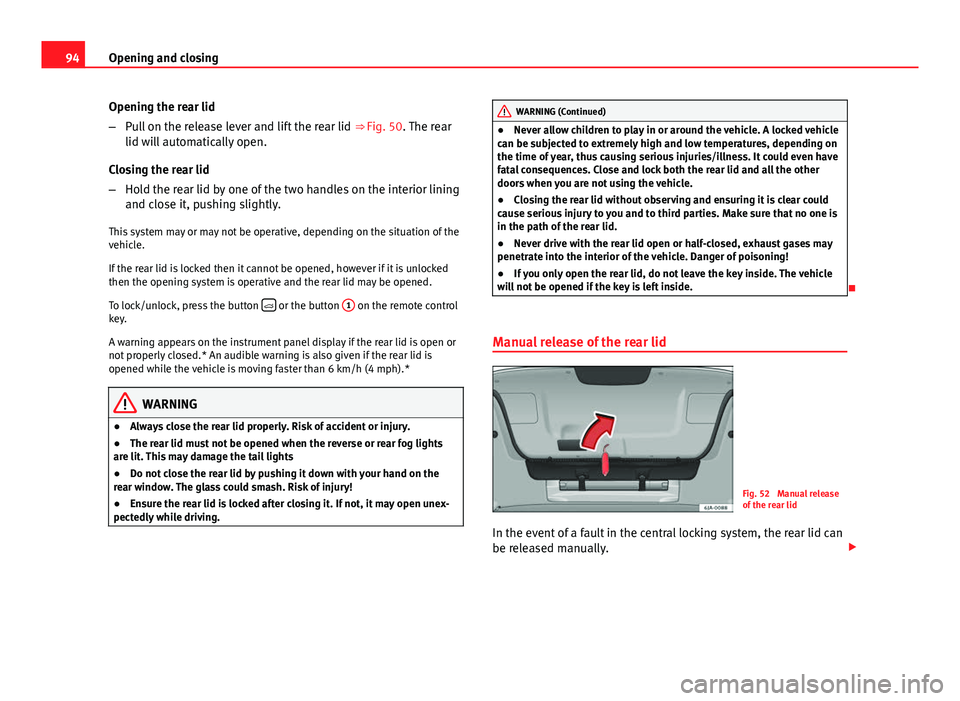
Manual release of the rear lid
Fig. 52 Manual release
of the rear lid
In the event of a fault in the central locking system, the rear lid can
be released manually.
Page 101 of 258

99
Lights and visibility
Switching on front fog lights
– First turn the light switch ⇒ Fig. 55 to position or .
– Pull on the light switch to position 1
.
The ⇒ page 69 warning lamp lights up on the general instrument panel if
the front fog lights are switched on.
Rear fog light
Switching on the rear fog light
– First turn the light switch ⇒ Fig. 55 ⇒ page 98 to position or
.
– Pull on the light switch to position 2
.
If the vehicle is not equipped with front fog lights ⇒ page 98, the rear fog
light is switched on by turning the switch to position and pulling it to po-
sition 2
. This type of switch only has one position.
The warning lamp lights up on the general instrument panel ⇒ page 69 if
the front fog lights are switched on.
If you are towing a trailer or caravan equipped with a rear fog light on a vehi-
cle with a factory-fitted towing bracket or one installed using parts from the
original SEAT parts catalogue , only the rear fog light on the trailer or cara-
van will light up. Range control of main lights
Fig. 56 Instrument pan-
el: light range control
– Turn the control ⇒ Fig. 56 to set the lights to the required set-
ting.
Positions
The control positions roughly correspond to the following vehicle load con-
ditions. Two front occupants, luggage compartment empty.
All seats occupied, luggage compartment empty.
All seats occupied, luggage compartment fully loaded.
Driver only, luggage compartment fully loaded.
CAUTION
Always adjust the range of the lights so that:
● Your vehicle does not dazzle others, particularly oncoming traffic
● The range of the headlights is sufficient for safe driving
-
123
Safety FirstOperating instructionsPractical TipsTechnical specifications
Page 102 of 258
100Lights and visibility
Note
Make sure you set the range of the main lights when the dipped beam
headlights are switched on.
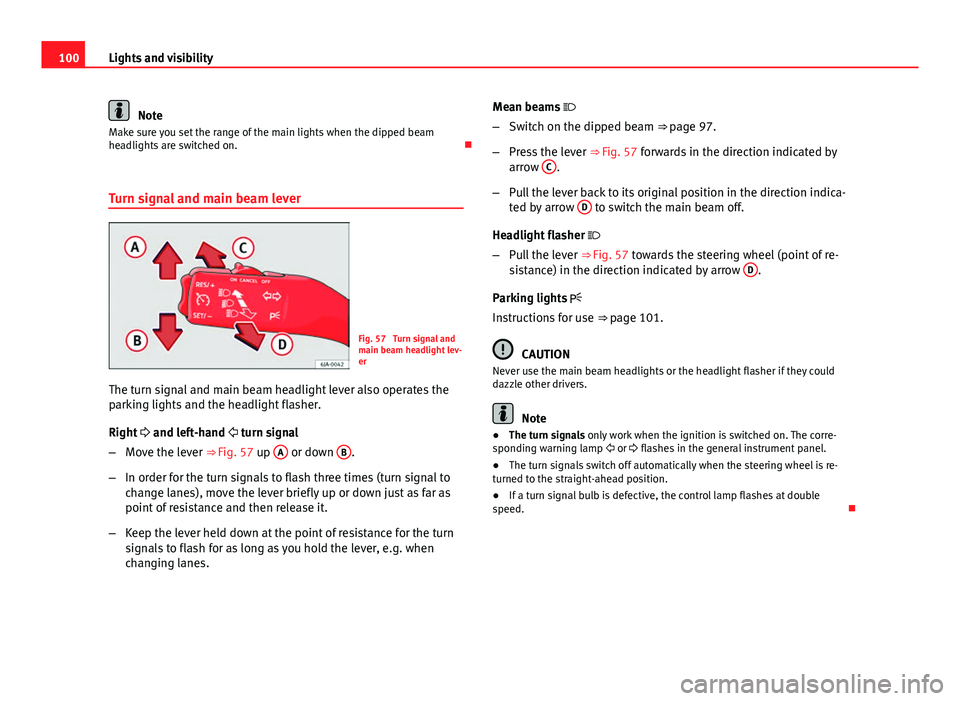
Turn signal and main beam lever
Fig. 57 Turn signal and
main beam headlight lev-
er
The turn signal and main beam headlight lever also operates the
parking lights and the headlight flasher.
Right and left-hand turn signal
– Move the lever ⇒ Fig. 57 up A
or down B.
– In order for the turn signals to flash three times (turn signal to
change lanes), move the lever briefly up or down just as far as
point of resistance and then release it.
– Keep the lever held down at the point of resistance for the turn
signals to flash for as long as you hold the lever, e.g. when
changing lanes. Mean beams
– Switch on the dipped beam ⇒ page 97.
– Press the lever ⇒ Fig. 57 forwards in the direction indicated by
arrow C
.
– Pull the lever back to its original position in the direction indica-
ted by arrow D
to switch the main beam off.
Headlight flasher
– Pull the lever ⇒ Fig. 57 towards the steering wheel (point of re-
sistance) in the direction indicated by arrow D
.
Parking lights
Instructions for use ⇒ page 101.
CAUTION
Never use the main beam headlights or the headlight flasher if they could
dazzle other drivers.
Note
● The turn signals only work when the ignition is switched on. The corre-
sponding warning lamp or flashes in the general instrument panel.
● The turn signals switch off automatically when the steering wheel is re-
turned to the straight-ahead position.
● If a turn signal bulb is defective, the control lamp flashes at double
speed.
Page 103 of 258
101
Lights and visibility
Parking lights*
Parking lights
– Switch the ignition off.
– Move the turn signal lever ⇒ Fig. 57 ⇒ page 100 up or down to
turn on the right or left-hand parking lights respectively.
Parking light on both sides
– Turn the light switch ⇒ Fig. 54 ⇒ page 97 to position and
engage the steering lock.
Note
● The parking lights only work when the ignition is switched on.
● The parking light will not come on automatically on switching the igni-
tion off if the left or right-hand turn signal is left on.
Front fog lights with CORNER function*
Front fog lights with CORNER function provide better lighting of the area
around the car when driving through a corner or parking, etc.
Front fog lights with CORNER function switch on depending on how far you
turn the steering wheel or whether or not the turn signals 1)
are switched on,
if the following conditions are met:
● the vehicle is stationary, the ignition is switched on or you are moving at
a speed less than 40 km/h (25 mph)
● The daytime driving light is switched off ●
The dipped beam is switched on
● The fog lights are switched off
● Reverse gear is not engaged
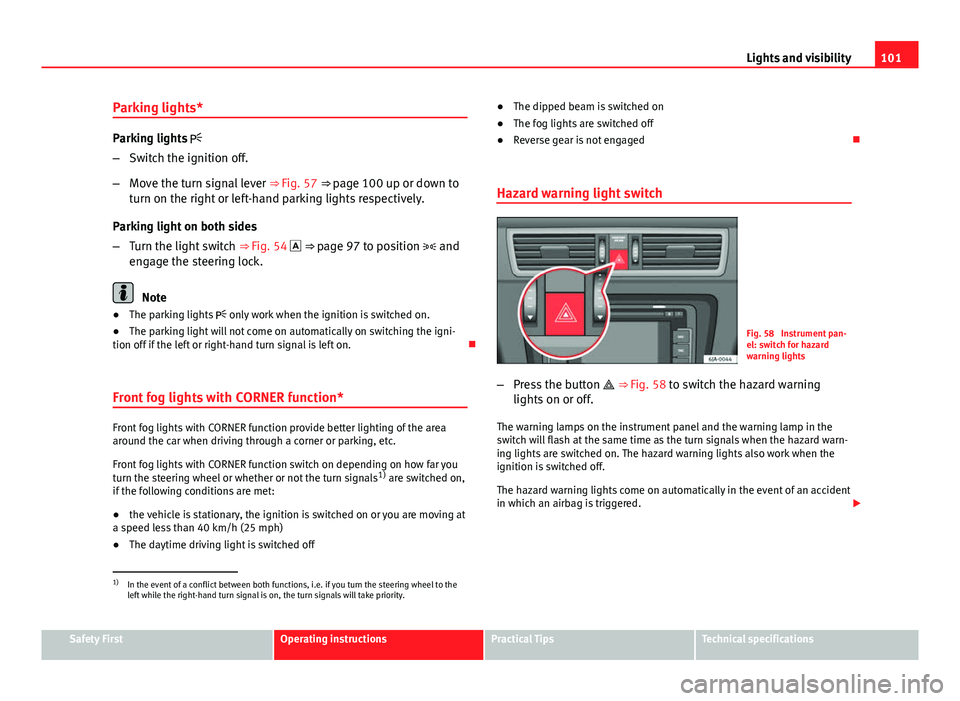
Hazard warning light switch
Fig. 58 Instrument pan-
el: switch for hazard
warning lights
– Press the button ⇒ Fig. 58 to switch the hazard warning
lights on or off.
The warning lamps on the instrument panel and the warning lamp in the
switch will flash at the same time as the turn signals when the hazard warn-
ing lights are switched on. The hazard warning lights also work when the
ignition is switched off.
The hazard warning lights come on automatically in the event of an accident
in which an airbag is triggered.
1)
In the event of a conflict between both functions, i.e. if you turn the steering wheel to the
left while the right-hand turn signal is on, the turn signals will take priority.
Safety FirstOperating instructionsPractical TipsTechnical specifications
Page 125 of 258
123
Seats and storage
Storage compartment
Summary
The following storage areas are available in the vehicle:
Passenger side glove compartment⇒ page 123Compartment for reflective vest⇒ page 124Storage compartments in front seats⇒ page 124Net pockets on back of front backrests⇒ page 125Storage compartment for (sun)glasses⇒ page 125Storage compartments in centre console⇒ page 126Multimedia compartment⇒ page 126Storage compartments in doors⇒ page 126Storage compartment in luggage compartment⇒ page 127
WARNING
● Never place any objects on the instrument panel. These objects could
be flown around the interior while the vehicle is moving (on accelerating
or turning) and distract you. Risk of accident!
● Make sure objects remain in the centre console or other compart-
ments while the vehicle is moving. Otherwise, this would prevent you
from braking, changing gear or accelerating. Risk of accident!
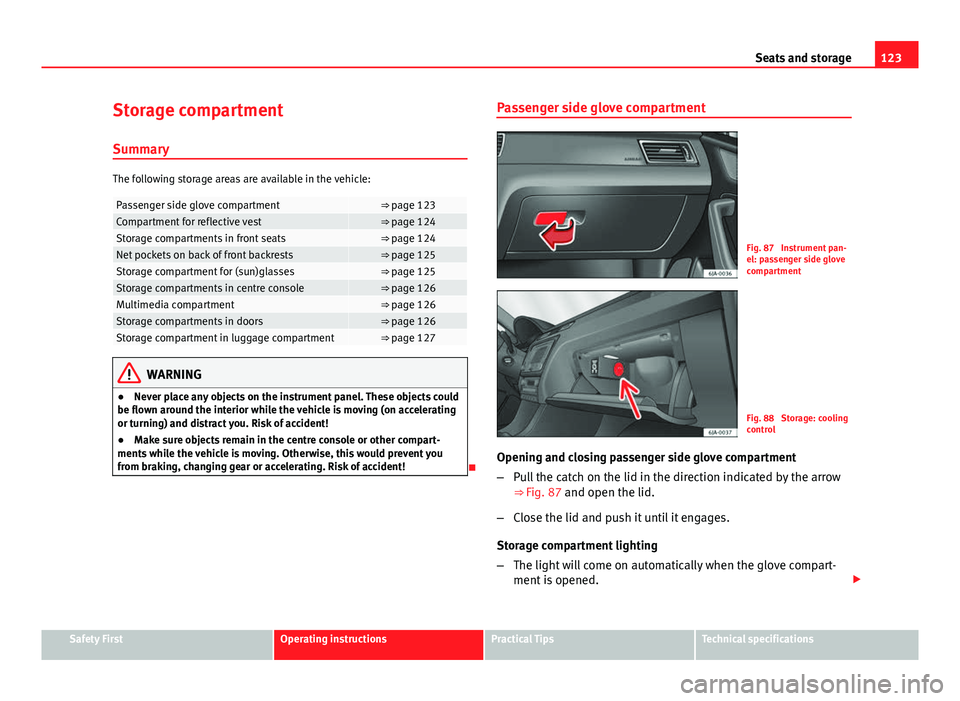
Passenger side glove compartment
Fig. 87 Instrument pan-
el: passenger side glove
compartment
Fig. 88 Storage: cooling
control
Opening and closing passenger side glove compartment
– Pull the catch on the lid in the direction indicated by the arrow
⇒
Fig. 87 and open the lid.
– Close the lid and push it until it engages.
Storage compartment lighting
– The light will come on automatically when the glove compart-
ment is opened.
Safety FirstOperating instructionsPractical TipsTechnical specifications
Page 146 of 258
144Driving
The warning lamp lights up when the handbrake is applied with the ignition
on .
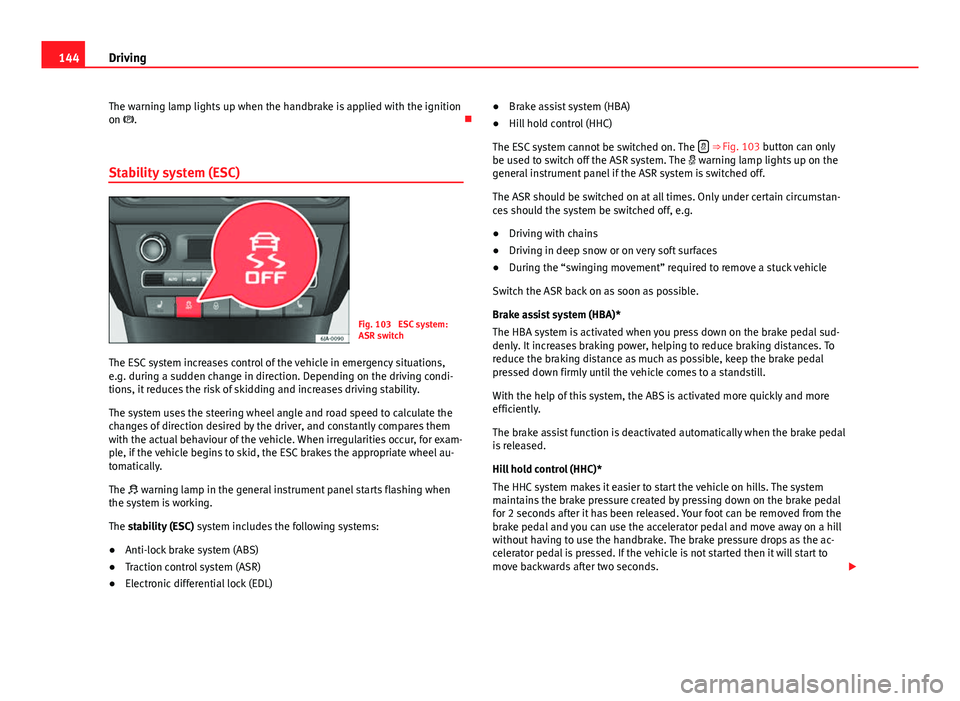
Stability system (ESC)
Fig. 103 ESC system:
ASR switch
The ESC system increases control of the vehicle in emergency situations,
e.g. during a sudden change in direction. Depending on the driving condi-
tions, it reduces the risk of skidding and increases driving stability.
The system uses the steering wheel angle and road speed to calculate the
changes of direction desired by the driver, and constantly compares them
with the actual behaviour of the vehicle. When irregularities occur, for exam-
ple, if the vehicle begins to skid, the ESC brakes the appropriate wheel au-
tomatically.
The warning lamp in the general instrument panel starts flashing when
the system is working.
The stability (ESC) system includes the following systems:
● Anti-lock brake system (ABS)
● Traction control system (ASR)
● Electronic differential lock (EDL) ●
Brake assist system (HBA)
● Hill hold control (HHC)
The ESC system cannot be switched on. The
⇒ Fig. 103 button can only
be used to switch off the ASR system. The warning lamp lights up on the
general instrument panel if the ASR system is switched off.
The ASR should be switched on at all times. Only under certain circumstan-
ces should the system be switched off, e.g.
● Driving with chains
● Driving in deep snow or on very soft surfaces
● During the “swinging movement” required to remove a stuck vehicle
Switch the ASR back on as soon as possible.
Brake assist system (HBA)*
The HBA system is activated when you press down on the brake pedal sud-
denly. It increases braking power, helping to reduce braking distances. To
reduce the braking distance as much as possible, keep the brake pedal
pressed down firmly until the vehicle comes to a standstill.
With the help of this system, the ABS is activated more quickly and more
efficiently.
The brake assist function is deactivated automatically when the brake pedal
is released.
Hill hold control (HHC)*
The HHC system makes it easier to start the vehicle on hills. The system
maintains the brake pressure created by pressing down on the brake pedal
for 2 seconds after it has been released. Your foot can be removed from the
brake pedal and you can use the accelerator pedal and move away on a hill
without having to use the handbrake. The brake pressure drops as the ac-
celerator pedal is pressed. If the vehicle is not started then it will start to
move backwards after two seconds.
Page 147 of 258
145
Driving
The HHC is activated on gradients of over 5 %, as the driver door is closed.
It only works to start on hills, moving both forwards and in reverse. It is not
activated during start-up down hill.
Anti-lock system (ABS)
The ABS system prevents the wheels locking during braking. This helps the
driver keep control of the vehicle.
The driver is made aware of ABS assistance by the pulsating of the brake
pedal and a characteristic noise.
Keep the brake pedal pressed down while the ABS is working. The ABS will
switch off when the brake pedal is released. Never brake intermittently
while the ABS is working!
Traction control system (ASR)
If the wheels start to slide, the ASR adapts the engine speed to the driving
conditions. Particularly in unfavourable conditions, ASR helps starting, ac-
celerating and hill starts.
The 1)
warning lamp in the general instrument panel flashes when the
system is working. Electronic differential lock
If one of the wheels starts to skid, the EDL brakes that wheel, transmitting
the driving force to the other wheels. This increases vehicle stability and im-
proves driving stability.
To prevent the disc brake of the braking wheel from overheating, the EDL
cuts out automatically if subjected to excessive loads. The vehicle will con-
tinue to function normally without EDL. The EDL will switch on again auto-
matically when the brake has cooled down.
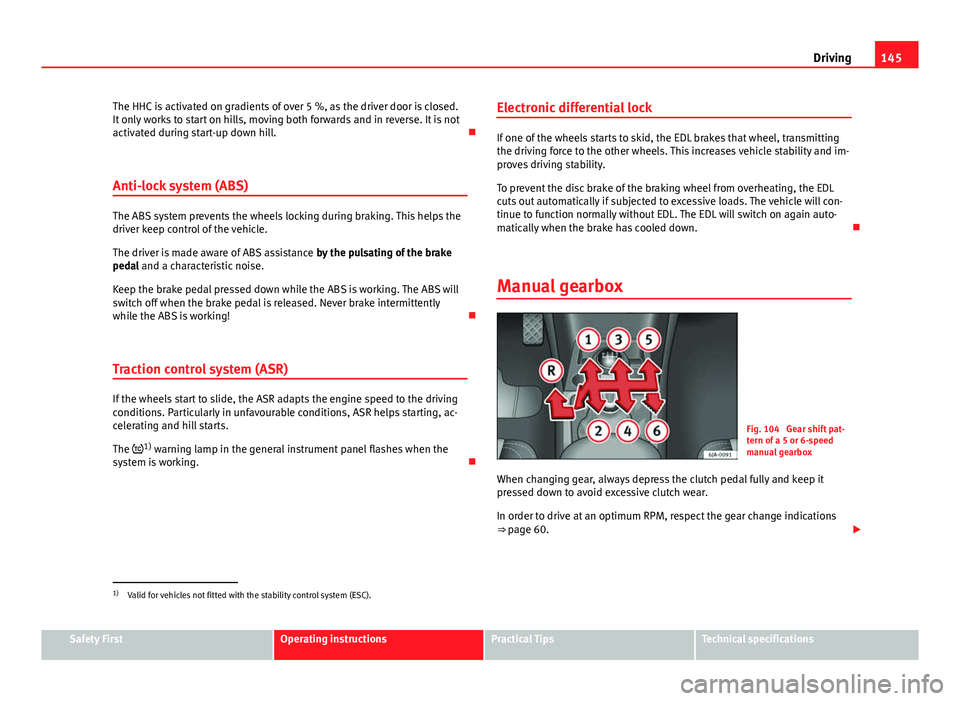
Manual gearbox
Fig. 104 Gear shift pat-
tern of a 5 or 6-speed
manual gearbox
When changing gear, always depress the clutch pedal fully and keep it
pressed down to avoid excessive clutch wear.
In order to drive at an optimum RPM, respect the gear change indications
⇒ page 60.
1)
Valid for vehicles not fitted with the stability control system (ESC).
Safety FirstOperating instructionsPractical TipsTechnical specifications
Page 149 of 258
147
Driving
The engine can only be started in positions P or N. If, on engaging the steer-
ing lock, switching the ignition on/off or starting the engine, the selector
lever is not in position P or N, the informative display will show Move the
selector lever to position P/N! or P/N is shown on the general instrument
panel display.
The engine can only be started in position P at temperatures below -10 °C
(14 °F).
Move the selector lever to position P when parking the vehicle on a flat sur-
face. On a slope, the handbrake should be firmly applied before moving the
selector lever to the park position. This reduces the load on the lock mecha-
nism while making it easier to move the selector lever from position P.
If, while the vehicle is moving, the selector lever is accidentally moved to
position N, release the accelerator and wait for the engine to idle before
moving it back into position.
Starting and driving
Starting
– Press and hold the brake pedal.
– Press and hold the interlock button on the selector lever knob
and move the selector lever to position ⇒ page 147 before re-
leasing the interlock button.
– Release the brake and press the accelerator.
Stopping
– The selector lever does not have to be moved to position N if
the vehicle is stopped for a short period, e.g. at junctions. Ap-
plying the brake is enough. However, the engine must remain
idling. Parking
–
Press the brake pedal.
– Apply the handbrake.
– Press the interlock button, move the selector lever to position P
and release the button.
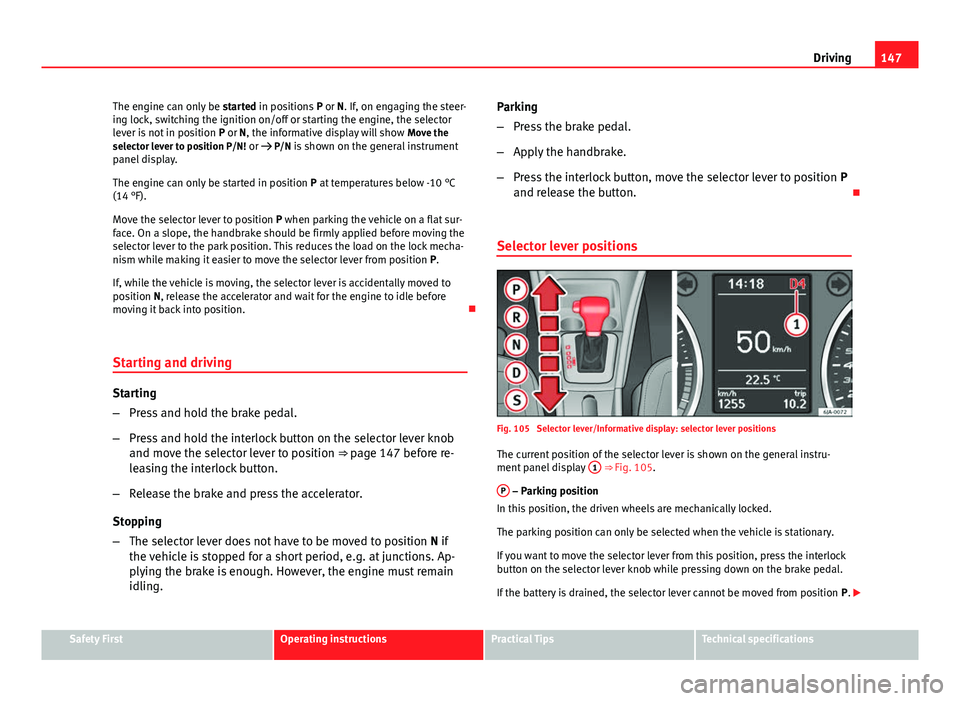
Selector lever positions
Fig. 105 Selector lever/Informative display: selector lever positions The current position of the selector lever is shown on the general instru-
ment panel display 1
⇒ Fig. 105.
P
– Parking position
In this position, the driven wheels are mechanically locked.
The parking position can only be selected when the vehicle is stationary.
If you want to move the selector lever from this position, press the interlock
button on the selector lever knob while pressing down on the brake pedal.
If the battery is drained, the selector lever cannot be moved from position P.
Safety FirstOperating instructionsPractical TipsTechnical specifications
Page 151 of 258
149
Driving
The manual gearbox can be activated when the vehicle is either moving or
stationary.
When accelerating, the gearbox automatically shifts up shortly before the
maximum engine speed is reached.
On shifting up, the gear is only engaged when there is no risk of engine
damage.
When the accelerator pedal is pressed down to the kick-down zone, the
gearbox will shift down in line with the road speed and engine speed.
Note
The kick-down function is also available in manual shift mode.
Selector lever lock
Automatic selector lever lock
The selector lever is locked in the positions P and N when the ignition is on.
Press down on the brake to unlock it. Remember, if the selector lever is in
positions P and N then the ⇒ page 77 warning lamp will light up on the
general instrument panel.
When the selector lever merely moves through position N (e.g. when moved
from R to D), the lever lock is not applied. This makes it possible, for exam-
ple, to rock a stuck vehicle backwards and forwards. The lock is only applied
if the brake is not pressed and the selector lever is moved to position N for
more than 2 seconds.
The selector lever lock is only activated in vehicles that are stationary and at
speeds below 5 km/h (3 mph). It is automatically switched off in position N
at higher speeds. Interlock button
The interlock button on the selector lever knob prevents the driver from in-
advertently engaging a gear. Press the button to unlock the selector lever.
Safety interlock for ignition key
1)
After switching off the ignition, you can only remove the ignition key if the
selector lever is in position P. When the ignition key is removed, the selec-
tor lever is locked in position P.
Kick-down feature
The kick-down feature allows maximum acceleration to be reached.
In any gear programme, press down fully on the accelerator for the automat-
ic gearbox to activate the kick-down feature. This function takes priority over
the gear programmes without taking into account the position of the selec-
tor lever (D, S or Tiptronic) and is used to reach maximum acceleration, us-
ing full engine power. Depending on the road speed and engine speed, the
automatic gearbox shifts down and the vehicle accelerates. It only shifts up
after the maximum engine speed has been reached.
Driving programmes
Your vehicle is equipped with an electronically-controlled automatic gear-
box. Shifting up or down depends on the programme selected.
For a calm driving style, the gearbox uses the most economic programme.
The gearbox shifts up as quickly as possible and shifts down as late as pos-
sible, thus increasing driving economy.
1)
Valid only for certain countries.
Safety FirstOperating instructionsPractical TipsTechnical specifications
Page 154 of 258
152Driving
Switching the parking aid system on and off
Parking aid is switched on when the ignition is on and reverse gear engag-
ed. This is confirmed by a short audible warning.
Parking aid is switched off when reverse gear is released.
WARNING
● Parking aid does not free the driver from responsibility when parking
or performing similar manoeuvres. Pay special attention to small children
or animals, as the parking aid sensors may not always be able to detect
them.
● Before reversing or parking, make sure there are no small obstacles,
e.g. stones, narrow pillars, towing brackets, etc. in front and behind the
vehicle. These obstacles may not always be detected by the parking aid
device.
● The surface of certain objects may not reflect the signals of the park-
ing aid sensors. Therefore, people wearing clothing of this kind may not
be detected by the parking aid system.
● Outside noise may interfere with the parking aid system. Under cer-
tain unfavourable circumstances, certain objects or people may not be
detected.
Note
● If a constant sound at a higher frequency is emitted for 3 seconds when
the system is switched on then there is a fault in the system. Please take the
vehicle to a specialised technical service to solve this fault.
● To ensure that the parking aid system works properly, the sensors must
be kept clean (e.g. free of ice).
● If the parking aid system is switched on when the automatic gearbox se-
lector lever is in position P, the acoustic signal will be interrupted (the car
cannot be moved). Cruise control (Cruise control system)*
Introduction
The cruise control system allows you to drive at a constant speed of 30 km/
h (19 mph) or higher without having to press the accelerator. However, the
speed is only maintained within the margin permitted by the engine power
and the braking effect of the engine.
The warning lamp lights up on the general instrument panel if cruise con-
trol is switched on.
WARNING
● For safety reasons the cruise control system must not be used in
dense traffic or where roads conditions are poor (e.g. due to ice, aqua-
planing, loose grit, snow). Risk of accident!
● The programmed speed can only be re-established if it is not too high
for current traffic conditions.
● Always switch the cruise control system off after using it in order to
avoid involuntary use.
CAUTION
● The cruise control cannot maintain a constant speed when the vehicle is
moving downhill. The vehicle tends to accelerate under its own weight.
Therefore, shift down or use the brake pedal in good time to slow the vehi-
cle.
Note
● In vehicles with an automatic gearbox, the cruise control system cannot
be switched on if the selector lever is in position P, N or R.
● In vehicles with a manual gearbox, the cruise control cannot be switched
on if first gear or reverse gear is engaged.