ignition Seat Toledo 2014 User Guide
[x] Cancel search | Manufacturer: SEAT, Model Year: 2014, Model line: Toledo, Model: Seat Toledo 2014Pages: 200, PDF Size: 4.37 MB
Page 37 of 200

Instruments and warning lamps
Coolant level and temperature If the warning lamp
(blue) is lit up, the en-
gine h a
s not yet reached its operating tem-
perature 1)
. Avoid high engine speeds, hard
acceleration and subjecting the engine to
high loads.
If the warning lamp (red) is lit up or flash-
ing, the c
oolant temperature is too high or its
level is too low.
The informative display indicates:
Check coolant! Instruction Manual!
Stop the vehicle, switch off the engine, check
the coolant level ›››
page 138 and refill if
nec e
ssary ››› page 138.
If the c
oolant is situated in the prescribed
area, the high temperature may be due to a
fault in the cooling system fan. Check the ra-
diator fan fuse and replace it if necessary
››› page 165, Changing fuses in the engine
compartment
.
If the warning lamp (red) remains lit up,
despite both the coolant level and the radia-
tor fan fuse being in correct condition,
stop the vehicle!
Go to a technical service. WARNING
● Take care when opening the coolant reser-
voir. When the engine is warm or hot, the
system is pressurised – Danger of burns!
Wait for the engine to cool before opening
the cover.
● Do not touch the fan. The fan can switch on
automatically regardless of whether the igni-
tion is switched on. Power steering
If the
warning lamp is illuminated, there is
a fault in the power steering.
The power steering system functions with re-
duced power steering effect.
Go to a technical service.
Stability Control (ESC) If the control lamp
flashes, the ESC is
working.
If the warning lamp illuminates on igni-
tion, the ESC system may have switched off
due to technical reasons. Turn off the ignition
and turn it on again. Upon switching on the
ignition again, if the warning lamp has switched off, this means the ESC is function-
ing correctly again.
If the
warning lamp is illuminated there is
a f au
lt in the ESC.
The informative display indicates: Report No.: electronic stability control (ESC)
or Report No.: Traction control system (ASR)
Go to a technical service.
Further information ››› page 108, Stability
system (ESC). Note
If the battery is disconnected and connected
again, the yellow warning lamp lights up
when the ignition i s
switched on. This warn-
ing lamp must switch off after covering a
short distance. Traction control system (ASR)
If the control lamp
flashes, the ASR is
working.
If the
warning lamp illuminates on igni-
tion, the TCS system may have switched off
due to technical reasons. Turn off the ignition »1)
This does not apply to vehicles equipped with an
informative display. 35
Technical specifications
Advice
Operation
Safety
Page 38 of 200

Operation
and turn it on again. Upon switching on the
ignition again, if the warning lamp has
switched off, this means the TCS is function-
ing correctly again.
If the warning lamp remains illuminated,
there is a fault in the TCS.
The informative display indicates:
Report No.: Traction control system (ASR)
Go to a technical service.
Further information ››› page 109, Traction
control system (ASR) .
Anti-lock system (ABS) If the
warning lamp is illuminated, there is
a fault in the ABS.
The informative display indicates:
ABS fault
The brake system alone is operational in the
vehicle, without ABS.
Go to a technical service. WARNING
● If the warning lamp illuminates together
w ith the ›
›› page 33 warning lamp, ,
st
op the vehicle! Go to a technical service. ●
A fault in the Anti-lock brake system (ABS)
can lead to longer braking distances – Risk of
accident! Rear fog light
The control lamp
lights up when the rear
fog light is switched on ››› page 64.
Bulb fault The control lamp
lights up when there is a
fault in a bulb:
● for several seconds after switching on the
ignition,
● When connecting a faulty bulb
This is indicated on the informative display,
e.g.: Check the front right dipped beam headlight! Note
The rear side lights and number plate light
contain several bulbs. The control lamp
lights up only when there is a fault in all the
number plate bulbs or side light bulbs (of a
combined tail light). Therefore it is advisable
to regularly check the bulb operation. Emission control system
If the warning lamp
is lit up, there is a
fault in the emission system. The engine con-
trol unit allows driving to continue in an
emergency program.
Go to a technical service.
Preheating (diesel engines) When you switch on the ignition, the warning
lamp lights up. The engine can be started
straight away when the lamp switches off.
If the
warning lamp
does not illuminate or
if it
does not switch off , there is a fault in the
glow plug system.
If the warning lamp starts to flash
while
driving, there is a fault in the engine power
control electronic system. The engine control
unit allows driving to continue in an emer-
gency program.
Go to a technical service.
Engine management system
(petrol engines) If the
warning lamp is illuminated, there is
a fault in the engine management system.
The engine control unit allows driving to con-
tinue in an emergency program.
36
Page 39 of 200

Instruments and warning lamps
Go to a technical service.
Particulate filter (diesel engines)The particulate filter eliminates soot from
emissions. The particles accumulate in the
filter where they are normally burned off.
If the warning lamp
is illuminated, the fil-
ter is obstructed by soot.
In order for the filter to clean itself (if the traf-
fic conditions ››› so permit) it is essential
to drive for at least 15 minutes (or until the
warning lamp switches off) with 4th or 5th
gear engaged (automatic gearbox: position
S) at a minimum speed of 60 km/h (37 mph)
with the engine speed between
1,800-2,500 rpm.
The warning lamp switches off once the
filter has been successfully cleaned.
If the cleaning process is not successful, the
warning lamp does not switch off and the
warning lamp starts to flash.
The informative display indicates:
Diesel particulate filter. Instruction Manual!
The engine control unit allows driving to con-
tinue in an emergency program. When
switching the ignition off and on again, the
warning lamp also illuminates.
Go to a technical service. WARNING
● The particulate filter attains very high tem-
peratures. Therefore, do not park the vehicle
in places where the exhaust pipe could come
into contact with dry grass or with highly-
flammable materials. Risk of fire! CAUTION
While the warning lamp is lit up, the fuel
c
onsumption is high, and in certain condi-
tions, the engine power is reduced. Note
● In order for the particulate filter to burn off
soot in a correct manner, avoid carrying out
frequent short journeys.
● Using diesel fuel with a high sulphur count
can considerably reduce the useful life of the
particulate filter. The specialised service pro-
vides information about the countries where
fuel with a high sulphur content is used. Fuel reserve
The warning lamp illuminates when ap-
proximately only 7 litres of fuel remain in the
tank
The informative display indicates:
Refuel! Fuel range…km...(miles) Note
The message on the display switches off only
after refuelling and carrying out a short jour-
ney. Airbag system
If the warning lamp
is lit up, there is a
f au
lt in the airbag system.
The informative display indicates: Airbag fault!
The airbag system availability is controlled
electronically, regardless of whether an air-
bag is disabled.
If the front airbag, side airbag, head protec-
tion airbag or the belt tensioner are disabled
using the diagnostics system:
● After switching on the ignition, the warn-
ing lamp illuminates for about 4 seconds and
flashes for another 12 seconds.
The informative display indicates:
Airbag/belt tensioner disabled! »
37
Technical specifications
Advice
Operation
Safety
Page 40 of 200
Operation
If the front passenger airbag has been disa-
bled with the airbag switch located in the
storage compartment side:
● When the ignition is turned on, the
warning lamp illuminates for about 4 sec-
onds.
● The airbag is disabled, signalled with the
warning lamp
which lights up with the
word placed in the cen-
tre part of the dash panel ››› Fig. 18
››› page 23. WARNING
When there is a fault in the airbag system,
have an inspection carried out by an Author-
ised Service. Otherwise the airbags may fail
to trigger in an accident. Tyre pressure monitoring system*
If the
warning lamp illuminates, the pres-
sure in one of the tyres has decreased signifi-
cantly. Check and adjust the pressure of all
the tyres ›››
page 144 .
If the
warning lamp flashes, there is a fault
in the system.
Go to a technical service.
Further information ›››
page 147, Tyre pres-
sure*
. Note
If the battery is disconnected the warning
lamp lights up when the ignition is switch-
ed on.
This warning lamp must switch off af-
ter covering a short distance. Windscreen washer fluid level
If the
warning lamp illuminates, the level
of w
indscreen washer fluid in the tank is very
low. Fill the windscreen washer fluid
››› page 139, Windscreen washer.
The informative display indicates: Refill windscreen washer fluid!
Turn signals Depending on the position of the turn signal
lever the left warning lamp on the left
or
right flashes.
If there is a turn signal fault, the warning
lamp flashes at approximately double the
normal speed.
All the turn signals flash in addition to both
warning lamps when the hazard warning
lights are switched on.
Further information ›››
page 63, Turn signal
and main beam lever. Fog lights
The control lamp
lights up when the fog
lights are switched on ››› page 64.
Cruise speed The warning lamp illuminates when the
cruise control is switched on (cruise speed)
››› page 111.
Sel ect
or lever lock If the
control lamp illuminates, press the
brake pedal. This is necessary when you re-
quire the automatic gearbox selector lever to
move out of the positions P or
N
›
›› page 103.
Main be
ams The warning lamp lights up with the main
beam headlights or when the headlights are
flashed
›››
page 63 .38
Page 41 of 200
Information system
Information system
Multi-function display* (on
board computer) Introduction The multifunction display can only be operat-
ed when the ignition is switched on. When
the ignition is switched on the last function
selected before it was switched off is dis-
played.
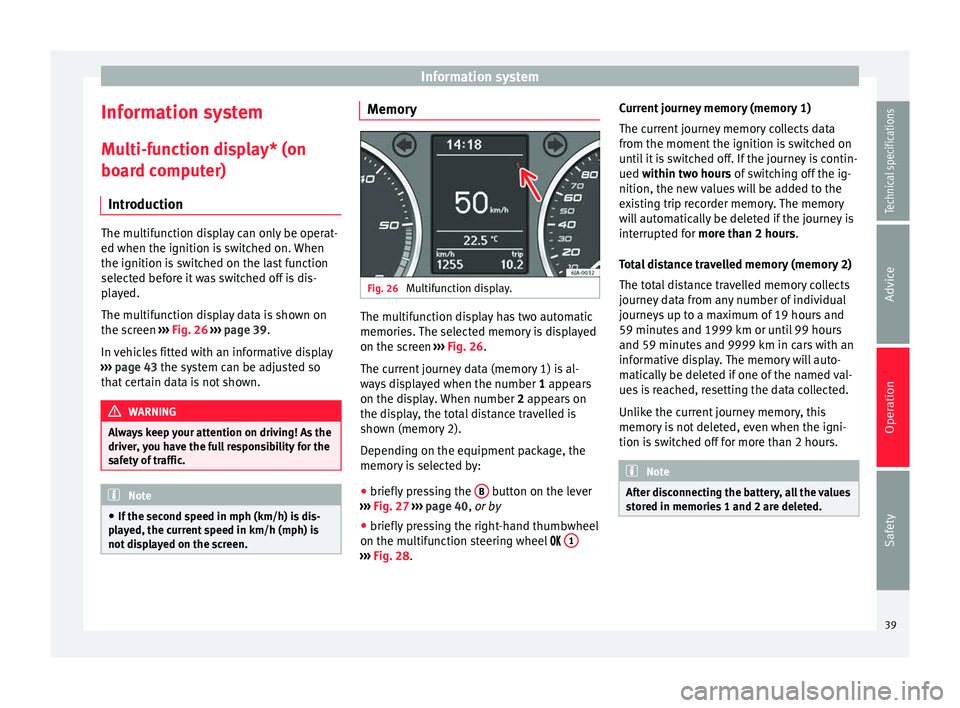
The multifunction display data is shown on
the screen
›››
Fig. 26 › › ›
page 39.
In vehicles fitted with an informative display
››› page 43 the system can be adjusted so
that
certain data is not shown. WARNING
Always keep your attention on driving! As the
driver, you have the full responsibility for the
safety of traffic. Note
● If the second speed in mph (km/h) is dis-
played, the current speed in km/h (mph) is
not displayed on the screen. Memory
Fig. 26
Multifunction display. The multifunction display has two automatic
memories. The selected memory is displayed
on the screen
››› Fig. 26 .
The c urr
ent journey data (memory 1) is al-
ways displayed when the number 1
appears
on the display. When number 2 appears on
the display, the total distance travelled is
shown (memory 2).
Depending on the equipment package, the
memory is selected by:
● briefly pressing the B button on the lever
››› Fig. 27 ›
›
›
page 40, or by
● briefly pressing the right-hand thumbwheel
on the multifunction steering wheel 1 ›››
Fig. 28 . C
urr
ent journey memory (memory 1)
The current journey memory collects data
from the moment the ignition is switched on
until it is switched off. If the journey is contin-
ued
within two hours of switching off the ig-
nition, the new values will be added to the
existing trip recorder memory. The memory
will automatically be deleted if the journey is
interrupted for
more than 2 hours.
Total distance travelled memory (memory 2)
The total distance travelled memory collects
journey data from any number of individual
journeys up to a maximum of 19 hours and
59 minutes and 1999 km or until 99 hours
and 59 minutes and 9999 km in cars with an
informative display. The memory will auto-
matically be deleted if one of the named val-
ues is reached, resetting the data collected.
Unlike the current journey memory, this
memory is not deleted, even when the igni-
tion is switched off for more than 2 hours. Note
After disconnecting the battery, all the values
stored in memories 1 and 2 are deleted. 39
Technical specifications
Advice
Operation
Safety
Page 45 of 200

Information system
– Press the thumbwheel on the multifunction
steering wheel once again to activate the
possibility of changing the speed limit.
If the indicated speed is exceeded at any
time, an audible warning is given. The mes-
sage Speed warning
appears simultaneously
on the di
splay with the imputed speed limit.
The speed limit stays in the memory even af-
ter switching the ignition off and on.
MAXI DOT* (Informative
display) Introduction The informative display informs about the
current operational status of your vehicle.
Additionally, the screen also displays infor-
mation for the radio, the multifunction dis-
play, the telephone, the navigation system,
the devices connected to the MDI input and
the automatic gearbox
››› page 100. WARNING
Always keep your attention on driving! As the
driver, you have the full responsibility for the
safety of traffic. Main menu
Fig. 29
Windscreen wiper lever: informative
display controls. Fig. 30
Multifunction steering wheel: controls
on the steering wheel. Depending on the equipment package:
– The Main menu is enabled by keeping rock-
er switch A
››› Fig. 29 on the multifunction
l ev
er pressed. –
The menu options can be selected with but-
ton A . Briefly press the button,
B to dis-
play the selected information.
or – The Main menu is enabled by pressing but-
t on
s A
››› Fig. 30 on the multifunction
s t
eering wheel.
– The menu options can be selected using
thumbwheel B on the multifunction steer-
ing wheel. Briefly press thumbwheel B on
the multifunction steering wheel to display
the selected information.
The following options can be selected:
■ MFD ››› page 39
■ Audio ››› Booklet Audio system Instruction
Manual
■ Navigation ››› Booklet Navigation system
Instruction Manual
■ Telephone ››› Booklet Audio system instruc-
tions manual or ››› Booklet Navigation sys-
tem instruction manual
■ Vehicle status ››› page 44
■ Settings ››› page 44
The Audio
and
Navigation options are only
displayed when these factory-fitted systems
are switched on. Note
● If the multifunction display is not operated
during 10 seconds, the menu automatically
returns to one of the higher levels. 43
Technical specifications
Advice
Operation
Safety
Page 46 of 200
Operation
Settings You can make certain adjustments using the
informative display. The current values are
displayed directly in their respective places
above and below the line.
The following items can be selected:
■ Language
■ MFD data
■ Time
■ Winter tyres
■ Units
■ Second speed
■ Inspec. Service
■ Factory settings
■ Back
Select the option Back
to return to the superi-
or menu level.
Language
Here the language used to display the warn-
ing and information texts can be selected.
MFD data
Here certain data shown on the multifunction
display can be switched on or off. Time
In this menu you can set, the time, the dis-
play format (24 or 12 hours) and changes
from winter to summer time.
Winter tyres
The speed at which an audible warning is
given can be adjusted here. This function can
be used with winter tyres, whose maximum
permitted speed is lower than the maximum
speed of the vehicle.
When exceeding the maximum speed the fol-
lowing is shown on the display:
Winter tyres max speed … km/h … (mph)
Units
The units of measure for temperature, con-
sumption and journey distances can be set
here.
Second speed
The second speed can be activated/deactiva-
ted in mph or km/h respectively here.
Inspection Service
Here you can choose to display the kilome-
tres (miles) and days remaining until the next
service, and reset the service interval display. Factory settings
Select
Factory setting to reset the values of
the informative display to their factory set-
tings.
Door, rear lid or bonnet open indicator If at least one of the doors, rear lid or bonnet
is open, a symbol is shown on the informa-
tive display indicating that the door, rear lid
or bonnet concerned is
open.
An audib l
e warning is also given simultane-
ously if the vehicle is being driven at a speed
higher than 6 km/h (4 mph).
Auto-check system Vehicle status
When the ignition is switched on, some vehi-
cle functions such as the condition of its sys-
tems are continually checked.
The warning messages about eventual faults
in addition to other information is displayed
on the informative display. This information
is displayed together with the respective
symbols on the informative display or by
warning lamps that illuminate on the general
instrument panel
›››
page 32 .
The option, V
ehic
le status , appears in the
menu when at least one warning message is
44
Page 47 of 200
Information system
present. The first of the warnings given is dis-
played upon selecting this option. If there is
more than one message, the number of mes-
sages is displayed on the screen, i.e. 1/3.
This means that the warning currently dis-
played is the first of a total of three.
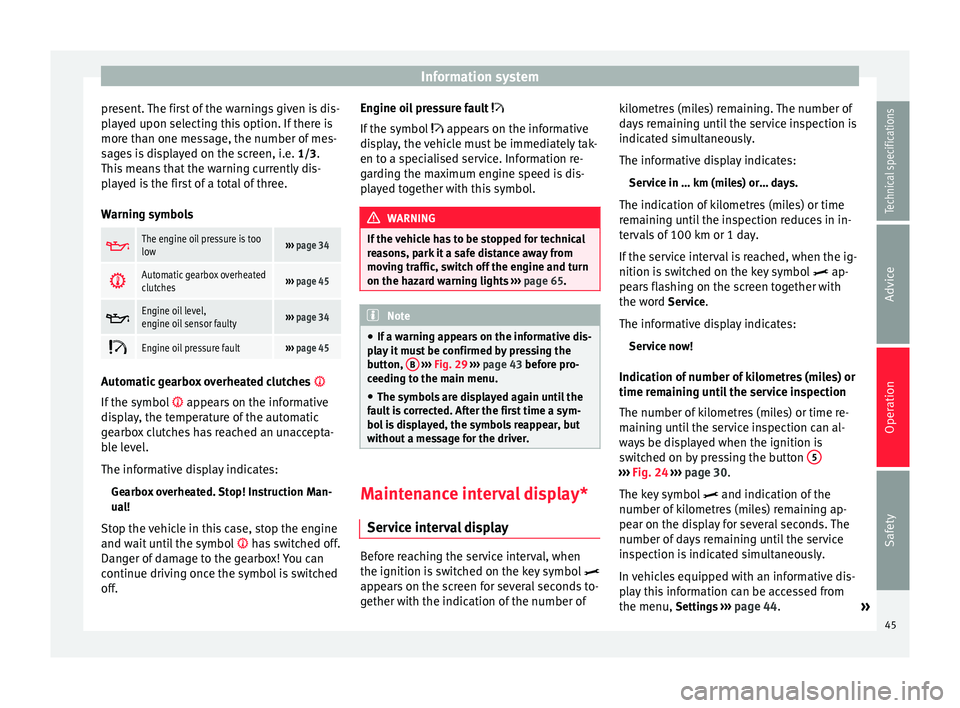
Warning symbols The engine oil pressure is too
low›››
page 34
Automatic gearbox overheated
clutches›››
page 45
Engine oil level,
engine oil sensor faulty›››
page 34
Engine oil pressure fault›››
page 45 Automatic gearbox overheated clutches
If the symbol appears on the informative
display, the temperature of the automatic
gearbox clutches has reached an unaccepta-
ble level.
The informative display indicates:
Gearbox overheated. Stop! Instruction Man-
ual!
Stop the vehicle in this case, stop the engine
and wait until the symbol has switched off.
Danger of damage to the gearbox! You can
continue driving once the symbol is switched
off. Engine oil pressure fault
If the symbol appears on the informative
di s
play, the vehicle must be immediately tak-
en to a specialised service. Information re-
garding the maximum engine speed is dis-
played together with this symbol. WARNING
If the vehicle has to be stopped for technical
reasons, park it a safe distance away from
moving traffic, switch off the engine and turn
on the hazard warning lights ››› page 65. Note
● If a warning appears on the informative dis-
play it must be confirmed by pressing the
button, B
››› Fig. 29 ››› p
age 43 before pro-
ceeding to the main menu.
● The symbols are displayed again until the
fault is corrected. After the first time a sym-
bol is displayed, the symbols reappear, but
without a message for the driver. Maintenance interval display*
Service interval display Before reaching the service interval, when
the ignition is switched on the key symbol
appears on the screen for several seconds to-
gether with the indication of the number of kilometres (miles) remaining. The number of
days remaining until the service inspection is
indicated simultaneously.
The informative display indicates:
Service in … km (miles) or… days.
The indication of kilometres (miles) or time
remaining until the inspection reduces in in-
tervals of 100 km or 1 day.
If the service interval is reached, when the ig-
nition is switched on the key symbol ap-
pe ar
s flashing on the screen together with
the word Service.
The informative display indicates: Service now!
Indication of number of kilometres (miles) or
time remaining until the service inspection
The number of kilometres (miles) or time re-
maining until the service inspection can al-
ways be displayed when the ignition is
switched on by pressing the button 5 ›››
Fig. 24
›
›› p
age 30.
The key symbol and indication of the
number of kilometres (miles) remaining ap-
pear on the display for several seconds. The
number of days remaining until the service
inspection is indicated simultaneously.
In vehicles equipped with an informative dis-
play this information can be accessed from
the menu, Settings ››› page 44.
»
45
Technical specifications
Advice
Operation
Safety
Page 53 of 200

Opening and closing
Multimedia AUX-IN and MDI Inputs Fig. 34
AUX-IN input/MDI input. The operating description is located in the re-
spective Instruction Manuals of the audio
system or the navigation system. AUX-IN Input
The AUX-IN input is located in one of the fol-
lowing places:
● in the centre console between the front
seats ››› Fig. 34 -
;
● abo
ve the storage compartment in the front
centre console ››› Fig. 34 -
;
● in the front panel of the SEAT Media System
2.2 navigation system.
The purpose of the AUX-IN input is to connect
external devices in order to play music (i.e.
iPod ®
or an mp3 player) using the factory-fit-
ted audio system or the navigation system.
MDI Input
The MDI input is located above the storage
compartment in the front centre console
››› Fig. 34 - ;
The MDI input
is composed of the USB and
AUX-IN inputs.
The purpose of the MDI input is to connect
external devices (i.e. iPod ®
, mp3 players or
USB memories) in order to play music using
the audio system or the navigation system.
In order to connect Apple multimedia devices
(such as an iPod ®
/iPhone ®
, etc.) the corre-
sponding adaptor from the SEAT Original Ac-
cessories Catalogue is required. Opening and closing
Remote control General notes The remote control key can
● Lock and unlock the vehicle
● Unlock or open the rear lid
The remote control transmitter and the bat-
teries are integrated in the key. The receiver
is inside the vehicle. The remote control key
has a maximum range of 30 metres. The
range is reduced as the batteries start to lose
power.
The key includes a foldaway part that can be
used to manually lock or unlock the vehicle
and to start the engine.
If a lost key is replaced or the receiver is re-
paired or changed, the remote control key
must be adapted by an authorised SEAT deal-
er. Only then can the remote control key be
used again. Note
● The remote control is automatically deacti-
vated when the ignition is switched on.
● The remote control function may be tempo-
rarily limited by interference from other » 51
Technical specifications
Advice
Operation
Safety
Page 54 of 200
Operation
transmitters near the vehicle that operate on
the same frequency (e.g. mobile phone, tele-
vision transmitter).
● If the central locking system or the anti-
theft alarm only responds to the remote con-
trol at a distance of less than 3 metres, then
the battery must be replaced ››› page 53.
● If the driver door is open, the vehicle can-
not be locked using the remote control. Unlocking and locking the vehicle
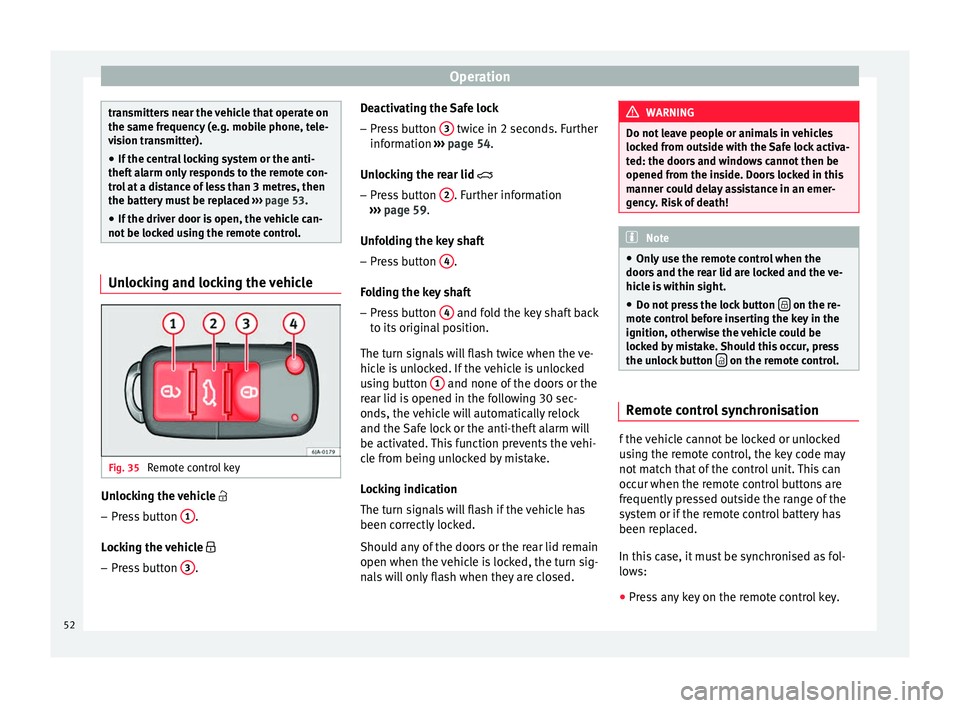
Fig. 35
Remote control key Unlocking the vehicle
– Press button 1 .
Locking the vehicle
– Press button 3 . Deactivating the Safe lock
– Press button 3 twice in 2 seconds. Further
information ››› page 54.
Unlocking the rear lid
– Pr e
ss button 2 . Further information
››› page 59 .
Unf o
lding the key shaft
– Press button 4 .
Folding the key shaft
– Press button 4 and fold the key shaft back
to its original position.
The turn signals will flash twice when the ve-
hicle is unlocked. If the vehicle is unlocked
using button 1 and none of the doors or the
rear lid is opened in the following 30 sec-
onds, the vehicle will automatically relock
and the Safe lock or the anti-theft alarm will
be activated. This function prevents the vehi-
cle from being unlocked by mistake.
Locking indication
The turn signals will flash if the vehicle has
been correctly locked.
Should any of the doors or the rear lid remain
open when the vehicle is locked, the turn sig-
nals will only flash when they are closed. WARNING
Do not leave people or animals in vehicles
locked from outside with the Safe lock activa-
ted: the doors and windows cannot then be
opened from the inside. Doors locked in this
manner could delay assistance in an emer-
gency. Risk of death! Note
● Only use the remote control when the
doors and the rear lid are locked and the ve-
hicle is within sight.
● Do not press the lock button on the re-
mote control before inserting the key in the
ignition, otherwise the vehicle could be
locked by mistake. Should this occur, press
the unlock button on the remote control.
Remote control synchronisation
f the vehicle cannot be locked or unlocked
using the remote control, the key code may
not match that of the control unit. This can
occur when the remote control buttons are
frequently pressed outside the range of the
system or if the remote control battery has
been replaced.
In this case, it must be synchronised as fol-
lows:
● Press any key on the remote control key.
52