instrument panel Seat Toledo 2014 User Guide
[x] Cancel search | Manufacturer: SEAT, Model Year: 2014, Model line: Toledo, Model: Seat Toledo 2014Pages: 200, PDF Size: 4.37 MB
Page 51 of 200

CommunicationButtonRadioMedia (except AUX)AUXTelephone
a)Navigation a)
FChange menu on instrument
panelChange menu on instrumentpanelChange menu on instrumentpanelChange menu on instrumentpanelChange menu on instrumentpanel
GEnable/disable voice control a)Enable/disable voice controla)Enable/disable voice controla)No functionb)Enable/disable voice control
H TurnNext/previous preset station c)Next/previous songc)Acts upon the dash panel
menu depending on where it is locatedActs upon the dash panel
menu depending on where it is locatedActs upon the dash panel
menu depending on where it is located
H Press
Acts on the MFA or confirms
the menu option of the dash
panel depending on the menu optionActs on the MFA or confirms
the menu option of the dash
panel depending on the menu optionActs on the MFA or confirms
the menu option of the dash
panel depending on the menu optionActs on the MFA or confirms
the menu option of the dash
panel depending on the menu optionActs on the MFA or confirms
the menu option of the dash
panel depending on the menu option
a)According to the vehicle's equipment package.
b) When a call is being made, radio/media functionality (except AUX).
c) Only if the dash panel is in audio menu.
Voice control Fig. 33
Multifunction steering wheel: voice
control. The time during which the system is ready to
receive voice commands and execute them is
called dialogue. The system provides acous-
tic warnings and if necessary, will guide you
through the respective functions.
It is recommended to use the
Help menu the
first time that voice control is used in order to
familiarize yourself with this function.
Optimum operation of the voice commands
depends on several factors:
● Speak slowly and clearly, as far as possi-
ble. The system will not recognise words pro-
nounced unclearly, or words and numbers in
which syllables are omitted. ●
Speak with normal voice volume, without
exaggerated intonation or long pauses.
● Close the doors, windows and sunroof for
the purpose of dampening or insulating
against unwanted noise from the exterior. Do
not aim the air from the diffusers at the roof.
● If you are driving very fast, it is recommen-
ded that you speak a little louder.
● While talking, avoid making other noise in-
side the vehicle, i.e., occupants that are talk-
ing at the same time.
● Do not speak when the system is providing
information. »
49
Technical specifications
Advice
Operation
Safety
Page 61 of 200

Opening and closing
Boot hatch Fig. 42
Rear lid: opening from the outside. Fig. 43
Close-up of the inside trim of the rear
lid: hand grip The rear lid opening system operates electri-
cally. It is activated by using the handle on
the boot lid. Opening the rear lid
– Pull on the release lever and lift the rear lid
››› Fig. 42 . The rear lid will automatically
open.
C lo
sing the rear lid
– Hold the rear lid by one of the two handles
on the interior lining and close it, pushing
slightly.
This system may or may not be operative, de-
pending on the situation of the vehicle.
If the rear lid is locked then it cannot be
opened, however if it is unlocked then the
opening system is operative and the rear lid
may be opened.
To lock/unlock, press the button or the
button 1 on the remote control key.
A warning appears on the instrument panel
display if the boot lid is open or not properly
closed.* An audible warning is also given if
the boot lid is opened while the vehicle is
moving faster than 6 km/h (4 mph)*. WARNING
● Always close the rear lid properly. Risk of
accident or injury.
● Do not close the rear lid by pushing it down
with your hand on the rear window. The glass
could smash. Risk of injury! ●
Ensure the rear lid is locked after closing it.
If not, it may open unexpectedly while driv-
ing.
● Never allow children to play in or around
the vehicle. A locked vehicle can be subjected
to extremely high and low temperatures, de-
pending on the time of year, thus causing se-
rious injuries/illness. It could even have fatal
consequences. Close and lock both the rear
lid and all the other doors when you are not
using the vehicle.
● Closing the rear lid without observing and
ensuring it is clear could cause serious injury
to you and to third parties. Make sure that no
one is in the path of the rear lid.
● Never drive with the rear lid open or half-
closed, exhaust gases may penetrate into the
interior of the vehicle. Danger of poisoning!
● If you only open the rear lid, do not leave
the key inside. The vehicle will not be opened
if the key is left inside. Note
● Once the rear lid is closed, its lock is en-
gaged and the alarm system is activated. On-
ly valid if the vehicle has been locked before
the rear lid is closed.
● The release catch located at the top of the
registration plate recess is deactivated on ac-
celerating or at speeds of over 5 km/h (3
mph). The catch is reactivated when the vehi-
cle comes to a standstill and a door is
opened. 59
Technical specifications
Advice
Operation
Safety
Page 63 of 200

Lights and visibility
cooled down, the window can be operated
once again.
Roll-back function on electric
windows
The electric windows are equipped with a
roll-back system that reduces risk of injury
when closing windows.
If an obstacle is present, the closing mecha-
nism will stop and the window will roll back a
few centimetres.
If an obstacle prevents closing for the next
10 seconds, the closing mechanism will once
again stop and the window will roll back an-
other few centimetres.
If in the next 10 seconds you attempt to close
the window after it has rolled back the sec-
ond time, only the closing mechanism will be
stopped even if the obstacle is still present.
The roll-back function is still connected.
The roll-back function will only be disconnec-
ted if you once again attempt to close the
window in the following 10 seconds. In this
case, the window will close at full force
.
If you wait for a further 10 seconds, the roll-
back function will be once again connected. Lights and visibility
Lights Introduction The location of the controls of
right-hand
drive cars differs slightly from the location
sho wn her
e ››› Fig. 45 ››› page 61. However,
the symbols indicating the respective posi-
tions of the controls remain the same. WARNING
Never drive with only the side lights on! The
side lights are not bright enough to illumi-
nate the road ahead and to ensure that other
road users are able to see you. Always use
your dipped beam headlights if it is dark or if
visibility is poor. CAUTION
● Use the lights in line with local law.
● However, drivers always remain responsi-
ble for correctly adjusting and using the
lights. Note
● An audible warning will be heard when the
light control is set to and you remove the
ignition k ey
and open the door. Once the
driver door is closed (ignition off), the audi-
ble warning will stop, whereas the side lights will remain on to light up the stationary vehi-
cle in case this is necessary.
● Depending on weather conditions (cold or
wet), the lights may mist up temporarily on
the inside. This is particularly the case in the
event of a difference in temperature between
the inside and in front of the light. By switch-
ing on the lights, the area through which the
beam of light is projected will quickly be
demisted, although the edges may remain
misted. The real lights and turn signals can
mist up. This has no influence on the useful
life of the lighting system. Sidelight and headlight
Fig. 45
Instrument panel: light control. Switching on side lights
– Turn the light switch ››› Fig. 45 to position
. »
61
Technical specifications
Advice
Operation
Safety
Page 64 of 200
Operation
Switching on dipped beam – Turn the light switch ››› Fig. 45 to position
.
Sw it
ching off lights (except daytime driving
lights)
– Turn the light switch ››› Fig. 45 to position
0.
Ran
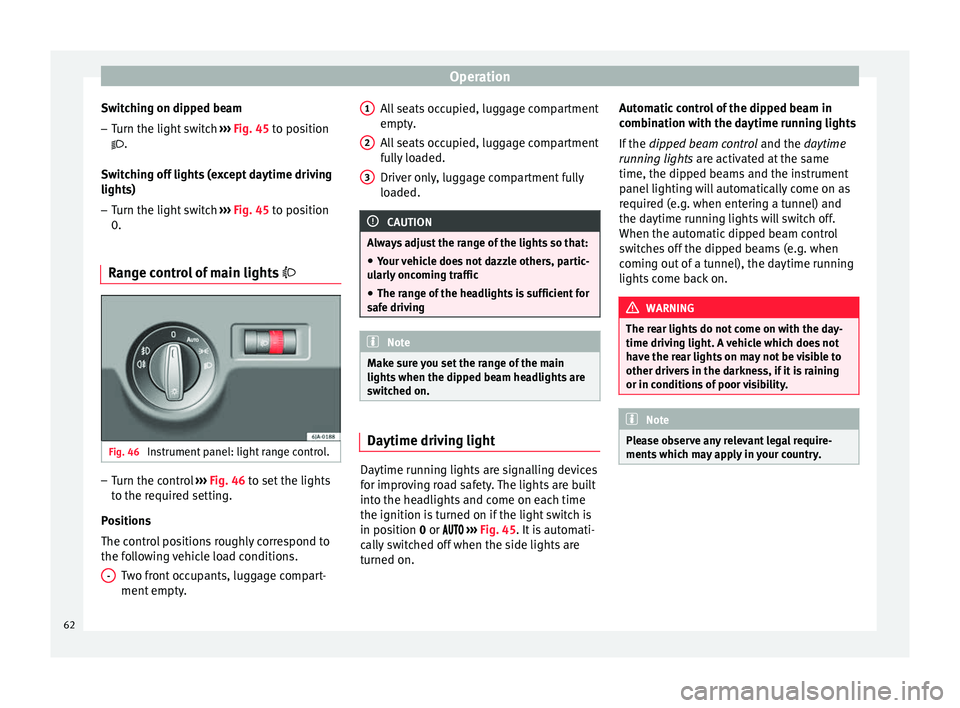
ge control of main lights Fig. 46
Instrument panel: light range control. –
Turn the control ››› Fig. 46 to set the lights
t o the r
equired setting.
Positions
The control positions roughly correspond to
the following vehicle load conditions. Two front occupants, luggage compart-
ment empty.
- All seats occupied, luggage compartment
empty.
All seats occupied, luggage compartment
fully loaded.
Driver only, luggage compartment fully
loaded.
CAUTION
Always adjust the range of the lights so that:
● Your vehicle does not dazzle others, partic-
ularly oncoming traffic
● The range of the headlights is sufficient for
safe driving Note
Make sure you set the range of the main
lights when the dipped beam headlights are
switched on. Daytime driving light
Daytime running lights are signalling devices
for improving road safety. The lights are built
into the headlights and come on each time
the ignition is turned on if the light switch is
in position
0
or ›
››
Fig. 45. It is automati-
cally switched off when the side lights are
turned on. 1 2
3 Automatic control of the dipped beam in
combination with the daytime running lights
If the
dipped beam control and the
daytime
r
unning lights are activated at the same
time, the dipped beams and the instrument
panel lighting will automatically come on as
required (e.g. when entering a tunnel) and
the daytime running lights will switch off.
When the automatic dipped beam control
switches off the dipped beams (e.g. when
coming out of a tunnel), the daytime running
lights come back on. WARNING
The rear lights do not come on with the day-
time driving light. A vehicle which does not
have the rear lights on may not be visible to
other drivers in the darkness, if it is raining
or in conditions of poor visibility. Note
Please observe any relevant legal require-
ments which may apply in your country. 62
Page 66 of 200

Operation
CAUTION
Do not cover the windscreen light sensor with
stickers or similar objects; this could impair
operation. Front fog lights*
Fig. 48
Instrument panel: light switch. Switching on front fog lights
– First turn the light switch ›››
Fig. 48 to posi-
tion , or
.
– Pull on the light switch to position 1 .
The ›››
page 32 warning lamp lights up on
the g ener
al instrument panel if the front fog
lights are switched on. Front fog lights with cornering
function* 3 Not valid for vehicles fitted with Full-LED lights
Fr ont
fog lights with cornering function pro-
vide better lighting of the area around the car
when driving through a corner or parking,
etc.
Front fog lights with cornering function
switch on depending on how far you turn the
steering wheel or whether or not the turn sig-
nals 1)
are switched on, if the following condi-
tions are met:
● The vehicle is stationary, the ignition is
switched on or you are moving at a speed of
less than 40 km/h (25 mph);
● The daytime driving light is switched off
● The dipped beam is switched on
● The fog lights are switched off
● Reverse gear is not engaged Rear fog light Switching on the rear fog light
– First turn the light switch ››› Fig. 48
››› page 64 to position
, or .
– Pull on the light switch to position 2 .
If the vehicle is not equipped with front fog
lights ››› page 64, the rear fog light is switch-
ed on b y
turning the switch to position or
and pulling it to position 2 . This type of
switch only has one position.
The ››› page 32
warning lamp lights up on
the g ener
al instrument panel if the rear fog
lights are switched on.
If you are towing a trailer or caravan equip-
ped with a rear fog light on a vehicle with a
factory-fitted towing bracket or one installed
using parts from the original SEAT parts
catalogue
, only the rear fog light on the trail-
er or caravan will light up. 1)
In the event of a conflict between both functions,
i.e. if you turn the steering wheel to the left while the
right-hand turn signal is on, the turn signals will take
priority.
64
Page 67 of 200

Lights and visibility
“Coming Home”/“Leaving Home”*
function This function makes it possible, under poor
visibility conditions, to automatically turn on
the lights for a brief period of time after the
vehicle has been parked or when approach-
ing the vehicle.
The function is automatically turned on if the
following conditions are met:
● The light switch is in position
››› page 63
.
● The v
isibility around the vehicle is reduced.
● The ignition is switched off.
To turn on this function, switch on the head-
light flasher prior to exiting the vehicle.
The light is adjusted according to the data re-
corded by the light sensor that is installed
between the windscreen and the inside rear
view mirror.
The function automatically turns on the side
lights and headlights, the lighting for the en-
try area on the exterior mirrors and the num-
ber plate light.
“Coming Home” function
The light is automatically switched on when
the driver door is opened (for 60 seconds af-
ter the ignition is switched off). The lights is switched off when all the doors
and the boot lid are closed.
If a door or the boot lid remains open, the
light will switch off after 60 seconds.
“Leaving Home” function
The light is automatically switched on when
the vehicle is unlocked using the remote con-
trol.
The light is switched off after 10 seconds or
when the vehicle is locked.
Hazard warning light switch Fig. 49
Instrument panel: switch for hazard
warning lights. –
Press the button ››› Fig. 49 to switch the
h az
ard warning lights on or off.
The warning lamps on the instrument panel
and the warning lamp on the switch will flash at the same time as the turn signals when
the hazard warning lights are switched on.
The hazard warning lights also work when
the ignition is switched off.
The hazard warning lights come on automati-
cally in the event of an accident in which an
airbag is triggered.
Note
Switch on the hazard warning lights to warn
other road users, for example:
● When reaching the tail end of a traffic jam
● if the vehicle has a technical fault or you
are involved in an emergency situation. Parking lights*
Parking lights
– Switch the ignition off.
– Move the turn signal lever ›››
Fig. 47
››› page 63 up or down to turn on the right
or l ef
t-hand parking lights respectively.
Parking light on both sides – Turn the light switch ›››
Fig. 45
››
› page 61 to position and eng age the
steering lock. »
65
Technical specifications
Advice
Operation
Safety
Page 78 of 200
Operation
Transport and practical
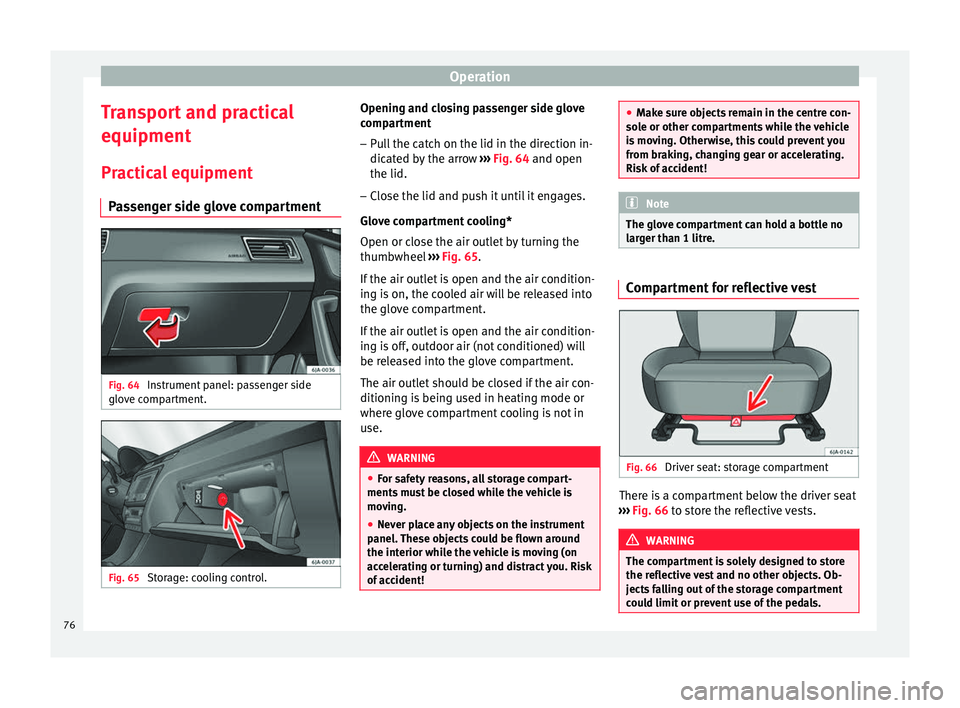
equipment Practical equipment Passenger side glove compartment Fig. 64
Instrument panel: passenger side
glove compartment. Fig. 65
Storage: cooling control. Opening and closing passenger side glove
compartment
– Pull the catch on the lid in the direction in-
dicated by the arrow ››› Fig. 64
and open
the lid.
– Clo
se the lid and push it until it engages.
Glove compartment cooling*
Open or close the air outlet by turning the
thumbwheel ››› Fig. 65.
If the air outl
et is open and the air condition-
ing is on, the cooled air will be released into
the glove compartment.
If the air outlet is open and the air condition-
ing is off, outdoor air (not conditioned) will
be released into the glove compartment.
The air outlet should be closed if the air con-
ditioning is being used in heating mode or
where glove compartment cooling is not in
use. WARNING
● For safety reasons, all storage compart-
ments must be closed while the vehicle is
moving.
● Never place any objects on the instrument
panel. These objects could be flown around
the interior while the vehicle is moving (on
accelerating or turning) and distract you. Risk
of accident! ●
Make sure objects remain in the centre con-
sole or other compartments while the vehicle
is moving. Otherwise, this could prevent you
from braking, changing gear or accelerating.
Risk of accident! Note
The glove compartment can hold a bottle no
larger than 1 litre. Compartment for reflective vest
Fig. 66
Driver seat: storage compartment There is a compartment below the driver seat
››› Fig. 66 to store the reflective vests. WARNING
The compartment is solely designed to store
the reflective vest and no other objects. Ob-
jects falling out of the storage compartment
could limit or prevent use of the pedals. 76
Page 103 of 200

Driving
and the vehicle could move backwards. Risk
of accident!
●
If you have to stop on a hill, press down on
the brake pedal to stop the vehicle from mov-
ing.
● The drive wheels could lose traction on a
slippery road surface when the kick-down
function is activated. Risk of sliding! CAUTION
● In DSG automatic gearboxes, the double
clutch is protected from overloads. If the hill
hold control is used, the clutches are subjec-
ted to greater force if the vehicle is at a
standstill on a slope or suddenly accelerating
on a slope.
● Should the clutches overheat, the sym-
bol is shown on the informative display with
a warning message Gear overheated. Stop! In-
struction Manual! An audible warning is also heard. Stop the vehicle in this case, stop the
engine and wait until the symbol has
switched off. Danger of damage to the gear-
box! You can continue driving once the sym-
bol is switched off. Starting and driving
Starting
– Press and hold the brake pedal.
– Press and hold the interlock button on the
selector lever knob and move the selector lever to position
››› page 101 before releas-
ing the interlock button.
– Release the brake and press the accelera-
tor.
Stopping
– The selector lever does not have to be
moved to position N
if the vehicle is stop-
ped f
or a short period, e.g. at intersections.
Applying the brake is enough. However, the
engine must remain idling.
Parking
– Press the brake pedal.
– Apply the handbrake.
– Press the interlock button, move the selec-
tor lever to position P and release the but-
ton.
Kick-down feature
The kick-down feature allows maximum ac-
celeration to be reached.
In any gear programme, press down fully on
the accelerator for the automatic gearbox to
activate the kick-down feature. This function
takes priority over the gear programmes with-
out taking into account the position of the se-
lector lever (
D, S or Tiptronic) and is used to
reach maximum acceleration, using full en-
gine power. Depending on the road speed
and engine speed, the automatic gearbox shifts down and the vehicle accelerates. It
only shifts up after the maximum engine
speed has been reached.
Selector lever positions Fig. 92
Selector lever/Informative display: se-
lector lever positions. The current position of the selector lever is
shown on the general instrument panel dis-
play
1
››› Fig. 92 .
»
101
Technical specifications
Advice
Operation
Safety
Page 108 of 200
Operation
●
Refuelling just once with leaded petrol dis-
ables the exhaust system! Economical and environmentally
friendly driving
Fuel consumption, environmental pollution
and wear to the engine, brakes and tyres de-
pends in large part on your driving style. By
adopting an economical driving style and an-
ticipating the traffic situation ahead, you can
easily reduce fuel consumption by 10-15%.
Some tips on how to help you reduce pollu-
tion while saving money are listed below.
Drive anticipating the traffic situation
A vehicle uses most fuel when accelerating.
When you anticipate situations, you have to
brake less often and, thus, accelerate less. If
it is possible, let the vehicle roll with a
gear
engaged , for example, if you see a red light
ahe a
d. The braking effect achieved in this
way helps to reduce the wear of brakes and
tyres; emissions and fuel consumption are
reduced to zero (disconnection due to iner-
tia).
Change gear early to save energy
An effective way of saving fuel is to change
up
quickly through the gears. Running the
engine at high rpm in the lower gears uses
an unnecessary amount of fuel. Manual gearbox:
shift up from first to second
gear as soon as possible. We recommend
that, whenever possible, you change to a
higher gear upon reaching 2000 rpm. Follow
the “recommended gear” indication that ap-
pears on the instrument panel ››› page 32,
Recommended gear display.
Avoid driving at high speed
We advise you not to drive at the top speed
permitted by the vehicle. Fuel consumption,
exhaust emissions and noise levels all in-
crease very rapidly at higher speeds. Driving
at moderate speeds will help to save fuel.
Avoid idling
It is worthwhile switching off the engine
when waiting in a traffic jam, at level cross-
ings or at traffic lights with a long red phase.
The fuel saved after only 30 - 40 seconds is
greater than the amount of fuel needed to re-
start the engine.
The engine takes a long time to warm up
when it is idling. Mechanical wear and pollu-
tant emissions are also especially high dur-
ing this initial warm-up phase. It is therefore
best to drive off immediately after starting
the engine. Avoid running the engine at high
speed. Periodic maintenance
Periodic maintenance work guarantees that,
before beginning a journey, you will not con-
sume more than the required amount of fuel.
A well-serviced engine gives you the benefit
of
improved fuel efficiency as well as maxi-
mum reliability and an enhanced resale val-
ue.
A badly serviced engine can consume up to
10% more fuel than necessary.
Avoid short journeys
To reduce the consumption and emission of
polluting exhaust gases, the engine and the
exhaust gas filtration systems should reach
the optimum operating temperature.
With the en
gine cold, fuel consumption is
proportionally higher. The engine does not
warm up and fuel consumption does not nor-
malise until having driven approximately four
kilometres (2.5 miles). This is why we recom-
mend avoiding short trips whenever possi-
ble.
Maintain the correct tyre pressures
Bear in mind that keeping the tyres at an ad-
equate pressure saves fuel. If the tyre pres-
sure is just one bar (14.5 psi/100 kPa) too
low, fuel consumption can increase by as
much as 5%. Due to the greater rolling resist-
ance, under-inflation also increases tyre wear
wear and impairs handling.
106
Page 111 of 200

Driver assistance systems
The
warning lamp on the general instru-
ment
panel starts flashing when the system
is working.
The
stability (ESC) system includes the fol-
lowing systems:
● Anti-lock brake system (ABS),
● Traction control system (TCS),
● Electronic differential lock (EDL),
● Hydraulic brake assist system (HBA),
● Hill hold control (HHC).
The ESC system cannot be switched on. The
››› Fig. 95 button can only be used to
sw it
ch off the TCS system. The warning
lamp lights up on the general instrument
panel if the TCS system is switched off.
The ASR should be switched on at all times.
Only under certain circumstances should the
system be switched off, e.g.
● driving with chains,
● driving in deep snow or on very soft surfa-
ces,
● During the “swinging movement” required
to remove a stuck vehicle
Switch the ASR back on as soon as possible. Brake assist system (HBA)*
The HBA system is activated when you press
down on the brake pedal suddenly. It increa-
ses braking power, helping to reduce braking
distances. To reduce braking distance as
much as possible, keep the brake pedal
pressed down firmly until the vehicle comes
to a standstill.
With the help of this system, the ABS is acti-
vated more quickly and more efficiently.
The brake assist function is deactivated auto-
matically when the brake pedal is released.
Hill hold control (HHC)*
The HHC system makes it easier to start the
vehicle on hills. The system maintains the
brake pressure created by pressing down on
the brake pedal for 2 seconds after it has
been released. Your foot can be removed
from the brake pedal and you can use the ac-
celerator pedal and move away on a hill with-
out having to use the handbrake. The brake
pressure drops as the accelerator pedal is
pressed. If the vehicle cannot be started, it
will start to move backwards after 2 seconds.
The HHC is activated on gradients of over
5%, if the driver door is closed. It only works
for starting on hills, moving both forward and
in reverse. It is not activated during start-up
down hill.
Anti-lock system (ABS) The ABS system prevents the wheels locking
during braking. This helps the driver keep
control of the vehicle.
The driver is made aware of ABS assistance
by the pulsating of the brake pedal
and a
characteristic noise.
Keep the brake pedal pressed down while the
ABS is working. The ABS will switch off when
the brake pedal is released. Never brake in-
termittently while the ABS is working!
Traction control system (ASR) If the wheels start to slip, the TCS adapts the
engine speed to the driving conditions. Par-
ticularly in unfavourable conditions, the TCS
helps starting, accelerating and hill starts.
The TCS
1)
warning lamp on the general
dash panel flashes when the system is work-
ing. 1)
Valid for vehicles not fitted with the stability con-
trol system (ESC). 109
Technical specifications
Advice
Operation
Safety