lights Seat Toledo 2014 User Guide
[x] Cancel search | Manufacturer: SEAT, Model Year: 2014, Model line: Toledo, Model: Seat Toledo 2014Pages: 200, PDF Size: 4.37 MB
Page 37 of 200

Instruments and warning lamps
Coolant level and temperature If the warning lamp
(blue) is lit up, the en-
gine h a
s not yet reached its operating tem-
perature 1)
. Avoid high engine speeds, hard
acceleration and subjecting the engine to
high loads.
If the warning lamp (red) is lit up or flash-
ing, the c
oolant temperature is too high or its
level is too low.
The informative display indicates:
Check coolant! Instruction Manual!
Stop the vehicle, switch off the engine, check
the coolant level ›››
page 138 and refill if
nec e
ssary ››› page 138.
If the c
oolant is situated in the prescribed
area, the high temperature may be due to a
fault in the cooling system fan. Check the ra-
diator fan fuse and replace it if necessary
››› page 165, Changing fuses in the engine
compartment
.
If the warning lamp (red) remains lit up,
despite both the coolant level and the radia-
tor fan fuse being in correct condition,
stop the vehicle!
Go to a technical service. WARNING
● Take care when opening the coolant reser-
voir. When the engine is warm or hot, the
system is pressurised – Danger of burns!
Wait for the engine to cool before opening
the cover.
● Do not touch the fan. The fan can switch on
automatically regardless of whether the igni-
tion is switched on. Power steering
If the
warning lamp is illuminated, there is
a fault in the power steering.
The power steering system functions with re-
duced power steering effect.
Go to a technical service.
Stability Control (ESC) If the control lamp
flashes, the ESC is
working.
If the warning lamp illuminates on igni-
tion, the ESC system may have switched off
due to technical reasons. Turn off the ignition
and turn it on again. Upon switching on the
ignition again, if the warning lamp has switched off, this means the ESC is function-
ing correctly again.
If the
warning lamp is illuminated there is
a f au
lt in the ESC.
The informative display indicates: Report No.: electronic stability control (ESC)
or Report No.: Traction control system (ASR)
Go to a technical service.
Further information ››› page 108, Stability
system (ESC). Note
If the battery is disconnected and connected
again, the yellow warning lamp lights up
when the ignition i s
switched on. This warn-
ing lamp must switch off after covering a
short distance. Traction control system (ASR)
If the control lamp
flashes, the ASR is
working.
If the
warning lamp illuminates on igni-
tion, the TCS system may have switched off
due to technical reasons. Turn off the ignition »1)
This does not apply to vehicles equipped with an
informative display. 35
Technical specifications
Advice
Operation
Safety
Page 38 of 200

Operation
and turn it on again. Upon switching on the
ignition again, if the warning lamp has
switched off, this means the TCS is function-
ing correctly again.
If the warning lamp remains illuminated,
there is a fault in the TCS.
The informative display indicates:
Report No.: Traction control system (ASR)
Go to a technical service.
Further information ››› page 109, Traction
control system (ASR) .
Anti-lock system (ABS) If the
warning lamp is illuminated, there is
a fault in the ABS.
The informative display indicates:
ABS fault
The brake system alone is operational in the
vehicle, without ABS.
Go to a technical service. WARNING
● If the warning lamp illuminates together
w ith the ›
›› page 33 warning lamp, ,
st
op the vehicle! Go to a technical service. ●
A fault in the Anti-lock brake system (ABS)
can lead to longer braking distances – Risk of
accident! Rear fog light
The control lamp
lights up when the rear
fog light is switched on ››› page 64.
Bulb fault The control lamp
lights up when there is a
fault in a bulb:
● for several seconds after switching on the
ignition,
● When connecting a faulty bulb
This is indicated on the informative display,
e.g.: Check the front right dipped beam headlight! Note
The rear side lights and number plate light
contain several bulbs. The control lamp
lights up only when there is a fault in all the
number plate bulbs or side light bulbs (of a
combined tail light). Therefore it is advisable
to regularly check the bulb operation. Emission control system
If the warning lamp
is lit up, there is a
fault in the emission system. The engine con-
trol unit allows driving to continue in an
emergency program.
Go to a technical service.
Preheating (diesel engines) When you switch on the ignition, the warning
lamp lights up. The engine can be started
straight away when the lamp switches off.
If the
warning lamp
does not illuminate or
if it
does not switch off , there is a fault in the
glow plug system.
If the warning lamp starts to flash
while
driving, there is a fault in the engine power
control electronic system. The engine control
unit allows driving to continue in an emer-
gency program.
Go to a technical service.
Engine management system
(petrol engines) If the
warning lamp is illuminated, there is
a fault in the engine management system.
The engine control unit allows driving to con-
tinue in an emergency program.
36
Page 40 of 200
Operation
If the front passenger airbag has been disa-
bled with the airbag switch located in the
storage compartment side:
● When the ignition is turned on, the
warning lamp illuminates for about 4 sec-
onds.
● The airbag is disabled, signalled with the
warning lamp
which lights up with the
word placed in the cen-
tre part of the dash panel ››› Fig. 18
››› page 23. WARNING
When there is a fault in the airbag system,
have an inspection carried out by an Author-
ised Service. Otherwise the airbags may fail
to trigger in an accident. Tyre pressure monitoring system*
If the
warning lamp illuminates, the pres-
sure in one of the tyres has decreased signifi-
cantly. Check and adjust the pressure of all
the tyres ›››
page 144 .
If the
warning lamp flashes, there is a fault
in the system.
Go to a technical service.
Further information ›››
page 147, Tyre pres-
sure*
. Note
If the battery is disconnected the warning
lamp lights up when the ignition is switch-
ed on.
This warning lamp must switch off af-
ter covering a short distance. Windscreen washer fluid level
If the
warning lamp illuminates, the level
of w
indscreen washer fluid in the tank is very
low. Fill the windscreen washer fluid
››› page 139, Windscreen washer.
The informative display indicates: Refill windscreen washer fluid!
Turn signals Depending on the position of the turn signal
lever the left warning lamp on the left
or
right flashes.
If there is a turn signal fault, the warning
lamp flashes at approximately double the
normal speed.
All the turn signals flash in addition to both
warning lamps when the hazard warning
lights are switched on.
Further information ›››
page 63, Turn signal
and main beam lever. Fog lights
The control lamp
lights up when the fog
lights are switched on ››› page 64.
Cruise speed The warning lamp illuminates when the
cruise control is switched on (cruise speed)
››› page 111.
Sel ect
or lever lock If the
control lamp illuminates, press the
brake pedal. This is necessary when you re-
quire the automatic gearbox selector lever to
move out of the positions P or
N
›
›› page 103.
Main be
ams The warning lamp lights up with the main
beam headlights or when the headlights are
flashed
›››
page 63 .38
Page 47 of 200
Information system
present. The first of the warnings given is dis-
played upon selecting this option. If there is
more than one message, the number of mes-
sages is displayed on the screen, i.e. 1/3.
This means that the warning currently dis-
played is the first of a total of three.
Warning symbols The engine oil pressure is too
low›››
page 34
Automatic gearbox overheated
clutches›››
page 45
Engine oil level,
engine oil sensor faulty›››
page 34
Engine oil pressure fault›››
page 45 Automatic gearbox overheated clutches
If the symbol appears on the informative
display, the temperature of the automatic
gearbox clutches has reached an unaccepta-
ble level.
The informative display indicates:
Gearbox overheated. Stop! Instruction Man-
ual!
Stop the vehicle in this case, stop the engine
and wait until the symbol has switched off.
Danger of damage to the gearbox! You can
continue driving once the symbol is switched
off. Engine oil pressure fault
If the symbol appears on the informative
di s
play, the vehicle must be immediately tak-
en to a specialised service. Information re-
garding the maximum engine speed is dis-
played together with this symbol. WARNING
If the vehicle has to be stopped for technical
reasons, park it a safe distance away from
moving traffic, switch off the engine and turn
on the hazard warning lights ››› page 65. Note
● If a warning appears on the informative dis-
play it must be confirmed by pressing the
button, B
››› Fig. 29 ››› p
age 43 before pro-
ceeding to the main menu.
● The symbols are displayed again until the
fault is corrected. After the first time a sym-
bol is displayed, the symbols reappear, but
without a message for the driver. Maintenance interval display*
Service interval display Before reaching the service interval, when
the ignition is switched on the key symbol
appears on the screen for several seconds to-
gether with the indication of the number of kilometres (miles) remaining. The number of
days remaining until the service inspection is
indicated simultaneously.
The informative display indicates:
Service in … km (miles) or… days.
The indication of kilometres (miles) or time
remaining until the inspection reduces in in-
tervals of 100 km or 1 day.
If the service interval is reached, when the ig-
nition is switched on the key symbol ap-
pe ar
s flashing on the screen together with
the word Service.
The informative display indicates: Service now!
Indication of number of kilometres (miles) or
time remaining until the service inspection
The number of kilometres (miles) or time re-
maining until the service inspection can al-
ways be displayed when the ignition is
switched on by pressing the button 5 ›››
Fig. 24
›
›› p
age 30.
The key symbol and indication of the
number of kilometres (miles) remaining ap-
pear on the display for several seconds. The
number of days remaining until the service
inspection is indicated simultaneously.
In vehicles equipped with an informative dis-
play this information can be accessed from
the menu, Settings ››› page 44.
»
45
Technical specifications
Advice
Operation
Safety
Page 57 of 200

Opening and closing
●
In the event of an accident in which the air-
bags deploy, the doors will be automatically
unlocked for easier access and assistance.
● If the central locking system should fail to
work at any time, only the driver door can be
locked or unlocked using the key
››› page 55. All other doors and the boot
h at
ch can be operated manually.
– Manual release ››› page 161.
– Manual release of the rear lid
››› page 161. Unlocking the vehicle with the key
Fig. 38
Key positions during vehicle locking
and unlocking. –
Turn the key in the driver door in the for-
ward driving direction to its unlock position
A
››› Fig. 38 .
– Pu
ll the handle and open the door.
● All doors (driver door only on vehicles with
anti-theft alarm) are unlocked.
● The rear lid is unlocked.
● The fuel tank flap is unlocked 1)
.
● The courtesy lights switch on.
● The Safe lock is deactivated.
● The driver door warning lamp stops flash-
ing (on vehicles not equipped with an anti-
theft system) ››› page 57. Note
If the vehicle is equipped with an anti-theft
alarm system, you have 15 seconds from the
time the door is opened to insert the key in
the ignition and start the vehicle. If, during
these 15 seconds, the vehicle is not started,
the alarm is triggered. Locking the vehicle with the key
–
Turn the key in the driver door lock cylinder
in the reverse direction to its lock position
B
›››
Fig. 38 . ●
The door s, the boot
lid and the fuel tank
flap 1)
will be locked.
● The courtesy lights switch off.
● The Safe lock is immediately activated.
● Warning lamp on the driver door starts to
flash. Note
The vehicle doors cannot be locked if the
driver door is open. Safe Lock
The central locking system is equipped with a
Safe lock
. If the vehicle is closed from out-
s ide, the door loc
ks will automatically lock.
The warning lamp on the driver door will
flash quickly for about 2 seconds and then at
a slower rate. It is not possible to open any of
the doors from the inside or outside using
the handle. This limits the possibility of in-
truders getting into the vehicle.
The Safe lock can be deactivated by pressing
the lock button twice in less than 2 seconds.
If Safe lock is out of service, the control lamp
on the driver door will flash quickly for about
2 seconds before switching off for 30 sec-
onds and then flashing at a slower rate. »1)
Valid for vehicles with a keyless fuel tank cap.
55
Technical specifications
Advice
Operation
Safety
Page 63 of 200

Lights and visibility
cooled down, the window can be operated
once again.
Roll-back function on electric
windows
The electric windows are equipped with a
roll-back system that reduces risk of injury
when closing windows.
If an obstacle is present, the closing mecha-
nism will stop and the window will roll back a
few centimetres.
If an obstacle prevents closing for the next
10 seconds, the closing mechanism will once
again stop and the window will roll back an-
other few centimetres.
If in the next 10 seconds you attempt to close
the window after it has rolled back the sec-
ond time, only the closing mechanism will be
stopped even if the obstacle is still present.
The roll-back function is still connected.
The roll-back function will only be disconnec-
ted if you once again attempt to close the
window in the following 10 seconds. In this
case, the window will close at full force
.
If you wait for a further 10 seconds, the roll-
back function will be once again connected. Lights and visibility
Lights Introduction The location of the controls of
right-hand
drive cars differs slightly from the location
sho wn her
e ››› Fig. 45 ››› page 61. However,
the symbols indicating the respective posi-
tions of the controls remain the same. WARNING
Never drive with only the side lights on! The
side lights are not bright enough to illumi-
nate the road ahead and to ensure that other
road users are able to see you. Always use
your dipped beam headlights if it is dark or if
visibility is poor. CAUTION
● Use the lights in line with local law.
● However, drivers always remain responsi-
ble for correctly adjusting and using the
lights. Note
● An audible warning will be heard when the
light control is set to and you remove the
ignition k ey
and open the door. Once the
driver door is closed (ignition off), the audi-
ble warning will stop, whereas the side lights will remain on to light up the stationary vehi-
cle in case this is necessary.
● Depending on weather conditions (cold or
wet), the lights may mist up temporarily on
the inside. This is particularly the case in the
event of a difference in temperature between
the inside and in front of the light. By switch-
ing on the lights, the area through which the
beam of light is projected will quickly be
demisted, although the edges may remain
misted. The real lights and turn signals can
mist up. This has no influence on the useful
life of the lighting system. Sidelight and headlight
Fig. 45
Instrument panel: light control. Switching on side lights
– Turn the light switch ››› Fig. 45 to position
. »
61
Technical specifications
Advice
Operation
Safety
Page 64 of 200
Operation
Switching on dipped beam – Turn the light switch ››› Fig. 45 to position
.
Sw it
ching off lights (except daytime driving
lights)
– Turn the light switch ››› Fig. 45 to position
0.
Ran
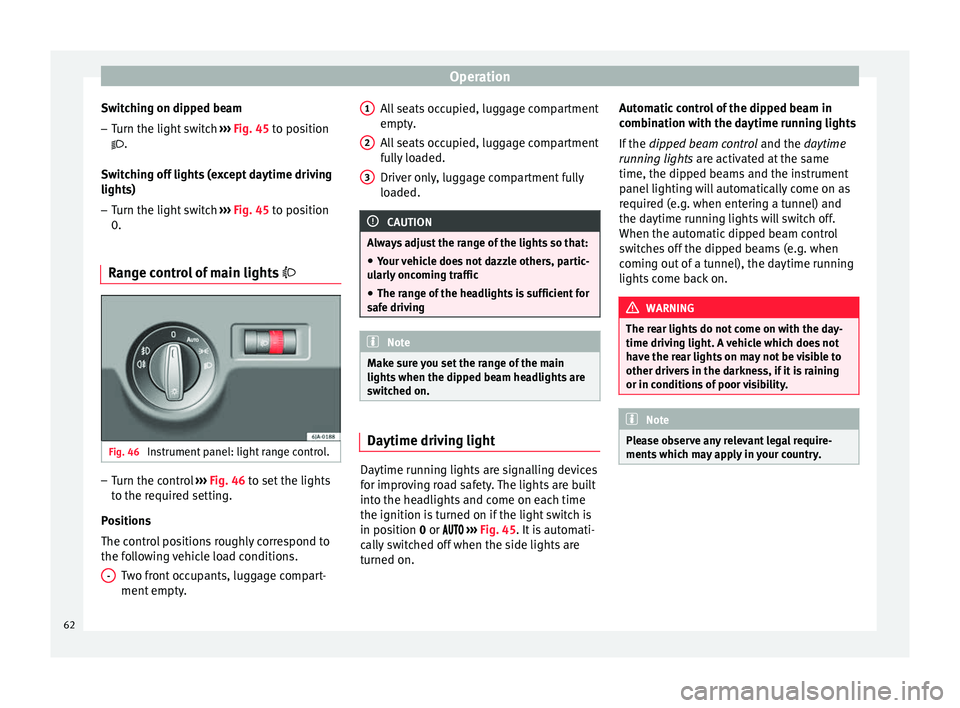
ge control of main lights Fig. 46
Instrument panel: light range control. –
Turn the control ››› Fig. 46 to set the lights
t o the r
equired setting.
Positions
The control positions roughly correspond to
the following vehicle load conditions. Two front occupants, luggage compart-
ment empty.
- All seats occupied, luggage compartment
empty.
All seats occupied, luggage compartment
fully loaded.
Driver only, luggage compartment fully
loaded.
CAUTION
Always adjust the range of the lights so that:
● Your vehicle does not dazzle others, partic-
ularly oncoming traffic
● The range of the headlights is sufficient for
safe driving Note
Make sure you set the range of the main
lights when the dipped beam headlights are
switched on. Daytime driving light
Daytime running lights are signalling devices
for improving road safety. The lights are built
into the headlights and come on each time
the ignition is turned on if the light switch is
in position
0
or ›
››
Fig. 45. It is automati-
cally switched off when the side lights are
turned on. 1 2
3 Automatic control of the dipped beam in
combination with the daytime running lights
If the
dipped beam control and the
daytime
r
unning lights are activated at the same
time, the dipped beams and the instrument
panel lighting will automatically come on as
required (e.g. when entering a tunnel) and
the daytime running lights will switch off.
When the automatic dipped beam control
switches off the dipped beams (e.g. when
coming out of a tunnel), the daytime running
lights come back on. WARNING
The rear lights do not come on with the day-
time driving light. A vehicle which does not
have the rear lights on may not be visible to
other drivers in the darkness, if it is raining
or in conditions of poor visibility. Note
Please observe any relevant legal require-
ments which may apply in your country. 62
Page 65 of 200

Lights and visibility
Turn signal and main beam lever Fig. 47
Turn signal and main beam lever. The turn signal and main beam lever also op-
erates the parking lights and the headlight
flasher.
Right and left-hand
turn signal
– Move the lever ››› Fig. 47 up A or down
B .
– In order for the turn signals to flash three
times (turn signal to change lanes), move
the lever briefly up or down just as far as
point of resistance and then release it.
– Keep the lever held down at the point of re-
sistance for the turn signals to flash for as
long as you hold the lever, e.g. when
changing lanes.
Main beams
– Switch on the dipped beam ›››
page 61. –
Press the lever ››› Fig. 47 forward in the di-
r ection indic
ated by arrow C .
– Pull the lever back to its original position in
the direction indicated by arrow D to
switch the main beam off.
Headlight flasher
– Pull the lever ››› Fig. 47 towards the steer-
ing wheel (point of resistance) in the direc- tion indicated by arrow D .
Parking lights
Instructions for use ››› page 65. CAUTION
Never use the main beam headlights or the
headlight flasher if they could dazzle other
drivers. Note
● The turn signals only work when the igni-
tion is switched on. The corresponding warn-
ing lamp or flashes in the general instru-
ment p
anel.
● The turn signals switch off automatically
when the steering wheel is returned to the
straight-ahead position.
● If a turn signal bulb is defective, the control
lamp flashes at double speed. Automatic headlight control (AHC)
If the light switch is in this position
››› Fig. 45, the side lights, headlights and the
number p l
ate lights will turn on or off auto-
matically.
The light is adjusted according to the data re-
corded by the light sensor that is installed
between the windscreen and the inside rear
view mirror.
If the light switch is in position , the sym-
bol located next to the light switch will il-
luminate. If the light illuminates automatical-
ly, symbol located next to the light switch
will also illuminate.
Automatic headlights in case of rain
If the light switch is in position and is
connected to the automatic wipe in case of
rain for more than 10 seconds or wipe (posi-
tion 2 or
3 ) for longer than 15 seconds,
››› page 69 then the side lights and head-
lights w
ill automatically switch on.
The light automatically switches off if more
than 4 minutes have elapsed and the auto-
matic wipe or wipe (position 2 or
3 ) have
not been switched on. »
63
Technical specifications
Advice
Operation
Safety
Page 66 of 200

Operation
CAUTION
Do not cover the windscreen light sensor with
stickers or similar objects; this could impair
operation. Front fog lights*
Fig. 48
Instrument panel: light switch. Switching on front fog lights
– First turn the light switch ›››
Fig. 48 to posi-
tion , or
.
– Pull on the light switch to position 1 .
The ›››
page 32 warning lamp lights up on
the g ener
al instrument panel if the front fog
lights are switched on. Front fog lights with cornering
function* 3 Not valid for vehicles fitted with Full-LED lights
Fr ont
fog lights with cornering function pro-
vide better lighting of the area around the car
when driving through a corner or parking,
etc.
Front fog lights with cornering function
switch on depending on how far you turn the
steering wheel or whether or not the turn sig-
nals 1)
are switched on, if the following condi-
tions are met:
● The vehicle is stationary, the ignition is
switched on or you are moving at a speed of
less than 40 km/h (25 mph);
● The daytime driving light is switched off
● The dipped beam is switched on
● The fog lights are switched off
● Reverse gear is not engaged Rear fog light Switching on the rear fog light
– First turn the light switch ››› Fig. 48
››› page 64 to position
, or .
– Pull on the light switch to position 2 .
If the vehicle is not equipped with front fog
lights ››› page 64, the rear fog light is switch-
ed on b y
turning the switch to position or
and pulling it to position 2 . This type of
switch only has one position.
The ››› page 32
warning lamp lights up on
the g ener
al instrument panel if the rear fog
lights are switched on.
If you are towing a trailer or caravan equip-
ped with a rear fog light on a vehicle with a
factory-fitted towing bracket or one installed
using parts from the original SEAT parts
catalogue
, only the rear fog light on the trail-
er or caravan will light up. 1)
In the event of a conflict between both functions,
i.e. if you turn the steering wheel to the left while the
right-hand turn signal is on, the turn signals will take
priority.
64
Page 67 of 200

Lights and visibility
“Coming Home”/“Leaving Home”*
function This function makes it possible, under poor
visibility conditions, to automatically turn on
the lights for a brief period of time after the
vehicle has been parked or when approach-
ing the vehicle.
The function is automatically turned on if the
following conditions are met:
● The light switch is in position
››› page 63
.
● The v
isibility around the vehicle is reduced.
● The ignition is switched off.
To turn on this function, switch on the head-
light flasher prior to exiting the vehicle.
The light is adjusted according to the data re-
corded by the light sensor that is installed
between the windscreen and the inside rear
view mirror.
The function automatically turns on the side
lights and headlights, the lighting for the en-
try area on the exterior mirrors and the num-
ber plate light.
“Coming Home” function
The light is automatically switched on when
the driver door is opened (for 60 seconds af-
ter the ignition is switched off). The lights is switched off when all the doors
and the boot lid are closed.
If a door or the boot lid remains open, the
light will switch off after 60 seconds.
“Leaving Home” function
The light is automatically switched on when
the vehicle is unlocked using the remote con-
trol.
The light is switched off after 10 seconds or
when the vehicle is locked.
Hazard warning light switch Fig. 49
Instrument panel: switch for hazard
warning lights. –
Press the button ››› Fig. 49 to switch the
h az
ard warning lights on or off.
The warning lamps on the instrument panel
and the warning lamp on the switch will flash at the same time as the turn signals when
the hazard warning lights are switched on.
The hazard warning lights also work when
the ignition is switched off.
The hazard warning lights come on automati-
cally in the event of an accident in which an
airbag is triggered.
Note
Switch on the hazard warning lights to warn
other road users, for example:
● When reaching the tail end of a traffic jam
● if the vehicle has a technical fault or you
are involved in an emergency situation. Parking lights*
Parking lights
– Switch the ignition off.
– Move the turn signal lever ›››
Fig. 47
››› page 63 up or down to turn on the right
or l ef
t-hand parking lights respectively.
Parking light on both sides – Turn the light switch ›››
Fig. 45
››
› page 61 to position and eng age the
steering lock. »
65
Technical specifications
Advice
Operation
Safety