seats Seat Toledo 2014 Owner's Guide
[x] Cancel search | Manufacturer: SEAT, Model Year: 2014, Model line: Toledo, Model: Seat Toledo 2014Pages: 200, PDF Size: 4.37 MB
Page 53 of 200

Opening and closing
Multimedia AUX-IN and MDI Inputs Fig. 34
AUX-IN input/MDI input. The operating description is located in the re-
spective Instruction Manuals of the audio
system or the navigation system. AUX-IN Input
The AUX-IN input is located in one of the fol-
lowing places:
● in the centre console between the front
seats ››› Fig. 34 -
;
● abo
ve the storage compartment in the front
centre console ››› Fig. 34 -
;
● in the front panel of the SEAT Media System
2.2 navigation system.
The purpose of the AUX-IN input is to connect
external devices in order to play music (i.e.
iPod ®
or an mp3 player) using the factory-fit-
ted audio system or the navigation system.
MDI Input
The MDI input is located above the storage
compartment in the front centre console
››› Fig. 34 - ;
The MDI input
is composed of the USB and
AUX-IN inputs.
The purpose of the MDI input is to connect
external devices (i.e. iPod ®
, mp3 players or
USB memories) in order to play music using
the audio system or the navigation system.
In order to connect Apple multimedia devices
(such as an iPod ®
/iPhone ®
, etc.) the corre-
sponding adaptor from the SEAT Original Ac-
cessories Catalogue is required. Opening and closing
Remote control General notes The remote control key can
● Lock and unlock the vehicle
● Unlock or open the rear lid
The remote control transmitter and the bat-
teries are integrated in the key. The receiver
is inside the vehicle. The remote control key
has a maximum range of 30 metres. The
range is reduced as the batteries start to lose
power.
The key includes a foldaway part that can be
used to manually lock or unlock the vehicle
and to start the engine.
If a lost key is replaced or the receiver is re-
paired or changed, the remote control key
must be adapted by an authorised SEAT deal-
er. Only then can the remote control key be
used again. Note
● The remote control is automatically deacti-
vated when the ignition is switched on.
● The remote control function may be tempo-
rarily limited by interference from other » 51
Technical specifications
Advice
Operation
Safety
Page 62 of 200

Operation
Electric window opening and
closing Introduction WARNING
● When locking the vehicle from the outside,
make sure that nobody is inside the vehicle,
as the windows cannot be opened from the
inside in an emergency.
● For safety reasons, use safety button 5›››
Fig. 44 that deactivates the window
sw it
ches on the rear doors when children are
travelling in the rear seats. CAUTION
● Keep the windows clean to ensure the sys-
tem operates correctly.
● Defrost ››› page 125, Windows and exterior
mirrors any frozen windows before use. Oth-
er w
ise you run the risk of damaging the elec-
tric window riser mechanism.
● Always make sure all of the windows are
closed on leaving the locked vehicle. Note
● The vehicle heating and ventilation system
should be used to ventilate the interior while
driving. Leaving the windows open could al-
low dust and other dirt to enter the vehicle and cause unpleasant noises at certain
speeds.
● Do not leave the side windows open at high
speeds, as this will overly increase fuel con-
sumption. Using electric window switches
Fig. 44
Detail of the driver door: controls for
the windows. The electric window opening and closing sys-
tem only works when the ignition is switched
on.
Opening
– Press gently on the respective button on
the door to open the window. The process
will stop when the button is released.
– The driver door window can also be auto-
matically opened by pressing the button as far as it will go (fully open). Press the but-
ton again to immediately stop it.
Closing
– Press the respective button gently to close
the window. The process will stop when the
button is released.
Window control buttons Button for window in front left door
Button for window in front right door
Button for window in rear left door
Button for window in rear right door
Safety switch for deactivating the electric
window buttons in the rear doors
Safety button
Press the safety button 5
››› Fig. 44 to deac-
tiv at
e the controls on the rear doors. Pressing
the safety button 5 again will reactivate the
controls on the rear doors.
If the rear door controls are deactivated, the
warning lamp on the safety button 5 will
light up. Note
The electric window opening mechanism is
equipped with a thermostat switch. This may
overheat if the window is opened and closed
repeatedly. This causes the window to lock
temporarily. Once the thermostat switch has 1
2
3
4
5
60
Page 64 of 200
Operation
Switching on dipped beam – Turn the light switch ››› Fig. 45 to position
.
Sw it
ching off lights (except daytime driving
lights)
– Turn the light switch ››› Fig. 45 to position
0.
Ran
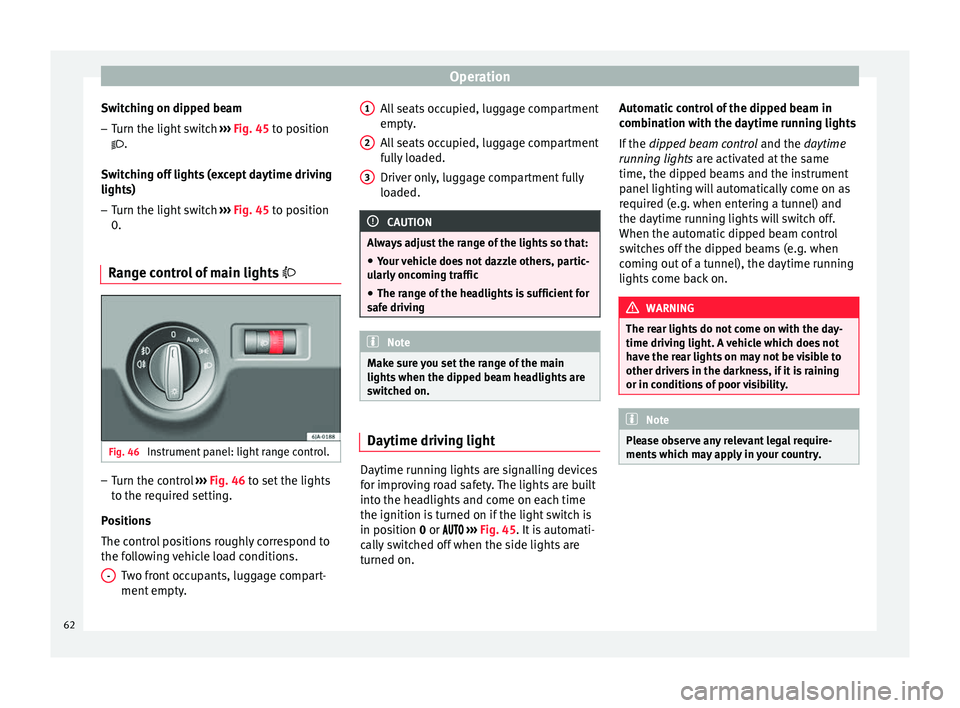
ge control of main lights Fig. 46
Instrument panel: light range control. –
Turn the control ››› Fig. 46 to set the lights
t o the r
equired setting.
Positions
The control positions roughly correspond to
the following vehicle load conditions. Two front occupants, luggage compart-
ment empty.
- All seats occupied, luggage compartment
empty.
All seats occupied, luggage compartment
fully loaded.
Driver only, luggage compartment fully
loaded.
CAUTION
Always adjust the range of the lights so that:
● Your vehicle does not dazzle others, partic-
ularly oncoming traffic
● The range of the headlights is sufficient for
safe driving Note
Make sure you set the range of the main
lights when the dipped beam headlights are
switched on. Daytime driving light
Daytime running lights are signalling devices
for improving road safety. The lights are built
into the headlights and come on each time
the ignition is turned on if the light switch is
in position
0
or ›
››
Fig. 45. It is automati-
cally switched off when the side lights are
turned on. 1 2
3 Automatic control of the dipped beam in
combination with the daytime running lights
If the
dipped beam control and the
daytime
r
unning lights are activated at the same
time, the dipped beams and the instrument
panel lighting will automatically come on as
required (e.g. when entering a tunnel) and
the daytime running lights will switch off.
When the automatic dipped beam control
switches off the dipped beams (e.g. when
coming out of a tunnel), the daytime running
lights come back on. WARNING
The rear lights do not come on with the day-
time driving light. A vehicle which does not
have the rear lights on may not be visible to
other drivers in the darkness, if it is raining
or in conditions of poor visibility. Note
Please observe any relevant legal require-
ments which may apply in your country. 62
Page 73 of 200

Seats and head restraints
●
Do not touch the exterior mirrors when the
heating system is running.
● If the electrical adjustment should ever fail
to operate, the rear vision mirrors can be ad-
justed by hand by pressing the edge of the
mirror glass.
● Visit the technical service in the event of a
fault in the electrical rear vision mirror ad-
justment system. Seats and head restraints
Adjusting seats and head
restraints
Introduction Set the driver seat in such a way that the
pedals can be fully depressed with your legs
slightly bent.
Set the driver seat backrest so that you can
reach the upper point of the steering wheel
with your arms slightly bent.
The correct seat position is very important
for:
●
reaching all of the controls safely and
quickly,
● a relaxed posture that will not produce fati-
gue,
● maximum protection from the seat belts
and airbag system WARNING
● Adjust the driver seat only when the vehi-
cle is stationary. Risk of accident!
● Be careful when adjusting the front seats!
Careless and uncontrolled adjustment can
cause injuries. ●
The backrests must not be reclined too far
back while driving. This could limit the effect
of the seat belts and the airbag system. Risk
of injury!
● Never transport more than the permitted
amount of people in your vehicle.
● Every occupant in the vehicle must properly
fasten and wear the seat belt belonging to
his or her seat. Children must be protected
with an appropriate child restraint system
››› page 24, Transporting children safety.
● The front seats, head restraints and seat
belts must always be adjusted to the size of
the vehicle occupant to provide you and your
passengers with the greatest possible protec-
tion.
● Your feet should remain in the footwell
while the vehicle is moving; never rest them
on the dash panel, on the window or on the
seat! This also applies to passengers. An in-
correct sitting position exposes you to an in-
creased risk of injury in case of a sudden
braking or an accident. If the airbag is trig-
gered, you could sustain severe injuries due
to an incorrect sitting position!
● It is important for the driver and front pas-
senger to keep a distance of at least 25 cm
from the steering wheel and dash panel. Fail-
ure to respect the minimum distance means
that the airbag will not protect you. Risk of
fatal injury if triggered!
● Objects must not be placed in the footwell,
as they could move to the area of the pedals
in the event of a braking manoeuvre or
change of direction. This would prevent the » 71Technical specifications
Advice
Operation
Safety
Page 74 of 200

Operation
clutch, brake or accelerator from being press-
ed.
●
Do not place any items on the front passen-
ger seat other than those allowed (e.g. child
seat). Risk of accident! Note
After a certain time, the backrest angle ad-
justment mechanism may gain a certain
amount of play. Manually adjusting the front seats
Fig. 58
Seat adjustment controls/Adjustment
controls for a sports seat Adjusting the seat forwards and backwards
– Lift the lever 1
››› Fig. 58 (the central part)
and mo v
e the seat forwards or backwards.
– Then release the lever 1 and move the
seat further until the catch engages. Adjusting seat height
– To raise, pump the lever 2
››› Fig. 58 (sev-
er al
times if required) upwards to the re-
quired seat position.
– To lower, pump the lever 2 (several times
if required) downwards to the required seat
position.
Adjusting the backrest angle
– Take your weight off the backrest and pull
the lever 3
››› Fig. 58 backwards, pressing
on the b ac
krest to the required angle.
– When the lever 3 is released, the backrest
will remain in the set position. Head restraints
Fig. 59
Head restraints: adjusting/removing
head restraints. Head restraints cannot be moved up or down
or removed on sports seats.
Adjusting height
– Take hold of the sides of the head restraint
and pull upwards.
72
Page 75 of 200

Seats and head restraints
– To lower the head restraint, press button
A
››› Fig. 59 while pushing the head re-
s tr
aint downward.
Fitting and removing head restraints on front
seats
– Push the head restraint up as far as it will
go.
– Press catch A
››› Fig. 59 and remove the
he a
d restraint.
– To refit, insert the head restraint into the
holes in the backrest, pushing it down until
it engages.
Fitting and removing head restraints on rear
seats
– Push the head restraint up as far as it will
go.
– Press catch 1
››› Fig. 59 while pressing on
the c at
ch in hole 2 with a max. 5 mm flat-
headed screwdriver and remove the head
restraint.
– To refit, insert the head restraint into the
holes in the backrest, pushing it down until
it engages.
For maximum head restraint protection, ad-
just the head restraint so that its upper edge
is at the same level as the top of your head.
The head restraint must be adjusted in line
with the height of users. Correct adjustment of the head restraint, together with the seat
belts, ensure effective passenger protection
››› page 6 . WARNING
● Badly adjusted head restraints increase the
risk of injuries in the event of an accident.
● Never drive with the head restraints re-
moved. Risk of injuries!
● If the seats are in use, never drive with the
rear head restraints in their out-of-use posi-
tion. Seat functions
Heated front seats* Fig. 60
Heated front seats. The cushion and backrest of the front seats
can be heated electrically. Press the
or
››› Fig. 60 button to switch
on and a dju
st the heated front seats.
Press once to connect the heating at maxi-
mum force.
Press the button again to reduce the force of
the heating and switch it off. The force is indi-
cated by the number of warning lamps lit on
the button. WARNING
Do not use the heated seat if your perception
of pain and/or temperature or that of your
passenger is limited, e.g. due to medication,
paralysis or chronic illness (e.g. diabetes). It
could cause burns on the back, buttocks and
legs that are difficult to heal. If you still want
to use the heated seat, take frequent breaks
on long journeys so that the body can recover
from the trip. Ask your doctor about your par-
ticular situation. CAUTION
● To avoid damaging the heating elements,
do not kneel on the seat or apply sharp pres-
sure at a single point to the seat cushion or
backrest.
● Do not use the heated seats if nobody is
sitting on them or if there are items attached
to or lying on them, such as a child seat or a
bag, etc. This could lead to a fault in the seat
heating elements.
● Do not clean the seats with anything damp
››› page 127.
» 73
Technical specifications
Advice
Operation
Safety
Page 76 of 200
Operation
Note
● Only connect the heated seats when the
engine is running. This provides considerable
savings on the battery capacity.
● In the event of a drop in voltage in the on-
board systems, the heated seats switch off
automatically to ensure enough power to con-
trol the engine ››› page 143, Automatic dis-
connection of electrical equipment . Armrest on front seats with inner
storage*
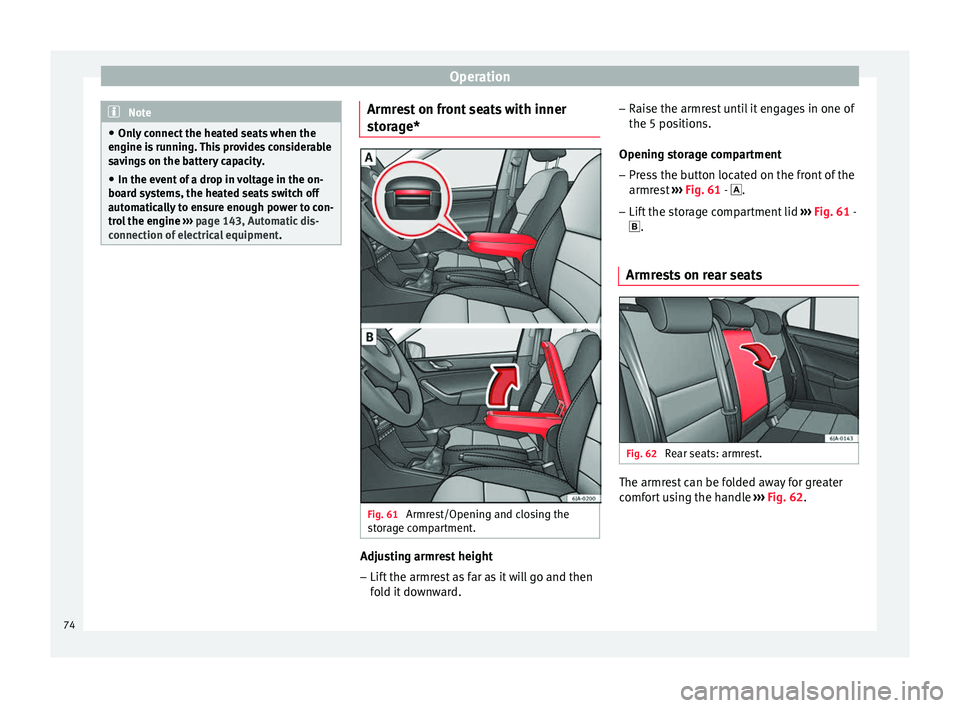
Fig. 61
Armrest/Opening and closing the
storage compartment. Adjusting armrest height
– Lift the armrest as far as it will go and then
fold it downward. –
Raise the armrest until it engages in one of
the 5 positions.
Opening storage compartment
– Press the button located on the front of the
armrest ››› Fig. 61 -
.
– Lif
t the storage compartment lid ››› Fig. 61 -
.
Armre
sts on rear seats Fig. 62
Rear seats: armrest. The armrest can be folded away for greater
comfort using the handle
››› Fig. 62 .
74
Page 77 of 200

Seats and head restraints
Folding the rear backrest Fig. 63
Unlocking the backrest. Folding
– Before folding the rear seats, adjust the po-
sition of the front seats so that the rear
seats are not damaged. When the front
seats are adjusted to the rear position,
their head restraints should be removed
before folding the backrests on the rear
seats. Store the removed head restraints in such a way that they cannot be soiled or
damaged.
– Insert the seat belt latch plate into hole A ›››
Fig. 63 located on the corresponding
s ide of
the vehicle – safety position.
– Press the lock button B to unlock the
backrest and fold it forward.
Returning to the initial position
– Where the head restraint has been re-
moved, insert it into the backrest when par-
tially raised.
– Push the backrest backwards to its original
position until the lock button engages –
check that it is locked by pulling on the
backrest ››› .
– Make sure the red protruding part C is not
visible. WARNING
● Once the backrests have been lifted, the
seat belts and their buckles must be in their
initial position – ready for use.
● The backrests must be safely locked to en-
sure any items in the boot cannot move
around the interior of the vehicle in the event
of a sudden braking manoeuvre. Risk of inju-
ries!
● Make sure the rear backrests are correctly
locked. Only then will the three-point auto-
matic seat belt on the rear central seat work
correctly. CAUTION
Take care when handling the rear backrests
so as not to damage the seat belts. The seat
belt must never be left behind the lifted back-
rest. 75
Technical specifications
Advice
Operation
Safety
Page 79 of 200

Transport and practical equipment
CAUTION
The compartment is solely designed to store
the reflective vest and no other objects, since
there is a risk of damaging the storage com-
partment. Front seat storage compartments
There is a storage pocket on the rear part of
the backrest of the front seats.
These pockets are designed to hold maps,
magazines, etc.
WARNING
Do not place heavy objects in the pockets.
Risk of injury! CAUTION
Do not place overly large objects in the pock-
ets (e.g. bottles) or objects with sharp edges.
Risk of damage to the pockets and the up-
holstery. Drink holder in centre console
Fig. 67
Centre console: drink holder Front drink holder in the centre console
Rear drink holder in the centre console
WARNING
● Do not put hot drinks in the drink holders.
They could spill while the vehicle is moving.
Risk of scalding! A
B ●
Do not use cups or glasses made of fragile
materials (e.g. glass or china). These could
cause injury in the event of an accident. CAUTION
Avoid putting open drinks containers in the
drink holder while the vehicle is moving.
They could spill (e.g. on braking) and cause
damage to the electrical equipment or the
seat covers. Drink holder in the rear armrest
Fig. 68
Rear seats armrest: drink holder Two drinks can be placed in the drink holder.
Use the detachable parts
A and
B ›››
Fig. 68 to change the size of the holes.
– Remo
ve part A or
B in the direction indi-
cated by the arrow and replace in the re-
quired position in the drink holder.
77
Technical specifications
Advice
Operation
Safety
Page 82 of 200
Operation
Storage compartment for
(sun)glasses* Fig. 73
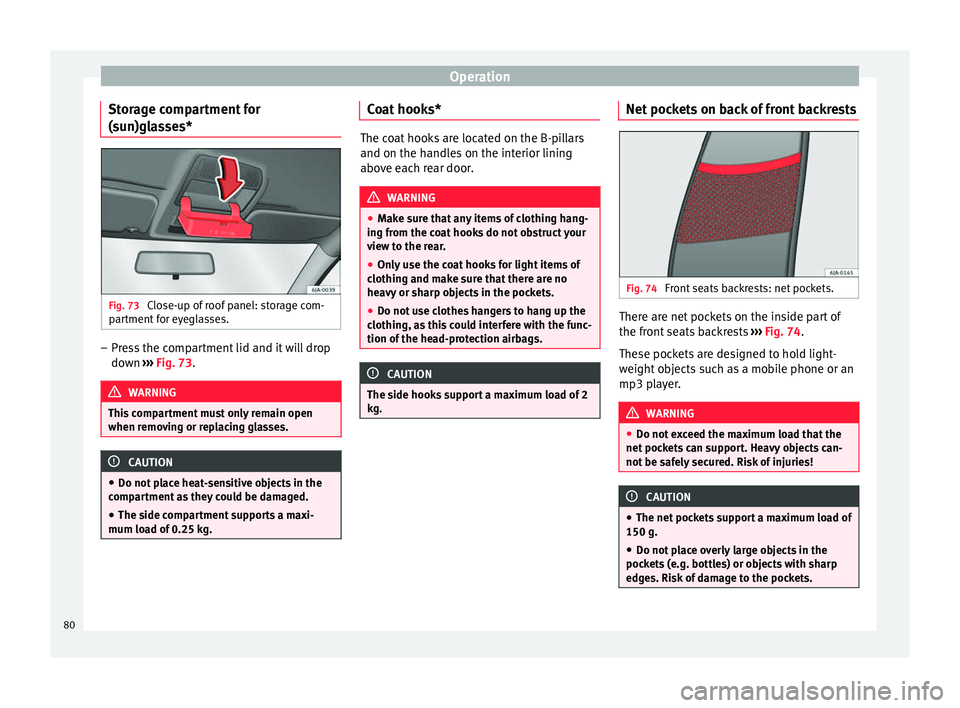
Close-up of roof panel: storage com-
partment for eyeglasses. –
Press the compartment lid and it will drop
down ››› Fig. 73 . WARNING
This compartment must only remain open
when removing or replacing glasses. CAUTION
● Do not place heat-sensitive objects in the
compartment as they could be damaged.
● The side compartment supports a maxi-
mum load of 0.25 kg. Coat hooks*
The coat hooks are located on the B-pillars
and on the handles on the interior lining
above each rear door.
WARNING
● Make sure that any items of clothing hang-
ing from the coat hooks do not obstruct your
view to the rear.
● Only use the coat hooks for light items of
clothing and make sure that there are no
heavy or sharp objects in the pockets.
● Do not use clothes hangers to hang up the
clothing, as this could interfere with the func-
tion of the head-protection airbags. CAUTION
The side hooks support a maximum load of 2
kg. Net pockets on back of front backrests
Fig. 74
Front seats backrests: net pockets. There are net pockets on the inside part of
the front seats backrests
››› Fig. 74 .
The se poc
kets are designed to hold light-
weight objects such as a mobile phone or an
mp3 player. WARNING
● Do not exceed the maximum load that the
net pockets can support. Heavy objects can-
not be safely secured. Risk of injuries! CAUTION
● The net pockets support a maximum load of
150 g.
● Do not place overly large objects in the
pockets (e.g. bottles) or objects with sharp
edges. Risk of damage to the pockets. 80