display SKODA CITIGO 2012 1.G User Guide
[x] Cancel search | Manufacturer: SKODA, Model Year: 2012, Model line: CITIGO, Model: SKODA CITIGO 2012 1.GPages: 157, PDF Size: 3.9 MB
Page 17 of 157
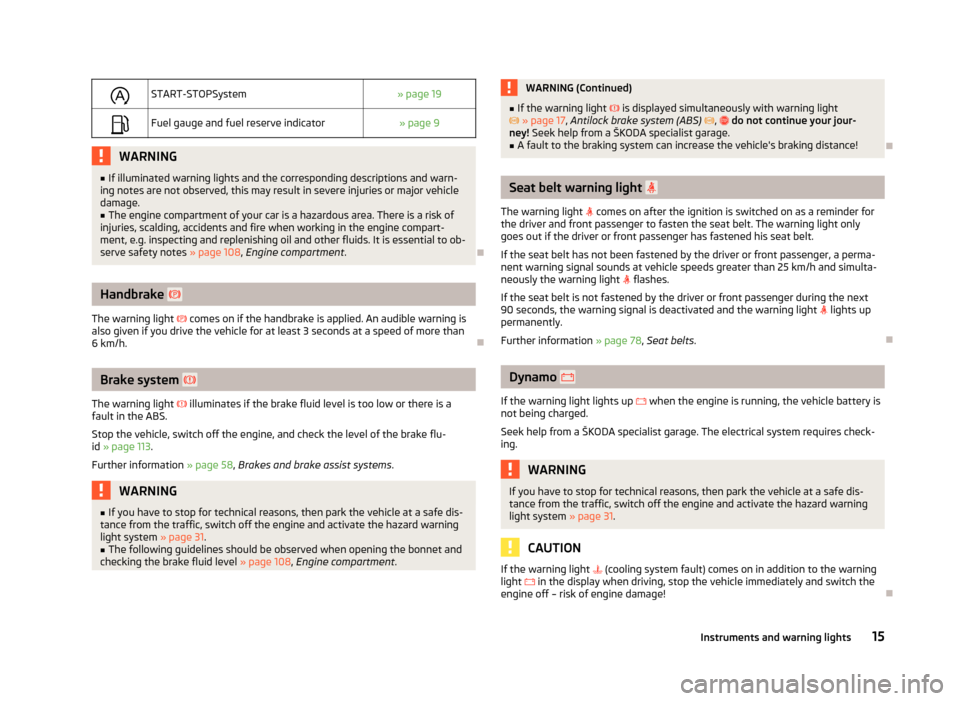
START-STOPSystem
» page 19
Fuel gauge and fuel reserve indicator
» page 9WARNING
■ If illuminated warning lights and the corresponding descriptions and warn-
ing notes are not observed, this may result in severe injuries or major vehicle
damage.
■ The engine compartment of your car is a hazardous area. There is a risk of
injuries, scalding, accidents and fire when working in the engine compart-
ment, e.g. inspecting and replenishing oil and other fluids. It is essential to ob-
serve safety notes »
page 108, Engine compartment . ÐHandbrake
The warning light comes on if the handbrake is applied. An audible warning is
also given if you drive the vehicle for at least 3
seconds at a speed of more than
6 km/h. ÐBrake system
The warning light illuminates if the brake fluid level is too low or there is a
fault in the ABS.
Stop the vehicle, switch off the engine, and check the level of the brake flu-
id » page 113.
Further information » page 58, Brakes and brake assist systems. WARNING
■ If you have to stop for technical reasons, then park the vehicle at a safe dis-
tance from the traffic, switch off the engine and activate the hazard warning
light system » page 31.
■ The following guidelines should be observed when opening the bonnet and
checking the brake fluid level » page 108, Engine compartment . WARNING (Continued)
■ If the warning light is displayed simultaneously with warning light
» page 17, Antilock brake system (ABS) , do not continue your jour-
ney! Seek help from a
ŠKODA specialist garage.
■ A fault to the braking system can increase the vehicle's braking distance! Ð Seat belt warning light
The warning light comes on after the ignition is switched on as a reminder for
the driver and front passenger to fasten the seat belt. The warning light only
goes out if the driver or front passenger has fastened his seat belt.
If the seat belt has not been fastened by the driver or front passenger, a perma-
nent warning signal sounds at vehicle speeds greater than 25
km/h and simulta-
neously the warning light flashes.
If the seat belt is not fastened by the driver or front passenger during the next
90 seconds, the warning signal is deactivated and the warning light lights up
permanently.
Further information » page 78, Seat belts. Ð Dynamo
If the warning light lights up when the engine is running, the vehicle battery is
not being charged.
Seek help from a ŠKODA
specialist garage. The electrical system requires check-
ing. WARNING
If you have to stop for technical reasons, then park the vehicle at a safe dis-
tance from the traffic, switch off the engine and activate the hazard warning
light system » page 31. CAUTION
If the warning light (cooling system fault) comes on in addition to the warning
light in the display when driving, stop the vehicle immediately and switch the
engine off – risk of engine damage! Ð
15
Instruments and warning lights
Page 19 of 157
Electronic Stability Control (ESC)
The warning light flashes to show that the ESC is currently operating.
If the warning light lights up, there is a fault in the ESC.
As the ESC operates in conjunction with the ABS, the ESP warning light will also
come on if the ABS system fails.
If the warning light comes on immediately after starting the engine, the ESC
can be switched off for technical reasons. In this case, the ESC can be switched
on again by switching the ignition on and off. If the warning light goes out, the
ESC is fully functional again.
Further information » page 60, Stabilisation control (ESC) .Note
If the vehicle's battery has been disconnected and reconnected, the warning light comes on after switching on the ignition. The warning light should go out after
driving a short distance. ÐTraction Control System (TCS)
The warning light comes on for a few seconds when the ignition is switched
on.
The warning light comes on when driving when a control cycle is activated.
The warning light illuminates permanently if there is a fault in the TCS.
The fact that the TCS operates together with the ABS means that the TCS warn-
ing light will also come on if the ABS system is not operating properly.
If the warning light
comes on immediately after starting the engine, the TCS
can be switched off for technical reasons. In this case, the TCS can be switched
on again by switching the ignition on and off. If the warning light goes out, the
TCS is fully functional again.
Further information » page 61, Traction control (TC) .Note
If the vehicle's battery has been disconnected and reconnected, the warning light comes on after switching on the ignition. The warning light should go out after
driving a short distance. Ð Antilock brake system (ABS)
If the warning light lights up, there is a fault in the ABS.
The vehicle will only be braked by the normal brake system without the ABS.
Seek help from a
ŠKODA specialist garage.
Further information » page 61, Antilock brake system (ABS) . WARNING
■ If you have to stop for technical reasons, then park the vehicle at a safe dis-
tance from the traffic, switch off the engine and activate the hazard warning
light system » page 31.
■ If the warning light » page 15 is displayed simultaneously with the ABS
warning light , do not continue your journey! Seek help from a
ŠKODA
specialist garage. ■ The following guidelines should be observed when opening the bonnet and
checking the brake fluid level » page 108, Engine compartment .Ð The rear fog light
The warning light comes on when the rear fog lights are operating » page 30.Ð Exhaust inspection system
If the warning light lights up, there is a fault in the exhaust inspection system.
The engine control unit allows the vehicle to run in emergency mode.
Seek help from a
ŠKODA specialist garage. Ð EPC
fault light
If the warning light
lights up, there is a fault in the engine control. The engine
control unit allows the vehicle to run in emergency mode.
Seek help from a ŠKODA specialist garage. Ð
17
Instruments and warning lights
Page 21 of 157
Safety belt fastened/not fastened (belt status display) - Rear
seat
/
After switching on the ignition, the belt status warning lights up for the rear
seats in the instrument panel display for 30 seconds and indicates whether any
rear seat passengers have fastened their seat belts. The belt status indicator will
then light up when the passenger on the rear seat fastens or unfastens the seat
belt (when the ignition is switched on or during the journey).
If the warning light , is switched on, the passenger on the rear seat has their
seat belt on.
If the warning light , is switched on, the passenger on the rear seat does not
have their seat belt on.
If a seat belt is unfastened on the rear seat during the journey at a speed of more
than 25
km/h, an acoustic signal will sound, and the belt status indicator for the
rear seats will flash for around 30 seconds.
Further information » page 78, Seat belts. ÐCity Safe Drive
If the City Safe Drive system is currently slowing the vehicle down automatically,
the warning light will flash quickly .
If the
City Safe Drive system is not currently available, or if there is a system fault,
the warning light will flash slowly .
When the City Safe Drive system is switched off while the vehicle is travelling at a
speed between 5–30 km/h (3-19 mph), the warning light will light up in the
instrument cluster display.
If the City Safe Drive system is switched on, the warning light in the instrument
cluster display will light up for around 5 seconds.
Further information » page 66, City Safe Drive. ÐSTART STOP
If the START STOP system is active, the warning light will light up .
If the
START STOP system is active, but automatic engine shut down is not possi-
ble, the warning light will light up . When the warning light flashes
the
START STOP system will not be available.
Further information » page 65, START/STOP . Ð 19
Instruments and warning lights
Page 65 of 157
Visual parking system
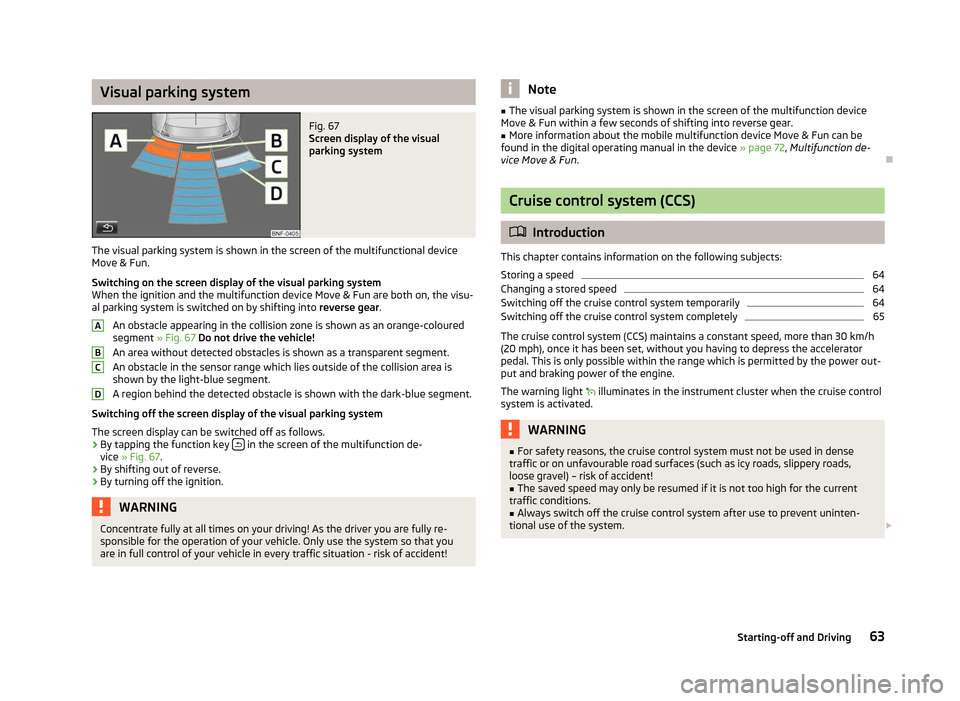
Fig. 67
Screen display of the visual
parking system
The visual parking system is shown in the screen of the multifunctional device
Move & Fun .
Switching on the screen display of the visual parking system
When the ignition and the multifunction device Move & Fun are both on, the visu-
al parking system is switched on by shifting into reverse gear.
An obstacle appearing in the collision zone is shown as an orange-coloured
segment » Fig. 67 Do not drive the vehicle!
An area without detected obstacles is shown as a transparent segment.
An obstacle in the sensor range which lies outside of the collision area is
shown by the light-blue segment.
A region behind the detected obstacle is shown with the dark-blue segment.
Switching off the screen display of the visual parking system
The screen display can be switched off as follows.
› By tapping the function key
in the screen of the multifunction de-
vice » Fig. 67.
› By shifting out of reverse.
› By turning off the ignition. WARNING
Concentrate fully at all times on your driving! As the driver you are fully re-
sponsible for the operation of your vehicle. Only use the system so that you
are in full control of your vehicle in every traffic situation - risk of accident! A
B
C
D Note
■ The visual parking system is shown in the screen of the multifunction device
Move & Fun
within a few seconds of shifting into reverse gear.
■ More information about the mobile multifunction device Move & Fun can be
found in the digital operating manual in the device » page 72, Multifunction de-
vice Move & Fun. Ð Cruise control system (CCS)
ä
Introduction
This chapter contains information on the following subjects:
Storing a speed 64
Changing a stored speed 64
Switching off the cruise control system temporarily 64
Switching off the cruise control system completely 65
The cruise control system (CCS) maintains a constant speed, more than 30 km/h
(20
mph), once it has been set, without you having to depress the accelerator
pedal. This is only possible within the range which is permitted by the power out-
put and braking power of the engine.
The warning light illuminates in the instrument cluster when the cruise control
system is activated. WARNING
■ For safety reasons, the cruise control system must not be used in dense
traffic or on unfavourable road surfaces (such as icy roads, slippery roads,
loose gravel) – risk of accident! ■ The saved speed may only be resumed if it is not too high for the current
traffic conditions. ■ Always switch off the cruise control system after use to prevent uninten-
tional use of the system. £
63
Starting-off and Driving
Page 67 of 157
Briefly press the rocker button B
into the position RES
to resume the stored
speed after the clutch or brake pedal is released. ÐSwitching off the cruise control system completely
First read and observe the introductory information and safety warn-
ings on page 63.
›
Turn the switch A
» Fig. 68
on page 64 » page 64 into the OFF position. ÐSTART/STOP
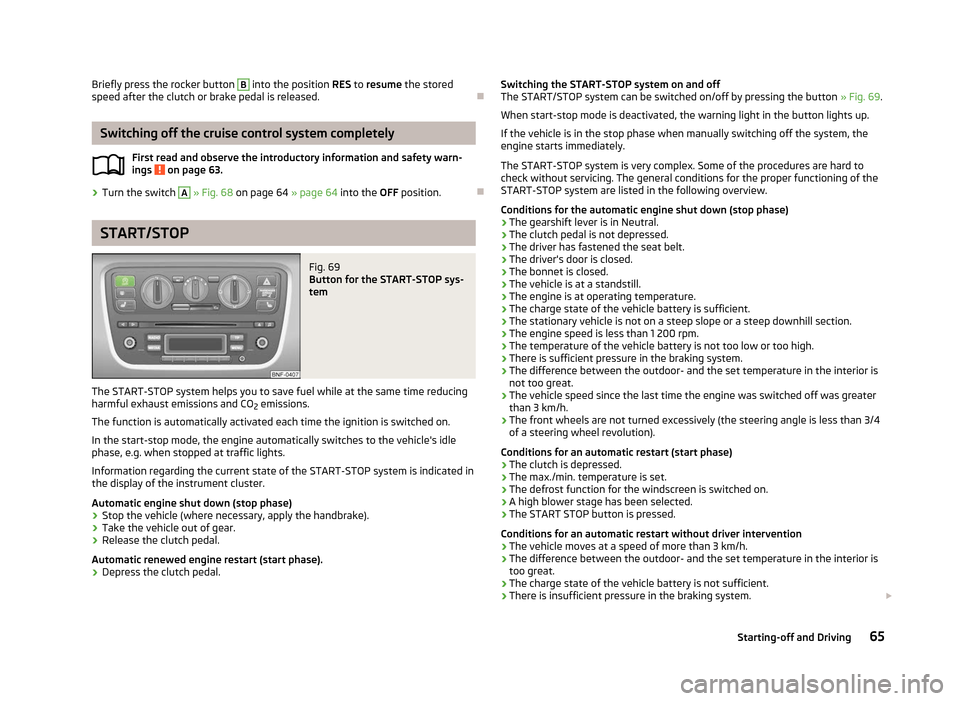
Fig. 69
Button for the START-STOP sys-
tem
The START-STOP system helps you to save fuel while at the same time reducing
harmful exhaust emissions and CO 2 emissions.
The function is automatically activated each time the ignition is switched on.
In the start-stop mode, the engine automatically switches to the vehicle's idle
phase, e.g. when stopped at traffic lights.
Information regarding the current state of the
START-STOP system is indicated in
the display of the instrument cluster.
Automatic engine shut down (stop phase)
› Stop the vehicle (where necessary, apply the handbrake).
› Take the vehicle out of gear.
› Release the clutch pedal.
Automatic renewed engine restart (start phase).
› Depress the clutch pedal.
ä
Switching the START-STOP system on and off
The START/STOP
system can be switched on/off by pressing the button » Fig. 69.
When start-stop mode is deactivated, the warning light in the button lights up.
If the vehicle is in the stop phase when manually switching off the system, the
engine starts immediately.
The START-STOP system is very complex. Some of the procedures are hard to
check without servicing. The general conditions for the proper functioning of the
START-STOP system are listed in the following overview.
Conditions for the automatic engine shut down (stop phase)
› The gearshift lever is in Neutral.
› The clutch pedal is not depressed.
› The driver has fastened the seat belt.
› The driver's door is closed.
› The bonnet is closed.
› The vehicle is at a standstill.
› The engine is at operating temperature.
› The charge state of the vehicle battery is sufficient.
› The stationary vehicle is not on a steep slope or a steep downhill section.
› The engine speed is less than 1 200 rpm.
› The temperature of the vehicle battery is not too low or too high.
› There is sufficient pressure in the braking system.
› The difference between the outdoor- and the set temperature in the interior is
not too great.
› The vehicle speed since the last time the engine was switched off was greater
than 3 km/h.
› The front wheels are not turned excessively (the steering angle is less than 3/4
of a steering wheel revolution).
Conditions for an automatic restart (start phase)
› The clutch is depressed.
› The max./min. temperature is set.
› The defrost function for the windscreen is switched on.
› A high blower stage has been selected.
› The START STOP button is pressed.
Conditions for an automatic restart without driver intervention
› The vehicle moves at a speed of more than 3 km/h.
› The difference between the outdoor- and the set temperature in the interior is
too great.
› The charge state of the vehicle battery is not sufficient.
› There is insufficient pressure in the braking system.
£
65
Starting-off and Driving
Page 69 of 157
WARNING (Continued)
■ The City Safe Drive system can carry out unexpected braking interventions
in complex driving situations, e.g. when vehicles scrape past each other.
■ Taking the City Safe Drive system into account in one's own driving behav-
iour can lead to accidents and serious injuries. The
City Safe Drive system is
not a substitute for the driver's attention. ■ Always adapt your speed and safety distance to the vehicle ahead to the
visibility, weather, road and traffic conditions.
■ The laser beam from the laser sensor can cause serious eye injuries.
■ Never use optical devices, e.g. a range-finder camera or magnifying glass to
look into the laser sensor.
■ The laser beam can also be active when the City Safe Drive system is
switched off or is not available. The laser beam is not visible to the human
eye.
■ The City Safe Drive system cannot detect persons, animals, or crossing vehi-
cles or approaching vehicles in the same lane.
■ The City Safe Drive system cannot exceed physical and system-defined lim-
its. For instance, responses from the
City Save Drive system can happen late
or unexpectedly from the driver's perspective. Always stay attentive and take
control when required. CAUTION
If the vehicle starts to roll after the City Safe Drive system is triggered, use the
foot pedal to break. Note
■ When replacing the windscreen wiper blades, only use windscreen blades ap-
proved by ŠKODA. ■ Do not paint the laser sensor range on the windscreen. Do not cover it up with
stickers or similar. ■ Remove any snow with a hand-held brush and we recommend you remove any
ice with a solvent-free deicing spray. ■ Keep the laser sensor range free of dirt and ice at all times.
■ If the laser sensor range on the windscreen has scratches, cracks, etc, replace
the windscreen. Only use windscreens approved by
ŠKODA. Carrying out repairs
to the windscreen are not permissible. ■
A damaged windscreen in the area of the laser sensor can lead to a failure of
the City Safe Drive
system.
■ Repairing the laser sensor requires specialist expertise. We recommend an au-
thorised
ŠKODA Service partner. Ð Switching the City Safe Drive on and off
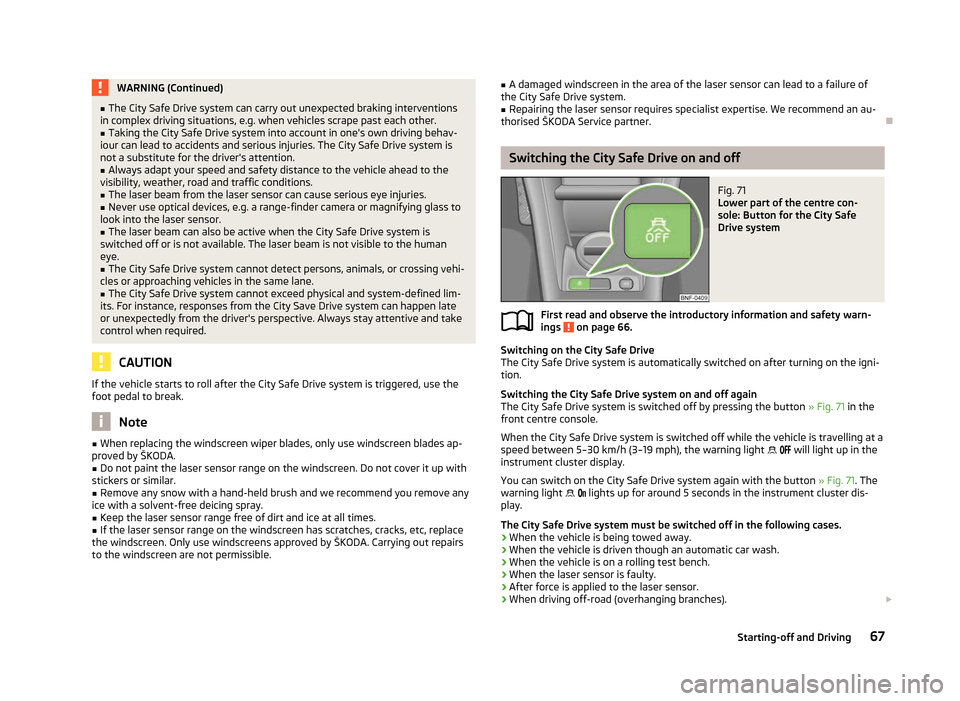
Fig. 71
Lower part of the centre con-
sole: Button for the City Safe
Drive system
First read and observe the introductory information and safety warn-
ings on page 66.
Switching on the City Safe Drive
The City Safe Drive
system is automatically switched on after turning on the igni-
tion.
Switching the City Safe Drive system on and off again
The City Safe Drive system is switched off by pressing the button » Fig. 71 in the
front centre console.
When the City Safe Drive system is switched off while the vehicle is travelling at a
speed between 5–30 km/h (3–19 mph), the warning light will light up in the
instrument cluster display.
You can switch on the City Safe Drive system again with the button » Fig. 71. The
warning light lights up for around 5 seconds in the instrument cluster dis-
play.
The City Safe Drive system must be switched off in the following cases.
› When the vehicle is being towed away.
› When the vehicle is driven though an automatic car wash.
› When the vehicle is on a rolling test bench.
› When the laser sensor is faulty.
› After force is applied to the laser sensor.
› When driving off-road (overhanging branches).
£
ä
67
Starting-off and Driving
Page 70 of 157
›
When objects are extending into the area above the bonnet, e.g. when a rood
load sticks out far ahead.
› When the windscreen is damaged in the region of the laser sensor. ÐLaser sensor
First read and observe the introductory information and safety warn-
ings on page 66.
Possible impairment of the laser sensor
If the functioning of the laser sensor is impaired by e.g. heavy rain, snow or slush,
the
City Safe Drivesystem will temporarily shut down. The warning light flashes
slowly in the instrument cluster display.
If the laser sensor is no longer impaired, the City Safe Drive system will automati-
cally switch back to ready. The warning light goes out. ÐSpecial driving situations
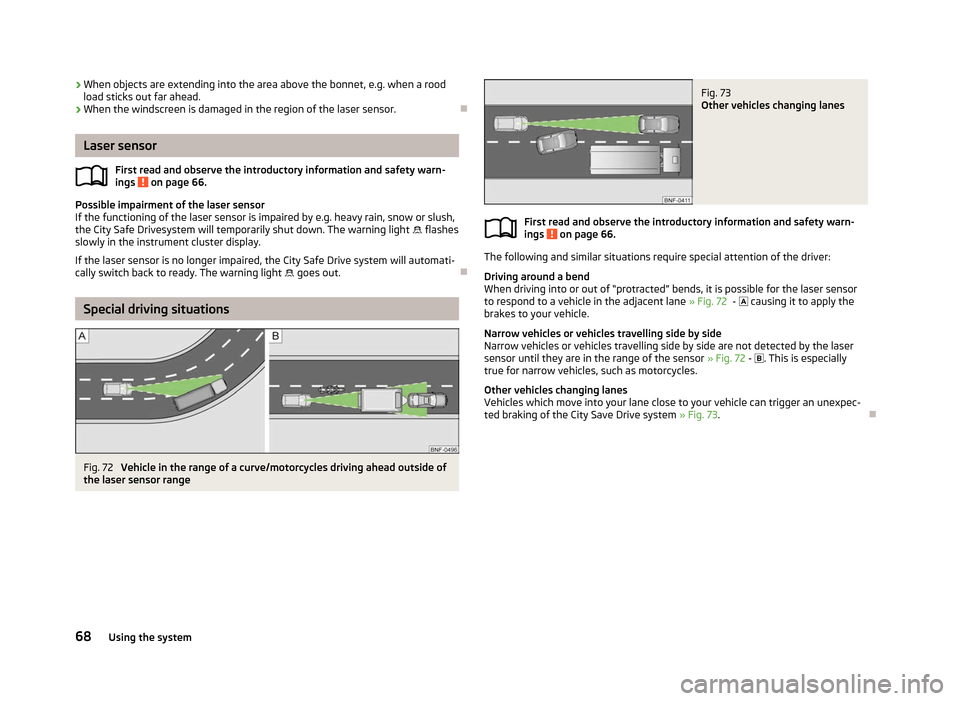
Fig. 72
Vehicle in the range of a curve/motorcycles driving ahead outside of
the laser sensor range
ä Fig. 73
Other vehicles changing lanes
First read and observe the introductory information and safety warn-
ings on page 66.
The following and similar situations require special attention of the driver:
Driving around a bend
When driving into or out of
“protracted” bends, it is possible for the laser sensor
to respond to a vehicle in the adjacent lane » Fig. 72 - causing it to apply the
brakes to your vehicle.
Narrow vehicles or vehicles travelling side by side
Narrow vehicles or vehicles travelling side by side are not detected by the laser
sensor until they are in the range of the sensor » Fig. 72 - . This is especially
true for narrow vehicles, such as motorcycles.
Other vehicles changing lanes
Vehicles which move into your lane close to your vehicle can trigger an unexpec-
ted braking of the City Save Drive system » Fig. 73 .Ð ä
68 Using the system
Page 72 of 157
›
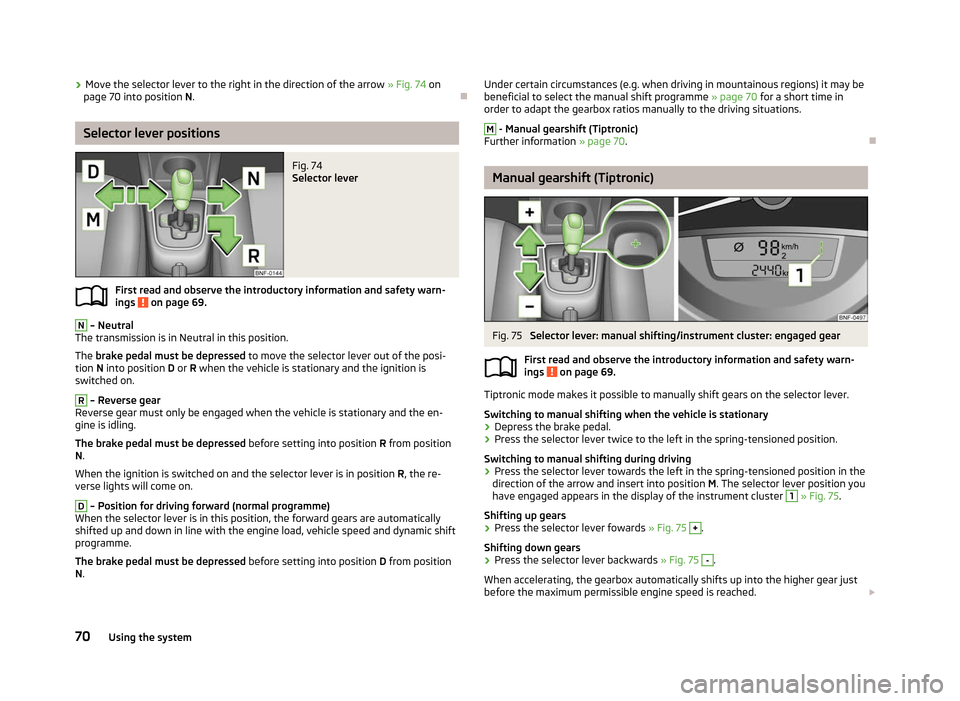
Move the selector lever to the right in the direction of the arrow
» Fig. 74 on
page 70 into position N. ÐSelector lever positions
Fig. 74
Selector lever
First read and observe the introductory information and safety warn-
ings on page 69.
N
– Neutral
The transmission is in Neutral in this position.
The brake pedal must be depressed to move the selector lever out of the posi-
tion N into position D or R when the vehicle is stationary and the ignition is
switched on. R
– Reverse gear
Reverse gear must only be engaged when the vehicle is stationary and the en-
gine is idling.
The brake pedal must be depressed before setting into position R from position
N.
When the ignition is switched on and the selector lever is in position R, the re-
verse lights will come on. D
– Position for driving forward (normal programme)
When the selector lever is in this position, the forward gears are automatically
shifted up and down in line with the engine load, vehicle speed and dynamic shift
programme.
The brake pedal must be depressed before setting into position D from position
N.
ä
Under certain circumstances (e.g. when driving in mountainous regions) it may be
beneficial to select the manual shift programme » page 70 for a short time in
order to adapt the gearbox ratios manually to the driving situations. M
- Manual gearshift (Tiptronic)
Further information » page 70. Ð Manual gearshift (Tiptronic)
Fig. 75
Selector lever: manual shifting/instrument cluster: engaged gear
First read and observe the introductory information and safety warn-
ings on page 69.
Tiptronic mode makes it possible to manually shift gears on the selector lever.
Switching to manual shifting when the vehicle is stationary
›
Depress the brake pedal.
› Press the selector lever twice to the left in the spring-tensioned position.
Switching to manual shifting during driving
› Press the selector lever towards the left in the spring-tensioned position in the
direction of the arrow and insert into position M. The selector lever position you
have engaged appears in the display of the instrument cluster 1
» Fig. 75
.
Shifting up gears
› Press the selector lever fowards
» Fig. 75 +
.
Shifting down gears
› Press the selector lever backwards
» Fig. 75 -
.
When accelerating, the gearbox automatically shifts up into the higher gear just
before the maximum permissible engine speed is reached. £
ä
70 Using the system
Page 75 of 157
Installing the cradle for the navigation unit
›
Place the cradle into the opening of the centre section of the dash panel from
above, press it down until it latches » .
Installing the multifunctional device
› Firstly, place the multifunction device into the top holder B
» Fig. 77 and press
it on the underside of the cradle until it latches » .
Setting the tilt of the multifunction device
› You can set the tilt to the required position by moving the multifunction device
in the direction of the arrows » Fig. 77 » .
Removing the multifunction device
› With one hand, secure the multifunction device on the upper and lower edge.
› Using the other hand, press the release button C
» Fig. 77 and remove the de-
vice.
› Store the multifunction device in a safe place to avoid damaging it.
Removing the cradle on the multifunction device
› Grab hold of the cradle with one hand.
› With the other hand, press the release button A
» Fig. 77
.
› Remove the cradle from the dash panel from above.
› Seal the opening for the cradle in the dash panel with the cover
» Fig. 76.
Loading the user manual
› Switch on the multifunction device by pressing button D
» Fig. 77
.
› Press the button
more on the screen.
› Press the button
Manual on the screen.
› Call up the required chapter by pressing the appropriate button.
Functions of the multifunction device
› Navigation.
› Operating the radio using multimedia devices connected via Bluetooth ®
.
› Displaying information from the MFD, rev counter and coolant tempera-
ture » page 8.
› Hands-free device for mobile phones coupled with the multifunction device via
Bluetooth ®
.
› Indicator for opened bonnet, doors and luggage compartment lid.
› Display from the visual parking system (OPS).
› Image viewer. WARNING
■ Concentrate fully at all times on your driving! As the driver you are fully re-
sponsible for the operation of your vehicle. Only use the system so that you
are in full control of your vehicle in every traffic situation - risk of accident!
■ The multifunction device must always slot securely into the cradle or be
safely stored in the vehicle.
■ Unsecured or incorrectly secured multifunction devices may be thrown
through the interior of the vehicle and cause injuries in a sudden driving or
braking manoeuvre or accident. ■ Adjust the volume to ensure that acoustic signals from outside, e.g. sirens
from vehicles which have the right of way, such as police, ambulance and fire
brigade vehicles, can be heard at all time. ■ High volumes can cause hearing damage. CAUTION
■ Improper tilt settings can damage both the multifunction device and the cradle.
■ Always take the multifunction device with you when leaving the vehicle to pro-
tect it from extreme temperatures and strong sunlight. Extreme ambient temper-
atures can impair the functioning of the multifunction device and may damage
the device.
■ Moisture can damage the electrical contacts in the dash panel for the portable
multifunction device.
■ Never use water when cleaning the navigation unit cradle. Always use a dry
cloth instead. ■ Install/remove the multifunction device cradle without the multifunction device
in it.
■ Do not install/remove the multifunction device until the cradle for the multi-
function device has been installed into the dash panel. Note
The range of the Bluetooth ®
connection to the hands-free system is restricted to
the vehicle interior. The range is dependent on local factors, e.g. obstacles be-
tween the devices and mutual interferences with other devices. If your mobile
phone is e.g. in a jacket pocket, this can lead to difficulties when establishing the
Bluetooth ®
connection with the hands-free system or the data transfer. Ð
73
Communication
Page 87 of 157
WARNING (Continued)
■ If children adopt an incorrect seated position when travelling, they may be
exposed to an increased risk of injury in the event of an accident. This can re-
sult in serious injuries » page 87, Child seat.
■ The airbag control unit operates with pressure sensors located in the front
doors. For this reason no adjustments must be carried out to the doors and
door panels (e.g. additional installation of loudspeakers). Resulting damages
can have a negative affect on the operation of the airbag system. All work on
the front doors and their panels must only be carried out by a
ŠKODA special-
ist garage.
■ In the event of a side collision, the side airbags will not function properly, if
the sensors cannot measure the increasing air pressure inside the doors, be-
cause the air can escape through large, non-sealed openings in the door pan-
el. ■Never drive with removed inner door panels.
■ Never drive, if parts of the inner door panel have been removed and the
remaining openings have not been properly sealed.
■ Never drive, if the loudspeakers in the doors have been removed, only if
the loudspeaker openings have been properly sealed.
■ Always make sure that the openings are covered or filled, if additional
loudspeakers or other equipment parts are installed in the inner door pan-
els. ■ Always have work completed by a ŠKODA
Service Partner or a competent
ŠKODA specialist garage.
■ Only hang light items of clothing on the hooks fitted in the vehicle. Never
leave any heavy or sharp-edged objects in the pockets of the items of cloth-
ing.
■ Ensure that there are no excessive forces, such as violent knocks, kicks etc.,
impact on the backrests of the seats otherwise the system may be damaged.
The side airbags would not be deployed in such a case!
■ Any seat or protective covers which you fit to the driver or front passenger
seats must only be of the type expressly authorized by
ŠKODA. In view of the
fact that the airbag inflates out of the backrest of the seat, use of non-ap-
proved seat or protective covers would considerably impair the protective
function of the side airbag.
■ Any damage to the original seat covers in the area of the side airbag module
must be repaired without delay by your
ŠKODA specialist garage.
■ The airbag modules in the front seats must not display any damage, cracks
or deep scratches. It is not permissible to use force in order to open the mod-
ules. Ð Switching off the airbags
Deactivating airbags
Deactivation of airbags is envisaged only for particular instances, such as if: › using a child seat on the front passenger seat, in which the child has its back to
the vehicle's direction of travel (in some countries this must be in the direction
of travel due to different legal regulations applying)
» page 87, Transporting
children safely ;
› not being able to maintain a distance of at least 25 cm between the middle of
the steering wheel and chest, despite the driver's seat being correctly adjusted;
› special attachments are required in the area of the steering wheel because of a
physical disability;
› other seats have been installed (e.g. orthopaedic seats without side airbags).
The front passenger airbag can be switched off with the key-operated
switch » page 86.
We recommend that you ask a
ŠKODA Service Partner to switch off any other air-
bags.
Monitoring the airbag system
The functionality of the airbag system is also monitored electronically when one
airbag has been switched off.
If the airbag was switched off using diagnostic equipment:
› The airbag warning light
lights up for 3 seconds each time the ignition is
switched on and then flashes after that for about 12 seconds.
If the airbag was switched off using the key switch on the side of the dash pan-
el:
› The airbag warning light
comes on for 3 seconds after the ignition has been
switched on;
› The deactivated airbag is indicated by the illumination of the warning light
in the middle of the dash panel » Fig. 86 on page 86 - . Note
■ The national regulations for switching off airbags must be observed.
■ A ŠKODA Service Partner will be able to inform you which airbags in your vehicle
can/must be deactivated. Ð
85
Airbag system