Set SKODA CITIGO 2016 1.G Owner's Manual
[x] Cancel search | Manufacturer: SKODA, Model Year: 2016, Model line: CITIGO, Model: SKODA CITIGO 2016 1.GPages: 172, PDF Size: 24.59 MB
Page 5 of 172
Table of Contents
materials defect liability and ŠKODA warranty
for new cars5
Printed Owner's Manual
7
Online Owner's Manual
8
Notes
9
Structure of the Owner's Manual and further
information
10
Abbreviations
Safety
Passive Safety
12
General information
12
Correct and safe seated position
12
Seat belts
14
Using seat belts
14
Inertia reels and belt tensioners
16
Airbag system
17
Description of the airbag system
17
Airbag deactivation
20
Transporting children safely
21
Child seat
21
Fastening systems
24
Using the system
cockpit
29
Overview
28
Instruments and warning lights
30
Instrument cluster
30
Warning lights
31Information system37Driver information system37
Driving data (multifunction display)
39
MAXI DOT display
41
Service interval display
42
Unlocking and opening
42
Unlocking and locking
42
Luggage compartment lid
46
Window operation
46
Panoramic tilt / slide sunroof
48
Lights and visibility
49
Lights
49
Interior lighting
52
Visibility
53
Windscreen wipers and washers
53
Rear view mirror
55
Seats and head restraints
56
Front seats
56
Rear seat backrests
57
Headrests
57
Front seat heating
58
Useful features
59
Interior fittings
59
Phone bracket
66
Transport of cargo
67
Luggage compartment and transporting
objects
67
Transportation on the roof rack
70
Heating and ventilation
71
Heating, manual air conditioning system,
Climatronic
71Infotainment
Swing/ Blues Radio75
Important notes
75
Unit overview and operation
76
Device Settings - Swing
78
Device settings - Blues
80
Radio
81
Media
84
Phone
88
Application operationŠKODA Move & Fun
93
Driving
Starting-off and Driving
95
Starting and stopping the engine
95
START-STOPsystem
96
Brakes and Parking
98
Manual gear changing and pedals
99
Automated transmission
100
Running in and economical driving
101
Avoiding damage to your vehicle
102
Assist systems
103
General information
103
Braking and stabilisation systems
103
Parking aid (ParkPilot)
105
Cruise Control System
106
City Safe Drive
107
Tyre pressure monitoring
108
General Maintenance
Care and maintenance
110
Service work, adjustments and technical
alterations
110
Service intervals
112
Cleaning and care
1133Table of Contents
Page 14 of 172
Safety
Passive Safety
General information
Introduction
This chapter contains information on the following subjects:
Before setting off
12
Driving safety
12
In this section of the instructions you will find important information on the
subject of passive safety. We have combined everything here which you
should be familiar with, for example, regarding seat belts, airbags, safety of children and anything similar.
Other important safety information can also be found in the subsequent sec-
tions of this Owner's Manual. The Owner's Manual should therefore always be
kept in the vehicle.
Before setting off
For your own safety and the safety of the people travelling with you, please
pay attention to the following points before setting off.
▶ Check the lights and turn signal lights are functioning correctly.
▶ Check the wiper function and the wiper blades for wear. Check the wind-
screen washer fluid level.
▶ Ensure that all of the windows offer good visibility to the outside.
▶ Adjust the rear-view mirror so that vision to the rear is guaranteed. Ensure
that the mirrors are not covered.
▶ Check the tyre inflation pressure.
▶ Check the engine oil, brake fluid and coolant level.
▶ Secure all items of luggage.
▶ Do not exceed the permissible axle loads and permissible gross weight of the
vehicle.
▶ Close all doors as well as the bonnet and boot lid.
▶ Ensure that no objects can obstruct the pedals.
▶
Protect children using a suitable child seat » page 21, Transporting children
safely .
▶ Adopt the correct seated position. Tell your passengers to assume the cor-
rect seated position » page 12, Correct and safe seated position .
Driving safety
For safety in traffic, the following precautions must be observed. ▶ Do not become distracted from concentrating on the traffic situation, (e.g. by
your passengers or mobile phone calls).
▶ Never drive when your driving ability is impaired, (e.g. due to medication, al-
cohol, drugs or similar).
▶ Keep to the traffic regulations and the permissible speed limit.
▶ Always adjust the driving speed to the road, traffic and weather conditions.
▶ Take regular breaks on long journeys (at least every two hours).
Correct and safe seated position
Introduction
This chapter contains information on the following subjects:
The correct seating position for the driver
13
Adjusting the steering wheel position
13
Correct seating position for the front passenger
14
Correct seating position for the passengers in the rear seats
14
Always assume the correct seated position before setting off and do not
change this position while driving. Also advise your passengers to adopt the
correct seated position and not to change this position while the car is moving.
The following list contains instructions for the Passenger which, if not ob-
served, may cause serious injuries or death. ▶ Do not lean against the dash panel.
▶ Do not put your feet on the dash panel.
The following list contains instructions for all Passengers which, if not ob-
served, may cause serious injuries or death.
▶ Do not sit only on the front part of the seat.
▶ Do not sit facing to one side.
▶ Do not lean out of the window.
▶ Do not put your limbs out of the window.
▶ Do not put your feet on the seat cushion.
12Safety
Page 24 of 172
WARNING (Continued)■Children are exposed to an increased risk of injury in the event of an acci-
dent if they lean forward or adopt an incorrect seated position when the
vehicle is moving. This particularly applies to children who are transported
on the front passenger seat as they can suffer severe, or even fatal injuries
if the airbag system is deployed!■
Pay particular attention to the information provided by the manufacturer
of the child safety seat regarding the correct routing of the belt. Seat belts
which are not correctly adjusted can themselves cause injuries even in mi-
nor accidents.
■
Safety belts must be checked to ensure that they are running properly.
One should also ensure that the belt is not damaged by sharp-edged fit-
tings.
■
When installing the child seat on the back seat, the corresponding front
seat must be adjusted so that there is no contact between the front seat
and the child seat or the child being transported in a child seat.
CAUTION
■ When installing a child seat in which the child faces forward, adjust the head
restraints so that they are as high as possible (valid for the rear seats).■
If the head restraints still prevent the child seat from being installed, even in
the highest position, you will need to remove them (valid for the rear seats)
» page 58 . After removing the child seat, refit the head restraints.
Note
We recommend that you use child seats from ŠKODA Original Accessories.
These child seats were developed and also tested for use in ŠKODA vehicles.
They meet the ECE-R 44 standard.Use of a child seat on the front passenger seat
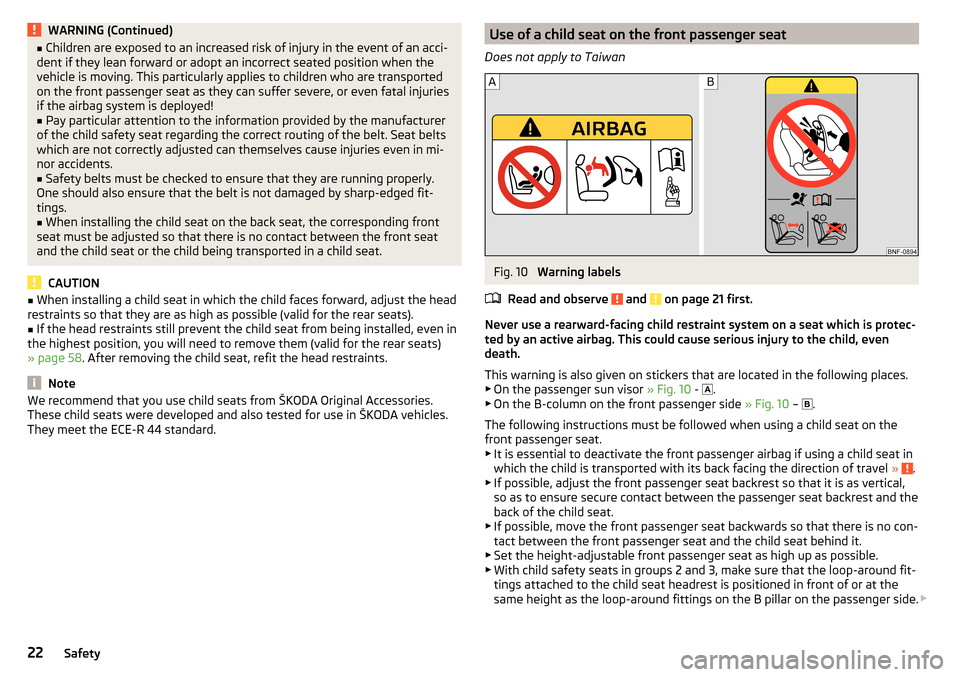
Does not apply to TaiwanFig. 10
Warning labels
Read and observe
and on page 21 first.
Never use a rearward-facing child restraint system on a seat which is protec-
ted by an active airbag. This could cause serious injury to the child, even
death.
This warning is also given on stickers that are located in the following places.
▶ On the passenger sun visor » Fig. 10 -
.
▶ On the B-column on the front passenger side » Fig. 10 –
.
The following instructions must be followed when using a child seat on the
front passenger seat.
▶ It is essential to deactivate the front passenger airbag if using a child seat in
which the child is transported with its back facing the direction of travel »
.
▶ If possible, adjust the front passenger seat backrest so that it is as vertical,
so as to ensure secure contact between the passenger seat backrest and the
back of the child seat.
▶ If possible, move the front passenger seat backwards so that there is no con-
tact between the front passenger seat and the child seat behind it.
▶ Set the height-adjustable front passenger seat as high up as possible.
▶ With child safety seats in groups 2 and 3, make sure that the loop-around fit-
tings attached to the child seat headrest is positioned in front of or at the
same height as the loop-around fittings on the B pillar on the passenger side.
22Safety
Page 32 of 172
Instruments and warning lights
Instrument cluster
Introduction
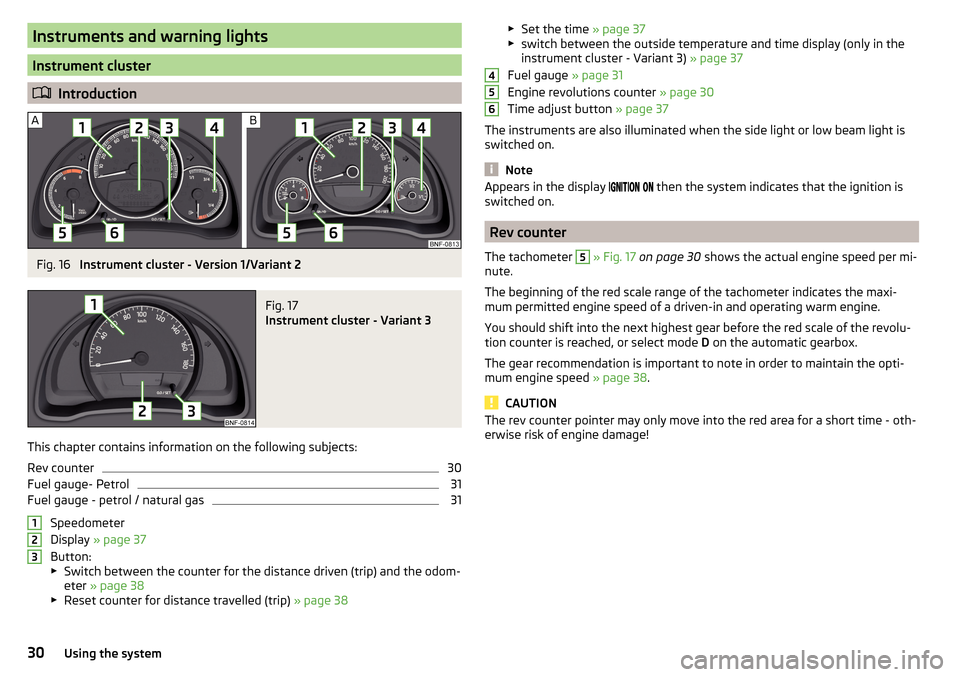
Fig. 16
Instrument cluster - Version 1/Variant 2
Fig. 17
Instrument cluster - Variant 3
This chapter contains information on the following subjects:
Rev counter
30
Fuel gauge- Petrol
31
Fuel gauge - petrol / natural gas
31
Speedometer
Display » page 37
Button:
▶ Switch between the counter for the distance driven (trip) and the odom-
eter » page 38
▶ Reset counter for distance travelled (trip) » page 38
123▶
Set the time » page 37
▶ switch between the outside temperature and time display (only in the
instrument cluster - Variant 3) » page 37
Fuel gauge » page 31
Engine revolutions counter » page 30
Time adjust button » page 37
The instruments are also illuminated when the side light or low beam light is
switched on.
Note
Appears in the display then the system indicates that the ignition is
switched on.
Rev counter
The tachometer
5
» Fig. 17 on page 30 shows the actual engine speed per mi-
nute.
The beginning of the red scale range of the tachometer indicates the maxi-
mum permitted engine speed of a driven-in and operating warm engine.
You should shift into the next highest gear before the red scale of the revolu- tion counter is reached, or select mode D on the automatic gearbox.
The gear recommendation is important to note in order to maintain the opti-
mum engine speed » page 38.
CAUTION
The rev counter pointer may only move into the red area for a short time - oth-
erwise risk of engine damage!45630Using the system
Page 39 of 172
Information system
Driver information system
Introduction
This chapter contains information on the following subjects:
Display in the instrument cluster
37
Switching between the time and external temperature display
37
Setting the time in the instrument cluster
37
Trip counter
38
Recommended gear
38
Operating the information system
39
Display in the instrument cluster
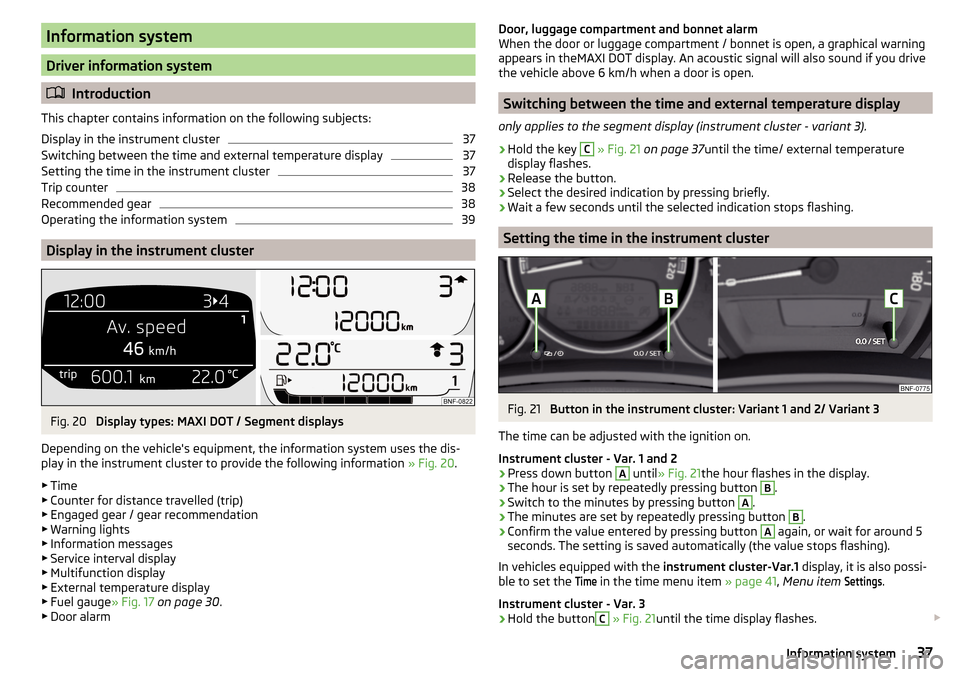
Fig. 20
Display types: MAXI DOT / Segment displays
Depending on the vehicle's equipment, the information system uses the dis-
play in the instrument cluster to provide the following information » Fig. 20.
▶ Time
▶ Counter for distance travelled (trip)
▶ Engaged gear / gear recommendation
▶ Warning lights
▶ Information messages
▶ Service interval display
▶ Multifunction display
▶ External temperature display
▶ Fuel gauge » Fig. 17 on page 30 .
▶ Door alarm
Door, luggage compartment and bonnet alarm
When the door or luggage compartment / bonnet is open, a graphical warning appears in theMAXI DOT display. An acoustic signal will also sound if you drive
the vehicle above 6 km/h when a door is open.
Switching between the time and external temperature display
only applies to the segment display (instrument cluster - variant 3).
›
Hold the key
C
» Fig. 21 on page 37 until the time/ external temperature
display flashes.
›
Release the button.
›
Select the desired indication by pressing briefly.
›
Wait a few seconds until the selected indication stops flashing.
Setting the time in the instrument cluster
Fig. 21
Button in the instrument cluster: Variant 1 and 2/ Variant 3
The time can be adjusted with the ignition on.
Instrument cluster - Var. 1 and 2
›
Press down button
A
until » Fig. 21 the hour flashes in the display.
›
The hour is set by repeatedly pressing button
B
.
›
Switch to the minutes by pressing button
A
.
›
The minutes are set by repeatedly pressing button
B
.
›
Confirm the value entered by pressing button
A
again, or wait for around 5
seconds. The setting is saved automatically (the value stops flashing).
In vehicles equipped with the instrument cluster-Var.1 display, it is also possi-
ble to set the
Time
in the time menu item » page 41, Menu item
Settings
.
Instrument cluster - Var. 3
›
Hold the button
C
» Fig. 21 until the time display flashes.
37Information system
Page 40 of 172
›Release the button and keep it pressed down until the hour display starts
flashing.›
Release the button and set the hour by pressing repeatedly.
›
Press and hold the button until the minutes display flashes.
›
Release the button and set the minutes by pressing repeatedly.
›
Keep the button pressed down until the minute indicator stops flashing on
the display.
Trip counter
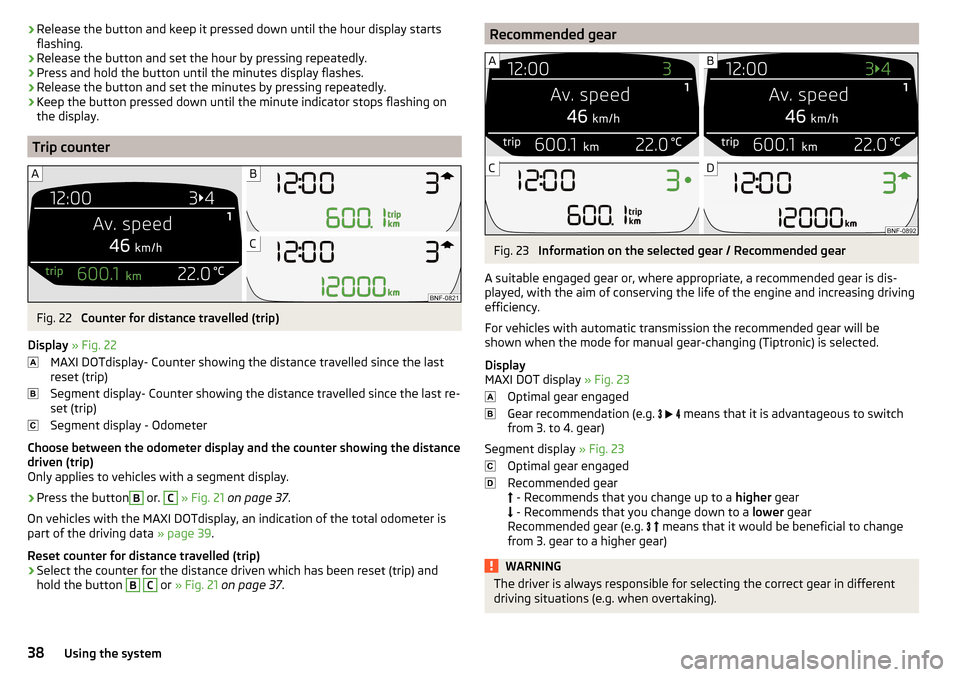
Fig. 22
Counter for distance travelled (trip)
Display » Fig. 22
MAXI DOTdisplay- Counter showing the distance travelled since the last
reset (trip)
Segment display- Counter showing the distance travelled since the last re-
set (trip)
Segment display - Odometer
Choose between the odometer display and the counter showing the distance
driven (trip)
Only applies to vehicles with a segment display.
›
Press the button
B
or.
C
» Fig. 21 on page 37 .
On vehicles with the MAXI DOTdisplay, an indication of the total odometer is
part of the driving data » page 39.
Reset counter for distance travelled (trip)
›
Select the counter for the distance driven which has been reset (trip) and
hold the button
B
C
or » Fig. 21 on page 37 .
Recommended gearFig. 23
Information on the selected gear / Recommended gear
A suitable engaged gear or, where appropriate, a recommended gear is dis- played, with the aim of conserving the life of the engine and increasing driving
efficiency.
For vehicles with automatic transmission the recommended gear will be
shown when the mode for manual gear-changing (Tiptronic) is selected.
Display
MAXI DOT display » Fig. 23
Optimal gear engaged
Gear recommendation (e.g.
means that it is advantageous to switch
from 3. to 4. gear)
Segment display » Fig. 23
Optimal gear engaged
Recommended gear
- Recommends that you change up to a higher gear
- Recommends that you change down to a lower gear
Recommended gear (e.g.
means that it would be beneficial to change
from 3. gear to a higher gear)
WARNINGThe driver is always responsible for selecting the correct gear in different
driving situations (e.g. when overtaking).38Using the system
Page 41 of 172
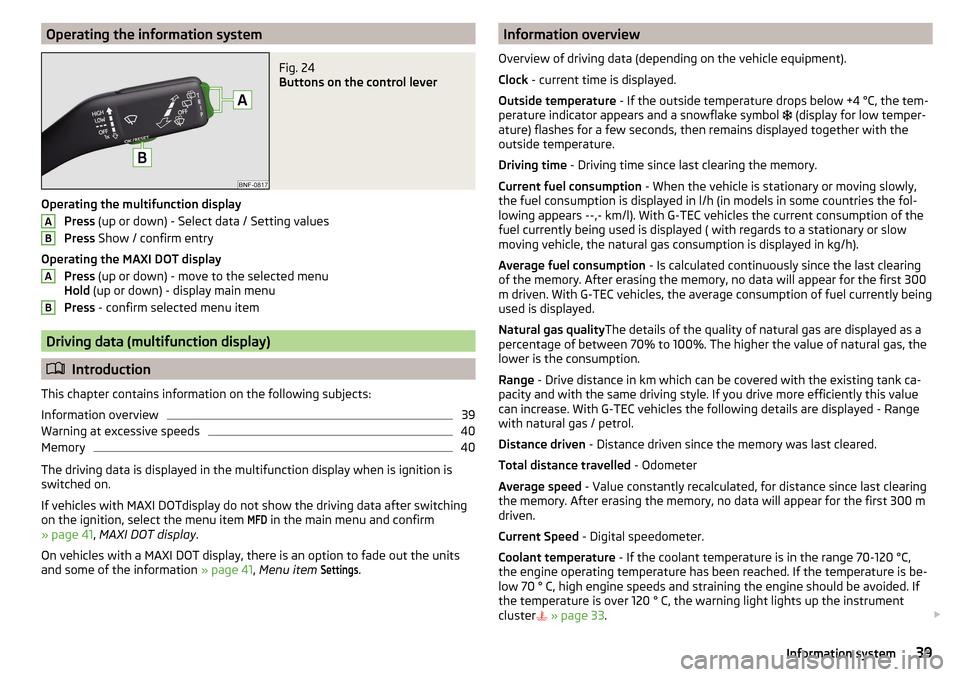
Operating the information systemFig. 24
Buttons on the control lever
Operating the multifunction displayPress (up or down) - Select data / Setting values
Press Show / confirm entry
Operating the MAXI DOT display Press (up or down) - move to the selected menu
Hold (up or down) - display main menu
Press - confirm selected menu item
Driving data (multifunction display)
Introduction
This chapter contains information on the following subjects:
Information overview
39
Warning at excessive speeds
40
Memory
40
The driving data is displayed in the multifunction display when is ignition is
switched on.
If vehicles with MAXI DOTdisplay do not show the driving data after switching
on the ignition, select the menu item
MFD
in the main menu and confirm
» page 41 , MAXI DOT display .
On vehicles with a MAXI DOT display, there is an option to fade out the units
and some of the information » page 41, Menu item
Settings
.
ABABInformation overview
Overview of driving data (depending on the vehicle equipment).
Clock - current time is displayed.
Outside temperature - If the outside temperature drops below +4 °C, the tem-
perature indicator appears and a snowflake symbol
(display for low temper-
ature) flashes for a few seconds, then remains displayed together with the
outside temperature.
Driving time - Driving time since last clearing the memory.
Current fuel consumption - When the vehicle is stationary or moving slowly,
the fuel consumption is displayed in l/h (in models in some countries the fol-
lowing appears --,- km/l). With G-TEC vehicles the current consumption of the
fuel currently being used is displayed ( with regards to a stationary or slow
moving vehicle, the natural gas consumption is displayed in kg/h).
Average fuel consumption - Is calculated continuously since the last clearing
of the memory. After erasing the memory, no data will appear for the first 300
m driven. With G-TEC vehicles, the average consumption of fuel currently being
used is displayed.
Natural gas quality The details of the quality of natural gas are displayed as a
percentage of between 70% to 100%. The higher the value of natural gas, the
lower is the consumption.
Range - Drive distance in km which can be covered with the existing tank ca-
pacity and with the same driving style. If you drive more efficiently this value
can increase. With G-TEC vehicles the following details are displayed - Range
with natural gas / petrol.
Distance driven - Distance driven since the memory was last cleared.
Total distance travelled - Odometer
Average speed - Value constantly recalculated, for distance since last clearing
the memory. After erasing the memory, no data will appear for the first 300 m
driven.
Current Speed - Digital speedometer.
Coolant temperature - If the coolant temperature is in the range 70-120 °C,
the engine operating temperature has been reached. If the temperature is be-
low 70 ° C, high engine speeds and straining the engine should be avoided. If
the temperature is over 120 ° C, the warning light lights up the instrument
cluster
» page 33 . 39Information system
Page 42 of 172
Oil temperature - if the temperature is lower than 50 °C or if there is a fault in
the system for checking the oil temperature, the symbols are displayed.
Warning of excessive speed - It is possible to set a speed limit.WARNINGEven at temperatures of around +4 °C, black ice may still be on the road
surface! You should therefore not only rely on the outside temperature dis- play for accurate information as to whether there is ice on the road.
Warning at excessive speeds
The system offers the possibility to set a speed limit beyond which an acoustic
warning signal will sound and the following warning message (MAXI DOT Dis-
play) and the symbol appears in the display of the instrument cluster.
Adjust the speed limit while the vehicle is stationary
›
Select the menu item
Speed warning at
or and confirm.
›
Set the desired speed limit.
›
Confirm the set value, or wait several seconds; your settings will be saved
automatically.
Adjusting the speed limit while the vehicle is moving
›
Select the menu item
Speed warning at
or and confirm.
›
Drive at the desired speed.
›
Confirm the current speed as the speed limit.
The set speed limit can be manually adjusted later if needed.
Reset speed limit
›
Select the menu item
Speed warning at
or and confirm.
›
By confirming the speed stored in the memory, the speed limit is reset.
The set driving mode remains stored even after switching the ignition on and
off. If the break in a journey exceeds 2 hours, the pre-set speed limit is deacti-
vated.
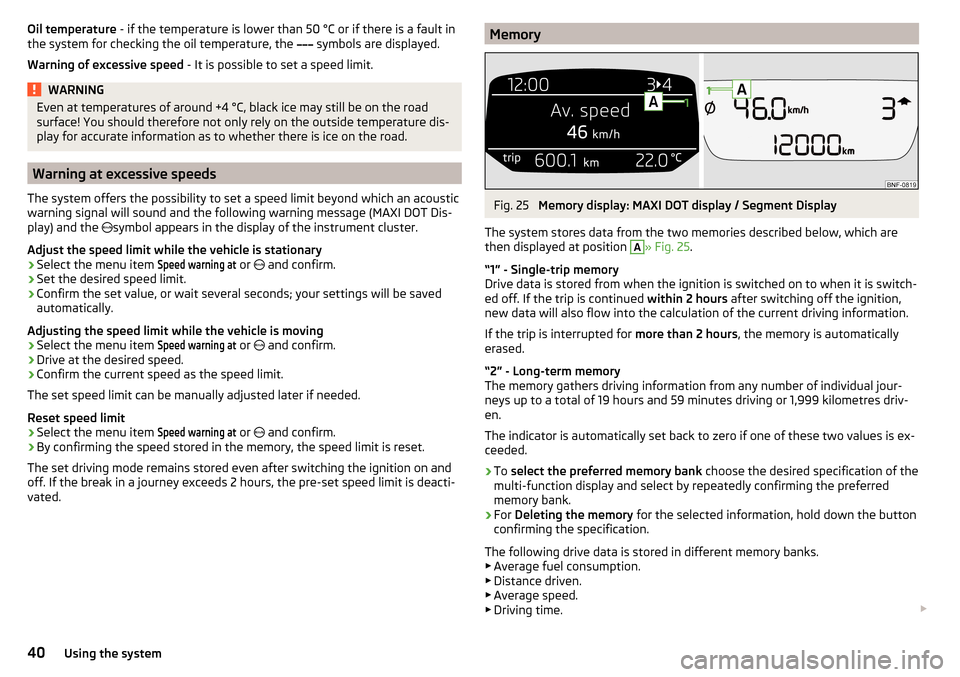
MemoryFig. 25
Memory display: MAXI DOT display / Segment Display
The system stores data from the two memories described below, which are
then displayed at position
A
» Fig. 25 .
“1” - Single-trip memory
Drive data is stored from when the ignition is switched on to when it is switch-
ed off. If the trip is continued within 2 hours after switching off the ignition,
new data will also flow into the calculation of the current driving information.
If the trip is interrupted for more than 2 hours, the memory is automatically
erased.
“2” - Long-term memory
The memory gathers driving information from any number of individual jour-
neys up to a total of 19 hours and 59 minutes driving or 1,999 kilometres driv-
en.
The indicator is automatically set back to zero if one of these two values is ex-
ceeded.
›
To select the preferred memory bank choose the desired specification of the
multi-function display and select by repeatedly confirming the preferred
memory bank.
›
For Deleting the memory for the selected information, hold down the button
confirming the specification.
The following drive data is stored in different memory banks.
▶ Average fuel consumption.
▶ Distance driven.
▶ Average speed.
▶ Driving time.
40Using the system
Page 43 of 172
NoteDisconnecting the vehicle battery will delete all memory data.
MAXI DOT display
Introduction
This chapter contains information on the following subjects:
Menu item
Audio41
Menu item
Vehicle status41
Menu item
Settings41
The MAXI DOT display is a user interface which, depending on equipment fit-
ted, provides information about the radio, the multifunction display, the assis-
tance systems etc. Furthermore, it enables the setting of some other functions
of your vehicle.
The menus with details can be operated and displayed using the buttons on
the operating lever » page 39.
Main menu points ■
MFD
(Multifunction display) » page 39
■
Audio
» page 41
■
Vehicle status
» page 41
■
Settings
» page 41
Note
■
If warning messages are displayed, these messages must be verified to ac-
cess the main menu.■
The menu chosen always shifts to one of the higher levels after 10 seconds if
the display is not currently active.
Menu item
Audio
The following information is displayed in the
Audio
menu item.
Radio
▶ Currently playing station (name/frequency).
▶ The selected frequency range (e.g. FM) optionally with the number of the sta-
tion button (e.g. FM 3), if the station is stored in the memory list.
▶ List of available stations (if more than 5 stations can be received).
▶ TP traffic announcements.
Media
▶ Name of the track being played, if necessary, further information regarding
title (e.g. artist, album name), if this information is stored as a so called ID3
tag on the audio source.
Menu item
Vehicle status
Certain functions and conditions of individual vehicle systems are checked
continuously when the ignition is switched on. If there is a system failure, the
relevant message is displayed in the MAXI DOTDisplay, in conjunction with in-
dicator lights, if necessary, indicator light illumination takes place in the instru-
ment cluster » page 31, Warning lights .
The menu item
Vehicle status
is shown in the main menu of the MAXI DOT dis-
play whenever there is at least one fault message . After selecting this menu,
the first of the error messages is displayed.
Several error messages are shown on the display under the message e.g. 1/3.
This indicates that the first of a total of three error messages is being dis-
played.
Menu item
Settings
There is an option to change certain settings using the display. The following
menu items can be selected.
Language
Setting the language for the texts shown on the display.
MFD data
Switching on/off certain information of the multifunction display.
Time
- Setting the time, the time format (24 or 12 hour) and the change-over to
summer/winter time.
Units
- Setting the units for temperature, consumption and distance travelled.
Service
Display the distance travelled and the days until the next service
date » page 42 , Service interval display .
Factory setting.
- Resetting the display functions to factory settings.
41Information system
Page 44 of 172
Service interval display
Introduction
This chapter contains information on the following subjects:
Prompt in the MAXI DOT display
42
Prompt in the segment display
42
The service interval display shows the kilometres or days until the next service
event.
Information regarding the service intervals » page 112.
Prompt in the MAXI DOT display
Before the next service date has been reached , the symbol as well as a mes-
sage about the mileage or days until the next service event appears in the dis-
play after switching on the ignition.
At the time of the service , a message appears in the display after switching on
the ignition.
Displaying the distance and days until the next service interval
Messages regarding the kilometres and days until the next service appoint-
ment can be displayed any time when the ignition is on, in the
service
menu item
» page 41 , Menu item
Settings
» page 41 .
Prompt in the segment display
Before the next service interval is reached , a key symbol
and the remain-
ing kilometres are indicated on the display for several seconds after switching
on the ignition.
At the time of the service , an acoustic signal will sound and the lettering
appears for a few seconds after switching on the ignition.
Unlocking and opening
Unlocking and locking
Introduction
This chapter contains information on the following subjects:
Unlock / lock using key and lock
43
Unlocking/locking with the remote control key
43
Vehicle unlocking / locking with the door opening lever
44
Vehicle locking / unlocking with the central locking button
44
SafeLock
44
Opening/closing a door
45
Child safety lock
45
Malfunctions
45
The vehicle may be equipped with a central locking system which makes it
possible to unlock/lock all doors and the boot lid simultaneously.
The turn signal lights flash twice as confirmation that the vehicle has been un-
locked .
If you unlock the vehicle and do not open a door or the boot lid within the next
30 seconds, the vehicle will lock again automatically.
The turn signal lights flash once as confirmation that the vehicle has been
locked .
If the driver's door has been opened, the vehicle cannot be locked.
If the doors or the luggage compartment lid remain open after the vehicle has
been locked, the turn signal lights do not flash until they have been closed.
Automatic locking / unlocking of a vehicle with central locking system
This function enables the locking of all doors and the boot lid from a speed of
15 km / h. Opening the doors and the boot lid from the outside is not possible.
Renewed automatic unlocking of all doors as well as the luggage compartment
door when removing the ignition key or by opening any of the doors.
42Using the system