lock SKODA KODIAQ 2016 1.G Service Manual
[x] Cancel search | Manufacturer: SKODA, Model Year: 2016, Model line: KODIAQ, Model: SKODA KODIAQ 2016 1.GPages: 344, PDF Size: 58.96 MB
Page 86 of 344
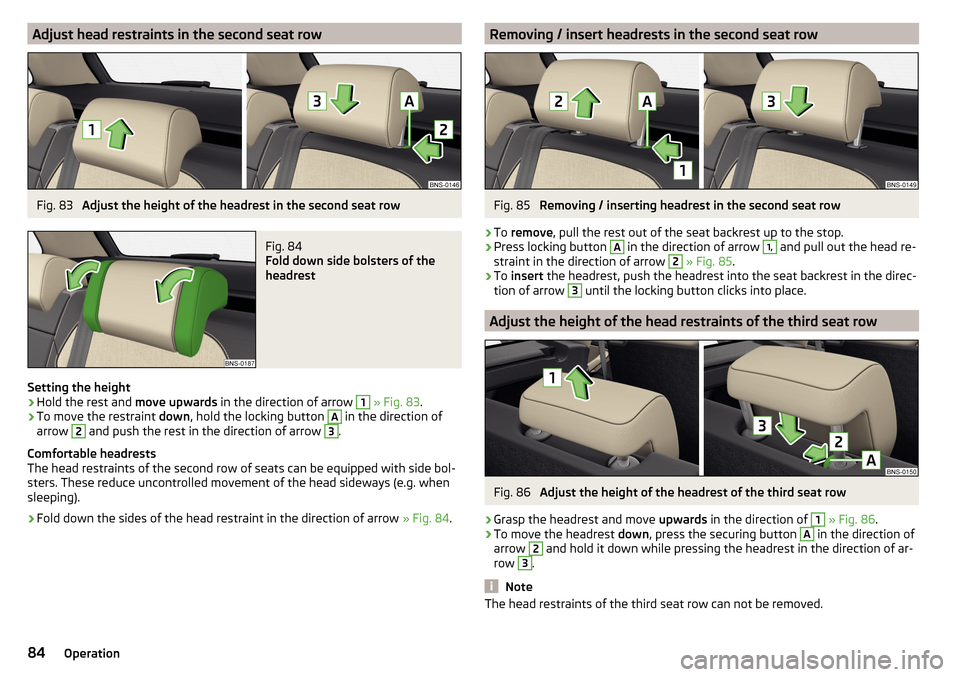
Adjust head restraints in the second seat rowFig. 83
Adjust the height of the headrest in the second seat row
Fig. 84
Fold down side bolsters of the
headrest
Setting the height
›
Hold the rest and move upwards in the direction of arrow
1
» Fig. 83 .
›
To move the restraint down, hold the locking button
A
in the direction of
arrow
2
and push the rest in the direction of arrow
3
.
Comfortable headrests
The head restraints of the second row of seats can be equipped with side bol-
sters. These reduce uncontrolled movement of the head sideways (e.g. when
sleeping).
›
Fold down the sides of the head restraint in the direction of arrow » Fig. 84.
Removing / insert headrests in the second seat rowFig. 85
Removing / inserting headrest in the second seat row
›
To remove , pull the rest out of the seat backrest up to the stop.
›
Press locking button
A
in the direction of arrow
1,
and pull out the head re-
straint in the direction of arrow
2
» Fig. 85 .
›
To insert the headrest, push the headrest into the seat backrest in the direc-
tion of arrow
3
until the locking button clicks into place.
Adjust the height of the head restraints of the third seat row
Fig. 86
Adjust the height of the headrest of the third seat row
›
Grasp the headrest and move upwards in the direction of
1
» Fig. 86 .
›
To move the headrest down, press the securing button
A
in the direction of
arrow
2
and hold it down while pressing the headrest in the direction of ar-
row
3
.
Note
The head restraints of the third seat row can not be removed.84Operation
Page 88 of 344
With repeated pressing of the button, the level is down-regulated until it
switches off . The level of the seat heating is indicated by the number of illu-
minated warning lights underneath / in the button.
Increasing in heating power of the rear seat heating can be locked / unlocked .
To do this, press button
on the Climatronic → Tap the function surfaces
/
on the Infotainment screen (applies to vehicles with Climatronic controls
in the rear). In the locked heating power increase, the heating power can only
be adjusted down to turn off.
Front seats with heating and ventilation
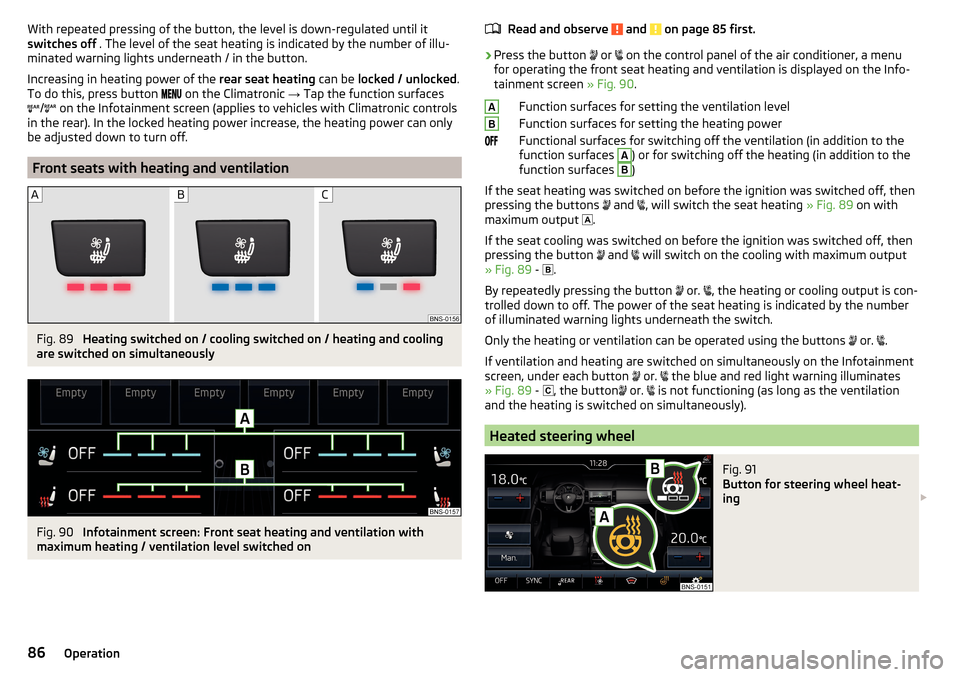
Fig. 89
Heating switched on / cooling switched on / heating and cooling
are switched on simultaneously
Fig. 90
Infotainment screen: Front seat heating and ventilation with
maximum heating / ventilation level switched on
Read and observe and on page 85 first.›
Press the button
or
on the control panel of the air conditioner, a menu
for operating the front seat heating and ventilation is displayed on the Info-
tainment screen » Fig. 90.
Function surfaces for setting the ventilation level
Function surfaces for setting the heating power
Functional surfaces for switching off the ventilation (in addition to the
function surfaces
A
) or for switching off the heating (in addition to the
function surfaces
B
)
If the seat heating was switched on before the ignition was switched off, then
pressing the buttons and
, will switch the seat heating
» Fig. 89 on with
maximum output .
If the seat cooling was switched on before the ignition was switched off, then
pressing the button and
will switch on the cooling with maximum output
» Fig. 89 -
.
By repeatedly pressing the button or.
, the heating or cooling output is con-
trolled down to off. The power of the seat heating is indicated by the number
of illuminated warning lights underneath the switch.
Only the heating or ventilation can be operated using the buttons or.
.
If ventilation and heating are switched on simultaneously on the Infotainment
screen, under each button or.
the blue and red light warning illuminates
» Fig. 89 -
, the button
or.
is not functioning (as long as the ventilation
and the heating is switched on simultaneously).
Heated steering wheel
Fig. 91
Button for steering wheel heat-
ing
AB86Operation
Page 90 of 344
WARNING (Continued)■No objects should be placed in the storage compartments nor in the
drinks holders; the vehicle occupants could be endangered if there is sud-
den braking or the vehicle collides with something.■
For safety reasons, lockable storage compartments must be closed while
driving - there is a risk of injury from the opened cover or from the items in
the compartment.
■
Make sure that no objects protrude from the compartments - there is
danger of injury!
■
Do not exceed the permissible load for the storage compartments and
pockets - it may cause injury or there is the risk of damaging the compart-
ments and pockets!
■
Ash, cigarettes, cigars and the like may only be placed in the ashtray - risk
of fire!
■
The storage compartments and the waste containers are not a substitute
for the ashtray and must also not be used for such purposes – risk of fire!
CAUTION
No not place large or sharp objects in the storage compartments and pockets -
there is a risk of damage to the compartments and pockets.
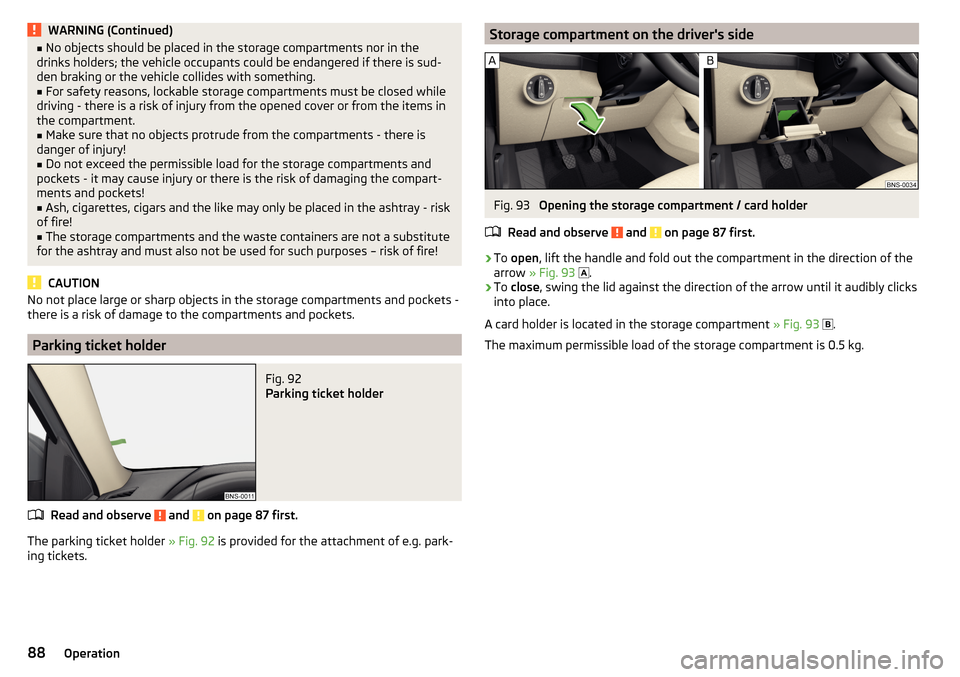
Parking ticket holder
Fig. 92
Parking ticket holder
Read and observe and on page 87 first.
The parking ticket holder » Fig. 92 is provided for the attachment of e.g. park-
ing tickets.
Storage compartment on the driver's sideFig. 93
Opening the storage compartment / card holder
Read and observe
and on page 87 first.
›
To open , lift the handle and fold out the compartment in the direction of the
arrow » Fig. 93
.
›
To
close , swing the lid against the direction of the arrow until it audibly clicks
into place.
A card holder is located in the storage compartment » Fig. 93
.
The maximum permissible load of the storage compartment is 0.5 kg.
88Operation
Page 91 of 344
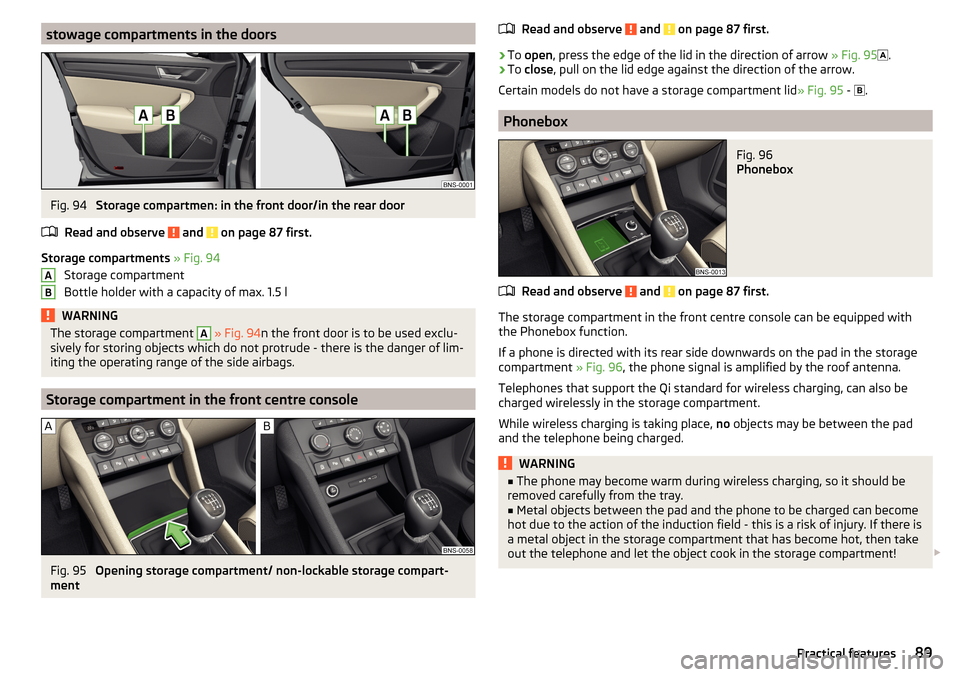
stowage compartments in the doorsFig. 94
Storage compartmen: in the front door/in the rear door
Read and observe
and on page 87 first.
Storage compartments » Fig. 94
Storage compartment
Bottle holder with a capacity of max. 1.5 l
WARNINGThe storage compartment A » Fig. 94 n the front door is to be used exclu-
sively for storing objects which do not protrude - there is the danger of lim-
iting the operating range of the side airbags.
Storage compartment in the front centre console
Fig. 95
Opening storage compartment/ non-lockable storage compart-
ment
ABRead and observe and on page 87 first.›
To open , press the edge of the lid in the direction of arrow » Fig. 95
.
›
To close , pull on the lid edge against the direction of the arrow.
Certain models do not have a storage compartment lid » Fig. 95 -
.
Phonebox
Fig. 96
Phonebox
Read and observe and on page 87 first.
The storage compartment in the front centre console can be equipped with
the Phonebox function.
If a phone is directed with its rear side downwards on the pad in the storage
compartment » Fig. 96, the phone signal is amplified by the roof antenna.
Telephones that support the Qi standard for wireless charging, can also be
charged wirelessly in the storage compartment.
While wireless charging is taking place, no objects may be between the pad
and the telephone being charged.
WARNING■ The phone may become warm during wireless charging, so it should be
removed carefully from the tray.■
Metal objects between the pad and the phone to be charged can become
hot due to the action of the induction field - this is a risk of injury. If there is
a metal object in the storage compartment that has become hot, then take
out the telephone and let the object cook in the storage compartment!
89Practical features
Page 94 of 344
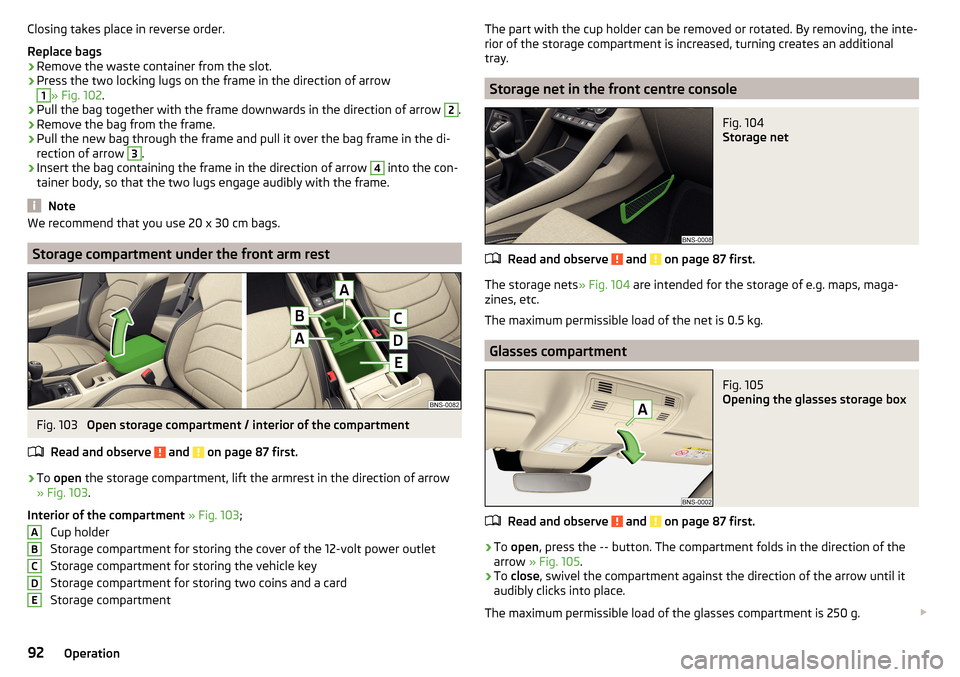
Closing takes place in reverse order.
Replace bags›
Remove the waste container from the slot.
›
Press the two locking lugs on the frame in the direction of arrow
1
» Fig. 102 .
›
Pull the bag together with the frame downwards in the direction of arrow
2
.
›
Remove the bag from the frame.
›
Pull the new bag through the frame and pull it over the bag frame in the di-
rection of arrow
3
.
›
Insert the bag containing the frame in the direction of arrow
4
into the con-
tainer body, so that the two lugs engage audibly with the frame.
Note
We recommend that you use 20 x 30 cm bags.
Storage compartment under the front arm rest
Fig. 103
Open storage compartment / interior of the compartment
Read and observe
and on page 87 first.
›
To open the storage compartment, lift the armrest in the direction of arrow
» Fig. 103 .
Interior of the compartment » Fig. 103 ;
Cup holder
Storage compartment for storing the cover of the 12-volt power outlet
Storage compartment for storing the vehicle key
Storage compartment for storing two coins and a card
Storage compartment
ABCDEThe part with the cup holder can be removed or rotated. By removing, the inte-
rior of the storage compartment is increased, turning creates an additional
tray.
Storage net in the front centre console
Fig. 104
Storage net
Read and observe and on page 87 first.
The storage nets » Fig. 104 are intended for the storage of e.g. maps, maga-
zines, etc.
The maximum permissible load of the net is 0.5 kg.
Glasses compartment
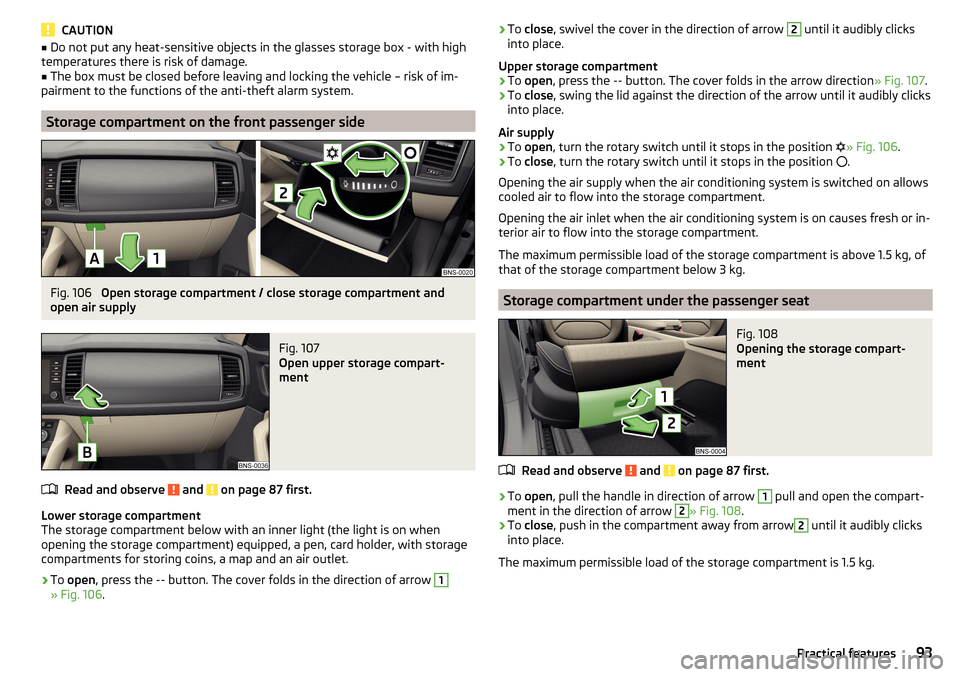
Fig. 105
Opening the glasses storage box
Read and observe and on page 87 first.
›
To open , press the
--
button. The compartment folds in the direction of the
arrow » Fig. 105 .
›
To close , swivel the compartment against the direction of the arrow until it
audibly clicks into place.
The maximum permissible load of the glasses compartment is 250 g.
92Operation
Page 95 of 344
CAUTION■Do not put any heat-sensitive objects in the glasses storage box - with high
temperatures there is risk of damage.■
The box must be closed before leaving and locking the vehicle – risk of im-
pairment to the functions of the anti-theft alarm system.
Storage compartment on the front passenger side
Fig. 106
Open storage compartment / close storage compartment and
open air supply
Fig. 107
Open upper storage compart-
ment
Read and observe and on page 87 first.
Lower storage compartment
The storage compartment below with an inner light (the light is on when
opening the storage compartment) equipped, a pen, card holder, with storage
compartments for storing coins, a map and an air outlet.
›
To open , press the
--
button. The cover folds in the direction of arrow
1
» Fig. 106 .
›To
close , swivel the cover in the direction of arrow 2 until it audibly clicks
into place.
Upper storage compartment›
To open , press the
--
button. The cover folds in the arrow direction » Fig. 107.
›
To close , swing the lid against the direction of the arrow until it audibly clicks
into place.
Air supply
›
To open , turn the rotary switch until it stops in the position
» Fig. 106 .
›
To close , turn the rotary switch until it stops in the position
.
Opening the air supply when the air conditioning system is switched on allows
cooled air to flow into the storage compartment.
Opening the air inlet when the air conditioning system is on causes fresh or in-
terior air to flow into the storage compartment.
The maximum permissible load of the storage compartment is above 1.5 kg, of
that of the storage compartment below 3 kg.
Storage compartment under the passenger seat
Fig. 108
Opening the storage compart-
ment
Read and observe and on page 87 first.
›
To open , pull the handle in direction of arrow
1
pull and open the compart-
ment in the direction of arrow
2
» Fig. 108 .
›
To close , push in the compartment away from arrow
2
until it audibly clicks
into place.
The maximum permissible load of the storage compartment is 1.5 kg.
93Practical features
Page 97 of 344
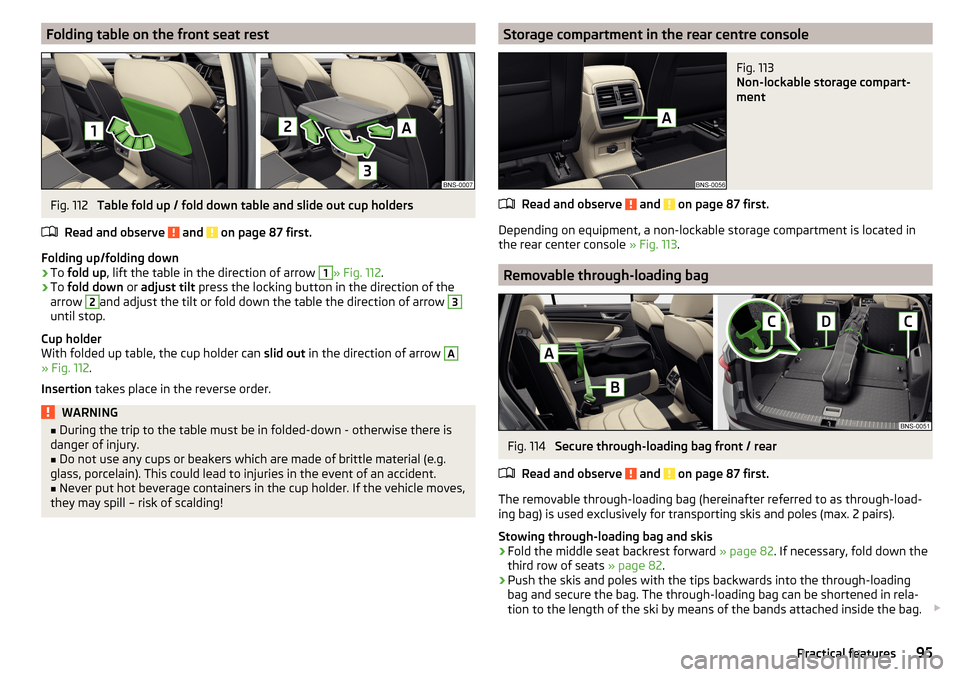
Folding table on the front seat restFig. 112
Table fold up / fold down table and slide out cup holders
Read and observe
and on page 87 first.
Folding up/folding down
›
To fold up , lift the table in the direction of arrow
1
» Fig. 112 .
›
To fold down or adjust tilt press the locking button in the direction of the
arrow
2
and adjust the tilt or fold down the table the direction of arrow
3
until stop.
Cup holder
With folded up table, the cup holder can slid out in the direction of arrow
A
» Fig. 112 .
Insertion takes place in the reverse order.
WARNING■
During the trip to the table must be in folded-down - otherwise there is
danger of injury.■
Do not use any cups or beakers which are made of brittle material (e.g.
glass, porcelain). This could lead to injuries in the event of an accident.
■
Never put hot beverage containers in the cup holder. If the vehicle moves,
they may spill – risk of scalding!
Storage compartment in the rear centre consoleFig. 113
Non-lockable storage compart-
ment
Read and observe and on page 87 first.
Depending on equipment, a non-lockable storage compartment is located in
the rear center console » Fig. 113.
Removable through-loading bag
Fig. 114
Secure through-loading bag front / rear
Read and observe
and on page 87 first.
The removable through-loading bag (hereinafter referred to as through-load-
ing bag) is used exclusively for transporting skis and poles (max. 2 pairs).
Stowing through-loading bag and skis
›
Fold the middle seat backrest forward » page 82. If necessary, fold down the
third row of seats » page 82.
›
Push the skis and poles with the tips backwards into the through-loading
bag and secure the bag. The through-loading bag can be shortened in rela-
tion to the length of the ski by means of the bands attached inside the bag.
95Practical features
Page 98 of 344
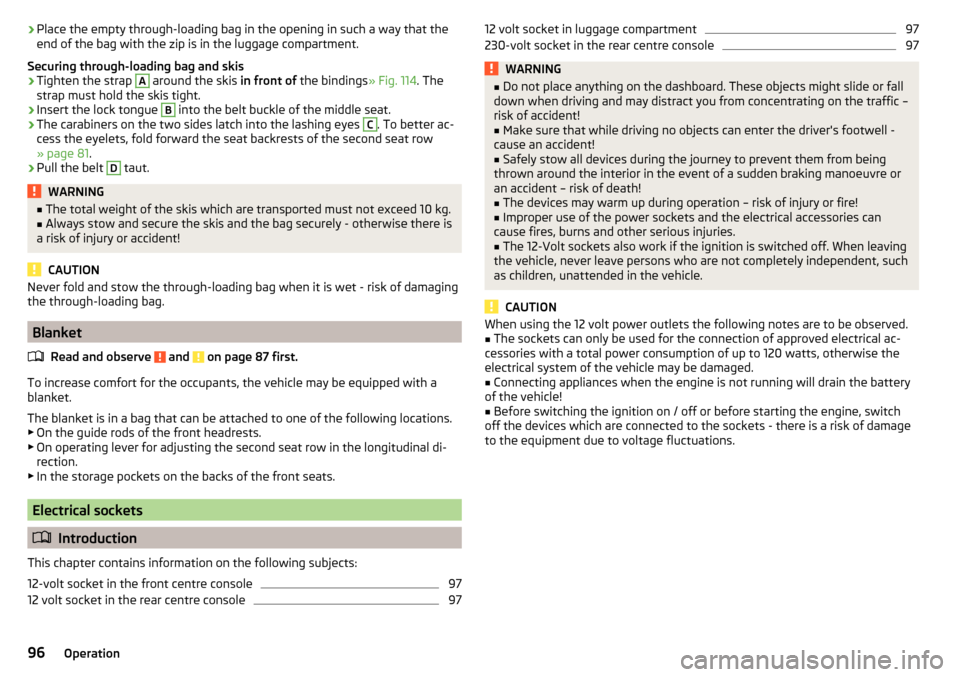
›Place the empty through-loading bag in the opening in such a way that the
end of the bag with the zip is in the luggage compartment.
Securing through-loading bag and skis›
Tighten the strap
A
around the skis in front of the bindings » Fig. 114. The
strap must hold the skis tight.
›
Insert the lock tongue
B
into the belt buckle of the middle seat.
›
The carabiners on the two sides latch into the lashing eyes
C
. To better ac-
cess the eyelets, fold forward the seat backrests of the second seat row
» page 81 .
›
Pull the belt
D
taut.
WARNING■
The total weight of the skis which are transported must not exceed 10 kg.■Always stow and secure the skis and the bag securely - otherwise there is
a risk of injury or accident!
CAUTION
Never fold and stow the through-loading bag when it is wet - risk of damaging
the through-loading bag.
Blanket
Read and observe
and on page 87 first.
To increase comfort for the occupants, the vehicle may be equipped with a
blanket.
The blanket is in a bag that can be attached to one of the following locations.
▶ On the guide rods of the front headrests.
▶ On operating lever for adjusting the second seat row in the longitudinal di-
rection.
▶ In the storage pockets on the backs of the front seats.
Electrical sockets
Introduction
This chapter contains information on the following subjects:
12-volt socket in the front centre console
97
12 volt socket in the rear centre console
9712 volt socket in luggage compartment97230-volt socket in the rear centre console97WARNING■ Do not place anything on the dashboard. These objects might slide or fall
down when driving and may distract you from concentrating on the traffic –
risk of accident!■
Make sure that while driving no objects can enter the driver's footwell -
cause an accident!
■
Safely stow all devices during the journey to prevent them from being
thrown around the interior in the event of a sudden braking manoeuvre or
an accident – risk of death!
■
The devices may warm up during operation – risk of injury or fire!
■
Improper use of the power sockets and the electrical accessories can
cause fires, burns and other serious injuries.
■
The 12-Volt sockets also work if the ignition is switched off. When leaving
the vehicle, never leave persons who are not completely independent, such
as children, unattended in the vehicle.
CAUTION
When using the 12 volt power outlets the following notes are to be observed.■The sockets can only be used for the connection of approved electrical ac-
cessories with a total power consumption of up to 120 watts, otherwise the
electrical system of the vehicle may be damaged.■
Connecting appliances when the engine is not running will drain the battery
of the vehicle!
■
Before switching the ignition on / off or before starting the engine, switch
off the devices which are connected to the sockets - there is a risk of damage
to the equipment due to voltage fluctuations.
96Operation
Page 99 of 344
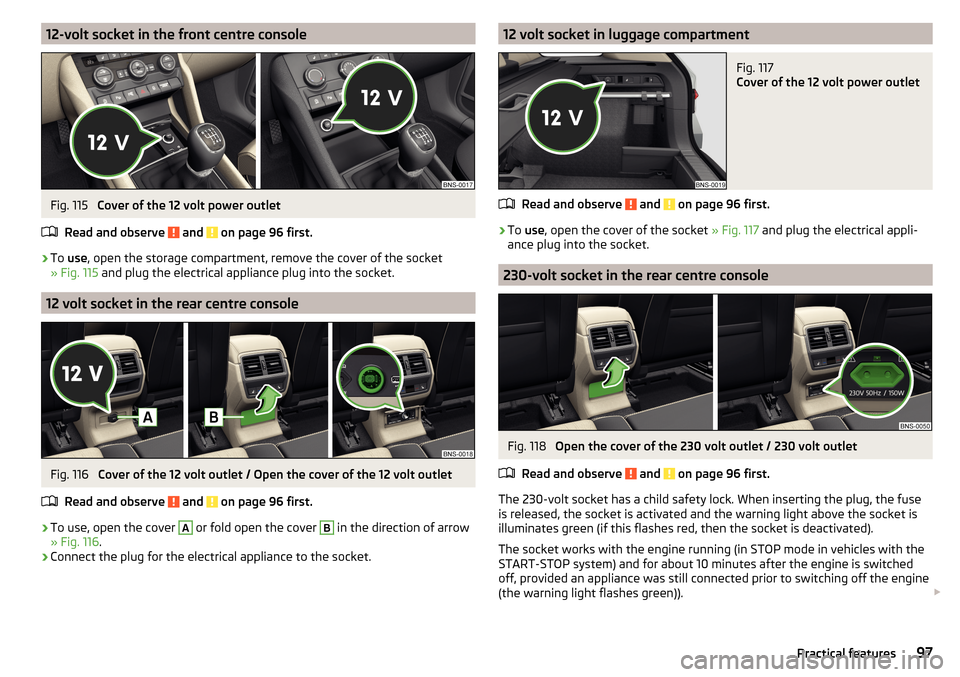
12-volt socket in the front centre consoleFig. 115
Cover of the 12 volt power outlet
Read and observe
and on page 96 first.
›
To use , open the storage compartment, remove the cover of the socket
» Fig. 115 and plug the electrical appliance plug into the socket.
12 volt socket in the rear centre console
Fig. 116
Cover of the 12 volt outlet / Open the cover of the 12 volt outlet
Read and observe
and on page 96 first.
›
To use, open the cover
A
or fold open the cover
B
in the direction of arrow
» Fig. 116 .
›
Connect the plug for the electrical appliance to the socket.
12 volt socket in luggage compartmentFig. 117
Cover of the 12 volt power outlet
Read and observe and on page 96 first.
›
To use , open the cover of the socket » Fig. 117 and plug the electrical appli-
ance plug into the socket.
230-volt socket in the rear centre console
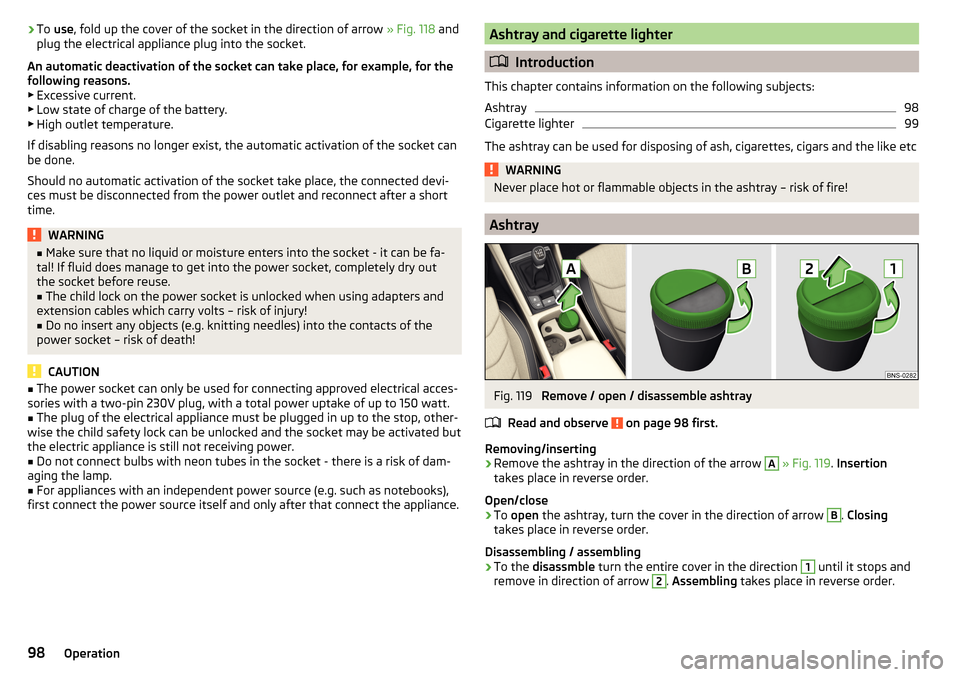
Fig. 118
Open the cover of the 230 volt outlet / 230 volt outlet
Read and observe
and on page 96 first.
The 230-volt socket has a child safety lock. When inserting the plug, the fuse
is released, the socket is activated and the warning light above the socket is
illuminates green (if this flashes red, then the socket is deactivated).
The socket works with the engine running (in STOP mode in vehicles with the
START-STOP system) and for about 10 minutes after the engine is switched
off, provided an appliance was still connected prior to switching off the engine
(the warning light flashes green)).
97Practical features
Page 100 of 344
›To
use , fold up the cover of the socket in the direction of arrow » Fig. 118 and
plug the electrical appliance plug into the socket.
An automatic deactivation of the socket can take place, for example, for the
following reasons. ▶ Excessive current.
▶ Low state of charge of the battery.
▶ High outlet temperature.
If disabling reasons no longer exist, the automatic activation of the socket can
be done.
Should no automatic activation of the socket take place, the connected devi-
ces must be disconnected from the power outlet and reconnect after a short
time.WARNING■ Make sure that no liquid or moisture enters into the socket - it can be fa-
tal! If fluid does manage to get into the power socket, completely dry out
the socket before reuse.■
The child lock on the power socket is unlocked when using adapters and
extension cables which carry volts – risk of injury!
■
Do no insert any objects (e.g. knitting needles) into the contacts of the
power socket – risk of death!
CAUTION
■ The power socket can only be used for connecting approved electrical acces-
sories with a two-pin 230V plug, with a total power uptake of up to 150 watt.■
The plug of the electrical appliance must be plugged in up to the stop, other-
wise the child safety lock can be unlocked and the socket may be activated but
the electric appliance is still not receiving power.
■
Do not connect bulbs with neon tubes in the socket - there is a risk of dam-
aging the lamp.
■
For appliances with an independent power source (e.g. such as notebooks),
first connect the power source itself and only after that connect the appliance.
Ashtray and cigarette lighter
Introduction
This chapter contains information on the following subjects:
Ashtray
98
Cigarette lighter
99
The ashtray can be used for disposing of ash, cigarettes, cigars and the like etc
WARNINGNever place hot or flammable objects in the ashtray – risk of fire!
Ashtray
Fig. 119
Remove / open / disassemble ashtray
Read and observe
on page 98 first.
Removing/inserting
›
Remove the ashtray in the direction of the arrow
A
» Fig. 119 . Insertion
takes place in reverse order.
Open/close
›
To open the ashtray, turn the cover in the direction of arrow
B
. Closing
takes place in reverse order.
Disassembling / assembling
›
To the disassmble turn the entire cover in the direction
1
until it stops and
remove in direction of arrow
2
. Assembling takes place in reverse order.
98Operation