USB port SKODA KODIAQ 2016 1.G Owner's Manual
[x] Cancel search | Manufacturer: SKODA, Model Year: 2016, Model line: KODIAQ, Model: SKODA KODIAQ 2016 1.GPages: 344, PDF Size: 58.96 MB
Page 92 of 344
CAUTION■Metal objects between the pad and the phone to be charged can become hot
due to the action of the induction field - this is a risk of damage to the tele-
phone.■
With some phones, the charging process can be interrupted or the phone can
switch off due to heating up.
■
Do not insert any electronic or magnetic storage media (e.g. SD cards, USB
sticks, cards with magnetic strips or chips) between the pad and the phone to
be charged- there is a risk of data loss and damage to these data carriers.
■
If a message appears in the Infotainment screen that the phone cannot be
charged, then proceed as follows. ■Check that there is no object between the support and the phone to be
charged. If this is the case, then take out the object and the phone. Place the
phone centrally on the phone symbol on the pad again.
■ Check if the position of the phone to be charged has not changed during
the journey. If this is the case, then take out the phone and put it back cen-
trally on the phone symbol on the pad.
Note
■ At the start of the wireless charging, the appropriate message appears on
the Infotainment screen.■
For the optimum phone signal strength and uninterrupted wireless charging,
we recommend position the phone in the storage compartment without the
protective sleeve, if possible.
■
Place a max. 160x80 mm phone in the storage compartment.
USB and AUX inputs
Fig. 97
USB and auxiliary inputs front
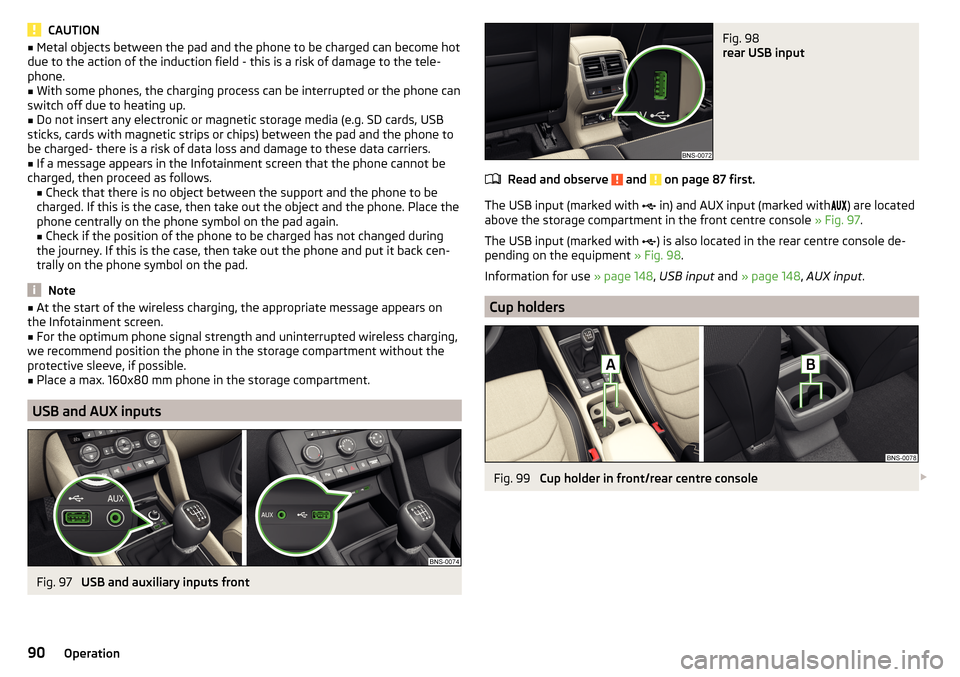
Fig. 98
rear USB input
Read and observe and on page 87 first.
The USB input (marked with in) and AUX input (marked with
) are located
above the storage compartment in the front centre console » Fig. 97.
The USB input (marked with ) is also located in the rear centre console de-
pending on the equipment » Fig. 98.
Information for use » page 148, USB input and » page 148 , AUX input .
Cup holders
Fig. 99
Cup holder in front/rear centre console
90Operation
Page 139 of 344
■Show POIs - Switch on/off the display of POIs
■Select categories for POIs
- Selection of the displayed category POIs
■
Show brands for POIs
- Switch on/off the company logos available for the POIs
shown
■
Traffic flow settings
- Setting the display of a traffic obstruction received from
online traffic ■
Display free-moving traffic
- Enable / disable the display of routes with free-
moving transport
■
See jam
- Enable / disable the display of routes with heavy traffic
■
Display traffic disruptions
- Enable / disable the display of routes with a traffic
incident
Manage memory
›
In the Navigation main menu, tap the function surface
→
Manage memory
.
■
Sort Contacts:
- Setting the arrangement of the phonebook
■
By surname
- Sorting by the contact surname
■
By first name
- Sorting by the contact first name
■
Define home address
- Enter the home address
■
Delete My POIs
- Deleting own POI categories (Personal POI)
■
Update "My POIs" (SD/USB)
- Import / update your own POI categories (Personal
POI)
■
Retrieve "My POIs" (online)
- Online import / update of the user profile on the
website ŠKODA Connect Portal started own POI categories
■
Import destinations (SD/USB)
- Import destinations in vCard format
■
Delete user data
- Delete user data (by pressing the function surface
Delete
and
confirm the deletion) ■
Last destinations
- Delete the last destinations
■
Dest. memory
- Delete the stored destinations
■
Online dests
- Delete the stored online dests
■
Routes
- Delete saved routes
■
My points of interest (Personal POI)
- Delete the custom POIs
■
Entered cities
- Delete the history of places already entered via the address
■
Home address
- Delete the stored home address
■
Flagged destination
- Delete the flagged destination
■
Waypoints
- Delete item in the Waypoint mode menu (applies to Infotain-
ment Columbus)
■
Most frequent routes
- Delete the most travelled routes
nav. announcements›
In the Navigation main menu, tap the function surface
→
Nav. announce-ments
.
■
Volume
- Volume control of the nav. announcements
■
Entertainment fading (nav. announce.)
- Setting the fading of the audio volume (e.g.
radio volume.) with nav. announcements
■
Nav. announcements:
- Setting the playback method of nav. announcements
■
Comprehensive
- All nav. announcements
■
Brief
- Short nav. announcements
■
Congestion only
- Only nav. announcements when a route is changed
■
No navigation sound during call
- Activate/ deactivate non-playback of nav. an-
nouncements during a telephone call
■
Note: “My POIs”
- Turn on/off an audible indication when approaching a custom
POI (if supported by the imported custom POI) (applies to Infotainment Co-
lumbus)
Top speeds
›
In the Navigation main menu, tap the function surface
→
Top speeds
.
The maximum speed limits for the current country are displayed.
When
Note: national border crossed
» page 138 , Advanced settings function is
turned on, the country-specific speed limits are displayed when crossing inter-
national borders.
Fuel options
›
In the Navigation main menu, tap the function surface
→
Fuel options
.
■
Select preferred fuel station
- Select your preferred fuel station brand (the selec-
ted station brand will be displayed in the first three positions of the list)
■
Fuel warning
-Turn on- / Off the display of a warning message with the option
to visit the nearest petrol station when the fuel level reaches the reserve
area
Version information
›
In the Navigation main menu, tap the function surface
Tap
→
Version infor-mation
.
137Infotainment settings - Columbus, Amundsen, Bolero
Page 140 of 344
A list of countries is displayed that exist for the navigation data, together with
the date of the last update.
An update of the navigation data can be carried out by tapping the function
surface Update (SD/USB)
or
Update (online)
.
The information on updating the navigation data is to be obtained from a
ŠKODA partner or on the following ŠKODA Internet pages.
http://go.skoda.eu/updateportal
Advanced settings
›
In the Navigation main menu, tap the function surface
→
Advanced settings
.
■
Time display:
- Select the time display in the status line
■ - Estimated arrival time at destination
■ Estimated travelling time to the destination
■
Status line:
- Selection of the target type, for which the status line, the route
and travel time are displayed (Here it is also determined which destination
type after selecting
→
is displayed on the map)
■ - Route destination
■ - Next waypoint
■
Note: national border crossed
- Switching on/off the display for information on na-
tional speed limits when crossing the national border
■
Demo mode
- Switch on/off guidance in demo mode
■
Define demo mode starting point
- Specifying the start point of the route guidance
in the demo mode by entering the address or the current vehicle position
Infotainment settings - Swing
Infotainment system settings
Sound settings
›
Press the or button, then tap the function surface
Units
.
■
Volume
- Volume settings
■
Maximum switch-on volume
- Setting the maximum volume when switching on
Infotainment
■
Message
- Adjustment of traffic announcements volume (TP)
■
Speed-dependent volume adjustment
- Volume increases as speed increases
■
Entertainment fading (parking)
- Lowers the audio volume (e.g. radio volume)
with activated parking aid
■
Entertainment fading (nav. announce.)
- Lowers the audio volume (e.g. radio vol-
ume) in the event of a nav. announcements
■
AUX volume:
- Sets the volume for the device connected through AUX
■
Bluetooth audio:
- Volume setting via Bluetooth ®
audio profile of the connec-
ted device
■
Balance - Fader
- Sets the balance between left and right, front and rear
■
Bass - Mid - Treble
- Setting the equalizer
■
Touchscreen tone
- Switch on/off audible tone when touching the screen
Display settings
›
Press the button, then tap the function surface
Screen
.
■
Switch off screen (in 10 seconds)
- Enable / disable the automatic power off func-
tion 1)
■
Brightness:
- Adjusts the brightness of the screen
■
Touchscreen tone
- Switch on/off audible tone when touching the screen
■
Show clock in standby mode
- Time and date displayed on the screen when the
ignition is switched on and Infotainment is switched off
Time and date settings
›
Press the button, then tap the function surface
Time and date
.
1)
Infotainment turns the screen off when no touch screen is performed or none of the keys are pressed /
rotated for more than 10 seconds.
138Infotainment
Page 145 of 344
›To
filter the stations according to programme type (e.g. culture, music, sport
etc.) in the FM 1)
and DAB 2)
station list, tap on the function surface -- » Fig. 175
- .
Information symbolsSymbolMeaningRadio station, which is stored on a preset buttonCurrently played stationsTraffic information station(e.g.) Type of program being broadcast (FM) (does not apply to Info-
tainment Swing)(e.g.) Type the regional broadcast (FM) (e.g.)Type of program being broadcast (FM, DAB) (applies to the info-
tainment Swing)Signal reception is not available (DAB)The transmitter reception is not secure (DAB) (applies to Info-
tainment Amundsen, Bolero, Swing)Stations with image broadcasting (DAB) (does not apply to info-
tainment Swing)
Refresh list
Depending on Infotainment, the station list update takes place as follows:
Frequen- cyColumbusAmundsen, BoleroSwingFMautomaticallyautomaticallyautomaticallyAMautomaticallymanuallymanuallyDABautomaticallymanuallymanually
▶To manually update, tap on the function surface
» Fig. 175 .
CAUTION
To sort the stations according to genre, the RDS and AF functions must be
switched on. These functions can be set in the radio main menu in the FM
band by tapping the function surface
→ Advanced settings
switched on / off.
Preset buttons for your favourite channels
In every broadcasting range, there are station buttons available to store pre-
ferred stationsC
That are split into groups
E
» Fig. 174 on page 141 or .
›
To save a station on the main menu Radio , hold down the desired function
surface
C
until an acoustic signal sounds.
›
To save a station in the station list , keep the function surface of the desired
station held down, select the memory group, and then tap the desired sta-
tion button.
If a station is saved on an already assigned station button, this station button will be overwritten.
Station logos - Columbus, Amundsen, Bolero
Station logos are stored in the Infotainment memory which are assigned auto- matically by the device when storing the stations under preset buttons.
Assign station logo automatically
›
to Disable / Enable in the radio main menu, tap on the function surface
Tap on →
Advanced settings
→
Auto-save station logos
.
Assign station logo manually
›
Tap on the function surface in the Radio main menu
→
Station logos
.
›
Tap on an occupied station button and select the data carrier (SD card, USB).
›
Search for and select the desired station logo on the respective data carrier.
Remove channel logo manually
›
Tap on the function surface in the Radio main menu
→
Station logos
.
›
Tap on the station button from which you want to remove a logo.
Note
■
The following image formats are supported: jpg, gif, png, bmp.■We recommend a resolution of up to 500x500 pixels.
Station logos - Swing
The station button of a preferred station can contain the name and the station
logo.
1)
Applies when the RDS function is switched on.
2)
Applies during selected global sorting of the station list.
143Radio
Page 146 of 344
Assign a station logo›Tap on the function surface in the Radio main menu →
Station logos
.›
Tap on an occupied station button and select the data carrier (SD card, USB).
›
Search for and select the desired station logo on the respective data carrier.
Remove station logo
›
Tap on the function surface in the Radio main menu
→
Station logos
.
›
Tap on the station button from which you want to remove a logo.
›
or The function surface
All
to delete the logos of all the station buttons si-
multaneously.
›
Confirm / cancel the removal.
Note
■ jpg, gif, png, bmp (we recommend using the png format).■Maximum resolution 400x240 pixels.
TP Traffic program
›
To switch on/off traffic monitoring in the main menu Radio, tap on the func-
tion surface
→
Traffic programme (TP)
.
During a traffic announcement, it is possible to cancel the current announce-
ment if necessary by deactivating traffic monitoring.
Note
■ If the station that is currently set does not transmit traffic reports or the sig-
nal is not available, then Infotainment automatically searches in the back-
ground for another TP station.■
During playback in the Media menu or a station in the AM radio range, traffic
news is received from the previously selected FM radio range.
Media
service
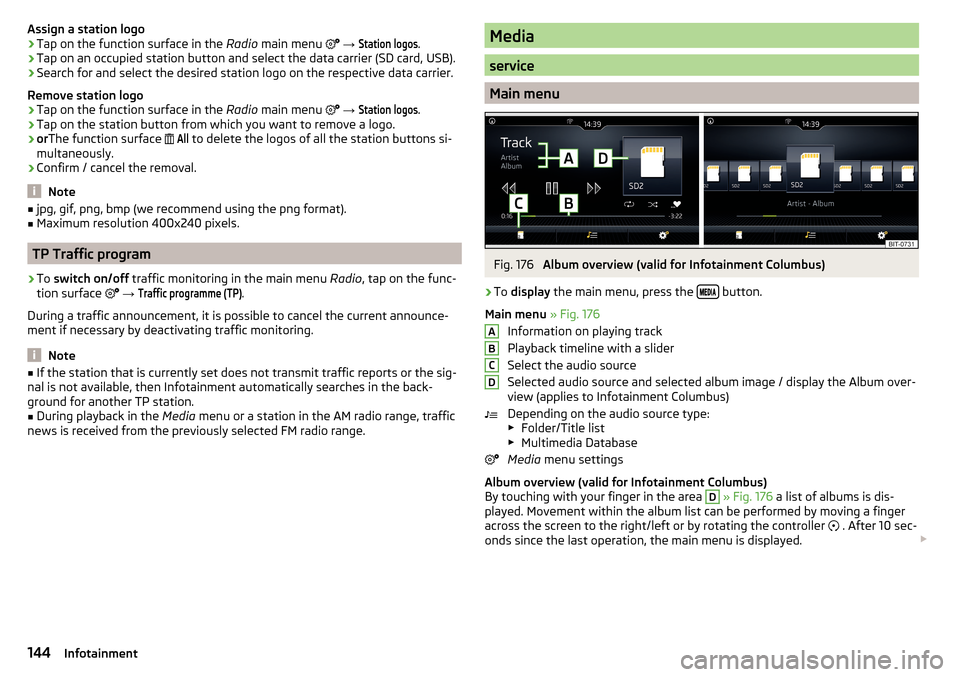
Main menu
Fig. 176
Album overview (valid for Infotainment Columbus)
›
To display the main menu, press the button.
Main menu » Fig. 176
Information on playing track
Playback timeline with a slider
Select the audio source
Selected audio source and selected album image / display the Album over-
view (applies to Infotainment Columbus)
Depending on the audio source type:
▶ Folder/Title list
▶ Multimedia Database
Media menu settings
Album overview (valid for Infotainment Columbus)
By touching with your finger in the area
D
» Fig. 176 a list of albums is dis-
played. Movement within the album list can be performed by moving a finger
across the screen to the right/left or by rotating the controller . After 10 sec-
onds since the last operation, the main menu is displayed.
ABCD144Infotainment
Page 152 of 344
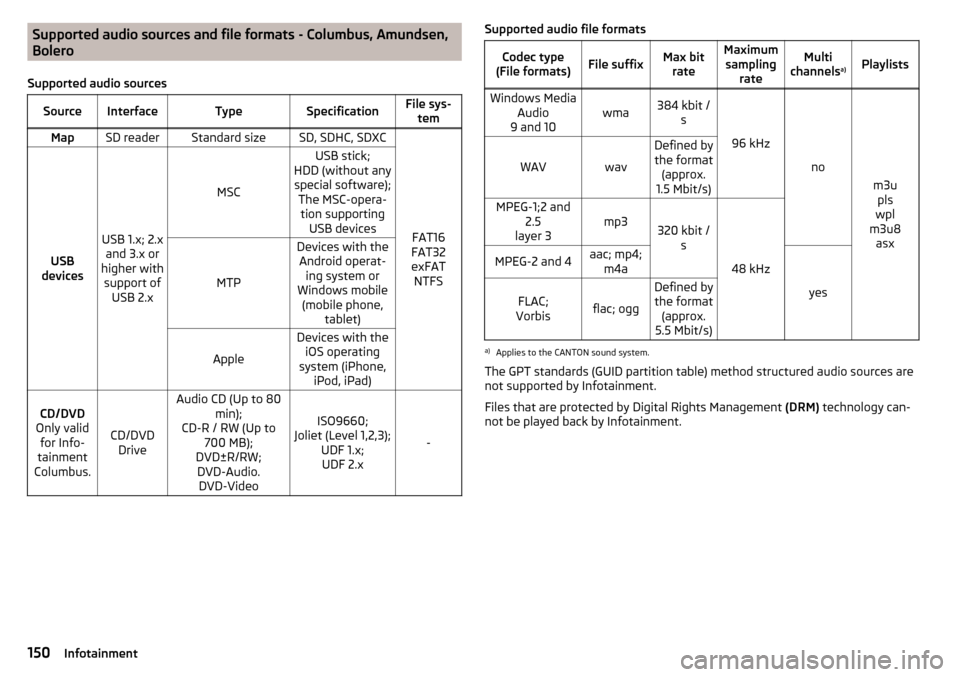
Supported audio sources and file formats - Columbus, Amundsen,
Bolero
Supported audio sourcesSourceInterfaceTypeSpecificationFile sys- temMapSD readerStandard sizeSD, SDHC, SDXC
FAT16
FAT32
exFAT NTFSUSB
devices
USB 1.x; 2.x and 3.x or
higher with support of USB 2.x
MSC
USB stick;
HDD (without any special software); The MSC-opera-tion supporting USB devices
MTP
Devices with theAndroid operat- ing system or
Windows mobile (mobile phone, tablet)
Apple
Devices with theiOS operating
system (iPhone, iPod, iPad)CD/DVD
Only valid for Info-
tainment
Columbus.
CD/DVD Drive
Audio CD (Up to 80 min);
CD-R / RW (Up to 700 MB);
DVD±R/RW; DVD-Audio. DVD-Video
ISO9660;
Joliet (Level 1,2,3); UDF 1.x;UDF 2.x
-
Supported audio file formatsCodec type
(File formats)File suffixMax bit rateMaximumsampling rateMulti
channels a)PlaylistsWindows Media
Audio
9 and 10wma384 kbit / s
96 kHz
no
m3upls
wpl
m3u8 asx
WAVwav
Defined bythe format (approx.
1.5 Mbit/s)MPEG-1;2 and 2.5
layer 3mp3320 kbit / s
48 kHz
MPEG-2 and 4aac; mp4;m4a
yes
FLAC;
Vorbisflac; ogg
Defined by the format (approx.
5.5 Mbit/s)a)
Applies to the CANTON sound system.
The GPT standards (GUID partition table) method structured audio sources are
not supported by Infotainment.
Files that are protected by Digital Rights Management (DRM) technology can-
not be played back by Infotainment.
150Infotainment
Page 153 of 344
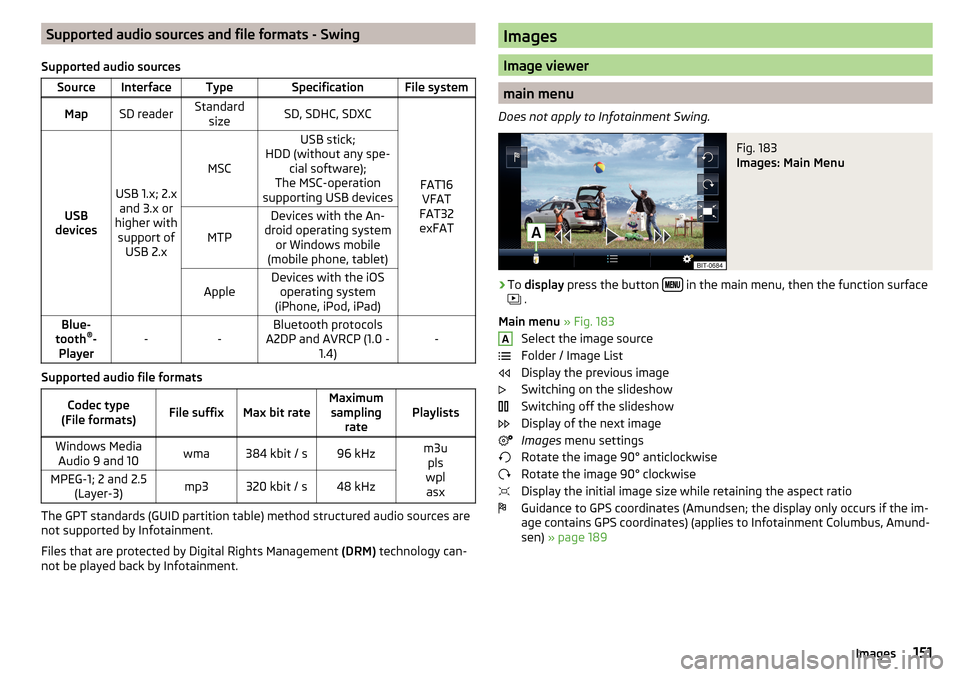
Supported audio sources and file formats - Swing
Supported audio sourcesSourceInterfaceTypeSpecificationFile systemMapSD readerStandard sizeSD, SDHC, SDXC
FAT16VFAT
FAT32
exFATUSB
devices
USB 1.x; 2.x and 3.x or
higher with support of USB 2.x
MSC
USB stick;
HDD (without any spe- cial software);
The MSC-operation
supporting USB devices
MTP
Devices with the An-
droid operating system or Windows mobile
(mobile phone, tablet)AppleDevices with the iOS operating system
(iPhone, iPod, iPad)Blue-
tooth ®
-
Player--Bluetooth protocols
A2DP and AVRCP (1.0 - 1.4)-
Supported audio file formats
Codec type
(File formats)File suffixMax bit rateMaximum sampling ratePlaylistsWindows MediaAudio 9 and 10wma384 kbit / s96 kHzm3u pls
wpl asxMPEG-1; 2 and 2.5 (Layer-3)mp3320 kbit / s48 kHz
The GPT standards (GUID partition table) method structured audio sources are
not supported by Infotainment.
Files that are protected by Digital Rights Management (DRM) technology can-
not be played back by Infotainment.
Images
Image viewer
main menu
Does not apply to Infotainment Swing.
Fig. 183
Images: Main Menu
›
To display press the button in the main menu, then the function surface
.
Main menu » Fig. 183
Select the image source
Folder / Image List
Display the previous image
Switching on the slideshow
Switching off the slideshow
Display of the next image
Images menu settings
Rotate the image 90° anticlockwise
Rotate the image 90° clockwise
Display the initial image size while retaining the aspect ratio
Guidance to GPS coordinates (Amundsen; the display only occurs if the im-
age contains GPS coordinates) (applies to Infotainment Columbus, Amund-
sen) » page 189
A151Images
Page 154 of 344
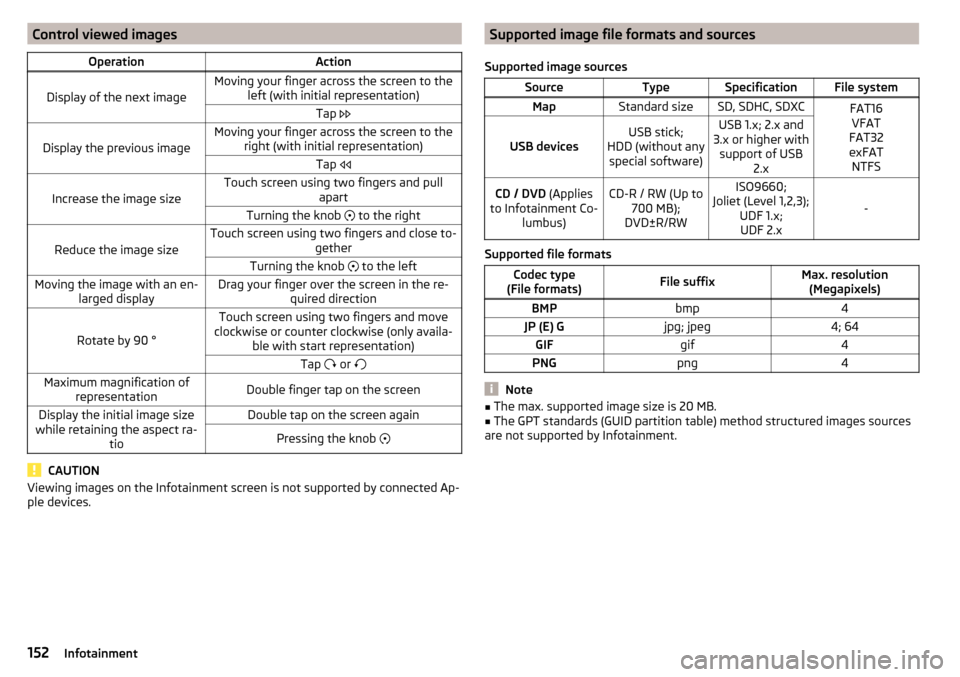
Control viewed imagesOperationAction
Display of the next image
Moving your finger across the screen to theleft (with initial representation)Tap
Display the previous image
Moving your finger across the screen to the
right (with initial representation)Tap
Increase the image size
Touch screen using two fingers and pull
apartTurning the knob to the right
Reduce the image size
Touch screen using two fingers and close to-
getherTurning the knob to the leftMoving the image with an en-
larged displayDrag your finger over the screen in the re- quired direction
Rotate by 90 °
Touch screen using two fingers and move
clockwise or counter clockwise (only availa- ble with start representation)Tap or Maximum magnification of
representationDouble finger tap on the screenDisplay the initial image size
while retaining the aspect ra- tioDouble tap on the screen againPressing the knob
CAUTION
Viewing images on the Infotainment screen is not supported by connected Ap-
ple devices.Supported image file formats and sources
Supported image sourcesSourceTypeSpecificationFile systemMapStandard sizeSD, SDHC, SDXCFAT16 VFAT
FAT32
exFAT NTFS
USB devicesUSB stick;
HDD (without any special software)USB 1.x; 2.x and
3.x or higher with support of USB 2.xCD / DVD (Applies
to Infotainment Co- lumbus)CD-R / RW (Up to700 MB);
DVD±R/RWISO9660;
Joliet (Level 1,2,3); UDF 1.x;UDF 2.x
-
Supported file formats
Codec type
(File formats)File suffixMax. resolution (Megapixels)BMPbmp4JP (E) Gjpg; jpeg4; 64GIFgif4PNGpng4
Note
■ The max. supported image size is 20 MB.■The GPT standards (GUID partition table) method structured images sources
are not supported by Infotainment.152Infotainment
Page 156 of 344
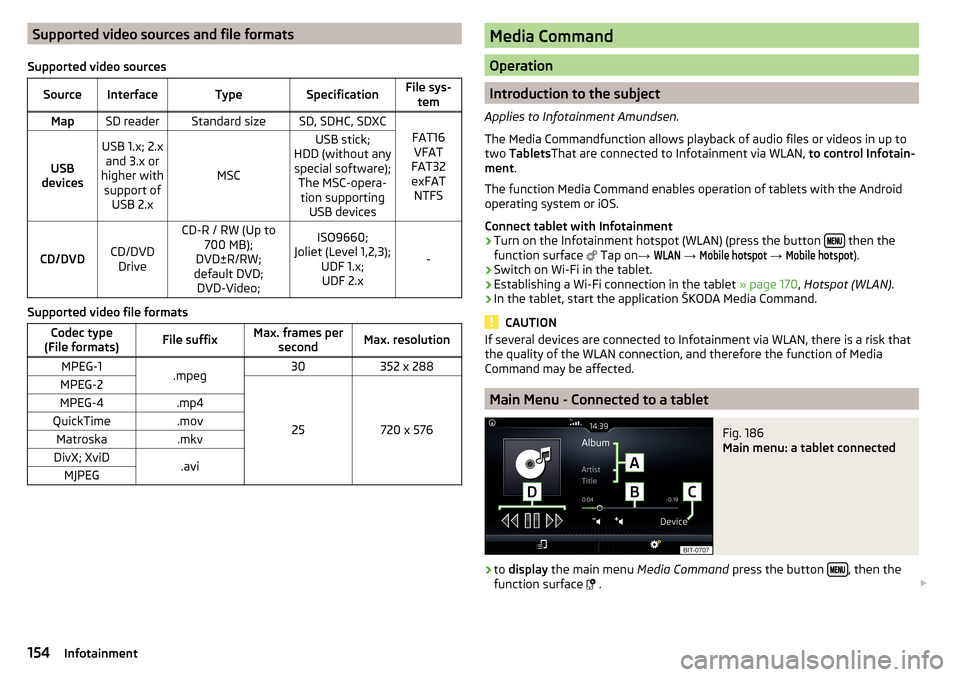
Supported video sources and file formats
Supported video sourcesSourceInterfaceTypeSpecificationFile sys- temMapSD readerStandard sizeSD, SDHC, SDXC
FAT16VFAT
FAT32
exFAT NTFSUSB
devices
USB 1.x; 2.x and 3.x or
higher with support of USB 2.x
MSC
USB stick;
HDD (without any special software); The MSC-opera-tion supporting USB devices
CD/DVDCD/DVDDrive
CD-R / RW (Up to 700 MB);
DVD±R/RW;
default DVD; DVD-Video;ISO9660;
Joliet (Level 1,2,3); UDF 1.x;UDF 2.x
-
Supported video file formats
Codec type
(File formats)File suffixMax. frames per secondMax. resolutionMPEG-1.mpeg30352 x 288MPEG-2
25720 x 576
MPEG-4.mp4QuickTime.movMatroska.mkvDivX; XviD.aviMJPEGMedia Command
Operation
Introduction to the subject
Applies to Infotainment Amundsen.
The Media Commandfunction allows playback of audio files or videos in up to
two Tablets That are connected to Infotainment via WLAN, to control Infotain-
ment .
The function Media Command enables operation of tablets with the Android
operating system or iOS.
Connect tablet with Infotainment
›
Turn on the Infotainment hotspot (WLAN) (press the button then the
function surface Tap on
→
WLAN
→
Mobile hotspot
→
Mobile hotspot
).
›
Switch on Wi-Fi in the tablet.
›
Establishing a Wi-Fi connection in the tablet » page 170, Hotspot (WLAN) .
›
In the tablet, start the application ŠKODA Media Command.
CAUTION
If several devices are connected to Infotainment via WLAN, there is a risk that
the quality of the WLAN connection, and therefore the function of Media
Command may be affected.
Main Menu - Connected to a tablet
Fig. 186
Main menu: a tablet connected
›
to display the main menu Media Command press the button , then the
function surface
.
154Infotainment
Page 173 of 344
Show available hotspots
▶ Press the button, then tap on the function surface
→
WIRELESS INTER-NET ACCESS
→
WIRELESS INTERNET ACCESS
1)
Tap.
With WLAN activated, a list of available or previously connected hotspots with
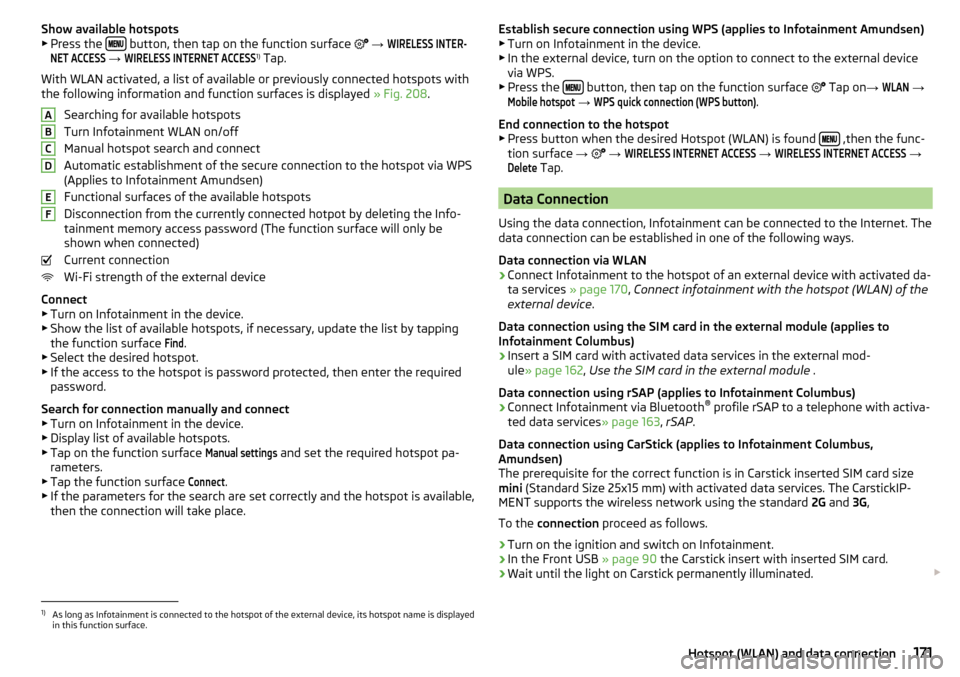
the following information and function surfaces is displayed » Fig. 208.
Searching for available hotspots
Turn Infotainment WLAN on/off
Manual hotspot search and connect
Automatic establishment of the secure connection to the hotspot via WPS
(Applies to Infotainment Amundsen)
Functional surfaces of the available hotspots
Disconnection from the currently connected hotpot by deleting the Info-
tainment memory access password (The function surface will only be
shown when connected)
Current connection
Wi-Fi strength of the external device
Connect ▶ Turn on Infotainment in the device.
▶ Show the list of available hotspots, if necessary, update the list by tapping
the function surface
Find
.
▶ Select the desired hotspot.
▶ If the access to the hotspot is password protected, then enter the required
password.
Search for connection manually and connect ▶ Turn on Infotainment in the device.
▶ Display list of available hotspots.
▶ Tap on the function surface
Manual settings
and set the required hotspot pa-
rameters.
▶ Tap the function surface
Connect
.
▶ If the parameters for the search are set correctly and the hotspot is available,
then the connection will take place.
ABCDEFEstablish secure connection using WPS (applies to Infotainment Amundsen) ▶ Turn on Infotainment in the device.
▶ In the external device, turn on the option to connect to the external device
via WPS.
▶ Press the
button, then tap on the function surface
Tap on →
WLAN
→
Mobile hotspot
→
WPS quick connection (WPS button)
.
End connection to the hotspot ▶ Press button when the desired Hotspot (WLAN) is found
,then the func-
tion surface →
→
WIRELESS INTERNET ACCESS
→
WIRELESS INTERNET ACCESS
→
Delete
Tap.
Data Connection
Using the data connection, Infotainment can be connected to the Internet. The
data connection can be established in one of the following ways.
Data connection via WLAN
›
Connect Infotainment to the hotspot of an external device with activated da-
ta services » page 170, Connect infotainment with the hotspot (WLAN) of the
external device .
Data connection using the SIM card in the external module (applies to
Infotainment Columbus)
›
Insert a SIM card with activated data services in the external mod-
ule » page 162 , Use the SIM card in the external module .
Data connection using rSAP (applies to Infotainment Columbus)
›
Connect Infotainment via Bluetooth ®
profile rSAP to a telephone with activa-
ted data services » page 163, rSAP .
Data connection using CarStick (applies to Infotainment Columbus,
Amundsen)
The prerequisite for the correct function is in Carstick inserted SIM card size
mini (Standard Size 25x15 mm) with activated data services. The CarstickIP-
MENT supports the wireless network using the standard 2G and 3G,
To the connection proceed as follows.
›
Turn on the ignition and switch on Infotainment.
›
In the Front USB » page 90 the Carstick insert with inserted SIM card.
›
Wait until the light on Carstick permanently illuminated.
1)
As long as Infotainment is connected to the hotspot of the external device, its hotspot name is displayed
in this function surface.
171Hotspot (WLAN) and data connection