turn signal SKODA OCTAVIA 2006 Owner´s Manual
[x] Cancel search | Manufacturer: SKODA, Model Year: 2006, Model line: OCTAVIA, Model: SKODA OCTAVIA 2006Pages: 218, PDF Size: 5.48 MB
Page 43 of 218
If the light switch is in the position
, the symbol illuminates when the ignition
is switched on next to the light switch. If the low beam is activated with the
light sensor, the symbol illuminates additionally next to the light switch.
If the light comes on automatically, the side lights and low beam as well as li-
cence plate light light up at the same time.
If the automatic driving lamp control is switched on, the light is regulated with
the light sensor in the rear mirror holder. If the light intensity drops below the set
value, e.g when driving during the day into a tunnel, the low beam and the side
lights as well as the licence plate light come on automatically. If the light intensity
increases again, the lights switch off automatically.
Rain lights
If the windscreen wiper is switched on in rain sensor mode for longer than 10
sec-
onds or in permanent wipe mode (position 2 or 3) » page 49, Activating the
windscreen wipers and washers for longer than 15 seconds, the side lights and
low beam are switched on automatically. The light switches off if the windscreen
wipe is in operation rain sensor for more than around 4 minutes or is not switch-
ed on in the operation permanent wipe. Note
Do not affix any stickers in front of the light sensor, so that its functionality is not
impaired or disabled. ÐCornering lights
First read and observe the introductory information and safety warn-
ings on page 39.
The cornering lights are used to illuminate the curves by means of the cone of
light swivelling together with the front headlight with Xenon lights. This function
is active when the speed of the car increases to more than 10
km/h.
The swivelling function of the headlights can be switched off/on via the menu
point Assistants in the main menu of the information display » page 15.
ä WARNING
If the cornering lights are defective, the headlights are automatically lowered
to the emergency position, which prevents a possible dazzling of oncoming
traffic. Thus the illuminated length of the road is shortened. Drive carefully
and visit a
ŠKODA specialist garage as soon as possible. Ð Parking light
First read and observe the introductory information and safety warn-
ings on page 39.
Parking light
› Switch off the ignition.
› Pull the turn signal light lever
» Fig. 28 on page 45 upwards or downwards -
the side light on the right or left side of the vehicle is switched.
Parking light on both sides
› Turn the light switch into the position
and lock the vehicle. Note
■ The parking light can only be activated if the ignition is switched off.
■ If the right or left turn signal light has been switched on and the ignition is
switched off, the parking light is not automatically switched on. Ð COMING HOME/LEAVING HOME function
First read and observe the introductory information and safety warn-
ings on page 39.
When it is dark, this function makes it possible to switch on the lights for a short
time after leaving the vehicle or when approaching the vehicle.
Switching on the
COMING HOME function
› The light switch is in the position automatic driving lamp control
.
› Switch off the ignition.
› The light switches on after the driver's door is opened.
Switching on the
LEAVING HOME function
› After leaving the vehicle, the light switch is in the position automatic driving
lamp control . £
ä
ä
41
Lights and visibility
Page 45 of 218
The fog lights with the function CORNER are adjusted according to the steering
angle or after switching on the turn signal light
1)
in the following circumstances:
› the vehicle is stationary and the engine is running or it moves with a speed of
maximum 40 km/h;
› the daytime running lights are not switched on;
› the low beam is switched on or the light switch is in the position
and the
intensity of the ambient light causes the low beam to be switched on;
› the fog lights are not switched on;
› no reverse gear is engaged. Note
If the reverse gear is engaged during the active function CORNER, both fog lights
illuminate. ÐRear fog light
First read and observe the introductory information and safety warn-
ings on page 39.
Switching on
› First of all, turn the light switch to position
or » Fig. 24 on page 42.
› Pull the light switch to position 2
.
If the vehicle is not fitted with fog lights » page 42, the rear fog light is switched
on by turning the light switch to the position or and is pulled out directly to
the position 2
. This switch does not have two positions, but only one position.
The warning light
lights up in the instrument cluster when the rear fog light is
switched on » page 18.
Only the rear fog light on the trailer lights up if the vehicle has a factory-fitted
towing device or a towing device from ŠKODA original accessories and it is driven
with a trailer and the rear fog light switched on.
The rear fog light is located in the rear light array on the driver's side. Ð
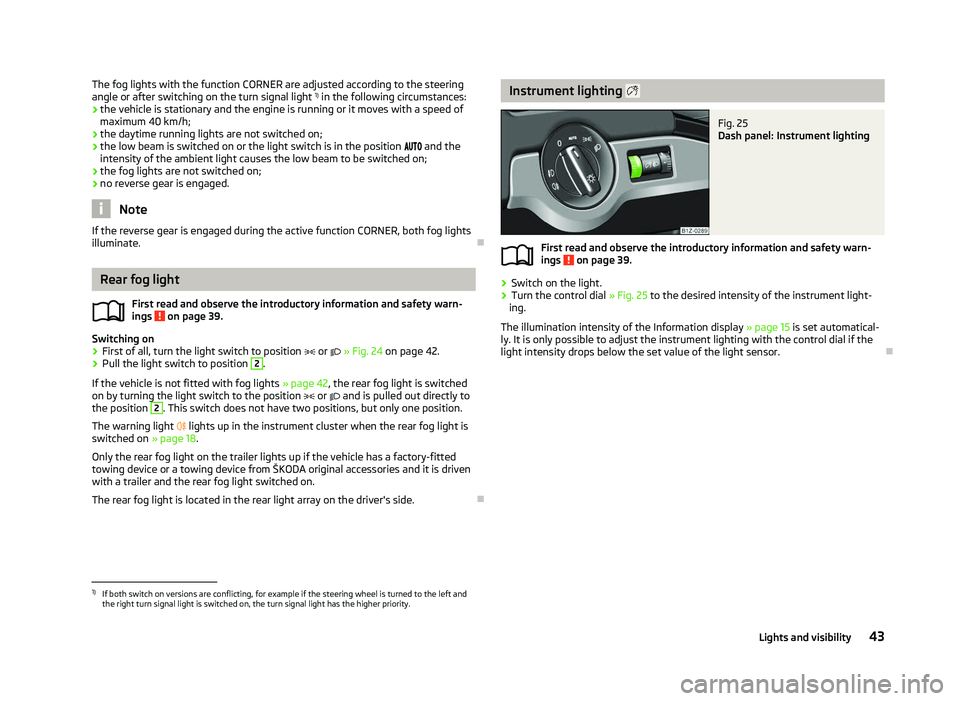
ä Instrument lighting
Fig. 25
Dash panel: Instrument lighting
First read and observe the introductory information and safety warn-
ings on page 39.
›
Switch on the light.
› Turn the control dial
» Fig. 25 to the desired intensity of the instrument light-
ing.
The illumination intensity of the Information display »
page 15 is set automatical-
ly. It is only possible to adjust the instrument lighting with the control dial if the
light intensity drops below the set value of the light sensor. Ð
ä
1)
If both switch on versions are conflicting, for example if the steering wheel is turned to the left and
the right turn signal light is switched on, the turn signal light has the higher priority.
43
Lights and visibility
Page 46 of 218
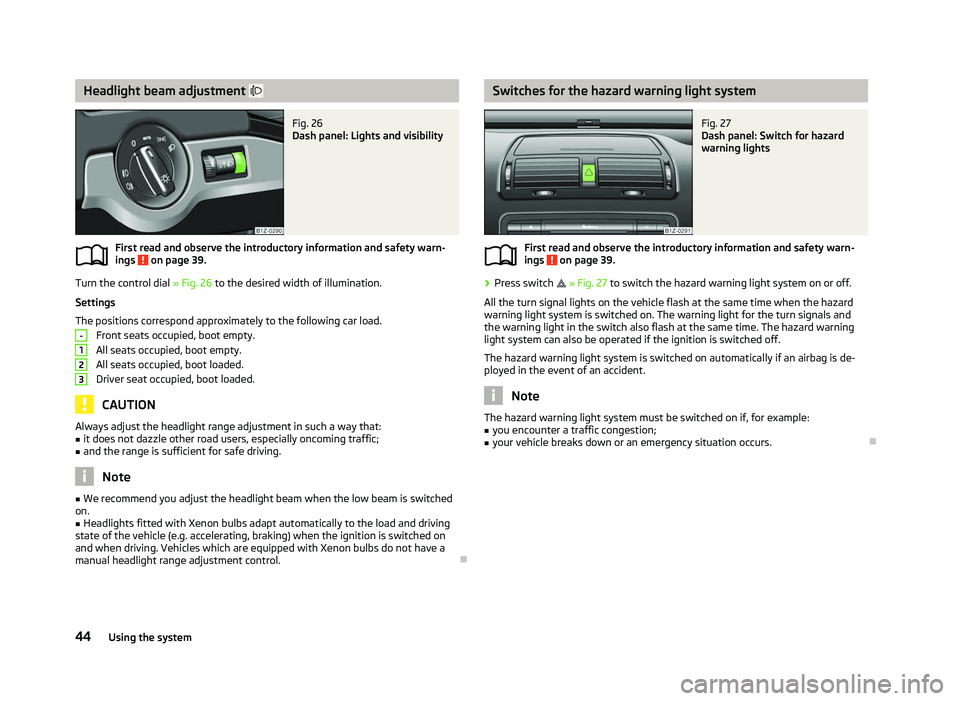
Headlight beam adjustment
Fig. 26
Dash panel: Lights and visibility
First read and observe the introductory information and safety warn-
ings on page 39.
Turn the control dial
» Fig. 26 to the desired width of illumination.
Settings
The positions correspond approximately to the following car load. Front seats occupied, boot empty.
All seats occupied, boot empty.
All seats occupied, boot loaded.
Driver seat occupied, boot loaded. CAUTION
Always adjust the headlight range adjustment in such a way that:
■ it does not dazzle other road users, especially oncoming traffic;
■ and the range is sufficient for safe driving. Note
■ We recommend you adjust the headlight beam when the low beam is switched
on. ■ Headlights fitted with Xenon bulbs adapt automatically to the load and driving
state of the vehicle (e.g. accelerating, braking) when the ignition is switched on
and when driving. Vehicles which are equipped with Xenon bulbs do not have a
manual headlight range adjustment control. Ð
ä -
1
2
3 Switches for the hazard warning light system
Fig. 27
Dash panel: Switch for hazard
warning lights
First read and observe the introductory information and safety warn-
ings on page 39.
›
Press switch
» Fig. 27 to switch the hazard warning light system on or off.
All the turn signal lights on the vehicle flash at the same time when the hazard
warning light system is switched on. The warning light for the turn signals and
the warning light in the switch also flash at the same time. The hazard warning
light system can also be operated if the ignition is switched off.
The hazard warning light system is switched on automatically if an airbag is de-
ployed in the event of an accident. Note
The hazard warning light system must be switched on if, for example:
■ you encounter a traffic congestion;
■ your vehicle breaks down or an emergency situation occurs. Ð
ä
44 Using the system
Page 47 of 218
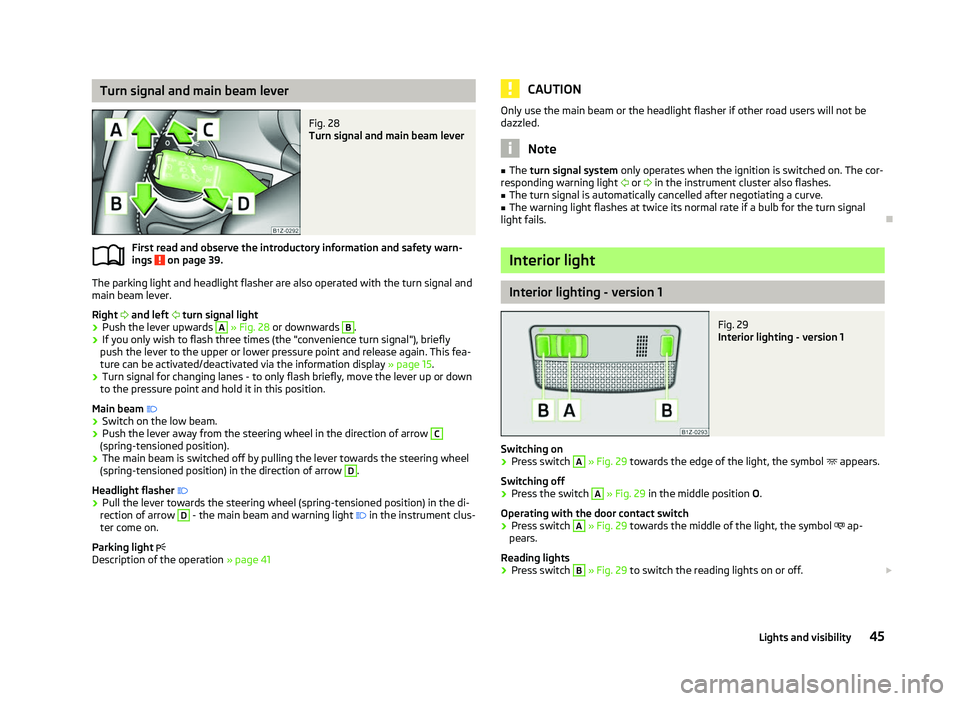
Turn signal and main beam lever
Fig. 28
Turn signal and main beam lever
First read and observe the introductory information and safety warn-
ings on page 39.
The parking light and headlight flasher are also operated with the turn signal and
main beam lever.
Right and left turn signal light
› Push the lever upwards A
» Fig. 28
or downwards B
.
› If you only wish to flash three times (the "convenience turn signal"), briefly
push the lever to the upper or lower pressure point and release again. This fea-
ture can be activated/deactivated via the information display » page 15.
› Turn signal for changing lanes - to only flash briefly, move the lever up or down
to the pressure point and hold it in this position.
Main beam
› Switch on the low beam.
› Push the lever away from the steering wheel in the direction of arrow C
(spring-tensioned position).
› The main beam is switched off by pulling the lever towards the steering wheel
(spring-tensioned position) in the direction of arrow D
.
Headlight flasher
› Pull the lever towards the steering wheel (spring-tensioned position) in the di-
rection of arrow D
- the main beam and warning light
in the instrument clus-
ter come on.
Parking light
Description of the operation » page 41
ä CAUTION
Only use the main beam or the headlight flasher if other road users will not be
dazzled. Note
■ The turn signal system only operates when the ignition is switched on. The cor-
responding warning light or in the instrument cluster also flashes.
■ The turn signal is automatically cancelled after negotiating a curve.
■ The warning light flashes at twice its normal rate if a bulb for the turn signal
light fails. Ð Interior light
Interior lighting - version 1
Fig. 29
Interior lighting - version 1
Switching on › Press switch A
» Fig. 29 towards the edge of the light, the symbol
appears.
Switching off
› Press the switch A
»
Fig. 29
in the middle position O.
Operating with the door contact switch
› Press switch A
» Fig. 29 towards the middle of the light, the symbol
ap-
pears.
Reading lights
› Press switch B
» Fig. 29 to switch the reading lights on or off.
£
45
Lights and visibility
Page 58 of 218
Storing setting
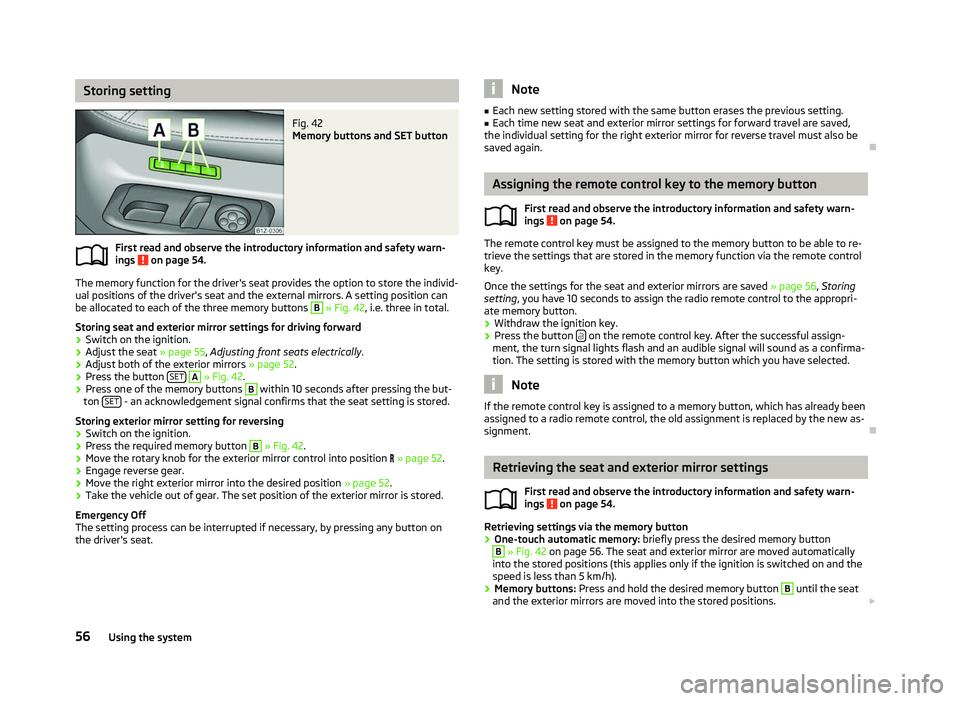
Fig. 42
Memory buttons and SET button
First read and observe the introductory information and safety warn-
ings on page 54.
The memory function for the driver's seat provides the option to store the individ-
ual positions of the driver's seat and the external mirrors. A setting position can
be allocated to each of the three memory buttons B
» Fig. 42, i.e. three in total.
Storing seat and exterior mirror settings for driving forward
› Switch on the ignition.
› Adjust the seat
» page 55, Adjusting front seats electrically .
› Adjust both of the exterior mirrors
» page 52.
› Press the button
SET A
» Fig. 42.
› Press one of the memory buttons B
within 10 seconds after pressing the but-
ton SET - an acknowledgement signal confirms that the seat setting is stored.
Storing exterior mirror setting for reversing › Switch on the ignition.
› Press the required memory button B
» Fig. 42.
› Move the rotary knob for the exterior mirror control into position
» page 52.
› Engage reverse gear.
› Move the right exterior mirror into the desired position
» page 52.
› Take the vehicle out of gear. The set position of the exterior mirror is stored.
Emergency Off
The setting process can be interrupted if necessary, by pressing any button on
the driver's seat.
ä Note
■ Each new setting stored with the same button erases the previous setting.
■ Each time new seat and exterior mirror settings for forward travel are saved,
the individual setting for the right exterior mirror for reverse travel must also be
saved again. Ð Assigning the remote control key to the memory button
First read and observe the introductory information and safety warn-
ings on page 54.
The remote control key must be assigned to the memory button to be able to re-
trieve the settings that are stored in the memory function via the remote control
key.
Once the settings for the seat and exterior mirrors are saved » page 56, Storing
setting, you have 10
seconds to assign the radio remote control to the appropri-
ate memory button.
› Withdraw the ignition key.
› Press the button
on the remote control key. After the successful assign-
ment, the turn signal lights flash and an audible signal will sound as a confirma-
tion. The setting is stored with the memory button which you have selected. Note
If the remote control key is assigned to a memory button, which has already been
assigned to a radio remote control, the old assignment is replaced by the new as-
signment. Ð Retrieving the seat and exterior mirror settings
First read and observe the introductory information and safety warn-
ings on page 54.
Retrieving settings via the memory button
›
One-touch automatic memory:
briefly press the desired memory button B
» Fig. 42 on page 56. The seat and exterior mirror are moved automatically
into the stored positions (this applies only if the ignition is switched on and the
speed is less than 5 km/h).
› Memory buttons:
Press and hold the desired memory button B
until the seat
and the exterior mirrors are moved into the stored positions. £
ä
ä
56 Using the system
Page 85 of 218
Setting temperature
›
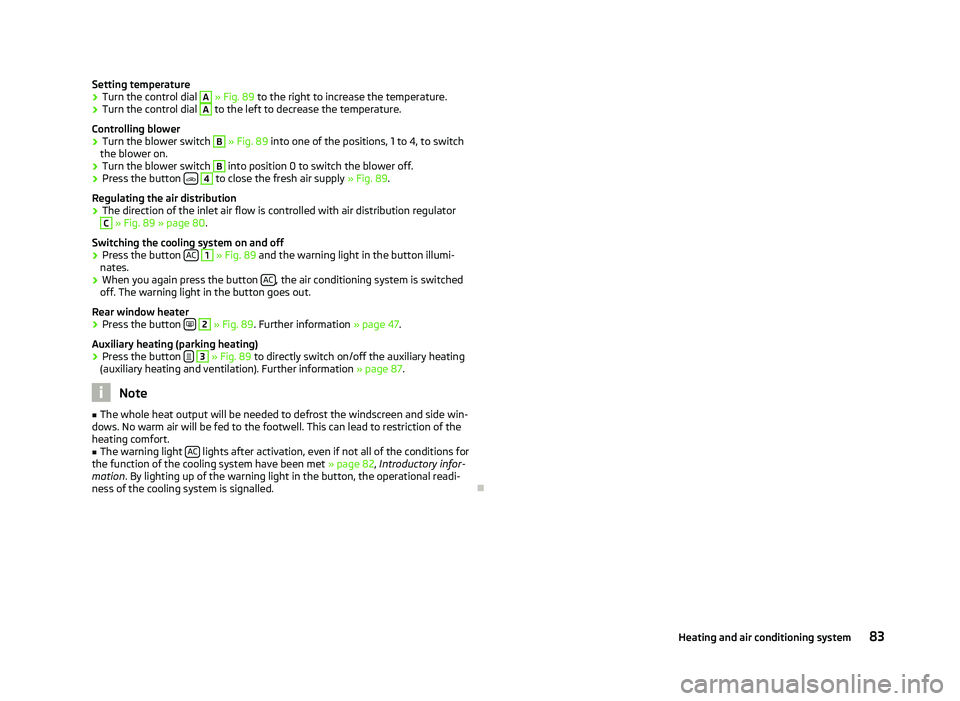
Turn the control dial A
» Fig. 89 to the right to increase the temperature.
› Turn the control dial A
to the left to decrease the temperature.
Controlling blower
› Turn the blower switch B
» Fig. 89 into one of the positions, 1 to 4, to switch
the blower on.
› Turn the blower switch B
into position 0 to switch the blower off.
› Press the button
4
to close the fresh air supply
» Fig. 89.
Regulating the air distribution
› The direction of the inlet air flow is controlled with air distribution regulator C
» Fig. 89
» page 80.
Switching the cooling system on and off
› Press the button
AC 1
» Fig. 89 and the warning light in the button illumi-
nates.
› When you again press the button
AC , the air conditioning system is switched
off. The warning light in the button goes out.
Rear window heater › Press the button
2
» Fig. 89
. Further information » page 47.
Auxiliary heating (parking heating)
› Press the button
3
»
Fig. 89
to directly switch on/off the auxiliary heating
(auxiliary heating and ventilation). Further information » page 87. Note
■ The whole heat output will be needed to defrost the windscreen and side win-
dows. No warm air will be fed to the footwell. This can lead to restriction of the
heating comfort. ■ The warning light AC lights after activation, even if not all of the conditions for
the function of the cooling system have been met » page 82, Introductory infor-
mation . By lighting up of the warning light in the button, the operational readi-
ness of the cooling system is signalled. Ð 83
Heating and air conditioning system
Page 91 of 218
System settings
First read and observe the introductory information and safety warn-
ings on page 87.
The following menu items can be selected in the menu
Aux. heating in the infor-
mation display (depending on the equipment fitted in the vehicle):
■ Day of the wk. - Set the current weekday.
■ Time- Set the desired running time in 5
minute increments. The running time
can be 10 to 60 minutes.
■ Mode - Set the desired heating/ventilation mode.
■ Starting time 1-3 - In each pre-set time, the day and the time (hour and minute)
can be set for switching on the auxiliary heating and/or ventilation. An empty
position can be found between Sunday and Monday when selecting the day. If
this empty position is selected, the activation is performed without taking into
account the day.
■ Activate - Enable pre-set mode.
■ Dectivate - Disable pre-set mode.
■ Factory setting - Restore factory setting.
■ Back - Return to main menu.
Only one programmed pre-set time can be active.
The last programmed pre-set time remains active.
After the auxiliary heating activates at the set time, it is necessary to pre-set a
time again.
If the pre-set menu is closed by selecting the menu item Back or if no changes
are made on the display for more than 10 seconds, the set values are stored, but
the pre-set time is not activated.
An warning light on the button »
Fig. 91
on page 88 is illuminated when the
system is running.
The running system deactivates after expiration of the operating period or can be
deactivated earlier by pressing the button to directly switch on/off the auxiliary
heating » Fig. 91 on page 88
or by using the radio remote control. Ð
ä Radio remote control
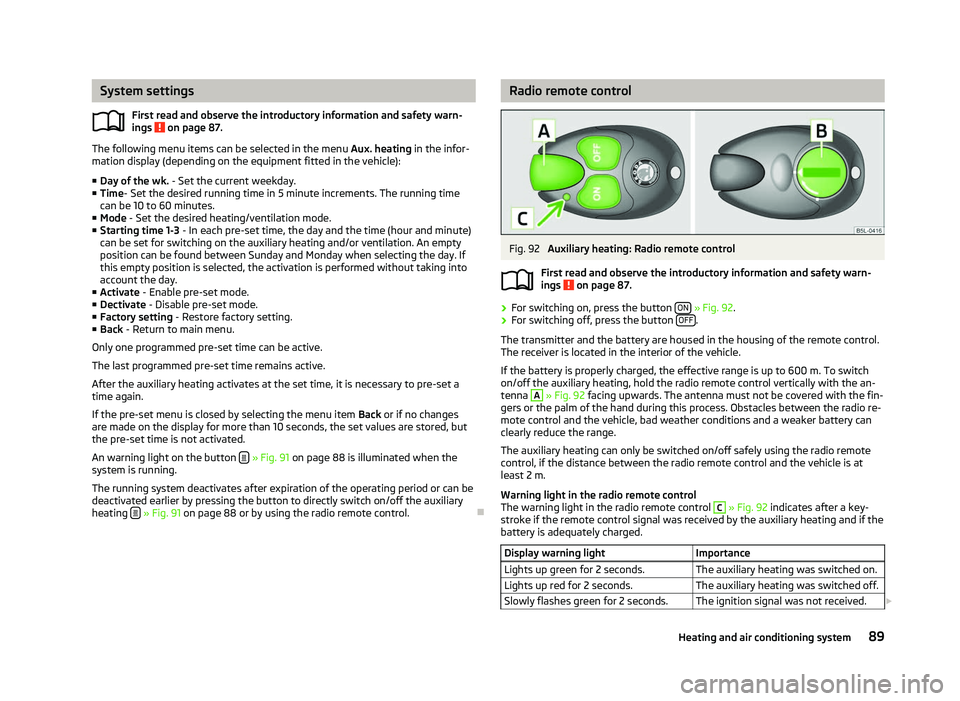
Fig. 92
Auxiliary heating: Radio remote control
First read and observe the introductory information and safety warn-
ings on page 87.
›
For switching on, press the button
ON » Fig. 92.
› For switching off, press the button
OFF .
The transmitter and the battery are housed in the housing of the remote control.
The receiver is located in the interior of the vehicle.
If the battery is properly charged, the effective range is up to 600
m. To switch
on/off the auxiliary heating, hold the radio remote control vertically with the an-
tenna A
» Fig. 92 facing upwards. The antenna must not be covered with the fin-
gers or the palm of the hand during this process. Obstacles between the radio re-
mote control and the vehicle, bad weather conditions and a weaker battery can
clearly reduce the range.
The auxiliary heating can only be switched on/off safely using the radio remote
control, if the distance between the radio remote control and the vehicle is at
least 2
m.
Warning light in the radio remote control
The warning light in the radio remote control C
» Fig. 92 indicates after a key-
stroke if the remote control signal was received by the auxiliary heating and if the
battery is adequately charged.
Display warning light Importance
Lights up green for 2 seconds. The auxiliary heating was switched on.
Lights up red for 2 seconds. The auxiliary heating was switched off.
Slowly flashes green for 2 seconds. The ignition signal was not received. £ ä
89
Heating and air conditioning system
Page 92 of 218
Display warning light
Importance
Quickly flashes green for 2 seconds. The auxiliary heating is blocked, e. g
because the tank is nearly empty or
there is a fault in the auxiliary heating.
Flashes red for 2 seconds. The switch off signal was not received.
Lights up orange for 2 seconds, then
green or red. The battery is weak, however the
switching on or off signal was received.
Lights up orange for 2 seconds, then
flashes green or red. The battery is weak, however the
switching on or off signal was not re-
ceived.
Flashes orange for 5 seconds. The battery is discharged, however the
switching on or off signal was not re-
ceived.CAUTION
The radio remote control comprises electronic components and must therefore be
protected against water, severe impacts and direct sunlight. ÐChanging the battery of the radio remote control
First read and observe the introductory information and safety warn-
ings on page 87.
If the warning light on the radio remote control indicates a weak or discharged
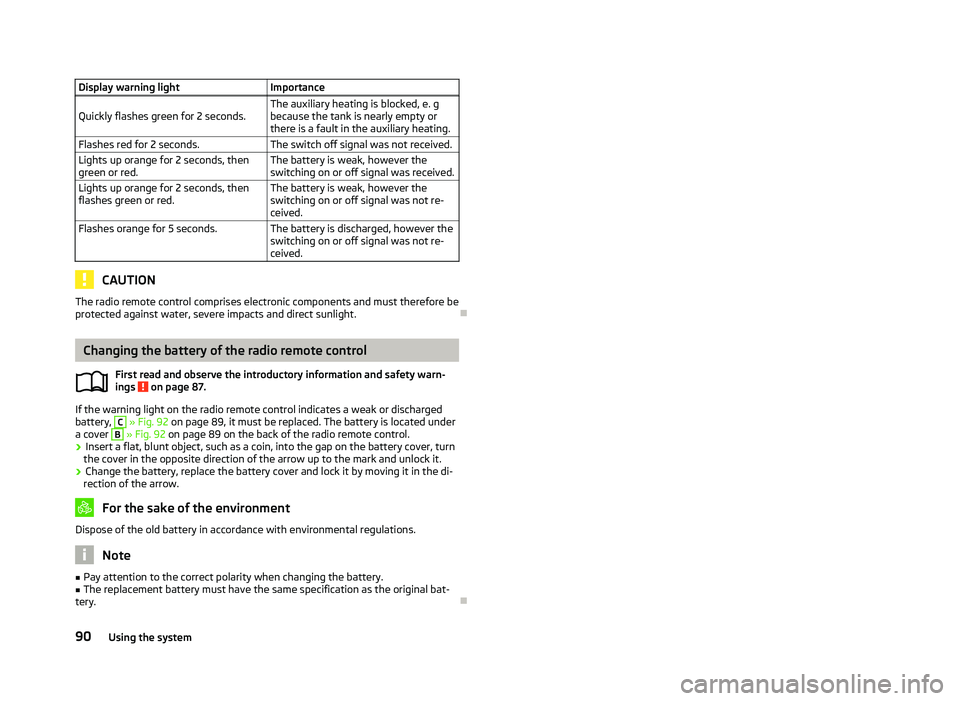
battery, C
» Fig. 92 on page 89
, it must be replaced. The battery is located under
a cover B
» Fig. 92
on page 89 on the back of the radio remote control.
› Insert a flat, blunt object, such as a coin, into the gap on the battery cover, turn
the cover in the opposite direction of the arrow up to the mark and unlock it.
› Change the battery, replace the battery cover and lock it by moving it in the di-
rection of the arrow. For the sake of the environment
Dispose of the old battery in accordance with environmental regulations. Note
■ Pay attention to the correct polarity when changing the battery.
■ The replacement battery must have the same specification as the original bat-
tery. Ð
ä
90
Using the system
Page 100 of 218

Parking aid
Fig. 99
Parking aid: Range of the sensors/activating the parking aid
The parking aid determines the distance between the front or rear bumper and
an obstacle with the aid of ultrasound sensors. The sensors are integrated in the
front/rear bumper.
The signal tones for the front parking aid sound higher than for the rear parking
aid. The tones of the parking aid can be adapted in the menu of the Information
display » page 16.
Range of sensors
The distance warning begins at a distance of about 160°cm from the obstacle at
the rear of the vehicle and about 120
cm from the obstacle in front of the vehicleA
» Fig. 99
. The interval between the warning signals becomes shorter as the
clearance is reduced.
A continuous tone sounds from a distance of approx. 30
cm B
» Fig. 99
- danger
area. From this moment on do not continue driving!
On vehicles with a factory-fitted radio or navigation system, the distance to the
obstacle is simultaneously graphically illustrated on the display, refer to the oper-
ating instructions for the radio or navigation system.
On vehicles with a factory-fitted towing device, the border of the danger area
starts (continuous tone) 5
cm further away from the vehicle. The length of the ve-
hicle can be increased with an installed detachable towing device.
On vehicles with a factory-fitted towing device, the rear sensors are deactivated
when towing a trailer. Activating/deactivating the rear parking aid
The parking aid is activated automatically when
reverse gear is engaged and the
ignition is turned on. This is confirmed by a brief audible signal.
The parking aid is deactivated by removing the reverse gear.
Activating/deactivating the front and rear parking aid
The parking aid is activated when the ignition is turned on and reverse gear is en-
gaged and or by pressing the button » Fig. 99
- the symbol lights up in the
button. This is confirmed by a brief audible signal.
The parking aid is deactivated by pressing the button or at a speed of more
than 10 km/h (the symbol in the button is no longer illuminated). WARNING
■ The parking aid is not a substitute for the driver paying proper attention and
it is always the driver's responsibility to take care when reversing the vehicle
or carrying out similar manoeuvres. Pay particular attention to small children
and animals as they are not recognised by the parking aid sensors.
■ Before reversing or parking, check that there is no small obstacle, such as a
rock, thin post, trailer drawbar etc., in front of or behind the vehicle. Such ob-
stacles may not be recognised by the parking aid sensors.
■ Under certain circumstances, surfaces of certain objects and types of cloth-
ing cannot reflect the signals from the parking aid. Thus, these objects or peo-
ple who wear such clothing are not recognised by the parking aid sensors.
■ External sound sources can have a detrimental effect on the parking aid.
Under unfavourable conditions, objects or people may not be recognised. Note
■ If a warning signal sounds for about 3
seconds after activating the system and
there is no obstacle close to your car, this indicates a system fault. The fault is
confirmed additionally when the symbol flashes in the button . Have the
fault rectified by a
ŠKODA specialist garage.
■ The sensors must be kept clean (free of ice, etc.) to enable the parking aid to
operate properly.
■ If the parking aid is activated and the selector lever of the automatic gearbox is
in the position P, the warning signal is interrupted (the vehicle cannot move). Ð
98 Using the system
Page 101 of 218
Cruise control system (CCS)
ä
Introduction
This chapter contains information on the following subjects:
Storing a speed 99
Changing a stored speed 99
Switching off the cruise control system temporarily 100
Switching off the cruise control system completely 100
The cruise control system (CCS) maintains a constant speed, more than 30 km/h
(20 mph), once it has been set, without you having to depress the accelerator
pedal. This is only possible within the range which is permitted by the power out-
put and braking power of the engine.
The warning light illuminates in the instrument cluster when the cruise control
system is activated. WARNING
■ For safety reasons, the cruise control system must not be used in dense
traffic or on unfavourable road surfaces (such as icy roads, slippery roads,
loose gravel) - risk of accident!
■ The saved speed may only be resumed if it is not too high for the current
traffic conditions.
■ Always switch off the cruise control system after use to prevent uninten-
tional use of the system. CAUTION
■ Always depress the clutch pedal if switching to the neutral position (vehicle
with a manual gearbox) when the cruise control system is switched on! Otherwise
the engine can rev up unintentionally.
■ The cruise control system is not able to maintain a constant speed when driving
in areas with steeper gradients. The weight of the vehicle increases the speed at
which it travels. Therefore, shift to a lower gear in good time or slow the vehicle
down by applying the foot brake. Note
It is not possible on vehicles fitted with an automatic gearbox to switch on the
cruise control system if the selector lever is in the position P, N or R. Ð Storing a speed
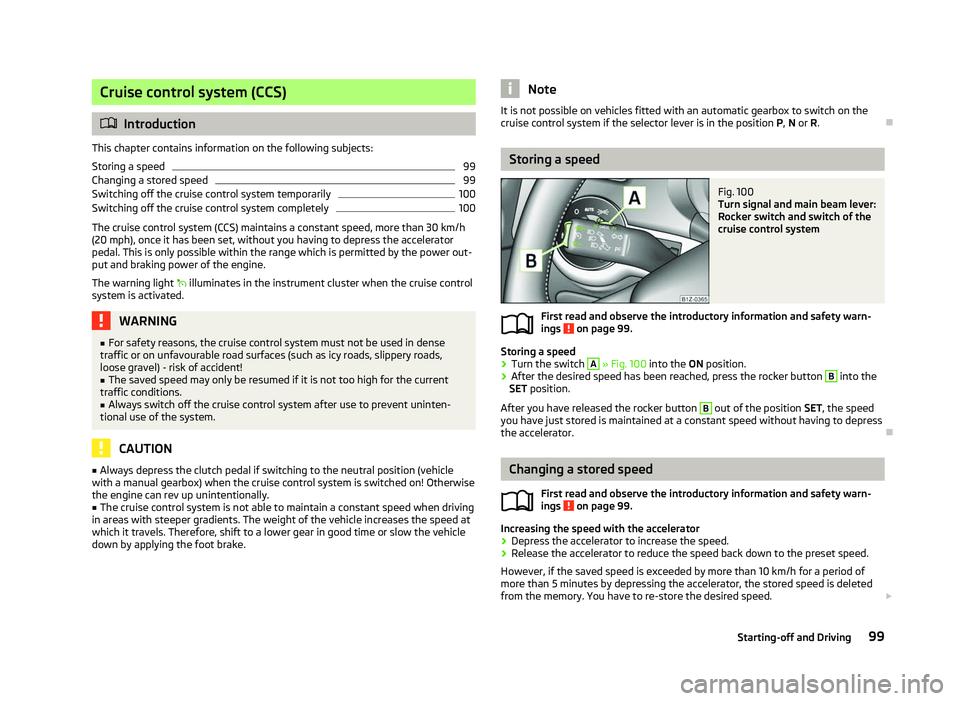
Fig. 100
Turn signal and main beam lever:
Rocker switch and switch of the
cruise control system
First read and observe the introductory information and safety warn-
ings on page 99.
Storing a speed
›
Turn the switch A
» Fig. 100 into the ON position.
› After the desired speed has been reached, press the rocker button B
into the
SET position.
After you have released the rocker button B
out of the position SET
, the speed
you have just stored is maintained at a constant speed without having to depress
the accelerator. Ð Changing a stored speed
First read and observe the introductory information and safety warn-
ings on page 99.
Increasing the speed with the accelerator
›
Depress the accelerator to increase the speed.
› Release the accelerator to reduce the speed back down to the preset speed.
However, if the saved speed is exceeded by more than 10 km/h for a period of
more than 5 minutes by depressing the accelerator, the stored speed is deleted
from the memory. You have to re-store the desired speed. £
ä
ä
99
Starting-off and Driving