turn signal SKODA OCTAVIA 2006 Owner´s Manual
[x] Cancel search | Manufacturer: SKODA, Model Year: 2006, Model line: OCTAVIA, Model: SKODA OCTAVIA 2006Pages: 218, PDF Size: 5.48 MB
Page 112 of 218
›
Managing telephone calls via the adapter
» page 111.
› Operation of the telephone via the information display
» page 112.
› Voice control of the telephone
» page 116.
› Music playback from the telephone or other multimedia units
» page 118.
All communication between a mobile phone and your vehicle's hands-free system
is established with the help of Bluetooth ®
technology. The adapter serves only
for charging the telephone and for transmitting the signal to the vehicle's exter-
nal aerial. Note
The following guidelines must be observed » page 107, Mobile phones and two-
way radio systems. ÐConnecting the mobile phone to the hands-free system
To connect a mobile phone with the hands-free system, the two devices must be
paired. Detailed information on this is provided in the operating instructions for
your mobile phone. The following steps must be carried out for the connection.
› Activate Bluetooth ®
and the visibility of your mobile phone on your telephone.
› Switch on the ignition.
› Select the menu
Phone - New user in the information display and wait until the
control unit has completed the search.
› Select your mobile phone from the menu of the units found.
› Confirm the PIN 1)
.
› If the hands-free system announces (as standard
SKODA_BT) on the display of
the mobile phone, enter the PIN 1)
within 30 seconds and wait, until the connec-
tion is established 2
).
› After terminating the connection, confirm the creation of a new user profile in
the information display.
If there is no free space available to create a new user profile, delete an existing
user profile.
During the connecting procedure, no other mobile phone may be connected with
the hands-free system. Up to four mobile phones can be paired with the hands-free system, whereby on-
ly one mobile phone can communicate with the hands-free system.
The visibility of the hands-free system is automatically switched off 3
minutes af-
ter the ignition is switched on and is also deactivated when the mobile phone has
connected to the hands-free system.
Restoring the visibility of the hands-free system
If you have not managed to connect your mobile phone with the hands-free sys-
tem within 3 minutes of switching on the ignition, the visibility of the hands-free
system can be reestablished for 3 minutes in the following ways.
› By turning the ignition off and on.
› By turning voice control off and on.
› Via the information display in the menu item Bluetooth
- Visibility.
Creating a connection with an already paired mobile phone
After switching on the ignition, the connection is automatically established for
the already paired mobile phone 2)
. Check on your mobile phone if the automatic
connection has been established.
Disconnecting the connection
› By withdrawing the ignition key.
› By disconnecting the hands-free system in the mobile phone.
› By disconnecting the user in the information display in the menu
Bluetooth -
User .
Solving connection problems
If the system announces No paired phone found, check the operating state of the
mobile phone.
› Is the mobile phone switched on?
› Is the PIN code entered?
› Is Bluetooth ®
active?
› Is the visibility of the mobile phone active?
› Has the mobile phone already been paired with the hands-free system?
£1)
Depending on the Bluetooth ®
version on the mobile phone, an automatically generated 6-digit PIN is
either displayed or the PIN 1234 has to be entered manually.
2) Some mobile phones have a menu, in which the authorisation for establishing a Bluetooth ®
connec-
tion is completed by inputting a code. If the authorisation input is required, it must always be per-
formed when re-establishing the Bluetooth connection.
110 Using the system
Page 117 of 218
■
Media player
■ Active device
■ Paired devices
■Connect
■ Rename
■ Delete
■ Authorisation
■ Search - search for available media players
■ Visibility - Switching on the visibility of the hands-free system for media play-
ers in the vicinity
■ Extras
■Modem - overview of the active and paired devices for the connection to the
internet
■Active device
■ Paired devices
■ Phone name - the possibility to change the name of the hands-free system
(pre-set SKODA UHV)
Settings
The following menu items can be selected in the menu Settings.
■ Phone book
■ Update - scan the telephone book
■ Select memory
■ SIM & phone
■ SIM card
■ Mobile phone - Initial setting to also import contacts from the SIM card, it is
necessary to switch to the menu item SIM & phone
■ List
■ Surname
■ First name
■ Own number - optionally display your own telephone number on the display of
the device of the person you are calling (this function is network-dependent)
■ Network depnd. .
■ Yes
■ No
■ Signal settings
■ Ring tone
■ Volume
■Turn vol. up
■ Turn vol. down ■
Phone settings
■Select operator
■ Automatic
■ Manual
■ Network mode
■ GSM
■ Automatic
■ SIM mode - valid for telephones with the rSAP profile, that simultaneously
support the operation of two SIM cards - there is an option to choose which
SIM card should be connected to the hands-free system
■ Change
■ Phone Mode - Toggle between rSAP and HFP mode
■ Premium - rSAP mode
■ Hands-free - HFP mode
■ Off time - Setting in five-minute steps
■ Data - Settings for the Internet access point - ask network operator for details
■ Switch off ph. (Switch off ph.) - switches off the phone unit (phone remains
coupled)
Back
Return in the main menu of the information display. Ð Internet connection
A notebook can, for example, be connected to the Internet via the hands-free
system.
The control unit of the hands-free system supports the GPRS, EDGE and UMTS/3G
technologies.
An Internet can only be established via a telephone which is connected via the
rSAP profile.
The procedure for connecting to the Internet can vary depending on the type and
version of the operating system as well as the type of the device to be connected.
Successfully connecting to the internet requires appropriate knowledge of the
operating system for connecting the device .
Process of connection
› Connect the mobile phone with the hands-free system.
› Set the access point (depending on the operator, usually “Internet”) in the
menu Phone - Settings - Data .
› Switch on the visibility of the hands-free system for the other devices in the
menu Phone - Bluetooth - Visibility . £
115
Communication
Page 123 of 218
Safety
Passive Safety
General information
ä
Introduction
This chapter contains information on the following subjects:
Safety equipment 121
Before setting off 121
What influences the driving safety? 122
In this section you will find important information, tips and notes on the subject
of passive safety in your vehicle. We have combined everything here which you
should be familiar with, for example, regarding seat belts, airbags, child seats and
safety of children. It is therefore important, in particular, to comply with the notes
and warnings in this section for your own interest and in the interest of those
travelling with you. WARNING
■ This chapter contains important information on how to use the vehicle for
the driver and his occupants. You will find further information on safety, which
concerns you and those travelling with you, in the following chapters of this
Owner's Manual.
■ The complete on-board literature should always be in the vehicle. This ap-
plies in particular, if you rent out or sell the vehicle. ÐSafety equipment
First read and observe the introductory information and safety warn-
ings on page 121.
The following list contains part of the safety equipment in your vehicle:
› three-point seat belts for all the seats;
› belt force limiter for front and outer rear seats;
ä ›
belt tensioners for front seats;
› seat belt height adjusters for front seats;
› Front airbag for the driver and the front seat passenger;
› side airbags;
› head airbags;
› anchoring points for child seat using the
ISOFIX system;
› anchoring points for child seat using the TOP TETHER system;
› head restraints adjustable for height;
› adjustable steering column.
The specified safety equipment works together, in order to optimally protect you
and those travelling with you in accident situations. The safety equipment does
not protect you or the people travelling with you, if you or your occupants adopt
an incorrect seated position or the equipment is not correctly adjusted or used. Ð Before setting off
First read and observe the introductory information and safety warn-
ings on page 121.
For your own safety and the safety of the people travelling with you, please pay
attention to the following points before setting off.
›
Ensure that the lighting and the turn signal system are functioning properly.
› Check the tyre inflation pressure.
› Ensure that all of the windows offer good visibility to the outside.
› Secure all items of luggage
» page 60, Boot.
› Ensure that no objects can obstruct the pedals.
› Adjust the mirrors, the front seat and head restraint to your body size.
› Advise your passengers to adjust the head restraints to their body size.
› Protect children in suitable child seats with correctly fastened seat
belts
» page 135, Transporting children safely .
› Adopt the correct seated position
» page 122, Correct seated position . Tell your
passengers to assume the correct seated position.
› Correctly fasten the seat belt. Also inform passengers to fasten the seat belt
correctly » page 125, Seat belts . Ð
ä
121
Passive Safety
Page 189 of 218
Driver of the tow vehicle
›
Release the clutch particularly gently when starting off or depress the accelera-
tor particularly gently if the vehicle is fitted with an automatic gearbox.
› On vehicles with a manual transmission, only push down on the accelerator
pedal once the rope is taught.
The maximum towing speed is 50 km/h.
Driver of the towed vehicle
› Switch on the ignition so that the steering wheel is not blocked and so that the
turn signal lights, horn, windscreen wipers and windscreen washer system can
be switched on.
› Take the vehicle out of gear or move the selector lever into position
N if the
vehicle is fitted with an automatic gearbox.
Please note that the brake servo unit and power steering only operate if the en-
gine is running. If the engine is not running, significantly more physical force is re-
quired to depress the brake pedal and steer the vehicle.
If using a tow rope, ensure that it is always kept taught. CAUTION
■ Do not tow start the engine - danger of damaging the engine! On vehicles with
a catalytic converter, unburnt fuel may get into the catalytic converter where it
may ignite. This in turn may damage or destroy the catalytic converter. The bat-
tery from another vehicle can be used as a jump-start aid » page 185, Jump-start-
ing .
■ If the gearbox of your vehicle no longer contains any oil because of a defect,
your vehicle must only be towed in with the driven wheels raised clear of the
ground, or on a special vehicle transporter or trailer.
■ The vehicle must be transported on a special vehicle or trailer if it is not possible
to tow in the vehicle in the way described or if the towing distance is greater than
50 km. ■ To protect both vehicles when tow-starting or towing, the tow rope should be
elastic. Thus one should only use plastic fibre rope or a rope made out of a simi-
larly elastic material.
■ One should be constantly vigilant not to allow impermissibly high towing forces
or jerky loadings. There is always a risk of excessive stresses and damage result-
ing at the points to which you attach the tow rope or tow bar when you attempt
to tow a vehicle which is not standing on a paved road.
■ Attach the tow rope or the tow bar to the towing eyes or to the detachable ball
head of the towing device » page 187
or » page 188. Note
■ We recommend using a tow rope from
ŠKODA Original Accessories available
from a ŠKODA Service Partner. ■ Towing another vehicle requires a certain amount of practice. Both drivers
should be familiar with the particular points about towing a vehicle. Unskilled
drivers should not attempt to tow in another vehicle or to be towed in. ■ When towing, respect the national legal provisions, especially those which re-
late to the identification of the towing vehicle and the vehicle being towed. ■ The tow rope must not be twisted as it may in certain circumstances result in
the front towing eye being unscrewed out of your vehicle. Ð Front towing eye
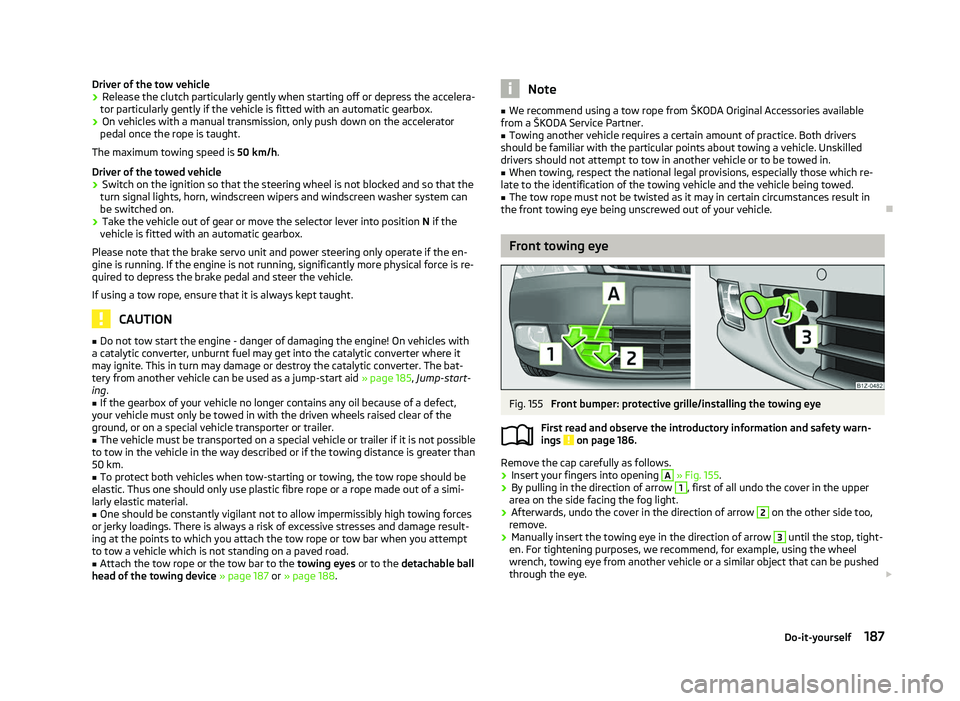
Fig. 155
Front bumper: protective grille/installing the towing eye
First read and observe the introductory information and safety warn-
ings on page 186.
Remove the cap carefully as follows.
›
Insert your fingers into opening A
» Fig. 155 .
› By pulling in the direction of arrow 1
, first of all undo the cover in the upper
area on the side facing the fog light.
› Afterwards, undo the cover in the direction of arrow 2
on the other side too,
remove.
› Manually insert the towing eye in the direction of arrow 3
until the stop, tight-
en. For tightening purposes, we recommend, for example, using the wheel
wrench, towing eye from another vehicle or a similar object that can be pushed
through the eye. £
ä
187
Do-it-yourself
Page 192 of 218
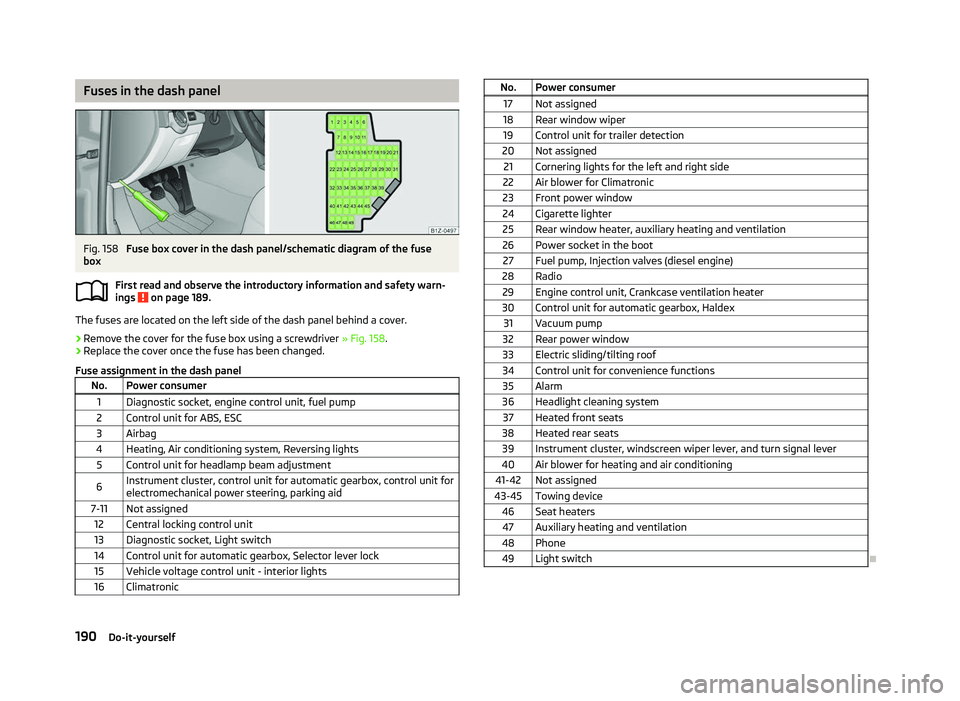
Fuses in the dash panel
Fig. 158
Fuse box cover in the dash panel/schematic diagram of the fuse
box
First read and observe the introductory information and safety warn-
ings on page 189.
The fuses are located on the left side of the dash panel behind a cover.
›
Remove the cover for the fuse box using a screwdriver
» Fig. 158.
› Replace the cover once the fuse has been changed.
Fuse assignment in the dash panel No. Power consumer
1 Diagnostic socket, engine control unit, fuel pump
2 Control unit for ABS, ESC
3 Airbag
4 Heating, Air conditioning system, Reversing lights 5 Control unit for headlamp beam adjustment
6 Instrument cluster, control unit for automatic gearbox, control unit for
electromechanical power steering, parking aid
7-11 Not assigned 12 Central locking control unit
13 Diagnostic socket, Light switch
14 Control unit for automatic gearbox, Selector lever lock 15 Vehicle voltage control unit - interior lights
16 Climatronic ä
No. Power consumer
17 Not assigned
18 Rear window wiper 19 Control unit for trailer detection
20 Not assigned 21 Cornering lights for the left and right side
22 Air blower for Climatronic
23 Front power window
24 Cigarette lighter 25 Rear window heater, auxiliary heating and ventilation
26 Power socket in the boot 27 Fuel pump, Injection valves (diesel engine)
28 Radio 29 Engine control unit, Crankcase ventilation heater
30 Control unit for automatic gearbox, Haldex 31 Vacuum pump
32 Rear power window
33 Electric sliding/tilting roof
34 Control unit for convenience functions 35 Alarm
36 Headlight cleaning system 37 Heated front seats
38 Heated rear seats 39 Instrument cluster, windscreen wiper lever, and turn signal lever
40 Air blower for heating and air conditioning
41-42 Not assigned
43-45 Towing device 46 Seat heaters47 Auxiliary heating and ventilation
48 Phone 49 Light switch Ð
190 Do-it-yourself
Page 193 of 218
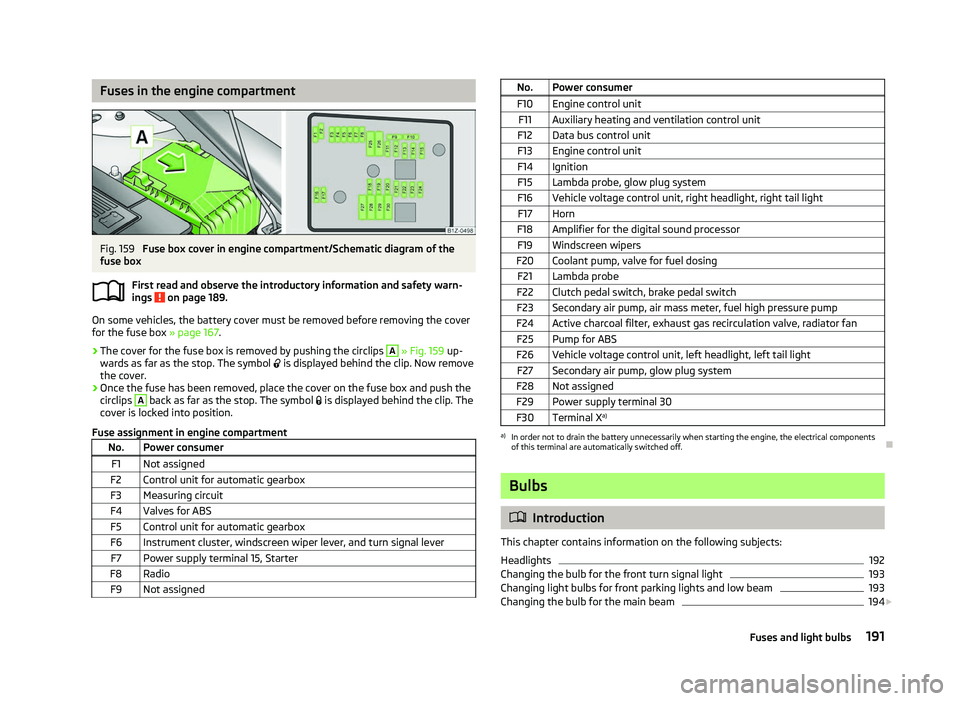
Fuses in the engine compartment
Fig. 159
Fuse box cover in engine compartment/Schematic diagram of the
fuse box
First read and observe the introductory information and safety warn-
ings on page 189.
On some vehicles, the battery cover must be removed before removing the cover
for the fuse box
» page 167.
› The cover for the fuse box is removed by pushing the circlips A
» Fig. 159
up-
wards as far as the stop. The symbol is displayed behind the clip. Now remove
the cover.
› Once the fuse has been removed, place the cover on the fuse box and push the
circlips A
back as far as the stop. The symbol
is displayed behind the clip. The
cover is locked into position.
Fuse assignment in engine compartment No. Power consumer
F1 Not assigned
F2 Control unit for automatic gearbox
F3 Measuring circuit
F4 Valves for ABS F5 Control unit for automatic gearbox
F6 Instrument cluster, windscreen wiper lever, and turn signal lever F7 Power supply terminal 15, Starter
F8 Radio F9 Not assigned ä
No. Power consumer
F10 Engine control unit F11 Auxiliary heating and ventilation control unit
F12 Data bus control unit
F13 Engine control unit
F14 Ignition F15 Lambda probe, glow plug system
F16 Vehicle voltage control unit, right headlight, right tail light F17 Horn
F18 Amplifier for the digital sound processor F19 Windscreen wipers
F20 Coolant pump, valve for fuel dosing F21 Lambda probe
F22 Clutch pedal switch, brake pedal switch
F23 Secondary air pump, air mass meter, fuel high pressure pump
F24 Active charcoal filter, exhaust gas recirculation valve, radiator fan F25 Pump for ABS
F26 Vehicle voltage control unit, left headlight, left tail light F27 Secondary air pump, glow plug system
F28 Not assigned F29 Power supply terminal 30
F30 Terminal X a) a)
In order not to drain the battery unnecessarily when starting the engine, the electrical components
of this terminal are automatically switched off. Ð Bulbs
ä
Introduction
This chapter contains information on the following subjects:
Headlights 192
Changing the bulb for the front turn signal light 193
Changing light bulbs for front parking lights and low beam 193
Changing the bulb for the main beam 194
£
191
Fuses and light bulbs
Page 194 of 218

Fog lights and daytime running lights 194
Fog lights Octavia RS, Octavia Scout 195
Changing the bulb for the licence plate light 195
Tail lamp assembly 196
Tail light (Combi) 196
Some manual skills are required to change a bulb. For this reason, if uncertain, we
recommend that bulbs are replaced by a ŠKODA specialist garage or other expert
help is sought.
› Switch off the ignition and all of the lights before replacing a bulb.
› Faulty bulbs must only be replaced with the same type of bulbs. The designa-
tion is located on the light socket or the glass bulb.
› A stowage compartment for replacement bulbs is located in a plastic box in the
spare wheel or underneath the floor covering in the boot. WARNING
■ Accidents can be caused if the road in front of the vehicle is not sufficiently
illuminated and the vehicle cannot or can only be seen with difficulty by other
road users.
■ Always read and observe the warnings before completing any work in the
engine compartment »
page 158, Engine compartment .
■ Bulbs H7 and H1 are pressurised and may burst when changing the bulb -
risk of injury! We therefore recommended wearing gloves and safety glasses
when changing a bulb. ■ Gas discharge bulbs (xenon bulbs) operate with a high voltage, professional
knowledge is required - danger to life! CAUTION
■ Do not take hold of the glass bulb with naked fingers (even the smallest
amount of dirt reduces the working life of the light bulb). Use a clean cloth, nap-
kin, or similar. ■ When removing and installing the headlight make sure that the paintwork of
the vehicle and the headlight are not damaged. Note
■ This Owner's Manual only describes the replacement of bulbs where it is possi-
ble to replace the bulbs on your own without any complications arising. Other
light bulbs should be changed by a
ŠKODA specialist garage.
■ We recommend that a box of replacement bulbs be always carried in the vehi-
cle. Replacement bulbs can be purchased from
ŠKODAOriginal Accessories.
■ We recommend that the headlight settings are checked by a ŠKODA specialist
garage after replacing a bulb in the main or low beam.
■ Gas discharge bulbs and LED diodes are replaced by a ŠKODA specialist garage. Ð Headlights
Fig. 160
Headlights: Bulb arrangement/removal
First read and observe the introductory information and safety warn-
ings on page 191.
Overview of the location of the bulbs
» Fig. 160. 1
- front turn signal light
2
- parking lights and low beam
3
- main beam light
The headlight must be removed in order to change the light bulb of the parking
lights, low beam lights and main beam lights as well as the turn signal lights.
Removing the main beam lights
› Open the bonnet
» page 160, Opening and closing the bonnet .
› Unscrew the plastic nuts A
» Fig. 160
.
› Pull the locking button B
upwards.
£
ä
192 Do-it-yourself
Page 195 of 218

›
Pull the locking lever on the headlight as far as the stop in the direction of ar-
row C
.
› Disconnect the plug connection and carefully remove the head light in the di-
rection of arrow D
.
Installation is carried out in the reverse order. ÐChanging the bulb for the front turn signal light
Fig. 161
Removing light bulb for turn sig-
nal light
First read and observe the introductory information and safety warn-
ings on page 191.
›
Remove the head light
» page 192.
› Turn the socket in the direction of arrow
OPEN and remove it together with the
warning light bulb » Fig. 161.
› Push in the bulb into the socket, turn counter-clockwise up to the stop and re-
move.
› Insert a new bulb into the socket and turn
clockwise up to the stop.
› Insert the socket with the new bulb into the headlamp. Secure it by turning it in
the direction of arrow CLOSE. Ð
ä Changing light bulbs for front parking lights and low beam
Fig. 162
Removing light bulbs for front
parking lights and low beam
First read and observe the introductory information and safety warn-
ings on page 191.
In order to facilitate the removal of the socket with the bulb for the parking light,
we recommend to remove first of all the connector for the low beam light bulb.
›
Remove the head light
» page 192.
› Remove the rubber cover 2
» Fig. 160
on page 192.
› To replace the bulb for the
low beam, turn the connector with the bulb B
» Fig. 162 counter-clockwise
up to the stop, and remove.
› Replace the lamp, insert the connector with the new bulb and turn
clockwise
up to the stop.
› To remove the bulb for the
front parking light, remove the holder A
.
› Remove the faulty bulb from the socket, insert a new bulb, and insert the sock-
et containing the bulb.
› Insert the rubber cover. Ð
ä
193
Fuses and light bulbs
Page 212 of 218
Environmentally friendly driving 140
ESC Operating principle 95
Warning light 22
Ethanol E85 see fuel 157
F
Fire extinguisher 178
First-aid kit 178
Floor mats 97
Front airbag 130
Front seats 54
Fuel 155
Diesel 158
Ethanol E85 157
Fuel gauge 9
gauge 9
refer to Fuel 155
Refuelling 155
Unleaded petrol 156
Fuel consumption 140
Fuses Assignment 189
Replacing 189
G
Gear Recommended gear 11
General view Cockpit 7
Glow plug system Warning light 23
GSM 109, 112
H
Handbrake 95
Head airbag 132Headlight cleaning system
Headlight cleaning system 50
Headlights Driving abroad 143
Headlight cleaning system 50
Head restraint 58
Heating 80
Defrosting windows 81
Exterior mirror 52
Rear window 47
Recirculated air mode 82
Seats 57
Heating rear window 47
Horn 7
I
Ignition 93
Ignition lock 93
Immobiliser 92
Information display see MAXI DOT 15
Instrument cluster 8
Instrument lighting 43
Interior monitor 32
Internet connection 115
ISOFIX 137
J
Jacking points Raise vehicle 181
Jump-starting 185
L
Lever Main beam 45
Turn signal 45Light
Automatic driving lamp control 40
Cockpit 45
COMING HOME/LEAVING HOME function 41
Daylight driving light 40
Fog lights 42
Fog lights with the function CORNER 42
Hazard warning light system 44
Headlight beam adjustment 44
Headlight flasher 45
Low beam 40
Main beam 45
Parking light 40, 41
Rear fog light 43
Replacing bulbs 191
Tourist light 42
Turn signal 45
Lights Cornering lights 41
switching on and off 40
Warning lights 18
Loads 197
Lock Central locking system 29
Locking Emergency locking 32
Remote control 30
Locking and unlocking from the inside 29
Luggage compartment Folding double hooks 62
Folding hooks 62
M
MAXI DOT 15
Main menu 15
Settings 16
Mirror Automatic dimming interior mirror 52
Exterior mirror 52
210 Index