lock SKODA OCTAVIA 2006 Owner´s Manual
[x] Cancel search | Manufacturer: SKODA, Model Year: 2006, Model line: OCTAVIA, Model: SKODA OCTAVIA 2006Pages: 218, PDF Size: 5.48 MB
Page 104 of 218
Automatic gearbox
Automatic gearbox
ä
Introduction
This chapter contains information on the following subjects:
Introductory information 102
Starting-off and driving 103
Selector lever positions 103
Manual shifting of gears (Tiptronic) 104
Selector lever lock 105
Kickdown function 105
Dynamic shift programme 105
Emergency programme 106
Selector lever-emergency unlocking 106
WARNING
■ Do not depress the accelerator if changing the position of the selector lever
when the vehicle is stationary and the engine is running - risk of accident!
■ Never move the selector lever into position R or P when driving - risk of an
accident!
■ When the engine is running and the vehicle is stationary, it is necessary to
hold the car with the brake pedal in all the positions of the selector lever (ex-
cept P and N) since the power transmission is never completely interrupted,
also not when the engine is idling - the vehicle creeps.
■ The selector lever must be placed into position P and the handbrake firmly
applied before the bonnet can be opened and work on the running engine can
be completed - risk of accident! The safety guidelines must always be ob-
served » page 158 , Engine compartment . WARNING (Continued)
■ If stopping on a hill (downhill gradient), never try to maintain the vehicle sta-
tionary with the gear engaged by means of the
“accelerator pedal”, i.e. by let-
ting the clutch slip. This can lead to overheating of the clutch. If there is a risk
of overheating of the clutch due to overload, the clutch is opened automati-
cally and the vehicle rolls backward - risk of accident!
■ If you have to stop on a slope, depress and hold the brake pedal to prevent
the vehicle from rolling back.
■ On a smooth or slippery road surface using the kickdown function can cause
the driven wheels to spin - risk of skidding! CAUTION
■ The double clutch on the automatic gearbox DSG is equipped with an overload
protection. If the uphill function is used when the vehicle is stationary or driving
slowly uphill, the thermal stress on the clutches is increased. ■ If the clutch system overheats, the symbol is shown in the information dis-
play along with the message Gearbox overheated. Stop! Owner's man.! appears.
An audible signal sounds as a warning signal. Stop the vehicle, switch off the en-
gine, and wait until the symbol disappears - risk of gearbox damage! You can
continue your journey as soon as the symbol disappears. Ð Introductory information
First read and observe the introductory information and safety warn-
ings on page 102.
Shifting up and down through the gears is performed automatically. The gearbox
can also be switched to
Tiptronic mode. This mode makes it possible for you to
also shift gears manually » page 104.
The engine can only be started when the selector lever is in position P or N . If
the selector lever is not in the P or N positions when locking the steering, switch-
ing the ignition on or off or when leaving the engine on, the following message
will appear in the Information display Move selector lever to position P/N! or, in
the instrument cluster display: P/N
.
At temperatures below -10 °C the engine can only be started in the selector lever
position P 1)
. £
ä
1)
Applies to DSG.
102 Using the system
Page 105 of 218
When parking on a level road surface, it suffices to engage selector lever position
P. When parking on a slope, the handbrake should be applied firmly before the
park position is selected. This ensures that there is no excessive pressure on the
lock mechanism and that it is subsequently easier to move the selector lever out
of position P.
If the selector lever position N is accidentally selected while driving, it is first nec-
essary to release pressure on the accelerator pedal and wait for the idling speed
of the engine to be reached before the selector lever can be engaged in the drive
position. ÐStarting-off and driving
First read and observe the introductory information and safety warn-
ings on page 102.
Starting off
›
Firmly depress and hold the brake pedal.
› Press the Shiftlock button (button in the selector lever handle), move the selec-
tor lever into the desired position » page 103 and then release the Shiftlock
button.
› Wait a moment until the gearbox has shifted (a slight engagement nudge can
be felt) 1)
.
› Release the brake pedal and accelerate.
Stop
› The selector lever position
N does not have to be selected when stopping for a
short time, such as at a cross roads. It is sufficient to hold the vehicle stationary
using the foot brake. The engine can, however, be allowed just to idle.
Parking
› Depress the brake pedal.
› Firmly apply the handbrake.
› Press and Shiftlock button in the selector lever, move the selector lever to
P
and then release the Shiftlock button. Ð
ä Selector lever positions
Fig. 102
Selector lever/information display: Selector lever positions
First read and observe the introductory information and safety warn-
ings on page 102.
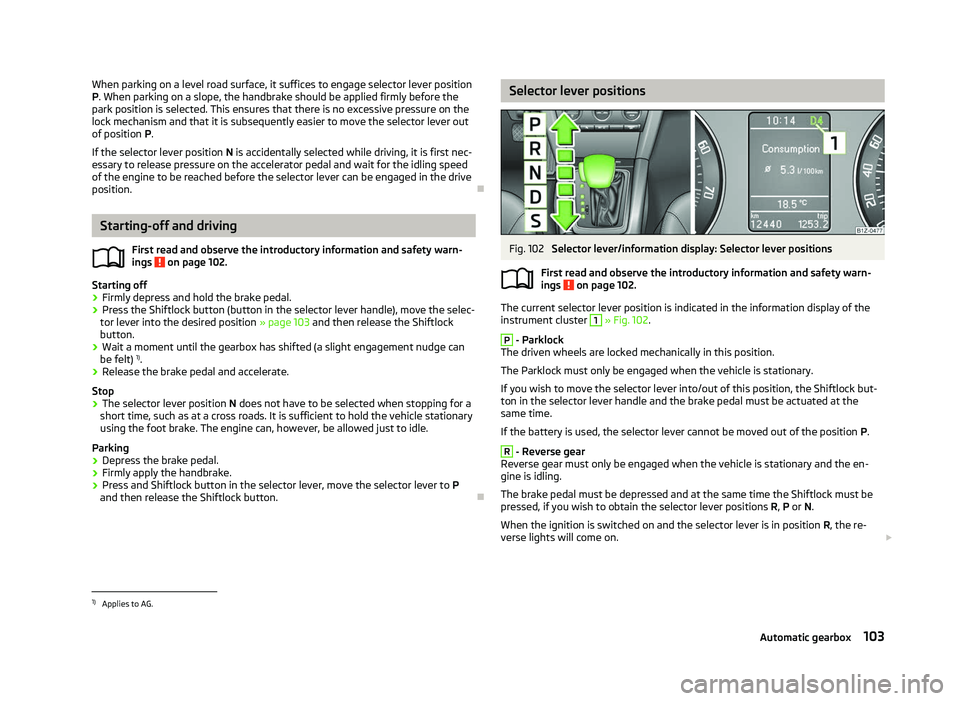
The current selector lever position is indicated in the information display of the
instrument cluster
1
» Fig. 102.
P
- Parklock
The driven wheels are locked mechanically in this position.
The Parklock must only be engaged when the vehicle is stationary.
If you wish to move the selector lever into/out of this position, the Shiftlock but-
ton in the selector lever handle and the brake pedal must be actuated at the
same time.
If the battery is used, the selector lever cannot be moved out of the position P. R
- Reverse gear
Reverse gear must only be engaged when the vehicle is stationary and the en-
gine is idling.
The brake pedal must be depressed and at the same time the Shiftlock must be
pressed, if you wish to obtain the selector lever positions R, P or N.
When the ignition is switched on and the selector lever is in position R, the re-
verse lights will come on. £
ä
1)
Applies to AG.
103
Automatic gearbox
Page 106 of 218
N
- Neutral
The transmission is in Neutral in this position.
The brake pedal must be depressed to move the selector lever out of the position
N (if the lever is in this position for longer than 2
seconds) into the position D or R
when the vehicle is travelling at less than 5 km/h or the vehicle is stationary and
the ignition is switched on. D
- Position for driving forward (normal programme)
When the selector lever is in this position, the forward gears are automatically
shifted up and down in line with the engine load, vehicle speed and dynamic shift
programme.
The brake pedal must be depressed to move the selector lever into position D
from Nwhen the vehicle is travelling at less than 5
km/h or is stationary.
Under certain circumstances (e.g. when driving in mountainous regions or when
towing a trailer) it may be beneficial to select the manual shift pro-
gramme » page 104 for a short time in order to adapt the gearbox ratios manual-
ly to the driving situations. S
- Position for driving forward (sports programme)
Shifting up later into a higher gear makes it possible to fully exploit the power po-
tential of the engine. The gearbox also then shifts down at higher engine speeds
as in the position D .
The Shiftlock on the selector lever grip must be pressed when moving the selec-
tor lever out of the position D into the position S. ÐManual shifting of gears (Tiptronic)
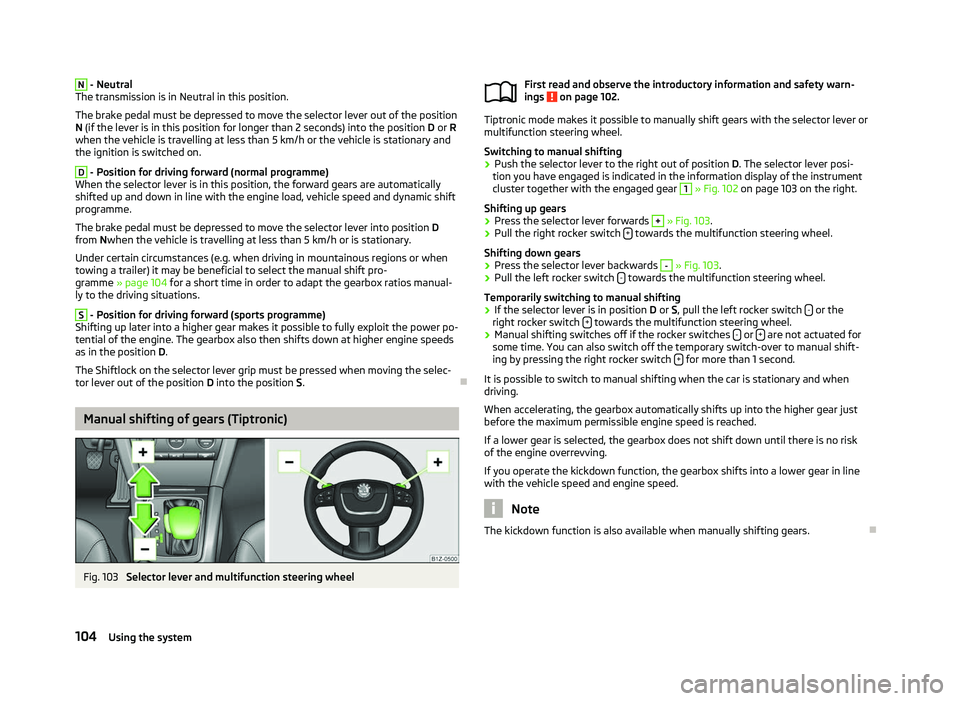
Fig. 103
Selector lever and multifunction steering wheel First read and observe the introductory information and safety warn-
ings on page 102.
Tiptronic mode makes it possible to manually shift gears with the selector lever or
multifunction steering wheel.
Switching to manual shifting
›
Push the selector lever to the right out of position
D. The selector lever posi-
tion you have engaged is indicated in the information display of the instrument
cluster together with the engaged gear 1
» Fig. 102 on page
103 on the right.
Shifting up gears
› Press the selector lever forwards +
» Fig. 103.
› Pull the right rocker switch
+ towards the multifunction steering wheel.
Shifting down gears › Press the selector lever backwards -
» Fig. 103.
› Pull the left rocker switch
- towards the multifunction steering wheel.
Temporarily switching to manual shifting
› If the selector lever is in position
D or S, pull the left rocker switch - or the
right rocker switch + towards the multifunction steering wheel.
› Manual shifting switches off if the rocker switches
- or
+ are not actuated for
some time. You can also switch off the temporary switch-over to manual shift-
ing by pressing the right rocker switch + for more than 1 second.
It is possible to switch to manual shifting when the car is stationary and when
driving.
When accelerating, the gearbox automatically shifts up into the higher gear just
before the maximum permissible engine speed is reached.
If a lower gear is selected, the gearbox does not shift down until there is no risk
of the engine overrevving.
If you operate the kickdown function, the gearbox shifts into a lower gear in line
with the vehicle speed and engine speed. Note
The kickdown function is also available when manually shifting gears. Ð
ä
104 Using the system
Page 107 of 218
Selector lever lock
First read and observe the introductory information and safety warn-
ings on page 102.
Automatic selector lever lock
With the ignition on, the selector lever is locked when it is in the positions P and
N. The brake pedal must be depressed to move the selector lever out of this posi-
tion. The warning light » page 25, Selector lever lock illuminates in the in-
strument cluster as a reminder for the driver when the selector lever is in the po-
sitions P and N.
The selector lever is not locked when quickly moving across the position
N (e.g.
from R to D). This, for example, helps to rock out a vehicle that is stuck. The selec-
tor lever lock will click into place if the lever is in the N position for more than 2
seconds without the brake pedal being pressed.
The selector lever lock is only active if the vehicle is stationary or moving at speed
of less than 5 km/hour. The lock is switched off automatically into position N
when the car is travelling at a higher speed.
Shiftlock button
The Shiftlock button in the handle of selector lever prevents certain selector lever
positions being engaged inadvertently. The selector lever lock is cancelled when
the Shiftlock button is pressed.
Ignition key withdrawal lock
After the ignition is switched off, the ignition key can only be withdrawn if the se-
lector lever is in the position P. If the ignition key is withdrawn, the selector lever
is blocked in position P . ÐKickdown function
First read and observe the introductory information and safety warn-
ings on page 102.
The kickdown function provides you with maximum acceleration power.
When the accelerator pedal is fully depressed, the kickdown function is activated
in the desired driving program. This function has precedence over the driving pro-
gramme and serves for maximum acceleration of the vehicle when exploiting the
maximum power potential of the engine without taking into account the current
selector lever position ( D, S or Tiptronic ). The gearbox shifts down to one or sev-
ä
ä
eral gears in line with the driving state and the vehicle accelerates. The gearbox
does not shift up into the highest gear until the engine has reached its maximum
revolutions for this gear range. Ð Dynamic shift programme
First read and observe the introductory information and safety warn-
ings on page 102.
The automatic gearbox of your vehicle is controlled electronically. Shifting up and
down through the gears is performed automatically on the basis of pre-defined
driving programmes.
Adopting a moderate style of driving
will cause the gearbox to select the most
economical driving programme. Shifting up into a higher gear as soon as possible
and shifting down as late as possible will have a favourable effect on your fuel
consumption.
When adopting a sporty style of driving with rapid movements of the accelerator
pedal combined with sharp acceleration, frequent changes in speed and exploit-
ing the top speed of the car, the gearbox will adjust to this style of driving once
the accelerator pedal (kickdown function) is depressed and will shift down earlier,
frequently by several gears in comparison to a moderate style of driving.
Selecting the most appropriate driving programme for the particular style of driv-
ing is a continuous process. Irrespective of this it is, however, possible to switch
or shift down into a dynamic shift programme by depressing the accelerator rap-
idly. The gearbox shifts down into a lower gear in accordance with the speed,
therefore enabling rapid acceleration (e.g. when overtaking) without the accelera-
tor pedal having to be depressed into the kickdown range. The original pro-
gramme will be reactivated to match your particular style of driving once the
gearbox has shifted up again.
When driving in hilly regions, the gears are selected to match uphill and downhill
sections. This avoids the gearbox frequently shifting up and down when negoti-
ating an uphill stretch. When driving downhill, it is possible to shift down into the
Tiptronic position, in order to exploit the engine brake torque. Ð
ä
105
Automatic gearbox
Page 108 of 218
Emergency programme
First read and observe the introductory information and safety warn-
ings on page 102.
An emergency programme exists in the event of a fault in the system.
The gearbox operates in a corresponding emergency programme if there are
functional faults in the gearbox electronics. All of the display elements illuminate
or go out.
A functional fault can have the following effect:
› The gearbox only shifts into certain gears;
› The reverse gear
R cannot be used,
› The manual shift programme is switched off in emergency mode. Note
If the gearbox has switched to emergency mode, drive to a ŠKODA specialist ga-
rage to have the fault rectified. ÐSelector lever-emergency unlocking
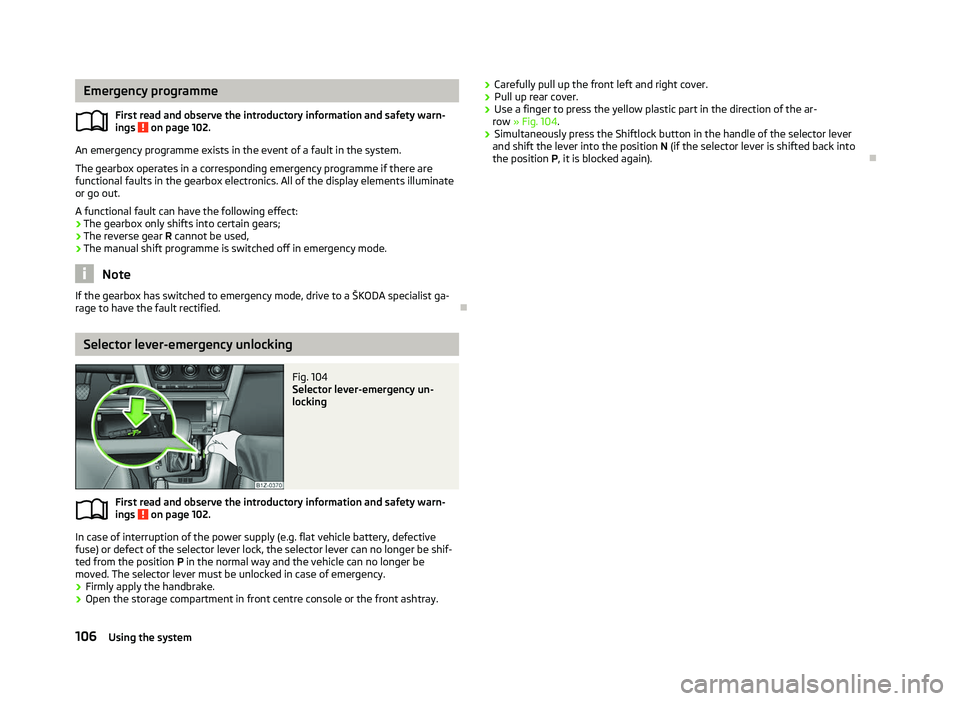
Fig. 104
Selector lever-emergency un-
locking
First read and observe the introductory information and safety warn-
ings on page 102.
In case of interruption of the power supply (e.g. flat vehicle battery, defective
fuse) or defect of the selector lever lock, the selector lever can no longer be shif-
ted from the position
P in the normal way and the vehicle can no longer be
moved. The selector lever must be unlocked in case of emergency.
› Firmly apply the handbrake.
› Open the storage compartment in front centre console or the front ashtray.
ä
ä
›
Carefully pull up the front left and right cover.
› Pull up rear cover.
› Use a finger to press the yellow plastic part in the direction of the ar-
row » Fig. 104.
› Simultaneously press the Shiftlock button in the handle of the selector lever
and shift the lever into the position N (if the selector lever is shifted back into
the position P , it is blocked again). Ð106
Using the system
Page 113 of 218

Note
■ If a suitable adapter is available for your mobile phone, only use your mobile
phone in the adapter inserted in the telephone mount so that the radiation in the
vehicle drops to a minimum. ■ Placing the mobile phone in the adapter inserted in the telephone mount en-
sures optimum sending and receiving power. ÐInserting the mobile phone and adapter
Fig. 106
Universal telephone preinstalla-
tion
Only one telephone mount is factory-fitted. An adapter for the mobile phone can
be purchased from ŠKODA Original Accessories.
Inserting the adapter and mobile phone › First of all push the adapter A
in the direction of the arrow
» Fig. 106 up to the
stop into the mount. Then press the adapter slightly downwards, until it locks
securely into position.
› Insert the mobile phone into the adapter A
(as specified in the instructions
from the manufacturer of the adapter).
Removing the adapter and mobile phone
› Simultaneously press the locks on the mount
» Fig. 106 and remove the adapter
with the mobile phone. CAUTION
Taking the mobile phone out of the adapter during the call can lead to interrup-
tion of the connection. When removing the mobile phone, the connection to the
factory-fitted antenna is interrupted, which reduces the quality of the transmit-
ting and receiving signal. The charging of the mobile phone battery is also inter-
rupted. Ð Managing telephone calls with the help of the adapter
Fig. 107
Principle sketch: single-button adapter/two-button adapter
Function overview of the »
Fig. 107 (PTT - “push to talk”) button on the adapt-
er:
› Switch on/off voice control;
› Accept/end a call.
On some adapters include the button SOS » Fig. 107
A
in addition to the button
. After pressing this button for 2 seconds, the number 112 (Emergency call) is
dialled. Note
On vehicles fitted with the Columbus navigation system , the buttons and
SOS do not work.
Ð
111
Communication
Page 115 of 218

All communication between a telephone and the hands-free system of your vehi-
cle can only be established with the help of the following profiles of Bluetooth
®
technology.
rSAP - Remote SIM access profile
After connecting the telephone with the hands-free system via the rSAP profile,
the telephone deregisters from the GSM network, and communication with the
network is only enabled by the control unit via the vehicle's external aerial. In the
telephone only the interface for Bluetooth ®
remains active. In this case, you can
only use the mobile phone to disconnect from the hands-free system, deactivate
the Bluetooth ®
connection or dial the emergency number
112 (only valid in some
countries).
HFP - Hands Free Profile
After connecting the telephone with the hands-free system via the HFP profile,
the telephone continues to use its GMS module and the internal antenna to com-
municate with the GSM network. Note
The following guidelines must be observed » page 107, Mobile phones and two-
way radio systems. ÐConnecting the phone to the hands-free system
To connect a mobile phone with the hands-free system, it is necessary to inter-
connect the telephone and hands-free system. Detailed information on this is
provided in the operating instructions for your mobile phone. The following steps
must be carried out for the connection.
Connecting the telephone with the hands-free system via the rSAP profile
› Activate Bluetooth ®
and the visibility of your mobile phone on your telephone.
For certain mobile phones it is necessary to switch on first the rSAP function.
› Switch on the ignition.
› Select the menu
Phone - New user in the information display and wait until the
control unit has completed the search.
› Select your mobile phone from the menu of the units found.
› Within 30 seconds enter the 16-digit code that is shown on the information dis-
play and confirm it according to the instructions on the display of your mobile
phone. ›
If your SIM card is blocked by a PIN code, enter the PIN code for the SIM card in
your phone. The telephone connects to the hands-free system (during the first
connection you can only enter the PIN code in the information display when the
vehicle is stationary, as this is the only situation when you can choose whether
the PIN code should be stored).
› Follow the instructions in the information display, the first time a new user is
stored.
› Reconfirm the
rSAP command on your mobile phone to download the tele-
phone book and the identification data from the SIM card into the control unit.
Connecting the telephone with the hands-free system via the HPP profile
› Activate Bluetooth ®
and the visibility of your mobile phone on your telephone.
› Switch on the ignition.
› Select the menu
Phone - New user in the information display and wait until the
control unit has completed the search.
› Select your mobile phone from the menu of the units found.
› Within 30 seconds enter the 16-digit code that is shown on the information dis-
play and confirm it according to the instructions on the display of your mobile
phone.
› Follow the instructions on the information display and the mobile phone, to
store a new user or to download the telephone book and identification data
from the SIM card into the control unit.
The telephone primarily connects via the rSAP profile.
If the PIN code was stored, the telephone is automatically detected and connec-
ted with the hands-free system the next time the ignition is switched on. Check
your mobile phone to see whether this automatic connection has been establish-
ed.
Disconnecting the connection
› By removing the key from the ignition lock (the connection is disconnected dur-
ing a telephone call).
› By disconnecting the hands-free system in the mobile phone.
› By disconnecting the user in the information display in the menu
Bluetooth -
User - Select user - Disconnect.
On vehicles which are fitted with a radio or navigation system at the factory, it is
possible to terminate the telephone call after removing the key from the ignition
lock by pressing the button on the touchscreen of the radio 1)
or navigation sys-
tem; refer to the operating instructions for the radio or navigation system. £1)
Does not apply for Radio Swing.
113
Communication
Page 118 of 218
›
Use the device that is to be connected to search for available Bluetooth ®
devi-
ces.
› Select the hands-free system (as standard “SKODA_BT”) from the list of found
devices.
› Enter the password on the device being connected and follow any instructions
given on this device or in the information display.
› Enter the desired Internet address in the Internet browser. The operating sys-
tem requests the entry of the telephone number for the internet access (de-
pending on the operator, usually
“*99#”). ÐVoice control
Dialogue
The period of time during which the system is ready to receive voice commands
and to carry them out is called a dialogue. The system gives audible feedback and
guides you if necessary through the relevant functions.
Optimum understanding of the voice commands depends on several factors.
› Speak with a normal tone of voice without intonation and excessive pauses.
› Avoid a bad pronunciation.
› Close the doors, windows and sliding roof, to reduce or stop disturbing exterior
noise.
› It is recommended to speak louder at higher speeds, so that the tone of your
voice is louder than the increased surrounding noise.
› During the dialogue, limit additional noise in the vehicle, e.g. passengers talking
at the same time.
› Do not speak, if the system makes an announcement.
The microphone for voice control is inserted in the moulded headliner and direc-
ted to the driver and front passenger. Therefore the driver and the front passen-
ger can operate the equipment.
Entering a phone number
The telephone number can be entered as a continuous series of individually spo-
ken digits (the whole number at once) or in the form of digital blocks (separated
by short pauses). After each order of digits (separation through brief voice pause)
all of the digits detected up to now are repeated by the system. The digits 0 - 9
, symbols +, , # are permitted. The system detects no continuous
digit combinations such as twenty-three, but only individually spoken digits (two,
three).
Activating voice control - GSM
II
› by briefly pressing the button
» Fig. 107
on page 111 on the adapter 1)
;
› by briefly pressing the button 1
on the multi-function steering
wheel » page 108 , Operating the phone on the multifunction steering wheel .
Deactivating voice control - GSM
II
If the system is currently playing a message, the message that is currently being
played will have to be stopped:
› by briefly pressing the button
on the adapter
1)
,
› by briefly pressing the button 1
on the multifunction steering wheel.
If the system expects a voice command, you can end the dialogue yourself:
› with the
CANCEL voice command;
› by pressing the button
on the adapter
1)
;
› by briefly pressing the button 1
on the multifunction steering wheel.
Activating voice control - GSM
III
The dialogue can be started at any time by pressing the button 1
on the multi-
function steering wheel 1)
.
Deactivating voice control - GSM
III
If the system is currently playing a message, you will need to end the message
currently being played by pressing the 1
button on the multifunction steering
wheel.
If the system expects a voice command, you can end the dialogue yourself:
› with the
CANCEL voice command;
› by briefly pressing the button 1
on the multifunction steering wheel.
Note
■ The dialogue of an incoming call is immediately interrupted.
■ The voice control is only possible in vehicles fitted with a multifunction steering
wheel with telephone control or a phone mount and adapter.
■ On vehicles which are factory-fitted with the Columbus navigation system, it is
only possible to operate the voice control for the telephone via this device; refer
to the operating instructions for the Columbus navigation system. Ð1)
Not valid for vehicles with the Columbus navigation system.
116 Using the system
Page 124 of 218
What influences the driving safety?
First read and observe the introductory information and safety warn-
ings on page 121.
The driver is fully responsible for himself and his occupants. If your driving safety
is effected, you place yourself and the oncoming traffic at risk.
The following guidelines must therefore be observed. › Do not get distracted from concentrating on the traffic situation, e.g. by your
passengers or mobile phone calls.
› Never drive when your driving ability is impaired, e.g. through medication, alco-
hol, drugs.
› Keep to the traffic regulations and the permissible speed limit.
› Always adjust the driving speed to the road, traffic and weather conditions.
› Take regular breaks on long journeys – at least every two hours. ÐCorrect seated position
ä
Introduction
This chapter contains information on the following subjects:
Correct seated position for the driver 123
Correct seated position for the front passenger 123
Correct seated position for the occupants on the rear seats 123
Examples of an incorrect seated position 124
WARNING
■ The front seats and the head restraints must always be adjusted to match
the body size of the seat occupant as well as the seat belts must always be
correctly fastened in order to provide an optimal protection for you and your
occupants.
■ Always assume the correct seated position before setting off and do not
change this position while driving. Also advise your passengers to adopt the
correct seated position and not to change this position while the car is mov-
ing.
ä WARNING (Continued)
■ If the occupant adopts an incorrect seated position, he is exposed to life-
threatening injuries, in case he is hit by a deployed airbag.
■ If the occupants on the rear seats are not sitting upright, the risk of injury is
increased due to incorrect routing of the seat belt.
■ The driver must maintain a distance of at least 25 cm to the steering wheel.
The front passenger must maintain a distance of at least 25 cm to the dash
panel. Not maintaining this minimum distance will mean that the airbag sys-
tem will not be able to properly protect you - hazard!
■ When driving, hold the steering wheel with both hands firmly on the outer
edge in the 9
o'clock and 3 o'clock position. Never hold the steering wheel in
the 12 o'clock position or in any other way (e.g. in the middle or inner edge of
the steering wheel). In such cases, you could severely injure the arms, hands
and head when the driver airbag is deployed.
■ The seat backrests must not be angled too far back when driving otherwise
this will affect proper operation of the seat belts and of the airbag system -
risk of injury!
■ Ensure that there are no objects in the driver's footwell as they may get
caught behind the pedals when driving or applying the braking. You would
then no longer be able to operate the clutch, brake or accelerate.
■ Always keep your feet in the footwell when the car is being driven - never
place your feet on the instrument panel, out of the window or on the surfaces
of the seats. You will be exposed to increased risk of injury if it becomes nec-
essary to apply the brake or in the event of an accident. If an airbag is de-
ployed, you may suffer fatal injuries when adopting an incorrect seated posi-
tion! Ð
122 Safety
Page 127 of 218
Seat belts
Seat belts
ä
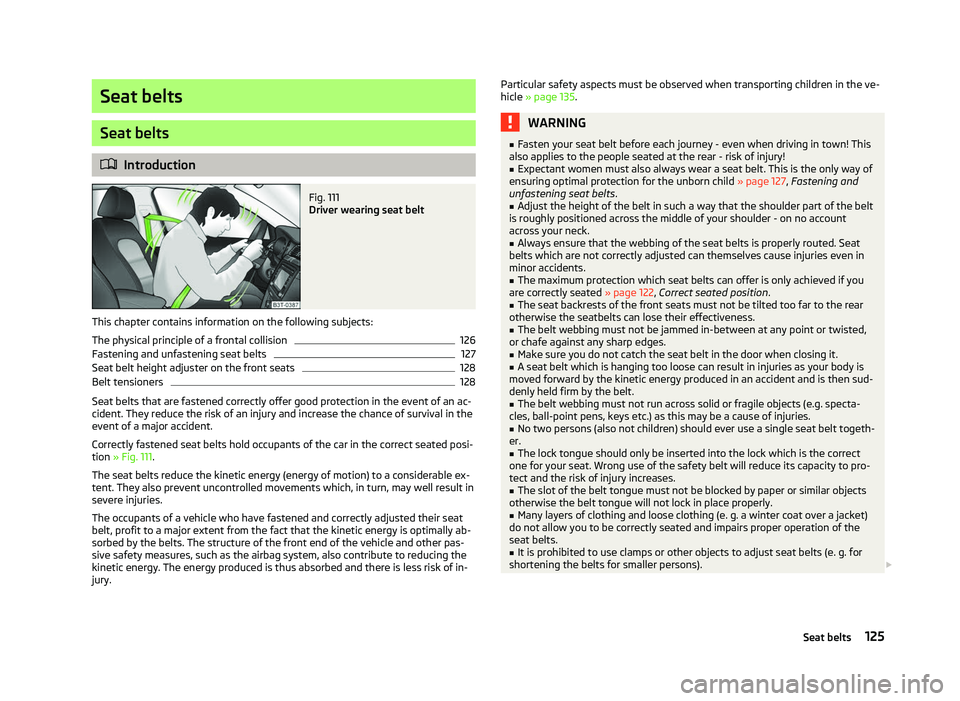
Introduction Fig. 111
Driver wearing seat belt
This chapter contains information on the following subjects:
The physical principle of a frontal collision 126
Fastening and unfastening seat belts 127
Seat belt height adjuster on the front seats 128
Belt tensioners 128
Seat belts that are fastened correctly offer good protection in the event of an ac-
cident. They reduce the risk of an injury and increase the chance of survival in the
event of a major accident.
Correctly fastened seat belts hold occupants of the car in the correct seated posi-
tion » Fig. 111.
The seat belts reduce the kinetic energy (energy of motion) to a considerable ex-
tent. They also prevent uncontrolled movements which, in turn, may well result in
severe injuries.
The occupants of a vehicle who have fastened and correctly adjusted their seat
belt, profit to a major extent from the fact that the kinetic energy is optimally ab-
sorbed by the belts. The structure of the front end of the vehicle and other pas-
sive safety measures, such as the airbag system, also contribute to reducing the
kinetic energy. The energy produced is thus absorbed and there is less risk of in-
jury. Particular safety aspects must be observed when transporting children in the ve-
hicle
» page 135. WARNING
■ Fasten your seat belt before each journey - even when driving in town! This
also applies to the people seated at the rear - risk of injury!
■ Expectant women must also always wear a seat belt. This is the only way of
ensuring optimal protection for the unborn child » page 127, Fastening and
unfastening seat belts .
■ Adjust the height of the belt in such a way that the shoulder part of the belt
is roughly positioned across the middle of your shoulder - on no account
across your neck.
■ Always ensure that the webbing of the seat belts is properly routed. Seat
belts which are not correctly adjusted can themselves cause injuries even in
minor accidents.
■ The maximum protection which seat belts can offer is only achieved if you
are correctly seated » page 122, Correct seated position .
■ The seat backrests of the front seats must not be tilted too far to the rear
otherwise the seatbelts can lose their effectiveness.
■ The belt webbing must not be jammed in-between at any point or twisted,
or chafe against any sharp edges.
■ Make sure you do not catch the seat belt in the door when closing it.
■ A seat belt which is hanging too loose can result in injuries as your body is
moved forward by the kinetic energy produced in an accident and is then sud-
denly held firm by the belt.
■ The belt webbing must not run across solid or fragile objects (e.g. specta-
cles, ball-point pens, keys etc.) as this may be a cause of injuries.
■ No two persons (also not children) should ever use a single seat belt togeth-
er.
■ The lock tongue should only be inserted into the lock which is the correct
one for your seat. Wrong use of the safety belt will reduce its capacity to pro-
tect and the risk of injury increases.
■ The slot of the belt tongue must not be blocked by paper or similar objects
otherwise the belt tongue will not lock in place properly.
■ Many layers of clothing and loose clothing (e. g. a winter coat over a jacket)
do not allow you to be correctly seated and impairs proper operation of the
seat belts.
■ It is prohibited to use clamps or other objects to adjust seat belts (e. g. for
shortening the belts for smaller persons). £
125
Seat belts