lock SKODA OCTAVIA 2006 Owner´s Manual
[x] Cancel search | Manufacturer: SKODA, Model Year: 2006, Model line: OCTAVIA, Model: SKODA OCTAVIA 2006Pages: 218, PDF Size: 5.48 MB
Page 37 of 218
Note
■ After switching the ignition off, it is still possible to open or close the windows
for approx. 10
minutes. The power windows are only switched off completely
once the driver or front passenger door are opened. ■ When driving always use the existing heating, air conditioning and ventilation
system for ventilating the interior of the vehicle. If the windows are opened, dust
as well as other dirt can get into the vehicle and in addition the wind noise is
more at certain speeds.
■ At high speeds, you should keep the windows closed to prevent unnecessarily
high fuel consumption.
■ The convenience opening of the windows by means of the key in the driver's
lock is only possible within 45
seconds of deactivating or activating the alarm sys-
tem. ÐWindow open/close
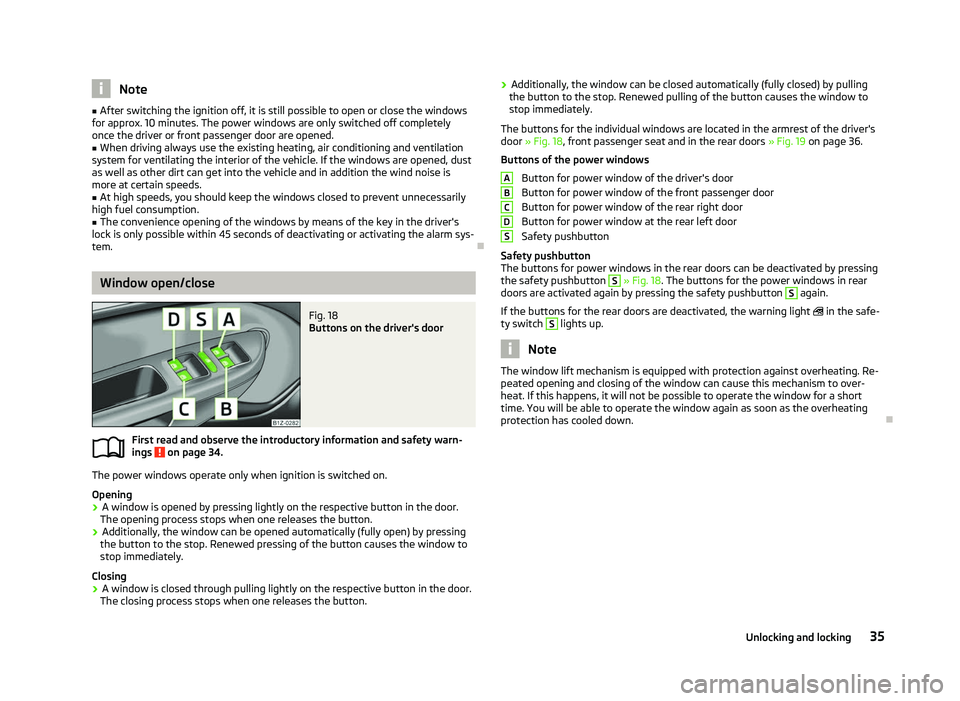
Fig. 18
Buttons on the driver's door
First read and observe the introductory information and safety warn-
ings on page 34.
The power windows operate only when ignition is switched on.
Opening
›
A window is opened by pressing lightly on the respective button in the door.
The opening process stops when one releases the button.
› Additionally, the window can be opened automatically (fully open) by pressing
the button to the stop. Renewed pressing of the button causes the window to
stop immediately.
Closing
› A window is closed through pulling lightly on the respective button in the door.
The closing process stops when one releases the button.
ä ›
Additionally, the window can be closed automatically (fully closed) by pulling
the button to the stop. Renewed pulling of the button causes the window to
stop immediately.
The buttons for the individual windows are located in the armrest of the driver's
door » Fig. 18, front passenger seat and in the rear doors » Fig. 19 on page
36.
Buttons of the power windows Button for power window of the driver's door
Button for power window of the front passenger door
Button for power window of the rear right door
Button for power window at the rear left door
Safety pushbutton
Safety pushbutton
The buttons for power windows in the rear doors can be deactivated by pressing
the safety pushbutton S
» Fig. 18. The buttons for the power windows in rear
doors are activated again by pressing the safety pushbutton S
again.
If the buttons for the rear doors are deactivated, the warning light in the safe-
ty switch S
lights up.
Note
The window lift mechanism is equipped with protection against overheating. Re-
peated opening and closing of the window can cause this mechanism to over-
heat. If this happens, it will not be possible to operate the window for a short
time. You will be able to operate the window again as soon as the overheating
protection has cooled down. Ð A
B
C
D
S
35
Unlocking and locking
Page 38 of 218
Window in the front passenger door and the rear doors open/
close
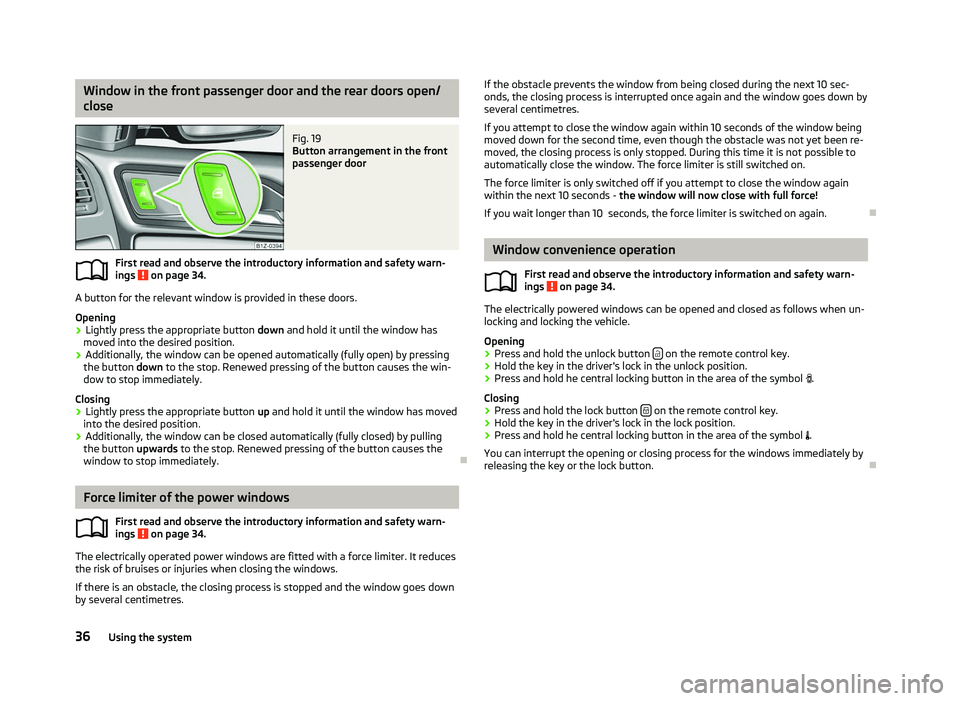
Fig. 19
Button arrangement in the front
passenger door
First read and observe the introductory information and safety warn-
ings on page 34.
A button for the relevant window is provided in these doors.
Opening
›
Lightly press the appropriate button
down and hold it until the window has
moved into the desired position.
› Additionally, the window can be opened automatically (fully open) by pressing
the button down to the stop. Renewed pressing of the button causes the win-
dow to stop immediately.
Closing
› Lightly press the appropriate button
up and hold it until the window has moved
into the desired position.
› Additionally, the window can be closed automatically (fully closed) by pulling
the button upwards to the stop. Renewed pressing of the button causes the
window to stop immediately. ÐForce limiter of the power windows
First read and observe the introductory information and safety warn-
ings on page 34.
The electrically operated power windows are fitted with a force limiter. It reduces
the risk of bruises or injuries when closing the windows.
If there is an obstacle, the closing process is stopped and the window goes down
by several centimetres.ä
ä If the obstacle prevents the window from being closed during the next 10 sec-
onds, the closing process is interrupted once again and the window goes down by
several centimetres.
If you attempt to close the window again within 10
seconds of the window being
moved down for the second time, even though the obstacle was not yet been re-
moved, the closing process is only stopped. During this time it is not possible to
automatically close the window. The force limiter is still switched on.
The force limiter is only switched off if you attempt to close the window again
within the next 10 seconds - the window will now close with full force!
If you wait longer than 10 seconds, the force limiter is switched on again. Ð Window convenience operation
First read and observe the introductory information and safety warn-
ings on page 34.
The electrically powered windows can be opened and closed as follows when un-
locking and locking the vehicle.
Opening
›
Press and hold the unlock button
on the remote control key.
› Hold the key in the driver's lock in the unlock position.
› Press and hold he central locking button in the area of the symbol
.
Closing
› Press and hold the lock button
on the remote control key.
› Hold the key in the driver's lock in the lock position.
› Press and hold he central locking button in the area of the symbol
.
You can interrupt the opening or closing process for the windows immediately by
releasing the key or the lock button. Ð
ä
36 Using the system
Page 39 of 218
Operational faults
First read and observe the introductory information and safety warn-
ings on page 34.
Electrically operated power windows do not operate
If the battery has been disconnected and then reconnected while the window
was opened, the electrically operated power windows do not operate. The system
must be activated. Proceed as follows in order to re-establish the function:
› switch on the ignition;
› pull the top edge of the button in the driver's door to close the window;
› release the button;
› pull the relevant button upwards again for approx. 3
seconds.
Operation in winter
In the winter, ice accumulating on the surface of the window may cause there to
be more resistance when closing the window. The window will stop and move
back several centimetres.
It is necessary to deactivate the force limiter to close the window » page 36.ÐElectric sliding/tilting roof
Introductory information
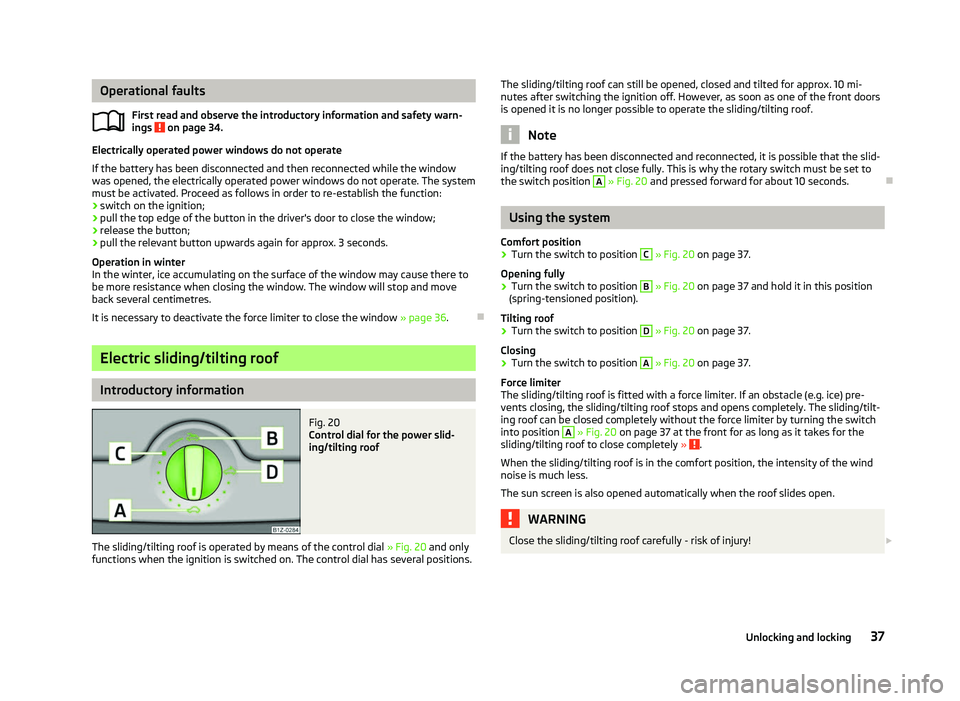
Fig. 20
Control dial for the power slid-
ing/tilting roof
The sliding/tilting roof is operated by means of the control dial » Fig. 20
and only
functions when the ignition is switched on. The control dial has several positions.
ä
The sliding/tilting roof can still be opened, closed and tilted for approx. 10
mi-
nutes after switching the ignition off. However, as soon as one of the front doors
is opened it is no longer possible to operate the sliding/tilting roof. Note
If the battery has been disconnected and reconnected, it is possible that the slid-
ing/tilting roof does not close fully. This is why the rotary switch must be set to
the switch position A
» Fig. 20 and pressed forward for about 10
seconds.Ð Using the system
Comfort position
› Turn the switch to position C
» Fig. 20 on page 37
.
Opening fully
› Turn the switch to position B
» Fig. 20 on page 37
and hold it in this position
(spring-tensioned position).
Tilting roof
› Turn the switch to position D
» Fig. 20 on page 37
.
Closing
› Turn the switch to position A
» Fig. 20 on page 37
.
Force limiter
The sliding/tilting roof is fitted with a force limiter. If an obstacle (e.g. ice) pre-
vents closing, the sliding/tilting roof stops and opens completely. The sliding/tilt-
ing roof can be closed completely without the force limiter by turning the switch
into position A
» Fig. 20 on page 37 at the front for as long as it takes for the
sliding/tilting roof to close completely » .
When the sliding/tilting roof is in the comfort position, the intensity of the wind
noise is much less.
The sun screen is also opened automatically when the roof slides open. WARNING
Close the sliding/tilting roof carefully - risk of injury! £
37
Unlocking and locking
Page 40 of 218
CAUTION
During the winter it may be necessary to remove any ice and snow in the vicinity
of the sliding/tilting roof before opening it to prevent any damage to the opening
mechanism and seal. ÐConvenience operation
An open sliding/tilting roof can also be closed from the outside.
› Press and hold the lock button
on the remote control key or keep the key in
the lock cylinder of the driver's door in the locked position » .
The closing operation stops immediately when you release the key or the lock
button. WARNING
Close the sliding/tilting roof carefully - risk of injury! The force limiter does not
operate with the convenience closing. ÐEmergency operation
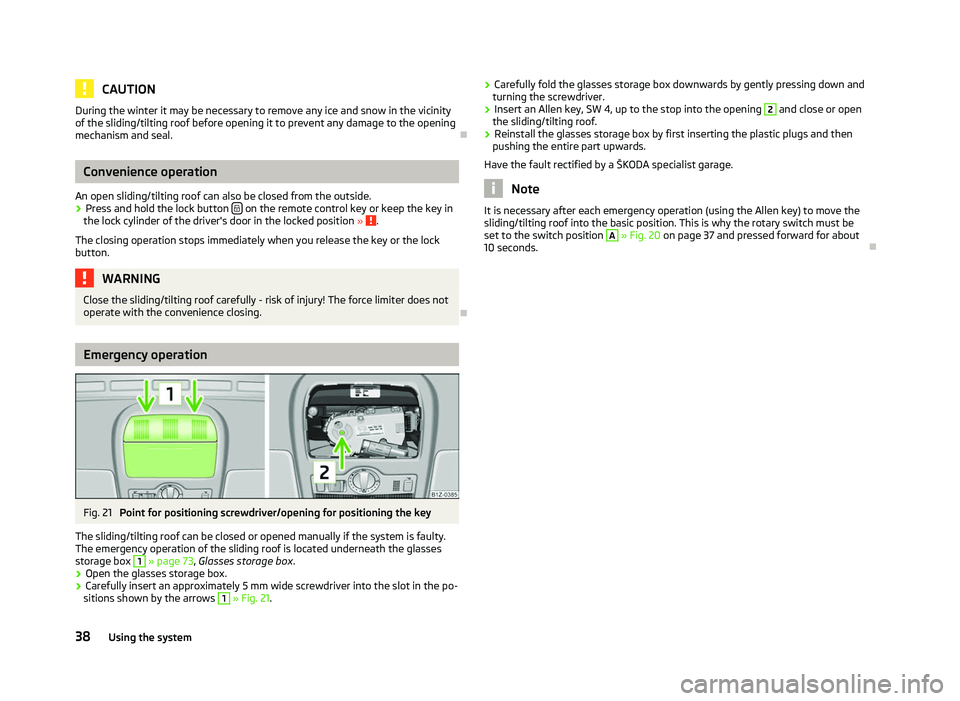
Fig. 21
Point for positioning screwdriver/opening for positioning the key
The sliding/tilting roof can be closed or opened manually if the system is faulty.
The emergency operation of the sliding roof is located underneath the glasses
storage box 1
» page 73
, Glasses storage box .
› Open the glasses storage box.
› Carefully insert an approximately 5 mm wide screwdriver into the slot in the po-
sitions shown by the arrows 1
» Fig. 21. ›
Carefully fold the glasses storage box downwards by gently pressing down and
turning the screwdriver.
› Insert an Allen key, SW 4, up to the stop into the opening 2
and close or open
the sliding/tilting roof.
› Reinstall the glasses storage box by first inserting the plastic plugs and then
pushing the entire part upwards.
Have the fault rectified by a
ŠKODA specialist garage. Note
It is necessary after each emergency operation (using the Allen key) to move the
sliding/tilting roof into the basic position. This is why the rotary switch must be
set to the switch position A
» Fig. 20 on page 37 and pressed forward for about
10 seconds. Ð38
Using the system
Page 43 of 218
If the light switch is in the position
, the symbol illuminates when the ignition
is switched on next to the light switch. If the low beam is activated with the
light sensor, the symbol illuminates additionally next to the light switch.
If the light comes on automatically, the side lights and low beam as well as li-
cence plate light light up at the same time.
If the automatic driving lamp control is switched on, the light is regulated with
the light sensor in the rear mirror holder. If the light intensity drops below the set
value, e.g when driving during the day into a tunnel, the low beam and the side
lights as well as the licence plate light come on automatically. If the light intensity
increases again, the lights switch off automatically.
Rain lights
If the windscreen wiper is switched on in rain sensor mode for longer than 10
sec-
onds or in permanent wipe mode (position 2 or 3) » page 49, Activating the
windscreen wipers and washers for longer than 15 seconds, the side lights and
low beam are switched on automatically. The light switches off if the windscreen
wipe is in operation rain sensor for more than around 4 minutes or is not switch-
ed on in the operation permanent wipe. Note
Do not affix any stickers in front of the light sensor, so that its functionality is not
impaired or disabled. ÐCornering lights
First read and observe the introductory information and safety warn-
ings on page 39.
The cornering lights are used to illuminate the curves by means of the cone of
light swivelling together with the front headlight with Xenon lights. This function
is active when the speed of the car increases to more than 10
km/h.
The swivelling function of the headlights can be switched off/on via the menu
point Assistants in the main menu of the information display » page 15.
ä WARNING
If the cornering lights are defective, the headlights are automatically lowered
to the emergency position, which prevents a possible dazzling of oncoming
traffic. Thus the illuminated length of the road is shortened. Drive carefully
and visit a
ŠKODA specialist garage as soon as possible. Ð Parking light
First read and observe the introductory information and safety warn-
ings on page 39.
Parking light
› Switch off the ignition.
› Pull the turn signal light lever
» Fig. 28 on page 45 upwards or downwards -
the side light on the right or left side of the vehicle is switched.
Parking light on both sides
› Turn the light switch into the position
and lock the vehicle. Note
■ The parking light can only be activated if the ignition is switched off.
■ If the right or left turn signal light has been switched on and the ignition is
switched off, the parking light is not automatically switched on. Ð COMING HOME/LEAVING HOME function
First read and observe the introductory information and safety warn-
ings on page 39.
When it is dark, this function makes it possible to switch on the lights for a short
time after leaving the vehicle or when approaching the vehicle.
Switching on the
COMING HOME function
› The light switch is in the position automatic driving lamp control
.
› Switch off the ignition.
› The light switches on after the driver's door is opened.
Switching on the
LEAVING HOME function
› After leaving the vehicle, the light switch is in the position automatic driving
lamp control . £
ä
ä
41
Lights and visibility
Page 44 of 218
›
Unlock the vehicle with the radio remote control and the light is switched on.
Depending on the equipment fitted the COMING HOME/LEAVING HOME function
switches on the following lights:
› Parking lights;
› Low beam;
› Entry lighting in the exterior mirrors;
› Licence plate light.
The COMING HOME/LEAVING HOME function is controlled with the light sensor in
the mount of the interior rear mirror. If the light intensity is higher than the set
value of the light sensor, the light is not switched on after opening the driver's
door or unlocking the vehicle with the radio remote control.
Switching off the COMING HOME function
The light goes out 10 seconds after closing all of the doors and the boot lid.
If a door or the boot lid remains open, the light goes out after 60 seconds.
Switching off the LEAVING HOME function
The light goes out 10 seconds after unlocking the vehicle with the radio remote
control, switching on the ignition or locking the vehicle.
If no door is opened, the vehicle is locked automatically after 30 seconds.Note
■ If the
COMING HOME/LEAVING HOME function is switched on constantly, the
battery will be heavily discharged particularly over short distances. ■ The illumination period for the COMING HOME/LEAVING HOME function can be
changed by means of the information display. ÐTourist light
First read and observe the introductory information and safety warn-
ings on page 39.
This mode makes it possible to drive in countries with opposing traffic system,
driving on the left/right, without dazzling the oncoming vehicles. When the mode
tourist light is active, the side to side swivel of the headlights is deactivated. ä The mode tourist light is activated/deactivated via the information display in the
menu:
■ Settings
■ Lights & Vision
■ Travel mode
■ Off
■ Switched on Ð Fog lights
Fig. 24
Dash panel: Light switch
First read and observe the introductory information and safety warn-
ings on page 39.
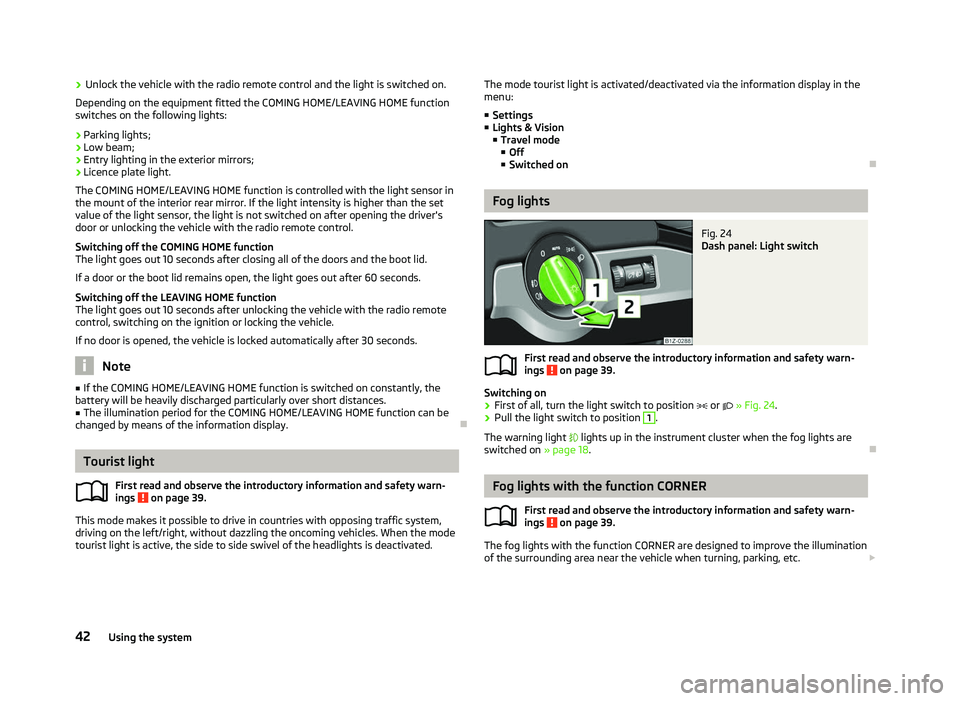
Switching on
› First of all, turn the light switch to position
or » Fig. 24.
› Pull the light switch to position 1
.
The warning light lights up in the instrument cluster when the fog lights are
switched on » page 18. Ð Fog lights with the function CORNER
First read and observe the introductory information and safety warn-
ings on page 39.
The fog lights with the function CORNER are designed to improve the illumination
of the surrounding area near the vehicle when turning, parking, etc. £
ä
ä
42 Using the system
Page 48 of 218
If operating lights with the door contact switch is enabled (switch A
is in position
), the light will come on when:
› the vehicle is unlocked;
› one of the doors is opened;
› or the ignition key is removed.
If operating lights with the door contact switch is enabled (switch A
is in position
), the light will turn off when:
› the vehicle is locked;
› the ignition is switched on;
› about 30 seconds after all the doors have been closed.
If a door remains open, or if the switch A
is in the position
, the interior light
goes out after 10
minutes to prevent the battery from discharging. Note
We recommend having these bulbs replaced by a ŠKODA specialist garage. ÐInterior lighting - version 2
Fig. 30
Interior lighting - version 2
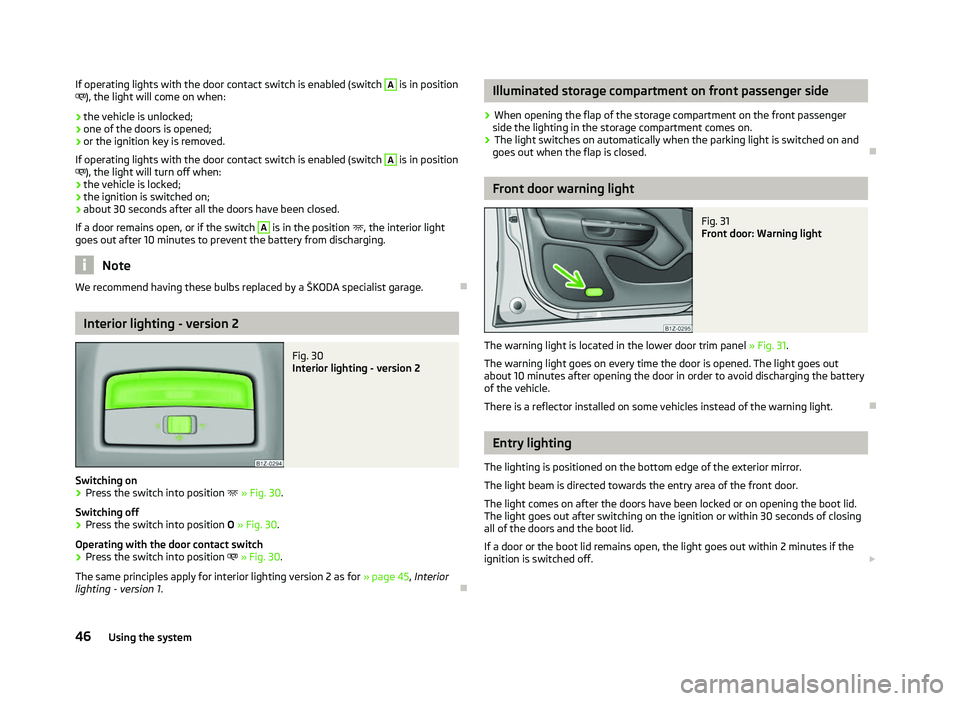
Switching on
› Press the switch into position
» Fig. 30.
Switching off
› Press the switch into position
O » Fig. 30.
Operating with the door contact switch
› Press the switch into position
» Fig. 30.
The same principles apply for interior lighting version 2 as for » page 45, Interior
lighting - version 1 . Ð Illuminated storage compartment on front passenger side
› When opening the flap of the storage compartment on the front passenger
side the lighting in the storage compartment comes on.
› The light switches on automatically when the parking light is switched on and
goes out when the flap is closed. Ð Front door warning light
Fig. 31
Front door: Warning light
The warning light is located in the lower door trim panel » Fig. 31.
The warning light goes on every time the door is opened. The light goes out
about 10 minutes after opening the door in order to avoid discharging the battery
of the vehicle.
There is a reflector installed on some vehicles instead of the warning light. Ð Entry lighting
The lighting is positioned on the bottom edge of the exterior mirror.
The light beam is directed towards the entry area of the front door.
The light comes on after the doors have been locked or on opening the boot lid.
The light goes out after switching on the ignition or within 30
seconds of closing
all of the doors and the boot lid.
If a door or the boot lid remains open, the light goes out within 2 minutes if the
ignition is switched off. £
46 Using the system
Page 50 of 218
Sun screen
Fig. 34
Sun screen: unroll/remove
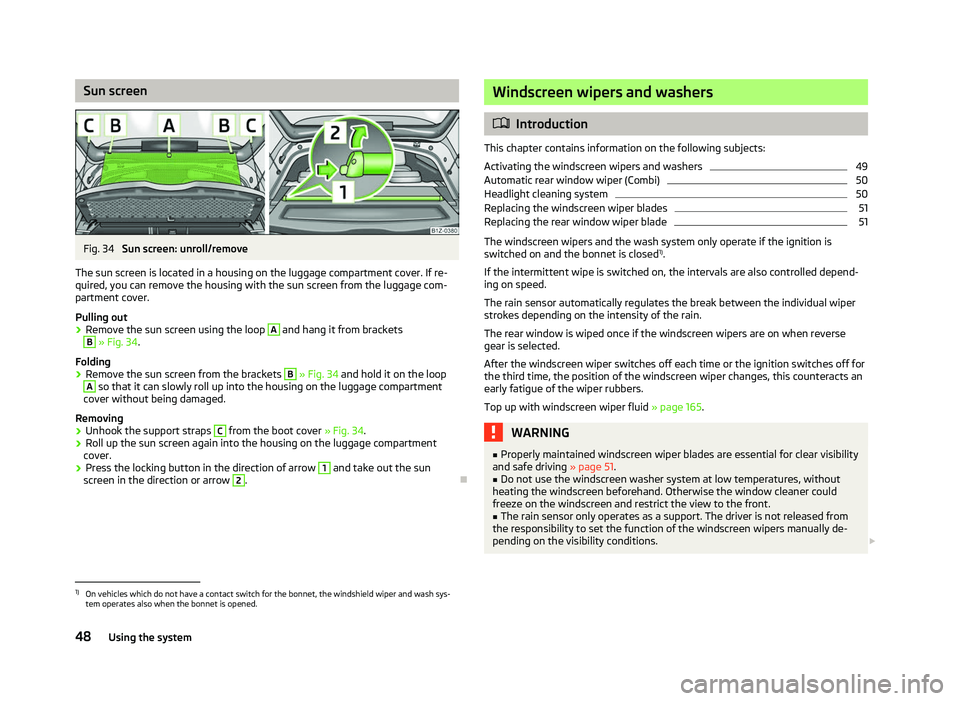
The sun screen is located in a housing on the luggage compartment cover. If re-
quired, you can remove the housing with the sun screen from the luggage com-
partment cover.
Pulling out
› Remove the sun screen using the loop A
and hang it from brackets
B
» Fig. 34.
Folding
› Remove the sun screen from the brackets B
» Fig. 34 and hold it on the loop
A
so that it can slowly roll up into the housing on the luggage compartment
cover without being damaged.
Removing
› Unhook the support straps C
from the boot cover » Fig. 34.
› Roll up the sun screen again into the housing on the luggage compartment
cover.
› Press the locking button in the direction of arrow 1
and take out the sun
screen in the direction or arrow 2
.
Ð Windscreen wipers and washers
ä
Introduction
This chapter contains information on the following subjects:
Activating the windscreen wipers and washers 49
Automatic rear window wiper (Combi) 50
Headlight cleaning system 50
Replacing the windscreen wiper blades 51
Replacing the rear window wiper blade 51
The windscreen wipers and the wash system only operate if the ignition is
switched on and the bonnet is closed 1)
.
If the intermittent wipe is switched on, the intervals are also controlled depend-
ing on speed.
The rain sensor automatically regulates the break between the individual wiper
strokes depending on the intensity of the rain.
The rear window is wiped once if the windscreen wipers are on when reverse
gear is selected.
After the windscreen wiper switches off each time or the ignition switches off for
the third time, the position of the windscreen wiper changes, this counteracts an
early fatigue of the wiper rubbers.
Top up with windscreen wiper fluid » page 165. WARNING
■ Properly maintained windscreen wiper blades are essential for clear visibility
and safe driving » page 51.
■ Do not use the windscreen washer system at low temperatures, without
heating the windscreen beforehand. Otherwise the window cleaner could
freeze on the windscreen and restrict the view to the front. ■ The rain sensor only operates as a support. The driver is not released from
the responsibility to set the function of the windscreen wipers manually de-
pending on the visibility conditions. £1)
On vehicles which do not have a contact switch for the bonnet, the windshield wiper and wash sys-
tem operates also when the bonnet is opened.
48 Using the system
Page 51 of 218
CAUTION
■ In cold temperatures and during the winter, check before the journey or before
switching on the ignition that the wiper blades are not frozen to the windscreen.
If the windscreen wipers are switched on when the blades are frozen to the
windscreen, this may damage both the blades and windscreen wiper motor!
■ If the ignition is switched off while the windscreen wipers are switched on, the
windscreen wipers will continue wiping in the same mode after the ignition is
turned back on. The windscreen wipers could freeze up in cold temperatures be-
tween the time the ignition was turned off and when it was turned back on again.
■ Carefully detach frozen wiper blades from the front or rear window.
■ Remove snow and ice from the windscreen wipers before driving.
■ If the windscreen wipers are handled carelessly, there is a risk of damage to the
windscreen.
■ Replace the windscreen wiper blades once or twice a year for safety reasons.
These can be purchased from a ŠKODA Service Partner.
■ The ignition must not be switched on if the front windscreen wiper arms are fol-
ded out. The wiper blades would move back into their rest position and while do-
ing so damage the paintwork of the bonnet. Note
■ If the slower 2
» Fig. 35 on page 49 or the faster 3
wiper setting is switched
on and the vehicle speed decreases to below 4 km/h, the lower wiper step is
switched on automatically. At a speed increase of more than 8 km/h the previous
wiper setting is established again.
■ If there is an obstacle on the windscreen, the wiper will try to push away the
obstacle. If the obstacle continues to block the wiper, the wiper stops automati-
cally after 5 attempts to eliminate the obstacle, in order to avoid a damage to the
wiper. Remove the the obstacle and switch the wiper on again. ■ The windscreen washer nozzles for the windscreen are heated when the en-
gine is running and the outside temperature is less than approx. +10
°C.
■ The content of the windscreen washer fluid reservoir is 3 litres. On vehicles fit-
ted with the headlight cleaning system, the volume is 5.5
litres. On vehicles fitted
with auxiliary heating, the content of the windscreen wiper reservoir is 4.5 litres.
■ The wiper blades should be cleaned on a regular basis with a windscreen clean-
er to avoid any smears. The wiper blades should be cleaned with a sponge or
cloth if they are heavily soiled by insect residues, for example. Ð Activating the windscreen wipers and washers
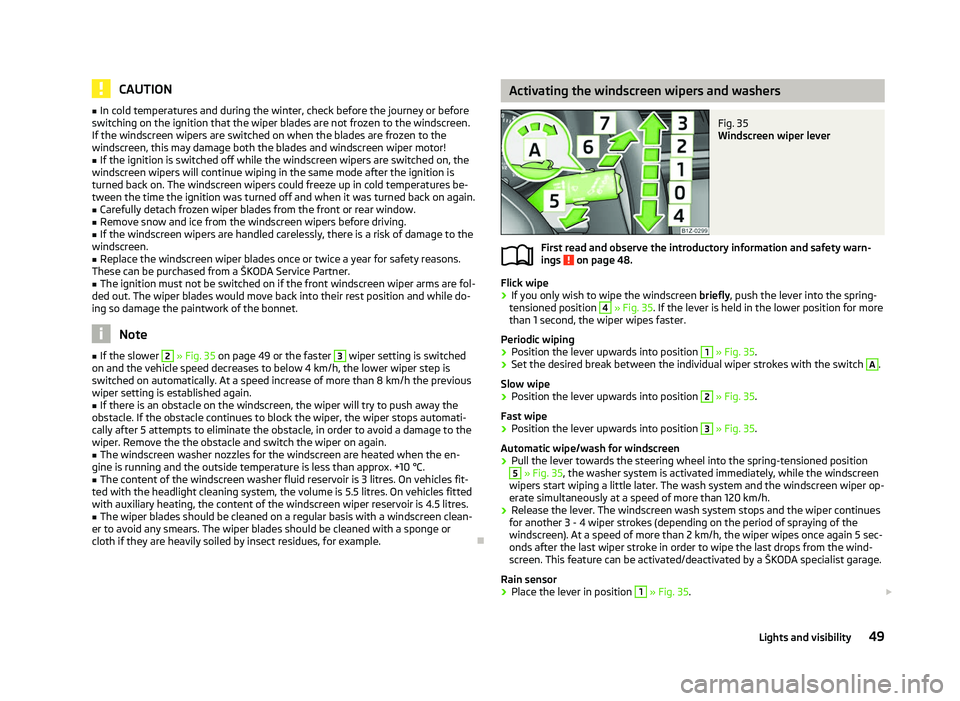
Fig. 35
Windscreen wiper lever
First read and observe the introductory information and safety warn-
ings on page 48.
Flick wipe
›
If you only wish to wipe the windscreen
briefly, push the lever into the spring-
tensioned position 4
» Fig. 35. If the lever is held in the lower position for more
than 1 second, the wiper wipes faster.
Periodic wiping
› Position the lever upwards into position 1
» Fig. 35.
› Set the desired break between the individual wiper strokes with the switch A
.
Slow wipe
› Position the lever upwards into position 2
» Fig. 35.
Fast wipe
› Position the lever upwards into position 3
» Fig. 35.
Automatic wipe/wash for windscreen
› Pull the lever towards the steering wheel into the spring-tensioned position 5
» Fig. 35, the washer system is activated immediately, while the windscreen
wipers start wiping a little later. The wash system and the windscreen wiper op-
erate simultaneously at a speed of more than 120
km/h.
› Release the lever. The windscreen wash system stops and the wiper continues
for another 3 - 4 wiper strokes (depending on the period of spraying of the
windscreen). At a speed of more than 2 km/h, the wiper wipes once again 5 sec-
onds after the last wiper stroke in order to wipe the last drops from the wind-
screen. This feature can be activated/deactivated by a
ŠKODA specialist garage.
Rain sensor
› Place the lever in position 1
» Fig. 35.
£
ä
49
Lights and visibility
Page 53 of 218
Replacing the windscreen wiper blades
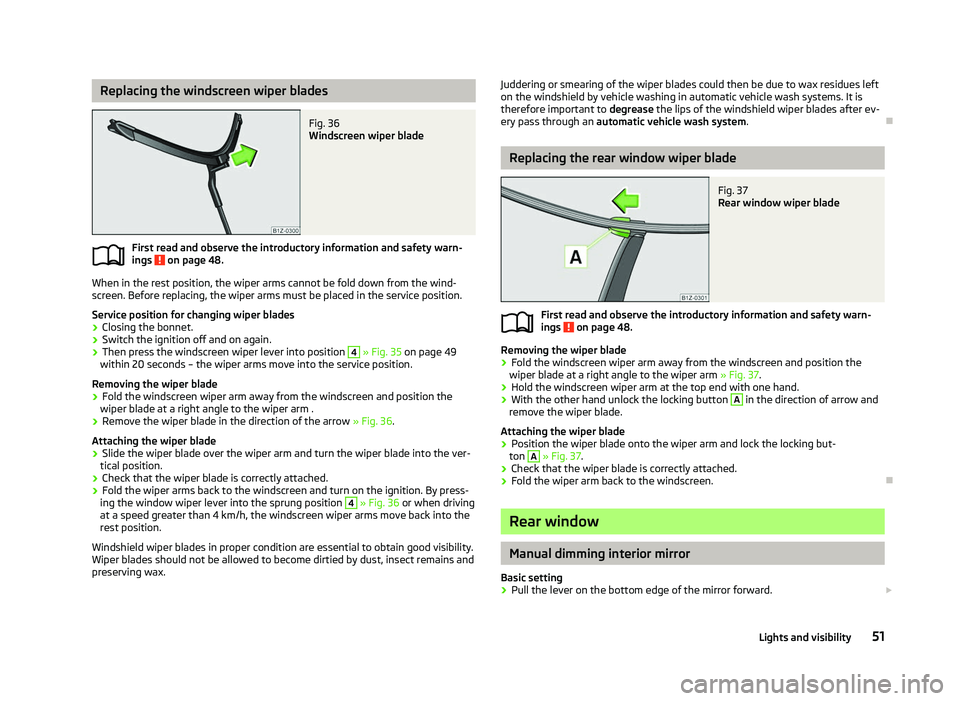
Fig. 36
Windscreen wiper blade
First read and observe the introductory information and safety warn-
ings on page 48.
When in the rest position, the wiper arms cannot be fold down from the wind-
screen. Before replacing, the wiper arms must be placed in the service position.
Service position for changing wiper blades
› Closing the bonnet.
› Switch the ignition off and on again.
› Then press the windscreen wiper lever into position 4
» Fig. 35 on page
49
within 20 seconds – the wiper arms move into the service position.
Removing the wiper blade
› Fold the windscreen wiper arm away from the windscreen and position the
wiper blade at a right angle to the wiper arm .
› Remove the wiper blade in the direction of the arrow
» Fig. 36.
Attaching the wiper blade
› Slide the wiper blade over the wiper arm and turn the wiper blade into the ver-
tical position.
› Check that the wiper blade is correctly attached.
› Fold the wiper arms back to the windscreen and turn on the ignition. By press-
ing the window wiper lever into the sprung position 4
» Fig. 36 or when driving
at a speed greater than 4
km/h, the windscreen wiper arms move back into the
rest position.
Windshield wiper blades in proper condition are essential to obtain good visibility.
Wiper blades should not be allowed to become dirtied by dust, insect remains and
preserving wax.
ä
Juddering or smearing of the wiper blades could then be due to wax residues left
on the windshield by vehicle washing in automatic vehicle wash systems. It is
therefore important to degrease the lips of the windshield wiper blades after ev-
ery pass through an automatic vehicle wash system .Ð Replacing the rear window wiper blade
Fig. 37
Rear window wiper blade
First read and observe the introductory information and safety warn-
ings on page 48.
Removing the wiper blade
›
Fold the windscreen wiper arm away from the windscreen and position the
wiper blade at a right angle to the wiper arm » Fig. 37.
› Hold the windscreen wiper arm at the top end with one hand.
› With the other hand unlock the locking button A
in the direction of arrow and
remove the wiper blade.
Attaching the wiper blade
› Position the wiper blade onto the wiper arm and lock the locking but-
ton A
» Fig. 37
.
› Check that the wiper blade is correctly attached.
› Fold the wiper arm back to the windscreen. Ð Rear window
Manual dimming interior mirror
Basic setting
› Pull the lever on the bottom edge of the mirror forward.
£
ä
51
Lights and visibility