Time SKODA OCTAVIA 2008 2.G / (1Z) User Guide
[x] Cancel search | Manufacturer: SKODA, Model Year: 2008, Model line: OCTAVIA, Model: SKODA OCTAVIA 2008 2.G / (1Z)Pages: 304, PDF Size: 17.69 MB
Page 28 of 304
Instruments and Indicator/Warning Lights27
Using the systemSafetyDriving TipsGeneral MaintenanceBreakdown assistanceTechnical Data
Operating with the buttons on the windshield wiper lever
– You can activate the MAIN MENU by pressing the rocker switch
⇒ page 26, fig. 28 for more than 1 second.
– You can select the menu through the rocker switch . When the pushbutton is briefly pressed, the information you have selected is
displayed.
Operating with the buttons on the multifunction steering wheel
– You can activate the MAIN MENU by pressing the rocker switch
⇒ page 26, fig. 29 for more than 1 second.
– You can select the individual menus by pressing the handwheel . After briefly pressing the handwheel , the desired menu is indi-
cated.
– After briefly pressing the button you can achieve a higher level, by
pressing the button for longer than 1 second, you can call up the
MAIN MENU .
You can select the following information (depending on the equipment installed on
the vehicle):
„MFD (Onboard computer) ⇒ page 21
„Driving time
„Current consumption
„Average fuel consumption
„Range
„Distance driven
„Average speed
„Current speed
„Warning against excessive speeds
„Audio ⇒ page 28
„Navigation ⇒ page 28
„Phone ⇒ page 143
„Aux. Heating (auxiliary heating) ⇒ page 119
„Vehicle status ⇒ page 28
„Setup ⇒ page 30
The menu Audio is only displayed when th e Radio* is switched on.
The menu Navigation is only displayed when the Navigation* is switched on.
The menu Aux. Heating is only then displayed, if the vehicle is fitted with auxiliary
heating*.
Note
•If warning messages are shown on the information display ⇒page 27
⇒ page 28, these messages ca n be confirmed with the button on the wind-
shield wiper lever or with the button on the multifunction steering wheel in
order to call up the main menu.
•If you do not activate the information display at that moment, the menu shifts
to one level higher every 10 seconds.
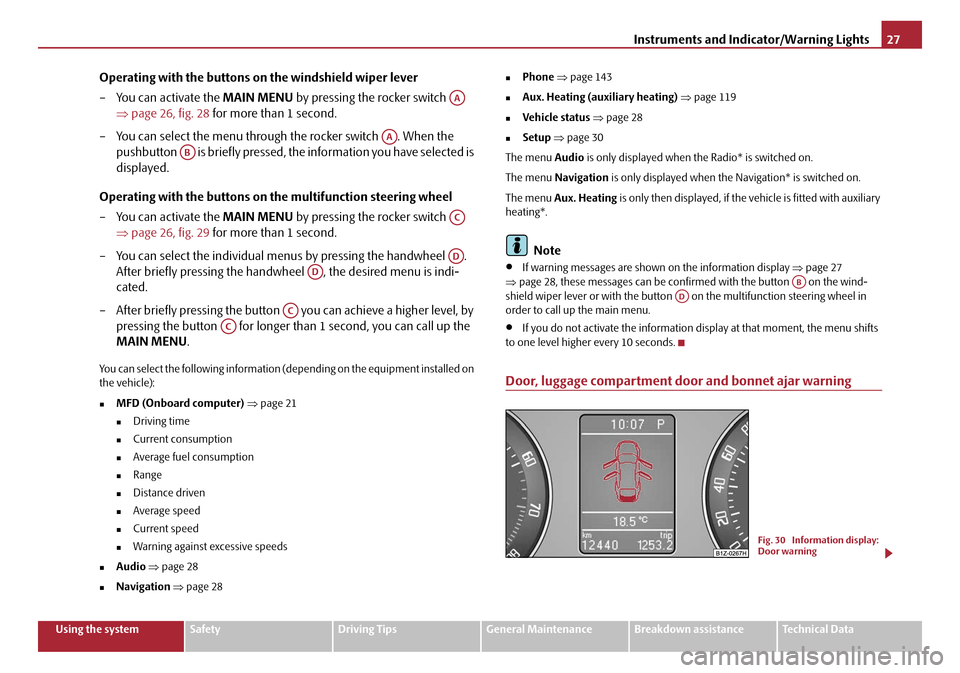
Door, luggage compartment door and bonnet ajar warning
AA
AA
AB
AC
AD
AD
AC
AC
ABAD
Fig. 30 Information display:
Door warning
20A5Facelift.book Page 27 Saturday, September 6, 2008 2:13 PM
Page 31 of 304
Instruments and Indicator/Warning Lights
30
Set-up
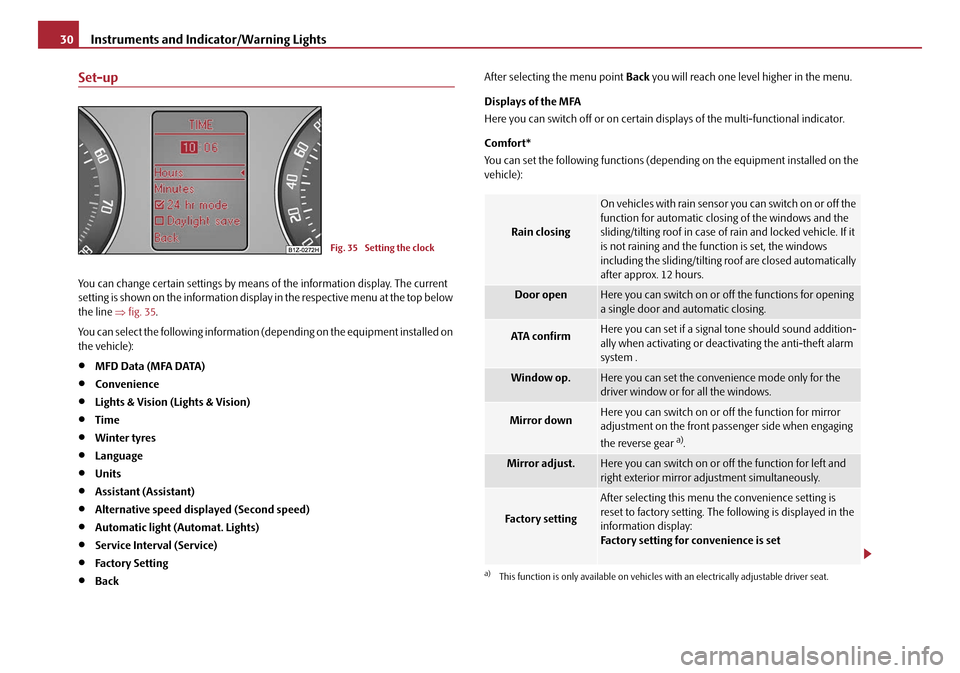
You can change certain settings by means of the information display. The current
setting is shown on the information displa y in the respective menu at the top below
the line ⇒fig. 35 .
You can select the following information (d epending on the equipment installed on
the vehicle):
•MFD Data (MFA DATA)
•Convenience
•Lights & Vision (Lights & Vision)
•Time
•Winter tyres
•Language
•Units
•Assistant (Assistant)
•Alternative speed displayed (Second speed)
•Automatic light (Automat. Lights)
•Service Interval (Service)
•Factory Setting
•Back After selecting the menu point
Back you will reach one level higher in the menu.
Displays of the MFA
Here you can switch off or on certain di splays of the multi-functional indicator.
Comfort*
You can set the following functions (depen ding on the equipment installed on the
vehicle):
Fig. 35 Setting the clock
Rain closing
On vehicles with rain sensor you can switch on or off the
function for automatic closing of the windows and the
sliding/tilting roof in case of rain and locked vehicle. If it
is not raining and the function is set, the windows
including the sliding/tilting roof are closed automatically
after approx. 12 hours.
Door openHere you can switch on or of f the functions for opening
a single door and automatic closing.
ATA confirmHere you can set if a signal tone should sound addition-
ally when activating or deactivating the anti-theft alarm
system .
Window op.Here you can set the convenience mode only for the
driver window or for all the windows.
Mirror downHere you can switch on or off the function for mirror
adjustment on the front passe nger side when engaging
the reverse gear
a).
a)This function is only available on vehicles with an electrically adjustable driver seat.
Mirror adjust.Here you can switch on or off the function for left and
right exterior mirror adjustment simultaneously.
Fa c t o r y s e t t i n g
After selecting this menu the convenience setting is
reset to factory setting. The following is displayed in the
information display:
Factory setting for convenience is set
20A5Facelift.book Page 30 Saturday, September 6, 2008 2:13 PM
Page 32 of 304
Instruments and Indicator/Warning Lights31
Using the systemSafetyDriving TipsGeneral MaintenanceBreakdown assistanceTechnical Data
Lights and Visibility
Here you can set how long the light should
stay on for the function Coming/Leaving
Home and the intensity of the footwell li ghting. Furthermore you can here switch
on or off the function daylight drivin g lights and convenience turn signal.
After selecting the menu point Fac to r y s e tt ing the factory setting is established
again.
Time
Here you can set the time, the time format (12 or 24 hour indicator) and the time
change summer/winter time.
Winter tyres
Here you can set at which speed a warning signal should sound. This function is
used for e.g winter tyres with the permissible maximum speed less than the
maximum speed of the vehicle.
When exceeding the speed, the following is displayed on the information display*:
Snow tyres max. speed ... km/h (Winter tyres maximum ... km/h)
Language
Here you can set in which language the warning and information texts should be
displayed.
Measures
Here you can set the units for temperat ure, consumption and distance driven.
Assistant
Here you can adjust the tones of the acoustic signals of the parking aid*.
Second speed
Here you can switch on the display of the second speed in mph or in km/h
3).
Service
Here you can have the kilomete rs still to be driven and the days until the following
service interval shown and the Service Interval Display reset. Factory Setting
After selecting the menu point
Factory Setting the factory setting of the informa-
tion display is established again.
3)Valid for countries where the values are indicated in British measuring units.
20A5Facelift.book Page 31 Saturday, September 6, 2008 2:13 PM
Page 37 of 304
Instruments and Indicator/Warning Lights
36
WARNING
Contact your specialist garage if the power steering is defective.
Note
•If the yellow warning light goes out after starting the engine again and a short
drive, it is not necessary to visit a specialist garage.
•If the battery has been disconnected an d reconnected, the yellow warning light comes on after switching on the ignition. The warning light must go out after
driving a short distance.
Engine oil pressure
The warning light comes on for a few seconds 4) when the ignition is switched
on.
Stop the vehicle and sw itch the engine off if the warning light does not go off
after the engine has started or flashes while driving. Check the oil level and top up
with oil as necessary ⇒page 228, “Replenishing engine oil”.
An audible signal sounds three times as an additional warning signal.
Do not continue your journey if for some reason it is not possible under the
conditions prevailing to top up with oil. Keep the engine switched off and obtain
professional assistance from a specialist garage, otherwise it could lead to severe
engine damage.
Do not drive any further if the warning light flashes even if the oil is at the correct
level. Do not run the engine not at idling speed either. Contact the nearest specialist
garage to obtain professional assistance.
The following text will be displayed in the information display*:
Oil Pressure Engine off! Owner's manual
WARNING
•If you must stop for technical reasons, then park the vehicle at a safe
distance from the traffic and switch off the engine and switch on the hazard
warning light system.
•The red oil pressure light is not an oil level indicator! One should
therefore check the oil level at regular intervals, preferably after every refu-
eling stop.
EPC fault light (petrol engine)
The (Electronic Power Control) warning light comes on for a few seconds when
the ignition is switched on.
If the warning light
does not go out or lights up after starting the engine, a fault
exists in the engine control. The engine management system selects an emergency
programme which enables you to drive to the nearest specialist garage by adopting
a gentle style of driving.
The following text will be displayed in the information display*:
Engine fault Workshop! (Engine fault workshop!)
Glow plug system (diesel engine)
The warning light lights up for a cold engine when switching on the ignition
(pre-heat position) 2 ⇒ page 125. Start the engine after the indicator light goes out.
The glow plug indicato r light will come on for about 1 second if the engine is at a
normal operating temperature or if the outside temperature is above +5°C. This
means that you can start the engine right away.
There is a fault in the glow plug system if the warning light
does not come on
at all or lights up continuously . Contact a specialist garage as soon as possible to
obtain assistance.
If the warning light
begins to flash while driving, a fault exists in the engine
control. The engine management system selects an emergency programme which 4)The warning light on vehicles fitted with information display does not come on after
switching the ignition on, but only if a fault exists or the engine oil level is too low.
20A5Facelift.book Page 36 Saturday, September 6, 2008 2:13 PM
Page 40 of 304
Instruments and Indicator/Warning Lights39
Using the systemSafetyDriving TipsGeneral MaintenanceBreakdown assistanceTechnical Data
A fault in the ABS
The system is not functioning pr
operly if the ABS warning light
does not go out
within a few seconds after switching on the ignition, does not light up at all or lights
up while driving. The vehicle will only be braked by the normal brake system. Visit
a specialist garage as quickly as possible and adjust your style of driving in the
meantime since you will not kn ow how great the damage is.
Further information about ABS ⇒page 197, “Antilock brake system (ABS)”.
A fault in the entire brake system
If the ABS warning light
comes on together with the brake system warning light (handbrake must be released), there is a fault not only in the ABS but also in
another part of the brake system ⇒.
WARNING
•If the brake system warning light comes on together with the ABS
warning light stop the vehicle immediatel y and check the brake fluid
level in the reservoir ⇒page 231, “Brake fluid”. If the fluid level has dropped
below the MIN marking, do not drive any further - risk of accident! Contact
a Škoda dealer to obtain professional assistance.
•Pay attention to the following instructions ⇒page 225, “Working in the
engine compartment” before checking the brake fluid level and opening the
bonnet.
•If the brake fluid is at the correct level, the ABS control function has
failed. The rear wheels may then block ve ry rapidly when braking. In certain
circumstances, this can result in the rear end of the car breaking away - risk
of skidding! Drive carefully to the ne arest specialist garage and have the
fault rectified.
Bonnet
The warning light comes on if the bonnet is unl ocked. If the engine bonnet
unlocks while driving , the warning light lights up and an audible signal sounds.
The warning light comes on even when the ignition is switched off. The warning
light lights up for a maximum of 5 minutes. On vehicles with informatio
n display* this warning light is replaced by a vehicle
symbol ⇒page 27.
Seat belt warning light
The warning light comes on after the ignition is switched on as a reminder for the
driver and front passenger to fasten the seat belt. The warning light only goes out if
the driver or front passenger has fastened his seat belt.
If the seat belt has not been fastened by the driver or front passenger, a permanent
warning signal sounds at vehicle speeds greater than 20 km/h and simultaneously
the warning light
flashes.
If the seat belt is not fastened by the dr iver or front passenger during the next 90
seconds, the warning signal is deactivated and the warning light
lights up perma-
nently.
Further information on the seat belts ⇒page 168, “Seat belts”.
Thickness of the brake pads*
The warning light comes on for a few seconds 6) when the ignition is switched
on.
If the warning light
comes on, contact a specialist garage immediately and have
the brake pads on all of the wheels inspected.
The following text will be displayed in the information display*: Check brake pads!
6)The warning light on vehicles fitted with information display does not come on after
switching the ignition on, but only if a fault exists.
20A5Facelift.book Page 39 Saturday, September 6, 2008 2:13 PM
Page 41 of 304
Instruments and Indicator/Warning Lights
40
Boot lid
The warning light comes on when the ignition is switched on if the luggage
compartment door is open. If th e boot lid opens while driving , the warning light
lights up and an audible signal sounds.
An audible signal sounds as an additional warning signal.
The warning light comes on even when the ignition is switched off. The warning
light lights up for a maximum of 5 minutes.
On vehicles with information display* this warning light is replaced by a vehicle
symbol ⇒page 27.
Open door
The warning light comes on if one or several doors are opened or if the boot lid
is opened. If one of the doors opens wh ile driving, the warning light lights up
and an audible signal sounds.
The warning light comes on even when the ignition is switched off. The warning
light lights up for a maximum of 5 minutes.
On vehicles with information display* this warning light is replaced by a vehicle
symbol ⇒page 27.
Windshield washer fluid level*
The warning light comes on when the ignition is switched on if there is insuffi-
cient fluid in the windshield washer system. Top up with liquid ⇒page 235.
The following text will be displayed in the information display*: Add wash fluid!
Brake system
The warning light flashes or comes on if the brake fluid level is too low, if there
is a fault in the ABS or if the handbrake is applied.
If the warning light
flashes and an audible signal sounds three times (handbrake
is not applied), stop and check the brake fluid level ⇒.
The following text will be displayed in the information display*: Brake fluid Owner's manual
If there is a fault in the ABS which also in fluences the function of the brake system
(e.g. distribution of brake pressure), the ABS warning light
comes on and at the
same time the brake system warning light starts flashing . Be aware that not only
the ABS but also another part of th brake system is defective ⇒.
An audible signal sounds three times as an additional warning signal.
One should get used to high pedal forces, long braking distances and long free play
of the brake pedal when driving to the next specialist garage.
For further information on the brake system ⇒page 196, “Brakes”.
Handbrake applied
The warning light
also comes on if the handbrake is applied. An audible warning
is also given if you drive the vehicle for at least 3 seconds at a speed of more than 6
km/h.
The following text will be displayed in the information display*:
Release parking brake!
WARNING
•Pay attention to the following instructions ⇒page 225, “Working in the
engine compartment” before checking the brake fluid level and opening the
bonnet.
•If the brake system warning light does not go out a few seconds after
switching on the ignition or comes on when driving, stop immediately and
check the brake fluid in the reservoir ⇒page 231. If the fluid level has
20A5Facelift.book Page 40 Saturday, September 6, 2008 2:13 PM
Page 43 of 304
Unlocking and locking
42
Unlocking and locking
Key
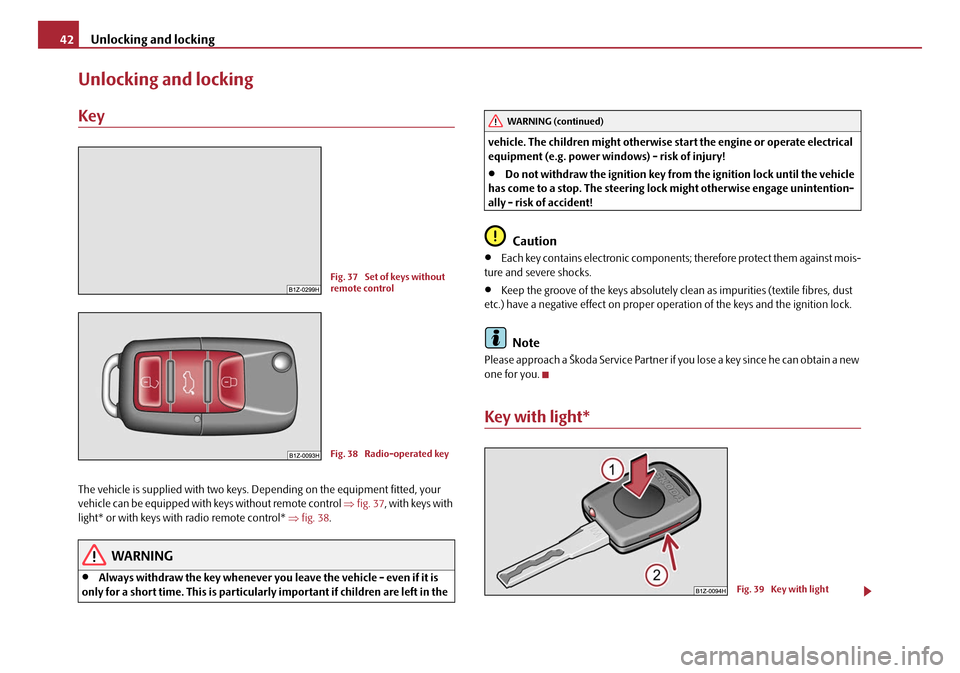
The vehicle is supplied with two keys. Depending on the equipment fitted, your
vehicle can be equipped with keys without remote control ⇒fig. 37 , with keys with
light* or with keys with radio remote control* ⇒fig. 38 .
WARNING
•Always withdraw the key whenever you leave the vehicle - even if it is
only for a short time. This is particularly important if children are left in the vehicle. The children might otherwise st
art the engine or operate electrical
equipment (e.g. power windows) - risk of injury!
•Do not withdraw the ignition key from the ignition lock until the vehicle
has come to a stop. The steering lock might otherwise engage unintention-
ally - risk of accident!
Caution
•Each key contains electronic components; therefore protect them against mois-
ture and severe shocks.
•Keep the groove of the keys absolutely cl ean as impurities (textile fibres, dust
etc.) have a negative effect on proper op eration of the keys and the ignition lock.
Note
Please approach a Škoda Service Partner if you lose a key since he can obtain a new
one for you.
Key with light*
Fig. 37 Set of keys without
remote control
Fig. 38 Radio-operated key
WARNING (continued)
Fig. 39 Key with light
20A5Facelift.book Page 42 Saturday, September 6, 2008 2:13 PM
Page 46 of 304
Unlocking and locking45
Using the systemSafetyDriving TipsGeneral MaintenanceBreakdown assistanceTechnical Data
Central locking system
Description
Unlocking or locking causes all the doors and the fuel filler flap* to be unlocked or
locked at the same time by the central lockin g system (as long as it is not set differ-
ently in the menu Setup (settings) - Convenience information display*). The boot
lid is unlocked when opening. It can be op ened by pressing the hand grip above the
licence plate ⇒page 48.
Operation of the central locking system is possible:
•from the outside using the vehicle key ⇒page 46,
•using the button for the central locking system ⇒page 47,
•by using the remote control ⇒page 50.
Indicator light in the driver's door on vehicles without anti-theft alarm system
After the car is locked, the indicator light flashes after 2 seconds.
After the car is locked with the deactivate d safe securing system, the indicator light
flashes only after 30 seconds.
Indicator light in the driver's door on vehicles with anti-theft alarm system
After locking the vehicle the indicator light flashes for 2 seconds fast, then more
slowly.
If the vehicle is locked and the safe securing system ⇒page 46 is not operating, the
indicator light in the driver door flashes for about 2 seconds fast, goes out and starts
to flash slowly after about 30 seconds.
If the indicator light first of all flashes fast for about 2 seconds, afterwards lights up
for about 30 seconds and then flashes slowly, there is a fault in the system of the
central locking or the interior monitor* ⇒page 52. Contact a specialist garage to
obtain assistance.
Convenience operation of windows
One can open and close the electrically powered windows when unlocking and
locking the vehicle ⇒page 55. Opening a single door*
This function allows one to just unlock
the driver's door. The other doors and the
fuel filler flap* remain locked and are only unlocked after repetitive unlocking.
If you wish, you can have your Škoda Dealer activate the function of the single door
opening mode.
Automatic locking*
All the doors and the boot lid are locked automatically once the car reaches a speed
of about 15 km/h.
If the ignition key is withdrawn, the car is then automatically unlocked again. In
addition, it is possible for the driver to unlock the car by pressing the central locking
button
or by pulling the door opening lever.
If you wish, your Škoda Deal er can activate the function of the automatic locking
mode.
WARNING
Locking the doors prevents involuntary opening in an exceptional situation
(an accident). Locked doors prevent unwanted entry into the vehicle from
outside, for example at road crossings. Locked doors do, however, make it
more difficult for rescuers to get into the vehicle in an emergency - danger to
life!
Note
•In the event of an accident in which the airbags are deployed, the locked doors
are automatically unlocked in order to enable rescuers to gain access to the vehicle.
•Only the front doors can be unlocked and locked using the key if the central
locking system fails. You can lock or unlock manually the other doors and the boot
lid.
−Emergency locking of the door ⇒page 48.
− Emergency unlocking of the boot lid ⇒page 49.
20A5Facelift.book Page 45 Saturday, September 6, 2008 2:13 PM
Page 47 of 304
Unlocking and locking
46
Safe securing
The central locking system is equipped with a safe securing system. Locking the
vehicle from the outside causes the door lock s to be automatically blocked. It is not
possible to open the doors with the door handle either from the inside or from the
outside. This acts as an effective deterrent for attempts to break into your vehicle.
You can deactivate the safe securing sy stem by locking twice within 2seconds.
If the safe securing system is not operating, the warning light in the driver door
flashes for about 2 seconds fast, goes out and starts to flash slowly again after about
30 seconds.
The safe securing system is again activate d the next time the vehicle is unlocked and
locked again.
The doors can be opened from the inside if the vehicle is locked and the safe
securing system is deactivated:
•The door is unlocked by actuating the door-opening lever.
•The door opens upon actuating the door-opening lever again.
WARNING
If the vehicle is locked from the outside and the safe securing system is acti-
vated, there must not be any person and animals in the vehicle as it is then
not possible to open either a door or a window from the inside. The locked
doors make it more difficult for rescuers to get into the vehicle in an emer-
gency - hazard!
Note
The anti-theft alarm system* is also activated with the deactivated safe securing
system when locking the vehicle. The inte rior monitor* is however not activated.
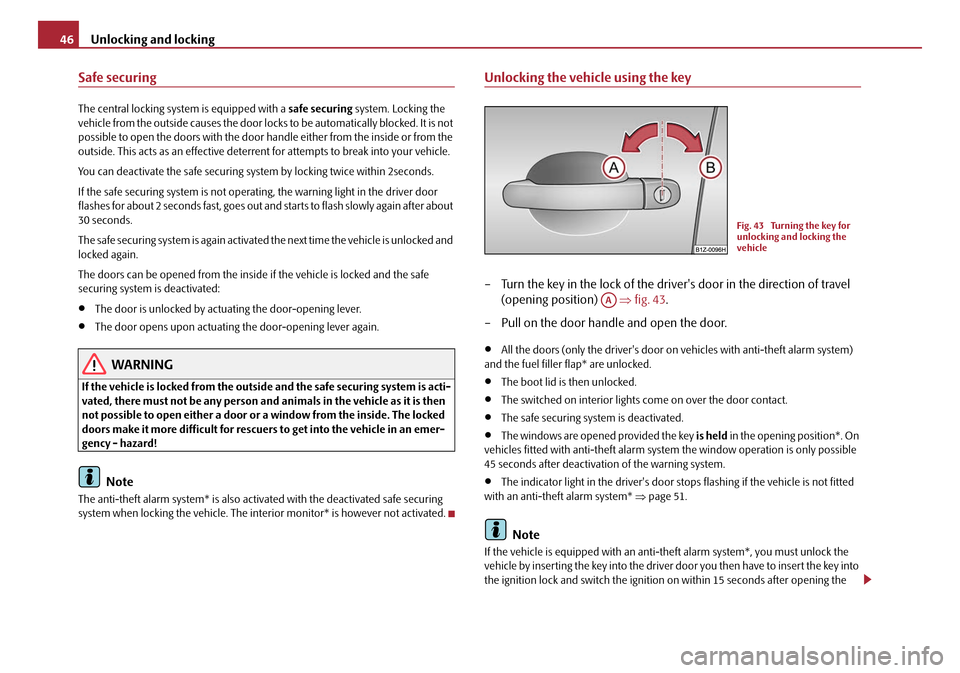
Unlocking the vehicle using the key
– Turn the key in the lock of the driver's door in the direction of travel
(opening position) ⇒fig. 43 .
– Pull on the door handle and open the door.
•All the doors (only the driver's door on vehicles with anti-theft alarm system)
and the fuel filler flap* are unlocked.
•The boot lid is then unlocked.
•The switched on interior lights come on over the door contact.
•The safe securing system is deactivated.
•The windows are opened provided the key is held in the opening position*. On
vehicles fitted with anti-theft alarm syst em the window operation is only possible
45 seconds after deactivation of the warning system.
•The indicator light in the driver's door stops flashing if the vehicle is not fitted
with an anti-theft alarm system* ⇒page 51.
Note
If the vehicle is equipped with an anti-theft alarm system*, you must unlock the
vehicle by inserting the key into the driver door you then have to insert the key into
the ignition lock and switch the ignition on within 15 seconds after opening the
Fig. 43 Turning the key for
unlocking and locking the
vehicle
AA
20A5Facelift.book Page 46 Saturday, September 6, 2008 2:13 PM
Page 49 of 304
Unlocking and locking
48
Note
The door opening lever and the buttons for the central locking system do not
operate if the safe securing system is activated.
Emergency locking of the doors
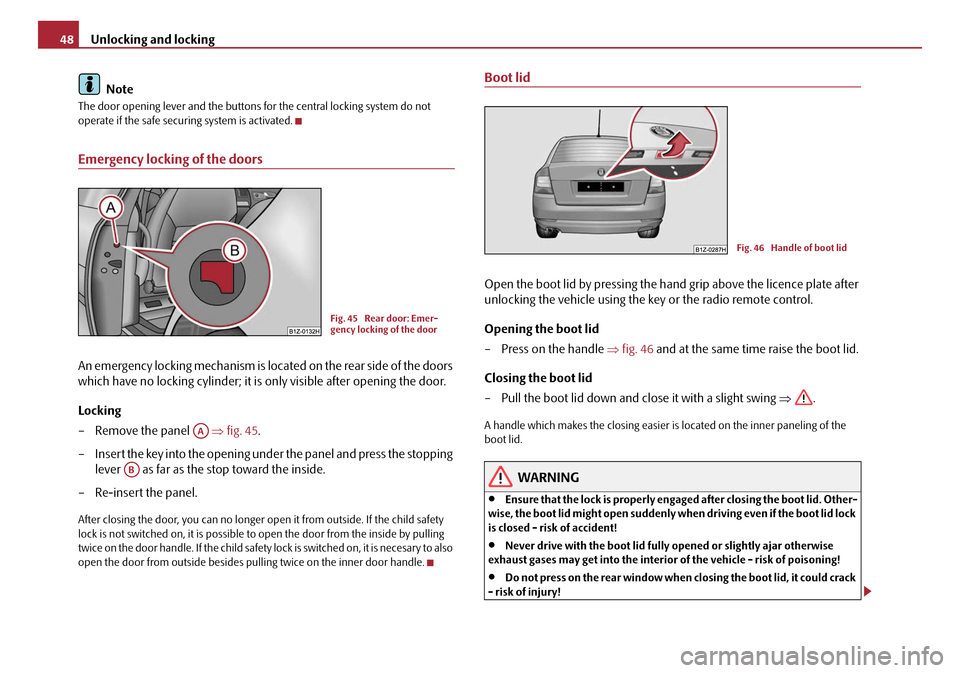
An emergency locking mechanism is loca ted on the rear side of the doors
which have no locking cyli nder; it is only visible after opening the door.
Locking
– Remove the panel ⇒fig. 45 .
– Insert the key into the opening under the panel and press the stopping lever as far as the stop toward the inside.
– Re-insert the panel.
After closing the door, you can no longer op en it from outside. If the child safety
lock is not switched on, it is possible to open the door from the inside by pulling
twice on the door handle. If the child safety lock is switched on, it is necesary to also
open the door from outside besides pu lling twice on the inner door handle.
Boot lid
Open the boot lid by pressing the hand grip above the licence plate after
unlocking the vehicle using the key or the radio remote control.
Opening the boot lid
– Press on the handle ⇒fig. 46 and at the same time raise the boot lid.
Closing the boot lid
– Pull the boot lid down and close it with a slight swing ⇒.
A handle which makes the closing easier is located on the inner paneling of the
boot lid.
WARNING
•Ensure that the lock is properly enga ged after closing the boot lid. Other-
wise, the boot lid might open suddenly wh en driving even if the boot lid lock
is closed - risk of accident!
•Never drive with the boot lid fully opened or slightly ajar otherwise
exhaust gases may get into the interior of the vehicle - risk of poisoning!
•Do not press on the rear window when closing the boot lid, it could crack
- risk of injury!
Fig. 45 Rear door: Emer-
gency locking of the door
AA
AB
Fig. 46 Handle of boot lid
20A5Facelift.book Page 48 Saturday, September 6, 2008 2:13 PM