Time SKODA OCTAVIA 2008 2.G / (1Z) Owner's Guide
[x] Cancel search | Manufacturer: SKODA, Model Year: 2008, Model line: OCTAVIA, Model: SKODA OCTAVIA 2008 2.G / (1Z)Pages: 304, PDF Size: 17.69 MB
Page 52 of 304
Unlocking and locking51
Using the systemSafetyDriving TipsGeneral MaintenanceBreakdown assistanceTechnical Data
button but do not open a door or the boot
lid within the next 30 seconds. This
function is intended to prevent th e car being unlocked unintentionally.
In addition, when the car is unlocked, the power seats and exterior mirrors* move
into the position assigned to this key. The stored setting of driver seat and exterior
mirrors is retrieved.
Display of the locking
The turn signal lights flash once to co nfirm that the vehicle has been correctly
locked.
If the vehicle is locked by pressing the button and some doors or the boot lid are
not closed, the turn signal lights flash only after closing.
WARNING
If the vehicle is locked from the outside and the safe securing system is acti-
vated, there must not be any person in the vehicle as it is then not possible
to open either a door or a window from the inside. The locked doors make it
more difficult for rescuers to get into the vehicle in an emergency - hazard!
Note
•Operate the radio remote control only when the doors and boot lid are closed
and you have visual contact with the vehicle.
•Once in the car, you must not press the lock button of the radio remote
control before inserting the key into the igni tion lock in order to avoid the car being
inadvertently locked and, in addition, the anti-theft alarm system* being switched
on. Should this happen, press the unlock button
of the radio remote control.
Synchonisation of the remote control
If the vehicle cannot be unlocked by actuatin g the remote control system then it is
possible that the code in the key and the control unit in the vehicle are no longer
synchronised. This can occur when the butt ons on the radio-operated key are actu-
ated a number of times outside of the operative range of the equipment or the
battery on the remote control was replaced. This means it is necessary to synchronise the code as follows:
•Press any button on the remote control.
•pressing of the button means that the door will unlock with the key within 1
minute.
Anti-theft alarm system*
Description
The anti-theft alarm system increases the level of protection against people seeking
to break into the vehicle. The system triggers audible and visual warning signals if
an attempt is made to break into the vehicle.
How is the alarm system activated?
The anti-theft alarm system is activated automatically when the vehicle is locked
with the key on the closed driver's door or by using the radio remote control. It is
activated 30 seconds after closing the door.
How is the alarm system deactivated?
The anti-theft alarm system is deactivated if the vehicle is unlocked by only using
the radio remote control. The vehicle is automatically locked again if the vehicle is
not opened within 30 seconds after reactivating the anti-theft alarm system.
Once you unlock the vehicle by inserting the key into the driver door you then have
to insert the key into the ignition lock and switch the ignition on within 15 seconds
after opening the door in order to deactivate the anti-theft alarm system. The
alarm will be triggered if you do not switch on the ignition within 15 seconds.
When is the alarm triggered?
The following security areas of the locked vehicle are monitored:
•Bonnet,
•Boot lid,
•Doors,
•Ignition lock,
A1
A3
20A5Facelift.book Page 51 Saturday, September 6, 2008 2:13 PM
Page 53 of 304
Unlocking and locking
52
•Angle of the vehicle* ⇒page 52,
•Vehicle interior* ⇒page 52,
•A drop in voltage of the on-board power supply.
An alarm is immediately triggered if either of the two battery terminals is discon-
nected while the anti-theft alarm system is activated.
How is the alarm switched off?
You switch the alarm off if you unlock the car with the radio remote control in the
key or if you switch the ignition on.
Note
•The working life of the alarm siren is 6 years. More detailed information is avail-
able from your Škoda Service Partner.
•Before leaving the car, check that al l the doors, windows and the electric
sliding/tilting roof* are properly closed in order to ensure that the anti-theft alarm
system is fully operational.
•Coding of the radio remote control and the receptor part precludes the use of
the radio remote control from other vehicles.
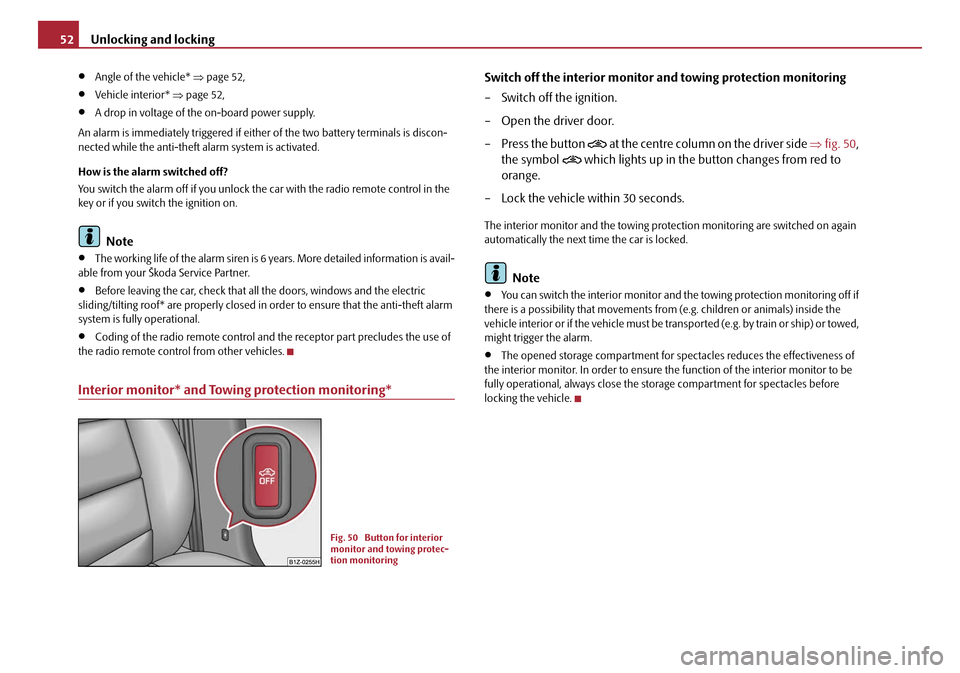
Interior monitor* and Towing protection monitoring*
Switch off the interior monitor and towing protection monitoring
– Switch off the ignition.
– Open the driver door.
– Press the button
at the centre c olumn o n the dr iver s ide ⇒fig. 50 ,
the symbol
which lights up in the button changes from red to
orange.
– Lock the vehicle within 30 seconds.
The interior monitor and the towing protec tion monitoring are switched on again
automatically the next time the car is locked.
Note
•You can switch the interior monitor and th e towing protection monitoring off if
there is a possibility that movements from (e.g. children or animals) inside the
vehicle interior or if the vehicle must be tr ansported (e.g. by train or ship) or towed,
might trigger the alarm.
•The opened storage compartment for spectacles reduces the effectiveness of
the interior monitor. In order to ensure the function of the interior monitor to be
fully operational, always close the storage compartment for spectacles before
locking the vehicle.
Fig. 50 Button for interior
monitor and towing protec-
tion monitoring
20A5Facelift.book Page 52 Saturday, September 6, 2008 2:13 PM
Page 54 of 304
Unlocking and locking53
Using the systemSafetyDriving TipsGeneral MaintenanceBreakdown assistanceTechnical Data
Power windows*
Buttons on the driver's door
The power windows operate only when ignition is switched on.
Opening a window
– A window is opened by pres sing lightly on the respective butto n in the
door. The process stops when one releases the button.
– Additionally you can open the window automatically (fully opened) by pressing the button up to the stop. Renewed pressing of the button
causes the window to stop immediately.
Closing a window
– A window is closed through pulling lightly on the respective button in
the door. The closing process stop s when one releases the button.
– Additionally you can close the window automatically (fully closed) by pulling the button up to the stop. Renewed pulling of the button
causes the window to stop immediately.
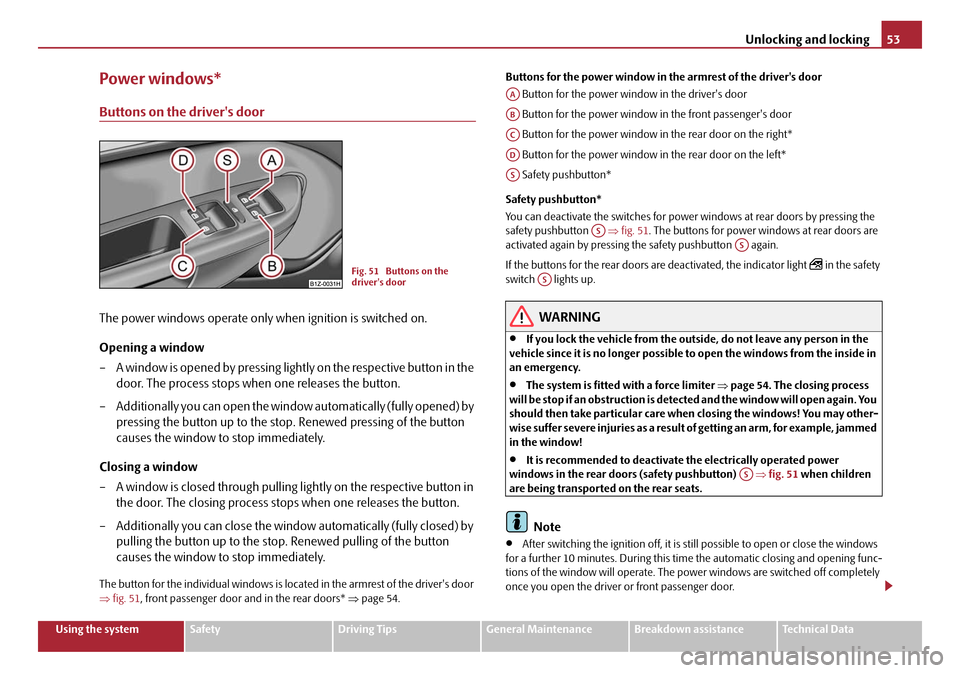
The button for the individual windows is located in the armrest of the driver's door
⇒fig. 51 , front passenger door and in the rear doors* ⇒page 54. Buttons for the power window in the armrest of the driver's door
Button for the power window in the driver's door
Button for the power window in the front passenger's door
Button for the power window in the rear door on the right*
Button for the power window in the rear door on the left*
Safety pushbutton*
Safety pushbutton*
You can deactivate the switches for power windows at rear doors by pressing the
safety pushbutton ⇒fig. 51 . The buttons for power windows at rear doors are
activated again by pressing th e safety pushbutton again.
If the buttons for the rear doors are deactivated, the indicator light
in the safety
switch lights up.
WARNING
•If you lock the vehicle from the outside, do not leave any person in the
vehicle since it is no longer possible to open the windows from the inside in
an emergency.
•The system is fitted with a force limiter ⇒page 54. The closing process
will be stop if an obstruction is detected and the window will open again. You
should then take particular care when closing the windows! You may other-
wis e suf fe r se v e re inj uri es a s a re s ult of g e tt ing a n ar m , for e xa m ple , ja m m e d
in the window!
•It is recommended to deactivate the electrically operated power
windows in the rear doors (safety pushbutton) ⇒fig. 51 when children
are being transported on the rear seats.
Note
•After switching the ignition off, it is still possible to open or close the windows
for a further 10 minutes. Duri ng this time the automatic closing and opening func-
tions of the window will operate. The po wer windows are switched off completely
once you open the driver or front passenger door.
Fig. 51 Buttons on the
driver's door
AA
AB
AC
AD
AS
ASAS
AS
AS
20A5Facelift.book Page 53 Saturday, September 6, 2008 2:13 PM
Page 55 of 304
Unlocking and locking
54
•When driving always use the existing he ating, air conditioning and ventilation
system for ventilating the interior of the ve hicle. If the windows are opened, dust as
well as other dirt can get into the vehicle and in addition the wind noise is more at
certain speeds.
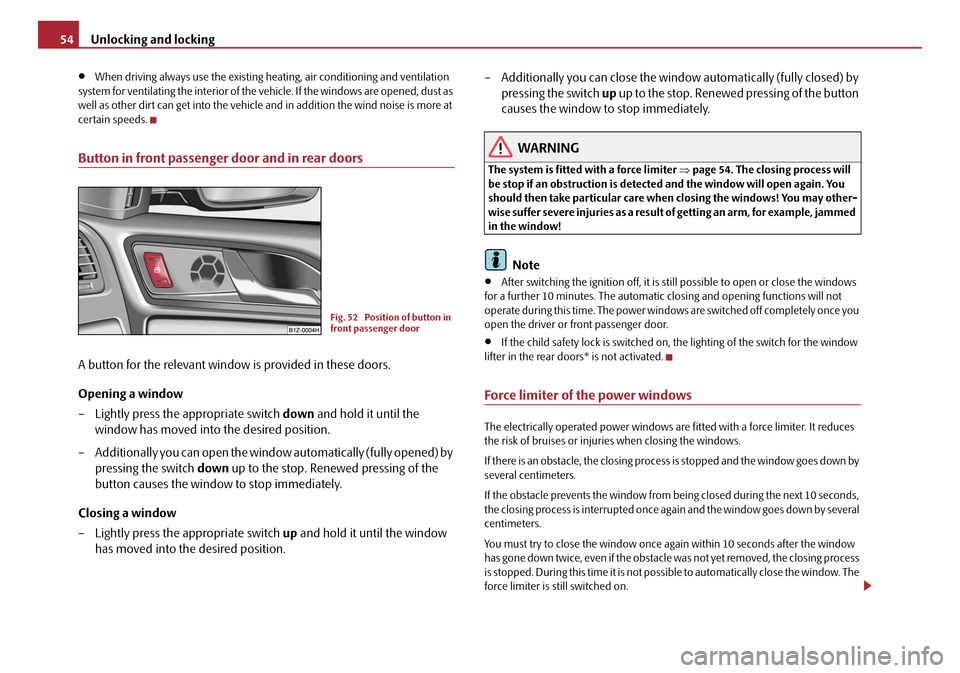
Button in front passenger door and in rear doors
A button for the relevant window is provided in these doors.
Opening a window
– Lightly press the appropriate switch down and hold it until the
window has moved into the desired position.
– Additionally you can open the window automatically (fully opened) by
pressing the switch down up to the stop. Renewed pressing of the
button causes the window to stop immediately.
Closing a window
– Lightly press the appropriate switch up and hold it until the window
has moved into the desired position. – Additionally you can close the window automatically (fully closed) by
pressing the switch up up to the stop. Renewed pressing of the button
causes the window to stop immediately.
WARNING
The system is fitted with a force limiter ⇒page 54. The closin g process will
be stop if an obstruction is detected and the window will open again. You
should then take particular care when closing the windows! You may other-
wise suffer severe injuries as a result of getting an arm, for example, jammed
in the window!
Note
•After switching the ignition off, it is st ill possible to open or close the windows
for a further 10 minutes. The automatic closing and opening functions will not
operate during this time. The power windows are switched off completely once you
open the driver or front passenger door.
•If the child safety lock is switched on, the lighting of the switch for the window
lifter in the rear doors* is not activated.
Force limiter of the power windows
The electrically operated power windows are fitted with a force limiter. It reduces
the risk of bruises or injuri es when closing the windows.
If there is an obstacle, the closing process is stopped and the window goes down by
several centimeters.
If the obstacle prevents the window from being closed during the next 10 seconds,
the closing process is interrupted once again and the window goes down by several
centimeters.
You must try to close the window once ag ain within 10 seconds after the window
has gone down twice, even if the obstacle was not yet removed, the closing process
is stopped. During this time it is not possible to automatically close the window. The
force limiter is still switched on.
Fig. 52 Position of button in
front passenger door
20A5Facelift.book Page 54 Saturday, September 6, 2008 2:13 PM
Page 56 of 304
Unlocking and locking55
Using the systemSafetyDriving TipsGeneral MaintenanceBreakdown assistanceTechnical Data
The force limiter is only switched off, if you attempt to close the window within the
next 10 seconds -
the window closes now with full strength!
If you wait longer than 10 seconds, the force limiter is switched on again.
WARNING
You should take particular care when closing the windows! You may other-
wi se s uffe r s e ve re i njur ie s a s a re sul t of getting an arm, for example, jammed
in the window!
Window convenience operation
You can open and close the electrically powered windows as follows
when unlocking and locking the vehicle (just closing of the sliding roof).
Opening a window
– Turn the key in the lock of the driver door into the opening position or
press the opening button of the radio remote control until all the
windows are open.
Closing a window
– Turn the key in the lock of the driver door into the closing position or press the closing button of the radio remote control until all the
windows are closed.
You can interrupt the opening or closing operation of the windows immediately by
releasing the key or the closing button.
WARNING
The system is fitted with a force limiter ⇒page 54. The clos ing process will
be stop if an obstruction is detected and the window will open again. You
should then take particular care when closing the windows! You may other- wis e suf fe r se v e re inj uri es a s a re s ult of g e tt ing a n ar m , for e xa m ple , ja m m e d
in the window!
Note
•On vehicles fitted with anti-theft
alarm system the convenience window
opening is possible by means of the key in the lock only 45 seconds after deacti-
vating the warning system or after ac tivating the anti-theft alarm system.
Operational faults
Electrically operated power windows do not operate
If the battery of the car has been disconnected and then reconnected, the electri-
cally operated power windows do not operate. The system must be activated.
Proceed as follows in order to re-establish the function:
•Switch on the ignition.
•Press the relevant switch top and hold it pressed as long as necessary until the
window is closed.
•Release the switch.
•Press once again the relevant switch top and hold it pressed for approx. 3
seconds.
Operation in winter
Ice accumulating on the surface of the wi ndows during the winter may result in a
greater resistance when closing the windows and the window may stop and move
back several centimetres
Proceed as follows to close the window fully:
•Turn the key in the lock of the driver d oor into the closing position and hold it
there until all of the windows are closed.
•repeat this operation until the window stops.
WARNING (continued)
20A5Facelift.book Page 55 Saturday, September 6, 2008 2:13 PM
Page 61 of 304
Lights and Visibility
60
Daylight driving lights*
In some countries, the national legislation requires that the vehicles are
equipped with the function daylight driving lights.
Switching on daylight driving lights
– Switch on the ignition without turning the light switch out of the posi- tion 0.
Deactivate function daylight driving lights
– Pull the turn signal light lever towards the steering wheel up to 3 seconds after switching on the ignition and at the same time, slide it to
the bottom and hold it in this position for at least 3 seconds.
Activate function daylight driving lights
– Pull the turn signal light lever towards the steering wheel up to 3 seconds after switching on the ignition and at the same time, slide it to
the top and hold it in this position for at least 3 seconds.
When the daylight driving lights are switched on, the side lights and the low beam
shine together.
On vehicles which are fitted with bulbs for daylight driving lights* in the fog lights,
the parking lights do not switch on when activating the function daylight driving
lights.
When the daylight driving lights are switch ed on, the illumination of the instrument
cluster is switched off, however, it is switched on in the position
when it is dark
and the low beam shines with full br ightness (100 % of the performance).
On vehicles fitted with an information disp lay*, you can activate or deactivate in the
menu the function dayl ight driving lights:
„SETUP (Settings)
„Lights & Vision (Lights & Vision)
Automatic light control*
Switching on automatic light control*
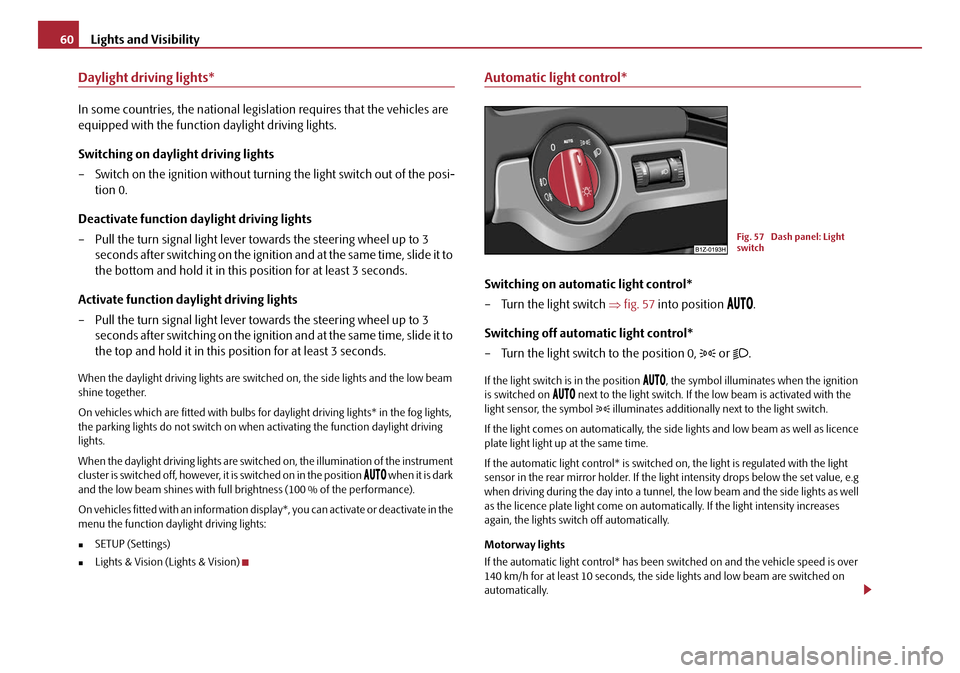
– Turn the light switch ⇒fig. 57 into position
.
Switching off automatic light control*
– Turn the light switch to the position 0,
or .
If the light switch is in the position , the symbol illuminates when the ignition
is switched on next to the light switch. If th e low beam is activated with the
light sensor, the symbol illuminates additionally next to the light switch.
If the light comes on automatically, the side lights and low beam as well as licence
plate light light up at the same time.
If the automatic light control* is switched on, the light is regulated with the light
sensor in the rear mirror holder. If the li ght intensity drops below the set value, e.g
when driving during the day into a tunnel, the low beam and the side lights as well
as the licence plate light co me on automatically. If the light intensity increases
again, the lights swit ch off automatically.
Motorway lights
If the automatic light control* has been sw itched on and the vehicle speed is over
140 km/h for at least 10 seconds, the sid e lights and low beam are switched on
automatically.
Fig. 57 Dash panel: Light
switch
20A5Facelift.book Page 60 Saturday, September 6, 2008 2:13 PM
Page 62 of 304
Lights and Visibility61
Using the systemSafetyDriving TipsGeneral MaintenanceBreakdown assistanceTechnical Data
If the vehicle speed is below 65 km/h for at least 2 minutes, the lights are switched
off.
Rain lights
If you switch on the windscreen wipe in
the operation rain sensor* for longer than
10 seconds or in the operation permanent wipe (position 2 or 3) ⇒page 69
switching on for longer than 15 seconds, th e side lights and low beam are switched
on automatically. The light switches off if the windscreen wipe is in operation rain
sensor* for more than 4 minutes or is no t switched on in the operation permanent
wipe.
WARNING
The automatic light control only operates as a support. The driver is not
released from his responsibility to inspect the light and if necessary to switch
on the light depending on the light conditions. The light sensor cannot
detect for example rain or snow. For these conditions we recommend to
switch on the low beam
!
Note
•Do not affix any stickers in front of the light sensor, so that you do not impair its
function or put it out of operation.
•The same principles as fo r using the automatic light control also apply to the
light which is switched on manually ⇒page 59.
Cornering lights*
The cornering lights are used to illuminate the curves by means of the cone of light
swiveling together with the front headlight with Xenon lights*.
WARNING
If the cornering lights are defectiv e, the headlights are automatically
lowered to the emergency position, whic h prevents a possible dazzling of oncoming traffic. Thus the illuminated length of the road is shortened. Drive
carefully and have the car inspected
immediately by a specialist garage.
Coming Home Function
The function makes it possible to switch on the lights in the darkness for
a short time after leaving the vehicle.
Switching on Coming Home Function
– The light switch is in the position automatic driving lamp control
and the low beam illuminates.
– Switch off the ignition.
– After opening the driver's door , the function Coming Home is
switched on.
– Close all the doors and the boot lid and lock the vehicle. After a short time, switch all lights off.
Depending on equipment fitted the function Coming Home switches on the
following lights:
•Parking lights,
•Low beam,
•Entry lighting in the exterior mirrors,
•Licence plate light.
Coming Home Function
The lights go out 10 seconds after cl osing all the doors and the boot lid.
If a door or the boot lid remains open, th e lights go out 60 seconds after switching
off the ignition.
The function Coming Home is controlled wi th the light sensor in the mount of the
interior rear mirror. If the light intensity is higher than the set value of the light
WARNING (continued)
20A5Facelift.book Page 61 Saturday, September 6, 2008 2:13 PM
Page 65 of 304
Lights and Visibility
64
Headlamp range adjustment
Once the low beam is switched on you can then adapt the range of
the headlights to the load of the vehicle.
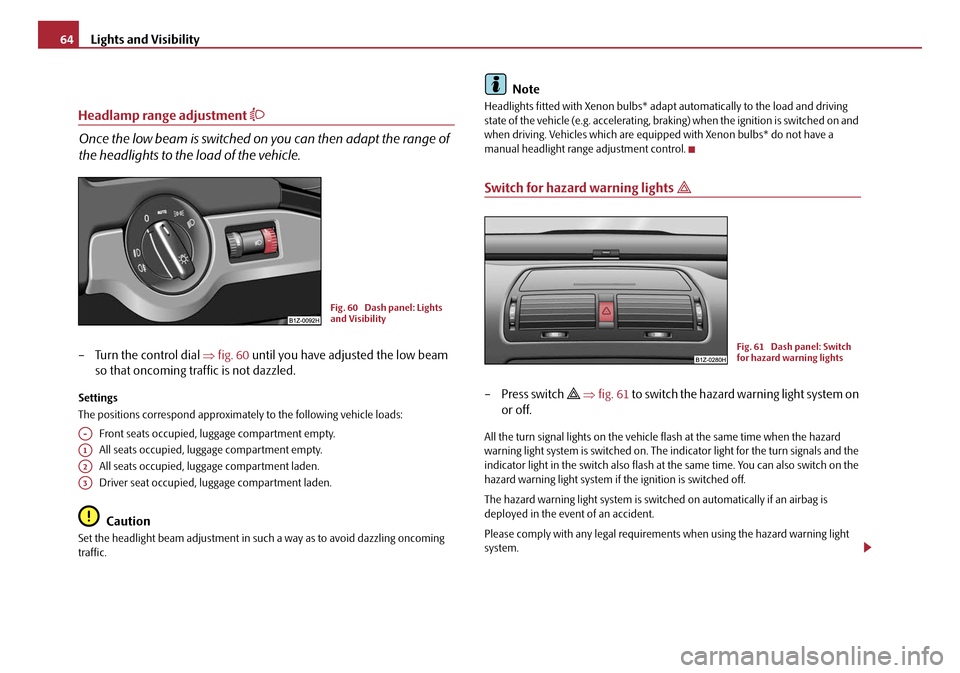
– Turn the control dial ⇒fig. 60 until you have adjusted the low beam
so that oncoming traffic is not dazzled.
Settings
The positions correspond approximat ely to the following vehicle loads:
Front seats occupied, lu ggage compartment empty.
All seats occupied, luggage compartment empty.
All seats occupied, luggage compartment laden.
Driver seat occupied, luggage compartment laden.
Caution
Set the headlight beam adjustment in su ch a way as to avoid dazzling oncoming
traffic.
Note
Headlights fitted with Xenon bulbs* adapt automatically to the load and driving
state of the vehicle (e.g. accelerating, braking) when the ignition is switched on and
when driving. Vehicles which are equi pped with Xenon bulbs* do not have a
manual headlight range adjustment control.
Switch for hazard warning lights
–Press switch ⇒ fig. 61 to switch the hazard warning light system on
or off.
All the turn signal lights on the vehicle flash at the same time when the hazard
warning light system is switched on. The indicator light for the turn signals and the
indicator light in the switch also flash at the same time. You can also switch on the
hazard warning light system if the ignition is switched off.
The hazard warning light system is switch ed on automatically if an airbag is
deployed in the event of an accident.
Please comply with any legal requirements when using the hazard warning light
system.
Fig. 60 Dash panel: Lights
and Visibility
A-
A1
A2
A3
Fig. 61 Dash panel: Switch
for hazard warning lights
20A5Facelift.book Page 64 Saturday, September 6, 2008 2:13 PM
Page 66 of 304
Lights and Visibility65
Using the systemSafetyDriving TipsGeneral MaintenanceBreakdown assistanceTechnical Data
Note
Switch on the hazard warning light system if, for example:
•you encounter traffic congestion,
•your vehicle breaks down or an emergency situation occurs.
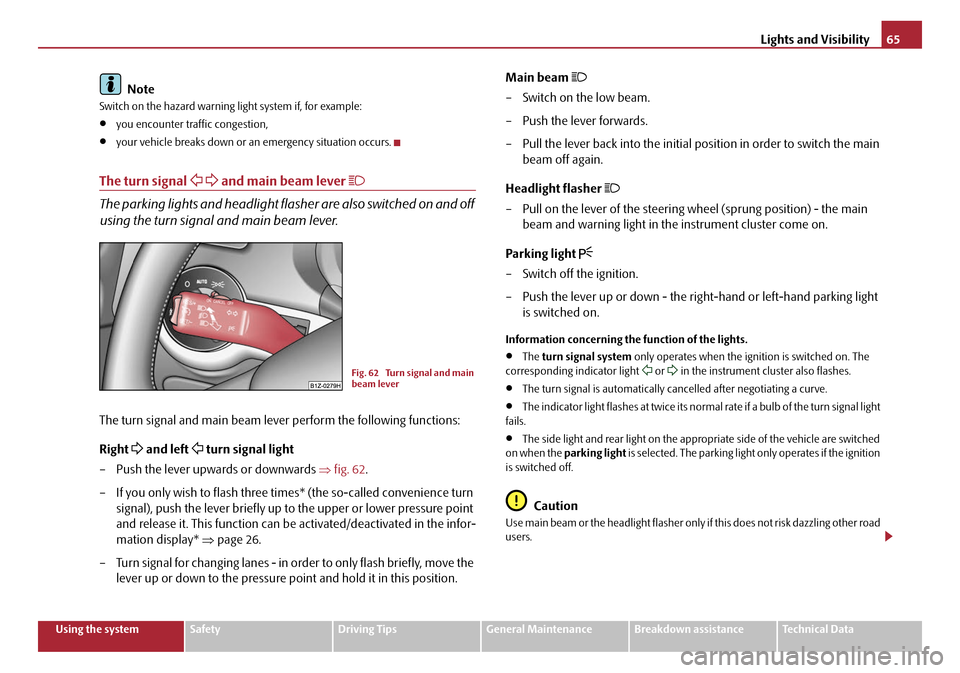
The turn signal and main beam lever
The parking lights and headlight flas her are also switched on and off
using the turn signal and main beam lever.
The turn signal and main beam lever perform the following functions:
Right
and left turn signal light
– Push the lever upwards or downwards ⇒fig. 62 .
– If you only wish to flash three times* (the so-called convenience turn signal), push the lever briefly up to the upper or lower pressure point
and release it. This function can be activated/deactivated in the infor-
mation display* ⇒page 26.
– Turn signal for changing lanes - in or der to only flash briefly, move the
lever up or down to the pressure po int and hold it in this position. Main beam
– Switch on the low beam.
– Push the lever forwards.
– Pull the lever back into the initial position in order to switch the main
beam off again.
Headlight flasher
– Pull on the lever of the steering wheel (sprung position) - the main beam and warning light in the instrument cluster come on.
Parking light
– Switch off the ignition.
– Push the lever up or down - the right-hand or left-hand parking light is switched on.
Information concerning the function of the lights.
•The turn signal system only operates when the ignition is switched on. The
corresponding indicator light or in the instrument cluster also flashes.
•The turn signal is automatically cancelled after negotiating a curve.
•The indicator light flashes at twice its normal rate if a bulb of the turn signal light
fails.
•The side light and rear light on the appropriate side of the vehicle are switched
on when the parking light is selected. The parking light only operates if the ignition
is switched off.
Caution
Use main beam or the headlight flasher only if this does not risk dazzling other road
users.
Fig. 62 Turn signal and main
beam lever
20A5Facelift.book Page 65 Saturday, September 6, 2008 2:13 PM
Page 68 of 304
Lights and Visibility67
Using the systemSafetyDriving TipsGeneral MaintenanceBreakdown assistanceTechnical Data
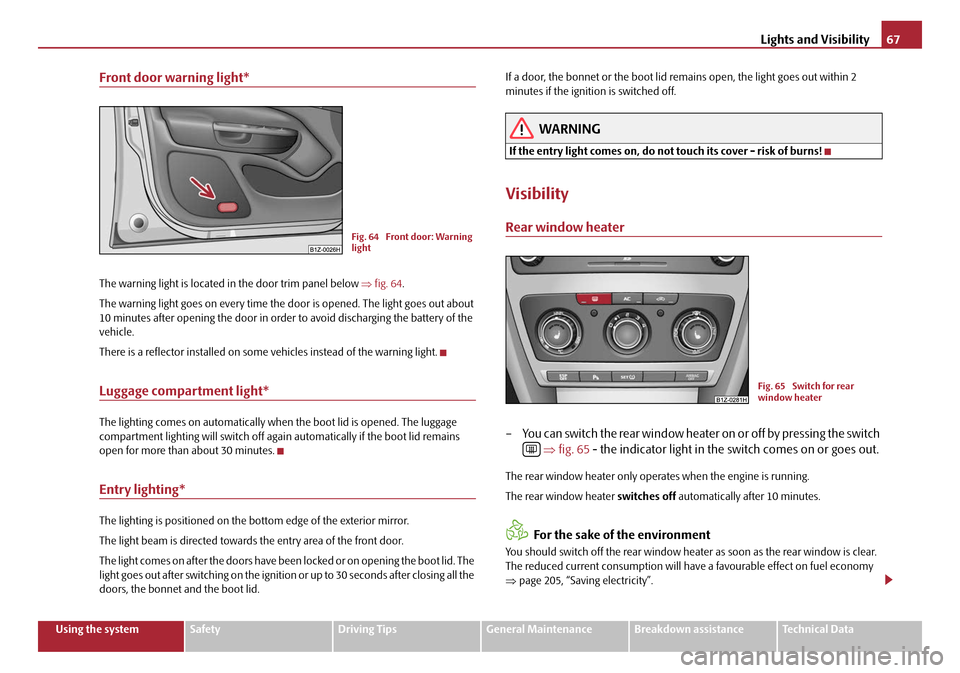
Front door warning light*
The warning light is located in the door trim panel below ⇒fig. 64 .
The warning light goes on every time the door is opened. The light goes out about
10 minutes after opening the door in order to avoid discharging the battery of the
vehicle.
There is a reflector installed on some vehicles instead of the warning light.
Luggage compartment light*
The lighting comes on automatically when the boot lid is opened. The luggage
compartment lighting will switch off agai n automatically if the boot lid remains
open for more than about 30 minutes.
Entry lighting*
The lighting is positioned on the bottom edge of the exterior mirror.
The light beam is directed towards the entry area of the front door.
The light comes on after the doors have been locked or on opening the boot lid. The
light goes out after switching on the ignition or up to 30 seconds after closing all the
doors, the bonnet and the boot lid. If a door, the bonnet or the boot lid remains open, the light goes out within 2
minutes if the ignition is switched off.
WARNING
If the entry light comes on, do not touch its cover - risk of burns!
Visibility
Rear window heater
– You can switch the rear window heater
on or off by pressing the switch
⇒ fig. 65 - the indicator light in the switch comes on or goes out.
The rear window heater only oper ates when the engine is running.
The rear window heater switches off automatically after 10 minutes.
For the sake of the environment
You should switch off the rear window heater as soon as the rear window is clear.
The reduced current consumption will have a favourable effect on fuel economy
⇒ page 205, “Saving electricity”.
Fig. 64 Front door: Warning
light
Fig. 65 Switch for rear
window heater
20A5Facelift.book Page 67 Saturday, September 6, 2008 2:13 PM