ESP SKODA OCTAVIA 2013 3.G / (5E) User Guide
[x] Cancel search | Manufacturer: SKODA, Model Year: 2013, Model line: OCTAVIA, Model: SKODA OCTAVIA 2013 3.G / (5E)Pages: 287, PDF Size: 18.55 MB
Page 62 of 287
Information message
The messages and information are indicated in the instrument cluster display. Fault: Light Assist
LIGHT ASSIST FAULT
Seek help from a specialist garage. Light Assist: clean the windscreen!
WINDSCREEN PLEASE CLEAN
Check for any obstacles on the windscreen in the viewing area of the camera.WARNINGHeadlight assist only functions as a support and does not relieve the driver of
his responsibility to check the headlights and light beam and, if necessary, to
switch on the lights depending on the light conditions. Manual operation may be required in the following situations.■
Poor visibility conditions, e.g. fog, heavy rain, thick snowfall.
■
The oncoming traffic is partially blocked on roads or motorways.
■
Passing poorly lit road users, e.g. cyclists.
■
Driving around “sharp” curves.
■
Driving on sharp slopes up/large inclines.
■
Driving through poorly-lit locations.
■
Driving over highly reflective surfaces.
■
The windscreen around the camera is dirty, iced up, misted up, or covered by
stickers.
■
Near the camera lens there is a light source, such as the screen of an exter-
nal navigation system.
CAUTION
Do not attach any stickers or similar objects to the windscreen to avoid impairing
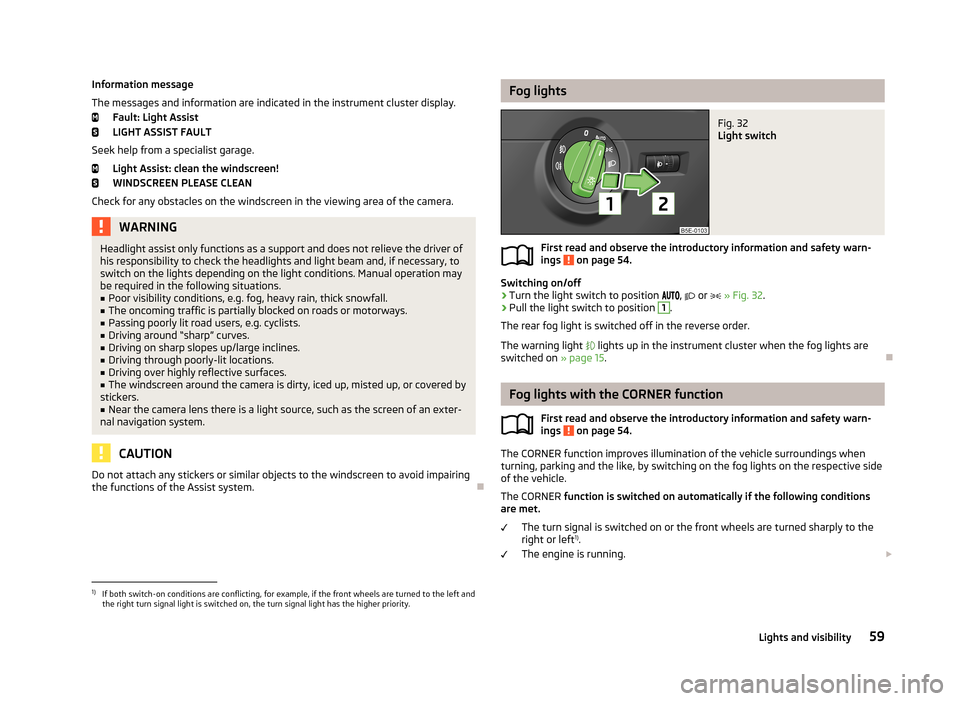
the functions of the Assist system.Fog lightsFig. 32
Light switch
First read and observe the introductory information and safety warn-
ings on page 54.
Switching on/off
›
Turn the light switch to position
,
or
» Fig. 32 .
›
Pull the light switch to position
1
.
The rear fog light is switched off in the reverse order.
The warning light
lights up in the instrument cluster when the fog lights are
switched on » page 15.
Fog lights with the CORNER function
First read and observe the introductory information and safety warn-ings
on page 54.
The CORNER function improves illumination of the vehicle surroundings when
turning, parking and the like, by switching on the fog lights on the respective side
of the vehicle.
The CORNER function is switched on automatically if the following conditions
are met.
The turn signal is switched on or the front wheels are turned sharply to the
right or left 1)
.
The engine is running.
1)
If both switch-on conditions are conflicting, for example, if the front wheels are turned to the left and
the right turn signal light is switched on, the turn signal light has the higher priority.
59Lights and visibility
Page 64 of 287
NoteIf this function is activated constantly, the battery will be heavily discharged par-
ticularly in short-haul traffic.
Hazard warning light system
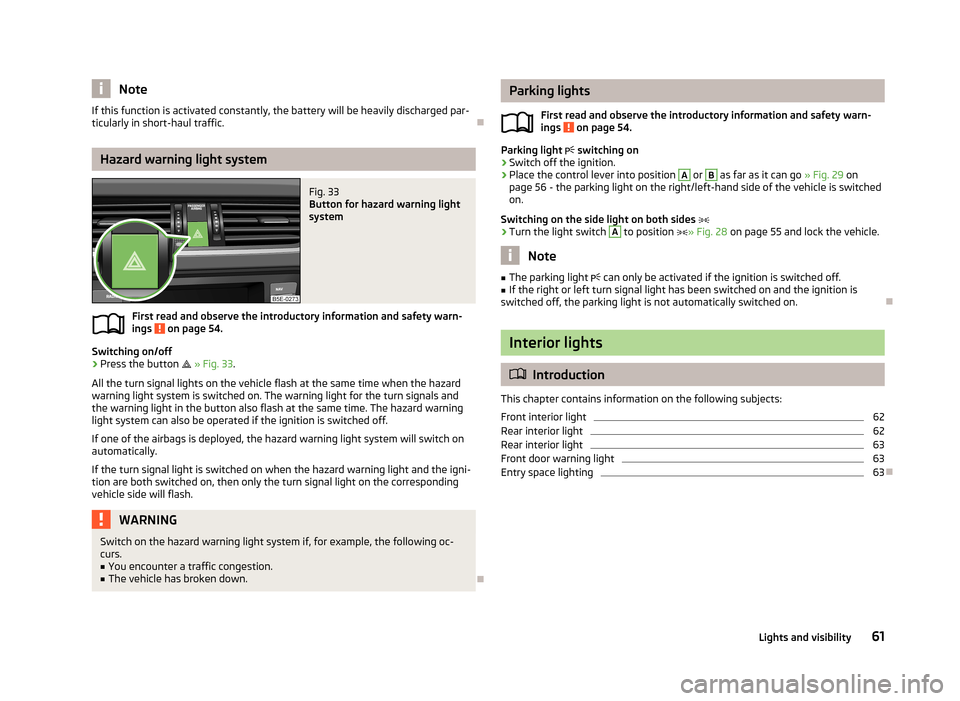
Fig. 33
Button for hazard warning light
system
First read and observe the introductory information and safety warn-
ings on page 54.
Switching on/off
›
Press the button
» Fig. 33 .
All the turn signal lights on the vehicle flash at the same time when the hazard
warning light system is switched on. The warning light for the turn signals and
the warning light in the button also flash at the same time. The hazard warning
light system can also be operated if the ignition is switched off.
If one of the airbags is deployed, the hazard warning light system will switch on
automatically.
If the turn signal light is switched on when the hazard warning light and the igni- tion are both switched on, then only the turn signal light on the corresponding
vehicle side will flash.
WARNINGSwitch on the hazard warning light system if, for example, the following oc-
curs.■
You encounter a traffic congestion.
■
The vehicle has broken down.
Parking lights
First read and observe the introductory information and safety warn-ings
on page 54.
Parking light switching on
›
Switch off the ignition.
›
Place the control lever into position
A
or
B
as far as it can go » Fig. 29 on
page 56 - the parking light on the right/left-hand side of the vehicle is switched
on.
Switching on the side light on both sides
›
Turn the light switch
A
to position » Fig. 28 on page 55 and lock the vehicle.
Note
■
The parking light can only be activated if the ignition is switched off.■If the right or left turn signal light has been switched on and the ignition is
switched off, the parking light is not automatically switched on.
Interior lights
Introduction
This chapter contains information on the following subjects:
Front interior light
62
Rear interior light
62
Rear interior light
63
Front door warning light
63
Entry space lighting
63
61Lights and visibility
Page 69 of 287
The rear window is wiped once automatically if the windscreen wipers are onwhen reverse gear is selected.
Automatic rear window wiping can be activated or deactivated in the Infotain-
ment » Operating instructions for Infotainment , chapter Vehicle settings (CAR
button) .
Top up with windscreen wiper fluid » page 218.WARNING■
Properly maintained windscreen wiper blades are essential for clear visibility
and safe driving » page 250.■
Replace the windscreen wiper blades once or twice a year for safety rea-
sons. These can be purchased from a ŠKODA Partner.
■
Do not use the windscreen washer system at low temperatures, without
heating the windscreen beforehand. Otherwise the window cleaner could
freeze on the windscreen and restrict the view to the front.
■
Automatic wiping in rain only operates as a support. The driver is not re-
leased from the responsibility to set the function of the windscreen wipers
manually depending on the visibility conditions.
CAUTION
■ In cold temperatures and during the winter, check before the journey or before
switching on the ignition that the wiper blades are not frozen to the windscreen. If the windscreen wipers are switched on when the blades are frozen to the
windscreen, this may damage both the blades and windscreen wiper motor!■
If the ignition is switched off while the windscreen wipers are switched on, the
windscreen wipers will continue wiping in the same mode after the ignition is
turned back on. The windscreen wipers could freeze up in cold temperatures be- tween the time the ignition was turned off and when it was turned back on again.
■
Carefully detach frozen wiper blades from the front or rear window.
■
Remove snow and ice from the windscreen wipers before driving.
■
If the windscreen wipers are handled carelessly, there is a risk of damage to the
windscreen.
■
Do not switch on the ignition if the front wiper arms are retracted. The wiper
blades would move back into their rest position and while doing so damage the
paintwork of the bonnet.
■
If there is an obstacle on the windscreen, the wiper will try to push away the
obstacle. The wiper stops automatically after 5 attempts to eliminate the obsta-
cle, in order to avoid a damage to the wiper. Remove the the obstacle and switch
the wiper on again.
Note■ Each time the ignition switches off for the third time, the position of the wind-
screen wipers changes. This counteracts an early fatigue of the wiper rubbers.■
The rear window wiper only operates if the boot lid is closed.
■
Keep the wiper blades clean. They may become soiled, e.g., with wax residues
after washing in automatic car wash systems » page 204.
■
The windscreen washer nozzles for the windscreen are heated when the en-
gine is running and the outside temperature is less than approx. +10 °C.
Windscreen wipers and washers
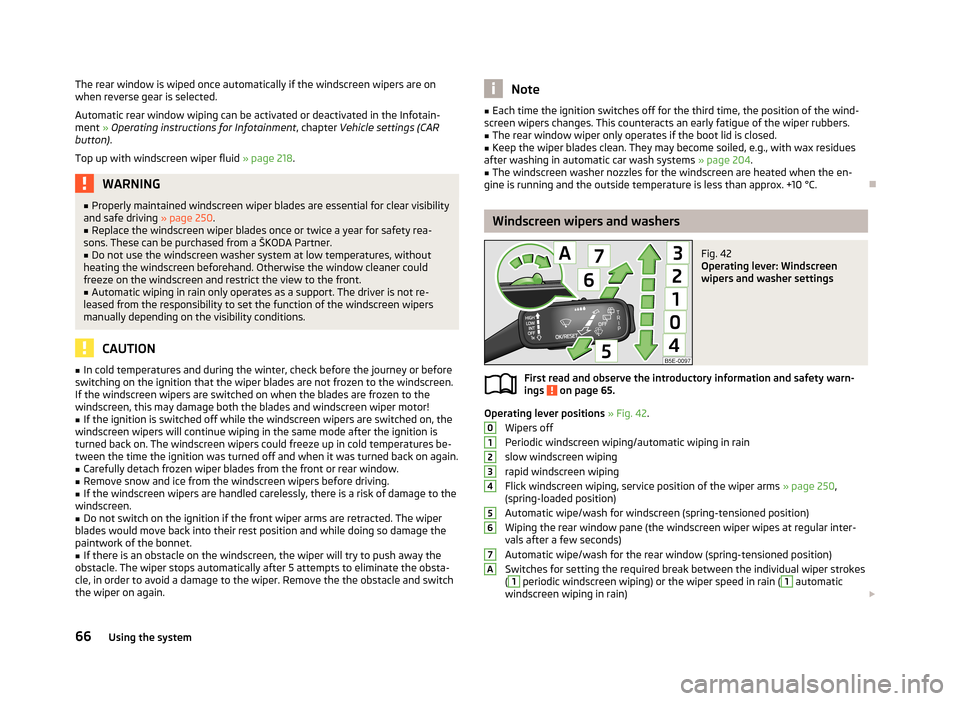
Fig. 42
Operating lever: Windscreen
wipers and washer settings
First read and observe the introductory information and safety warn-
ings on page 65.
Operating lever positions » Fig. 42 .
Wipers off
Periodic windscreen wiping/automatic wiping in rain
slow windscreen wiping
rapid windscreen wiping
Flick windscreen wiping, service position of the wiper arms » page 250,
(spring-loaded position)
Automatic wipe/wash for windscreen (spring-tensioned position)
Wiping the rear window pane (the windscreen wiper wipes at regular inter- vals after a few seconds)
Automatic wipe/wash for the rear window (spring-tensioned position)
Switches for setting the required break between the individual wiper strokes
(
1
periodic windscreen wiping) or the wiper speed in rain (
1
automatic
windscreen wiping in rain)
01234567A66Using the system
Page 77 of 287

›Hold the
rear head restraints on the sides with both hands and move them up-
wards » Fig. 49 .›
To move the head restraint downwards , press and hold the safety button
1
with one hand and press the head restraint downwards with the other hand.
The head restraints and the front seats must be adjusted to match the body size at all times and the seat belt must always be fastened properly to provide the
most effective levels of protection to the passengers » page 177, Correct seated
position .
Removing/installing
Only the real head restraints may be removed.
›
Pull the head restraint out of the seat backrest as far as the stop.
›
Press the locking button in the direction of arrow
1
» Fig. 49 simultaneously
press the locking button into the opening
2
using a flat screwdriver with a
width of maximum 5 mm and pull out the head rest.
›
To re-insert the head restraint, push it far enough down into the seat backrest until the locking button clicks into place.
WARNING■ The head restraints must be correctly adjusted in order to offer effective
protection for the occupants in the event of an accident.■
Never drive with the head restraints removed - risk of injury.
■
If the rear seats are occupied, the respective rear head restraint must not be
in the lower position.
Note
■ For the sports seats, the head restraints are integrated into the front seat
backrests. These headrests cannot be adjusted by height or removed.■
The middle rear head restraint is only adjustable in two positions.
Memory function of the electrically adjustable seatFig. 50
Memory buttons and SET button
First read and observe the introductory information and safety warn-
ings on page 71.
The memory function for the driver's seat provides the option to store the posi-
tions of the driver's seat and the external mirrors. Each of the three memory but- tons
B
» Fig. 50 can be assigned a set position.
Storing seat and exterior mirror settings for driving forward
›
Switch on the ignition.
›
Adjust the seat to the desired position.
›
Adjust both of the exterior mirrors » page 69.
›
Press the button SET
A
» Fig. 50 .
›
Within 10 seconds after pressing the SET button, press the desired memory
button
B
.
An acknowledgment sound confirms the storage.
Saving front passenger mirror settings when reversing
›
Switch on the ignition.
›
Press the required memory button
B
» Fig. 50 .
›
Adjust the rotary knob for the mirrors to the position
or in right-hand drive to
the position
» page 69 .
›
Engage reverse gear.
›
Adjust the front passenger's mirror to the desired position » page 69.
›
Disengage reverse gear.
The set position of the exterior mirror is stored.
Retrieving the saved setting
›
Tap the desired memory button
B
» Fig. 50 when the ignition is switched off
and the driver's door is opened.
74Using the system
Page 79 of 287
Seat features
Introduction
This chapter contains information on the following subjects:
Seat heaters
76
Front armrest
77
Rear armrest
77
Folding front passenger seat
77
Seat backrests
78
Seat heaters
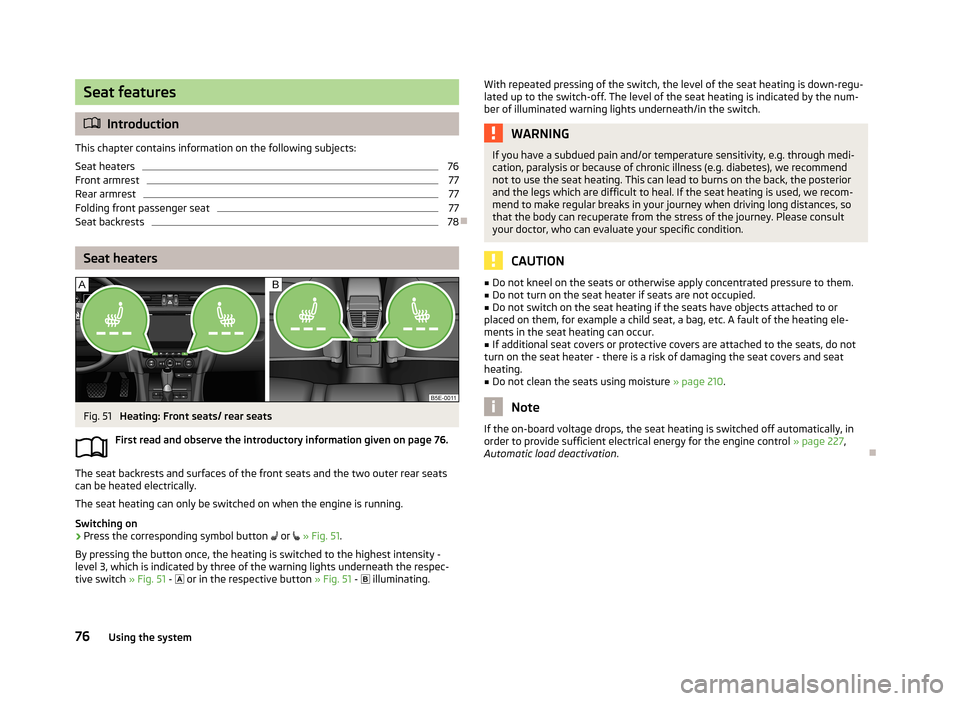
Fig. 51
Heating: Front seats/ rear seats
First read and observe the introductory information given on page 76.
The seat backrests and surfaces of the front seats and the two outer rear seats
can be heated electrically.
The seat heating can only be switched on when the engine is running.
Switching on
›
Press the corresponding symbol button
or
» Fig. 51 .
By pressing the button once, the heating is switched to the highest intensity - level 3, which is indicated by three of the warning lights underneath the respec-
tive switch » Fig. 51 -
or in the respective button » Fig. 51 -
illuminating.
With repeated pressing of the switch, the level of the seat heating is down-regu-
lated up to the switch-off. The level of the seat heating is indicated by the num- ber of illuminated warning lights underneath/in the switch.WARNINGIf you have a subdued pain and/or temperature sensitivity, e.g. through medi-
cation, paralysis or because of chronic illness (e.g. diabetes), we recommend
not to use the seat heating. This can lead to burns on the back, the posterior
and the legs which are difficult to heal. If the seat heating is used, we recom-
mend to make regular breaks in your journey when driving long distances, so
that the body can recuperate from the stress of the journey. Please consult
your doctor, who can evaluate your specific condition.
CAUTION
■ Do not kneel on the seats or otherwise apply concentrated pressure to them.■Do not turn on the seat heater if seats are not occupied.■
Do not switch on the seat heating if the seats have objects attached to or
placed on them, for example a child seat, a bag, etc. A fault of the heating ele-
ments in the seat heating can occur.
■
If additional seat covers or protective covers are attached to the seats, do not
turn on the seat heater - there is a risk of damaging the seat covers and seat
heating.
■
Do not clean the seats using moisture » page 210.
Note
If the on-board voltage drops, the seat heating is switched off automatically, in
order to provide sufficient electrical energy for the engine control » page 227,
Automatic load deactivation .
76Using the system
Page 82 of 287
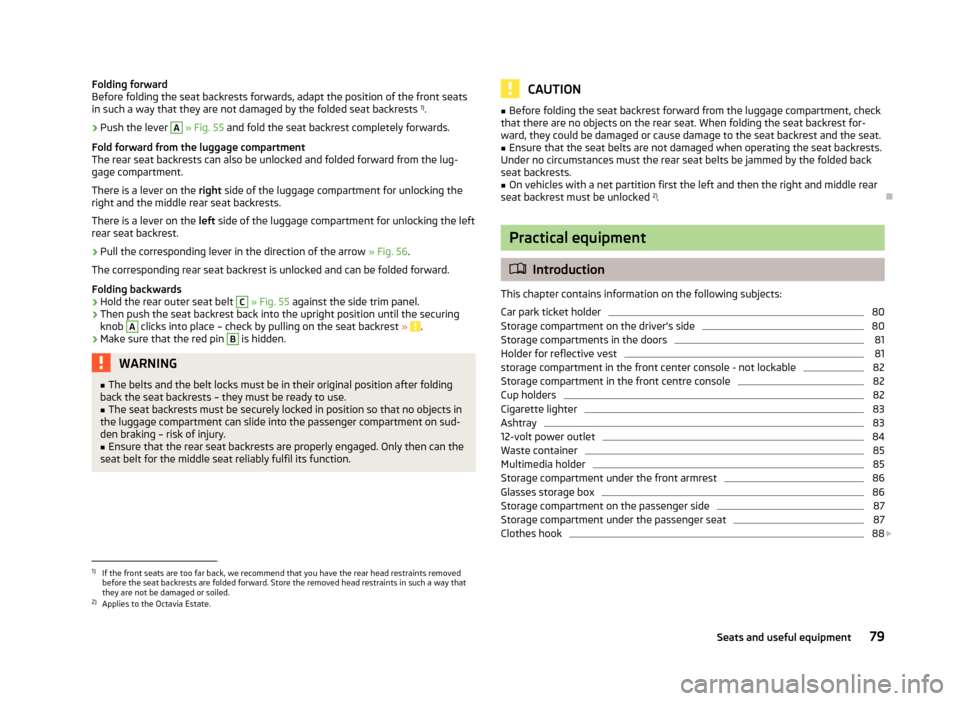
Folding forward
Before folding the seat backrests forwards, adapt the position of the front seats
in such a way that they are not damaged by the folded seat backrests 1)
.›
Push the lever
A
» Fig. 55 and fold the seat backrest completely forwards.
Fold forward from the luggage compartment
The rear seat backrests can also be unlocked and folded forward from the lug-
gage compartment.
There is a lever on the right side of the luggage compartment for unlocking the
right and the middle rear seat backrests.
There is a lever on the left side of the luggage compartment for unlocking the left
rear seat backrest.
›
Pull the corresponding lever in the direction of the arrow » Fig. 56.
The corresponding rear seat backrest is unlocked and can be folded forward.
Folding backwards
›
Hold the rear outer seat belt
C
» Fig. 55 against the side trim panel.
›
Then push the seat backrest back into the upright position until the securing
knob
A
clicks into place – check by pulling on the seat backrest » .
›
Make sure that the red pin
B
is hidden.
WARNING■
The belts and the belt locks must be in their original position after folding
back the seat backrests – they must be ready to use.■
The seat backrests must be securely locked in position so that no objects in
the luggage compartment can slide into the passenger compartment on sud- den braking – risk of injury.
■
Ensure that the rear seat backrests are properly engaged. Only then can the
seat belt for the middle seat reliably fulfil its function.
CAUTION■ Before folding the seat backrest forward from the luggage compartment, check
that there are no objects on the rear seat. When folding the seat backrest for-
ward, they could be damaged or cause damage to the seat backrest and the seat.■
Ensure that the seat belts are not damaged when operating the seat backrests.
Under no circumstances must the rear seat belts be jammed by the folded back
seat backrests.
■
On vehicles with a net partition first the left and then the right and middle rear
seat backrest must be unlocked 2)
.
Practical equipment
Introduction
This chapter contains information on the following subjects:
Car park ticket holder
80
Storage compartment on the driver's side
80
Storage compartments in the doors
81
Holder for reflective vest
81
storage compartment in the front center console - not lockable
82
Storage compartment in the front centre console
82
Cup holders
82
Cigarette lighter
83
Ashtray
83
12-volt power outlet
84
Waste container
85
Multimedia holder
85
Storage compartment under the front armrest
86
Glasses storage box
86
Storage compartment on the passenger side
87
Storage compartment under the passenger seat
87
Clothes hook
88
1)
If the front seats are too far back, we recommend that you have the rear head restraints removed
before the seat backrests are folded forward. Store the removed head restraints in such a way that
they are not be damaged or soiled.
2)
Applies to the Octavia Estate.
79Seats and useful equipment
Page 94 of 287
WARNING (Continued)■Make sure that the strap A holds the skis in front of the binding (also refer
to imprint on the removable through-loading bag).■
The total weight of the skis which are transported must not exceed 24 kg.
Note
■ The through-loading bag is foreseen for four pairs of skis.■Place the skis with the tips facing to the front and the sticks with the tips facing
to the rear. into the removable through-loading bag.■
If there are several pairs of skis in the removable through-loading bag, ensure
that the bindings are positioned at the same height.
■
The removable through-loading bag must never be folded together or stowed
when moist.
Luggage compartment
Introduction
This chapter contains information on the following subjects:
Class N1 vehicles
92
Fastening elements
92
Fixing nets
93
Folding double hooks
93
Foldable hooks (Octavia Estate)
94
Floor covering
94
Double sided floor covering
94
Luggage net
95
Luggage compartment cover
95
Roll-up luggage compartment cover (Octavia Estate)
96
Stowing roll-up luggage compartment cover and roof racks
97
Storage compartment in the luggage compartment
98
Storage compartments under the floor covering
98
Multifunction box (Octavia Estate)
99
Please observe the following for the purpose of maintaining good handling char-
acteristics of your vehicle:
› Distribute loads as evenly as possible.›Place heavy objects as far forward as possible.›
Attach the items of luggage to the lashing eyes or using the nets
» page 92.
In the event of an accident, even small and light objects gain so much kinetic en-
ergy that they can cause severe injuries.
The magnitude of the kinetic energy is dependent on the speed at which the ve-
hicle is travelling and the weight of the object.
Example: In the event of a frontal collision at a speed of 50 km/h, an object with a
weight of 4.5 kg produces an energy, which corresponds to 20 times its own
weight. This means that it results in a weight of approx. 90 kg “ ”.
Luggage compartment light
The light switches on/off when the boot lid is opened or closed.
If the boot lid is open and the ignition switched off, the light will extinguish auto-
matically after around 10 minutes.
WARNING■ Store the objects in the luggage compartment and attach them to the lash-
ing eyes.■
Loose objects can be thrown forward during a sudden manoeuvre or in case
of an accident and can injure the occupants or other road users.
■
Loose objects could hit a deployed airbag and injure occupants – danger of
death!
■
Please note that the handling properties of the vehicle may be affected
when transporting heavy objects as the centre of gravity can be displaced –
risk of accident! The speed and style of driving must be adjusted accordingly.
■
If the items of luggage or objects are attached to the lashing eyes with un-
suitable or damaged lashing straps, injuries can occur in the event of braking
manoeuvres or accidents. To prevent items of luggage from moving around,
always use suitable lashing straps which must be firmly attached to the lash-
ing eyes.
■
The items carried in the luggage compartment must be stored in such a way
that no objects are able to slip forward if any sudden driving or braking ma-
noeuvres are undertaken – risk of injury!
91Seats and useful equipment
Page 113 of 287
Air conditioning system (manual air conditioningsystem)
Introduction
This chapter contains information on the following subjects: Control elements
110
adjusting
111
Recirculated air mode
111
The cooling system only operates if the following conditions are met. The cooling system is switched on » page 110, Control elements .
The engine is running.
The outside temperature above approx. +2 °C.
The blower switch is switched on (positions 1-6).
If the desired interior temperature can also be achieved without activating the cooling system, fresh air mode should be selected.
The cooling system is switched off at a high coolant temperature in order to pro-
vide cooling at a high load of the engine.
CAUTION
■ Under certain circumstances, air at a temperature of about 5 °C can flow out of
the vents when the cooling system is switched on.■
Lengthy and uneven distribution of the air flow out of the vents (especially
around the feet) and large differences in temperature, for example, when getting
out of the vehicle, can cause susceptible individuals to catch a cold.
Note
We recommend that you have the air conditioning system cleaned by a specialist
garage once every year.Control elementsFig. 109
Air conditioning: Control elements
First read and observe the introductory information and safety warn- ings
on page 110.
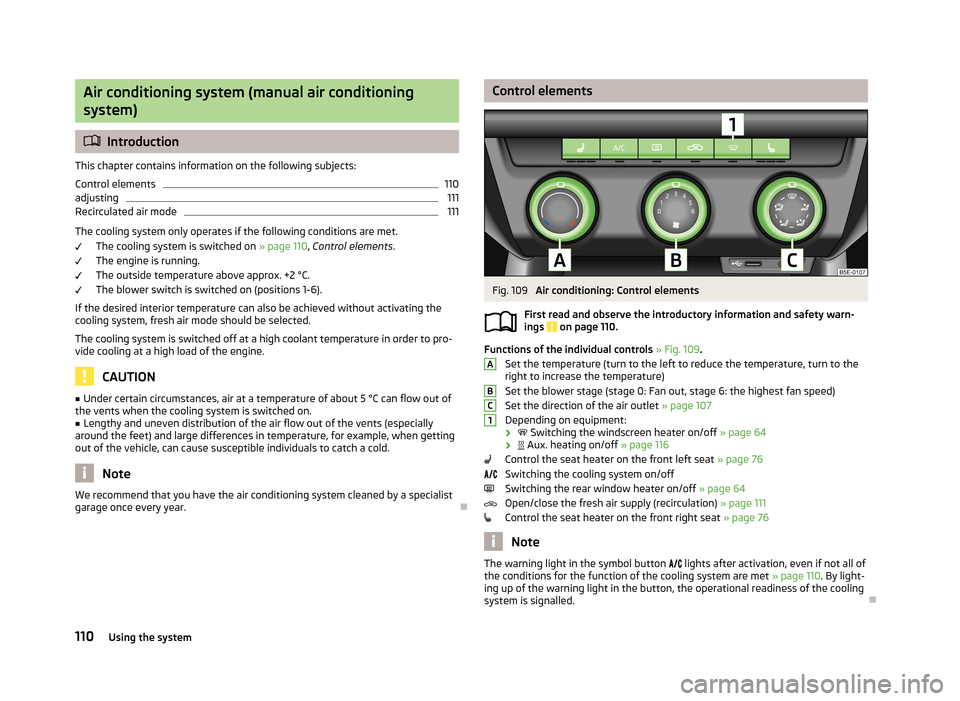
Functions of the individual controls » Fig. 109 .
Set the temperature (turn to the left to reduce the temperature, turn to the
right to increase the temperature)
Set the blower stage (stage 0: Fan out, stage 6: the highest fan speed)
Set the direction of the air outlet » page 107
Depending on equipment:
›
Switching the windscreen heater on/off » page 64
›
Aux. heating on/off » page 116
Control the seat heater on the front left seat » page 76
Switching the cooling system on/off
Switching the rear window heater on/off » page 64
Open/close the fresh air supply (recirculation) » page 111
Control the seat heater on the front right seat » page 76
Note
The warning light in the symbol button
lights after activation, even if not all of
the conditions for the function of the cooling system are met » page 110. By light-
ing up of the warning light in the button, the operational readiness of the cooling system is signalled.
ABC1110Using the system
Page 116 of 287
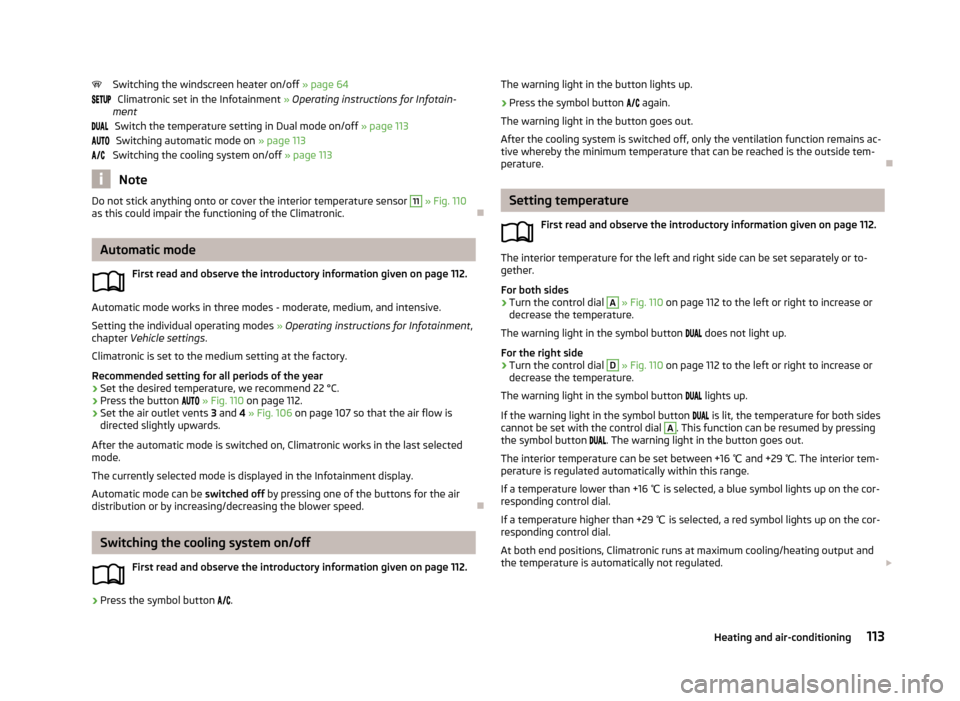
Switching the windscreen heater on/off » page 64
Climatronic set in the Infotainment » Operating instructions for Infotain-
ment
Switch the temperature setting in Dual mode on/off » page 113
Switching automatic mode on » page 113
Switching the cooling system on/off » page 113
Note
Do not stick anything onto or cover the interior temperature sensor 11 » Fig. 110
as this could impair the functioning of the Climatronic.
Automatic mode
First read and observe the introductory information given on page 112.
Automatic mode works in three modes - moderate, medium, and intensive.Setting the individual operating modes » Operating instructions for Infotainment ,
chapter Vehicle settings .
Climatronic is set to the medium setting at the factory.
Recommended setting for all periods of the year
›
Set the desired temperature, we recommend 22 °C.
›
Press the button
» Fig. 110 on page 112.
›
Set the air outlet vents 3 and 4 » Fig. 106 on page 107 so that the air flow is
directed slightly upwards.
After the automatic mode is switched on, Climatronic works in the last selected
mode.
The currently selected mode is displayed in the Infotainment display. Automatic mode can be switched off by pressing one of the buttons for the air
distribution or by increasing/decreasing the blower speed.
Switching the cooling system on/off
First read and observe the introductory information given on page 112.
›
Press the symbol button
.
The warning light in the button lights up.›
Press the symbol button
again.
The warning light in the button goes out.
After the cooling system is switched off, only the ventilation function remains ac-
tive whereby the minimum temperature that can be reached is the outside tem-
perature.
Setting temperature
First read and observe the introductory information given on page 112.
The interior temperature for the left and right side can be set separately or to-
gether.
For both sides
›
Turn the control dial
A
» Fig. 110 on page 112 to the left or right to increase or
decrease the temperature.
The warning light in the symbol button
does not light up.
For the right side
›
Turn the control dial
D
» Fig. 110 on page 112 to the left or right to increase or
decrease the temperature.
The warning light in the symbol button
lights up.
If the warning light in the symbol button
is lit, the temperature for both sides
cannot be set with the control dial
A
. This function can be resumed by pressing
the symbol button
. The warning light in the button goes out.
The interior temperature can be set between +16 ℃ and +29 ℃. The interior tem-
perature is regulated automatically within this range.
If a temperature lower than +16 ℃ is selected, a blue symbol lights up on the cor-
responding control dial.
If a temperature higher than +29 ℃ is selected, a red symbol lights up on the cor-
responding control dial.
At both end positions, Climatronic runs at maximum cooling/heating output and
the temperature is automatically not regulated.
113Heating and air-conditioning
Page 117 of 287
CAUTIONLengthy and uneven distribution of the air flow out of the vents (especially
around the feet) and large differences in temperature, for example, when getting
out of the vehicle, can cause susceptible individuals to catch a cold.
Automatic recirculation mode
First read and observe the introductory information given on page 112.
Recirculated air mode prevents polluted air outside the vehicle from getting into
the vehicle, for example when driving through a tunnel or when standing in a
traffic jam.
If a considerable increase in concentration of pollutants is recognised by the air
quality sensor, recirculated air mode will temporarily be switched off.
If the concentration of pollutants decreases to the normal level, the air distribu-
tion control is automatically switched off so that fresh air can be guided into the
vehicle interior.
In recirculated air mode air is sucked out of the interior of the vehicle and then
fed back into the interior. When the automatic air distribution control is switched on, an air quality sensor measures the concentration of pollutants in the drawn in
air.
If the air quality sensor does not switch on automatic recirculated air mode when
there is an unpleasant smell, you can switch in on manually.
Switching on/off
›
Press the symbol button
.
The warning light below the button lights up.
›
Press the symbol button
again; the warning light below the button goes out;
if necessary, press the symbol button
again.
Switching on and off is also possible in the Infotainment » Operating instructions
for Infotainment , chapter Vehicle settings .
WARNINGNever leave recirculated air mode switched on over a longer period of time, as
“stale air” can cause driver and passenger fatigue, reduce attention levels and
also cause the windows to mist up. The risk of having an accident increases.
Switch off recirculated air mode as soon as the windows start to mist up.
Note
■ If the windscreen mists up, press the symbol button . Press the symbol
button when the windscreen is demisted.■
The automatic air distribution control operates only if the outside temperature
is higher than approx. 2 °C.
Controlling blower
First read and observe the introductory information given on page 112.
The blower stage can be manually adapted to suit your particular needs.
›
Turn the control dial
C
» Fig. 110 on page 112 to the left or right to increase or
decrease the temperature.
If the blower speed is reduced to a minimum, Climatronic is switched off.
The set blower speed is displayed in the control dial
C
when the respective num-
ber of warning lights illuminate.
WARNING■ “Stale air” may result in fatigue in the driver and occupants, reduce attention
levels and also cause the windows to mist up. The risk of having an accident
increases.■
Do not switch off the Climatronic system for longer than necessary.
■
Switch on the Climatronic system as soon as the windows mist up.
114Using the system