ESP SKODA OCTAVIA 2013 3.G / (5E) Owner's Guide
[x] Cancel search | Manufacturer: SKODA, Model Year: 2013, Model line: OCTAVIA, Model: SKODA OCTAVIA 2013 3.G / (5E)Pages: 287, PDF Size: 18.55 MB
Page 129 of 287
WARNINGPlease note that the handbrake must be fully released. A handbrake which is
only partially released can result in the rear brakes overheating. This can have a negative effect on the operation of the brake system – risk of accident!
Manual shifting of gears and pedals
Introduction
This chapter contains information on the following subjects:
Manual gear changing
126
Pedals
126
Manual gear changing
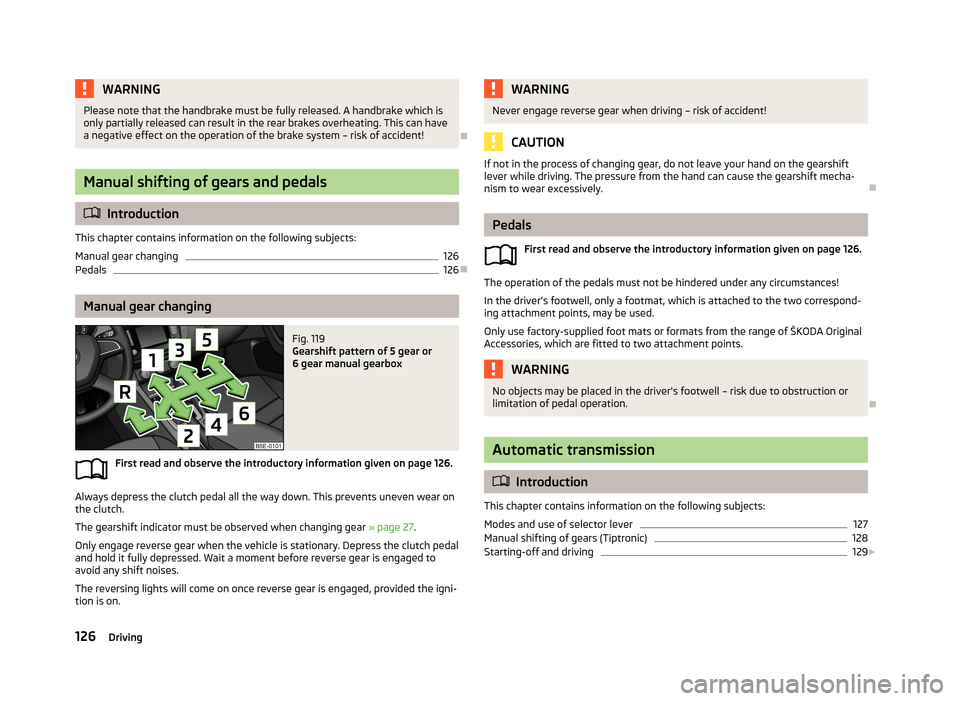
Fig. 119
Gearshift pattern of 5 gear or
6 gear manual gearbox
First read and observe the introductory information given on page 126.
Always depress the clutch pedal all the way down. This prevents uneven wear on the clutch.
The gearshift indicator must be observed when changing gear » page 27.
Only engage reverse gear when the vehicle is stationary. Depress the clutch pedal
and hold it fully depressed. Wait a moment before reverse gear is engaged to
avoid any shift noises.
The reversing lights will come on once reverse gear is engaged, provided the igni- tion is on.
WARNINGNever engage reverse gear when driving – risk of accident!
CAUTION
If not in the process of changing gear, do not leave your hand on the gearshift
lever while driving. The pressure from the hand can cause the gearshift mecha-nism to wear excessively.
Pedals
First read and observe the introductory information given on page 126.
The operation of the pedals must not be hindered under any circumstances!
In the driver's footwell, only a footmat, which is attached to the two correspond- ing attachment points, may be used.
Only use factory-supplied foot mats or formats from the range of ŠKODA Original
Accessories, which are fitted to two attachment points.
WARNINGNo objects may be placed in the driver's footwell – risk due to obstruction or
limitation of pedal operation.
Automatic transmission
Introduction
This chapter contains information on the following subjects:
Modes and use of selector lever
127
Manual shifting of gears (Tiptronic)
128
Starting-off and driving
129
126Driving
Page 133 of 287
The gearbox does not shift up into the highest gear until the engine has reached
its maximum revolutions for this gear range.WARNINGRapid acceleration, particularly on slippery roads, can lead to loss of control of
the vehicle – risk of accident!
Running in
Introduction
This chapter contains information on the following subjects:
New engine
130
New tyres
130
New brake pads
131
New engine
First read and observe the introductory information given on page 130.
The engine has to be run in during the first 1500 kilometres.Up to 1000 kilometres
›
Do not drive faster than 3/4 of the maximum speed of the gear in use, i.e. 3/4 of
the maximum permissible engine speed.
›
No full throttle.
›
Avoid high engine speeds.
›
Do not tow a trailer.
From 1000 up to 1500 kilometres
Gradually increase the power output of the engine up to the full speed of the
gear engaged, i.e. up to the maximum permissible engine speed.
The red scale of the rev counter indicates the range in which the system beginsto limit the engine speed.
During the first operating hours the engine has higher internal friction than later until all of the moving parts have harmonized. The driving style which you adopt
during the first approx.1500 kilometres plays a decisive part in the success of run-
ning in your car.
Never drive at unnecessarily high engine speeds, even after the running-in period is complete.
On vehicles fitted with a manual gearbox, at the very latest shift up into the next
gear when the red area is reached. Observe the recommended gear » page 27.
Very high engine speeds when accelerating (accelerator) are automatically re-
stricted »
.
With vehicles with a manual gearbox, do not drive at unnecessarily low engine
speeds. Shift down a gear when the engine is no longer running smoothly. Ob-
serve the recommended gear » page 27.
CAUTION
■
The engine is not protected from excessive engine revs caused by shifting
down at the wrong time. This can result in the sudden increase in revs beyond
the permissible maximum rpm and thus cause engine damage.■
Never rev up a cold engine when the vehicle is stationary or when driving in in-
dividual gears.
For the sake of the environment
Do not drive at unnecessarily high engine speeds. Shifting up sooner helps save
on fuel, reduces engine noises and protects the environment.
New tyres
First read and observe the introductory information given on page 130.
New tyres have to be “run in” since they do not offer optimal grip at first. Drive
especially carefully for the first 500 km or so.
130Driving
Page 134 of 287
New brake padsFirst read and observe the introductory information given on page 130.
New brake pads initially do not provide optimal braking performance. They firstneed to be “run in”. Drive especially carefully for the first 200 km or so.
Economical driving and environmental sustainability
Introduction
This chapter contains information on the following subjects:
Looking ahead
131
Economical gear changing
132
Avoiding full throttle
132
Reducing idling
132
Avoiding short distances
133
Convenience consumers
133
Checking tyre inflation pressure
133
Avoiding unnecessary ballast
134
Regular maintenance
134
Saving electrical energy
134
Environmental compatibility
134
The technical requirements for low fuel usage and economic efficiency of the ve-
hicle have already been built into the vehicle at the works. ŠKODA places a partic-
ular emphasis on minimising negative effects on the environment.
It is necessary to take note of the guidelines given in this chapter in order tomake best use of these characteristics and to maintain their effectiveness.
Fuel consumption, environmental pollution and the wear to the engine, brakes
and tyres depend essentially on the following three factors:
› your personal style of driving.
› the conditions under which your vehicle is use,
› technical requirements.
The fuel economy by can be improved by 10 -15 % by always looking ahead and
driving in an economical way.
Fuel consumption is also be influenced by external factors which are beyond the
driver's control. Consumption increases during the winter or under difficult condi-
tions, on poor roads, etc.
Fuel consumption can vary considerably from the manufacturer's data, as a result
of outside temperatures, the weather and driving style.
The optimal engine speed should be obtained when accelerating, in order to
avoid a high fuel consumption and resonance of the vehicle.
CAUTION
All the speed and engine revolution figures apply only when the engine is at its
normal operating temperature.
Looking ahead
First read and observe the introductory information and safety warn-
ings
on page 131.
A vehicle's highest fuel consumption occurs when accelerating, therefore unnec-
essary accelerating and braking should be avoided. If looking ahead when driving, less braking and consequently less accelerating are required.
If possible, let your vehicle coast to a stop, or use the engine brake, if you can see that the next set of traffic lights is on red, for example.
131Starting-off and Driving
Page 142 of 287
During an intervention of the system, the TCS warning light flashes in the in-
strument cluster.
The TCS should normally always be enabled. The system should be deactivated
only in the following situations, for example.
› When driving with snow chains.
› When driving in deep snow or on a very loose surface.
› When it is necessary to “rock” a car free when it has become stuck.
The TCS can be deactivated in the Infotainment or with the symbol button
» Fig. 128 » Infotainment manual , chapter Vehicle settings (CAR button) .
The warning light lights up in the instrument cluster when the TCR is deactiva-
ted.
Ensure the TCS is activated again afterwards.
Electronic Differential Lock (EDL and XDS)
First read and observe the introductory information and safety warn-
ings
on page 137.
EDL
If one of the wheels starts to spin, the EDL system brakes the spinning wheel and
transfers the driving force to the other wheels. This ensures the stability of the
vehicle and a quick journey.
The EDL switches itself off automatically, in order to avoid excessive heat genera-
tion in the disc brake of the wheel being braked. The vehicle can continue to be
driven and has the same characteristics as a vehicle not fitted with EDL. The EDL
switches on again automatically as soon as the brake has cooled down.
XDS
XDL is an extension to the electronic differential lock. XDL does not respond to traction, but to the load relief of the inner front wheel of the driving axle during
fast cornering.
The automatic brake intervention on the brake of the wheel with reduced load prevents the wheel from spinning. Thus, the traction is improved and the vehicle can continue to follow the desired track.
Driver Steering Recommendation (DSR)
First read and observe the introductory information and safety warn-ings
on page 137.
The DSR indicates to the driver in critical situations a steering recommendation in
order to stabilise the vehicle. The DSR is activated, for example, on the right and
left vehicle side when braking sharply on different road surfaces.
Hydraulic Brake Assist (HBA)
First read and observe the introductory information and safety warn-ings
on page 137.
HBA increases the braking effect and helps to shorten the braking distance.
The HBA is activated by the very quick operation of the brake pedal. To achieve
the shortest possible braking distance, the brake pedal must be applied firmly un-
til the vehicle has come to a complete standstill.
The HBA is automatically switched off when the brake pedal is released.The ABS is activated faster and more effectively with the intervention of the HBA.
Hill Hold Control (HHC)
First read and observe the introductory information and safety warn-ings
on page 137.
HHC allows you, when driving on slopes, to move your foot from the brake pedal
to the accelerator pedal without having to use the handbrake.
The system holds the brake pressure produced by the activation of the brakepedal for approx. 2 seconds after the brake pedal is released.
The brake pressure drops gradually the more you operate the accelerator pedal. Ifthe vehicle does not start off within 2 seconds, it starts to roll back.
The HHC is active from a 5% slope if the driver's door is closed. HHC is always ac-tive on slopes when in forward or reverse start off. When driving downhill, it is in- active.
139Assist systems
Page 143 of 287
Multicollision brakeFirst read and observe the introductory information and safety warn-
ings
on page 137.
The multifunction brake deploys automatic braking after a collision in order to re- duce the risk of further collisions. Automatic braking can only be deployed at
speeds of over 10 km/h in the event of a frontal or side impact.
The vehicle is slowed down automatically by the ESC system as long as the brakes, the ESC and the relevant electrical system remain operational after the impact.
Automatic braking is not applied if the driver presses the accelerator during the
accident.
Parking aid
Introduction
This chapter contains information on the following subjects:
Function
141
Automatic system activation when moving forward
142
Road display
142WARNING■ The parking aid is not a substitute for the driver paying proper attention and
it is always the driver's responsibility to take care when reversing the vehicle
or carrying out similar manoeuvres. Pay particular attention to small children
and animals as they may not be recognised by the system sensors.■
You should satisfy yourself before reversing that there is no small obstacle,
such as a rock, thin post, trailer drawbar etc., in front or behind your vehicle.
Such obstacles may not be recognised by the system sensors.
■
Under certain circumstances, surfaces of certain objects and types of cloth-
ing cannot reflect the system signals. Thus, these objects or people who wear such clothing are not recognised by the System sensors.
■
External sound sources can have a detrimental effect on the system. Under
adverse conditions, this can cause objects or people to not be recognized by
the system.
CAUTION■ If a warning signal sounds for about 3 seconds after activating the system and
there is no obstacle close to your car, this indicates a system fault. The fault is
also indicated by the symbol flashing » Fig. 129 on page 141 in the button. ! or
appears in the Infotainment display. Seek help from a specialist garage.■
The sensors must be kept clean (free of ice, etc.) to enable the system to oper-
ate properly.
■
The system function may be limited under adverse weather conditions (heavy
rain, water vapour, very low or high temperatures etc.).
■
Additional mounted modules, such as a bicycle carrier, can impair the function of
the parking aid.
Note
■ The signal tones for front obstacle recognition are factory-set to be higher than
for rear obstacle recognition.■
If not all fields around the vehicle are shown after the system is activated, the
vehicle will need to be moved a few metres forwards or in reverse.
■
If the system is activated and the selector lever of the automatic gearbox is in
position P (the vehicle cannot move), the warning tone is interrupted and no ob-
stacles are displayed.
140Driving
Page 146 of 287
WARNING■The system does not exempt the driver from his/her responsibility for park-
ing in and manoeuvring out of the parking space.■
External sound sources can have a detrimental effect on parking in and ma-
noeuvring out of the parking space. Under adverse conditions, this can cause
objects or people to not be recognized by the system.
■
When parking in, and manoeuvring out of parking spaces, the system auto-
matically executes quick steering movements. While it is doing so, do not place your hands between the steering wheel – risk of injury!
■
When parking or leaving a parking space on loose or slippery surfaces (grav-
el, snow, ice, etc.) you may stray from the calculated road because of the sur-
face conditions. Therefore we suggest that you do not use the system in such
situations.
CAUTION
■ If other vehicles are parked behind the kerb or on it, the system can also guide
your vehicle beyond the kerb or onto it. Ensure that the wheels or the wheel rims
of your vehicle are not damaged and if necessary intervene in time.■
Under certain circumstances, surfaces or structures of certain objects such as
wire mesh fences or powder snow cannot be recognised by the system.
■
The system function may be limited under adverse weather conditions (heavy
rain, water vapour, very low or high temperatures etc.).
■
The evaluation of the parking space and the parking procedure depends on the
circumference of the wheels on the vehicle. The system only works correctly if
the vehicle is fitted with the wheel size approved by the manufacturer.
■
If wheels other than those approved by the manufacturer are mounted, the re-
sulting position of the vehicle in the parking space can differ slightly. This can be avoided by readjusting the system at a specialist garage.
■
Under certain circumstances, the system may not function correctly, for exam-
ple, if the vehicle is fitted with snow chains or a temporary spare wheel.
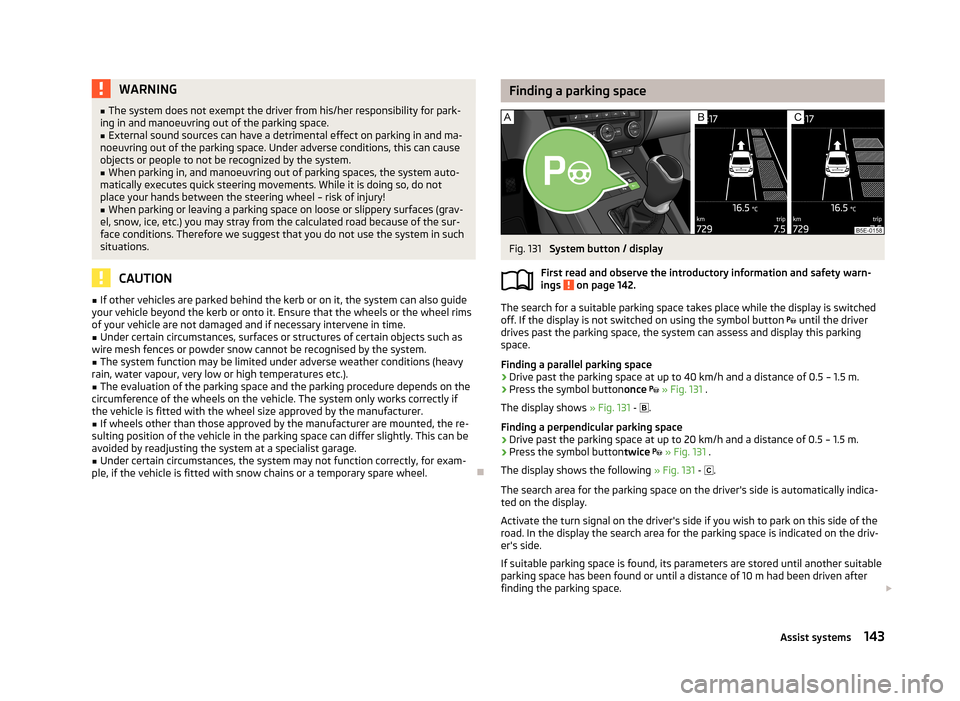
Finding a parking spaceFig. 131
System button / display
First read and observe the introductory information and safety warn-
ings
on page 142.
The search for a suitable parking space takes place while the display is switched
off. If the display is not switched on using the symbol button until the driver
drives past the parking space, the system can assess and display this parking
space.
Finding a parallel parking space
›
Drive past the parking space at up to 40 km/h and a distance of 0.5 – 1.5 m.
›
Press the symbol button once
» Fig. 131 .
The display shows » Fig. 131 -
.
Finding a perpendicular parking space
›
Drive past the parking space at up to 20 km/h and a distance of 0.5 – 1.5 m.
›
Press the symbol button twice
» Fig. 131 .
The display shows the following » Fig. 131 -
.
The search area for the parking space on the driver's side is automatically indica- ted on the display.
Activate the turn signal on the driver's side if you wish to park on this side of the
road. In the display the search area for the parking space is indicated on the driv-
er's side.
If suitable parking space is found, its parameters are stored until another suitable
parking space has been found or until a distance of 10 m had been driven after
finding the parking space.
143Assist systems
Page 148 of 287
Manoeuvring out of a parallel parking spaceFirst read and observe the introductory information and safety warn-
ings
on page 142.
Manoeuvring out
›
Press the symbol button once
» Fig. 131 on page 143 .
›
Activate the turn signal for side of the vehicle where the parking space is out of
which you wish to manoeuvre.
›
Select reverse gear or move the selector lever into position R.
›
As soon as the following message is shown in the display: Steer. interv.
Check area around veh.! , let go of the steering wheel. The steering will be tak-
en over by the system.
›
Observe the direct vicinity of the vehicle and reverse carefully.
›
Follow the system instructions shown in the display.
As soon as the parking procedure is completed, an audible signal sounds and the
following message appears in the information display:
Please take over steering and drive on.
Automatic termination
The system terminates the manoeuvring procedure if one of the following cases
arises.
› Speed of more than 7 km/h exceeded during the manoeuvring procedure.
› System button pressed.
› TCS system switched off.
› Intervention of the driver in the automatic steering procedure (stops the steer-
ing wheel).
› There is a system fault (system temporarily not available).
› Automatic braking for damage limitation.
If any of the above events occurs, the following warning message is dis-
played. » page 145 .
Automatic brake assist
First read and observe the introductory information and safety warn-
ings
on page 142.
The system provides assistance to the driver with automatic brake assist. The au-
tomatic brake assist does not exempt the driver from his/her responsibility for
the accelerator, brake and clutch.
Automatic braking for preventing cancellations caused by excessive speeds
To prevent the speed from exceeding 7 km/h and to subsequently prevent can-
cellation of the parking procedure, automatic brake support is initiated. The park-
ing procedure can be resumed after automatic braking.
Automatic braking takes place only once per parking procedure.
Automatic braking for damage limitation
The system detects an imminent collision based on the driving speed and the dis-
tance from the obstacle, automatic brake support is initiated.
The system function is ended after this automatic brake assist for damage limita- tion.WARNING■ Automatic brake assist only works as an element of the assist function. The
driver must always be ready to brake the vehicle him/herself.■
Automatic brake assist is ended after around 1.5 seconds. Depress the brak-
ing pedal so that the vehicle does not start moving by itself.
Information messages
First read and observe the introductory information and safety warn-
ings
on page 142.
Park Assist stopped. Speed too high.
If a speed of 50 km / h is exceeded while searching for a parking space, the sys-
tem with the key symbol is must be reactivated.
Speed too high. Take over steering!
The parking procedure was ended because the speed was exceeded. Park with a
max. speed of 7 km/h.
Park Assist stopped. Driver steer. intervent.
The parking procedure is terminated due to a driver steering intervention. Park Assist finished. ASR deactivated.
The parking procedure cannot be carried out because the TCS system is deactiva-
ted. Activate the TCS.
ASR deactivated. Take over steering!
145Assist systems
Page 151 of 287
Briefly push the rocker button B into the RES/+ position in order to resume the
stored speed after the clutch or brake pedal is released.
Information on the display
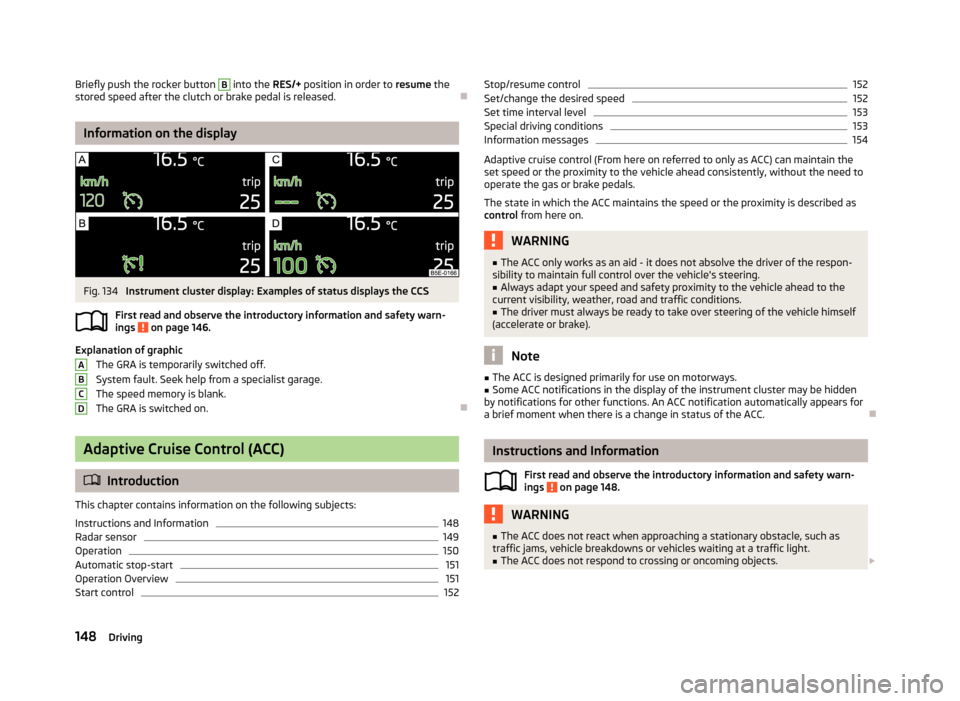
Fig. 134
Instrument cluster display: Examples of status displays the CCS
First read and observe the introductory information and safety warn- ings
on page 146.
Explanation of graphic
The GRA is temporarily switched off.
System fault. Seek help from a specialist garage.
The speed memory is blank. The GRA is switched on.
Adaptive Cruise Control (ACC)
Introduction
This chapter contains information on the following subjects:
Instructions and Information
148
Radar sensor
149
Operation
150
Automatic stop-start
151
Operation Overview
151
Start control
152ABCDStop/resume control152Set/change the desired speed152
Set time interval level
153
Special driving conditions
153
Information messages
154
Adaptive cruise control (From here on referred to only as ACC) can maintain the
set speed or the proximity to the vehicle ahead consistently, without the need to
operate the gas or brake pedals.
The state in which the ACC maintains the speed or the proximity is described as
control from here on.
WARNING■
The ACC only works as an aid - it does not absolve the driver of the respon-
sibility to maintain full control over the vehicle's steering.■
Always adapt your speed and safety proximity to the vehicle ahead to the
current visibility, weather, road and traffic conditions.
■
The driver must always be ready to take over steering of the vehicle himself
(accelerate or brake).
Note
■ The ACC is designed primarily for use on motorways.■Some ACC notifications in the display of the instrument cluster may be hidden
by notifications for other functions. An ACC notification automatically appears for
a brief moment when there is a change in status of the ACC.
Instructions and Information
First read and observe the introductory information and safety warn-ings
on page 148.
WARNING■ The ACC does not react when approaching a stationary obstacle, such as
traffic jams, vehicle breakdowns or vehicles waiting at a traffic light.■
The ACC does not respond to crossing or oncoming objects. 148Driving
Page 154 of 287
Explanation of graphic » Fig. 137
Control deactivated (vehicle detected).
Control activated (no vehicle detected).
Control deactivated (no speed stored).
Control activated (vehicle detected).
The ACC can consistently maintain the set speed of 30-160 km/h, as well as the
proximity to the vehicle ahead ranging from a very small to a very large time inter-
val.
The ACC adjusts the set speed with respect to the detected vehicle ahead, thus
maintaining the selected proximity.
If the ACC does not decelerate fast enough with respect to the vehicle ahead, the symbol
and the following message both appear in the instrument cluster dis-
play.
Apply the brake!
Take over the steering and apply the brake! The ACC can detect a vehicle that is up to approx.120m ahead using the radar
sensor .
Automatic stop-start
First read and observe the introductory information and safety warn-
ings
on page 148.
Vehicles with an automatic transmission can decelerate to a standstill and start
moving again using the ACC.
Decelerate to a standstill
If a vehicle ahead decelerates to a standstill, the ACC will also decelerate your ve-
hicle to a standstill.
Starting to drive again after a holding period As soon as the vehicle ahead starts moving again after a holding period, your ve-hicle will also move and the speed will continue to be regulated. Control is auto-
matically disconnected in case of longer holding periods.
Take over the steering and apply the brake.
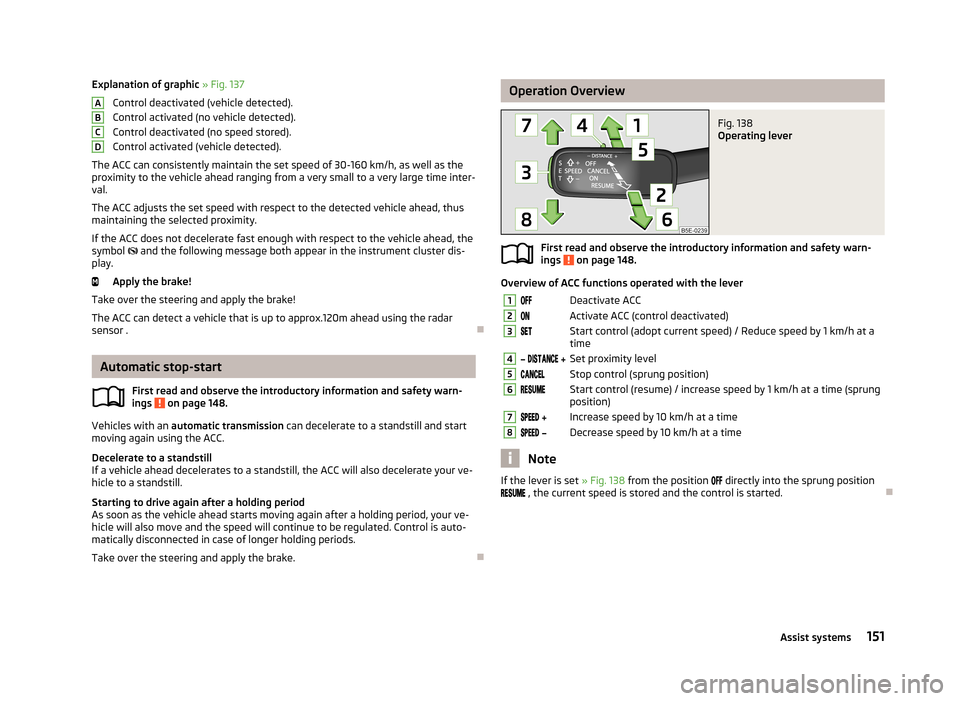
ABCDOperation OverviewFig. 138
Operating lever
First read and observe the introductory information and safety warn-
ings on page 148.
Overview of ACC functions operated with the lever
1Deactivate ACC2Activate ACC (control deactivated)3Start control (adopt current speed) / Reduce speed by 1 km/h at a
time4 Set proximity level5Stop control (sprung position)6Start control (resume) / increase speed by 1 km/h at a time (sprung
position)7 Increase speed by 10 km/h at a time8 Decrease speed by 10 km/h at a time
Note
If the lever is set » Fig. 138 from the position directly into the sprung position
, the current speed is stored and the control is started.
151Assist systems
Page 155 of 287
Start controlFirst read and observe the introductory information and safety warn-
ings
on page 148.
Basic requirements for start of control
ACC is enabled.
TCS is enabled » page 137, Brake assist systems .
On vehicles with a manual transmission, the second gear or higher must be
engaged.
On vehicles with a manual transmission, the current speed must be higher
than approx. 25 km/h.
On vehicles with an automatic transmission, the selector lever must be in the
D/S position or in the Tiptronic position.
On vehicles with an automatic transmission, the current speed must be high-
er than approx. 2 km/h.
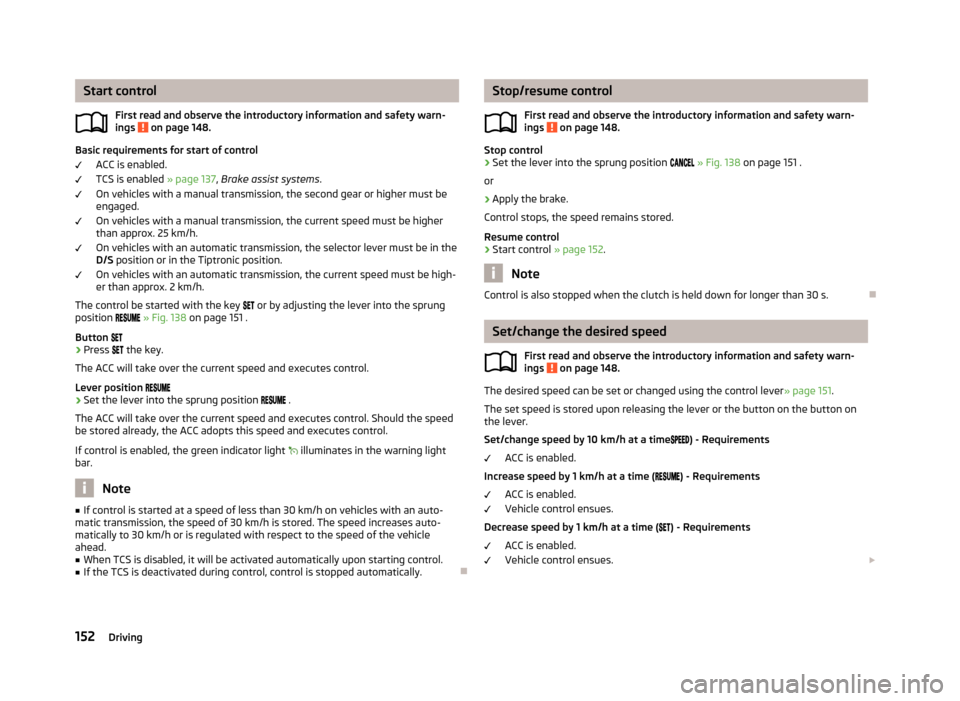
The control be started with the key
or by adjusting the lever into the sprung
position
» Fig. 138 on page 151 .
Button
›
Press
the key.
The ACC will take over the current speed and executes control.
Lever position
›
Set the lever into the sprung position
.
The ACC will take over the current speed and executes control. Should the speed be stored already, the ACC adopts this speed and executes control.
If control is enabled, the green indicator light
illuminates in the warning light
bar.
Note
■ If control is started at a speed of less than 30 km/h on vehicles with an auto-
matic transmission, the speed of 30 km/h is stored. The speed increases auto-
matically to 30 km/h or is regulated with respect to the speed of the vehicle ahead.■
When TCS is disabled, it will be activated automatically upon starting control.
■
If the TCS is deactivated during control, control is stopped automatically.
Stop/resume control
First read and observe the introductory information and safety warn-ings
on page 148.
Stop control
›
Set the lever into the sprung position » Fig. 138 on page 151 .
or
›
Apply the brake.
Control stops, the speed remains stored.
Resume control
›
Start control » page 152.
Note
Control is also stopped when the clutch is held down for longer than 30 s.
Set/change the desired speed
First read and observe the introductory information and safety warn-
ings
on page 148.
The desired speed can be set or changed using the control lever » page 151.
The set speed is stored upon releasing the lever or the button on the button on
the lever.
Set/change speed by 10 km/h at a time
) - Requirements
ACC is enabled.
Increase speed by 1 km/h at a time (
) - Requirements
ACC is enabled.
Vehicle control ensues.
Decrease speed by 1 km/h at a time (
) - Requirements
ACC is enabled.
Vehicle control ensues.
152Driving