Service SKODA OCTAVIA 2013 3.G / (5E) User Guide
[x] Cancel search | Manufacturer: SKODA, Model Year: 2013, Model line: OCTAVIA, Model: SKODA OCTAVIA 2013 3.G / (5E)Pages: 287, PDF Size: 18.55 MB
Page 69 of 287
The rear window is wiped once automatically if the windscreen wipers are onwhen reverse gear is selected.
Automatic rear window wiping can be activated or deactivated in the Infotain-
ment » Operating instructions for Infotainment , chapter Vehicle settings (CAR
button) .
Top up with windscreen wiper fluid » page 218.WARNING■
Properly maintained windscreen wiper blades are essential for clear visibility
and safe driving » page 250.■
Replace the windscreen wiper blades once or twice a year for safety rea-
sons. These can be purchased from a ŠKODA Partner.
■
Do not use the windscreen washer system at low temperatures, without
heating the windscreen beforehand. Otherwise the window cleaner could
freeze on the windscreen and restrict the view to the front.
■
Automatic wiping in rain only operates as a support. The driver is not re-
leased from the responsibility to set the function of the windscreen wipers
manually depending on the visibility conditions.
CAUTION
■ In cold temperatures and during the winter, check before the journey or before
switching on the ignition that the wiper blades are not frozen to the windscreen. If the windscreen wipers are switched on when the blades are frozen to the
windscreen, this may damage both the blades and windscreen wiper motor!■
If the ignition is switched off while the windscreen wipers are switched on, the
windscreen wipers will continue wiping in the same mode after the ignition is
turned back on. The windscreen wipers could freeze up in cold temperatures be- tween the time the ignition was turned off and when it was turned back on again.
■
Carefully detach frozen wiper blades from the front or rear window.
■
Remove snow and ice from the windscreen wipers before driving.
■
If the windscreen wipers are handled carelessly, there is a risk of damage to the
windscreen.
■
Do not switch on the ignition if the front wiper arms are retracted. The wiper
blades would move back into their rest position and while doing so damage the
paintwork of the bonnet.
■
If there is an obstacle on the windscreen, the wiper will try to push away the
obstacle. The wiper stops automatically after 5 attempts to eliminate the obsta-
cle, in order to avoid a damage to the wiper. Remove the the obstacle and switch
the wiper on again.
Note■ Each time the ignition switches off for the third time, the position of the wind-
screen wipers changes. This counteracts an early fatigue of the wiper rubbers.■
The rear window wiper only operates if the boot lid is closed.
■
Keep the wiper blades clean. They may become soiled, e.g., with wax residues
after washing in automatic car wash systems » page 204.
■
The windscreen washer nozzles for the windscreen are heated when the en-
gine is running and the outside temperature is less than approx. +10 °C.
Windscreen wipers and washers
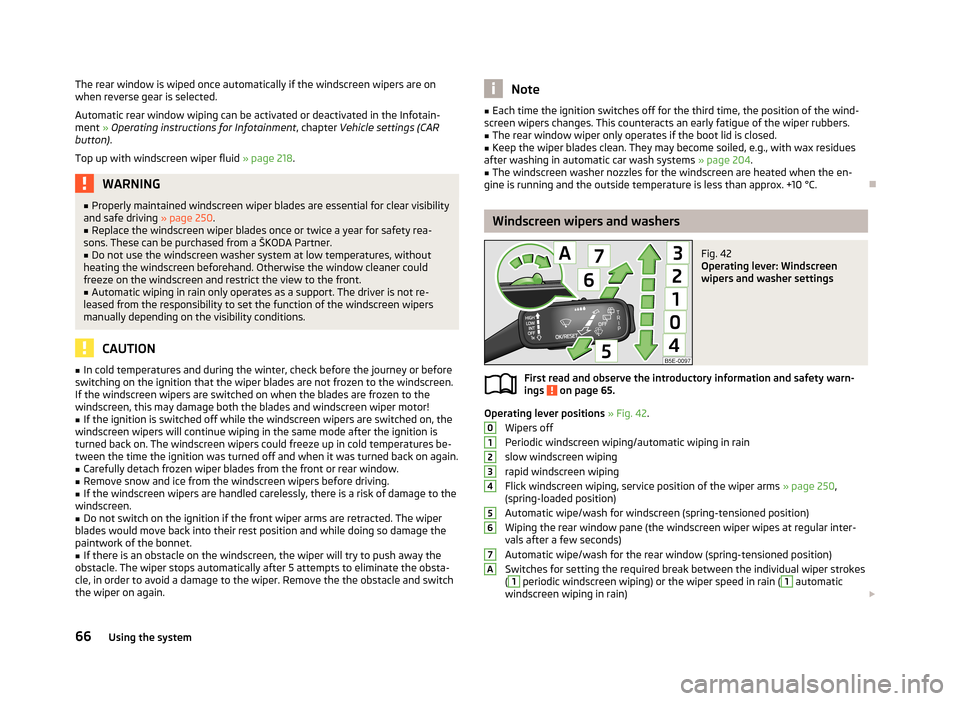
Fig. 42
Operating lever: Windscreen
wipers and washer settings
First read and observe the introductory information and safety warn-
ings on page 65.
Operating lever positions » Fig. 42 .
Wipers off
Periodic windscreen wiping/automatic wiping in rain
slow windscreen wiping
rapid windscreen wiping
Flick windscreen wiping, service position of the wiper arms » page 250,
(spring-loaded position)
Automatic wipe/wash for windscreen (spring-tensioned position)
Wiping the rear window pane (the windscreen wiper wipes at regular inter- vals after a few seconds)
Automatic wipe/wash for the rear window (spring-tensioned position)
Switches for setting the required break between the individual wiper strokes
(
1
periodic windscreen wiping) or the wiper speed in rain (
1
automatic
windscreen wiping in rain)
01234567A66Using the system
Page 70 of 287
Automatic windscreen wiping in rain
Automatic windscreen wiping in rain can be activated or deactivated in the Info-
tainment » Operating instructions for Infotainment , chapter Vehicle settings (CAR
button) .
Automatic wipe/wash for windscreen
The wash system operates immediately, the windscreen wipers wipe somewhat
later. The wash system and the windscreen wiper operate simultaneously at a
speed of more than 120 km/h.
Letting go of the operating lever will cause the windscreen wash system to stop and the wipers to continue for another 2-3 wiper strokes (depending on the spraying duration).
At a speed of more than 2 km/h, the wiper wipes once again 5 seconds after the last wiper stroke in order to wipe the last drops from the windscreen. This func-
tion can be activated/deactivated by a specialist garage.
Automatic wipe/wash for the rear windowThe wash system operates immediately, the windscreen wiper wipes somewhat
later.
Letting go of the operating lever will cause the windscreen wash system to stop and the wiper to continue for another 2-3 wiper strokes (depending on the spray-
ing duration). The operating lever remains in position 6
.
Automatic rear window wipe (Octavia Estate)
If the lever is in position
2
or
3
» Fig. 42 , the rear window is wiped every
30 or 10 seconds if the vehicle's speed exceeds 5 km/h.
If automatic windscreen wiping in rain is activated (the operating lever is in the
position
1
) the function is only active if the windscreen wipers operate in contin-
uous mode (no break between each wiping process).
Automatic rear window wiping can be activated or deactivated in the Infotain-
ment » Operating instructions for Infotainment , chapter Vehicle settings (CAR
button) .
Winter setting of the windscreen wiper If the windscreen wipers are in rest position, they cannot be folded out from thewindscreen. For this reason we recommend adjusting the windscreen wipers in
winter so that they can be folded out from the windscreen easily.
› Switch on the windscreen wipers.
› Switch off the ignition.
The windscreen wipers remain in the position in which they were when switching
off the ignition.
The service position can also be used as a winter position » page 250
.
Note
If the slow or the fast wiper setting is switched on and the vehicle speed decrea-
ses to below 4 km/h, the wiper speed is incrementally set to a lower wiper speed.
The original setting is restored step by step when the speed of the vehicle ex-
ceeds 8 km/h.
Headlight cleaning system
First read and observe the introductory information and safety warn-
ings
on page 65.
The headlights will be cleaned once the ignition is on and always upon the first and after every tenth spraying of the windscreen, when the low beam is switched
on.
Each time the headlamps are cleaned each lamp is sprayed twice. You should remove stubborn dirt (such as insect residues) from the headlight len-
ses at regular intervals, for example when refuelling. The following guidelines
must be observed » page 207, Headlight lenses .
To ensure the proper operation of the cleaning system during the winter, any
snow should be removed from the washer nozzle fixtures and ice should be
cleared with a de-icing spray.
CAUTION
Never remove the nozzles from the headlight cleaning system by hand – risk of
damage!
Note
The headlamp cleaning system works with an ambient temperature of about -12 °
C to + 39 ° C.
67Lights and visibility
Page 86 of 287
WARNING■Never put hot beverage containers in the cup holder. If the vehicle moves,
they may spill – risk of scalding!■
Do not use any cups or beakers which are made of brittle material (e.g. glass,
porcelain). This could lead to injuries in the event of an accident.
CAUTION
Do not leave open beverage containers in the cup holder during the journey.
There is a risk of spilling e.g. when braking which may cause damage to the elec-
trical components or seat upholstery.
Cigarette lighter
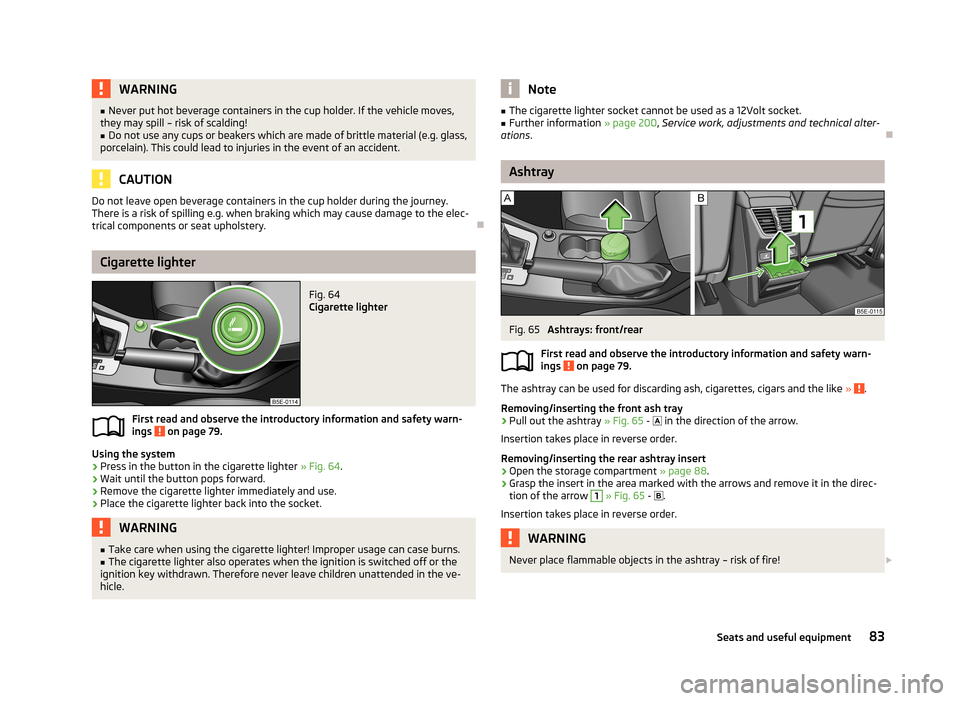
Fig. 64
Cigarette lighter
First read and observe the introductory information and safety warn-
ings on page 79.
Using the system
›
Press in the button in the cigarette lighter » Fig. 64
.
›
Wait until the button pops forward.
›
Remove the cigarette lighter immediately and use.
›
Place the cigarette lighter back into the socket.
WARNING■
Take care when using the cigarette lighter! Improper usage can case burns.■The cigarette lighter also operates when the ignition is switched off or the
ignition key withdrawn. Therefore never leave children unattended in the ve-
hicle.Note■ The cigarette lighter socket cannot be used as a 12Volt socket.■Further information » page 200, Service work, adjustments and technical alter-
ations .
Ashtray
Fig. 65
Ashtrays: front/rear
First read and observe the introductory information and safety warn- ings
on page 79.
The ashtray can be used for discarding ash, cigarettes, cigars and the like » .
Removing/inserting the front ash tray
›
Pull out the ashtray » Fig. 65 -
in the direction of the arrow.
Insertion takes place in reverse order.
Removing/inserting the rear ashtray insert
›
Open the storage compartment » page 88
.
›
Grasp the insert in the area marked with the arrows and remove it in the direc-
tion of the arrow
1
» Fig. 65 -
.
Insertion takes place in reverse order.
WARNINGNever place flammable objects in the ashtray – risk of fire! 83Seats and useful equipment
Page 95 of 287
WARNING (Continued)■When transporting objects in the luggage compartment that has been en-
larged by folding the rear seats forward, ensure the safety of the passengers
transported on the other rear seats » page 178, Correct seated position for
the passengers in the rear seats .■
Do not drive with the luggage compartment lid fully opened or slightly ajar
otherwise exhaust gases may get into the interior of the vehicle – risk of poi-
soning!
■
Do not exceed the permissible axle loads and permissible gross weight of
the vehicle – risk of accident!
■
Do not transport people in the boot!
CAUTION
Make sure that transported objects with sharp edges do not damage the threads
of the following devices.■
Rear window heater.
■
Rear window with an integrated antenna.
■
Integrated antenna in the rear side windows (Octavia Estate).
Note
Tyre pressure must be adjusted to the load » page 229, Service life of tyres .
Class N1 vehicles
First read and observe the introductory information and safety warn-
ings
on page 91.
In class N1 vehicles that are not fitted with a protective grille, a lashing set that complies with the EN 12195 standard (1-4) must be used for fastening the load.
Proper functioning of the electrical installation is essential for safe vehicle opera- tion. It is important to ensure that the electrical installation is not damaged dur-ing the adjustment process or when the storage area is being loaded and unloa-
ded.
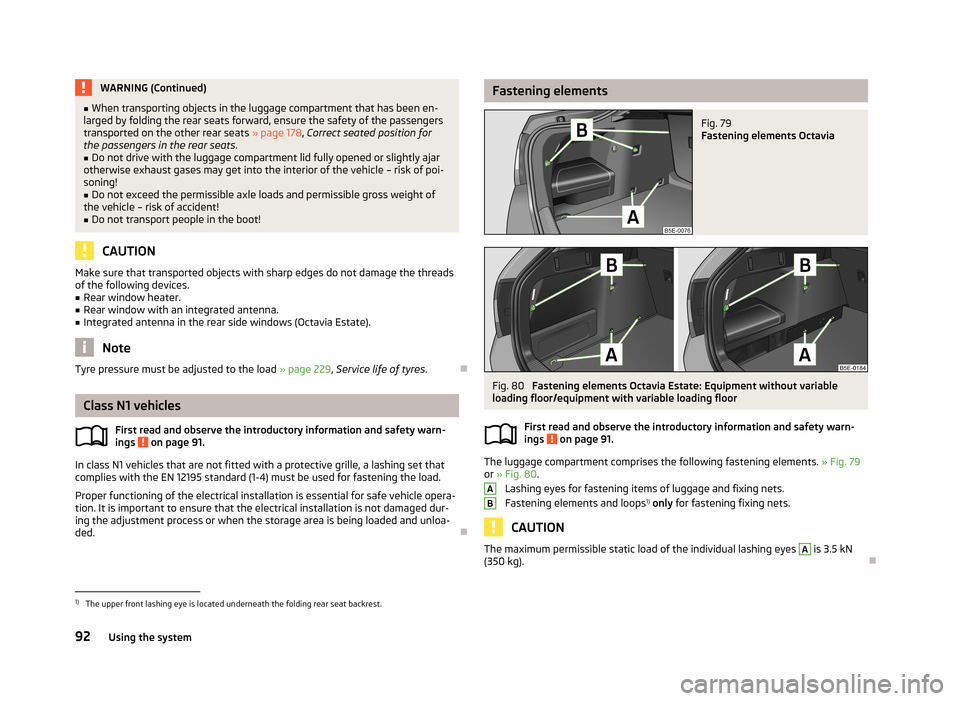
Fastening elementsFig. 79
Fastening elements Octavia
Fig. 80
Fastening elements Octavia Estate: Equipment without variable
loading floor/equipment with variable loading floor
First read and observe the introductory information and safety warn-
ings
on page 91.
The luggage compartment comprises the following fastening elements. » Fig. 79
or » Fig. 80 .
Lashing eyes for fastening items of luggage and fixing nets.
Fastening elements and loops 1)
only for fastening fixing nets.
CAUTION
The maximum permissible static load of the individual lashing eyes A is 3.5 kN
(350 kg).
AB1)
The upper front lashing eye is located underneath the folding rear seat backrest.
92Using the system
Page 127 of 287
The engine and the ignition are switched off simultaneously.
Emergency start-up of the engine
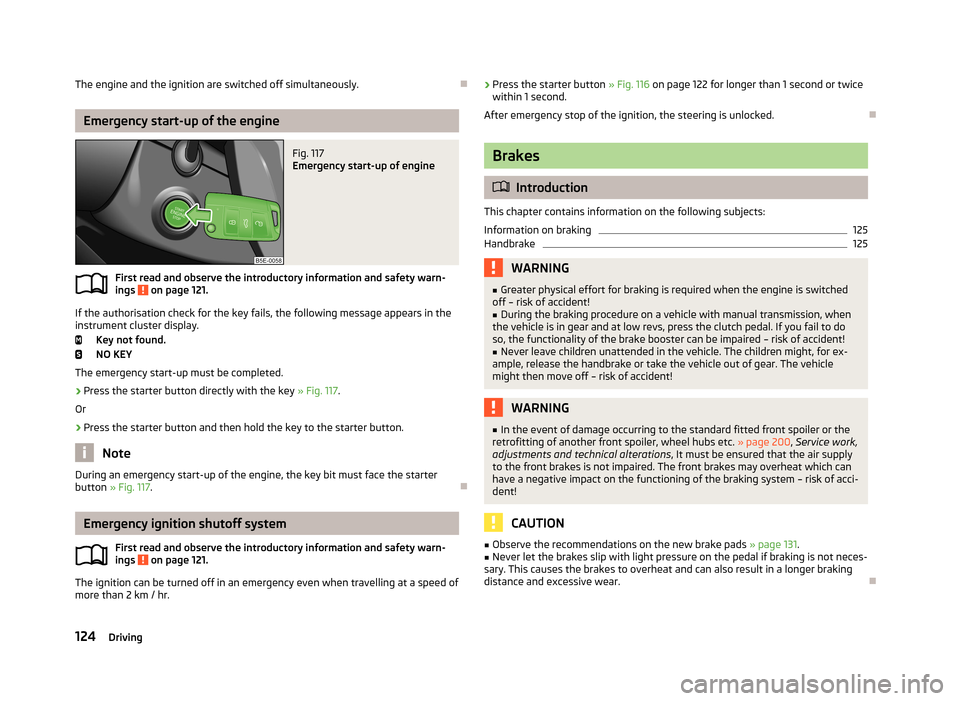
Fig. 117
Emergency start-up of engine
First read and observe the introductory information and safety warn-ings on page 121.
If the authorisation check for the key fails, the following message appears in the instrument cluster display.
Key not found.
NO KEY
The emergency start-up must be completed.
› Press the starter button directly with the key
» Fig. 117.
Or
› Press the starter button and then hold the key to the starter button.
Note
During an emergency start-up of the engine, the key bit must face the starter
button » Fig. 117 .
Emergency ignition shutoff system
First read and observe the introductory information and safety warn-
ings
on page 121.
The ignition can be turned off in an emergency even when travelling at a speed of
more than 2 km / hr.
› Press the starter button
» Fig. 116 on page 122 for longer than 1 second or twice
within 1 second.
After emergency stop of the ignition, the steering is unlocked.
Brakes
Introduction
This chapter contains information on the following subjects:
Information on braking
125
Handbrake
125WARNING■ Greater physical effort for braking is required when the engine is switched
off – risk of accident!■
During the braking procedure on a vehicle with manual transmission, when
the vehicle is in gear and at low revs, press the clutch pedal. If you fail to do
so, the functionality of the brake booster can be impaired – risk of accident!
■
Never leave children unattended in the vehicle. The children might, for ex-
ample, release the handbrake or take the vehicle out of gear. The vehicle might then move off – risk of accident!
WARNING■ In the event of damage occurring to the standard fitted front spoiler or the
retrofitting of another front spoiler, wheel hubs etc. » page 200, Service work,
adjustments and technical alterations , It must be ensured that the air supply
to the front brakes is not impaired. The front brakes may overheat which can
have a negative impact on the functioning of the braking system – risk of acci-
dent!
CAUTION
■ Observe the recommendations on the new brake pads » page 131.■Never let the brakes slip with light pressure on the pedal if braking is not neces-
sary. This causes the brakes to overheat and can also result in a longer braking
distance and excessive wear.
124Driving
Page 128 of 287
Information on brakingFirst read and observe the introductory information and safety warn-
ings
on page 124.
If the brakes are applied in full and the control unit for the braking system consid-
ers the situation to be dangerous for the following traffic, the brake light flashes
automatically.
After the speed was reduced below around 10 km/h or the vehicle was stopped,
the brake light stops flashing and the hazard warning light system switches on.
The hazard warning light system is switched off automatically after accelerating
or driving off again.
Before driving a long distance at a steep incline, reduce speed and shift into the
next lowest gear. As a result, the braking effect of the engine will be used, reduc- ing the load on the brakes. Any additional braking should be completed intermit-tently, not continuously.
Wear-and-tear
The wear of the brake pads is dependent on the operating conditions and driving style.
The brake pads wear more quickly if a lot of journeys are completed in towns and over short distances or if a very sporty style of driving is adopted.
If operated under severe conditions , the thickness of the brake pads must be
checked by a specialist garage between service appointments as well.
Wet roads or road salt
The performance of the brakes can be delayed as the brake discs and brake pads may be moist or have a coating of ice or layer of salt on them in winter. The
brakes are cleaned and dried by applying the brakes several times.
Corrosion
Corrosion on the brake discs and dirt on the bake pads occur if the vehicle has
been parked for a long period and if you do not make much use of the braking
system. The brakes are cleaned and dried by applying the brakes several times.
Faults in the brake surface
If it is found that the braking distance has suddenly become longer and that the
brake pedal can be depressed further, the brake system may be faulty.
Visit a specialist garage immediately and adjust your style of driving appropriate-ly, as you will not know the exact extent of the damage.
Low brake fluid level
An insufficient level of brake fluid may result in problems in the brake system. The level of the brake fluid is monitored electronically » page 16, Brake system .
Brake booster
The brake booster increases the pressure generated with the brake pedal. The brake booster only operates when the engine is running.
Handbrake
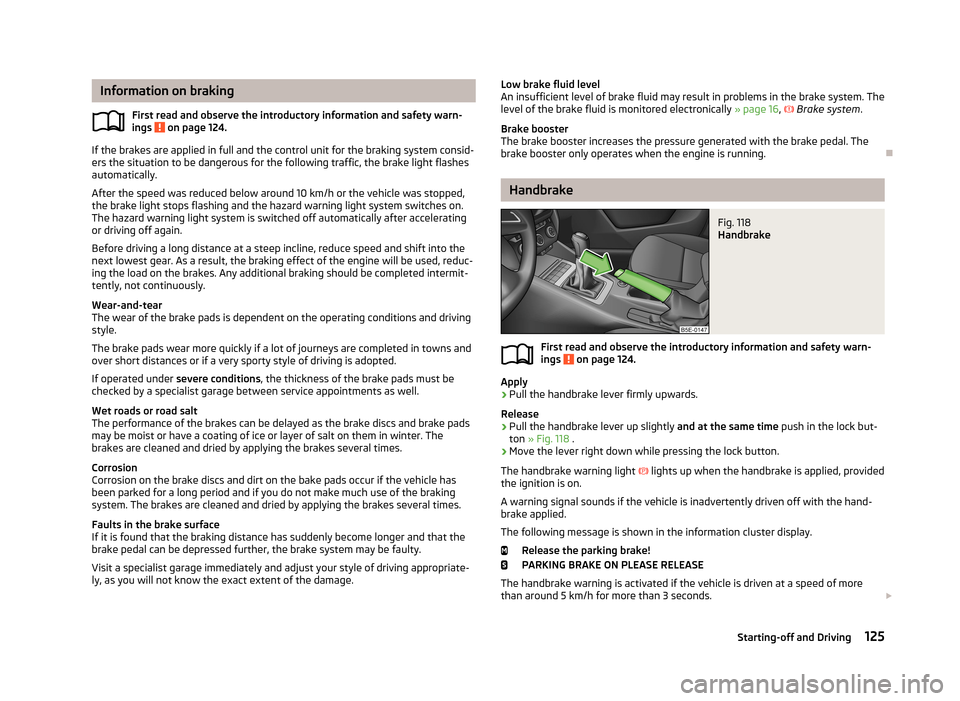
Fig. 118
Handbrake
First read and observe the introductory information and safety warn-ings on page 124.
Apply
›
Pull the handbrake lever firmly upwards.
Release
›
Pull the handbrake lever up slightly and at the same time push in the lock but-
ton » Fig. 118 .
›
Move the lever right down while pressing the lock button.
The handbrake warning light
lights up when the handbrake is applied, provided
the ignition is on.
A warning signal sounds if the vehicle is inadvertently driven off with the hand-
brake applied.
The following message is shown in the information cluster display. Release the parking brake!
PARKING BRAKE ON PLEASE RELEASE
The handbrake warning is activated if the vehicle is driven at a speed of more than around 5 km/h for more than 3 seconds.
125Starting-off and Driving
Page 137 of 287
Avoiding unnecessary ballastFirst read and observe the introductory information and safety warn-
ings
on page 131.
Transporting ballast costs fuel.
Each kilogramme of weight increases the fuel consumption. Therefore, we rec-
ommend to carry no unnecessary weight.
It is particularly in town traffic, when one is accelerating quite often, that the ve-
hicle weight will have a significant effect upon the fuel consumption. A rule of
thumb here is that an increase in weight of 100 kilograms will cause an increase
in fuel consumption of about 1 litre/100 kilometres.
At a speed of 100 - 120 km/h, a vehicle fitted with a roof rack cross member with-
out a load will use about 10 % more fuel than normal due to the increased aero-
dynamic drag.
Regular maintenance
First read and observe the introductory information and safety warn-
ings
on page 131.
A poorly tuned engine uses an unnecessarily high amount of fuel.
By having your vehicle regularly maintained by a specialist garage, you create the conditions needed for economical driving. The maintenance state of your vehicle has a positive effect on traffic safety and value retention.
A poorly tuned engine can result in a fuel consumption which is 10 % higher thannormal!
Check the oil at regular intervals, e.g. when filling up. Oil consumption is depend-
ent to a considerable extent on the load and speed of the engine. Oil consump-
tion could be as high as 0.5 litres/1000 km depending on your style of driving.
It is quite normal that a new engine has a higher oil consumption at first, and rea- ches its lowest level only after a certain running in time. The oil consumption of anew vehicle can therefore only be correctly assessed after driving about 5000 km.
For the sake of the environment■ Additional improvements to the fuel economy can be made by using synthetic
high-lubricity oils.■
Regularly check the ground under the vehicle. Have your vehicle inspected by a
specialist garage if you find any stains caused by oil or other fluids on the ground.
Note
We recommend that your vehicle be serviced on a regular basis by a ŠKODA serv- ice partner.
Saving electrical energy
First read and observe the introductory information and safety warn-ings
on page 131.
When the engine is running, the alternator generates and supplies electrical pow- er. If more electrical components of the electrical system are switched on, more
fuel is needed to operate the alternator. We therefore recommend switching off
electrical components if these are no longer required.
Environmental compatibility
First read and observe the introductory information and safety warn-ings
on page 131.
Environmental protection has played a major role in the design, selection of mate-
rials, and manufacture of your new ŠKODA. Particular emphasis has been placed
on the following points.
Design measures › Joints designed to be easily detached.
› Simplified disassembly due to the modular structure system.
› Improved purity of different classes of materials.
› Identification of all plastic parts in accordance with VDA Recommendation 260.
› Reduced fuel consumption and exhaust emission CO
2.
› Minimum fuel leakage during accidents.
› Reduced noise.
134Driving
Page 153 of 287
WARNING■If you suspect that the sensor is damaged, deactivate the ACC. Have the
sensor checked by a specialist garage.■
The sensor can become misaligned by collisions or by damage to the front of
the vehicle, the wheel arch or the underside of the vehicle. This can lead to an
impairment of the ACC function - risk of accidents! If this is the case, have the
sensor checked by a specialist garage.
■
Any improperly carried out work to the front of the vehicle may cause the
sensor to become misaligned. We therefore recommend only having these
modifications and technical alterations carried out by a specialist garage.
Please also observed the instructions in » page 200, Service work, adjust-
ments and technical alterations .
■
The area in front of and around the sensor must not be covered with stick-
ers, additional lights or similar items. This can lead to impaired function of the sensor - risk of accidents!
CAUTION
The sensor may not be able to distinguish all objects correctly under certain cir-cumstances. We therefore recommend that you avoid using the ACC in the follow-
ing cases.■
When driving through places where metal objects (such as metal buildings, rail-
road tracks, etc.) can be found.
■
When driving through very divided and enclosed spaces (such as large-capacity
garages, car ferries, tunnels and the like.).
CAUTION
Remove the snow with a brush and the ice with a solvent-free de-icer.
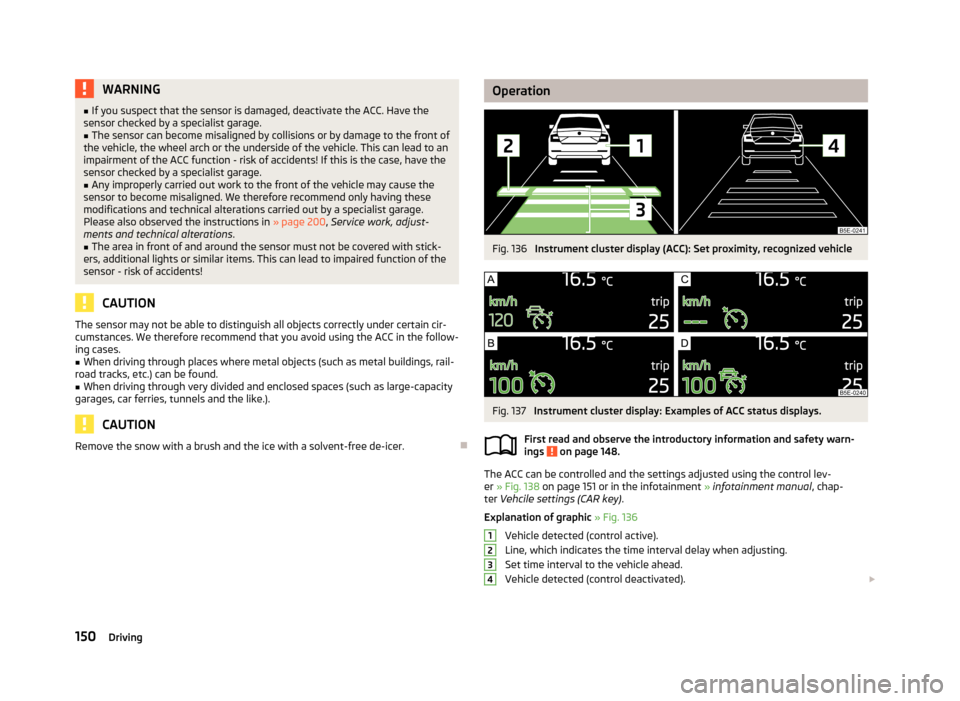
OperationFig. 136
Instrument cluster display (ACC): Set proximity, recognized vehicle
Fig. 137
Instrument cluster display: Examples of ACC status displays.
First read and observe the introductory information and safety warn-
ings
on page 148.
The ACC can be controlled and the settings adjusted using the control lev-
er » Fig. 138 on page 151 or in the infotainment » infotainment manual , chap-
ter Vehcile settings (CAR key) .
Explanation of graphic » Fig. 136
Vehicle detected (control active).
Line, which indicates the time interval delay when adjusting. Set time interval to the vehicle ahead.
Vehicle detected (control deactivated).
1234150Driving
Page 158 of 287
The area monitoring system (From here on only referred to as Front Assist) warns
you of the danger of a collision with an obstacle in front of the vehicle and tries to
avoid a collision or mitigate its consequences by automatically applying the
brakes as appropriate.WARNING■ Front Assist only works as an aid, it does absolve the driver of the responsi-
bility to maintain full control over the vehicle's steering.■
Front Assist has physical and system related limitations. For this reason, the
driver may experience some undesired or delayed system responses in certain
situations. You should therefore always be alert and ready to intervene!
■
Always adapt your speed and safety proximity to the vehicle ahead to the
current visibility, weather, road and traffic conditions.
■
If Front Assist gives a warning, then, depending on the traffic situation, im-
mediately slow down the car by applying the brakes or avoid the obstacle.
■
The increased safety through the Front Assist system must not tempt you
to take greater risks than otherwise – risk of accident!
■
The driver must always be ready to take over steering of the vehicle himself
(brake or accelerate).
■
Front Assist does not respond to crossing or oncoming objects.
Instructions and Information
First read and observe the introductory information and safety warn-ings
on page 154.
Front Assist may become impaired in the following situations, for example.
› When visibility is poor, (e.g. fog, heavy rain, thick snowfall).
› Driving around “sharp” bends.
› When fully pressing down the accelerator pedal.
› If there is a fault with the Front Assist system.
› When one of the brake assist systems (e.g. ESC) intervenes.
WARNINGIn the following situations, Front Assist should be switched off for safety rea-
sons.■
When the vehicle is being towed away.WARNING (Continued)■ When the vehicle is on a rolling test bench.■When an undesired activation has repeatedly occurred.■
When on a truck, train or a car ferry service or the like.
CAUTION
Narrow vehicles or vehicles travelling side by side are not detected by Front As-
sist via the radar sensor until they are within the sensor's range. This is especially
true for narrow vehicles, such as motorcycles.
Note
In case of failure of more than one brake light on the vehicle or on the electrically
connected trailer, Front Assist not available.
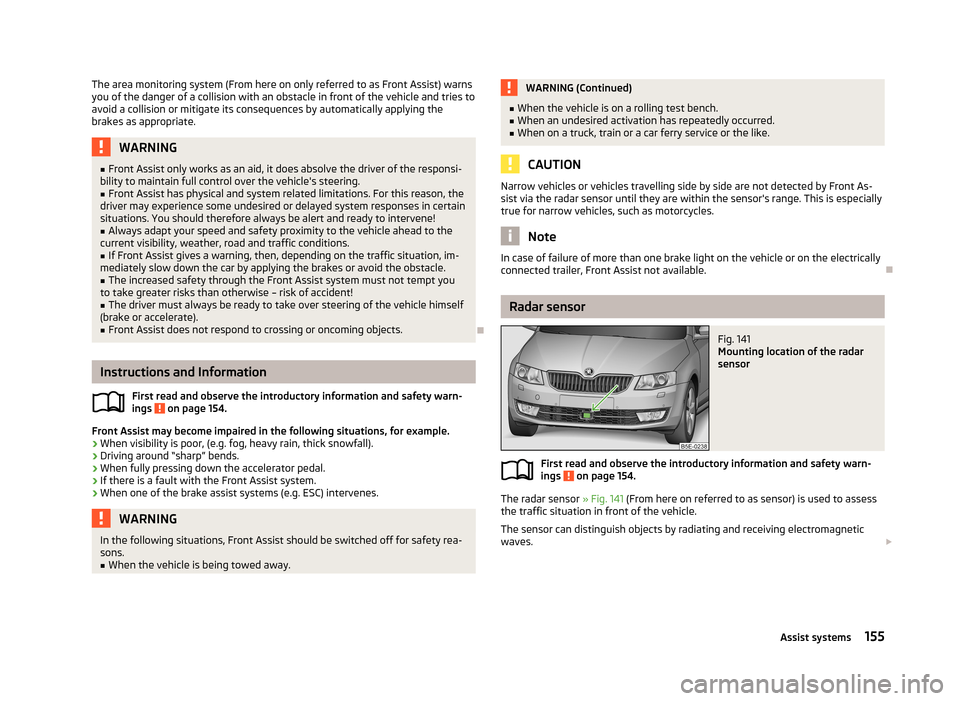
Radar sensor
Fig. 141
Mounting location of the radar
sensor
First read and observe the introductory information and safety warn- ings on page 154.
The radar sensor » Fig. 141 (From here on referred to as sensor) is used to assess
the traffic situation in front of the vehicle.
The sensor can distinguish objects by radiating and receiving electromagneticwaves.
155Assist systems
Page 159 of 287
The sensor function may be impaired in the events of one of the following.
› The sensor is covered by mud, snow or debris, for example.
› The sensor or its immediate surroundings are covered by other objects, for ex-
ample, a sticker is attached.
› When visibility is poor, (e.g. fog, heavy rain, thick snowfall).
If the sensor is dirty or does not have “visibility” for any other reason, the follow-
ing message appears in the instrument cluster display.
Front Assist: no sensor view.
Stop the car, switch off the engine and clean the sensor or eliminate the obstacle
causing the lack of“visibility”. Should Front Assist still be unavailable after the en-
gine is restarted, consult a specialist garage for help.WARNING■ If you suspect that the sensor is damaged, deactivate Front Assist. Have the
sensor checked by a specialist garage.■
The sensor can become misaligned by collisions or by damage to the front of
the vehicle, the wheel arch or the underside of the vehicle. This can lead to
impaired function of the Front Assist function - risk of accidents! If this is the
case, have the sensor checked by a specialist garage.
■
Any improperly carried out work to the front of the vehicle may cause the
sensor to become misaligned. We therefore recommend only having these
modifications and technical alterations carried out by a specialist garage. Please also observed the instructions in » page 200, Service work, adjust-
ments and technical alterations .
■
The area in front of and around the sensor must not be covered with stick-
ers, additional lights or similar items. This can lead to impaired function of the
sensor - risk of accidents!
WARNINGThe sensor may not be able to distinguish all objects correctly under certain
circumstances. You should therefore not use Front Assist in the following ca-
ses - risk of accidents!■
When driving through places where metal objects (such as metal buildings,
railroad tracks, etc.) can be found.
■
When driving through very divided and enclosed spaces (such as large-ca-
pacity garages, car ferries and the like.)
CAUTIONRemove the snow with a brush and the ice with a solvent-free de-icer.
Operation
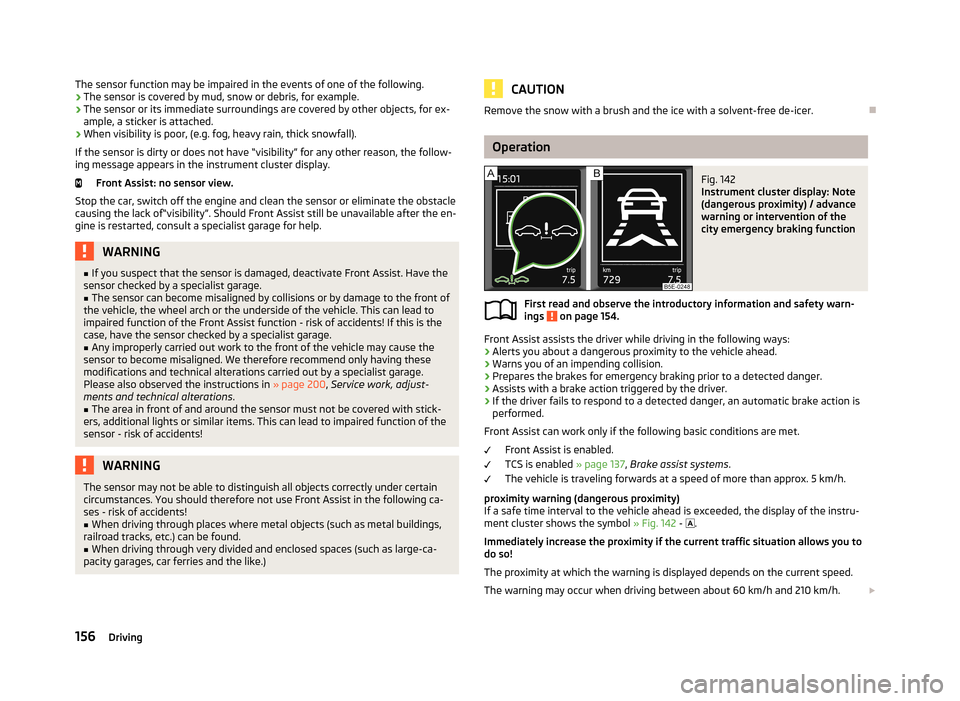
Fig. 142
Instrument cluster display: Note
(dangerous proximity) / advance
warning or intervention of the
city emergency braking function
First read and observe the introductory information and safety warn-
ings on page 154.
Front Assist assists the driver while driving in the following ways:
› Alerts you about a dangerous proximity to the vehicle ahead.
› Warns you of an impending collision.
› Prepares the brakes for emergency braking prior to a detected danger.
› Assists with a brake action triggered by the driver.
› If the driver fails to respond to a detected danger, an automatic brake action is
performed.
Front Assist can work only if the following basic conditions are met. Front Assist is enabled.
TCS is enabled » page 137, Brake assist systems .
The vehicle is traveling forwards at a speed of more than approx. 5 km/h.
proximity warning (dangerous proximity)
If a safe time interval to the vehicle ahead is exceeded, the display of the instru- ment cluster shows the symbol » Fig. 142 -
.
Immediately increase the proximity if the current traffic situation allows you to do so!
The proximity at which the warning is displayed depends on the current speed.
The warning may occur when driving between about 60 km/h and 210 km/h.
156Driving