ignition SKODA OCTAVIA 2013 3.G / (5E) User Guide
[x] Cancel search | Manufacturer: SKODA, Model Year: 2013, Model line: OCTAVIA, Model: SKODA OCTAVIA 2013 3.G / (5E)Pages: 287, PDF Size: 18.55 MB
Page 26 of 287
WARNING■If you have to stop for technical reasons, then park the vehicle at a safe dis-
tance from the traffic, switch off the engine and switch on the hazard warning lights » page 61 . The warning triangle must be set up at the prescribed dis-
tance - observe the national legal provisions when doing so.■
Carefully open the coolant expansion bottle. If the engine is hot, the cooling
system is pressurized – risk of scalding! It is therefore best to allow the engine
to cool down before removing the cap.
■
Do not touch the radiator fan. The radiator fan may switch itself on auto-
matically even if the ignition is off.
Engine oil pressure
First read and observe the introductory information and safety warn-
ings
on page 21.
When the warning icon
flashes, the engine oil pressure is too low.
The following message is shown in the information cluster display. Oil pressure: Stop! Owner's manual!
STOP VEHICLE OIL PRESSURE
Stop the vehicle, switch off the engine, and check the level of the engine
oil » page 220 , Checking the oil level .
Even if the oil level is correct, do not drive any further if the warning icon
is
flashing! Also do not leave the engine running at an idling speed.
Seek help from a specialist garage.
WARNINGIf you have to stop for technical reasons, then park the vehicle at a safe dis-
tance from the traffic, switch off the engine and switch on the hazard warning
lights » page 61 . The warning triangle must be set up at the prescribed dis-
tance - observe the national legal provisions when doing so.
Engine oil level
First read and observe the introductory information and safety warn-
ings
on page 21.
Engine oil level too low
If the warning icons and are lit , the engine oil level is too low.
The following message is shown in the information cluster display. Oil level: top up oil!
TOP UP OIL
Stop the vehicle, switch off the engine, and check the level of the engine
oil » page 220 .
The warning icon will go out if the bonnet is left open for more than 30 seconds.
If no engine oil has been replenished, the warning icon will come on again after
driving about 100 km.
Engine oil level too high
If the warning icons
and
are lit in conjunction with the following message on
the display, the engine oil level is too high.
Reduce oil level!
OIL LEVEL TOO HIGH
Stop the vehicle, switch off the engine, and check the level of the engine
oil » page 220 .
Engine oil level sensor
If the warning icons
and
are lit in conjunction with the following message on
the display, the engine oil level sensor is defective.
Oil sensor: workshop!
OIL SENSOR WORKSHOP
Seek assistance from a specialist garage immediately.
23Instruments and warning lights
Page 30 of 287
Description of the operationButton /
wheel » Fig. 7OperationActionASelect dataBriefly push up or downSet data valuesBriefly push up or downOpen main menu in the MAXI DOT displayPress and hold buttonBShow dataPress brieflyConfirm dataPress brieflyCOpen main menu in the MAXI DOT displayPress and hold buttonto go back one level in the menu of the MAXI DOT displayPress brieflyDSelect dataTurn upwards or downwardsSet data valuesTurn upwards or downwardsShow dataPress brieflyConfirm dataPress briefly
Outside temperature
First read and observe the introductory information and safety warn-ings
on page 26.
The current outside temperature is shown in the display.
If the outside temperature drops below +4 °C while driving, the following symbol
(warning signal for ice on the road) appears before the temperature indicator
and an audible signal will sound.
If the outside temperature is less than +4 °C when the ignition is turned on, the
following symbol appears in the display and an acoustic signal sounds.
After pressing the switch
B
or the adjustment wheel
D
» Fig. 7 on page 26, the
function shown last is indicated.
WARNINGEven at temperatures around +4 °C, black ice may still be on the road surface!
Do not only rely upon the information given on the outside temperature dis-
play that there is no ice on the road.
Gear recommendationFig. 8
Information on the selected
gear / Gear recommendation
First read and observe the introductory information and safety warn-
ings on page 26.
Information on the selected gear
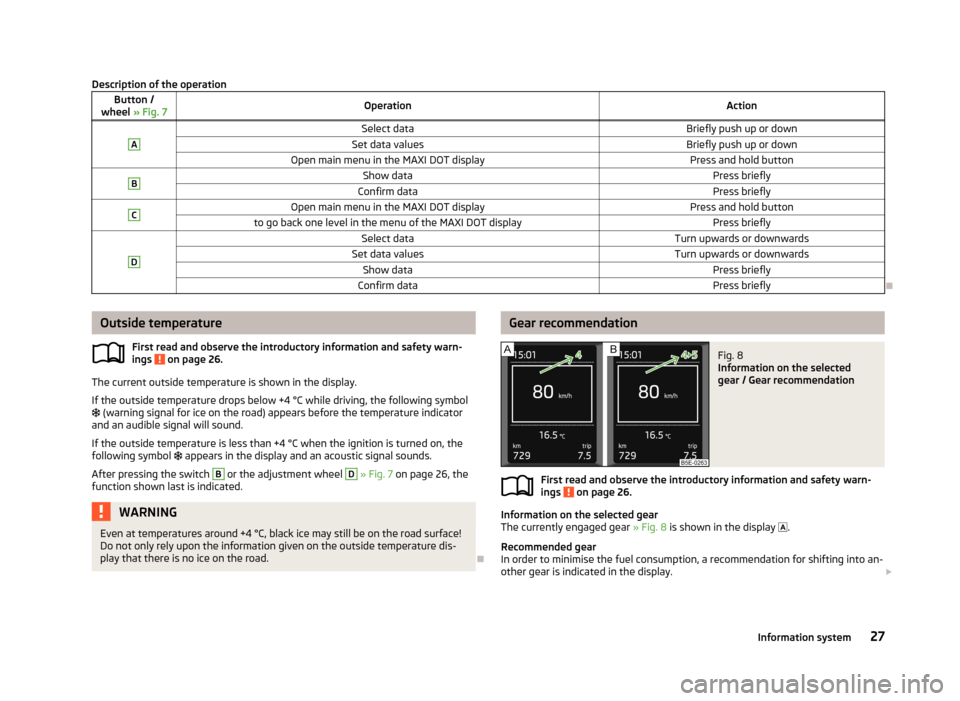
The currently engaged gear » Fig. 8 is shown in the display
.
Recommended gear
In order to minimise the fuel consumption, a recommendation for shifting into an-
other gear is indicated in the display.
27Information system
Page 31 of 287
When the system determines that a change in gear is required, the arrow symboland the recommended gear appear next to the current gear indication » Fig. 8 -
.
For instance, if appears in this display, this means it is recommended that
you shift from 4th into 5th gear.
The gear recommendation is intended only for vehicles with a manual transmis-
sion or for vehicles with an automatic transmission in manual shift mode (Tiptron-
ic).WARNINGThe driver is always responsible for selecting the correct gear in different driv- ing situations, such as overtaking.
For the sake of the environment
Correct shifting up has the following advantages.■It helps to reduce fuel consumption.■
It reduces the operating noise.
■
It protects the environment.
■
It benefits the durability and reliability of the engine.
Door, luggage compartment or bonnet warning
First read and observe the introductory information and safety warn-ings
on page 26.
If at least one door is open, or the boot or bonnet is open, the display indicates
the relevant open door or boot/bonnet.
An acoustic signal will also sound if you drive the vehicle above 6 km/h when a
door is opne.
Eco tips
First read and observe the introductory information and safety warn-ings
on page 26.
To minimise fuel consumption, fuel economy tips can appear in the display 1)
.
Eco tips are indicated next to the letters ECO-TIP.
For instance, if the air-condition is on and a window is open, the following mes- sage appears ECO TIP Air conditioning switched on: close windows.
Eco tips display must be activated in the Infotainment » operating instructions for
Infotainment , chapter Vehicle settings (CAR button) .
Compass point display
Fig. 9
Compass display
First read and observe the introductory information and safety warn-
ings on page 26.
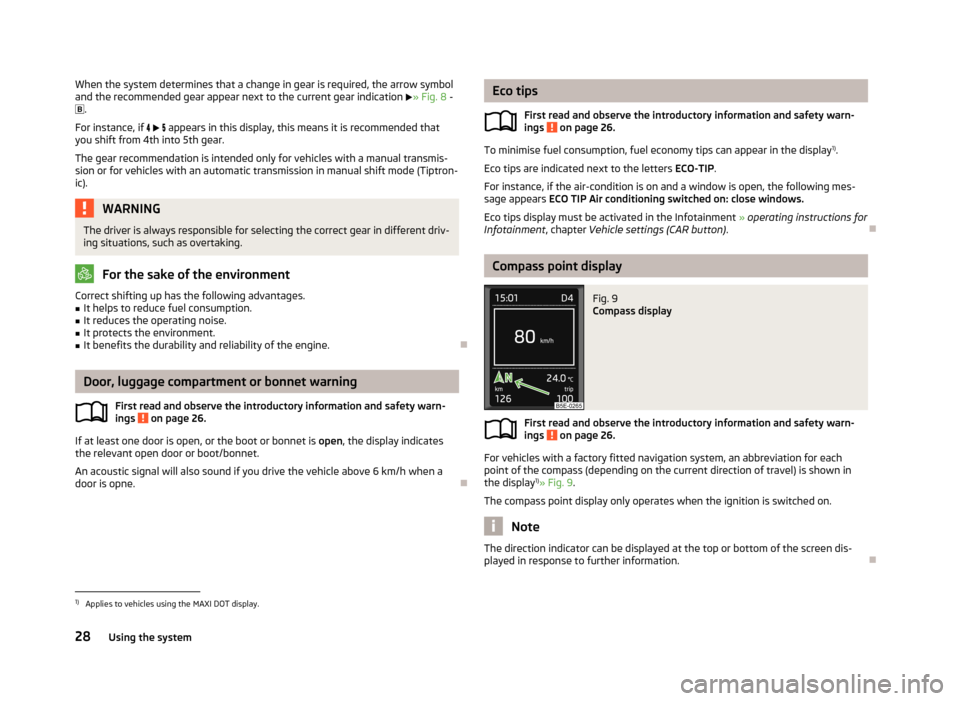
For vehicles with a factory fitted navigation system, an abbreviation for each
point of the compass (depending on the current direction of travel) is shown in the display 1)
» Fig. 9 .
The compass point display only operates when the ignition is switched on.
Note
The direction indicator can be displayed at the top or bottom of the screen dis-
played in response to further information.
1)
Applies to vehicles using the MAXI DOT display.
28Using the system
Page 32 of 287
Driving data (Multifunction display)
Introduction
This chapter contains information on the following subjects:
Memory
29
Information overview
29
Warning at excessive speeds
31
The multifunction display only operates if the ignition is switched on.
After the ignition is switched on, the function that was last selected before
switching off the ignition is displayed.
Individual menu items can be shown or hidden in the Infotainment » Bedienung-
sanleitung Infotainment, chapter Vehicle settings (CAR button).
WARNINGConcentrate fully at all times on your driving! As the driver, you are fully re-
sponsible for the operation of your vehicle.
Note
In some national versions the displays appear in the Imperial system of measure-
ment.
Memory
First read and observe the introductory information and safety warn-
ings
on page 29.
The multifunction display is equipped with three automatic memories.
The display of the selected memory varies depending on vehicle equipment.
Since start (MAXI DOT display) or “1” (segment display)The memory collates the driving information from the moment the ignition isswitched on until it is switched off.
New data will also flow into the calculation of the current driving information if
the trip is continued within 2 hours after switching off the ignition.
If the trip is interrupted for more than 2 hours, the memory is automatically
erased.
Long-term (MAXI DOT display) or “2” (segment display)
The memory gathers driving information from any number of individual journeys
up to a total of 99 hours and 59 minutes driving or 9999 kilometres driven.
The memory is deleted when either of these limits is reached and the calculation
starts all over again.
Since refuel (MAXI DOT display) or “3” (segment display)
The memory gathers driving information since the last refuelling.
The memory is erased automatically the next time you fill up.
Select memory›
Select the corresponding element of the travel data » page 26, Using the infor-
mation system .
Confirm the element again to switch between the individual memories.
Resetting
›
Select the corresponding element of the travel data » page 26, Using the infor-
mation system .
›
Select the desired memory.
›
Press and hold button
B
or adjustment wheel
D
» Fig. 7 on page 26.
The following values of the selected memory are set to zero. › Average fuel consumption.
› Distance driven.
› Average speed.
› Driving time
Note
Disconnecting the vehicle battery will delete all memory data.
Information overview
First read and observe the introductory information and safety warn-
ings
on page 29.
The amount of information displayed may differ depending on the equipment.
29Information system
Page 34 of 287
Together with the consumption display, a list of three convenience consumers
with the highest consumption is also displayed.
For more information » page 133 and » Infotainment manual , chapter Vehicle set-
tings (press CAR) .
Refuelling amount 1)
After the consumption of about 10 litres of fuel from the fully refuelled tank, an amount of fuel is displayed in l. This amount can now be safely refilled.
Warning at excessive speeds
First read and observe the introductory information and safety warn-
ings
on page 29.
Adjust the speed limit while the vehicle is stationary
›
Select the menu item Warning at (MAXI DOT display) or
(segment display).
›
Activate the speed limit option by confirming this menu item.
›
Set the desired speed limit, e.g. 50 km/h.
›
Store the speed limit by confirming the set value, or wait several seconds; your
settings will be saved automatically.
This allows you to set the speed in 5 km/h intervals.
Adjusting the speed limit while the vehicle is moving
›
Select the menu item Warning at (MAXI DOT display) or
(segment display).
›
Drive at the desired speed, e.g. 50 km/h.
›
Confirm the current speed as the speed limit.
If you wish to adjust the set speed limit, you can do so in 5 km/h intervals (e.g. the
accepted speed of 47 km/h increases to 50 km/h or decreases to 45 km/h).
›
Store the speed limit, or wait several seconds; your settings will be saved auto-
matically.
Change or disable speed limit
›
Select the menu item Warning at (MAXI DOT display) or
(segment display).
›
By confirming the stored value, the speed limit is disabled.
›
By reconfirming, the option to change the speed limit is activated.
If the pre-set speed is exceeded, an acoustic signal appears as a warning tone
and a warning message appears in the display.
Speed ... exceeded.
SPEED TOO HIGH
The speed limit set mode is stored even after the ignition is switched off and on.
After a gap between driving exceeding 2 hours, the pre-set speed limit is deacti- vated.
MAXI DOT display
Introduction
This chapter contains information on the following subjects:
Main menu
32
Lap timer (Stop watch)
32
The MAXI DOT display provides you with information about the current operating
state of your vehicle. The MAXI DOT display also provides you with data (depend-
ing on the equipment installed in the vehicle) relating to the Infotainment, multi-
functional indicator, and similar.
WARNINGConcentrate fully at all times on your driving! As the driver, you are fully re- sponsible for the operation of your vehicle.
1)
Only valid for some countries.
31Information system
Page 36 of 287
■Abort lap - Cancel the timer (the aborted lap time is not stored)
■ Hang up - End timing (the aborted lap time is stored)
Evaluate recorded times
› Select the menu item
Lap timer - Statistics .
The following information is displayed. › Fastest:
- The fastest lap
› Slowest:
- The slowest lap
› Average:
- The average lap time
› Overall time:
- The total of all the lap times
Reset measured times
› Select the menu item
Lap timer - Statistics - Reset .WARNING■
Concentrate fully at all times on your driving! As the driver, you are fully re-
sponsible for the operation of your vehicle.■
Only use the Lap timer system when you are in any traffic situation where
you have full control over the vehicle.
Note
■ The system allows the measurement of up to 11 lap times.■The measurement of single lap time is stopped after 99 h, 59 min and 59 sec.
After this time has been reached, measuring the new lap starts automatically.■
The measured times cannot be reset individually.
■
If the measured times are not reset, then these are stored even after turning
off the ignition.
Service interval display
Introduction
This chapter contains information on the following subjects:
Service messages
33
Resetting Service Interval Display
34
The service due date is automatically displayed on the display and this informa- tion can be displayed manually at any time if necessary.
Note■ Information is retained in the Service Interval Display even after the vehicle bat-
tery is disconnected.■
If the instrument cluster is exchanged after a repair, the correct values must be
entered in the counter for the Service Interval Display. This work is carried out by a specialist garage.
■
In some national versions the displays appear in the Imperial system of meas-
urement.
■
For more information on the service intervals, see » page 198, Service intervals .
Service messages
First read and observe the introductory information given on page 33.
Messages before reaching the scheduled service dateBefore reaching the service date, the icon
appears in the display after the igni-
tion is switched on, as well as the following message for example.
Oil change in ... days
OIL CHANGE IN ... DAYS
or
Inspection in ... days
INSPECT_ IN ...DAYS
The kilometre indicator or the days indicator reduces in steps of 100 km or, where
applicable, days until the service due date is reached.
Messages upon reaching scheduled service date
Once the service interval is reached, the icon
appears in the display after the
ignition is switched on, as well as the following message for example.
Oil change now!
OIL CHANGE NOW
or Inspection now!
INSPECTION NOW
or
33Information system
Page 37 of 287
Oil change and inspection now!
OIL CHAN_ AND INSPECTION NOW
Displaying the distance and days until the next service interval
› Switch on the ignition.
› Press the button 6
» Fig. 2 on page 11 and hold down until Service appears.
› Release the button
6
.
The icon appears in the display, as well as the following message for example.
Service in … km or … day(s). SERVICE IN … km OR … DAYS
Resetting Service Interval Display
First read and observe the introductory information given on page 33.
Resetting Service Interval Display
If the variable service interval is set in your vehicle and if the service interval dis- play is reset, the variable service interval is switched to the fixed service interval.
We therefore recommend that the Service Interval Display be reset only by a spe-
cialist garage, which will reset the display with a vehicle diagnostic tester.
Reset - oil change service
› Switch off the ignition (for vehicles with the KESSY system all doors as well as
the luggage compartment and bonnet flaps must also be shut).
› Press the button
6
» Fig. 2 on page 11 and hold down.
› Switch on the ignition, the following message displays.
Reset oil change service?
RESET OIL SERVICE
› Release and then press again the button
6
.
Reset - Inspection
› Switch off the ignition (for vehicles with the KESSY system all doors as well as
the luggage compartment and bonnet flaps must also be shut).
› Press the button
6
» Fig. 2 on page 11 and hold down.
› Switch on the ignition and keep button
6
pressed down until the following
message displays.
Reset inspection service – are you sure?
RESET SERVICE
›
Release and then press again the button 6.
CAUTION
We recommend that you do not reset the service interval display yourself. Incor-
rectly setting the service interval display could cause problems to the vehicle.
34Using the system
Page 39 of 287
Vehicle keyFig. 11
Key: without/with remote control
First read and observe the introductory information and safety warn- ings
on page 35.
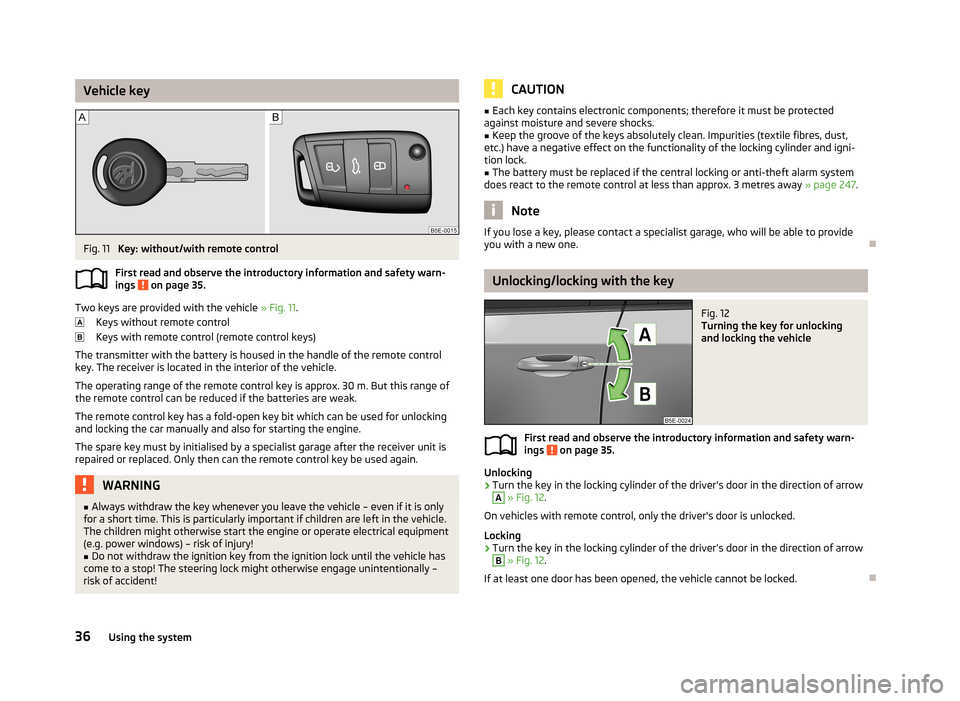
Two keys are provided with the vehicle » Fig. 11.
Keys without remote control
Keys with remote control (remote control keys)
The transmitter with the battery is housed in the handle of the remote control key. The receiver is located in the interior of the vehicle.
The operating range of the remote control key is approx. 30 m. But this range ofthe remote control can be reduced if the batteries are weak.
The remote control key has a fold-open key bit which can be used for unlocking
and locking the car manually and also for starting the engine.
The spare key must by initialised by a specialist garage after the receiver unit is repaired or replaced. Only then can the remote control key be used again.
WARNING■ Always withdraw the key whenever you leave the vehicle – even if it is only
for a short time. This is particularly important if children are left in the vehicle.
The children might otherwise start the engine or operate electrical equipment
(e.g. power windows) – risk of injury!■
Do not withdraw the ignition key from the ignition lock until the vehicle has
come to a stop! The steering lock might otherwise engage unintentionally – risk of accident!
CAUTION■ Each key contains electronic components; therefore it must be protected
against moisture and severe shocks.■
Keep the groove of the keys absolutely clean. Impurities (textile fibres, dust,
etc.) have a negative effect on the functionality of the locking cylinder and igni-
tion lock.
■
The battery must be replaced if the central locking or anti-theft alarm system
does react to the remote control at less than approx. 3 metres away » page 247.
Note
If you lose a key, please contact a specialist garage, who will be able to provide
you with a new one.
Unlocking/locking with the key
Fig. 12
Turning the key for unlocking
and locking the vehicle
First read and observe the introductory information and safety warn-
ings on page 35.
Unlocking
›
Turn the key in the locking cylinder of the driver's door in the direction of arrow
A
» Fig. 12 .
On vehicles with remote control, only the driver's door is unlocked.
Locking
›
Turn the key in the locking cylinder of the driver's door in the direction of arrow
B
» Fig. 12 .
If at least one door has been opened, the vehicle cannot be locked.
36Using the system
Page 41 of 287
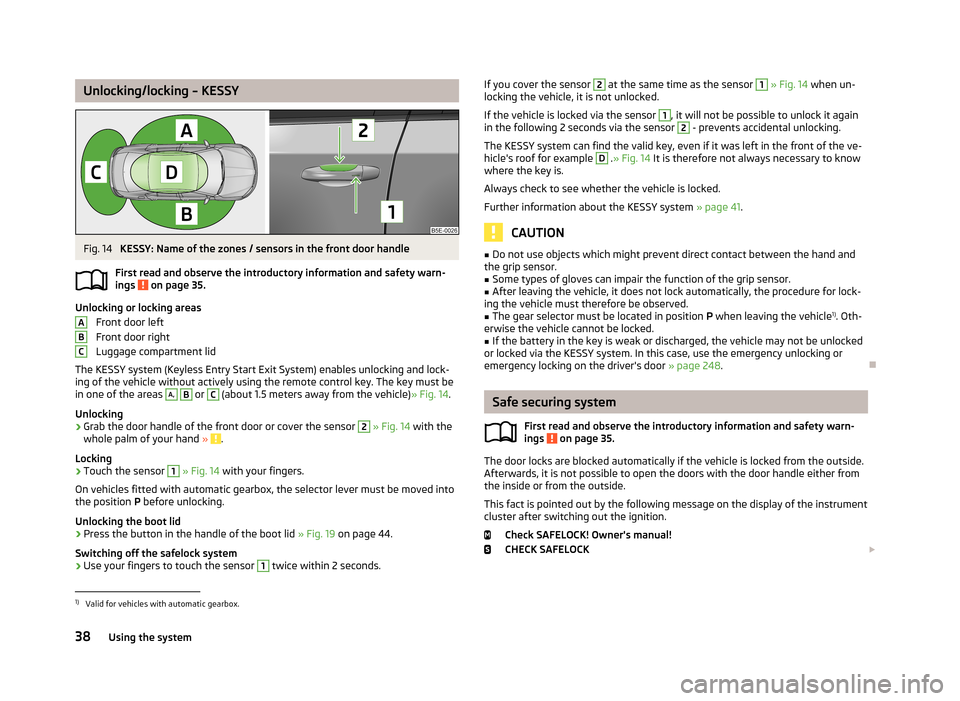
Unlocking/locking – KESSYFig. 14
KESSY: Name of the zones / sensors in the front door handle
First read and observe the introductory information and safety warn- ings
on page 35.
Unlocking or locking areas
Front door left
Front door right
Luggage compartment lid
The KESSY system (Keyless Entry Start Exit System) enables unlocking and lock-
ing of the vehicle without actively using the remote control key. The key must be
in one of the areas
A,
B
or
C
(about 1.5 meters away from the vehicle) » Fig. 14.
Unlocking
›
Grab the door handle of the front door or cover the sensor
2
» Fig. 14 with the
whole palm of your hand » .
Locking
›
Touch the sensor
1
» Fig. 14 with your fingers.
On vehicles fitted with automatic gearbox, the selector lever must be moved into the position P before unlocking.
Unlocking the boot lid
›
Press the button in the handle of the boot lid » Fig. 19 on page 44.
Switching off the safelock system
›
Use your fingers to touch the sensor
1
twice within 2 seconds.
ABCIf you cover the sensor 2 at the same time as the sensor 1 » Fig. 14 when un-
locking the vehicle, it is not unlocked.
If the vehicle is locked via the sensor 1
, it will not be possible to unlock it again
in the following 2 seconds via the sensor
2
- prevents accidental unlocking.
The KESSY system can find the valid key, even if it was left in the front of the ve-
hicle's roof for example
D
. » Fig. 14 It is therefore not always necessary to know
where the key is.
Always check to see whether the vehicle is locked. Further information about the KESSY system » page 41.
CAUTION
■
Do not use objects which might prevent direct contact between the hand and
the grip sensor.■
Some types of gloves can impair the function of the grip sensor.
■
After leaving the vehicle, it does not lock automatically, the procedure for lock-
ing the vehicle must therefore be observed.
■
The gear selector must be located in position P when leaving the vehicle 1)
. Oth-
erwise the vehicle cannot be locked.
■
If the battery in the key is weak or discharged, the vehicle may not be unlocked
or locked via the KESSY system. In this case, use the emergency unlocking or emergency locking on the driver's door » page 248.
Safe securing system
First read and observe the introductory information and safety warn-
ings
on page 35.
The door locks are blocked automatically if the vehicle is locked from the outside.
Afterwards, it is not possible to open the doors with the door handle either from
the inside or from the outside.
This fact is pointed out by the following message on the display of the instrument
cluster after switching out the ignition.
Check SAFELOCK! Owner's manual!
CHECK SAFELOCK
1)
Valid for vehicles with automatic gearbox.
38Using the system
Page 42 of 287
If the vehicle is locked and the safe securing system is switched off, the door can
be opened separately from the inside by a single pull on opening lever.
Switching off
The safelock can be switched off by locking twice within 2 seconds.
Switching on
The safelock switches on automatically the next time the vehicle is locked and unlocked.
Switch-on display
The warning light flashes for around 2 seconds in quick succession, afterwards it
begins to flash evenly at longer intervals.
Switch-off display
The indicator light in the driver door flashes for about 2 seconds fast, goes out
and starts to flash at longer intervals after about 30 seconds.WARNINGIf the car is locked and the safe securing system activated, no people must re- main in the car as it will then not be possible to either unlock a door or open a
window from the inside. The locked doors make it more difficult for rescuers
to get into the vehicle in an emergency – risk to life!
Note
This function only applies to certain countries.
Individual settings
First read and observe the introductory information and safety warn-
ings
on page 35.
The following functions of the central locking system can be set individual-
ly » owner's manual of Infotainment , chapter Vehicle settings (button CAR) .
Opening a single door
This function makes it possible to only unlock the driver's door. The other doors,
the fuel filler flap and the boot lid remain locked and are only unlocked after be- ing opened again.
Unlocking a vehicle side door
This function enables you to unlock both doors on the driver's side. The other
doors, the fuel filler flap and the boot lid remain locked and are only unlocked af-
ter being opened again.
Unlocking the vehicle with the KESSY system This function enables you to unlock all the doors, individual doors, both doors onthe left or right vehicle side. The other doors, the fuel filler flap and the boot lid
remain locked and are only unlocked after being opened again.
Automatic locking/unlocking
All doors are locked from a speed of around 15 km/h. The button in the handle of
the boot lid is deactivated.
If the ignition key is withdrawn, the car is then automatically unlocked again. In addition, it is possible for the driver or front passenger to unlock the car by press-
ing the central locking button
.
The vehicle doors can be unlocked and opened at any time by pulling once on the door opening lever.
Locking/unlocking the vehicle from the inside
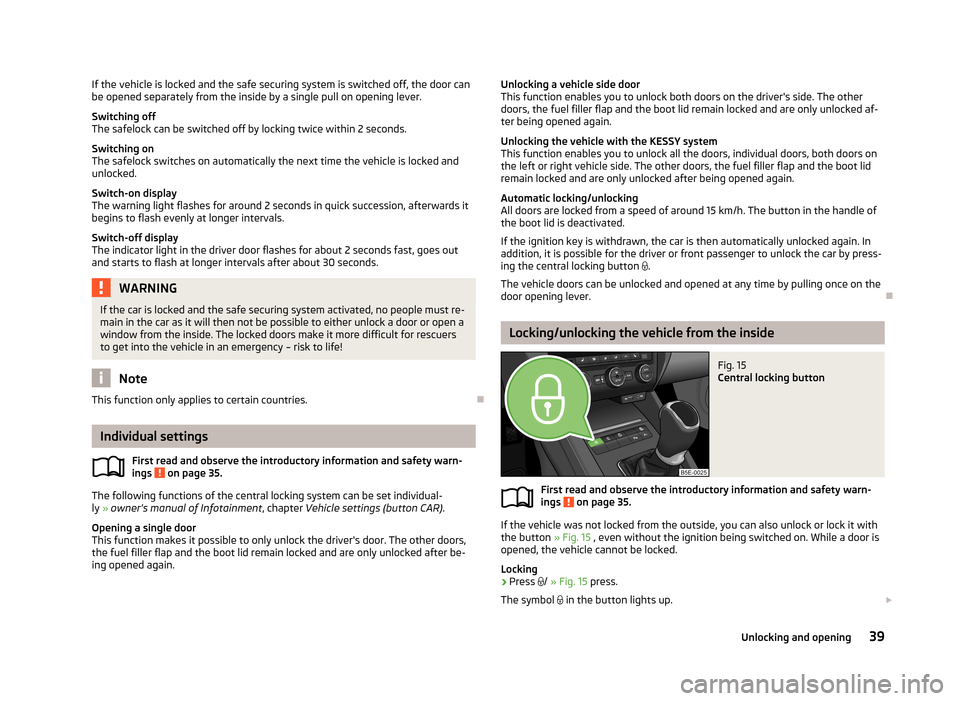
Fig. 15
Central locking button
First read and observe the introductory information and safety warn-
ings on page 35.
If the vehicle was not locked from the outside, you can also unlock or lock it with
the button » Fig. 15 , even without the ignition being switched on. While a door is
opened, the vehicle cannot be locked.
Locking
›
Press /
» Fig. 15 press.
The symbol in the button lights up.
39Unlocking and opening