ESP SKODA OCTAVIA 2014 3.G / (5E) Owner's Guide
[x] Cancel search | Manufacturer: SKODA, Model Year: 2014, Model line: OCTAVIA, Model: SKODA OCTAVIA 2014 3.G / (5E)Pages: 280, PDF Size: 35.53 MB
Page 79 of 280
WARNING (Continued)■The windscreen around the camera is dirty, iced up, misted up, or covered
by stickers.■
Near the camera lens there is a light source, such as the screen of an ex-
ternal navigation system.
CAUTION
Do not attach any stickers or similar objects in front of the camera on the
windscreen to avoid impairing the function or its reliability.
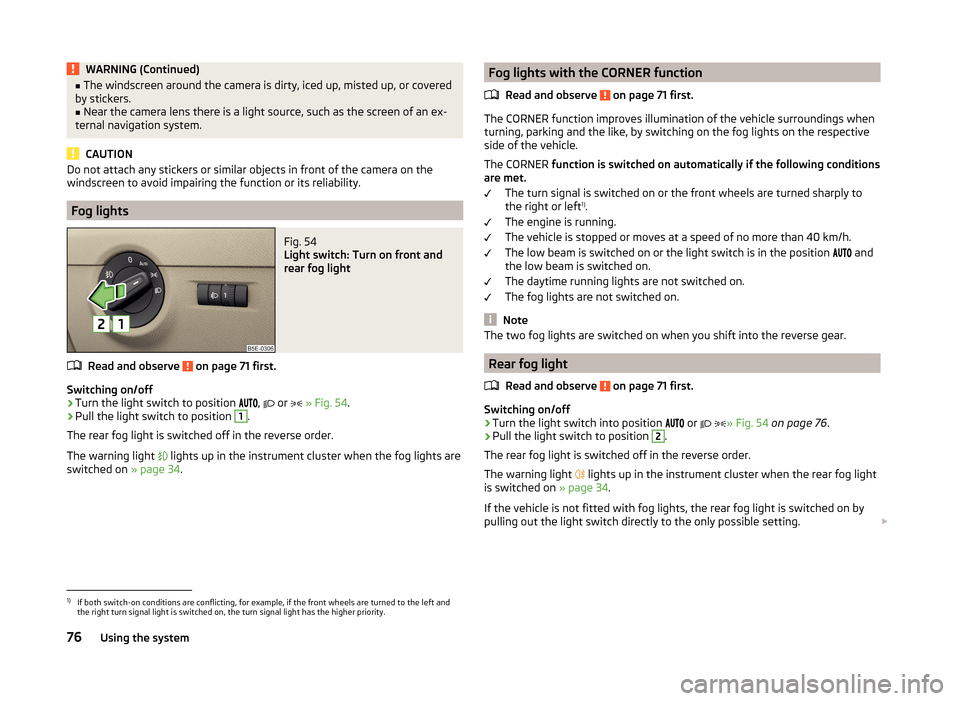
Fog lights
Fig. 54
Light switch: Turn on front and
rear fog light
Read and observe on page 71 first.
Switching on/off
›
Turn the light switch to position
,
or
» Fig. 54 .
›
Pull the light switch to position
1
.
The rear fog light is switched off in the reverse order.
The warning light
lights up in the instrument cluster when the fog lights are
switched on » page 34.
Fog lights with the CORNER function
Read and observe
on page 71 first.
The CORNER function improves illumination of the vehicle surroundings when
turning, parking and the like, by switching on the fog lights on the respective
side of the vehicle.
The CORNER function is switched on automatically if the following conditions
are met.
The turn signal is switched on or the front wheels are turned sharply to
the right or left 1)
.
The engine is running.
The vehicle is stopped or moves at a speed of no more than 40 km/h.
The low beam is switched on or the light switch is in the position and
the low beam is switched on.
The daytime running lights are not switched on.
The fog lights are not switched on.
Note
The two fog lights are switched on when you shift into the reverse gear.
Rear fog light
Read and observe
on page 71 first.
Switching on/off
›
Turn the light switch into position or
» Fig. 54
on page 76 .
›
Pull the light switch to position
2
.
The rear fog light is switched off in the reverse order.
The warning light lights up in the instrument cluster when the rear fog light
is switched on » page 34.
If the vehicle is not fitted with fog lights, the rear fog light is switched on by
pulling out the light switch directly to the only possible setting.
1)
If both switch-on conditions are conflicting, for example, if the front wheels are turned to the left and
the right turn signal light is switched on, the turn signal light has the higher priority.
76Using the system
Page 81 of 280
WARNINGSwitch on the hazard warning light system if, for example, the following oc-
curs.■
You encounter a traffic congestion.
■
The vehicle has to be parked on the roadside, due to a fault for example.
Parking lights
Read and observe
on page 71 first.
The parking light is provided for a temporary lighting of the parked vehicle.
Parking light switching on
›
Switch off the ignition.
›
Place the control lever into position
A
or
B
as far as it can go
» Fig. 51 on
page 73 - the parking light on the right/left-hand side of the vehicle is
switched on.
If the right or left turn signal light has been switched on and the ignition is
switched off, the parking light is not automatically switched on.
Switching on the side light on both sides
›
Turn the light switch
A
to position » Fig. 50
on page 71 and lock the vehi-
cle.
After pulling out the ignition key and opening the driver's door, an audible
warning sounds. After a few seconds or after closing the driver's door, the au-
dible alarm is turned off, but the parking lights will remain switched on.
CAUTION
Turning on the parking light means the battery is heavily loaded, especially
over short distances.
Driving abroad
Read and observe
on page 71 first.
The low beam is set asymmetrically. It illuminates the side of the road on
which the vehicle is being driven to a greater extent.
When driving in countries with opposing traffic system (traffic on the left/
right), asymmetric headlight adjustment can dazzle oncoming traffic. In order
to avoid this, the headlights must be adjusted at a specialist garage.
You can adjust the Xenon headlights yourself by setting the travel mode in In- fotainment » Operating instructions for Infotainment , chapter Vehicle settings
(button CAR) .
Note
You can find out more information on adjusting the headlights at a specialist
garage.
Interior lights
Introduction
This chapter contains information on the following subjects:
Front interior light
78
Rear interior lights
79
Front door warning light
79
Entry space lighting
80
Note
With the ignition off, the light turns off automatically after about 10 minutes.
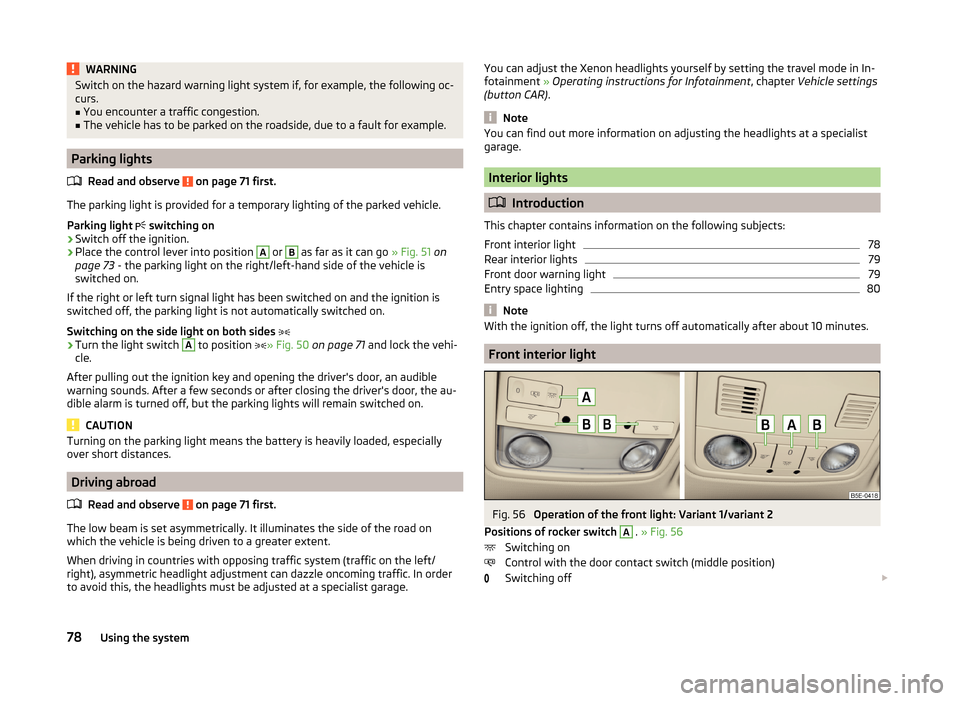
Front interior light
Fig. 56
Operation of the front light: Variant 1/variant 2
Positions of rocker switch
A
. » Fig. 56
Switching on
Control with the door contact switch (middle position)
Switching off
78Using the system
Page 84 of 280
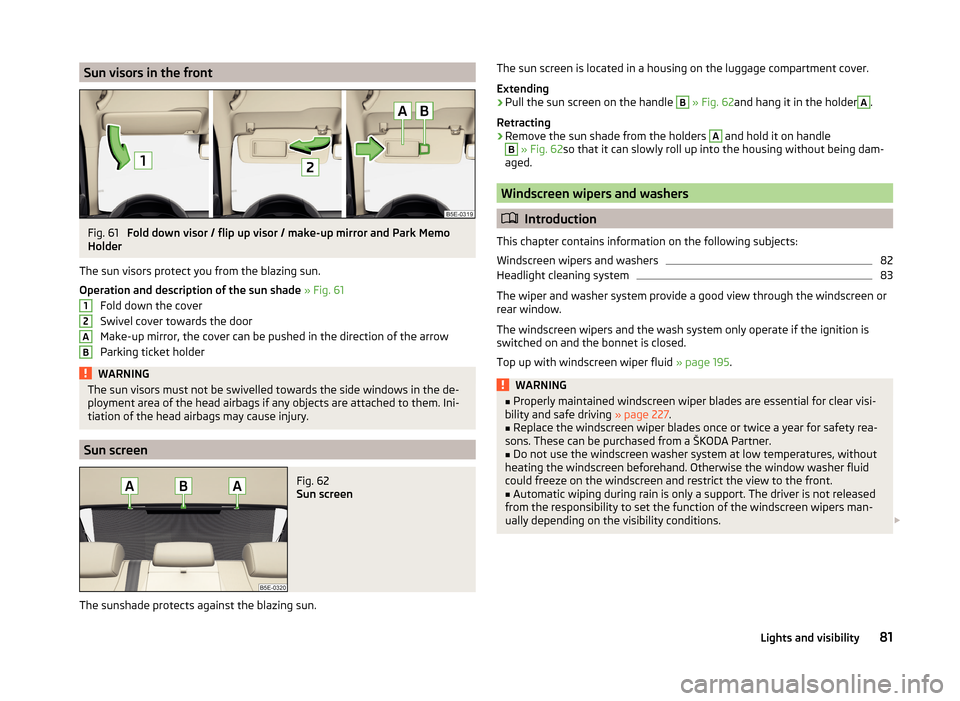
Sun visors in the frontFig. 61
Fold down visor / flip up visor / make-up mirror and Park Memo
Holder
The sun visors protect you from the blazing sun.
Operation and description of the sun shade » Fig. 61
Fold down the cover
Swivel cover towards the door
Make-up mirror, the cover can be pushed in the direction of the arrow
Parking ticket holder
WARNINGThe sun visors must not be swivelled towards the side windows in the de-
ployment area of the head airbags if any objects are attached to them. Ini-
tiation of the head airbags may cause injury.
Sun screen
Fig. 62
Sun screen
The sunshade protects against the blazing sun.
12ABThe sun screen is located in a housing on the luggage compartment cover.
Extending›
Pull the sun screen on the handle
B
» Fig. 62 and hang it in the holder
A
.
Retracting
›
Remove the sun shade from the holders
A
and hold it on handle
B
» Fig. 62 so that it can slowly roll up into the housing without being dam-
aged.
Windscreen wipers and washers
Introduction
This chapter contains information on the following subjects:
Windscreen wipers and washers
82
Headlight cleaning system
83
The wiper and washer system provide a good view through the windscreen or
rear window.
The windscreen wipers and the wash system only operate if the ignition is
switched on and the bonnet is closed.
Top up with windscreen wiper fluid » page 195.
WARNING■
Properly maintained windscreen wiper blades are essential for clear visi-
bility and safe driving » page 227.■
Replace the windscreen wiper blades once or twice a year for safety rea-
sons. These can be purchased from a ŠKODA Partner.
■
Do not use the windscreen washer system at low temperatures, without
heating the windscreen beforehand. Otherwise the window washer fluid
could freeze on the windscreen and restrict the view to the front.
■
Automatic wiping during rain is only a support. The driver is not released
from the responsibility to set the function of the windscreen wipers man-
ually depending on the visibility conditions.
81Lights and visibility
Page 91 of 280
The adjusted driver's seat position can be set in the memory of the
seat » page 89 or the remote control key » page 89.
Note
If the setting procedure is interrupted, you will need to press the button again.
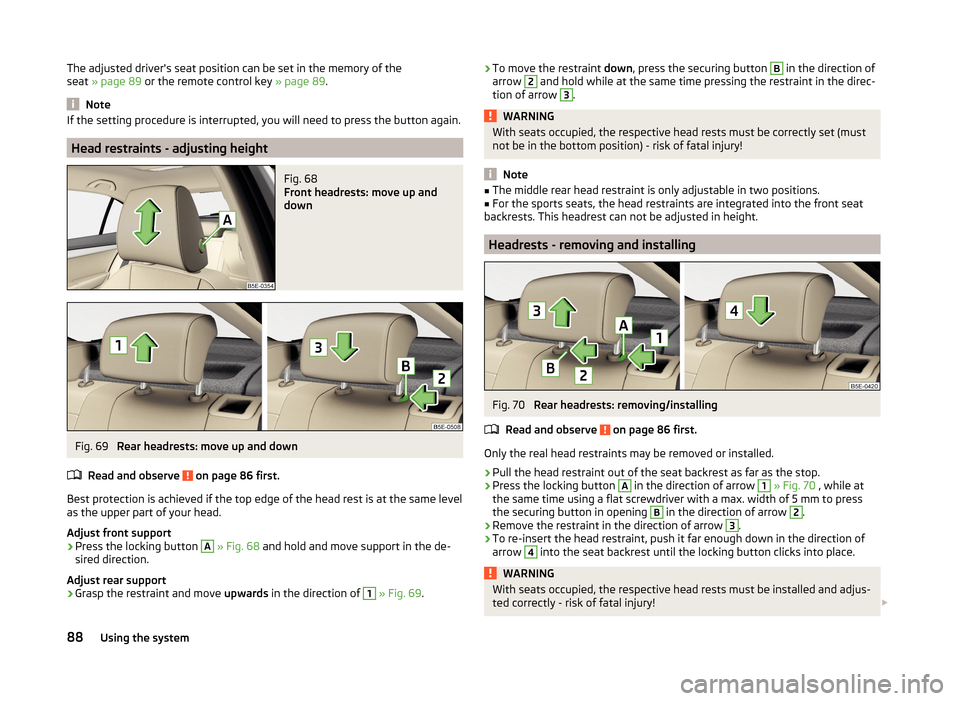
Head restraints - adjusting height
Fig. 68
Front headrests: move up and
down
Fig. 69
Rear headrests: move up and down
Read and observe
on page 86 first.
Best protection is achieved if the top edge of the head rest is at the same level as the upper part of your head.
Adjust front support
›
Press the locking button
A
» Fig. 68 and hold and move support in the de-
sired direction.
Adjust rear support
›
Grasp the restraint and move upwards in the direction of
1
» Fig. 69 .
›To move the restraint
down, press the securing button B in the direction of
arrow 2 and hold while at the same time pressing the restraint in the direc-
tion of arrow 3
.
WARNINGWith seats occupied, the respective head rests must be correctly set (must
not be in the bottom position) - risk of fatal injury!
Note
■ The middle rear head restraint is only adjustable in two positions.■For the sports seats, the head restraints are integrated into the front seat
backrests. This headrest can not be adjusted in height.
Headrests - removing and installing
Fig. 70
Rear headrests: removing/installing
Read and observe
on page 86 first.
Only the real head restraints may be removed or installed.
›
Pull the head restraint out of the seat backrest as far as the stop.
›
Press the locking button
A
in the direction of arrow
1
» Fig. 70 , while at
the same time using a flat screwdriver with a max. width of 5 mm to press
the securing button in opening
B
in the direction of arrow
2
.
›
Remove the restraint in the direction of arrow
3
.
›
To re-insert the head restraint, push it far enough down in the direction of
arrow
4
into the seat backrest until the locking button clicks into place.
WARNINGWith seats occupied, the respective head rests must be installed and adjus- ted correctly - risk of fatal injury! 88Using the system
Page 93 of 280
When automatic storage is activated, the current positions of the driver's seat
and the external mirrors are saved in the memory of the remote control key
each time the vehicle is locked. When the vehicle is next unlocked using the
same key, the driver's seat and the external mirrors assume the positions stor-
ed in the memory of this key 1)
.
Saving front passenger mirror settings when reversing
The function of the lowering of the passenger-side mirror surface must be en-
abled in infotainment » Bedienungsanleitung Infotainment, chapter Vehicle
settings (button CAR) .›
Unlock the vehicle with the remote control key.
›
Switch on the ignition.
›
Adjust the rotary knob for the mirrors to the position
or in right-hand drive
to the position
» page 85 .
›
Engage reverse gear.
›
Adjust the front passenger's mirror to the desired position » page 85.
›
Disengage reverse gear.
The adjusted position of the exterior mirror is stored in the remote control key
memory.
Disable the function of automatic storage
›
Unlock the vehicle with the remote control key.
›
Press and hold the SET button
A
» Fig. 71 on page 89 . At the same time,
press the button on the remote control key within 10 seconds.
The successful deactivation of the automatic storage function for each key is confirmed by an acoustic signal.
Stopping the ongoing adjustment
›
Press any button on the driver's seat.
Or
›
Press the button on the remote control key.
Seat features
Introduction
This chapter contains information on the following subjects:
Seat heaters
90
Front armrest
91
Rear armrest
91
Folding front passenger seat
92
Seat backrests
92
Rear seat backrests - fold down from the luggage compartment
93
Rear-seat backrest with long-cargo channel
94
Seat heaters
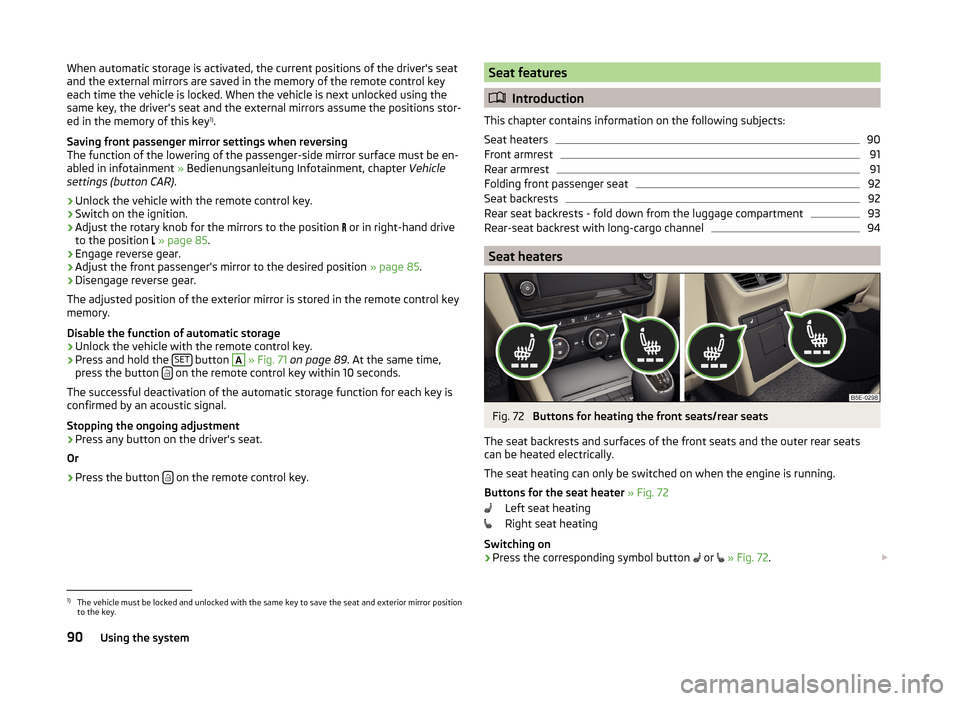
Fig. 72
Buttons for heating the front seats/rear seats
The seat backrests and surfaces of the front seats and the outer rear seats
can be heated electrically.
The seat heating can only be switched on when the engine is running.
Buttons for the seat heater » Fig. 72
Left seat heating
Right seat heating
Switching on
›
Press the corresponding symbol button or
» Fig. 72 .
1)
The vehicle must be locked and unlocked with the same key to save the seat and exterior mirror position
to the key.
90Using the system
Page 96 of 280
Fold down undivided seat backrest›Push the release handles Aon both sides of the seat backrest in the direc-
tion of arrow 1
simultaneously » Fig. 76.
›
Fold the backrest in the direction of the arrow
2
.
Fold divided seat backrest backwards
›
Pull the rear outer seat belt
C
to the side panel in the direction of arrow
3
» Fig. 76 .
›
Then push the seat backrest back into the upright position until the securing
knob
A
clicks into place – check by pulling on the seat backrest » .
›
Make sure that the red pin
B
is hidden.
Fold undivided seat backrest backwards
›
Pull the rear outer seat belt
C
to the side panel in the direction of arrow
3
» Fig. 76 .
›
Then push the seat backrest back into the upright position until the release
levers
A
on either side of the seat back click into place – check by pulling on
the seat backrest » .
›
Make sure that the red pins
B
on both sides of the seat back are not visible.
WARNING■
The seat belts and the belt locks must be in their original position after
folding back the seat backrests – they must be ready to use.■
The seat backrests must be securely locked in position so that no objects
in the luggage compartment can slide into the passenger compartment on
sudden braking – risk of injury.
■
If rear seats are occupied, make sure that the respective seat backrests
are properly engaged.
CAUTION
■ Ensure that the seat belts are not damaged when operating the seat backr-
ests. Under no circumstances must the seat belts be jammed by the folded
back seat backrests.■
Store the head restraints that were removed in such a way that they cannot
be damaged or soiled.
Rear seat backrests - fold down from the luggage compartmentFig. 77
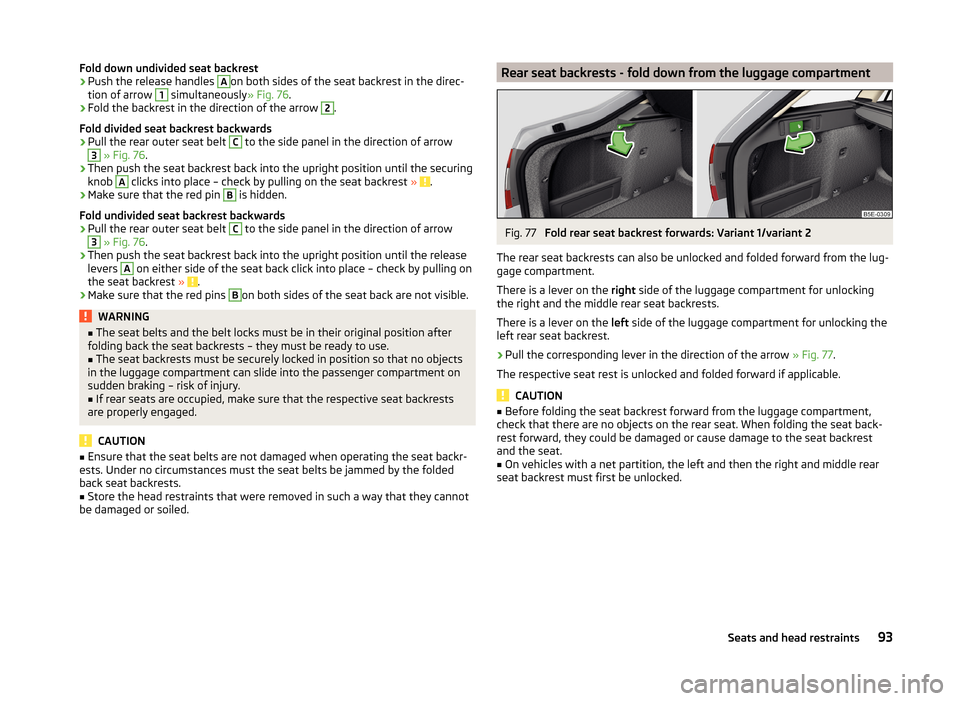
Fold rear seat backrest forwards: Variant 1/variant 2
The rear seat backrests can also be unlocked and folded forward from the lug-
gage compartment.
There is a lever on the right side of the luggage compartment for unlocking
the right and the middle rear seat backrests.
There is a lever on the left side of the luggage compartment for unlocking the
left rear seat backrest.
›
Pull the corresponding lever in the direction of the arrow » Fig. 77.
The respective seat rest is unlocked and folded forward if applicable.
CAUTION
■ Before folding the seat backrest forward from the luggage compartment,
check that there are no objects on the rear seat. When folding the seat back-
rest forward, they could be damaged or cause damage to the seat backrest
and the seat.■
On vehicles with a net partition, the left and then the right and middle rear
seat backrest must first be unlocked.
93Seats and head restraints
Page 106 of 280

›Fold the rear armrest and the cover in the seat backrest down-
wards » page 94 .›
Place the empty, through-loading bag in such a way that the end of the bag
with the zip is in the boot.
›
Push the skis into the through-loading bag from the boot » .
›
Close the through-loading bag.
Securing the through-loading bag and skis
›
Tighten the strap
A
on the free end around the skis in front of the bind-
ings » Fig. 96 .
›
Fold the seat backrest a little forward.
›
Guide the securing strap
B
through the opening in the seat backrest around
the upper part of the seat backrest.
›
Then push the seat backrest back into the upright position until the unlock-
ing button clicks into place - check by pulling on the seat backrest.
›
Insert the securing strap
B
into the lock
C
until it clicks into place.
WARNING■ After placing skis into the through-loading bag, you must secure the bag
with the securing strap B » Fig. 96 .■
The strap
A
must hold the skis tight.
■
Make sure that the strap
A
holds all skis in front of the binding (see also
the text on the through-loading bag).
■
The total weight of the skis which are transported must not exceed
24 kg.
CAUTION
■ Never fold and stow the through-loading bag when it is wet - risk of damag-
ing the through-loading bag.■
The through-loading bag is designed for the transportation of up to four
pairs of skis.
■
Place the skis with the tips facing to the front and the sticks with the tips
facing to the rear. into the through-loading bag.
Luggage compartment
Introduction
This chapter contains information on the following subjects:
Fastening elements
104
Fixing nets
105Folding double hooks105Foldable hook106
Floor covering
106
Floor covering on both sides
106
Luggage net
106
Luggage compartment cover
107
Retractable luggage compartment cover
108
Storage compartment with cargo element
108
Storage compartments under the floor covering
109
Multi-function pocket
110
Class N1 vehicles
110
Please observe the following for the purpose of maintaining good handling
characteristics of your vehicle:
›
Distribute loads as evenly as possible.
›
Place heavy objects as far forward as possible.
›
Attach the items of luggage to the lashing eyes or by using the fixing
nets » page 104 .
In the event of an accident, even small and light objects gain so much kinetic
energy that they can cause severe injuries.
The magnitude of the kinetic energy is dependent on the speed at which the
vehicle is travelling and the weight of the object.
Example: In the event of a frontal collision at a speed of 50 km/h, an object
with a weight of 4.5 kg produces an energy, which corresponds to 20 times its
own weight. This means that it results in a weight of approx. 90 kg “ ”.
Luggage compartment light
The warning light turns on when tailgate is opened.
The warning light turns off when the tailgate is closed.
If the boot lid is open and the ignition switched off, the light will extinguish
automatically after around 10 minutes.
WARNING■ Always store transported objects in the boot and attach them to the lash-
ing eyes.■
Loose objects can be thrown forward during a sudden manoeuvre or in
case of an accident and can injure the occupants or other road users.
103Transporting and practical equipment
Page 121 of 280
Automatic activation/deactivation of the air recirculation
Climatronic may have an air quality sensor for the detection of the pollutant
concentration in the sucked-in air.
If a considerable increase in concentration of pollutants is recognised by the
air quality sensor, the recirculated air mode will be switched on automatically.
When the pollutant concentration decreases to the normal level, the recircula-
ted air mode is automatically switched off.
The automatic activation/deactivation of the air recirculation can be activated or deactivated in the Infotainment » Infotainment operating instructions ,
chapter Vehicle settings .WARNINGThe recirculation system cannot be switched on for a longer period of time,
because there is no supply of fresh air from the outside. “Stale air” may re-
sult in fatigue in the driver and occupants, reduce attention levels and also
cause the windows to mist up. The risk of having an accident increases.
Switch off recirculated air mode as soon as the windows start to mist up.
CAUTION
We recommend not smoking in the vehicle when the recirculating air operation
is switched on. The smoke sucked from inside the vehicle is deposited on the
evaporator of the air conditioner. This produces a permanent odour when the
air conditioning system is operating which can only be eliminated through con-
siderable effort and expense (replacement of compressor).
Note
The automatic activation/deactivation of the air recirculation with Climatronic
only works if the outside temperature is higher than approx. 2 °C.HeatingFig. 124
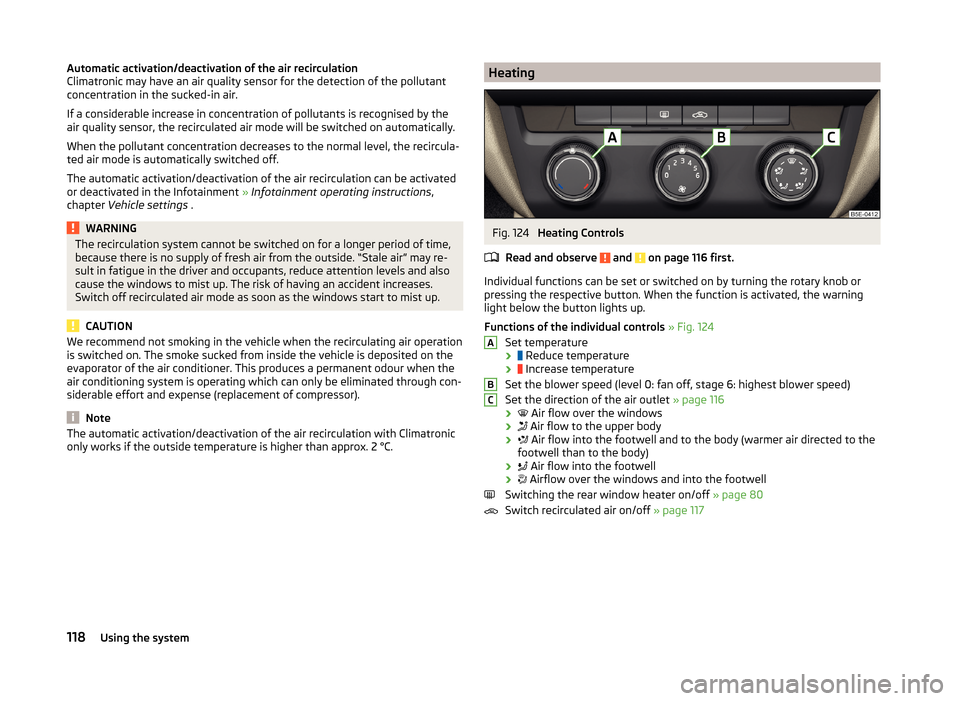
Heating Controls
Read and observe
and on page 116 first.
Individual functions can be set or switched on by turning the rotary knob or
pressing the respective button. When the function is activated, the warning
light below the button lights up.
Functions of the individual controls » Fig. 124
Set temperature ›
Reduce temperature
›
Increase temperature
Set the blower speed (level 0: fan off, stage 6: highest blower speed)
Set the direction of the air outlet » page 116
›
Air flow over the windows
›
Air flow to the upper body
›
Air flow into the footwell and to the body (warmer air directed to the
footwell than to the body)
›
Air flow into the footwell
›
Airflow over the windows and into the footwell
Switching the rear window heater on/off » page 80
Switch recirculated air on/off » page 117
ABC118Using the system
Page 122 of 280
Air conditioning (manual air conditioning)Fig. 125
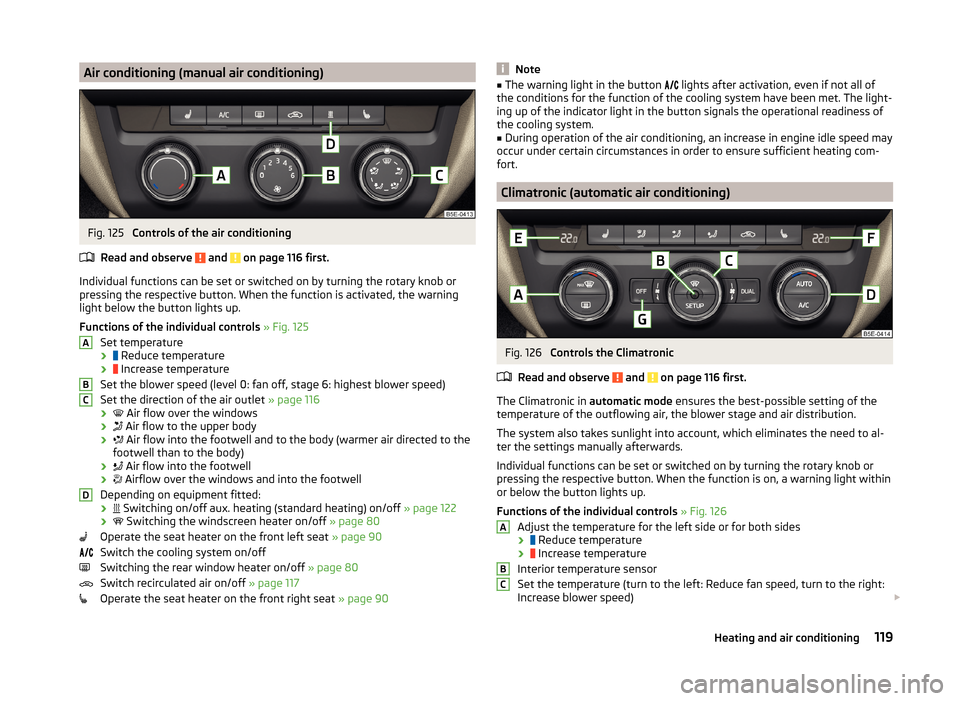
Controls of the air conditioning
Read and observe
and on page 116 first.
Individual functions can be set or switched on by turning the rotary knob or
pressing the respective button. When the function is activated, the warning
light below the button lights up.
Functions of the individual controls » Fig. 125
Set temperature ›
Reduce temperature
›
Increase temperature
Set the blower speed (level 0: fan off, stage 6: highest blower speed)
Set the direction of the air outlet » page 116
›
Air flow over the windows
›
Air flow to the upper body
›
Air flow into the footwell and to the body (warmer air directed to the
footwell than to the body)
›
Air flow into the footwell
›
Airflow over the windows and into the footwell
Depending on equipment fitted: ›
Switching on/off aux. heating (standard heating) on/off
» page 122
›
Switching the windscreen heater on/off
» page 80
Operate the seat heater on the front left seat » page 90
Switch the cooling system on/off
Switching the rear window heater on/off » page 80
Switch recirculated air on/off » page 117
Operate the seat heater on the front right seat » page 90
ABCDNote■
The warning light in the button lights after activation, even if not all of
the conditions for the function of the cooling system have been met. The light-
ing up of the indicator light in the button signals the operational readiness of
the cooling system.■
During operation of the air conditioning, an increase in engine idle speed may
occur under certain circumstances in order to ensure sufficient heating com-
fort.
Climatronic (automatic air conditioning)
Fig. 126
Controls the Climatronic
Read and observe
and on page 116 first.
The Climatronic in automatic mode ensures the best-possible setting of the
temperature of the outflowing air, the blower stage and air distribution.
The system also takes sunlight into account, which eliminates the need to al-
ter the settings manually afterwards.
Individual functions can be set or switched on by turning the rotary knob or
pressing the respective button. When the function is on, a warning light within
or below the button lights up.
Functions of the individual controls » Fig. 126
Adjust the temperature for the left side or for both sides
›
Reduce temperature
›
Increase temperature
Interior temperature sensor
Set the temperature (turn to the left: Reduce fan speed, turn to the right:
Increase blower speed)
ABC119Heating and air conditioning
Page 123 of 280
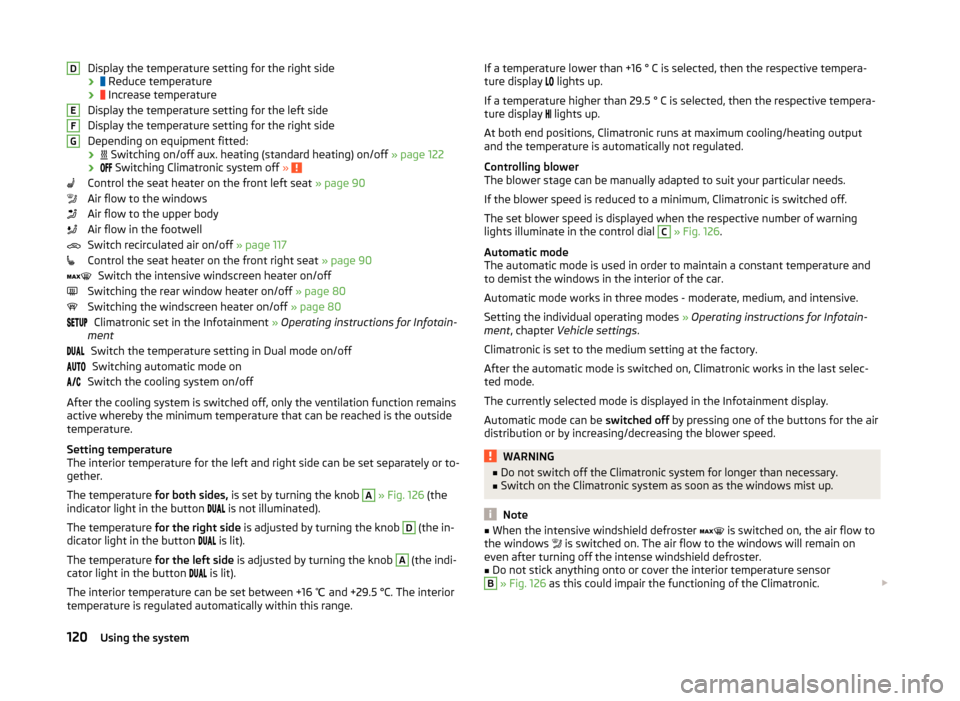
Display the temperature setting for the right side
›
Reduce temperature
›
Increase temperature
Display the temperature setting for the left side
Display the temperature setting for the right side
Depending on equipment fitted: ›
Switching on/off aux. heating (standard heating) on/off » page 122
›
Switching Climatronic system off »
Control the seat heater on the front left seat » page 90
Air flow to the windows
Air flow to the upper body
Air flow in the footwell
Switch recirculated air on/off » page 117
Control the seat heater on the front right seat » page 90
Switch the intensive windscreen heater on/off
Switching the rear window heater on/off » page 80
Switching the windscreen heater on/off » page 80
Climatronic set in the Infotainment » Operating instructions for Infotain-
ment
Switch the temperature setting in Dual mode on/offSwitching automatic mode on
Switch the cooling system on/off
After the cooling system is switched off, only the ventilation function remains active whereby the minimum temperature that can be reached is the outside
temperature.
Setting temperature
The interior temperature for the left and right side can be set separately or to-
gether.
The temperature for both sides, is set by turning the knob
A
» Fig. 126 (the
indicator light in the button is not illuminated).
The temperature for the right side is adjusted by turning the knob
D
(the in-
dicator light in the button is lit).
The temperature for the left side is adjusted by turning the knob
A
(the indi-
cator light in the button is lit).
The interior temperature can be set between +16 ℃ and +29.5 °C. The interior
temperature is regulated automatically within this range.
DEFGIf a temperature lower than +16 ° C is selected, then the respective tempera-
ture display lights up.
If a temperature higher than 29.5 ° C is selected, then the respective tempera-
ture display
lights up.
At both end positions, Climatronic runs at maximum cooling/heating output
and the temperature is automatically not regulated.
Controlling blower
The blower stage can be manually adapted to suit your particular needs.
If the blower speed is reduced to a minimum, Climatronic is switched off.
The set blower speed is displayed when the respective number of warning
lights illuminate in the control dial C
» Fig. 126 .
Automatic mode
The automatic mode is used in order to maintain a constant temperature and
to demist the windows in the interior of the car.
Automatic mode works in three modes - moderate, medium, and intensive.
Setting the individual operating modes » Operating instructions for Infotain-
ment , chapter Vehicle settings .
Climatronic is set to the medium setting at the factory.
After the automatic mode is switched on, Climatronic works in the last selec-
ted mode.
The currently selected mode is displayed in the Infotainment display.
Automatic mode can be switched off by pressing one of the buttons for the air
distribution or by increasing/decreasing the blower speed.
WARNING■ Do not switch off the Climatronic system for longer than necessary.■Switch on the Climatronic system as soon as the windows mist up.
Note
■When the intensive windshield defroster is switched on, the air flow to
the windows is switched on. The air flow to the windows will remain on
even after turning off the intense windshield defroster.■
Do not stick anything onto or cover the interior temperature sensor
B
» Fig. 126 as this could impair the functioning of the Climatronic.
120Using the system