technical data SKODA ROOMSTER 2006 1.G Repair Manual
[x] Cancel search | Manufacturer: SKODA, Model Year: 2006, Model line: ROOMSTER, Model: SKODA ROOMSTER 2006 1.GPages: 274, PDF Size: 48.64 MB
Page 126 of 274
Automatic gearbox125
Using the systemSafetyDriving TipsGeneral MaintenanceBreakdown assistanceTechnical Data
– Simultaneously press the shiftlock button in the handle of the
selector lever in the position N3).
Tow-starting and towing vehicle
Tow-starting a vehicle
It is not possible to tow-start vehicles fitted with automatic gearbox
⇒page 245.
you can use jump-start cables connected to the battery of another vehicle
for starting your car if the vehicle battery is flat ⇒page 243.
Towing a vehicle
Please pay attention to the following information if it comes necessary to
tow-in your car ⇒page 245.
3)If the selector lever is moved again into the position P, it is once again blocked.
NKO 20 A05.book Page 125 Wednesday, June 21, 2006 1:42 PM
Page 128 of 274
Communication127
Using the systemSafetyDriving TipsGeneral MaintenanceBreakdown assistanceTechnical Data
Radio and mobile phone operation
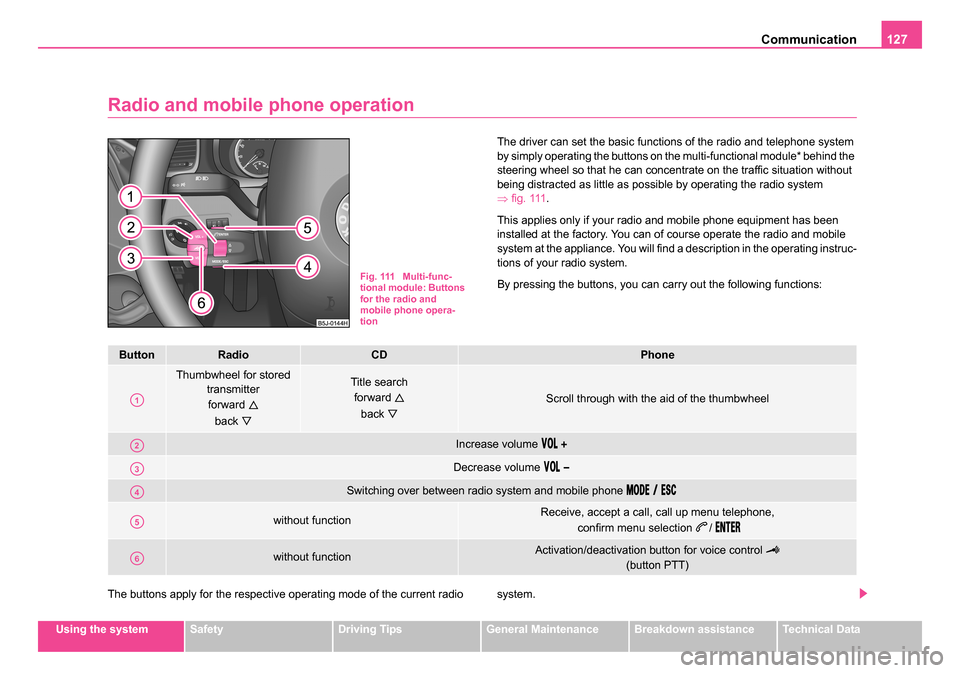
The driver can set the basic functions of the radio and telephone system
by simply operating the buttons on the multi-functional module* behind the
steering wheel so that he can concentrate on the traffic situation without
being distracted as little as possible by operating the radio system
⇒fig. 111 .
This applies only if your radio and mobile phone equipment has been
installed at the factory. You can of course operate the radio and mobile
system at the appliance. You will find a description in the operating instruc-
tions of your radio system.
By pressing the buttons, you can carry out the following functions:
The buttons apply for the respective operating mode of the current radio system.
Fig. 111 Multi-func-
tional module: Buttons
for the radio and
mobile phone opera-
tion
ButtonRadioCDPhone
Thumbwheel for stored transmitter
forward
back
Title search forward
back
Scroll through with the aid of the thumbwheel
Increase volume
Decrease volume
Switching over between radio system and mobile phone
without functionReceive, accept a call, call up menu telephone, confirm menu selection
/
without functionActivation/deactivation button for voice control
(button PTT)
A1
A2
A3
A4
A5
A6
NKO 20 A05.book Page 127 Wednesday, June 21, 2006 1:42 PM
Page 130 of 274
Communication129
Using the systemSafetyDriving TipsGeneral MaintenanceBreakdown assistanceTechnical Data
•It is recommended to speak louder at higher speeds, so that the tone
of your voice is louder than the increased surrounding noise.
•During the dialogue avoid additional noise in the vehicle, e.g. simulta-
neously talking occupants.
•Do not speak, if the system makes an announcement.
•The microphone for voice control is directed to the driver and front
passenger. Therefore the driver and the front passenger can operate the
equipment.
WARNING
Pay attention primarily to the traffic situation! As the driver you are
fully responsible for the traffic safety. Use the telephone system
only to such an extent, so that you are in full control of your vehicle
at any time.
Caution
Taking the mobile phone out of the adapter during the call can lead to
interruption of the connection. When taking out the mobile phone, the
connection to the factory-fitted antenna is interrupted, this reduces the
quality of the transmitting and receiving signal. This might result addition-
ally in harmful radiation from the mobile phone in the interior of the vehicle
and the charging of the telephone battery is interrupted.
Note
•Please also refer to the additional instructions ⇒page 138, “Mobile
phones and two-way radio systems”.
•Please contact your Škoda Service Partner if there are any points
which are not clear.
•The voice control of the telephone is only possible for adapters with
PTT button. Suitable adapters are available at a Škoda Service Partner.
Inserting the mobile phone and adapter
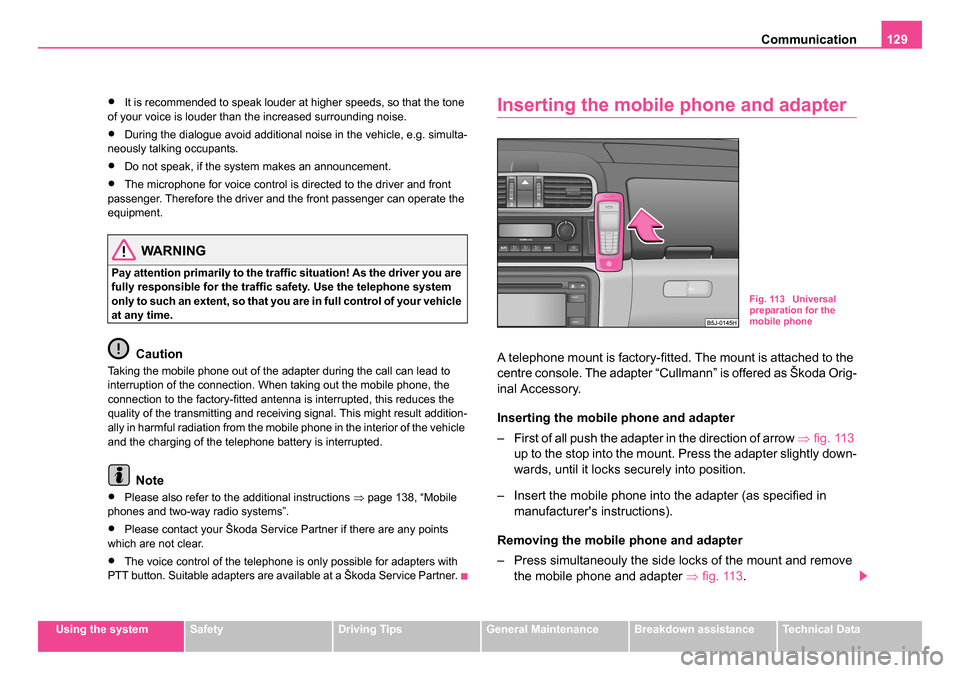
A telephone mount is factory-fitted. The mount is attached to the
centre console. The adapter “Cullmann” is offered as Škoda Orig-
inal Accessory.
Inserting the mobile phone and adapter
– First of all push the adapter in the direction of arrow ⇒fig. 113
up to the stop into the mount. Press the adapter slightly down-
wards, until it locks securely into position.
– Insert the mobile phone into the adapter (as specified in manufacturer's instructions).
Removing the mobile phone and adapter
– Press simultaneouly the side locks of the mount and remove the mobile phone and adapter ⇒fig. 113 .
Fig. 113 Universal
preparation for the
mobile phone
NKO 20 A05.book Page 129 Wednesday, June 21, 2006 1:42 PM
Page 132 of 274
Communication131
Using the systemSafetyDriving TipsGeneral MaintenanceBreakdown assistanceTechnical Data
You can operate the mobile phone via the voice control
⇒page 128 or via
the buttons of the multi-functional module* ⇒page 127.
Note
It a yellow or red warning symbol lights up in the information display, the
menu phonebook cannot be selected.
Voice commands
Voice commands for mobile phone operation
Voice commands for operating the phone phone book
ActivityRead out in display
Call termi-
natedINCOMING CALL TERMINATED
Number
engagedLINE BUSY
No service foundNO SERVICE
Enter PIN
codeENTER PIN
Voice commandActivity
ENTER PIN/PIN CODEAfter this command the PIN code of the mobile
phone can be entered ⇒page 132.
DIAL NUMBERAfter this command a telephone number can
be entered which establishes a connection to
the requested partner ⇒page 133.
REDIALAfter this command the last selected telephone
number is selected again ⇒page 133.
Voice commandActivity
SAVE/STORE
NAMES/NAME/NUMB ERAfter this command a name with its telephone
number can be stored in the phone phone book
⇒page 134.
SELECT
NAMES/NAMEAfter this command a telephone number which
was stored under its given name in the phone
phone book can be selected ⇒page 134.
DELETE
NAMES/NAMEAfter this command a name in the phone phone
book can be erased ⇒page 135.
LISTEN TO/PLAY
PHONEBOOKAfter this command you can listen-in to the
phone phone book ⇒page 135.
DELETE PHONE-
BOOKAfter this command the complete phone book
or a name can be erased ⇒page 135.
NKO 20 A05.book Page 131 Wednesday, June 21, 2006 1:42 PM
Page 134 of 274
Communication133
Using the systemSafetyDriving TipsGeneral MaintenanceBreakdown assistanceTechnical Data
You can interrupt the dialogue at any time by pressing the PTT button or
with the voice command
CANCEL.
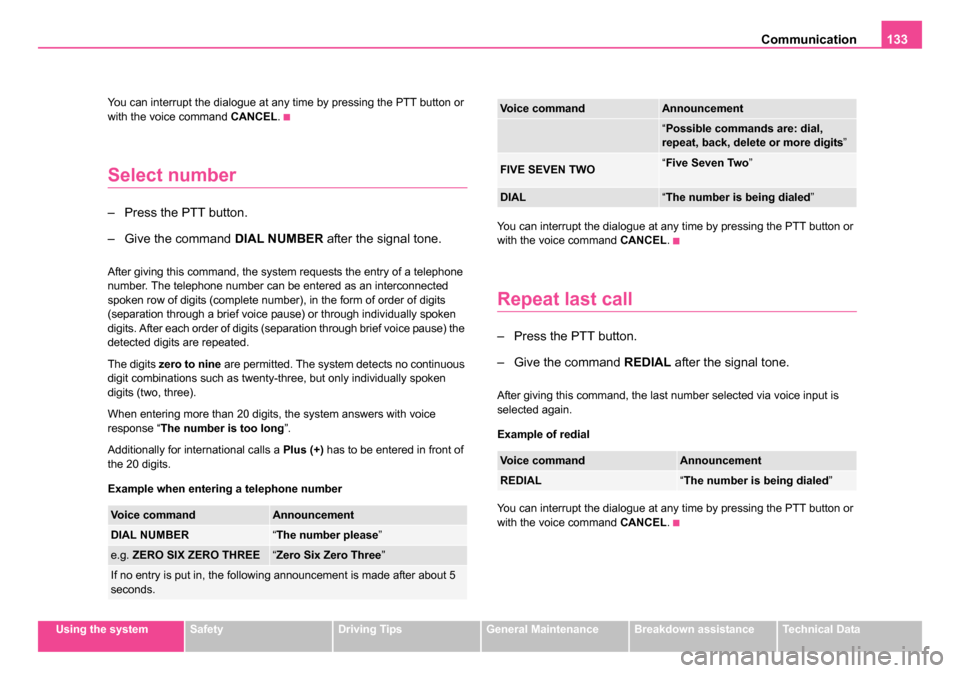
Select number
– Press the PTT button.
– Give the command DIAL NUMBER after the signal tone.
After giving this command, the system requests the entry of a telephone
number. The telephone number can be entered as an interconnected
spoken row of digits (complete number), in the form of order of digits
(separation through a brief voice pause) or through individually spoken
digits. After each order of digits (separation through brief voice pause) the
detected digits are repeated.
The digits zero to nine are permitted. The system detects no continuous
digit combinations such as twenty-three, but only individually spoken
digits (two, three).
When entering more than 20 digits, the system answers with voice
response “ The number is too long ”.
Additionally for international calls a Plus (+) has to be entered in front of
the 20 digits.
Example when entering a telephone number You can interrupt the dialogue at any time by pressing the PTT button or
with the voice command
CANCEL.
Repeat last call
– Press the PTT button.
– Give the command REDIAL after the signal tone.
After giving this command, the last number selected via voice input is
selected again.
Example of redial
You can interrupt the dialogue at any time by pressing the PTT button or
with the voice command CANCEL.
Voice commandAnnouncement
DIAL NUMBER“The number please ”
e.g. ZERO SIX ZERO THREE“Zero Six Zero Three ”
If no entry is put in, the following announcement is made after about 5
seconds.
“Possible commands are: dial,
repeat, back, delete or more digits ”
FIVE SEVEN TWO“Five Seven Two ”
DIAL“The number is being dialed ”
Voice commandAnnouncement
REDIAL“The number is being dialed ”
Voice commandAnnouncement
NKO 20 A05.book Page 133 Wednesday, June 21, 2006 1:42 PM
Page 136 of 274
Communication135
Using the systemSafetyDriving TipsGeneral MaintenanceBreakdown assistanceTechnical Data
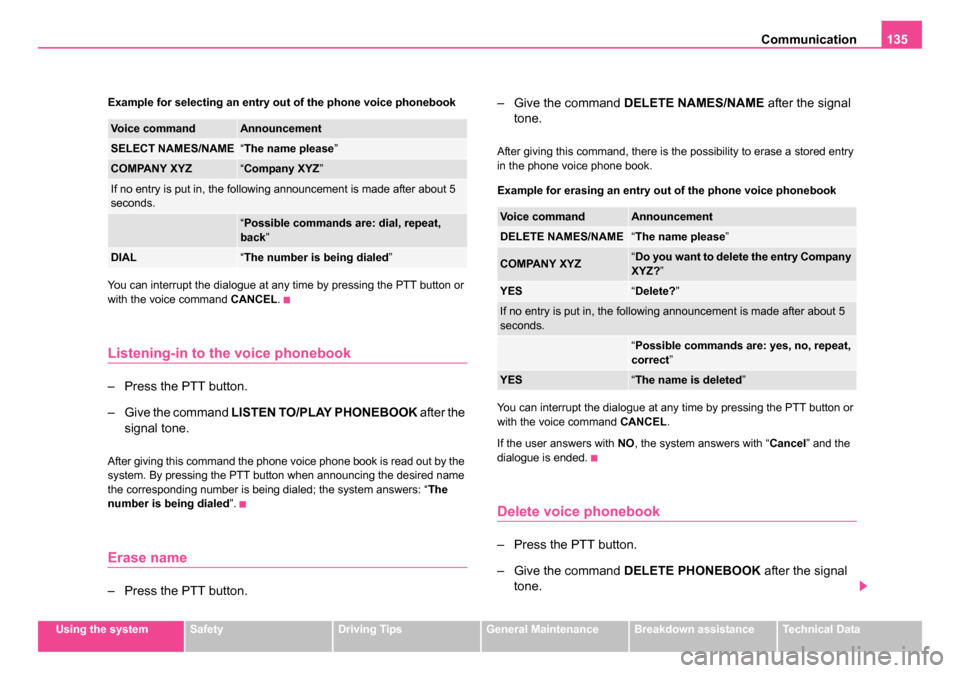
Example for selecting an entry out of the phone voice phonebook
You can interrupt the dialogue at any time by pressing the PTT button or
with the voice command
CANCEL.
Listening-in to the voice phonebook
– Press the PTT button.
– Give the command LISTEN TO/PLAY PHONEBOOK after the
signal tone.
After giving this command the phone voice phone book is read out by the
system. By pressing the PTT button when announcing the desired name
the corresponding number is being dialed; the system answers: “ The
number is being dialed ”.
Erase name
– Press the PTT button. – Give the command
DELETE NAMES/NAME after the signal
tone.
After giving this command, there is the possibility to erase a stored entry
in the phone voice phone book.
Example for erasing an entry out of the phone voice phonebook
You can interrupt the dialogue at any time by pressing the PTT button or
with the voice command CANCEL.
If the user answers with NO, the system answers with “ Cancel” and the
dialogue is ended.
Delete voice phonebook
– Press the PTT button.
– Give the command DELETE PHONEBOOK after the signal
tone.
Voice commandAnnouncement
SELECT NAMES/NAME“ The name please ”
COMPANY XYZ“Company XYZ ”
If no entry is put in, the following announcement is made after about 5
seconds.
“Possible commands are: dial, repeat,
back ”
DIAL“The number is being dialed ”
Voice commandAnnouncement
DELETE NAMES/NAME“The name please ”
COMPANY XYZ“Do you want to delete the entry Company
XYZ? ”
YES“Delete? ”
If no entry is put in, the following announcement is made after about 5
seconds.
“Possible commands are: yes, no, repeat,
correct ”
YES“The name is deleted ”
NKO 20 A05.book Page 135 Wednesday, June 21, 2006 1:42 PM
Page 138 of 274
Communication137
Using the systemSafetyDriving TipsGeneral MaintenanceBreakdown assistanceTechnical Data
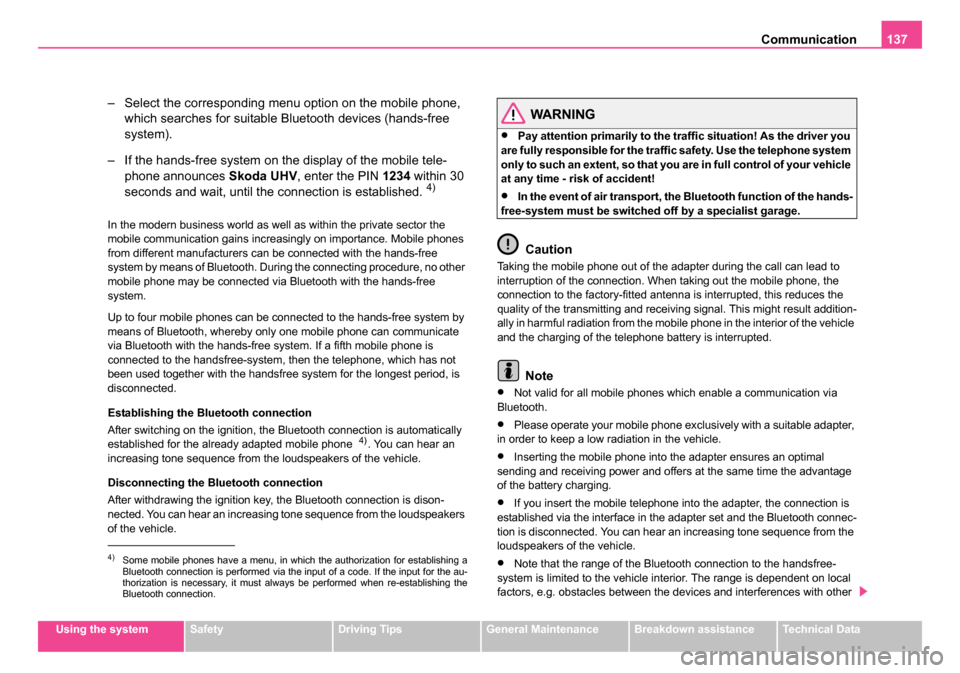
– Select the corresponding menu option on the mobile phone,
which searches for suitable Bluetooth devices (hands-free
system).
– If the hands-free system on the display of the mobile tele- phone announces Skoda UHV, enter the PIN 1234 within 30
seconds and wait, until the connection is established.
4)
In the modern business world as well as within the private sector the
mobile communication gains increasingly on importance. Mobile phones
from different manufacturers can be connected with the hands-free
system by means of Bluetooth. During the connecting procedure, no other
mobile phone may be connected via Bluetooth with the hands-free
system.
Up to four mobile phones can be connected to the hands-free system by
means of Bluetooth, whereby only one mobile phone can communicate
via Bluetooth with the hands-free system. If a fifth mobile phone is
connected to the handsfree-system, then the telephone, which has not
been used together with the handsfree system for the longest period, is
disconnected.
Establishing the Bluetooth connection
After switching on the ignition, the Bluetooth connection is automatically
established for the already adapted mobile phone
4). You can hear an
increasing tone sequence from the loudspeakers of the vehicle.
Disconnecting the Bluetooth connection
After withdrawing the ignition key, the Bluetooth connection is dison-
nected. You can hear an increasing tone sequence from the loudspeakers
of the vehicle.
WARNING
•Pay attention primarily to the traffic situation! As the driver you
are fully responsible for the traffic safety. Use the telephone system
only to such an extent, so that you are in full control of your vehicle
at any time - risk of accident!
•In the event of air transport, the Bluetooth function of the hands-
free-system must be switched off by a specialist garage.
Caution
Taking the mobile phone out of the adapter during the call can lead to
interruption of the connection. When taking out the mobile phone, the
connection to the factory-fitted antenna is interrupted, this reduces the
quality of the transmitting and receiving signal. This might result addition-
ally in harmful radiation from the mobile phone in the interior of the vehicle
and the charging of the telephone battery is interrupted.
Note
•Not valid for all mobile phones which enable a communication via
Bluetooth.
•Please operate your mobile phone exclusively with a suitable adapter,
in order to keep a low radiation in the vehicle.
•Inserting the mobile phone into the adapter ensures an optimal
sending and receiving power and offers at the same time the advantage
of the battery charging.
•If you insert the mobile telephone into the adapter, the connection is
established via the interface in the adapter set and the Bluetooth connec-
tion is disconnected. You can hear an increasing tone sequence from the
loudspeakers of the vehicle.
•Note that the range of the Bluetooth connection to the handsfree-
system is limited to the vehicle interior. The range is dependent on local
factors, e.g. obstacles between the devices and interferences with other 4)Some mobile phones have a menu, in which the authorization for establishing a
Bluetooth connection is performed via the input of a code. If the input for the au-
thorization is necessary, it must always be performed when re-establishing the
Bluetooth connection.
NKO 20 A05.book Page 137 Wednesday, June 21, 2006 1:42 PM
Page 139 of 274
Communication
138
devices. If your mobile phone is e.g. in a jacket pocket, this can lead to
difficulties when establishing the Bluetooth connection with the handsfree-
system or the data transfer.
•If you have set the Portuguese language in the information display, it
is used automatically for the mobile phone operation, as this is the
language, which was entered during coding of the handsfree-system.
Mobile phones and two-way radio
systems
We recommend that you have the installation of a mobile phone and two-
way radio system in a vehicle carried out by a Škoda Service Partner.
Škoda Auto a.s. permits the operation of mobile phones and two-way
radio systems with a professionally installed external aerial and a
maximum transmission power of up to 10 watts.
Our Škoda Service Partners are also happy to inform you about the possi-
bilities available for installing and operating mobile telephones and radio
transmitters which have an output greater than 10 watts. The Škoda
Service Partners can provide you with details about the technical possibil-
ities for retrofitting of mobile telephones and radio transmitters.
Operation of mobile phones or two-way radio systems may interfere with
functioning of the electronic systems of your vehicle. The reasons for this
may be:
•no external aerial,
•external aerial incorrectly installed,
•transmission power greater than 10 watts.
You should therefore not operate a mobile phone or two-way radio
system inside the vehicle without the use of an external aerial, or with
an external aerial which has been incorrectly installed. You should also be aware of the fact that only an
external aerial makes it
possible to achieve the optimal range of such equipment.
WARNING
•If a mobile phone or two-way radio system is operated inside the
vehicle without using an external aer ial, or with an external aerial
which has been incorrectly installed, the result can be excessive
electromagnetic fields which ma y cause harm to your health.
•Please always pay full attention to the traffic situation around
you!
•You must not install two-way radio systems, mobile phones or
mounts on the covers of the airbags or within the immediate
deployment range of airbags. This might result in injuries to the
occupants in the event of an accident!
Note
Please also refer to the operating instructions of the mobile phones and
two-way radio systems.
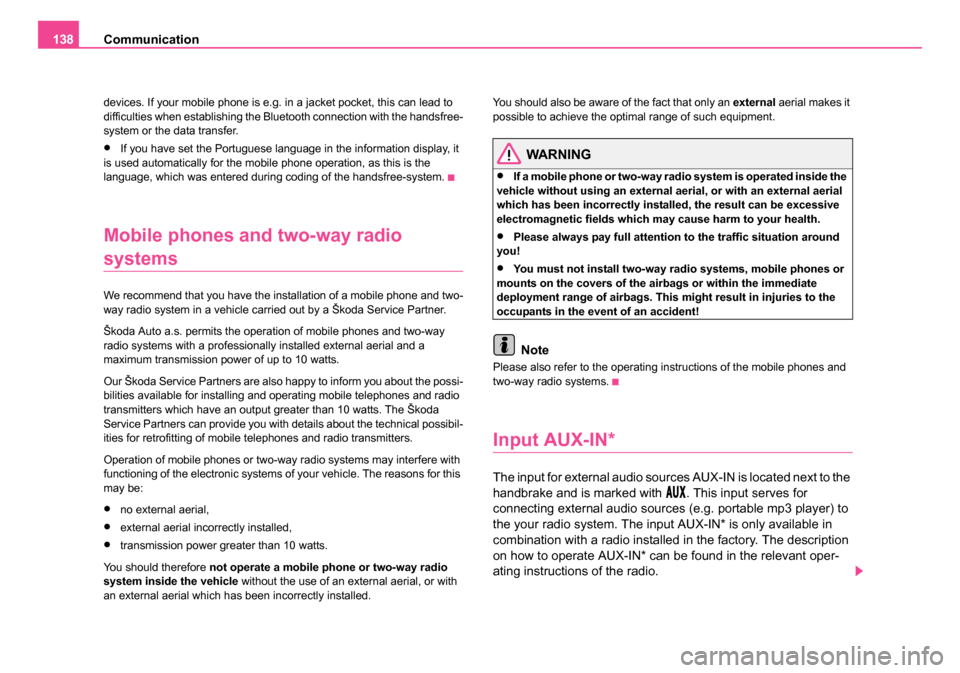
Input AUX-IN*
The input for external audio sources AUX-IN is located next to the
handbrake and is marked with
. This input serves for
connecting external audio sources (e.g. portable mp3 player) to
the your radio system. The input AUX-IN* is only available in
combination with a radio installed in the factory. The description
on how to operate AUX-IN* can be found in the relevant oper-
ating instructions of the radio.
NKO 20 A05.book Page 138 Wednesday, June 21, 2006 1:42 PM
Page 140 of 274
Communication139
Using the systemSafetyDriving TipsGeneral MaintenanceBreakdown assistanceTechnical Data
Note
If an external audio source is connected via AUX-IN*, which has a sepa-
rate power supply, this can lead to an interference of the audio signals. It
depends on the properties of the adapter.
CD changer*
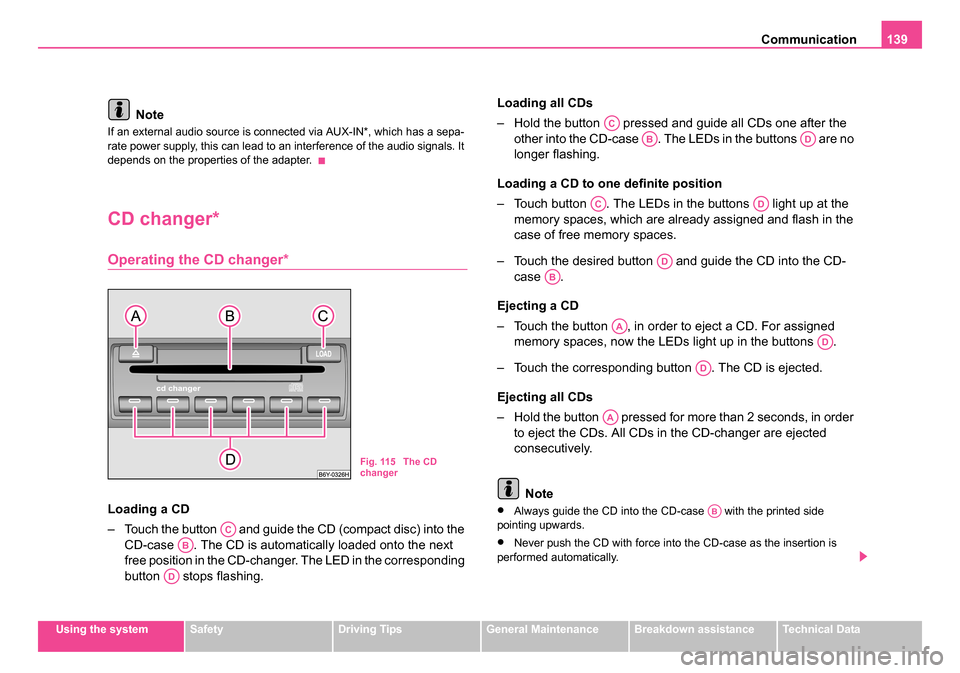
Operating the CD changer*
Loading a CD
– Touch the button and guide the CD (compact disc) into the
CD-case . The CD is automatically loaded onto the next
free position in the CD-changer. The LED in the corresponding
button stops flashing. Loading all CDs
– Hold the button pressed and guide all CDs one after the
other into the CD-case . The LEDs in the buttons are no
longer flashing.
Loading a CD to one definite position
– Touch button . The LEDs in the buttons light up at the memory spaces, which are already assigned and flash in the
case of free memory spaces.
– Touch the desired button and guide the CD into the CD- case .
Ejecting a CD
– Touch the button , in order to eject a CD. For assigned memory spaces, now the LEDs light up in the buttons .
– Touch the corresponding button . The CD is ejected.
Ejecting all CDs
– Hold the button pressed for more than 2 seconds, in order to eject the CDs. All CDs in the CD-changer are ejected
consecutively.
Note•Always guide the CD into the CD-case with the printed side
pointing upwards.
•Never push the CD with force into the CD-case as the insertion is
performed automatically.
Fig. 115 The CD
changer
AC
AB
AD
AC
ABAD
ACAD
AD
AB
AA
AD
AD
AA
AB
NKO 20 A05.book Page 139 Wednesday, June 21, 2006 1:42 PM
Page 142 of 274
Passive Safety141
Using the systemSafetyDriving TipsGeneral MaintenanceBreakdown assistanceTechnical Data
Safety
Passive Safety
Basic information
Driving the safe way
Passive safety measures reduce the risk of injury in acci-
dent situations.
In this section you will find important information, tips and notes on the
subject of passive safety in your vehicle. We have combined everything
here which you should be familiar with, for example, regarding seat belts,
airbags, child seats and safety of children. It is therefore important, in
particular, to comply with the notes and warnings in this section for your
own interest and in the interest of those travelling with you.
WARNING
•This chapter contains important information on how to use the
vehicle for the driver and his occupants. You will find further infor-
mation on safety, which concerns you and those travelling with
you, in the following chapters of this Owner's Manual.
•The complete on-board literature should always be in the
vehicle. This applies in particular, if you rent out or sell the
vehicle.
Safety equipment
The safety equipment is part of the occupant protection
and it can reduce the risk of injuries in accident situations.
“Do not put at risk” your safety and the safety of those travelling with you
. In the event of an accident, the safety equipment can reduce the risk of
injuries. The following list contains part of the safety equipment in your
vehicle:
•three-point seat belts for all the seats,
•belt force limiter for front seats,
•belt tensioner for front seats,
•seat belt height adjuster for front seats,
•front airbag for the driver and the front seat passenger*
•side airbags*,
•head airbags*,
•anchoring points for child seat using the “ISOFIX” system,
•anchoring points for child seat using the “Top Tether” system,
•head restraint adjustable for height,
•adjustable steering column.
The specified safety equipment works together, in order to optimally
protect you and those travelling with you in accident situations. The safety
equipment does not protect you or the people travelling with you, if you or
your occupants adopt an incorrect seated position or the equipment is not
correctly adjusted or used.
NKO 20 A05.book Page 141 Wednesday, June 21, 2006 1:42 PM